bonnet Seat Alhambra 2015 Owner's Manual
[x] Cancel search | Manufacturer: SEAT, Model Year: 2015, Model line: Alhambra, Model: Seat Alhambra 2015Pages: 305, PDF Size: 5.46 MB
Page 42 of 305
Operation
Key-operated switch in glove com-
partment for deactivating front pas-
senger front airbag . . . . . . . . . . . . . . .20
Passenger front airbag off warning
lamp . . . . . . . . . . . . . . . . . . . . . . . . . . . . . 20
Lever for:
– Manual gearbox . . . . . . . . . . . . . . . . 143
– Automatic gearbox . . . . . . . . . . . . .143
12 Volt power socket . . . . . . . . . . . . .119
Auto Hold Switch
- . . . . . . . . 156
Electronic parking brake switch 137
Start-up push button (Keyless Ac-
cess closing and start-up system)
21 22
23
24
25
26
27 Ignition lock
. . . . . . . . . . . . . . . . . . . . . . 133
Pedals . . . . . . . . . . . . . . . . . . . . . . . . . . . 143
Steering column adjustment lever .6
Fuse box cover . . . . . . . . . . . . . . . . . . . 264
Lever for:
– Cruise control system (CCS) –
– – /--/-- . . 169
Open bonnet lever . . . . . . . . . . . . . . . . 214
Controls for:
– Electric windows . . . . . . . . . . . . . 70
– Childproof locks . . . . . . . . . . . . . 63
28 29
30
31
32
33
34 Note
● Some of the items of equipment listed here
are fitted only on certain model versions or
are optional extras.
● In versions with the steering wheel on the
right, the layout of the control elements is
somewhat different. But the symbols as-
signed to the controls correspond to the sym-
bols used in the versions with the steering
wheel on the left Instruments
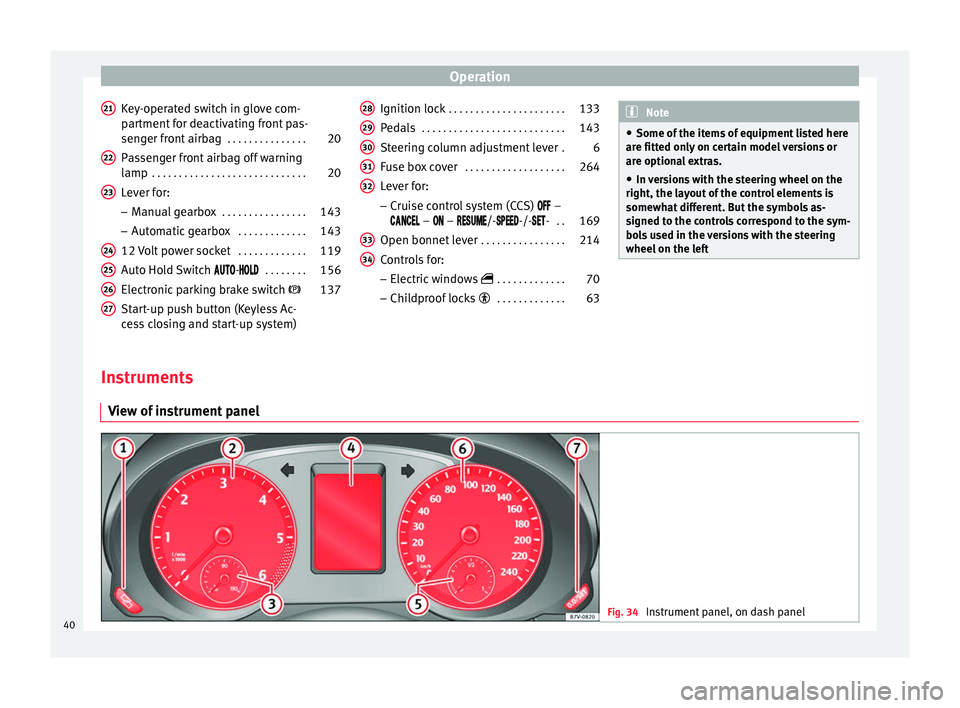
View of instrument panel Fig. 34
Instrument panel, on dash panel40
Page 49 of 305
Cockpit
Other control lampsSym- bolMeaning ››› See
Electronic immobiliser active.›››
page
133
Service interval display›››
page 44
Mobile telephone is connected
via Bluetooth to the original tel-
ephone device.›››
Book-
let Radio
or
››› Book-
let Navi-
gation
system
Mobile telephone battery
charge meter. Available only for
pre-installed factory-fitted devi-
ces.
Freezing warning. The outside
temperature is lower than +4 °C
(+39 °F).›››
page 42 WARNING
If the warning lamps and messages are ignor-
ed, the vehicle may stall in traffic, or may
cause accidents and severe injuries.
● Never ignore the warning lamps or text
messages.
● Stop the vehicle safely as soon as possible.
● Park the vehicle away from traffic and en-
sure that there are no highly flammable ma-
terials under the vehicle that could come into
contact with the exhaust system (e.g. dry
grass, fuel). ●
A faulty vehicle represents a risk of acci-
dent for the driver and for other road users. If
necessary, switch on the hazard warning
lamps and put out the warning triangle to ad-
vise other drivers.
● Before opening the bonnet, switch off the
engine and allow it to cool.
● In any vehicle, the engine compartment is a
hazardous area and could cause severe inju-
ries ››› page 214. CAUTION
Failure to heed the control lamps and text
messages when they appear may result in
faults in the vehicle. SEAT information system
Introduction With the ignition switched on, it is possible
to read the different functions of the display
by scrolling through the menus.
In vehicles with a multifunction steering
wheel, there are no buttons on the wind-
screen wiper lever. The multifunction display
can only be controlled from the buttons on
the steering wheel.
The number of menus displayed on the in-
strument panel will vary according to the ve-
hicle electronics and equipment.A specialised workshop will be able to pro-
gramme or modify additional functions, ac-
cording to the vehicle equipment. SEAT rec-
ommends taking your car in for technical
service.
Some menu options can only be read when
the vehicle is at a standstill.
As long as a priority 1 warning is displayed, it
will not be possible to read the menus. To
display the menus, confirm the warning by
pressing
OK .
Summary of the menu structure ■
Multifunction display (MFI) ››› page 50
■ Journey duration
■ Current fuel consumption
■ Average fuel consumption
■ Operating range
■ Distance covered
■ Average speed
■ Digital display of speed
■ Oil temperature digital display
■ Speed warning
■ Audio ›
›
›
Booklet Radio or ›››
Booklet Navi-
gation system
■ Navigation ››
›
Booklet Navigation system
■ Telephone ›››
Booklet Radio or ›››
Book-
let Navigation system
■ Auxiliary heating ››› page 128
»
47
Technical specifications
Advice
Operation
Safety
Page 64 of 305
Operation
●
When the doors are locked, it is difficult to
get to passengers in the vehicle interior in
case of an emergency. Passengers could re-
main trapped inside and unable to unlock the
doors in case of an emergency. Anti-theft alarm
The anti-theft alarm makes it more difficult to
break into the vehicle or steal it.
The anti-theft alarm is automatically turned
on when the vehicle is locked with the key.
When does the system trigger an alarm?
The anti-theft alarm siren will be triggered for
about 30 seconds accompanied by optical
warning signals for about five minutes when
the vehicle is locked and the following unau-
thorised actions are taken:
● When the door is mechanically unlocked
using the vehicle key without turning the ig-
nition within the following 15 seconds.
● A door is opened.
● The bonnet is opened.
● The rear lid is opened.
● When the ignition is switched on with a
non-authorised key.
● When the vehicle battery is disconnected.
● When there is movement inside the vehicle
(vehicles with interior monitoring). ●
When the vehicle is towed (vehicles with
anti-tow system)
● When the vehicle is lifted (vehicles with an-
ti-tow system).
● Transporting the vehicle on a ferry or by
railroad (vehicles with an anti-tow system or
interior monitoring).
● Unhitch a trailer connected to the anti-theft
alarm ››› page 179 .
Ho w t
o turn OFF the alarm
Unlock the vehicle with the unlocking button
on the key or turn on the ignition with a valid
key. On vehicles with the Keyless Access sys-
tem, the alarm can also be disabled by grasp-
ing the door handle ››› page 59. Note
● The alarm will be triggered once more when
anybody enters the same zone of surveillance
or any other zone. If, for example, after open-
ing a door, the rear lid is also opened.
● The anti-theft alarm is not activated when
the vehicle is locked from within using the
central locking button .
● If the driver door is unlocked mechanically
with the key, only the driver door is unlocked,
the rest of the doors remain locked. Only
when the ignition has been turned on will the
other doors be available - but not unlocked -
and the central lock button will be activated. ●
If the vehicle battery is run down or flat
then the anti-theft alarm will not operate cor-
rectly. Interior monitoring system and anti-
tow system*
Fig. 48
On the roof console: interior monitor-
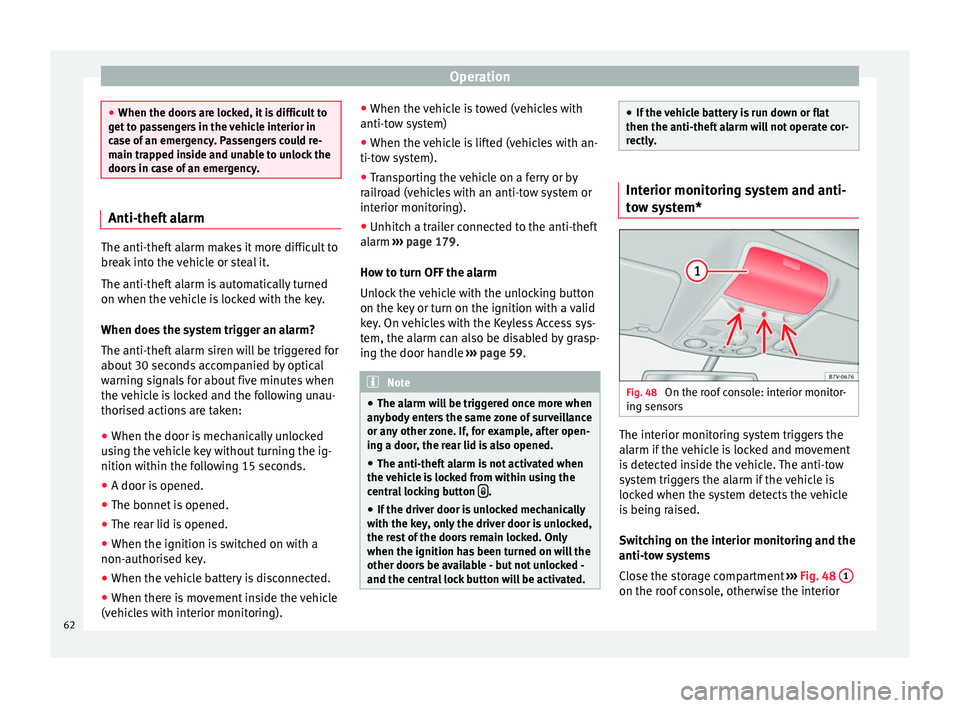
ing sensors The interior monitoring system triggers the
alarm if the vehicle is locked and movement
is detected inside the vehicle. The anti-tow
system triggers the alarm if the vehicle is
locked when the system detects the vehicle
is being raised.
Switching on the interior monitoring and the
anti-tow systems
Close the storage compartment
››› Fig. 48 1 on the roof console, otherwise the interior
62
Page 84 of 305
Operation
parked with the wipers in service position
››› page 83. Control lampIt
lights upPossible causeSolution
Windscreen wiper
fluid level too lowTop up the windscreen
wiper reservoir as
soon as possible
››› page 226. Several warning and control lamps light up
for a few seconds when the ignition is switch-
ed on, signalling that the function is being
verified. They will switch off after a few sec-
onds.
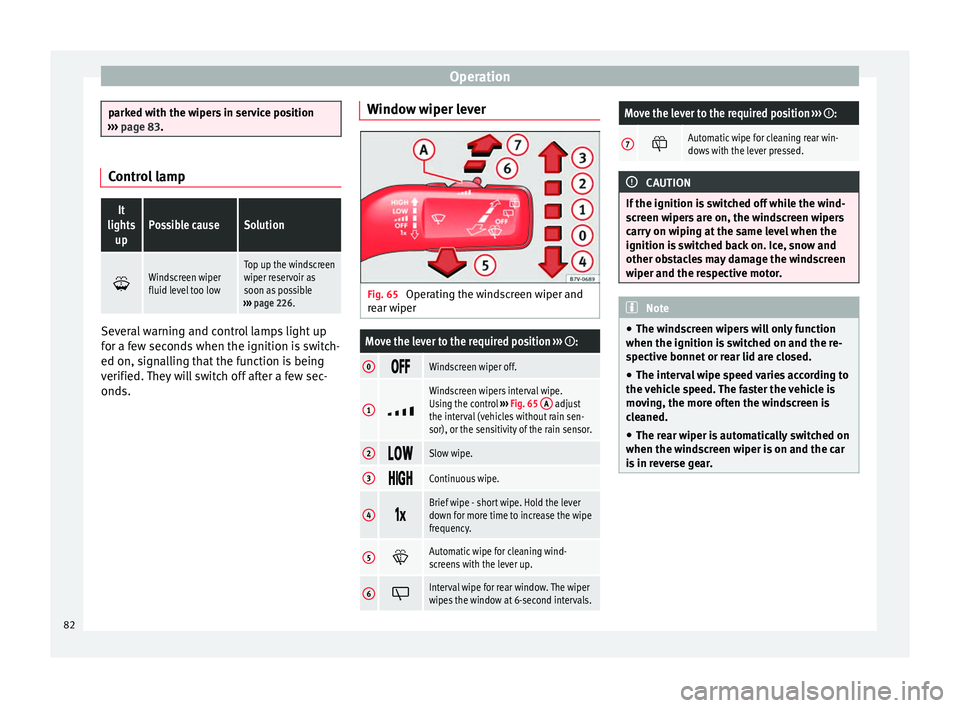
Window wiper lever Fig. 65
Operating the windscreen wiper and
rear wiper
Move the lever to the required position ››› :
0 Windscreen wiper off.
1
Windscreen wipers interval wipe.
Using the control
››› Fig. 65 A adjust
the interval (vehicles without rain sen-
sor), or the sensitivity of the rain sensor.
2 Slow wipe.
3
Continuous wipe.
4
Brief wipe - short wipe. Hold the lever
down for more time to increase the wipe
frequency.
5
Automatic wipe for cleaning wind-
screens with the lever up.
6
Interval wipe for rear window. The wiper
wipes the window at 6-second intervals.
Move the lever to the required position
››› :
7 Automatic wipe for cleaning rear win-
dows with the lever pressed.
CAUTION
If the ignition is switched off while the wind-
screen wipers are on, the windscreen wipers
carry on wiping at the same level when the
ignition is switched back on. Ice, snow and
other obstacles may damage the windscreen
wiper and the respective motor. Note
● The windscreen wipers will only function
when the ignition is switched on and the re-
spective bonnet or rear lid are closed.
● The interval wipe speed varies according to
the vehicle speed. The faster the vehicle is
moving, the more often the windscreen is
cleaned.
● The rear wiper is automatically switched on
when the windscreen wiper is on and the car
is in reverse gear. 82
Page 85 of 305
Lights and visibility
Windscreen wiper functionsWindscreen wiper performance in different sit-
uations
If the vehicle
is at a stand-
stillThe activated position provisionally
changes to the previous position.
During auto-
matic wipe
The air conditioner comes on for ap-
proximately 30 seconds in air recircula-
tion mode to prevent the smell of the
windscreen washer fluid entering the
inside the vehicle.
For the inter-
val wipeIntervals between wipes depend on the
vehicle's speed. The higher the vehicle
speed the shorter the intervals. Heated windscreen washer jets
The heating only thaws the frozen jets, it
does not thaw the water in the washer hoses.
The heated windscreen washer jets automati-
cally adjust the heat depending on the ambi-
ent temperature, when the ignition is switch-
ed on.
Headlight wash/wipe system
The headlight washers/wipers clean the
headlight lenses.
After the ignition is switched on, the first and
every fifth time the windscreen washer is
switched on, the headlights are also washed.
Therefore, the windscreen wiper lever should
be pulled towards the steering wheel when the dipped beam or main beam are on. Any
incrusted dirt (such as insects) should be
cleaned regularly (e.g. when refuelling).
To ensure the headlight washers work cor-
rectly in winter, any snow which has got into
the bumper jet supports should be cleaned
away. If necessary, remove snow with an anti-
icing spray.
Note
The wiper will try to wipe away any obstacles
that are on the windscreen. The wiper will
stop moving if the obstacle blocks its path.
Remove the obstacle and switch the wiper
back on again. Windscreen wipers service position
Fig. 66
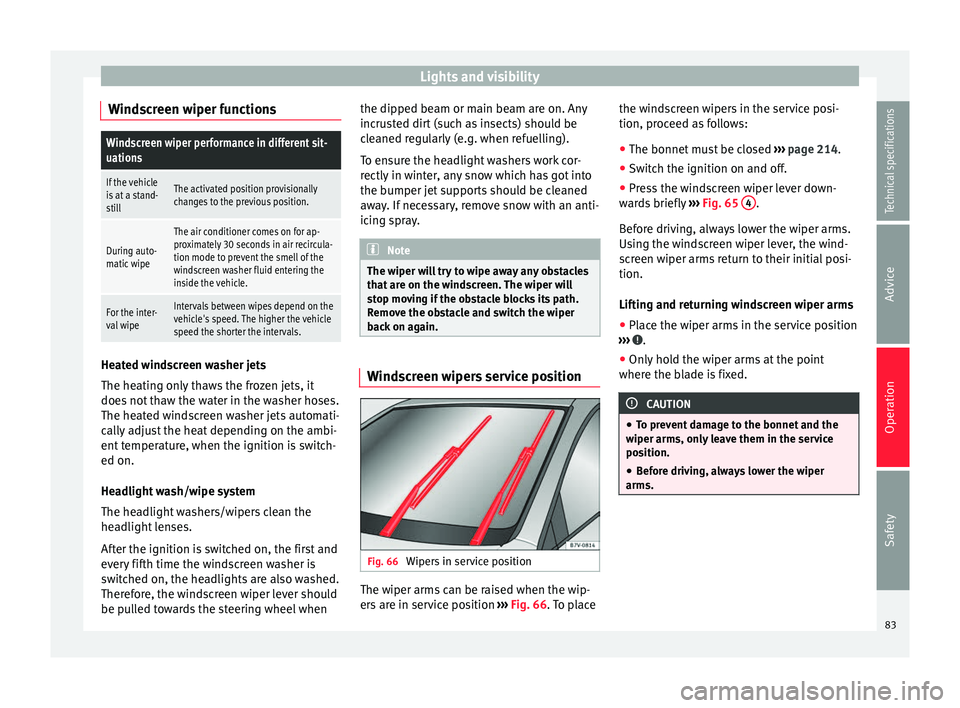
Wipers in service position The wiper arms can be raised when the wip-
ers are in service position
››› Fig. 66 . To place the w
ind
screen wipers in the service posi-
tion, proceed as follows:
● The bonnet must be closed ››› page 214.
● Switch the ignition on and off.
● Press the windscreen wiper lever down-
wards briefly ››› Fig. 65 4 .
Before driving, always lower the wiper arms.
Using the windscreen wiper lever, the wind-
screen wiper arms return to their initial posi-
tion.
Lifting and returning windscreen wiper arms
● Place the wiper arms in the service position
››› .
● Only hold the wiper arms at the point
where the blade is fixed. CAUTION
● To prevent damage to the bonnet and the
wiper arms, only leave them in the service
position.
● Before driving, always lower the wiper
arms. 83
Technical specifications
Advice
Operation
Safety
Page 160 of 305
Operation
CAUTION
Before entering an automatic car wash, al-
ways switch the Auto Hold function off, as it
could be damaged when the electronic park-
ing brake automatically engages. Start-Stop Function*
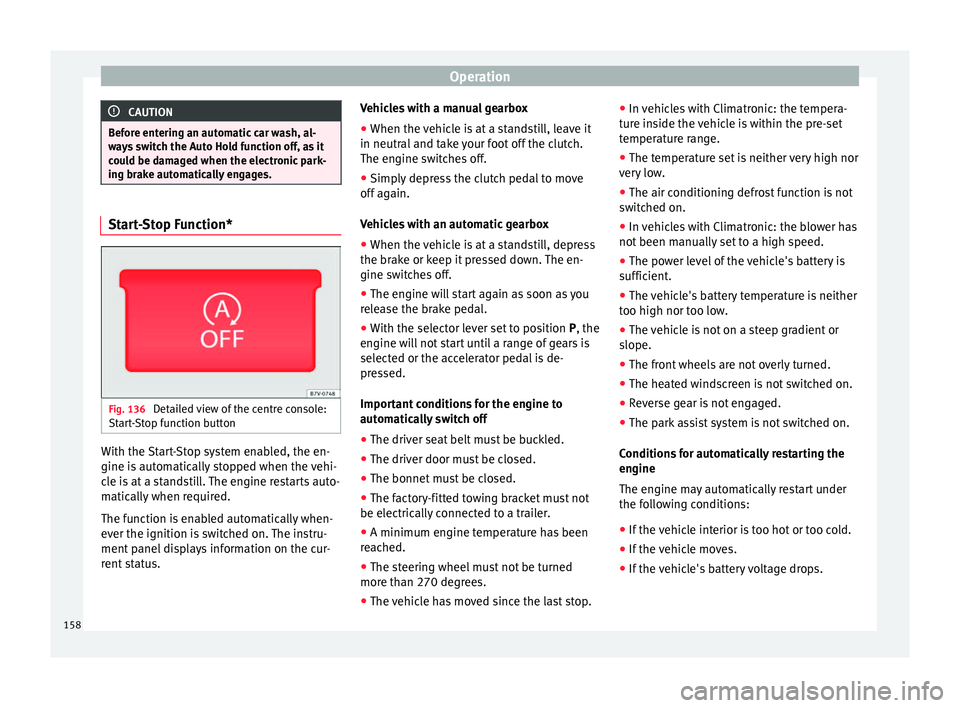
Fig. 136
Detailed view of the centre console:
Start-Stop function button With the Start-Stop system enabled, the en-
gine is automatically stopped when the vehi-
cle is at a standstill. The engine restarts auto-
matically when required.
The function is enabled automatically when-
ever the ignition is switched on. The instru-
ment panel displays information on the cur-
rent status. Vehicles with a manual gearbox
● When the vehicle is at a standstill, leave it
in neutral and take your foot off the clutch.
The engine switches off.
● Simply depress the clutch pedal to move
off again.
Vehicles with an automatic gearbox
● When the vehicle is at a standstill, depress
the brake or keep it pressed down. The en-
gine switches off.
● The engine will start again as soon as you
release the brake pedal.
● With the selector lever set to position P, the
en gine w
ill not start until a range of gears is
selected or the accelerator pedal is de-
pressed.
Important conditions for the engine to
automatically switch off
● The driver seat belt must be buckled.
● The driver door must be closed.
● The bonnet must be closed.
● The factory-fitted towing bracket must not
be electrically connected to a trailer.
● A minimum engine temperature has been
reached.
● The steering wheel must not be turned
more than 270 degrees.
● The vehicle has moved since the last stop. ●
In vehicles with Climatronic: the tempera-
ture inside the vehicle is within the pre-set
temperature range.
● The temperature set is neither very high nor
very low.
● The air conditioning defrost function is not
switched on.
● In vehicles with Climatronic: the blower has
not been manually set to a high speed.
● The power level of the vehicle's battery is
sufficient.
● The vehicle's battery temperature is neither
too high nor too low.
● The vehicle is not on a steep gradient or
slope.
● The front wheels are not overly turned.
● The heated windscreen is not switched on.
● Reverse gear is not engaged.
● The park assist system is not switched on.
Conditions for automatically restarting the
engine
The engine may automatically restart under
the following conditions:
● If the vehicle interior is too hot or too cold.
● If the vehicle moves.
● If the vehicle's battery voltage drops.
158
Page 161 of 305
Driver assistance systems
Conditions requiring the key to restart the
engine
The engine must be started manually under
the following conditions:
● If the driver unbuckles his/her seat belt.
● If the driver door is opened.
● If the bonnet is opened.
● In vehicles with a manual gearbox: if a gear
has been selected.
Switching Start-Stop mode on and off
manually
● Press the button on the centre console
››› Fig. 136 .
● The b utt
on will light up when the Start-Stop
function is switched off.
The engine will start immediately if the vehi-
cle is in Stop mode when it is switched off
manually. WARNING
The brake servo and the power steering do
not work when the engine is switched off.
● Never allow the vehicle to move when the
engine is switched off. CAUTION
Using the Start-Stop function for a long peri-
od at very high outside temperatures could
damage the vehicle's battery. Note
● In some cases, you may have to restart the
vehicle using the key. Observe the corre-
sponding message on the instrument panel
display.
● If the steering wheel is turned more than
270°, Stop will not function; however, the an-
gle of steering wheel turn does not affect
starting the vehicle. Parking sensor system*
Introduction The parking sensor system assists the driver
when parking. When the vehicle approaches
an obstacle, forwards or backwards, an inter-
mittent audible warning will be heard, higher
or lower depending on the distance. The
shorter the distance, the shorter the intervals
between tones. If the vehicle is too close to
the obstacle, the audible warning becomes
constant.
If you continue to approach an obstacle when
the sound is continuous, this means the sys-
tem can no longer measure the distance.
The sensor system on the bumpers transmit
and receive ultrasound. Using the ultrasound
signal (transmission, reflection from the ob-
stacle and reception), this system continu-ously calculates the distance between the
bumper and the obstacle. WARNING
The parking sensor system and the optical
parking system cannot replace driver aware-
ness.
● The sensors have blind spots in which ob-
stacles and people are not registered.
● Always observe the area around the vehi-
cle, as the sensors do not always detect
small children, animals or objects.
● The surface of certain objects and some
clothing do not reflect the ultrasound signals
from the parking distance system. The sys-
tem cannot detect or incorrectly detects
these objects and people wearing these
types of clothes.
● External sound sources can affect the park-
ing distance aid signals. In this case, under
certain circumstances, people and objects
will not be detected. CAUTION
● The sensors may not always be able to de-
tect objects such as trailer draw bars, thin
rails, fences, posts, trees and open boots,
etc. This could result in damage to your car.
● Although the parking sensor system de-
tects and warns of the presence of an obsta-
cle, the obstacle could disappear from the an-
gle of measurement of the sensors if it is too
high or low and the system would no longer » 159
Technical specifications
Advice
Operation
Safety
Page 195 of 305
Care and maintenance
equipment at the workshop. If this is the
case, the information and descriptions given
in the Instruction Manual will not match the
original functions. Therefore, SEAT recom-
mends that any modifications be recorded in
the section “Other workshop notes” in the
Maintenance Programme.
The technical service centre must have a re-
cord of any modification to the programming.
Reading the vehicle fault memory
There is a diagnostics connector in the vehi-
cle interior for reading the vehicle fault mem-
ory. The fault memory documents errors and
deviations from the theoretical values of the
electronic control units.
The diagnostics connector is in the driver
side footwell area, next to the lever for open-
ing the bonnet, below a cover.
The fault memory should only be read and re-
set by a specialised workshop.
Using a mobile telephone in a vehicle
without connection to an exterior
aerial Mobile telephones transmit and receive radio
waves, both when in use and when on stand-
by. Scientific studies state that radio waves
exceeding certain values may be harmful to
the human body. International committees and authorities have established limits and
directives in order to ensure electromagnetic
radiation from mobile phones remains within
certain limits that do not endanger health.
Nevertheless, there is no conclusive scientif-
ic evidence that wireless telephones are to-
tally safe.
Therefore, some experts recommend that use
of mobile phone be kept to a minimum until
the results of current research are published.
When a mobile phone not connected to an
exterior aerial is used inside the vehicle, the
electromagnetic radiation may be greater
than if the mobile phone were connected to a
built-in aerial or to another exterior aerial.
If the vehicle is fitted with a suitable hands-
free device, it will comply with the legislation
in many countries which only permits the use
of mobile phones inside vehicles using a
hands-free device.
The hands-free system mounted at the facto-
ry has been designed for use with conven-
tional mobile phones and phones with Blue-
tooth technology. Mobile phones should be
placed on a suitable phone cradle. In addi-
tion, the cradle should always be correctly fit-
ted into the base plate. This ensures that the
mobile phone is securely attached to the
dash panel, it is always within reach of the
driver and is connected to the vehicle exterior
aerial.
If the mobile phone is connected to an aerial
incorporated into the vehicle or an exterior
aerial connected to the vehicle, it will help re-
duce the electromagnetic radiation transmit-
ted and the risk to human health. It will also
improve the quality of the connection.
If the phone is used inside the vehicle with-
out the hands-free system, it will not be se-
curely fastened and will not be connected to
the exterior aerial of the vehicle telephone.
Nor will the telephone charge if it is not on
the support. In addition, some calls may
break off and the quality of the connection
will be affected.
Mobile phones should only be used inside
the vehicle if they are connected to a hands-
free system with an exterior aerial.
WARNING
If the mobile phone is not securely fastened
in position, it could be sent flying around the
vehicle in the event of sharp braking, sudden
manoeuvres or accident, causing injury.
● While driving, mobile phones must be se-
curely fastened in position, outside the radi-
us of action of the airbags, or safely stowed
away. WARNING
When using a mobile phone without a con-
nection to an exterior aerial, the maximum
permitted levels of electromagnetic radiation » 193Technical specifications
Advice
Operation
Safety
Page 198 of 305
Advice
Automatic car washes
Always observe the instructions provided at
the automatic car wash. The standard pre-
cautionary measures prior to entering the car
wash should be taken to avoid damage to
the vehicle (close all windows, fold in exterior
mirrors). If the vehicle is fitted with additional
components (spoiler, roof-rack, aerial, etc.),
check with the car wash supervisor whether
these can enter the car wash ››› .
The vehicle paintwork is so durable that the
vehicle can normally be washed without
problems in an automatic car wash tunnel.
However, wear and damage to the paintwork
will depend on the type of car wash used.
SEAT recommends the use of car washes
without brushes.
To remove traces of wax on windows and to
prevent wiper blades from scratching, please
observe the following ››› page 197, Cleaning
windows and exterior mirrors .
Washing the car by hand
When washing the car by hand, use plenty of
water to soften the dirt first, and rinse off as
well as possible.
Then clean the vehicle with a soft sponge,
glove or brush using only slight pressure.
St ar
t at the roof and work downwards. Spe-
cial car shampoo should only be used for
ver
y persistent dirt. Rinse the sponge or glove thoroughly and of-
ten.
Wheels, sills and similar should be cleaned
last. Use a second sponge for this.
WARNING
Sharp components on the vehicle may cause
injury.
● Protect arms and hands from sharp edges
when cleaning the vehicle undercarriage or
the interior of the wheel hubs. WARNING
After the vehicle has been washed, the brak-
ing effect will be reduced (and the braking
distance increased) due to moisture (and ice
in winter) on the brakes.
● “Dry the brakes and remove ice” by braking
carefully. Ensure that you are not endanger-
ing other road-users or breaking traffic regu-
lations in the process. CAUTION
● The temperature of the water must not ex-
ceed +60 °C (+140 °F).
● To avoid damage to the paintwork, do not
wash the vehicle in full sun.
● Do not use rough sponges or similar which
could damage the surface to clean away the
traces of insects. ●
Never wipe the headlights with a dry cloth
or sponge, always moisten first. It is best to
use soapy water.
● Washing the vehicle in low temperatures:
When washing the vehicle with a hose, do
not direct water into the lock cylinders or the
gaps around the doors or roof. Locks and
seals could freeze! CAUTION
To prevent damage to the vehicle, please ob-
serve the following before entering an auto-
matic car wash: ● Compare the distance between the vehicle
wheels and the distance between the guide-
rails of the car wash to prevent damage to the
wheels and tyres!
● Switch off the rain sensor and the Au-
to Hold function before entering a car wash.
● Compare the height and width of your vehi-
cle with the available height and width when
entering and driving through the car wash.
● Fold in exterior mirrors Electrically retracta-
ble exterior mirrors must not be folded in or
out by hand. Always use the electrical power
control.
● To avoid damaging the bonnet paintwork,
rest the wipers on the windscreen after dry-
ing them. Do not let them fall!
● Lock the rear lid to prevent it from opening
unexpectedly while inside the car wash. 196
Page 207 of 305
Care and maintenance
Notes for the user Labels and plates Some parts in the engine compartment come
from the factory with certificates of safety, la-
bels or plates containing important informa-
tion regarding the operation of the vehicle,
for example, on the petrol cap, on the pas-
senger's sun visor, on the driver door strut, or
on the floor of the boot.
● Never remove these certificates of safety,
labels or plates, and ensure they are kept in
good condition and are legible.
● If a vehicle part, bearing a certificate of
safety, label or plate, is replaced, the special-
ised workshop should attach the information
back in the same place.
Certificate of safety
A certificate of safety on the door strut states
that all the safety standards and regulations
established by the national traffic authorities
responsible for road safety were met at the
time of manufacture. It may also give the
month and year of manufacture, together
with the chassis number.
Warning of high voltage label*
There is a label close to the bonnet lock
which warns of high voltage in the vehicle's
electrical system. The vehicle ignition system complies with several standards, including
the Canadian standard, ICES-002.
Using your vehicle in other countries
and continents The vehicle is manufactured at the factory for
use in a particular country in accordance with
the national legislation in force at the time of
manufacture.
If the vehicle is sold in another country or
used in another country for an extended peri-
od of time, the applicable legislation of that
country should be observed.
It may be necessary to fit or remove certain
pieces of equipment or to deactivate certain
functions. Service work may also be affected.
This is particularly true if the vehicle is used
in a different climate for an extended period
of time.
As there are different types of frequency
bands around the world, you may find that
the radio or navigation system supplied at
the factory does not work in another country.
CAUTION
● SEAT does not accept liability for any dam-
age to the vehicle due to the use of a lower
quality fuel, an inadequate service or the
non-availability of genuine spare parts. ●
SEAT does not accept liability if the vehicle
does not comply in part or in full with the le-
gal requirements of other countries or conti-
nents. Radio reception and the aerial
The aerial of radio and navigation systems
fitted at the factory may be mounted in differ-
ent parts of the vehicle:
● On the inside of the rear window, next to
the rear window heating,
● on the inside of the rear side windows,
● on the inside of the windscreen,
● on the roof of the vehicle.
Aerials mounted on the inside of a window
can be recognised by the fine wires. CAUTION
Aerials on the inside of windows may be dam-
aged if knocked or if cleaned with corrosive or
acid cleaning products. Do not stick adhesive
labels over the heating elements and never
clean the inside of the rear window with cor-
rosive or acid products or other similar chem-
ical cleaning products. » 205Technical specifications
Advice
Operation
Safety