tow bar Seat Alhambra 2015 Owner's Manual
[x] Cancel search | Manufacturer: SEAT, Model Year: 2015, Model line: Alhambra, Model: Seat Alhambra 2015Pages: 305, PDF Size: 5.46 MB
Page 82 of 305
Operation
To reset, turn switch ››› Fig. 62 2 :ValueVehicle load status
a)
–Two front occupants, luggage compart-
ment empty
1All seats occupied, luggage compartment
empty
2All seats occupied, luggage compartment
full With trailer and minimum drawbar load
3Driver only, luggage compartment full With
trailer and maximum drawbar load
a)
If the vehicle load does not correspond to those shown in the
table, it is possible to select intermediary positions.
Dynamic headlight range control
The control 2 is not mounted in vehicles
with dynamic headlight range control. The
headlight range is automatically adjusted ac-
cording to the vehicle load status when they
are switched on. WARNING
Heavy objects in the vehicle may mean that
the headlights dazzle and distract other driv-
ers. This could result in a serious accident.
● Adjust the light beam to the vehicle load
status so that it does not blind other drivers. Interior and reading lights
Button/
SwitchFunction
Switches interior lights off.
Switches interior lights on.
Switches door contact control on (cen-
tral position).
The interior lights come on automati-
cally when the vehicle is unlocked, a
door is opened or the key is removed
from the ignition.
The lights go off a few seconds after all
the doors are closed, the vehicle is
locked or the ignition is switched on.
Turning the reading light on and off
Storage and luggage compartment lighting
When the glove compartment and the rear lid
are opened and closed, a light automatically
switches on or off.
Ambient lighting
The ambient lighting in the front covering of
the ceiling lights up the controls on the cen-
tre console from above when the side light or
dipped beam lights are on.
In addition, the lever on the door moulding
can also be illuminated. Note
The reading lights go out when the vehicle is
locked, or a few minutes after the key is re-
moved from the ignition. This prevents the
vehicle's battery from discharging. Visibility
Sun visors Fig. 63
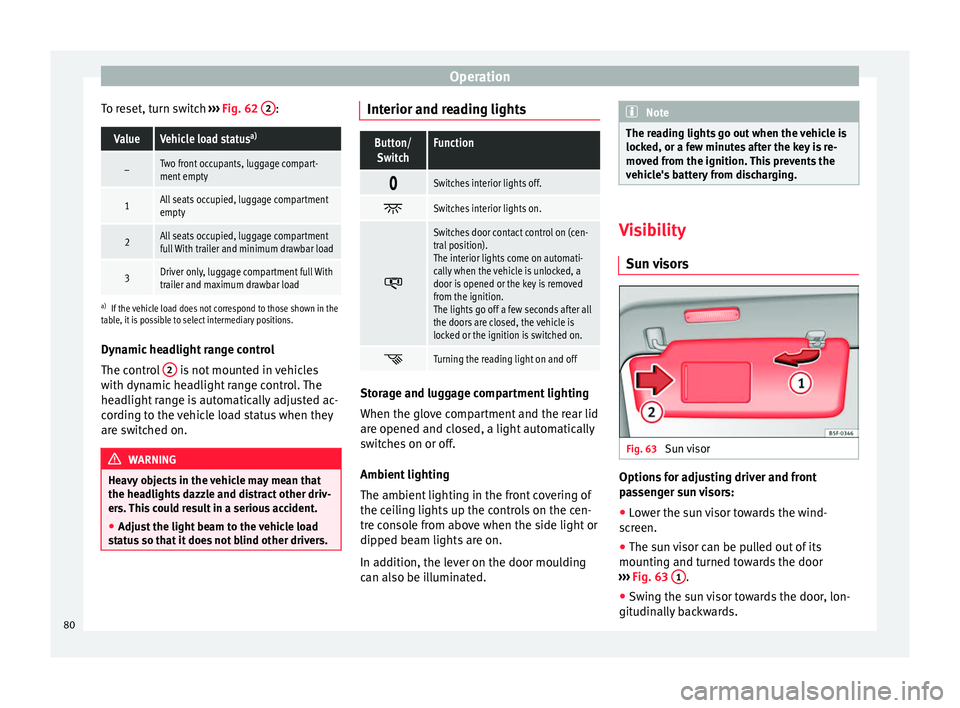
Sun visor Options for adjusting driver and front
passenger sun visors:
● Lower the sun visor towards the wind-
screen.
● The sun visor can be pulled out of its
mounting and turned towards the door
››› Fig. 63 1 .
● Swing the sun visor towards the door, lon-
gitudinally backwards.
80
Page 143 of 305
Driving
● Press and hold the brake pedal until the ve-
hicle comes to a standstill.
● Connect the electronic parking brake
››› page 140 .
● For an aut
omatic gearbox, move the selec-
tor lever to position P.
● Sw
itch off the engine and release the brake
pedal.
● Remove the key from the ignition.
● If necessary, turn the steering wheel slight-
ly to lock the steering.
● With a manual gearbox, engage 1st gear on
flat ground and slopes, or even reverse gear
on hills, and release the clutch pedal.
● Ensure that all passengers leave the vehi-
cle, especially children.
● When leaving the vehicle, take all keys with
you.
● Lock the vehicle.
Additional information for steep slopes and
hills
Before switching off the engine, rotate the
steering wheel so that if the vehicle should
move, it will be held by the kerb.
● On slopes, turn the front wheels so that
they are against the edge of the kerb.
● Uphill, turn the wheels towards the centre
of the road. WARNING
The components of the exhaust system reach
very high temperatures. This could cause a
fire and considerable damage.
● Always park your vehicle so that no part of
the exhaust system can come in contact with
flammable materials (such as wood,
leaves,dried grass, or spilled fuel). CAUTION
● Special care should be taken when parking
in areas with high kerbs or fixed barriers. Ob-
jects protruding from the ground may dam-
age the bumper or other parts of the vehicle
during manoeuvres. To avoid damage, stop
before the wheels touch the barrier or kerb.
● Special attention is required when driving
through entrances, over ramps, kerbs or oth-
er objects. The vehicle underbody, bumpers,
mudguards and running gear, and the engine
and exhaust system could be damaged as
you drive over these objects. Information about the brakes
For the first 200 to 300 km, new brake pads
have not yet reached their maximum braking
capacity, and need to be “run in” first
››› .
The slightly reduced braking effect can be
compensated for by increasing pressure on
the brake pedal. While running in, the full
br ak
ing distance or emergency braking dis- tance is larger
then when the brake pads
have been run in. While running in, avoid full
power braking or situations requiring braking
performance. For example, in heavy traffic.
The
rate of wear of the brake pads depends
to a great extent on the conditions in which
the vehicle is used and the way the vehicle is
driven. If the vehicle is used frequently in city
traffic or for short trips or driven sport style,
visit a specialised workshop regularly, more
frequently than advised in the Maintenance
Programme, to have the brake pads checked.
If you drive with wet brakes, for example, af-
ter crossing areas of water, in heavy rainfall
or even after washing the car, the effect of
the brakes is lessened as the brake discs are
wet or even frozen (in winter). At higher
speed, “dry” the brakes as quickly as possi-
ble by braking gently several times. Only do
this without endangering vehicles behind
you or any other road users ››› .
A layer of salt on the discs and brake pads
w i
ll reduce the effectiveness of the brakes
and increase braking distance. If you drive for
a prolonged period on salted roads without
braking then brake carefully several times to
eliminate the layer of salt on the brakes ››› .
If the vehicle remains parked for considera-
ble lengths of time, is used little, or if the
brakes are not used, there may be corrosion
on the brake discs and a build up of dirt on
the brake pads. If the brakes are not used »
141
Technical specifications
Advice
Operation
Safety
Page 164 of 305
OperationDistance from the
vehicle to the ob-
stacleAudible
warn- ing
Displayed in
colour on the
screen: colour
of the segment if an obstacleis recognised
Front: approx. 31 -
120 cm
Behind: approx. 31 -
160 cmBeeping soundYellow
Approximately 0 –
30 cm in front or be-
hind a)Perma-
nent
soundRed
a) The permanent sound starts at a somewhat greater distance
on vehicles with a factory-fitted towing bracket.
With towing bracket
A specific image is displayed on the screen of
vehicles with a factory-fitted towing bracket
and an electrically connected trailer. In this
case, the distances behind the vehicle are
not indicated.
Switching the parking sensor system sound
on and off
If the button on the radio or navigation
system screen may mute the sound of OPS
warnings. To switch the warnings back on,
press the button again briefly.
When the OPS is switched off and back on
again, muting is cancelled. Error messages
cannot be switched off. WARNING
Do not be distracted from the traffic when
looking at the screen. Park Assist system*
Introduction The Park Assist system helps the driver to
find a suitable place to park, to insert the ve-
hicle into parallel and perpendicular parking
places and to leave parallel parking places.
The Park Assist system is limited to the sys-
tem abilities and requires that the driver is
especially attentive
››› .
The parking sensor system is a component of
the Park Assist system that helps to park the
vehicle.
For vehicles with the optical parking system
(OPS), the radio navigation systems screen
displays the detected zones in front of and
behind the vehicle, indicating - within the
limits of the system - the position of obsta-
cles in relation to the vehicle.
The park assist system cannot be switched
on if the factory-fitted towing bracket is elec-
trically connected to a trailer. WARNING
Despite the assistance provided by the park
assist system, do not run any risks when
parking. The system is not a replacement for
driver awareness.
● Unintentional movements of the vehicle
could cause serious injury.
● Adjust your speed and driving style to visi-
bility, road, traffic and weather conditions.
● The surface of certain objects and items of
clothing and external sound sources may
have a negative affect on the park assist sig-
nals or on the system sensors or may not re-
flect its signals.
● The sensors have blind spots in which ob-
stacles and people are not registered.
● Always observe the area around the vehi-
cle, as the sensors do not always detect
small children, animals or objects. CAUTION
● The park assist system aims exclusively at
other parked vehicles, without taking curbs
or other circumstances into account. Make
sure you do not damage the tyres and wheel
rims when parking. Where necessary, stop
manoeuvring to avoid damaging the vehicle.
● The sensors may not always be able to de-
tect objects such as trailer draw bars, thin
rails, fences, posts and trees, etc. This could
result in damage to your car. 162
Page 181 of 305
Towing bracket device
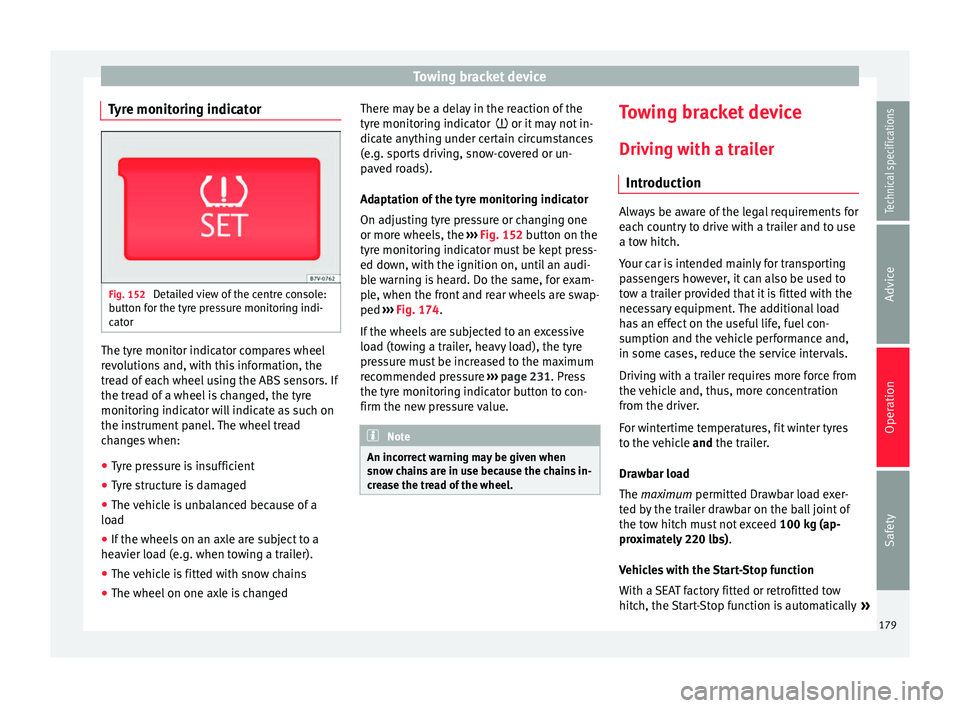
Tyre monitoring indicator Fig. 152
Detailed view of the centre console:
button for the tyre pressure monitoring indi-
cator The tyre monitor indicator compares wheel
revolutions and, with this information, the
tread of each wheel using the ABS sensors. If
the tread of a wheel is changed, the tyre
monitoring indicator will indicate as such on
the instrument panel. The wheel tread
changes when:
● Tyre pressure is insufficient
● Tyre structure is damaged
● The vehicle is unbalanced because of a
load
● If the wheels on an axle are subject to a
heavier load (e.g. when towing a trailer).
● The vehicle is fitted with snow chains
● The wheel on one axle is changed There may be a delay in the reaction of the
tyre monitoring indicator
or it may not in-
dic
ate anything under certain circumstances
(e.g. sports driving, snow-covered or un-
paved roads).
Adaptation of the tyre monitoring indicator
On adjusting tyre pressure or changing one
or more wheels, the ››› Fig. 152
button on the
tyre monitoring indicator must be kept press-
ed down, with the ignition on, until an audi-
ble warning is heard. Do the same, for exam-
ple, when the front and rear wheels are swap-
ped ››› Fig. 174
.
If the wheels are subjected to an excessive
load (towing a trailer, heavy load), the tyre
pressure must be increased to the maximum
recommended pressure ››› page 231. Press
the tyre monitoring indicator button to con-
firm the new pressure value. Note
An incorrect warning may be given when
snow chains are in use because the chains in-
crease the tread of the wheel. Towing bracket device
Driving with a trailer Introduction Always be aware of the legal requirements for
each country to drive with a trailer and to use
a tow hitch.
Your car is intended mainly for transporting
passengers however, it can also be used to
tow a trailer provided that it is fitted with the
necessary equipment. The additional load
has an effect on the useful life, fuel con-
sumption and the vehicle performance and,
in some cases, reduce the service intervals.
Driving with a trailer requires more force from
the vehicle and, thus, more concentration
from the driver.
For wintertime temperatures, fit winter tyres
to the vehicle
and
the trailer.
Dr a
wbar load
The
maximum permitted Drawbar load exer-
ted by the trailer drawbar on the ball joint of
the tow hitch must not exceed 100 kg (ap-
proximately 220 lbs).
Vehicles with the Start-Stop function
With a SEAT factory fitted or retrofitted tow
hitch, the Start-Stop function is automatically »
179
Technical specifications
Advice
Operation
Safety
Page 187 of 305
Towing bracket device
●
With the engine running, the electrical
equipment on the trailer will be supplied with
power. Loading the trailer
Trailer weight / drawbar load
The trailer weight is the load that the vehicle
can pull
››› . The drawbar load is the vertical
weight of the tow hitch on the tow hitch ball
››› page 188.
The figur e
s for trailer weights and drawbar
load weights given on the data plate of the
tow hitch are for values of this model only.
The correct figures for your specific vehicle,
which may be lower than these figures for the
t o
w hitch, are given in the vehicle documen-
tation. The instructions in the official vehicle
documents take precedence.
For the sake of road safety, SEAT recom-
mends using the maximum allowed drawbar
load
. The handling of the combined vehicle
and trailer will be poor if the drawbar load is
too low.
The drawbar load increases the weight on the
rear axle, reducing the vehicle carrying ca-
pacity.
Gross combination weight
This figure refers to the combined weight of
the loaded vehicle and loaded trailer. Loading the trailer
The combined vehicle and trailer must be
balanced. Use the maximum drawbar load
authorised and do not overload the front or
the rear of the trailer:
●
Distribute loads in the trailer so that heavy
objects are as near to the axle as possible or
above it.
● Correctly secure the trailer load.
Tyre pressure
Inflate the trailer tyres according to the man-
ufacturer's instructions.
Inflate the towing vehicles tyres to the maxi-
mum ››› page 231. WARNING
Exceeding the maximum authorised axle
load, drawbar load or the gross combination
weight of the towing vehicle and trailer could
cause a serious accident with severe conse-
quences.
● Never exceed the specifications.
● With the actual load on the front and rear
axles, the maximum axle load should never
be exceeded. The weight on the front and rear
should never exceed the gross vehicle
weight. WARNING
If the load moves, the stability and safety of
the vehicle and trailer combination will be se-
riously affected and this could result in a seri-
ous accident.
● Always correctly load the trailer.
● Always secure loads correctly with suitable
and undamaged attachment rope or straps. Driving with a trailer
Adjusting the headlights
When towing a trailer, the front of the vehicle
may rise and so the dipped beam headlights
may blind other drivers. Use the headlight
range control to lower the cone of light. If you
do not have headlight range control, have
the headlights adjusted by a specialised
workshop. Vehicles with high-intensity dis-
charge lamps adapt automatically and do not
require adjustment.
Details of driving with a trailer
● If the trailer has an overrun brake, apply
the brakes gently at first and then, firmly.
This will prevent the jerking that can be
caused by the trailer wheels locking.
● As of the combined vehicle and trailer
mass, braking distances will be greater.
● Select a low gear before driving down a
steep hill to use the engine braking effect to »
185
Technical specifications
Advice
Operation
Safety
Page 188 of 305
Operation
slow down the vehicle. Otherwise, the brak-
ing system could overheat and fail.
● The vehicle centre of gravity and handling
change because of the trailer load and be-
cause of the increased combined mass of the
vehicle and trailer.
● If the towing vehicle is empty and the trail-
er loaded then the load distribution is incor-
rect. If you must travel in these conditions,
drive carefully and reduce your speed accord-
ingly.
Hill starts with a trailer
Depending on the hill and the gross com-
bined weight, it is possible that the com-
bined vehicle and trailer move backwards
slightly when starting.
For a hill start with a trailer, proceed as fol-
lows:
● Press and hold the brake pedal.
● Press the button once to turn off the
electric parking brake ››› page 137.
● Press and hold the button to hold the
vehicle and trailer combination using the
parking brake.
● With a manual gearbox: press the clutch
pedal to the floor.
● Engage first gear or the gear range D
››› page 143, Changing gear .
● Rel
ease the brake pedal. ●
Move off slowly. To do this, gently release
the clutch pedal (for manual gearbox).
● Release the button only when the en-
gine provides sufficient power to move the
vehicle and trailer combination. WARNING
Jerking the trailer in an unsuitable manner
could cause loss of vehicle control with the
subsequent serious consequences.
● Driving with a trailer and transporting
heavy or a large objects will change the vehi-
cle handling and braking distances.
● Anticipate traffic and be extremely cau-
tious. Brake early.
● Adjust your speed and driving style to visi-
bility, road, traffic and weather conditions.
Reduce your speed, especially on steep hills.
● Accelerate gently and carefully. Avoid brus-
que manoeuvres and sudden braking.
● Always take the following precautions seri-
ously. Reduce your speed immediately if you
observe the trailer rocking from side to side.
● Never try to stop the “snaking” by increas-
ing speed.
● Always take the speed limits for vehicles
with and without trailers in each country into
account. Stabilising the vehicle and trailer
combination
Stabilisation of the vehicle and trailer combi-
nation is an extension of the electronic sta-
bility control (ESC) and helps, with the assis-
tance of the trajectory control, to reduce trail-
er “snaking”.
Stabilisation of the vehicle and trailer combi-
nation is active when the ESC
indicator on
the d a
sh panel remains lit for about two sec-
onds more than the ABS indicator.
Requirements for stabilising the
vehicle/trailer combination
● An original tow hitch is fitted by the manu-
facturer or a compatible model is retrofitted.
● The ECS is switched on. The warning lamp
on the dash panel is not lit.
● The trailer is connected to the vehicle using
the power socket.
● It travels faster than 60 km/h (37 mph).
● The maximum drawbar load is used.
● The trailer must have a fixed drawbar.
● Trailers with brakes must be equipped with
a mechanical inertia brake. WARNING
Do not let the extra safety afforded by the
stabilisation system tempt you into taking
any risks when driving. 186
Page 189 of 305
Towing bracket device
●
Adjust your speed and driving style to visi-
bility, road, traffic and weather conditions.
● If the road surface is slippery, take care
when accelerating.
● When a system is operating, lift your foot
off the accelerator. WARNING
It is possible that the combination stabilisa-
tion system does not correctly recognised all
driving situations.
● It is possible that the stabilisation system
does not detect snaking of a light trailer and
thus does not intervene.
● When driving on slippery ground, the trail-
er could jack-knife despite the stabilisation
sy
stem.
● Trailers with a high centre of gravity may
even tip over before they start to rock side-
ways.
● If a trailer is not used and the trailer power
socket is connected (e.g. installation of a bi-
cycle carrier with lights), repeated automatic
braking may occur in extreme driving condi-
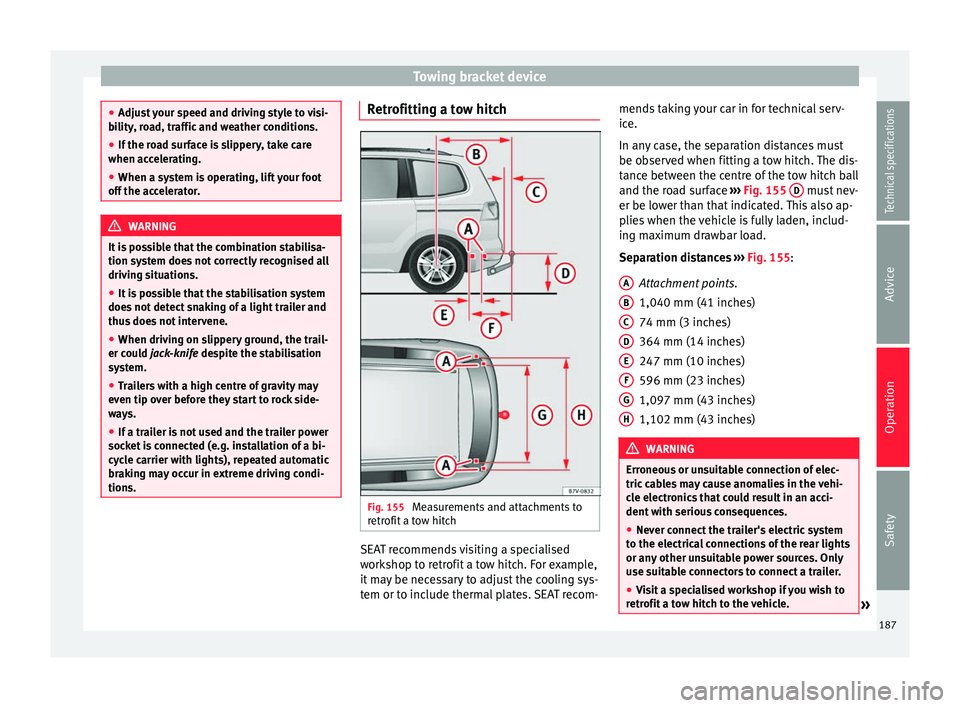
tions. Retrofitting a tow hitch
Fig. 155
Measurements and attachments to
retrofit a tow hitch SEAT recommends visiting a specialised
workshop to retrofit a tow hitch. For example,
it may be necessary to adjust the cooling sys-
tem or to include thermal plates. SEAT recom-mends taking your car in for technical serv-
ice.
In any case, the separation distances must
be observed when fitting a tow hitch. The dis-
tance between the centre of the tow hitch ball
and the road surface
››› Fig. 155 D must nev-
er be lower than that indicated. This also ap-
plies when the vehicle is fully laden, includ-
ing maximum drawbar load.
Separation distances
›
›› Fig. 155
:
Attachment points.
1,040 mm (41 inches)
74 mm (3 inches)
364 mm (14 inches)
247 mm (10 inches)
596 mm (23 inches)
1,097 mm (43 inches)
1,102 mm (43 inches) WARNING
Erroneous or unsuitable connection of elec-
tric cables may cause anomalies in the vehi-
cle electronics that could result in an acci-
dent with serious consequences.
● Never connect the trailer's electric system
to the electrical connections of the rear lights
or any other unsuitable power sources. Only
use suitable connectors to connect a trailer.
● Visit a specialised workshop if you wish to
retrofit a tow hitch to the vehicle. » A
B
C
D
E
F
G
H
187
Technical specifications
Advice
Operation
Safety
Page 258 of 305
Advice
the Keyless Access system, the steering
wheel could lock ››› .
WARNING
A vehicle with a flat battery should never be
towed.
● Never remove the key from the ignition
lock. Otherwise, the steering wheel lock
could suddenly lock. The vehicle would not
be controlled and a serious accident could
ensue. WARNING
When towing the vehicle, the handling and
braking efficiency change considerably.
Please observe the following instructions to
minimise the risk of serious accidents and in-
jury:
● As the driver of the vehicle being towed:
– The brake must be depressed must hard-
er as the brake servo does not operate.
Always remain aware to avoid collision
with the towing vehicle.
– More strength is required at the steering
wheel as the power steering does not op-
erate when the engine is switched off.
● As the driver of the towing vehicle:
– Accelerate gently and carefully.
– Avoid sudden braking and manoeuvres.
– Brake well in advance than usual and
brake gently. CAUTION
● Carefully fit and remove the towline anchor-
age and its cover to avoid damage to the ve-
hicle (e.g. paintwork).
● When towing, fuel could enter the catalytic
converter and cause damage! Instructions for tow starting
In general, the vehicle should not be started
by towing. Jump-starting is much more pref-
erable
› › ›
page 253.
For technical reasons, the following vehicles
can
not be tow started:
● Vehicles with an automatic gearbox.
● Vehicles with the Keyless Access locking
and ignition system, since the electronic
steering lock may not unlock.
● Vehicles with an electronic parking brake,
given that it is possible that the brake will
not be disengaged.
● If the vehicle battery is flat, it is possible
that the engine control units do not operate
correctly.
However, if your vehicle must absolutely be
tow-started (manual gearbox):
● Put it into second or third gear.
● Keep the clutch pressed down. ●
Switch on the ignition and the hazard warn-
ing lights.
● Release the clutch when both vehicles are
moving.
● As soon as the engine starts, press the
clutch and move the gear lever into neutral.
This helps to prevent a collision with the tow-
ing vehicle. CAUTION
When tow-starting, fuel could enter the cata-
lytic converter and damage it. Towing instructions
Tow rope or tow bar
When towing, the tow bar is the safest and
vehicle friendly way. You should only use a
tow rope if you do not have a tow bar.
A tow rope should be slightly elastic to avoid
damage to both vehicles. It is advisable to
use a tow rope made of synthetic fibre or sim-
ilarly elastic material.
Only secure the tow rope or tow bar to the
towline anchorage or specially designed fit-
ting.
Vehicles with a
factory fitted towing device ,
can only
be used for towing with a tow bar,
s
pecially designed to fit on a tow hitch ball
››› page 179.
256
Page 259 of 305
Emergencies
Towing vehicles with an automatic gearbox
Note the following for a towed vehicle:
● Make sure the gear selector lever is in the N
position.
● Do not drive faster than 50 km/h (30 mph).
● Do not tow further than 50 km (30 miles).
● If a breakdown truck is used, the vehicle
must be towed with the front wheels raised.
Note the following instructions for towing
four all-wheel drive vehicles.
Instructions for towing all-wheel drive
vehicles
All-wheel drive vehicles can be towed using a
toolbar or tow rope. If the vehicle is towed
with the front or rear axle raised, the engine
must be turned off to avoid transmission
damage.
For vehicles with a double clutched DSG ®
(di-
rect shift gearbox) the instructions for towing
vehicles with an automatic gearbox apply
››› page 257 .
Sit uation
s in which the vehicle should not be
towed
In the following cases, the vehicle should not
be towed but transported on a trailer or spe-
cial vehicle:
● If the vehicle gearbox does not contain lu-
bricant due to a fault. ●
If the vehicle battery is flat and, as a result,
the electronic steering lock and electronic
parking brake cannot be disengaged if ap-
plied.
● If the vehicle to be towed has an automatic
gearbox and the distance to be covered is
greater than 50 km (30 miles). Note
● The vehicle can only be towed if the elec-
tronic parking brake and steering lock are de-
activated. If the vehicle has no power supply
or there is an electric system fault, the en-
gine must be started using jump leads to de-
activate the electronic parking brake and
electronic steering lock.
● Vehicles with the Keyless Access locking
and ignition system should only be towed
with the ignition connected since, otherwise,
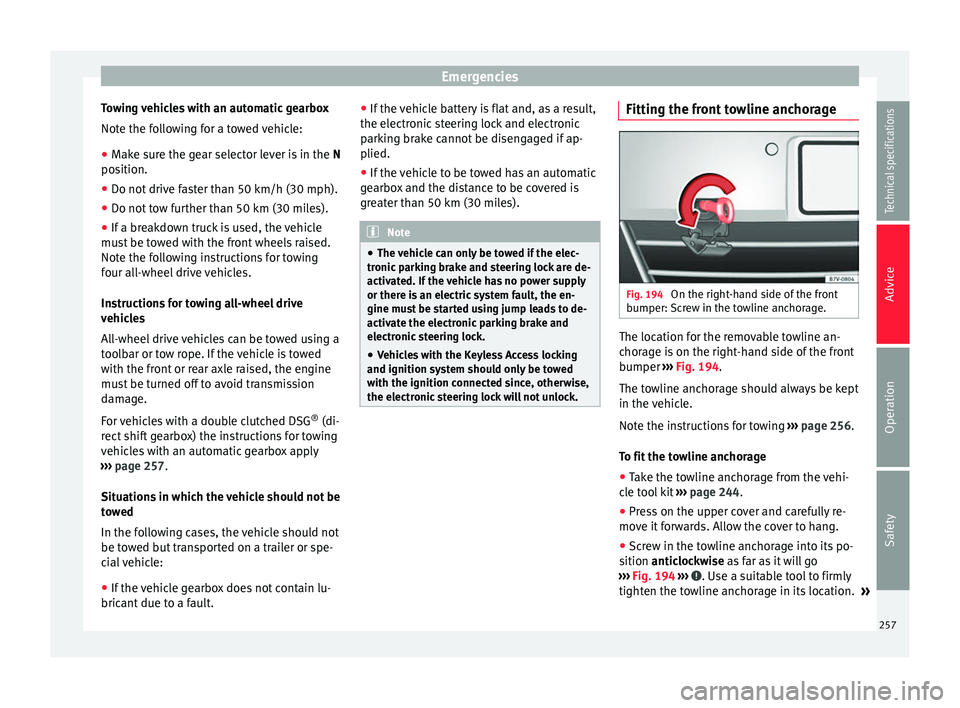
the electronic steering lock will not unlock. Fitting the front towline anchorage
Fig. 194
On the right-hand side of the front
bumper: Screw in the towline anchorage. The location for the removable towline an-
chorage is on the right-hand side of the front
bumper
››› Fig. 194 .
The t o
wline anchorage should always be kept
in the vehicle.
Note the instructions for towing ››› page 256.
To fit the towline anchorage
● Take the towline anchorage from the vehi-
cle tool kit ››› page 244.
● Pre
ss on the upper cover and carefully re-
move it forwards. Allow the cover to hang.
● Screw in the towline anchorage into its po-
sition anticlockwise as far as it will go
›
›› Fig. 194 ››› . Use a suitable tool to firmly
tighten the towline anchorage in its location. »
257
Technical specifications
Advice
Operation
Safety
Page 260 of 305
Advice
● After towing, remove the towline anchorage
by turning it clockwise and put the cover
b ac
k in place. CAUTION
The towline anchorage must always be com-
pletely and firmly tightened. Otherwise, it
could be released while towing and tow-start-
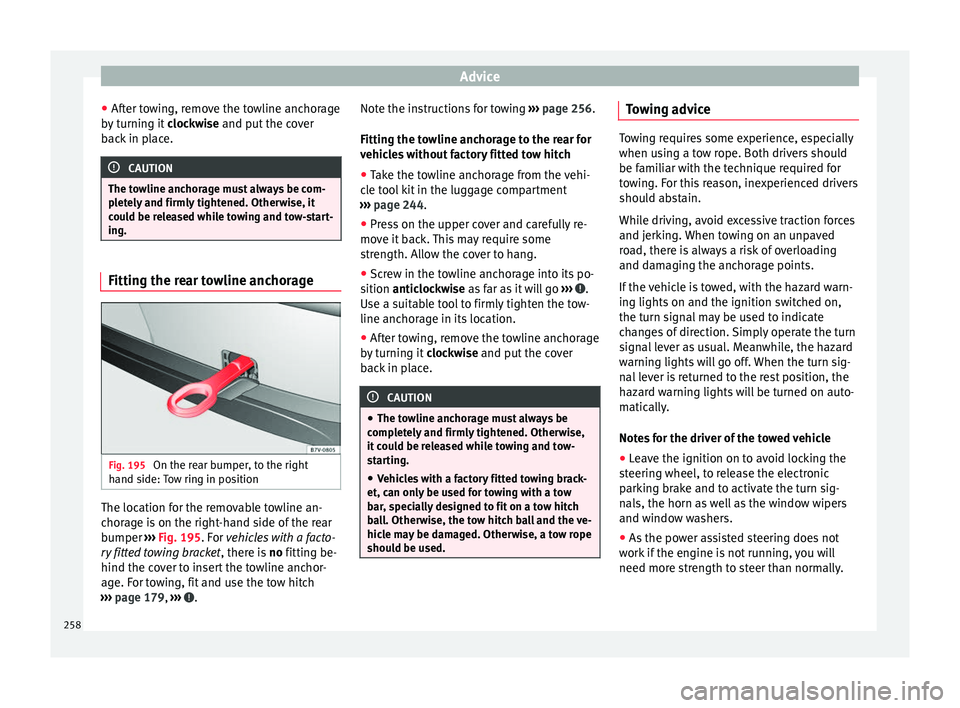
ing. Fitting the rear towline anchorage
Fig. 195
On the rear bumper, to the right
hand side: Tow ring in position The location for the removable towline an-
chorage is on the right-hand side of the rear
bumper
››› Fig. 195 . For
vehicles with a facto-
ry
fitted towing bracket , there is no fitting be-
hind the cover to insert the towline anchor-
age. For towing, fit and use the tow hitch
››› page 179, ››› . Note the instructions for towing
››› page 256.
Fitting the towline anchorage to the rear for
vehicles without factory fitted tow hitch ● Take the towline anchorage from the vehi-
cle tool kit in the luggage compartment
››› page 244 .
● Pr e
ss on the upper cover and carefully re-
move it back. This may require some
strength. Allow the cover to hang.
● Screw in the towline anchorage into its po-
sition anticlockwise as far as it will go ›
›› .
Use a suitable tool to firmly tighten the tow-
line anchorage in its location.
● After towing, remove the towline anchorage
by turning it clockwise and put the cover
b ac
k in place. CAUTION
● The towline anchorage must always be
completely and firmly tightened. Otherwise,
it could be released while towing and tow-
starting.
● Vehicles with a factory fitted towing brack-
et, can only be used for towing with a tow
bar, specially designed to fit on a tow hitch
ball. Otherwise, the tow hitch ball and the ve-
hicle may be damaged. Otherwise, a tow rope
should be used. Towing advice
Towing requires some experience, especially
when using a tow rope. Both drivers should
be familiar with the technique required for
towing. For this reason, inexperienced drivers
should abstain.
While driving, avoid excessive traction forces
and jerking. When towing on an unpaved
road, there is always a risk of overloading
and damaging the anchorage points.
If the vehicle is towed, with the hazard warn-
ing lights on and the ignition switched on,
the turn signal may be used to indicate
changes of direction. Simply operate the turn
signal lever as usual. Meanwhile, the hazard
warning lights will go off. When the turn sig-
nal lever is returned to the rest position, the
hazard warning lights will be turned on auto-
matically.
Notes for the driver of the towed vehicle
●
Leave the ignition on to avoid locking the
steering wheel, to release the electronic
parking brake and to activate the turn sig-
nals, the horn as well as the window wipers
and window washers.
● As the power assisted steering does not
work if the engine is not running, you will
need more strength to steer than normally.
258