clock Seat Alhambra 2016 User Guide
[x] Cancel search | Manufacturer: SEAT, Model Year: 2016, Model line: Alhambra, Model: Seat Alhambra 2016Pages: 324, PDF Size: 5.93 MB
Page 103 of 324
General instrument panel
– To c
ontinue settin
g, press 0.0 / SET ›››
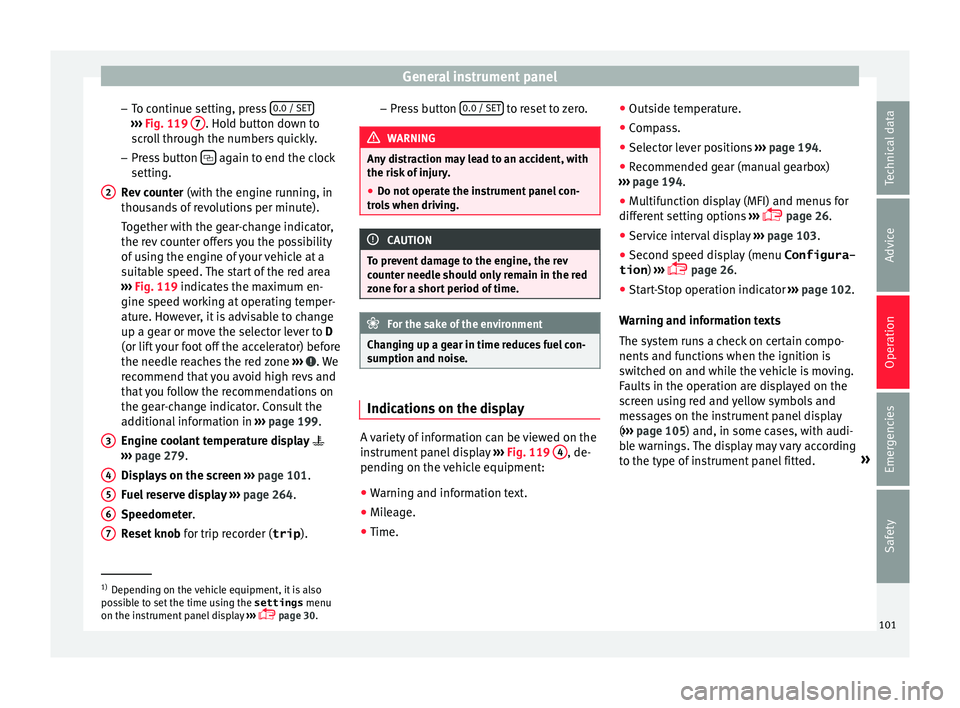
Fig. 119 7 . Hold button down to
s c
r
oll through the numbers quickly.
– Press button again to end the clock
settin g.
R ev
counter (with the engine running, in
thousands of revolutions per minute).
Together with the gear-change indicator,
the rev counter offers you the possibility
of using the engine of your vehicle at a
suitable speed. The start of the red area
››› Fig. 119 indicates the maximum en-
gine speed working at operating temper-
ature. However, it is advisable to change
up a gear or move the selector lever to D
(or lift your foot off the accelerator) before
the needle reaches the red zone ››› . We
r ec
ommend th
at you avoid high revs and
that you follow the recommendations on
the gear-change indicator. Consult the
additional information in ››› page 199.
Engine coolant temperature display
››› page 279.
Displays on the screen ››› page 101.
Fuel reserve display ››› page 264.
Speedometer.
Reset knob for trip recorder (trip ).
2
3
4
5
6
7 –
Pr e
s
s button 0.0 / SET to reset to zero.
WARNING
Any distraction may lead to an accident, with
the risk of
injury.
● Do not operate the instrument panel con-
trol
s when driving. CAUTION
To prevent damage to the engine, the rev
cou nt
er needle should only remain in the red
zone for a short period of time. For the sake of the environment
Changing up a gear in time reduces fuel con-
sumption and noi se. Indications on the display
A variety of information can be viewed on the
in
s
trument
panel display ›››
Fig. 119 4 , de-
pendin g on the
v
ehicle equipment:
● Warning and information text.
● Mileage.
● Time. ●
Outside temper
ature.
● Compass.
● Selector lever positions ›››
page 194.
● Recommended gear (manual gearbox)
›››
page 194.
● Multifunction display (MFI) and menus for
different
setting options ›››
page 26.
● Service interval display ›››
page 103 .
● Second speed display (menu Configura-
tion ) ›››
page 26.
● Start-Stop operation indicator ›››
page 102.
Warning and information texts
The system runs a check on certain compo-
nents and functions when the ignition is
switched on and while the vehicle is moving.
Faults in the operation are displayed on the
screen using red and yellow symbols and
messages on the instrument panel display
( ››› page 105) and, in some cases, with audi-
ble warnings. The display may vary according
to the type of instrument panel fitted. »1)
Depending on the vehicle equipment, it is also
pos s
ible to set the time using the settings menu
on the instrument panel display ›››
page 30.
101
Technical data
Advice
Operation
Emergencies
Safety
Page 106 of 324
Operation
other services (e.g. the next Inspection Serv-
ic e or c
h
ange of brake fluid) are listed on the
label attached to the door strut, or in the
Maintenance Programme.
In vehicles with Services established by time
or mileage, the service intervals are already
pre-defined.
In vehicles with LongLife Service , the inter-
vals are determined individually. Technical
progress has made it possible to considera-
bly reduce servicing requirements. The tech-
nology used by SEAT ensures that your vehi-
cle only has an Interval Service when it is
necessary. To establish when the Interval
Service is due (max. 2 years), the vehicle's
conditions of use and individual driving
styles are considered. The service pre-warn-
ing first appears 20 days before the date es-
tablished for the corresponding service. The
kilometres (miles) remaining until the next
service are always rounded up to the nearest
100 km (miles) and the time is given in com-
plete days. The current service message can-
not be viewed until 500 km after the last
service. Prior to this only lines are visible on
the display.
Inspection reminder
When the Service date is approaching, when
the ignition is switched on a Service remind-
er is displayed. In vehicles without text messages
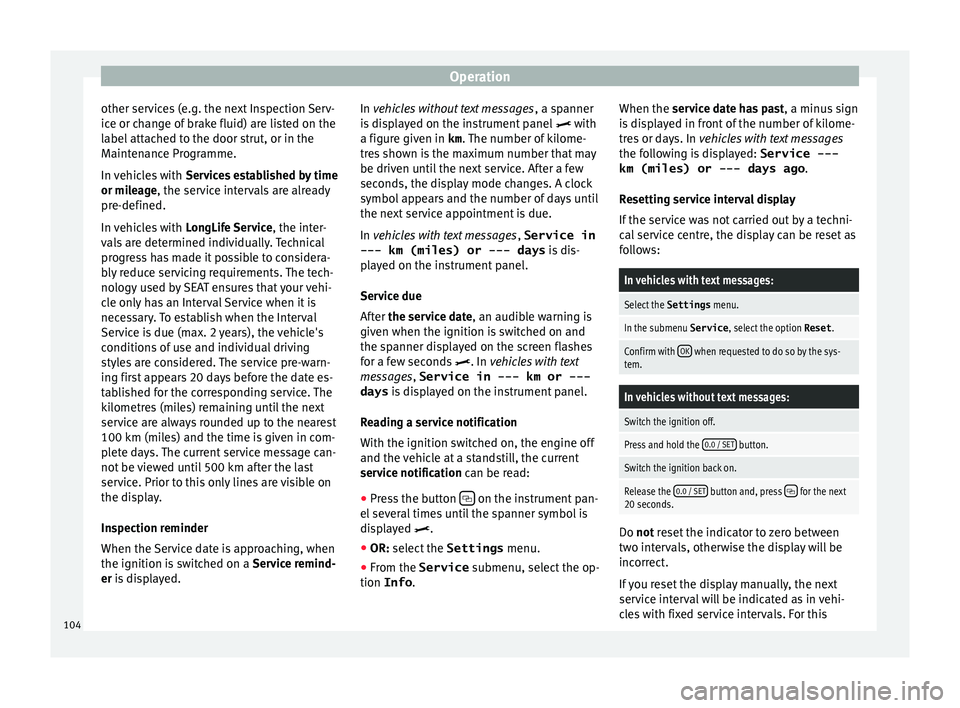
, a sp anner
is displayed on the instrument panel with
a figure given in km . The number of kilome-
tres shown is the maximum number that may
be driven until the next service. After a few
seconds, the display mode changes. A clock
symbol appears and the number of days until
the next service appointment is due.
In vehicles with text messages , Service in
--- km (miles) or --- days is dis-
played on the instrument panel.
Service due
After the service date, an audible warning is
given when the ignition is switched on and
the spanner displayed on the screen flashes
for a few seconds . In vehicles with text
messages, Service in --- km or --- days is displayed on the instrument panel.
Reading a service notification
With the ignition switched on, the engine off
and the vehicle at a standstill, the current
service notification can be read: ● Press the button on the instrument pan-
el sev
er
al times until the spanner symbol is
displayed .
● OR: select the Settings menu.
● From the
Service submenu, sel ect
the op-
tion Info . When the serv
ic
e date has past, a minus sign
is displayed in front of the number of kilome-
tres or days. In vehicles with text messages
the following is displayed: Service ---
km (miles) or --- days ago .
Resetting service interval display
If the service was not carried out by a techni-
cal service centre, the display can be reset as
follows:
In vehicles with text messages:
Select the Settings menu.
In the submenu Service , select the option Reset.
Confirm with OK when requested to do so by the sys-
tem.
In vehicles without text messages:
Switch the ignition off.
Press and hold the 0.0 / SET button.
Switch the ignition back on.
Release the 0.0 / SET button and, press for the next
20 seconds. Do not r
eset the indicator to zero between
tw o int
ervals, otherwise the display will be
incorrect.
If you reset the display manually, the next
service interval will be indicated as in vehi-
cles with fixed service intervals. For this
104
Page 173 of 324
Transport and practical equipment
Side compartments in the luggage compart-
ment
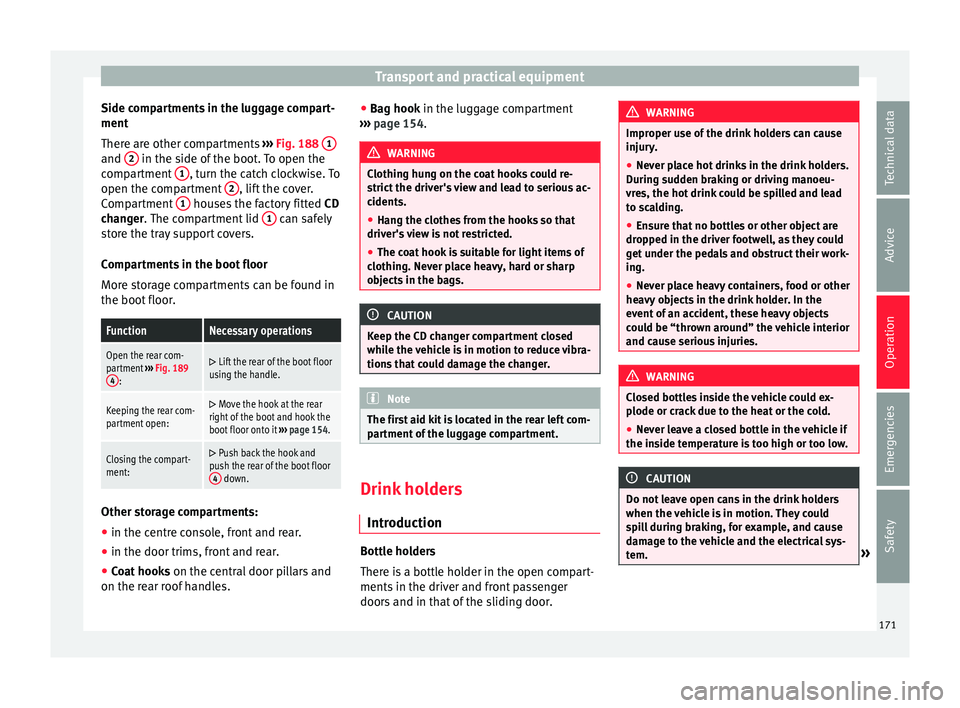
Ther e ar
e other c
ompartments ››› Fig. 188 1 and
2 in the side of the boot. To open the
c omp
ar
tment 1 , turn the catch clockwise. To
open the c omp
ar
tment 2 , lift the cover.
C omp
ar
tment 1 houses the factory fitted
CD
c h
an
ger. The compartment lid 1 can safely
s t
or
e the tray support covers.
Compartments in the boot floor
More storage compartments can be found in
the boot floor.
FunctionNecessary operations
Open the rear com-
partment ››› Fig. 189
4
:
Lift the rear of the boot floor
using the handle.
Keeping the rear com-
partment open: Move the hook at the rear
right of the boot and hook the
boot floor onto it ››› page 154.
Closing the compart-
ment: Push back the hook and
push the rear of the boot floor 4
down. Other storage compartments:
● in the centre console, front and rear.
● in the door trims, front and rear.
● Coat hooks on the centr
al
door pillars and
on the rear roof handles. ●
Bag hook in the lug
gage compartment
››› page 154. WARNING
Clothing hung on the coat hooks could re-
strict the driv
er's view and lead to serious ac-
cidents.
● Hang the clothes from the hooks so that
driver's
view is not restricted.
● The coat hook is suitable for light items of
clothing. Nev
er place heavy, hard or sharp
objects in the bags. CAUTION
Keep the CD changer compartment closed
whil e the
vehicle is in motion to reduce vibra-
tions that could damage the changer. Note
The first aid kit is located in the rear left com-
par tment
of the luggage compartment. Drink holders
Intr oduction Bottle holders
Ther
e i
s
a bottle holder in the open compart-
ments in the driver and front passenger
doors and in that of the sliding door. WARNING
Improper use of the drink holders can cause
injury .
● Nev
er place hot drinks in the drink holders.
During s
udden braking or driving manoeu-
vres, the hot drink could be spilled and lead
to scalding.
● Ensure that no bottles or other object are
dropped in the driv
er footwell, as they could
get under the pedals and obstruct their work-
ing.
● Never place heavy containers, food or other
heavy o
bjects in the drink holder. In the
event of an accident, these heavy objects
could be “thrown around” the vehicle interior
and cause serious injuries. WARNING
Closed bottles inside the vehicle could ex-
plode or c r
ack due to the heat or the cold.
● Never leave a closed bottle in the vehicle if
the inside t
emperature is too high or too low. CAUTION
Do not leave open cans in the drink holders
when the v ehic
le is in motion. They could
spill during braking, for example, and cause
damage to the vehicle and the electrical sys-
tem. » 171
Technical data
Advice
Operation
Emergencies
Safety
Page 274 of 324
Advice
Opening the tank filling neck
● Open the rear lid.
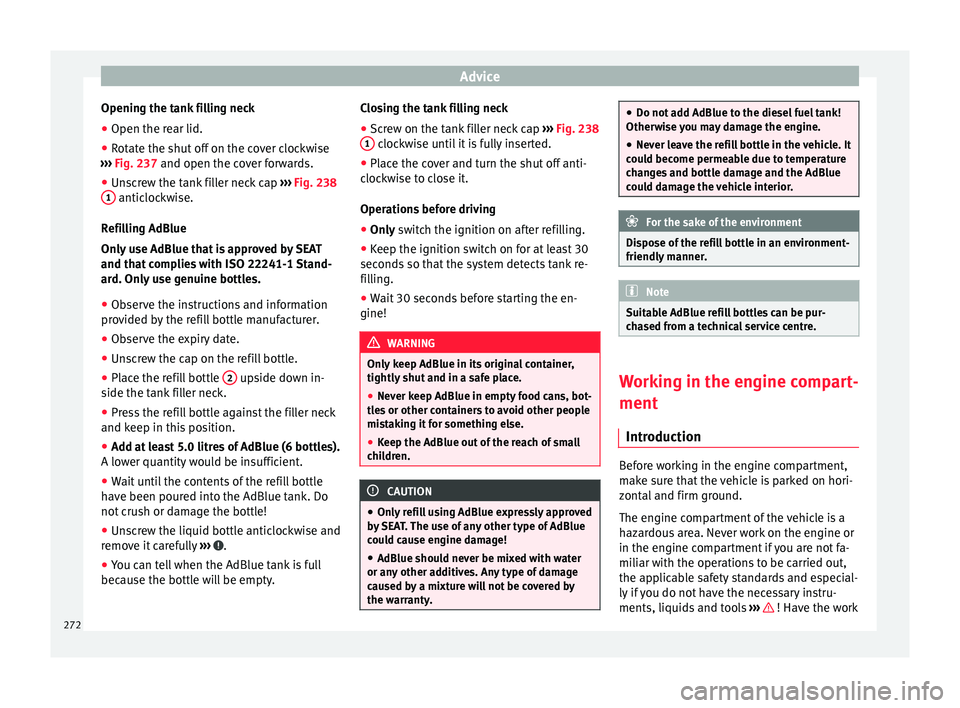
● Rotate the shut off on the cover clockwise
› ›
›
Fig. 237 and open the cover forwards.
● Unscrew the tank filler neck cap ›››
Fig. 238
1 anticlockwise.
R efi
l
ling AdBlue
Only use AdBlue that is approved by SEAT
and that complies with ISO 22241-1 Stand-
ard. Only use genuine bottles.
● Observe the instructions and information
prov
ided by the refill bottle manufacturer.
● Observe the expiry date.
● Unscrew the cap on the refill bottle.
● Place the refill bottle 2 upside down in-
s ide the t
ank
filler neck.
● Press the refill bottle against the filler neck
and keep in this
position.
● Add at least 5.0 litres of AdBlue (6 bottles).
A lower quantity
would be insufficient.
● Wait until the contents of the refill bottle
have been pour
ed into the AdBlue tank. Do
not crush or damage the bottle!
● Unscrew the liquid bottle anticlockwise and
remov
e it carefully ››› .
● You can tell when the AdBlue tank is full
bec au
se the bottl
e will be empty. Closing the tank filling neck
●
Screw on the tank filler neck cap ›››
Fig. 238
1 clockwise until it is fully inserted.
● Place the cover and turn the shut off anti-
c loc
k
wise to close it.
Operations before driving
● Only switch the ignition on after refilling.
● Keep the ignition sw
itch on for at least 30
seconds
so that the system detects tank re-
filling.
● Wait 30 seconds before starting the en-
gine! WARNING
Only keep AdBlue in its original container,
tightly shut and in a s
afe place.
● Never keep AdBlue in empty food cans, bot-
tles
or other containers to avoid other people
mistaking it for something else.
● Keep the AdBlue out of the reach of small
chil
dren. CAUTION
● Only r
efill using AdBlue expressly approved
by SEAT. The use of any other type of AdBlue
could cause engine damage!
● AdBlue should never be mixed with water
or any other a
dditives. Any type of damage
caused by a mixture will not be covered by
the warranty. ●
Do not a d
d AdBlue to the diesel fuel tank!
Otherwise you may damage the engine.
● Never leave the refill bottle in the vehicle. It
coul
d become permeable due to temperature
changes and bottle damage and the AdBlue
could damage the vehicle interior. For the sake of the environment
Dispose of the refill bottle in an environment-
friendly manner
. Note
Suitable AdBlue refill bottles can be pur-
ch a
sed from a technical service centre. Working in the engine compart-
ment
Intr oduction Before working in the engine compartment,
m
ak
e s
ure that the vehicle is parked on hori-
zontal and firm ground.
The engine compartment of the vehicle is a
hazardous area. Never work on the engine or
in the engine compartment if you are not fa-
miliar with the operations to be carried out,
the applicable safety standards and especial-
ly if you do not have the necessary instru-
ments, liquids and tools ››› ! Have the work
272
Page 275 of 324
Checking and refilling levels
carried out by a specialised workshop if you
ar e u
nc
ertain. Negligent work can cause seri-
ous injury. WARNING
If the vehicle moves unexpectedly, this could
cau se seriou
s injury.
● Never work under the vehicle if it has not
been immobi
lized. If you must work under-
neath the vehicle with the wheels in contact
with the ground then it should be parked on
flat ground, the wheels should be prevented
from moving and the key should be removed
from the ignition.
● If you have to work underneath the vehicle,
you mus
t use suitable stands additionally to
support the vehicle, there is a risk of acci-
dent!. The jack is not intended for this kind of
work and its failure could lead to severe inju-
ries. WARNING
The engine compartment is a dangerous area
cap ab
le of causing serious injury.
● For all type of work, always take the utmost
precaution
s, work carefully and note the gen-
eral safety standards in force. Never take per-
sonal risks.
● Never work on the engine or in the engine
compar
tment if you are not familiar with the
necessary operations. If you are not sure
about procedures then visit a specialised
workshop to carry out the necessary work. Working incorrectly can cause serious inju-
ries.
●
Nev er open the bonnet
if you see steam or
cool
ant escaping from the engine compart-
ment. This may cause serious burns. Always
wait until you cannot see or hear the sound of
steam or coolant coming from the engine
compartment.
● Always allow the engine to cool down be-
fore openin
g the bonnet.
● Contact with hot elements of the engine
and the exhau
st system can cause burns.
● Once the engine has cooled, follow the in-
structions
below before opening the bonnet:
– Turn on the electronic parking brake and
place the gear selector lever in P or the
gearbox lever in neutral.
– Remove the key from the ignition.
– Keep children away from the engine com-
partment and never leave them unsuper-
vised.
● When the engine is warm or hot, the cool-
ing sys
tem is pressurised. Do not unscrew
the cap on the expansion tank when the en-
gine is hot. Otherwise, coolant may spray out
under pressure causing burns and serious in-
jury.
– Carefully and slowly unscrew the cap an-
ticlockwise, gently pressing down on it.
– Always protect your face, hands and arms
from hot coolant and steam using a large,
thick cloth. ●
When refi l
ling liquids, avoid spilling them
on parts of the engine and the exhaust sys-
tem. Spilled liquids could cause a fire. WARNING
The high voltages of the electrical system can
giv e el ectric
shocks as well as causing burns
and serious injury and possibly even death!
● Never cause short circuits in the electrical
syst
em. The battery could explode.
● To minimise the risk of electric shock and
serious c
onsequences while the engine is
running or starting the engine, note the fol-
lowing:
– Never touch the electrical wiring of the
ignition system.
– Never touch electric cables or the gas dis-
charge lamps. WARNING
In the engine compartment, there are rotat-
ing p ar
ts that could cause serious injury.
● Never place your hands on or near the radi-
ator fan.
Touching the rotor blades could seri-
ously harm you. The ventilator works accord-
ing to the engine temperature and could start
suddenly even when the ignition is turned off
and the key is removed.
● If any work has to be performed when the
engine is
started or with the engine running,
there is an additional, potentially fatal, safety » 273
Technical data
Advice
Operation
Emergencies
Safety
Page 283 of 324
Checking and refilling levels
Checking the coolant level and top-
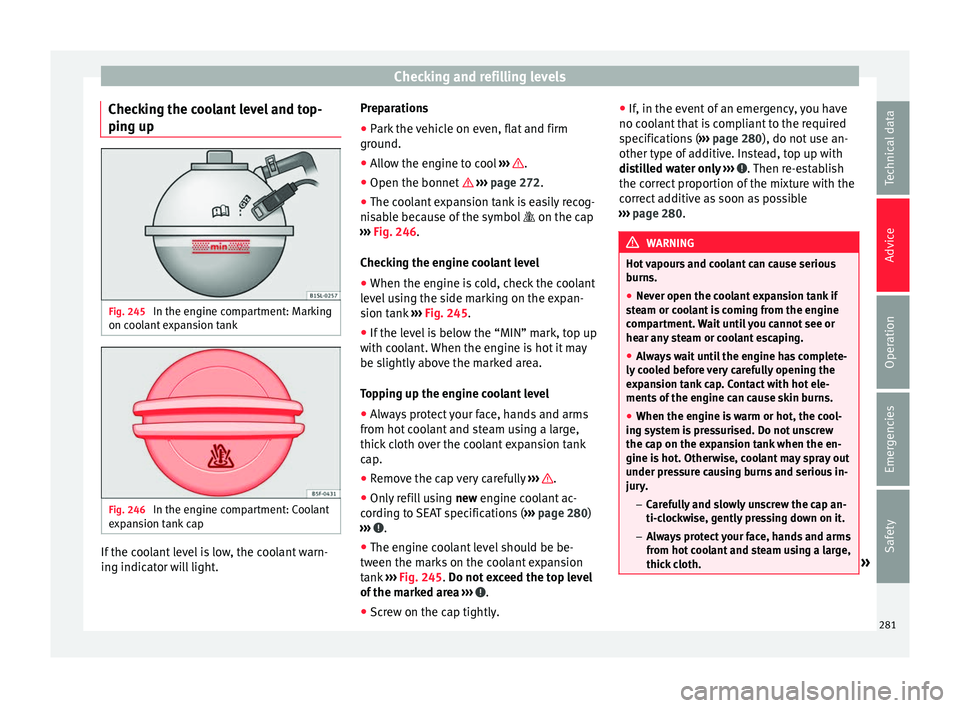
pin g up Fig. 245
In the engine compartment: Marking
on c oo
l
ant expansion tank Fig. 246
In the engine compartment: Coolant
e xp
an
sion tank cap If the coolant level is low, the coolant warn-
in
g indic
at
or will light. Preparations
● Park the vehicle on even, flat and firm
ground.
● A
llow the engine to cool ›››
.
● Open the bonnet › ›
›
page 272.
● The coolant expansion tank is easily recog-
nisab
le because of the symbol on the cap
››› Fig. 246.
Checking the engine coolant level ● When the engine is cold, check the coolant
level
using the side marking on the expan-
sion tank ››› Fig. 245.
● If the level is below the “MIN” mark, top up
with coo
lant. When the engine is hot it may
be slightly above the marked area.
Topping up the engine coolant level
● Always protect your face, hands and arms
from hot c
oolant and steam using a large,
thick cloth over the coolant expansion tank
cap.
● Remove the cap very carefully ›››
.
● Only refill using new engine c
oo
lant ac-
cording to SEAT specifications ( ››› page 280)
››› .
● The engine coolant level should be be-
tw een the m
ark
s on the coolant expansion
tank ››› Fig. 245. Do not exceed the top level
of the marked area ››› .
● Screw on the cap tightly. ●
If, in the ev
ent
of an emergency, you have
no coolant that is compliant to the required
specifications ( ››› page 280), do not use an-
other type of additive. Instead, top up with
distilled water only ››› . Then re-establish
the c orr
ect
proportion of the mixture with the
correct additive as soon as possible
››› page 280. WARNING
Hot vapours and coolant can cause serious
burn s.
● Nev
er open the coolant expansion tank if
ste
am or coolant is coming from the engine
compartment. Wait until you cannot see or
hear any steam or coolant escaping.
● Always wait until the engine has complete-
ly coo
led before very carefully opening the
expansion tank cap. Contact with hot ele-
ments of the engine can cause skin burns.
● When the engine is warm or hot, the cool-
ing sys
tem is pressurised. Do not unscrew
the cap on the expansion tank when the en-
gine is hot. Otherwise, coolant may spray out
under pressure causing burns and serious in-
jury.
– Carefully and slowly unscrew the cap an-
ti-clockwise, gently pressing down on it.
– Always protect your face, hands and arms
from hot coolant and steam using a large,
thick cloth. » 281
Technical data
Advice
Operation
Emergencies
Safety
Page 312 of 324
Index
Cornering lights see "St atic
c
ornering lights" . . . . . . . . . . . . . . 132
static . . . . . . . . . . . . . . . . . . . . . . . . . . . . . . . . . 132
Correct position . . . . . . . . . . . . . . . . . . . . . . . . . . . 57 driver . . . . . . . . . . . . . . . . . . . . . . . . . . . . . . . . . . 57
Counter steering assistance system . . . . . . . . . . 185
Crossing through water salt water . . . . . . . . . . . . . . . . . . . . . . . . . . . . . 205
Cruise Control System (CCS) . . . . . . . . . . . . 32, 221 Control lamp . . . . . . . . . . . . . . . . . . . . . . . . . . . 221
Operations . . . . . . . . . . . . . . . . . . . . . . . . . . . . 221
Warning lamp . . . . . . . . . . . . . . . . . . . . . . . . . . 221
D Dangers of not using a seat belt . . . . . . . . . . . . . . 63
Dash panel . . . . . . . . . . . . . . . . . . . . . . . . . . . . . . . 99 airbag system . . . . . . . . . . . . . . . . . . . . . . . . . . 262
Data registry . . . . . . . . . . . . . . . . . . . . . . . . . . . . . 250
Data storage during the journey . . . . . . . . . . . . . 250
Daytime running lights . . . . . . . . . . . . . . . . . . . . 131
DCC see Dynamic chassis control . . . . . . . . . . . . . . 233
De-icing the locks . . . . . . . . . . . . . . . . . . . . . . . . . 257
Diagnostics connector . . . . . . . . . . . . . . . . . . . . . 251
Diesel . . . . . . . . . . . . . . . . . . . . . . . . . . . . . . . . . . 268 auxiliary heater . . . . . . . . . . . . . . . . . . . . . . . . . 269
biodiesel . . . . . . . . . . . . . . . . . . . . . . . . . . . . . . 269
filter pre-heater . . . . . . . . . . . . . . . . . . . . . . . . . 268
winter-grade diesel . . . . . . . . . . . . . . . . . . . . . 268
Diesel particulate filter . . . . . . . . . . . . . . . . . . . . 203 Malfunction . . . . . . . . . . . . . . . . . . . . . . . . . . . . 203
recommended gear . . . . . . . . . . . . . . . . . . . . . 199
things to note . . . . . . . . . . . . . . . . . . . . . . . . . . 269
Differential lock See Braking assist systems . . . . . . . . . . . . . . . 206
Digital clock . . . . . . . . . . . . . . . . . . . . . . . . . . . . . 100
Dimensions . . . . . . . . . . . . . . . . . . . . . . . . . . . . . . 306 Directional tread pattern
tyre s . . . . . . . . . . . . . . . . . . . . . . . . . . . . . . . . . . . 49
Disconnecting devices . . . . . . . . . . . . . . . . . . . . . 287
Disconnecting the passenger front airbag . . . . . . 18
Display . . . . . . . . . . . . . . . . . . . . . . . . . . . . 100, 101
Disposal belt tension device . . . . . . . . . . . . . . . . . . . . . . . 68
Door childproof lock . . . . . . . . . . . . . . . . . . . . . . . . . 123
emergency locking and unlocking . . . . . . . . . . . . 8
opening and closing . . . . . . . . . . . . . . . . . . . . . . 8
warning lamp . . . . . . . . . . . . . . . . . . . . . . . . . . 121
Door handle . . . . . . . . . . . . . . . . . . . . . . . . . . . . . . . 8
Door lock . . . . . . . . . . . . . . . . . . . . . . . . . . . . . . . . . . 8
Door lock cylinder . . . . . . . . . . . . . . . . . . . . . . . . . . 8
Doors . . . . . . . . . . . . . . . . . . . . . . . . . . . . . . . . . . . 121
Drawbar load . . . . . . . . . . . . . . . . . . . . . . . . . . . . 237 loading the trailer . . . . . . . . . . . . . . . . . . . . . . . 242
Drawers . . . . . . . . . . . . . . . . . . . . . . . . . . . . . . . . . 169
Drink holders . . . . . . . . . . . . . . . . . . . . . . . . . . . . 171 central console . . . . . . . . . . . . . . . . . . . . . . . . . 172
rear . . . . . . . . . . . . . . . . . . . . . . . . . . . . . . . . . . 172
Driving automatic gearbox . . . . . . . . . . . . . . . . . . . . . . 198
cross country . . . . . . . . . . . . . . . . . . . . . . . . . . . 56
data storage . . . . . . . . . . . . . . . . . . . . . . . . . . . 250
driving abroad . . . . . . . . . . . . . . . . . . . . . . . . . 204
driving through water . . . . . . . . . . . . . . . . . . . . 204
economical . . . . . . . . . . . . . . . . . . . . . . . . . . . . 200
fuel gauge . . . . . . . . . . . . . . . . . . . . . . . . . . . . . 266
fuel level too low . . . . . . . . . . . . . . . . . . . . . . . 266
Parking downhill . . . . . . . . . . . . . . . . . . . . . . . . 192
Parking uphill . . . . . . . . . . . . . . . . . . . . . . . . . . 192
towing . . . . . . . . . . . . . . . . . . . . . . . . . . . . . . . . . 89
trailer . . . . . . . . . . . . . . . . . . . . . . . . . . . . . . . . . 243
undercarriage guard . . . . . . . . . . . . . . . . . . . . . . 56
with a trailer . . . . . . . . . . . . . . . . . . . . . . . . . . . 237 Driving abroad
headlights . . . . . . . . . . . . . . . . . . . . . . . . . . . . . 135
Driving in winter fuel consumption . . . . . . . . . . . . . . . . . . . . . . . 201
snow chains . . . . . . . . . . . . . . . . . . . . . . . . . . . . 49Tread depth . . . . . . . . . . . . . . . . . . . . . . . . . . . . 293
tyre pressures . . . . . . . . . . . . . . . . . . . . . . . . . . 292
Windscreen washer container . . . . . . . . . . . . . 256
Driving safety . . . . . . . . . . . . . . . . . . . . . . . . . . . . . 56
Driving through water . . . . . . . . . . . . . . . . . . . . . 204
Driving tips For a loaded vehicle . . . . . . . . . . . . . . . . . . . . . 152
Driving with a trailer extinguisher . . . . . . . . . . . . . . . . . . . . . . . . . . . 239
technical requirements . . . . . . . . . . . . . . . . . . 238
Duplicate keys . . . . . . . . . . . . . . . . . . . . . . . . . . . 112
Dynamic Chassis Control (DCC) . . . . . . . . . . . . . . 233 Control . . . . . . . . . . . . . . . . . . . . . . . . . . . . . . . . 233
fault . . . . . . . . . . . . . . . . . . . . . . . . . . . . . . . . . . 234
Operation . . . . . . . . . . . . . . . . . . . . . . . . . . . . . 233
Dynamic headlight range control . . . . . . . . . . . . 135
E
EDS See Braking assist systems . . . . . . . . . . . . . . . 206
Electric windows . . . . . . . . . . . . . . . . . . . . . . . . . . . . . . . 11
Electrical devices . . . . . . . . . . . . 173, 174, 183, 242
Electrical socket trailer . . . . . . . . . . . . . . . . . . . . . . . . . . . . . . . . . 241
Electric child safety lock . . . . . . . . . . . . . . . . . . . 123
Electric sliding doors opening and closing . . . . . . . . . . . . . . . . . . . . 122
rollback anti-trap function . . . . . . . . . . . . . . . . 123
Electric windows . . . . . . . . . . . . . . . . . . . . . . . . . . . 11 see Windows . . . . . . . . . . . . . . . . . . . . . . . . . . . 127
Electronic differential lock system (EDS) . 205, 206
310