gearbox Seat Alhambra 2017 User Guide
[x] Cancel search | Manufacturer: SEAT, Model Year: 2017, Model line: Alhambra, Model: Seat Alhambra 2017Pages: 320, PDF Size: 6.88 MB
Page 102 of 320
Operation
– Manual
g
earbox . . . . . . . . . . . . . . . . 192
– Automatic
gearbox . . . . . . . . . . . . . 192
12 volt power socket . . . . . . . . . . . . . .170
Auto Hold Switch -
. . . . . . . . 205
Electronic parking brake switch
. . . . . . . . . . . . . . . . . . . . . . . . . . . . . . . 187
Start-up push button (Keyless Ac-
ces
s closing and start-up system)
Ignition lock . . . . . . . . . . . . . . . . . . . . . . 182
Pedals . . . . . . . . . . . . . . . . . . . . . . . . . . . 192
23 24
25
26
27
28 Steering column adjustment lev-
er
. . . . . . . . . . . . . . . . . . . . . . . . . . . . . . . . 57
Fuse box cover . . . . . . . . . . . . . . . . . . . 90
Lever for:
– Crui
se C
ontrol System (CCS) –
– – – – . .219
Open bonnet lever . . . . . . . . . . . . . . . . 268
Controls for: – Electric w
indows . . . . . . . . . . . . . 125
– Child
proof locks . . . . . . . . . . . . . 119
29 30
31
32
33 Note
● Some of the it ems
of equipment listed here
are fitted only on certain model versions or
are optional extras.
● In versions with the steering wheel on the
right, the lay
out of the control elements is
somewhat different. But the symbols as-
signed to the controls correspond to the sym-
bols used in the versions with the steering
wheel on the left Instruments
V iew of
in
strument panel Fig. 118
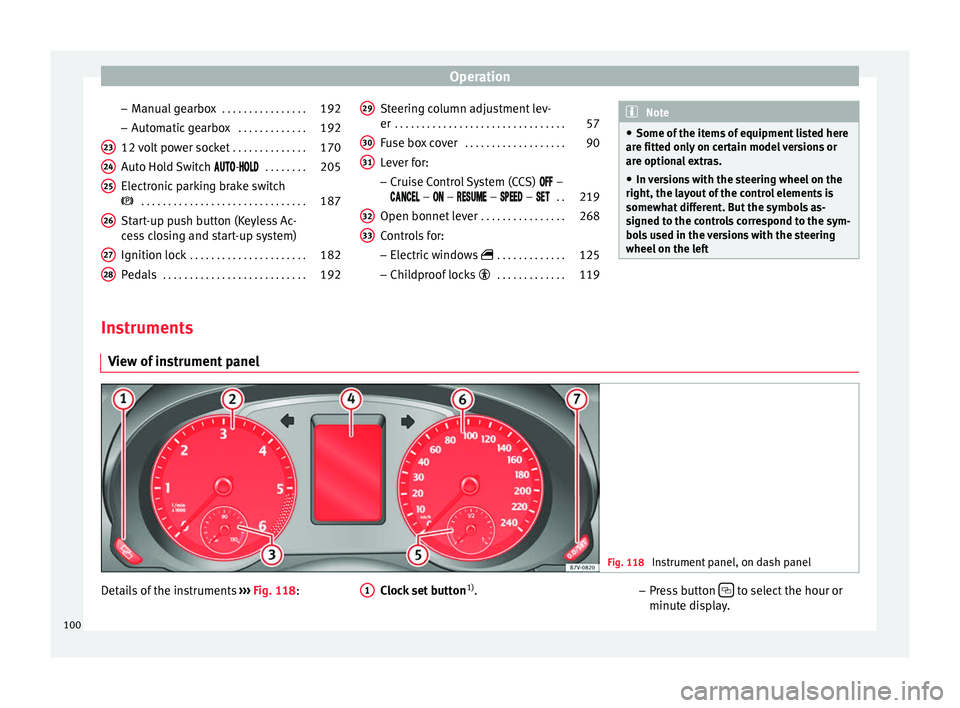
Instrument panel, on dash panel Details of the instruments
››
›
Fig. 118: Clock set button1)
.
1 –
Pr e
s
s button to select the hour or
minut e di
s
play.
100
Page 103 of 320

General instrument panel
– To c
ontinue settin
g, press 0.0 / SET ›››
Fig. 118 7 . Hold button down to
s c
r
oll through the numbers quickly.
– Press button again to end the clock
settin g.
R ev
counter (with the engine running, in
thousands of revolutions per minute).
Together with the gear-change indicator,
the rev counter offers you the possibility
of using the engine of your vehicle at a
suitable speed. The start of the red area
››› Fig. 118 indicates the maximum en-
gine speed working at operating temper-
ature. However, it is advisable to change
up a gear or move the selector lever to D
(or lift your foot off the accelerator) before
the needle reaches the red zone ››› . We
r ec
ommend th
at you avoid high revs and
that you follow the recommendations on
the gear-change indicator. Consult the
additional information in ››› page 196.
Engine coolant temperature display
››› page 274.
Displays on the screen ››› page 101.
Fuel reserve display ››› page 261.
Speedometer.
Reset knob for trip recorder (trip ).
2
3
4
5
6
7 –
Pr e
s
s button 0.0 / SET to reset to zero.
WARNING
Any distraction may lead to an accident, with
the risk of
injury.
● Do not operate the instrument panel con-
trol
s when driving. CAUTION
To prevent damage to the engine, the rev
cou nt
er needle should only remain in the red
zone for a short period of time. For the sake of the environment
Changing up a gear in time reduces fuel con-
sumption and noi se. Indications on the display
A variety of information can be viewed on the
in
s
trument
panel display ›››
Fig. 118 4 , de-
pendin g on the
v
ehicle equipment:
● Warning and information text.
● Mileage.
● Time. ●
Outside temper
ature.
● Compass.
● Selector lever positions ›››
page 192.
● Recommended gear (manual gearbox)
›››
page 192.
● Multifunction display (MFD) and menus for
different
setting options ›››
page 26.
● Service interval display ›››
page 103 .
● Second speed display (menu Configura-
tion ) ›››
page 26.
● Start-Stop operation indicator ›››
page 102.
Warning and information texts
The system runs a check on certain compo-
nents and functions when the ignition is
switched on and while the vehicle is moving.
Faults in the operation are displayed on the
screen using red and yellow symbols and
messages on the instrument panel display
( ››› page 105) and, in some cases, with audi-
ble warnings. The display may vary according
to the type of instrument panel fitted. »1)
Depending on the vehicle equipment, it is also
pos s
ible to set the time using the settings menu
on the instrument panel display ›››
page 30.
101
Technical data
Advice
Operation
Emergencies
Safety
Page 104 of 320

OperationPriority 1 warning (red symbols)
Symbol flashing or lit; partly combined with audible
warnings.
Stop the vehicle!
It is dangerous ››› in Control and
warning lamps on page 105 !
Check the function that is faulty and repair it. If necessa-
ry, request assistance from specialised personnel.
Priority 2 warning (yellow symbols)
Symbol flashing or lit; partly combined with audible
warnings.
A function fault, or fluids which are below the correct
levels may cause damage to the vehicle ›››
in Control
and warning lamps on page 105 !
Check the faulty operation as soon as possible. If neces-
sary, request assistance from specialised personnel.
Informative text
Information relating to different vehicle processes. Mileage
The odomet
er
r
egisters the total distance
travelled by the car.
The odometer (trip ) shows the distance
travelled since the last odometer reset. The
last digit of the trip recorder indicates distan-
ces of 100 metres or one tenths of a mile.
Outside temperature display
When the outside temperature is below +4°C
(+39°F), the symbol “ice crystal” (warning of
risk of freezing) is also displayed next to the temperature. At first this symbol flashes and
then it rem
ains lit until the outside tempera-
ture rises above +6°C (+43°F) ››› .
When the v
ehic
le is at a standstill, with the
auxiliary heating on ( ››› page 177), or when
travelling at very low speeds, the tempera-
ture displayed may be higher than the true
outside temperature, as a result of the heat
produced by the engine.
The temperatures measured range from
-40°C to +50°C (-40°F to +122°F).
Compass
With the ignition on and the navigation sys-
tem on, the cardinal point corresponding to
the vehicle's direction of travel is displayed
on the instrument panel ››› page 103.
Selector lever positions
The range of engaged gears of the selector
lever is shown on the side of the lever, and
on the instrument panel display. In positions
D and S, and with the Tiptronic, the corre-
sponding gear is also displayed.
Recommended gear (manual gearbox)
The recommended gear in order to save fuel
is displayed on the instrument panel while
you are driving ›››
page 192. Second speed display (mph or km/h)
In addition t
o the speedometer, the speed
can also be displayed in a different unit of
measurement (in miles or in km per hour). To
change the units, in the Settings menu, se-
lect the option Second speed
››› page 26.
Vehicles without menu display on the instru-
ment panel
● Switch on the engine.
● Press button three times. The odometer
di s
p
lay flashes on the instrument panel dis-
play.
● Press button 0.0 / SET once. “mph”
or “km/h” i s
di
splayed briefly instead of the
odometer.
● This activates the second speed display. To
switc
h it off, repeat the procedure.
This option cannot be deactivated in models
destined for countries in which the second
speed must always be visible.
Start-Stop operating display.
Updated information relating to the status is
displayed on the instrument panel
››› page 205. WARNING
Observe the safety warnings ›››
in Control
and warnin g l
amps on page 105. 102
Page 185 of 320
Driving
WARNING
Turning off the engine while driving will make
st op
ping the vehicle difficult; this could even
result in the loss of control causing an acci-
dent with serious consequences.
● The assisted braking and steering systems,
the airbag sys
tem, seat belts and certain
safety equipment are only active while the
engine is running.
● The engine should only be switched off
when the vehic
le is at a standstill. WARNING
While the engine is running or starting it
cou l
d help reduce the risk of serious injury.
● Never start or leave the engine running in
poorly v
entilated or closed spaces. Exhaust
gas contains carbon monoxide, a toxic, col-
ourless and odourless gas. Carbon monoxide
can cause people to lose consciousness. It
can also cause death.
● Never leave the vehicle unattended if the
engine is
running. The vehicle could move off
suddenly or something unexpected could
happen resulting in damage and serious in-
jury.
● Never use start boosters. Cold start sprays
coul
d explode or increase the engine speed
unexpectedly. WARNING
The components of the exhaust system reach
ver y
high temperatures. This could cause a
fire and considerable damage.
● Always park your vehicle so that no part of
the exhau
st system can come in contact with
flammable materials (such as wood, leaves,
dried grass, spilled fuel, etc.).
● Do not apply additional underseal or anti-
corro
sion coatings to the exhaust pipes, cata-
lytic converter, heat shields or the diesel par-
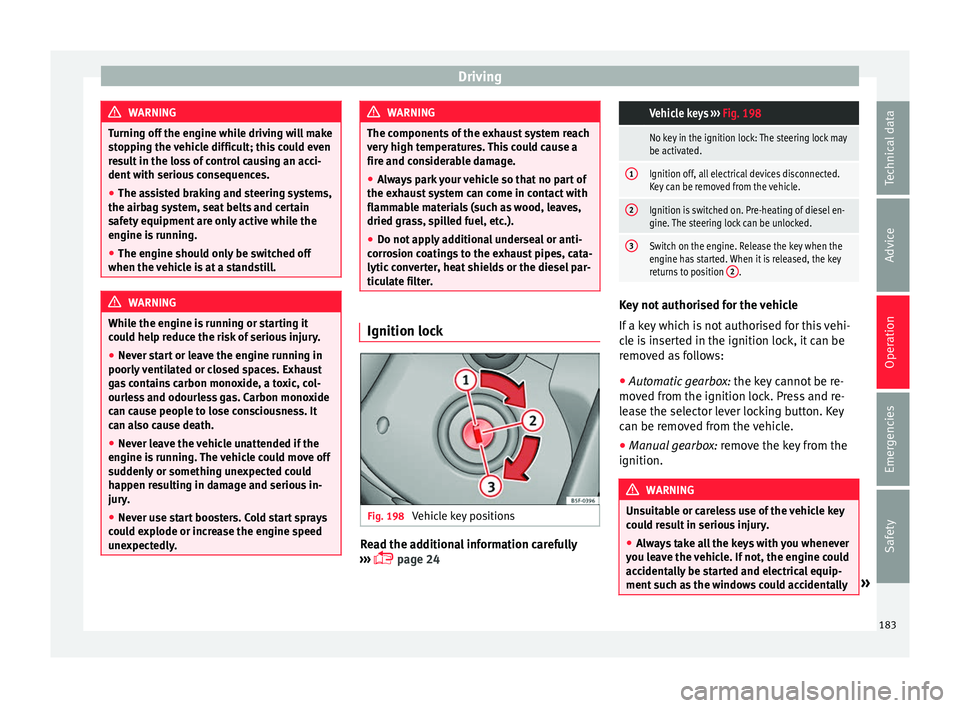
ticulate filter. Ignition lock
Fig. 198
Vehicle key positions Read the additional information carefully
› ›
›
page 24
Vehicle keys
››› Fig. 198
No key in the ignition lock: The steering lock may
be activated.
1Ignition off, all electrical devices disconnected.
Key can be removed from the vehicle.
2Ignition is switched on. Pre-heating of diesel en-
gine. The steering lock can be unlocked.
3Switch on the engine. Release the key when the
engine has started. When it is released, the key
returns to position 2
. Key not authorised for the vehicle
If
a k
ey
which is not authorised for this vehi-
cle is inserted in the ignition lock, it can be
removed as follows:
● Automatic gearbox: the key c
annot be re-
moved from the ignition lock. Press and re-
lease the selector lever locking button. Key
can be removed from the vehicle.
● Manual gearbox: remov
e the key from the
ignition. WARNING
Unsuitable or careless use of the vehicle key
cou l
d result in serious injury.
● Always take all the keys with you whenever
you le
ave the vehicle. If not, the engine could
accidentally be started and electrical equip-
ment such as the windows could accidentally » 183
Technical data
Advice
Operation
Emergencies
Safety
Page 186 of 320
Operation
be operated which may result in serious in-
jury
.
● Nev
er leave children or disabled people
alone in the car
. Passengers could be trapped
in the car in an emergency and not be able to
get themselves to safety. For example, de-
pending on the time of the year, tempera-
tures inside a locked and closed vehicle can
be extremely high or extremely low resulting
in serious injuries and illness or even death,
particularly for young children.
● Never remove the key from the ignition if
the vehic
le is in motion. The steering may
lock and it will not be possible to turn the
steering wheel. Note
● If the k ey
is left in the ignition lock with the
engine off for long periods, the vehicle bat-
tery will run flat.
● For automatic gearbox vehicles, the key can
only be r
emoved from the ignition lock if the
gear selector lever is in position P. In this
case, press and release the selector lever
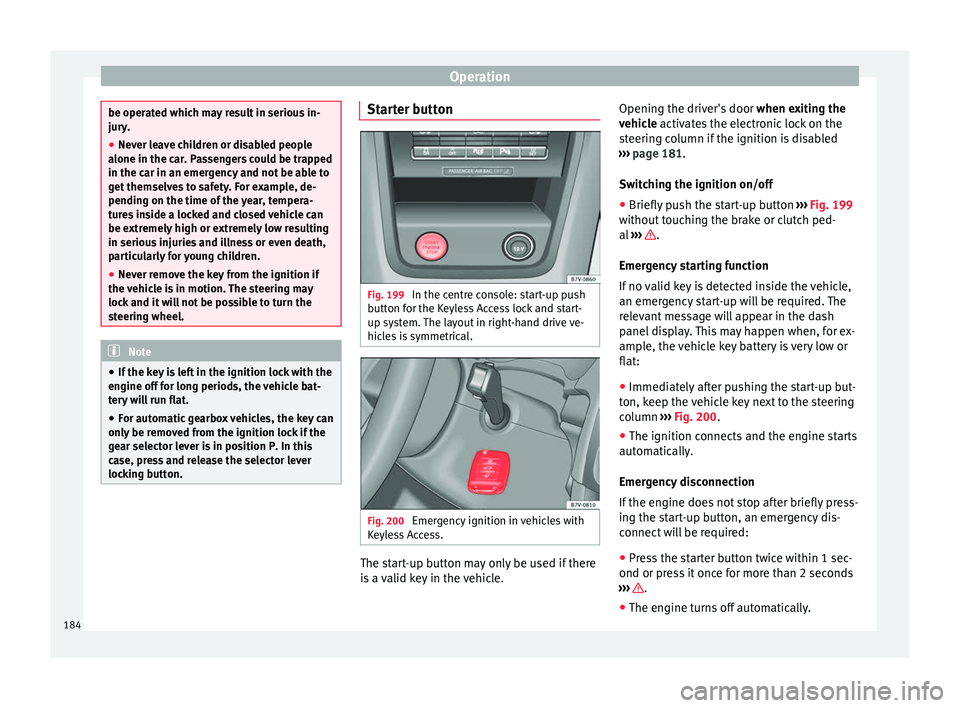
locking button. Starter button
Fig. 199
In the centre console: start-up push
b utt
on f
or the Keyless Access lock and start-
up system. The layout in right-hand drive ve-
hicles is symmetrical. Fig. 200
Emergency ignition in vehicles with
K eyl
e
ss Access. The start-up button may only be used if there
i
s a
valid key in the vehicle. Opening the driver's door
when exitin
g the
vehicle activates the electronic lock on the
steering column if the ignition is disabled
››› page 181.
Switching the ignition on/off
● Briefly push the start-up button ›››
Fig. 199
without touching the brake or clutch ped-
al ››› .
Emer g
ency
starting function
If no valid key is detected inside the vehicle,
an emergency start-up will be required. The
relevant message will appear in the dash
panel display. This may happen when, for ex-
ample, the vehicle key battery is very low or
flat:
● Immediately after pushing the start-up but-
ton, keep the
vehicle key next to the steering
column ››› Fig. 200.
● The ignition connects and the engine starts
automatic
ally.
Emergency disconnection
If the engine does not stop after briefly press-
ing the start-up button, an emergency dis-
connect will be required:
● Press the starter button twice within 1 sec-
ond or pres
s it once for more than 2 seconds
››› .
● The engine turns off automatically.
184
Page 187 of 320
Driving
Engine restart feature
If no
v
alid key is detected inside the vehicle
after the engine stops, you will only have 5
seconds to restart it. A warning will display
on the dash panel screen.
After this interval, it will not be possible to
start the engine without a valid key inside
the vehicle. WARNING
Any accidental movement of the vehicle could
re s
ult in serious injury.
● When pressing the start-up button, do not
pre
ss the brake or clutch pedal, this way the
engine will start immediately. WARNING
If vehicle keys are used negligently or with-
out due c ar
e, this may cause accidents and
serious injury.
● Never leave any key inside the vehicle
when exitin
g. Otherwise, a child or unauthor-
ised person could lock the vehicle, start the
engine or connect the ignition and, in this
way, operate electronic equipment (e.g. the
windows). Note
In diesel vehicles with the Keyless Access
sys t
em, there may be a delay in the engine
starting if it requires preheating. Starting the engine
Complete operations only in the sequence
given:
Vehicles without
Keyless AccessVehicles with
Keyless Access
1.Press and hold the brake pedal until step 5 is per- formed.
1a.In vehicles with a manual gearbox: press and
hold the clutch down until the engine starts.
2.Put the gearbox lever in neutral or the selector lever in position P or N.
3.
Only in vehicles with
diesel engines: for pre-
heating, turn the key in the ignition lock to po-
sition ››› Fig. 198 2
. A
control lamp lights up
on the dash panel
.
4.
Turn the key in the igni- tion lock to position
››› Fig. 198 3
; do not
press the accelerator.
Press the starter button ››› Fig. 199; do not
press the accelerator. There needs to be a
valid key inside the ve- hicle for the engine to start.
5.Once the engine starts,release the key in the ignition lock.Once the engine starts,release the start-up button.
Vehicles without
Keyless AccessVehicles with
Keyless Access
6.
If the engine does not
start, stop and wait for around 1 minute to try again.If the engine does not
start, stop and wait for around 1 minute to try again. If necessary,
perform an emergency start ››› page 184.
7.Disconnect the electronic parking brake when you
are about to start driving ››› page 187. WARNING
Never leave the vehicle unattended if the en-
gine is ru
nning. The vehicle could move off
suddenly, especially if it is in gear, resulting
in an accident and serious injury. WARNING
Cold start sprays could explode or cause a
sud den inc
rease in the engine speed.
● Never use start boosters. CAUTION
● An attempt t
o start the engine while driving
or starting the engine immediately after turn-
ing it off can cause damage to the engine or
starter motor.
● When the engine is cold, avoid high revs
and heavy ac
celeration and do not make the
engine work hard. » 185
Technical data
Advice
Operation
Emergencies
Safety
Page 188 of 320
Operation
●
Do not p u
sh or tow start the engine. Un-
burnt fuel could damage the catalytic con-
verter. For the sake of the environment
Do not warm the engine at idle speed; start
driv ing immedi
ately if the visibility is OK.
This helps the engine reach operating tem-
perature faster and reduces emissions. Note
● For e x
ample, if the key battery is very worn
or flat, the engine cannot be started with the
starter button. In this case, remove the igni-
tion button from the lock and insert the key.
● Electrical devices with a high power con-
sumption are sw
itched off temporarily when
the engine starts.
● When the engine is started cold, there may
be stron
g vibrations for a few moments for
technical reasons. This is quite normal, and
no cause for concern.
● At temperatures below +5°C (+41°F),
smoke ma
y be given off below the vehicle
when the additional heater is connected. Stopping the engine
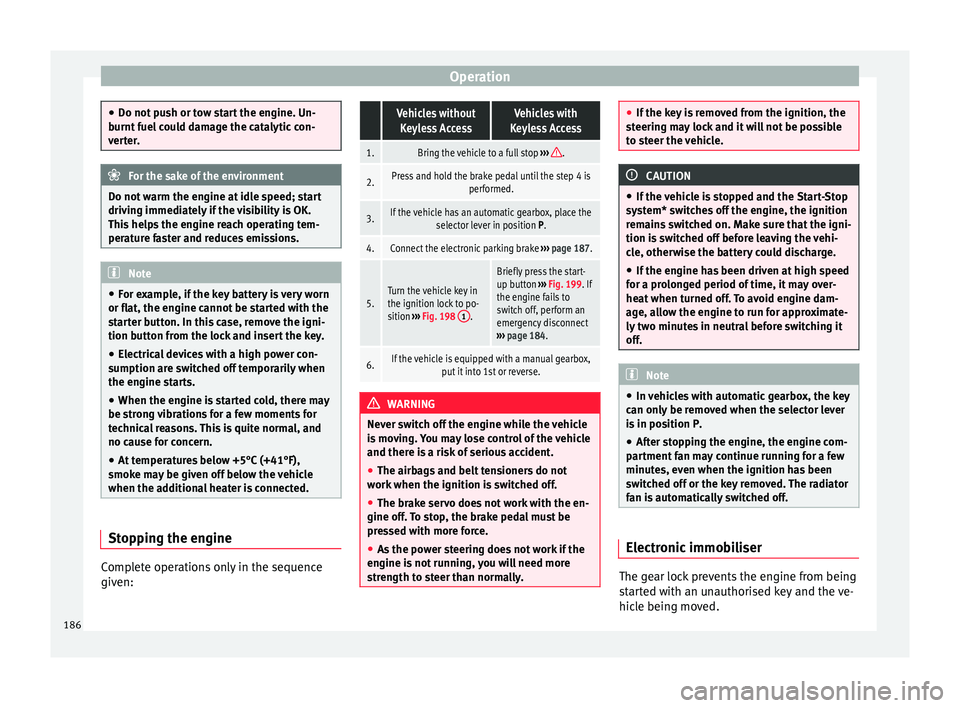
Complete operations only in the sequence
giv
en:
Vehicles without
Keyless AccessVehicles with
Keyless Access
1.Bring the vehicle to a full stop ››› .
2.Press and hold the brake pedal until the step 4 is
performed.
3.If the vehicle has an automatic gearbox, place theselector lever in position P.
4.Connect the electronic parking brake ››› page 187.
5.Turn the vehicle key in
the ignition lock to po-
sition ››› Fig. 198 1
.
Briefly press the start-
up button
››› Fig. 199. If
the engine fails to
switch off, perform an
emergency disconnect
››› page 184.
6.If the vehicle is equipped with a manual gearbox,
put it into 1st or reverse. WARNING
Never switch off the engine while the vehicle
is mo
ving. You may lose control of the vehicle
and there is a risk of serious accident.
● The airbags and belt tensioners do not
work when the ignition i
s switched off.
● The brake servo does not work with the en-
gine off. T
o stop, the brake pedal must be
pressed with more force.
● As the power steering does not work if the
engine is
not running, you will need more
strength to steer than normally. ●
If the k ey
is removed from the ignition, the
steering may lock and it will not be possible
to steer the vehicle. CAUTION
● If the v
ehicle is stopped and the Start-Stop
system* switches off the engine, the ignition
remains switched on. Make sure that the igni-
tion is switched off before leaving the vehi-
cle, otherwise the battery could discharge.
● If the engine has been driven at high speed
for a pro
longed period of time, it may over-
heat when turned off. To avoid engine dam-
age, allow the engine to run for approximate-
ly two minutes in neutral before switching it
off. Note
● In v ehic
les with automatic gearbox, the key
can only be removed when the selector lever
is in position P.
● After stopping the engine, the engine com-
partment
fan may continue running for a few
minutes, even when the ignition has been
switched off or the key removed. The radiator
fan is automatically switched off. Electronic immobiliser
The gear lock prevents the engine from being
s
t
ar
ted with an unauthorised key and the ve-
hicle being moved.
186
Page 191 of 320
Driving
is a fault in the brake system. Obtain profes-
sion
a
l assistance immediately ››› page 278,
Checking the brake fluid level.
● If the brake warning lamp lights up t
o-
gether with the ABS warning lamp , the
regulation function of the ABS could be mal-
functioning. As a result, the rear wheels can
lock relatively easily when braking. If the rear
wheels lock this could result in loss of vehicle
control! If possible, reduce your speed and
drive carefully to a specialised workshop
close by to check the brake system. During
the following journey, avoid sudden braking
and manoeuvres.
● If the ABS warning lamp does not
go out
or if it lights while driving, the ABS is mal-
functioning. The vehicle can only be stopped
using normal braking without ABS. The pro-
tection provided by the ABS is not available.
Visit a specialised workshop as soon as pos-
sible.
● If lights, alone or accompanied by a
warnin
g message on the instrument panel
display, please go immediately to a special-
ised workshop to check the brake pads and to
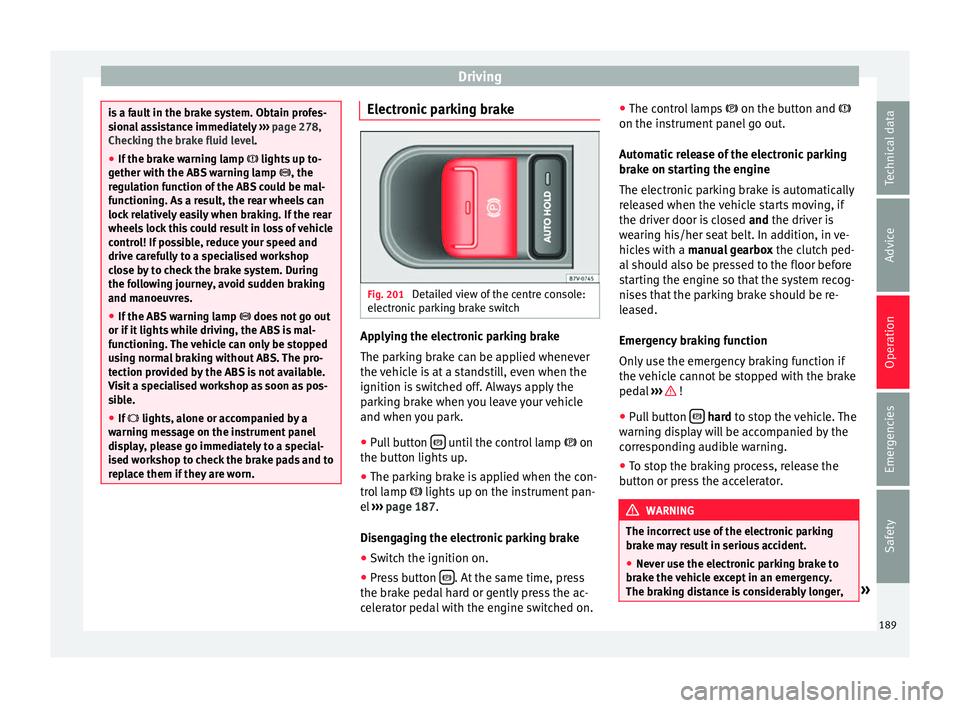
replace them if they are worn. Electronic parking brake
Fig. 201
Detailed view of the centre console:
el ectr
onic
parking brake switch Applying the electronic parking brake
The p
ark
in
g brake can be applied whenever
the vehicle is at a standstill, even when the
ignition is switched off. Always apply the
parking brake when you leave your vehicle
and when you park.
● Pull button until the control lamp
on
the b utt
on lights
up.
● The parking brake is applied when the con-
trol
lamp lights up on the instrument pan-
el ››› page 187.
Disengaging the electronic parking brake ● Switch the ignition on.
● Press button . At the same time, press
the br ak
e ped
al hard or gently press the ac-
celerator pedal with the engine switched on. ●
The contro
l lamps on the button and
on the instrument panel go out.
Automatic release of the electronic parking
brake on starting the engine
The electronic parking brake is automatically
released when the vehicle starts moving, if
the driver door is closed and the driver is
wearing his/her seat belt. In addition, in ve-
hicles with a manual gearbox the clutch ped-
al should also be pressed to the floor before
starting the engine so that the system recog-
nises that the parking brake should be re-
leased.
Emergency braking function
Only use the emergency braking function if
the vehicle cannot be stopped with the brake
pedal ››› !
● Pull button h
ard to stop the vehicle. The
w arnin
g display will be accompanied by the
corresponding audible warning.
● To stop the braking process, release the
button or pr
ess the accelerator. WARNING
The incorrect use of the electronic parking
brak e m
ay result in serious accident.
● Never use the electronic parking brake to
brake the
vehicle except in an emergency.
The braking distance is considerably longer, » 189
Technical data
Advice
Operation
Emergencies
Safety
Page 192 of 320
Operation
because braking is only applied to the rear
wheels. A
lw
ays use the foot brake.
● Never accelerate from the engine compart-
ment with the en
gine running and a gear or a
gear range engaged. The vehicle could move,
even if the parking brake is applied. Note
● In vehic
les with a manual gearbox: when
the clutch pedal is released and the accelera-
tor pressed at the same time, the electronic
parking brake is automatically released.
● If the vehicle battery is flat, it will not be
poss
ible to disconnect the electronic parking
brake. Use the jump-start ›››
page 51.
● When the electronic parking brake is ap-
plied or rel
eased, noises may be heard.
● If the electronic parking brake has not been
used for a lon
g while, the system sometimes
performs automatic and audible checks while
the vehicle is at a standstill. Parking
When parking your vehicle, all legal require-
ments
shou
l
d be observed.
To park the vehicle
Complete operations only in the sequence
given. ● Park the vehicle on a suitable surface ›››
.●
Pr e
s
s and hold the brake pedal until the ve-
hicle comes to a standstill.
● Connect the electronic parking brake
›››
page 189.
● For an automatic gearbox, move the selec-
tor lev
er to position P.
● Switch off the engine and release the brake
pedal.
● R
emove the key from the ignition.
● If necessary, turn the steering wheel slight-
ly to loc
k the steering.
● With a manual gearbox, engage 1st gear on
flat gr
ound and slopes, or even reverse gear
on hills, and release the clutch pedal.
● Ensure that all passengers leave the vehi-
cle, e
specially children.
● When leaving the vehicle, take all keys with
you.
● Loc
k the vehicle.
Additiona
l information for steep ascents and
descents
Before switching off the engine, rotate the
steering wheel so that if the vehicle should
move, it will be held by the kerb.
● On slopes, turn the front wheels so that
they are ag
ainst the edge of the kerb.
● Uphill, turn the wheels towards the centre
of the r o
ad. WARNING
The components of the exhaust system reach
ver y
high temperatures. This could cause a
fire and considerable damage.
● Always park your vehicle so that no part of
the exhau
st system can come in contact with
flammable materials (such as wood,
leaves,dried grass, or spilled fuel). CAUTION
● Spec i
al care should be taken when parking
in areas with high kerbs or fixed barriers. Ob-
jects protruding from the ground may dam-
age the bumper or other parts of the vehicle
during manoeuvres. To avoid damage, stop
before the wheels touch the barrier or kerb.
● Special attention is required when driving
through entranc
es, over ramps, kerbs or oth-
er objects. The vehicle underbody, bumpers,
mudguards and running gear, and the engine
and exhaust system could be damaged as
you drive over these objects. Information on the brakes
For the first 200 to 300 km (100 to 200
mi
l
e
s), new brake pads have not yet reached
their maximum braking capacity, and need to
be “run in” first ››› . The slightly reduced
br ak in
g effect can be compensated for by in-
creasing pressure on the brake pedal. While
running in, the full braking distance or
190
Page 194 of 320
Operation
WARNING
Wet, frozen or salt-covered brakes take lon-
ger t o en
gage and this increases braking dis-
tances.
● Test the brakes carefully.
● Dry the brakes, free them of ice and salt by
brakin
g gently several times, when weather,
road and traffic conditions permit. WARNING
Driving without the brake servo may signifi-
cantly inc
rease the braking distance and re-
sult in a severe accident.
● Never allow the vehicle to move forwards
when the engine is
switched off.
● If the brake servo does not operate or the
vehicl
e must be towed, then the brake pedal
will have to be pressed with more force given
that the braking distance will be increased
when the brake servo does not operate. CAUTION
● Never m ak
e the brakes “slip” by pressing
the pedal gently, if it is not really necessary
to brake. Continuously pressing on the brake
pedal will heat the brakes. This could signifi-
cantly reduce braking power, increase brak-
ing distance or even result in the total failure
of the brake system.
● Reduce speed or change down a gear when
faced w
ith steep and long slopes. This allows
you to use the engine braking effect and to reduce the strain on the brake system. Other-
wi
se, the br
akes may overheat and fail. Only
use the brakes to reduce speed or to stop. Note
When checking the front brake pads, take the
time t o al
so check the rear brake pads. The
thickness of the brake pads should be
checked visually and regularly, by looking
through the openings in the wheel rims or
from underneath the vehicle. If necessary, re-
move the wheels to check them thoroughly.
SEAT recommends taking your car in for tech-
nical service. Gearbox
Intr oduction When reverse gear is engaged and the igni-
tion i
s
sw
itched on the following takes place:
● Reverse lights light up.
● When reversing, the air conditioner auto-
matical
ly changes to air recirculation mode.
● The rear window heater switches on when
the winds
creen wiper is activated.
● Also, the parking sensor system, the opti-
cal p
arking sensor and the camera for the re-
verse assist system are connected. WARNING
Rapid acceleration can cause loss of traction
and skid din
g, especially on slippery ground.
This could cause loss of control of the vehicle
resulting in an accident and considerable
damage.
● Only use the kick-down function or rapid
accel
eration if visibility, weather, road and
traffic conditions so permit. WARNING
Do not allow the brakes to “rub” for a pro-
long ed period of
time, or brake frequently or
for long periods of time. Continuous braking
heats up the brakes. This could significantly
reduce braking power, increase braking dis-
tance or even result in the total failure of the
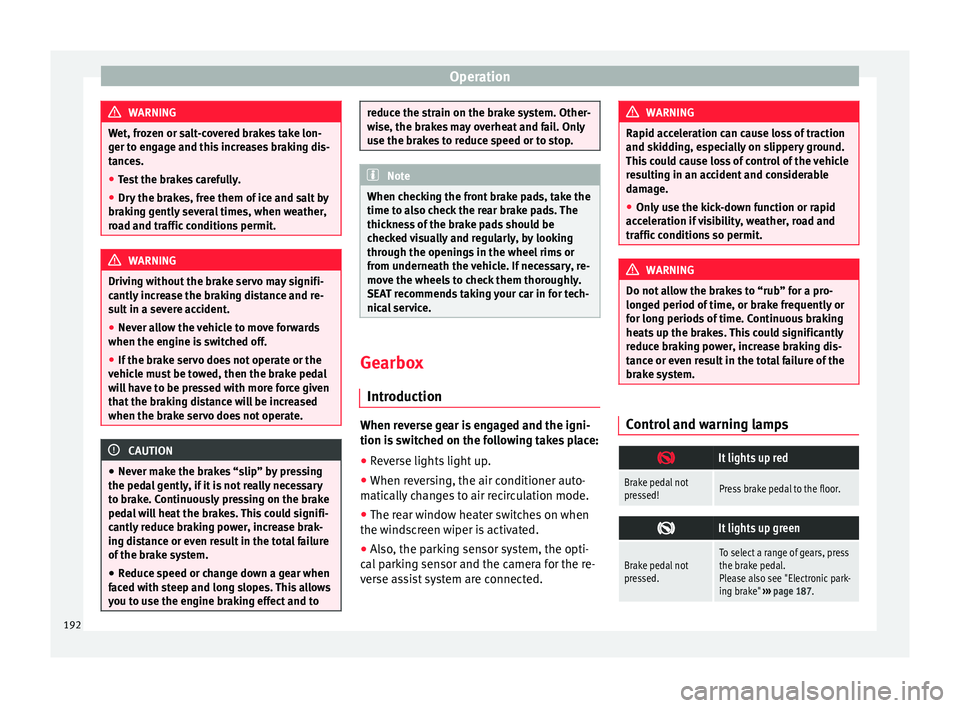
brake system. Control and warning lamps
It lights up red
Brake pedal not
pressed!Press brake pedal to the floor.
It lights up green
Brake pedal not
pressed.To select a range of gears, press
the brake pedal.
Please also see "Electronic park-
ing brake"
››› page 187. 192