key Seat Alhambra 2017 Owner's Guide
[x] Cancel search | Manufacturer: SEAT, Model Year: 2017, Model line: Alhambra, Model: Seat Alhambra 2017Pages: 320, PDF Size: 6.88 MB
Page 93 of 320
Fuses and bulbs
●
Prot ect
the fuse boxes when open to avoid
the entry of dust or humidity. Dirt and humid-
ity inside fuse boxes can cause damage to
the electrical system. Note
● In the vehic
le, there are more fuses than
those indicated in this chapter. These should
only be changed by a specialised workshop.
● One component may have more than one
fuse.
● Sev
eral components may run on a single
fuse. Changing bulbs
Intr oduction Changing bulbs requires a certain amount of
m
anual
sk
ill. If you are unsure, SEAT recom-
mends that you consult a technical service or
request assistance from a specialist. In gen-
eral, a specialist is required if other vehicle
components must be removed or if the dis-
charge bulbs must be replaced.
You should store spare light bulbs in the ve-
hicle for safety-relevant lights. Spare bulbs
may be obtained from the technical services.
In some countries, it is a legal requirement to
carry spare bulbs in the vehicle. Driving with faults and blown bulbs on the
vehicl
e exterior lighting is against the law.
Additional bulb specifications
The specifications of some headlamp bulbs
and bulbs for the rear lamps fitted at the fac-
tory may be different to those of conventional
bulbs. Bulb information is displayed on the
bulb socket or on the bulb itself. WARNING
If the road is not well-lit and the vehicle is
not c l
early visible to other drivers, there is a
risk of accident. WARNING
Failure to replace bulbs correctly may cause
serious ac
cidents.
● Before carrying out any work in the engine
compar
tment please read and observe the
warnings ››› page 268. In any vehicle, the en-
gine compartment is a hazardous area and
could cause severe injury.
● Discharge lamps work with high-voltage
and can cau
se serious or fatal injury if han-
dled incorrectly.
● H7 and discharge bulbs are highly pressur-
ised and cou
ld explode when being changed.
● Only replace the bulbs concerned when
they hav
e cooled.
● Never replace bulbs alone if you are not fa-
miliar w
ith the operations necessary. If you are not sure about procedures then visit a
spec
i
alised workshop to carry out the neces-
sary work.
● Never touch the bulb glass directly. Finger-
prints w
ill be evaporated by the heat of the
operating bulb thus “fogging” up the reflec-
tor.
● The headlamp frameworks in the engine
compar
tment and the rear lamps contain
sharp elements. Always protect your hands
when changing bulbs. CAUTION
● Aft er c
hanging a bulb, if the rubber covers
are not replaced correctly on the headlamp
framework, the electrical installation may be
damaged, especially if water is allowed to en-
ter.
● Remove the ignition key before working on
the electric sy
stem. Otherwise, a short circuit
could occur.
● Switch off the lights and the parking light
before c
hanging a bulb.
● Take good care to avoid damaging any com-
ponents. 91
Technical data
Advice
Operation
Emergencies
Safety
Page 101 of 320

General instrument panel
Operation
Gener a
l
instrument panel
Instrument panel Interior door release lever
. . . . . . . . .119
Central lock button . . . . . . . . . . 112
Switch for adjusting the exterior
mirror s . . . . . . . . . . . . . . . . . . . . . . . . . . . 137
– Exterior mirr or a
djustment
– Heated exterior mirrors
– Folding exterior mirrors
Instrument panel controls and light-
ing control . . . . . . . . . . . . . . . . . . . . . 128
Headlamp range adjustment . . . 128
Light switch . . . . . . . . . . . . . . . . . . . 128
– Light off - -
– Aut
omatic dipped beam head-
light control - -
– Side/dipped lights
– Fog lights
Lever for . . . . . . . . . . . . . . . . . . . . . . . . . 128
– Main beam he
adlights
– Headlight flasher
– Turn signals
– Parking lights
Instrument panel:
1 2
3
4
5
6
7
8 –
Ins
truments . . . . . . . . . . . . . . . . . . . . 100
– Digit
al di
splay . . . . . . . . . . . . . . . . . . 100
– Warning and indic
ation lamps . . .105
Steering wheel with horn and – Driver airbag . . . . . . . . . . . . . . . . . . . 17
– On-bo
ard c
omputer controls . . . .26
– Contro
ls for radio, telephone,
navigation and speech dialogue
system ››› Booklet Radio
– Paddle levers for tiptronic gear-
shift (automatic gearbox) . . . . . . .195
Windscreen wiper/ windscreen
wash l
ever . . . . . . . . . . . . . . . . . . . . . . . 135
– Wind s
creen wipers –
– Intermittent wipe
– “Brief wipe” x
– Windscreen wipers
– Automatic windscreen wash/wipe
– Rear window wiper
– Automatic rear window
wash/wipe
– Lever with buttons for controlling
the SEAT information system - ,
/ . . . . . . . . . . . . . . . . . . . . . . . . . 26
Left seat heating controls . . . . . . . 144
Radio or navigation system (fitted
at fact
ory) ››› Booklet Radio or
››› Booklet Navigation system
9
10
11
12 Storage compartment
. . . . . . . . . . . . .163
Hazard warning lights switch . . . 82
Switches for:
– Electr
onic
manual air condition-
ing . . . . . . . . . . . . . . . . . . . . . . . . . . . . . 173
– Climatr
onic . . . . . . . . . . . . . . . . . . . . . 173
Right seat heating controls . . . . . 144
Button for:
– Anti-slip r
egulation (ASR) . .187
– Start
-Stop operation . . . . . . . . . .205
– Park in
g distance warning system
(Park Pilot) . . . . . . . . . . . . . . . . . . 208
– Park As
sist system . . . . . . . . . . . 211
– Tyr
e pressure monitor . . . . .231
– Dyn
amic chassis control (DCC)
– Opening the rear lid . . . . . . . . .122
– Opening and clo
sing of electric
sliding doors . . . . . . . . . . . . . . . . 119
Locking lever to open glove com-
par tment . . . . . . . . . . . . . . . . . . . . . . . . . 163
P
osition of passenger front airbag
on the dash p
anel . . . . . . . . . . . . . . . . 17
Key-operated switch in glove com-
partment
for deactivating front pas-
senger front airbag . . . . . . . . . . . . . . .18
Passenger front airbag off warning
lamp . . . . . . . . . . . . . . . . . . . . . . . . . . . . . 72
L ev
er for: »
13 14
15
16
17
18
19
20
21
22
99
Technical data
Advice
Operation
Emergencies
Safety
Page 102 of 320
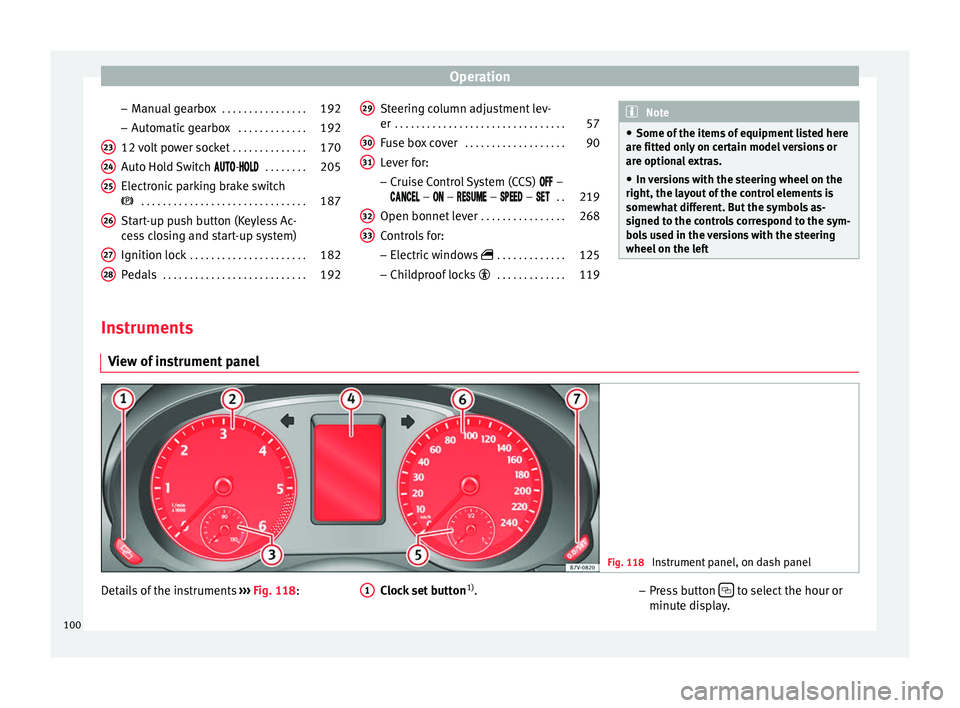
Operation
– Manual
g
earbox . . . . . . . . . . . . . . . . 192
– Automatic
gearbox . . . . . . . . . . . . . 192
12 volt power socket . . . . . . . . . . . . . .170
Auto Hold Switch -
. . . . . . . . 205
Electronic parking brake switch
. . . . . . . . . . . . . . . . . . . . . . . . . . . . . . . 187
Start-up push button (Keyless Ac-
ces
s closing and start-up system)
Ignition lock . . . . . . . . . . . . . . . . . . . . . . 182
Pedals . . . . . . . . . . . . . . . . . . . . . . . . . . . 192
23 24
25
26
27
28 Steering column adjustment lev-
er
. . . . . . . . . . . . . . . . . . . . . . . . . . . . . . . . 57
Fuse box cover . . . . . . . . . . . . . . . . . . . 90
Lever for:
– Crui
se C
ontrol System (CCS) –
– – – – . .219
Open bonnet lever . . . . . . . . . . . . . . . . 268
Controls for: – Electric w
indows . . . . . . . . . . . . . 125
– Child
proof locks . . . . . . . . . . . . . 119
29 30
31
32
33 Note
● Some of the it ems
of equipment listed here
are fitted only on certain model versions or
are optional extras.
● In versions with the steering wheel on the
right, the lay
out of the control elements is
somewhat different. But the symbols as-
signed to the controls correspond to the sym-
bols used in the versions with the steering
wheel on the left Instruments
V iew of
in
strument panel Fig. 118
Instrument panel, on dash panel Details of the instruments
››
›
Fig. 118: Clock set button1)
.
1 –
Pr e
s
s button to select the hour or
minut e di
s
play.
100
Page 112 of 320
Operation
Opening and closing V ehic
l
e key set
Vehicle key Fig. 124
Vehicle keys Fig. 125
Vehicle key for vehicles with electric
s lidin
g door
s Vehicle keys
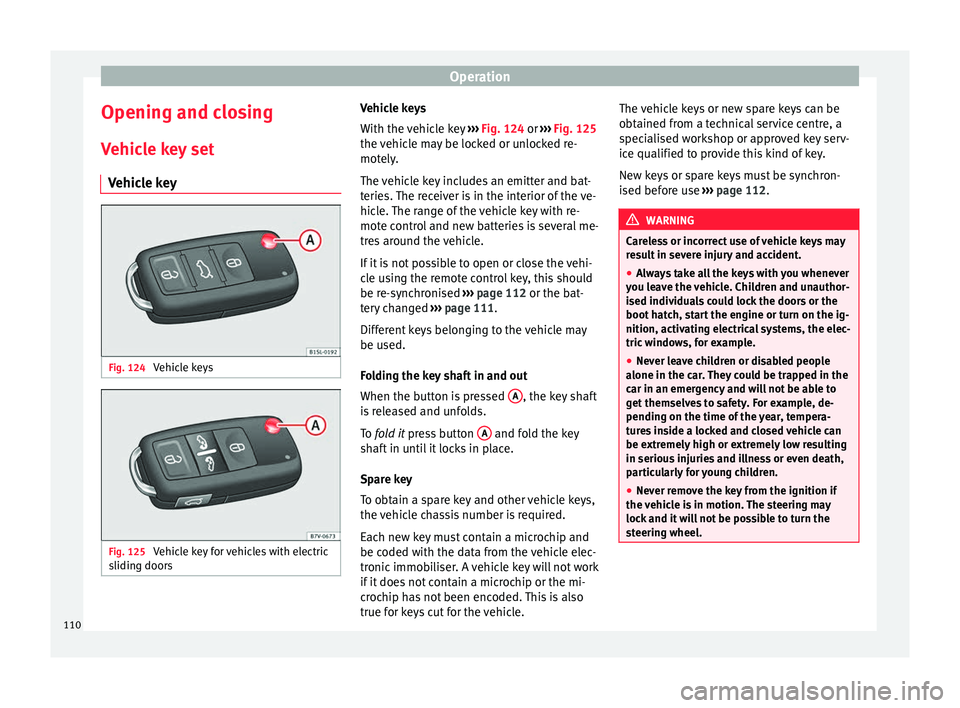
W
ith the v
ehicle key ››› Fig. 124 or ››› Fig. 125
the vehicle may be locked or unlocked re-
motely.
The vehicle key includes an emitter and bat-
teries. The receiver is in the interior of the ve-
hicle. The range of the vehicle key with re-
mote control and new batteries is several me-
tres around the vehicle.
If it is not possible to open or close the vehi-
cle using the remote control key, this should
be re-synchronised ››› page 112 or the bat-
tery changed ››› page 111.
Different keys belonging to the vehicle may
be used.
Folding the key shaft in and out
When the button is pressed A , the key shaft
i s
r
eleased and unfolds.
To fold it press button A and fold the key
sh af
t
in until it locks in place.
Spare key
To obtain a spare key and other vehicle keys,
the vehicle chassis number is required.
Each new key must contain a microchip and
be coded with the data from the vehicle elec-
tronic immobiliser. A vehicle key will not work
if it does not contain a microchip or the mi-
crochip has not been encoded. This is also
true for keys cut for the vehicle. The vehicle keys or new spare keys can be
obtained fr
om a technical service centre, a
specialised workshop or approved key serv-
ice qualified to provide this kind of key.
New keys or spare keys must be synchron-
ised before use ››› page 112. WARNING
Careless or incorrect use of vehicle keys may
re s
ult in severe injury and accident.
● Always take all the keys with you whenever
you le
ave the vehicle. Children and unauthor-
ised individuals could lock the doors or the
boot hatch, start the engine or turn on the ig-
nition, activating electrical systems, the elec-
tric windows, for example.
● Never leave children or disabled people
alone in the car
. They could be trapped in the
car in an emergency and will not be able to
get themselves to safety. For example, de-
pending on the time of the year, tempera-
tures inside a locked and closed vehicle can
be extremely high or extremely low resulting
in serious injuries and illness or even death,
particularly for young children.
● Never remove the key from the ignition if
the vehic
le is in motion. The steering may
lock and it will not be possible to turn the
steering wheel. 110
Page 113 of 320
Opening and closing
CAUTION
All of the vehicle keys contain electronic com-
ponents. Pr ot
ect them from damage, impacts
and humidity. Note
● Only u
se the key button when you require
the corresponding function. Pushing the but-
ton unnecessarily could accidentally unlock
the vehicle or trigger the alarm. It is also pos-
sible even when you are outside the radius of
action.
● Key operation can be greatly influenced by
overl
apping radio signals around the vehicle
working in the same range of frequencies
(e.g. radio transmitters, mobile telephones).
● Obstacles between the remote control and
the vehic
le, bad weather conditions and
draining batteries can considerably reduce
the range of the remote control. Control lamp on the vehicle key
Fig. 126
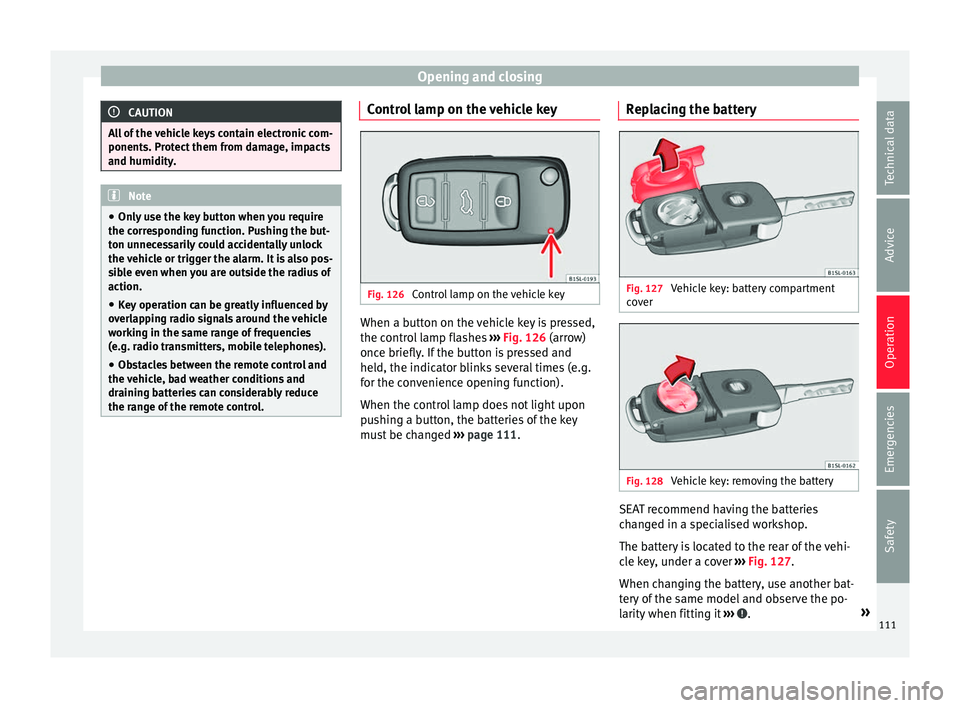
Control lamp on the vehicle key When a button on the vehicle key is pressed,
the c ontr
o
l lamp flashes ››› Fig. 126 (arrow)
once briefly. If the button is pressed and
held, the indicator blinks several times (e.g.
for the convenience opening function).
When the control lamp does not light upon
pushing a button, the batteries of the key
must be changed ››› page 111. Replacing the battery Fig. 127
Vehicle key: battery compartment
c o
v
er Fig. 128
Vehicle key: removing the battery SEAT recommend having the batteries
c
h
an
ged in a specialised workshop.
The battery is located to the rear of the vehi-
cle key, under a cover ››› Fig. 127.
When changing the battery, use another bat-
tery of the same model and observe the po-
larity when fitting it ››› .
»
111
Technical data
Advice
Operation
Emergencies
Safety
Page 114 of 320
Operation
To change the battery
● Unfold the vehicle key blade ››
› page 110.
● Remove the cover from the back of the ve-
hicle k
ey ››› Fig. 127 in the direction of the ar-
row ››› .
● Extract the battery from the compartment
u s
in
g a suitable thin object ››› Fig. 128.
● Place the new battery in the compartment,
pres
sing in the direction of the arrow as
shown ››› Fig. 128 ››› .
● Fit the battery compartment cover, pressing
in the dir ection of
the arr
ow as shown
››› Fig. 127 until it clicks into place. CAUTION
● If the b att
ery is not changed correctly, the
vehicle key may be damaged.
● Use of unsuitable batteries may damage
the vehic
le key. For this reason, always re-
place the dead battery with another of the
same voltage, size and specifications. For the sake of the environment
● Ple a
se dispose of your used batteries cor-
rectly and with respect for the environment.
● The vehicle key battery may contain per-
chlor
ate. Observe the legal requirements for
their disposal. Synchronising the vehicle key
If the button
is pressed frequently outside
of the v
ehicle range, it is possible that the ve-
hicle can no longer be locked or unlocked us-
ing the key. In this case, the vehicle key must
be synchronised once more as follows:
● Unfold the vehicle key blade ›››
page 110.
● Remove the cover from the driver door han-
dle ››
› page 89.
● Press the button on the vehicle key. For
this, it mu
st remain with the vehicle.
● Open the vehicle within one minute using
the key sh
aft.
● Turn on the ignition using the vehicle key.
The key h
as been synchronised.
● Replace the driver door handle cover.
Central locking and locking
syst
em
Introduction Read the additional information carefully
› ›
›
page 8
Central locking functions correctly when all
the doors and the rear lid are correctly shut.
If the driver door is open, the vehicle cannot
be locked with the key. If the vehicle has the Keyless Access closing
and ignition syst
em, it may only be locked
with the ignition off and the driver's door
closed.
The battery of an unlocked vehicle parked for
a long period (e.g. in a private garage) may
run down and fail to start the motor. WARNING
The incorrect use of the central locking sys-
tem m a
y cause serious injuries.
● The central locking system will lock all
doors. A v
ehicle locked from the inside can
prevent any non-authorised individual from
opening the doors and accessing the vehicle.
Nevertheless, in case of emergency or acci-
dent, locked doors will complicate access to
the vehicle interior to help the passengers.
● Never leave children or disabled people
alone in the v
ehicle. The central locking but-
ton can be used to lock all the doors from
within. Therefore, passengers will be locked
inside the vehicle. Individuals locked in the
vehicle can be exposed to very high or very
low temperatures.
● Depending on the time of the year, temper-
ature
s inside a locked and closed vehicle can
be extremely high or extremely low resulting
in serious injuries and illness or even death,
particularly for young children.
● Never leave individuals locked in a closed
and locked
vehicle. In case of emergency,
they may not be able to exit the vehicle by
themselves or get help. 112
Page 115 of 320
Opening and closing
Description of the central locking sys-
t em The central locking system allows all doors
and the re
ar lid t
o be locked and unlocked
centrally.
● From outside, using the vehicle key.
● From outside with the Keyless Access sys-
tem ››
› page 115,
● From inside, by pushing the central locking
button ›
›› page 114.
In the submenu Convenience in the Con-
figuration menu, or by visiting a special-
ised workshop, special functions of the cen-
tral locking system can be switched on or off
››› page 26.
In case of a vehicle key fault or central lock-
ing system fault, all doors can be locked or
unlocked manually.
Automatic locking (Auto Lock)
In this instance, the vehicle locks automati-
cally when moving at speeds above approx.
15 km/h (10 mph) ›››
page 26. When the
vehicle is locked, the control lamp of the
central locking button ›››
Fig. 130 lights up in
yellow. Automatic unlocking (Auto Unlock)
When the key
i
s removed from the ignition
slot, here the vehicle unlocks all doors and
the boot automatically ›››
page 26.
Locking the vehicle after the airbags have
been deployed
If the airbags are deployed due to an acci-
dent, the vehicle will be automatically and
completely unlocked. Depending on the
amount of damage, it can be locked follow-
ing an accident in the following ways:
FunctionAction
Lock the vehicle
by pushing the
central locking
button:– Switch off the ignition.
– Open a door of the vehicle and
close it again.
– Push the central locking button
.
Lock the vehicle
with the vehicle
key:– Disconnect the ignition button.
OR: remove the key from the igni-
tion.
– Open a door once.
– Lock the vehicle with the key. Note
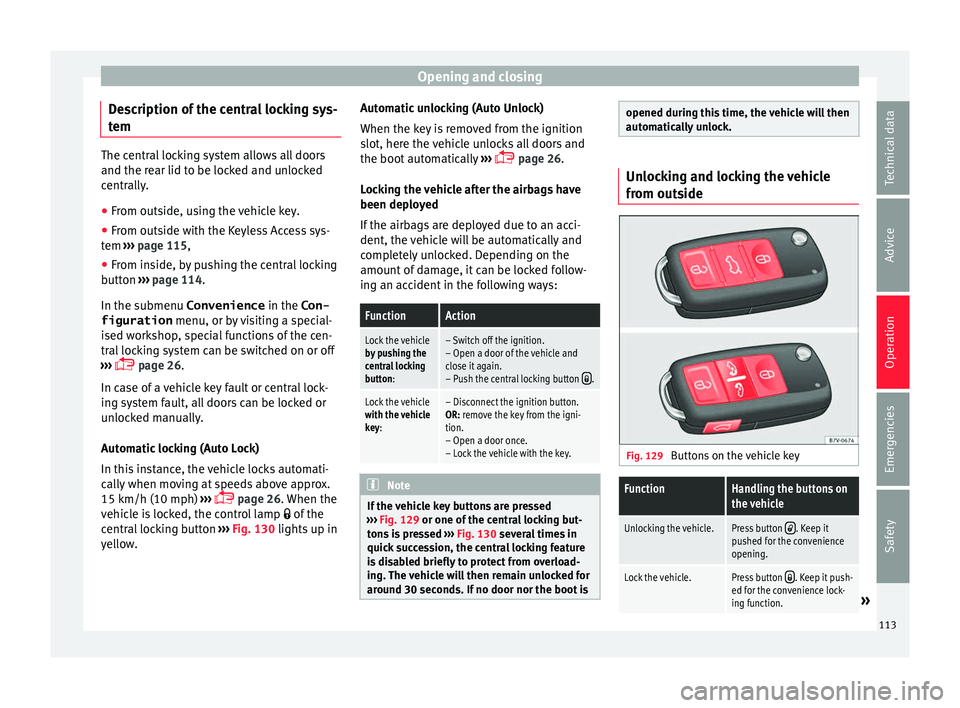
If the vehicle key buttons are pressed
›› ›
Fig. 129 or one of the central locking but-
tons is pressed ››› Fig. 130 several times in
quick succession, the central locking feature
is disabled briefly to protect from overload-
ing. The vehicle will then remain unlocked for
around 30 seconds. If no door nor the boot is opened during this time, the vehicle will then
autom
atic
ally unlock. Unlocking and locking the vehicle
from out
s
ide Fig. 129
Buttons on the vehicle key
FunctionHandling the buttons on
the vehicle
Unlocking the vehicle.Press button . Keep it
pushed for the convenience
opening.
Lock the vehicle.Press button . Keep it push-
ed for the convenience lock-
ing function.
» 113
Technical data
Advice
Operation
Emergencies
Safety
Page 116 of 320
OperationFunctionHandling the buttons on
the vehicle
Unlocking the rear lid.Press button .
Open the sliding door.›››
page 119. Please note: depending on the sel
ect
ed func-
tion in the central locking submenu Conven-
ience , you may push the button twice ›››
page 26 to unlock all doors and the
boot h
atch.
The vehicle key only locks and unlocks the
vehicle if it is within range of the vehicle and
if the batteries have enough power. When
locking, the vehicle's turn signals will blink.
If the driver door is open, the vehicle cannot
be locked with the key. If you unlock the vehi-
cle without opening any doors or the rear lid,
it will lock again automatically after a few
seconds. This function prevents the vehicle
from remaining unlocked if the unlocking
button is pressed by mistake.
Convenience open/close function
● See "Electric windows: functions"
›› ›
page 125.
● See "Panoramic sliding sunroof: operation"
›››
page 126. Unlocking and locking the vehicle
from ins
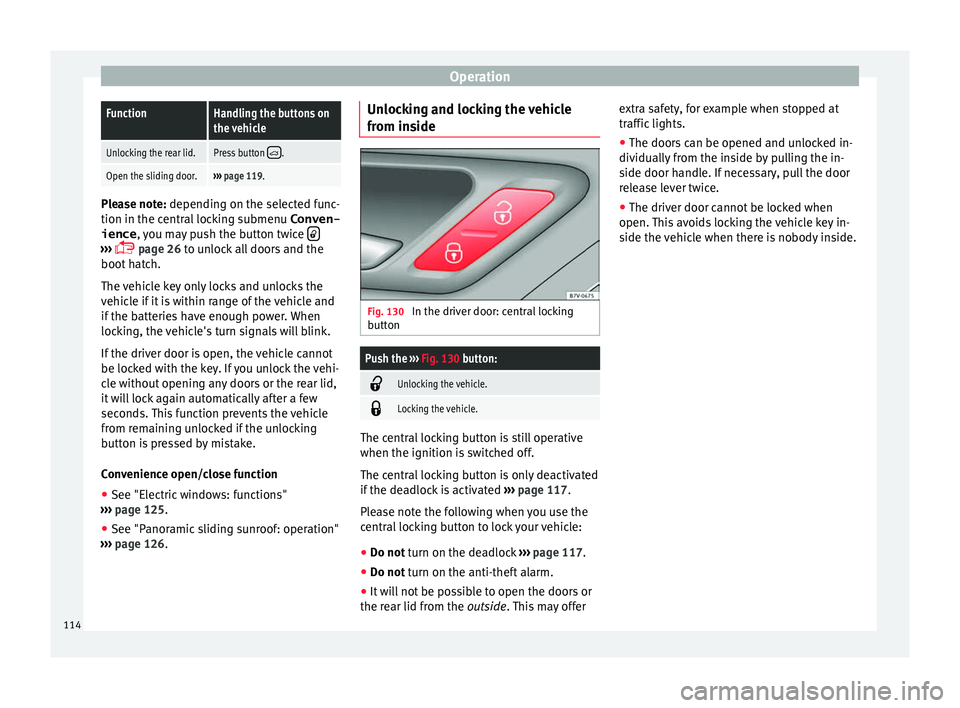
ide Fig. 130
In the driver door: central locking
b utt
on
Push the ››› Fig. 130 button:
Unlocking the vehicle.
Locking the vehicle.
The central locking button is still operative
when the ignition i
s
sw
itched off.
The central locking button is only deactivated
if the deadlock is activated ››› page 117.
Please note the following when you use the
central locking button to lock your vehicle:
● Do not turn on the deadlock ››
› page 117.
● Do not turn on the anti-theft alarm.
● It w
ill not be possible to open the doors or
the re ar lid fr
om the outside. This may offer extra safety, for example when stopped at
traffic lights.
●
The door
s can be opened and unlocked in-
dividually
from the inside by pulling the in-
side door handle. If necessary, pull the door
release lever twice.
● The driver door cannot be locked when
open. This
avoids locking the vehicle key in-
side the vehicle when there is nobody inside.
114
Page 117 of 320

Opening and closing
Locking and unlocking the vehicle
w ith K
eyl
ess Access Fig. 131
Keyless Access locking and ignition
sy s
t
em: in the proximity of the car. Fig. 132
Keyless Access locking and ignition
sy s
t
em: sensor surface A for unlocking in-
s ide the door h
andl
e and sensor surface Bfor locking on the exterior of the handle.
Keyless Access is a key-free locking and igni-
tion sy
s
t
em to unlock and lock the vehicle
without actively using its key. For this, only a valid vehicle key is required to be in an area
near
››
› Fig. 131 the vehicle and one of the
sensor surfaces to be touched on the door
handles ››› Fig. 132.
General information
If a valid key is located in the proximity of the
car ››› Fig. 131, the Keyless Access lock and
ignition system gives the key entry as soon
as one of the sensor surfaces on the door
handles is touched or the push button on the
boot hatch is operated. The following fea-
tures are then available without having to
use the vehicle key actively:
● Keyless-Entry: unlocking of the vehicle with
the handle
s on the four doors or the button
located on the boot hatch.
● Keyless-Go: engine ignition and driving. For
this t
o occur, there has to be a valid key in-
side the vehicle and the ignition push button
needs to be pressed ››› page 182.
● Keyless-Exit: unlocking of the vehicle with
one of the four door h
andle.
The central locking and locking systems oper-
ate in the same way as a normal locking and
unlocking system. Only the controls change.
Unlocking the vehicle is confirmed with a
double flash of the indicator lights; locking
by a single flash. The vehicle will lock again after a few sec-
onds if
you unlock the vehicle but fail to open
any door or boot hatch.
Unlocking and opening the doors (Keyless-
Entry)
● Grip the door handle. In doing this, the
sensor sur
face ››› Fig. 132 A (arrow) is
t ouc
hed on the h
andle and the vehicle un-
locks.
● Open the door.
On vehic
les without a "safe" system: locking
and unlocking doors (Keyless-Exit)
● Switch the ignition off.
● Close the driver's door.
● Touch the surface sensor B onc
e (arrow)
on the door h andl
e. The door being operated
must be closed.
On vehicles with a "safe" security system:
locking and unlocking doors (Keyless-Exit)
● Switch the ignition off.
● Close the driver's door.
● Touch the surface sensor B onc
e (arrow)
on the door h andl
e. The vehicle locks with
the "safe" security system ››› page 117. The
door being operated must be closed.
● Touch the sensor surface B twic
e (arrow)
on the door h andl
e to lock the vehicle with-
out the "safe" security system ››› page 117. »
115
Technical data
Advice
Operation
Emergencies
Safety
Page 118 of 320
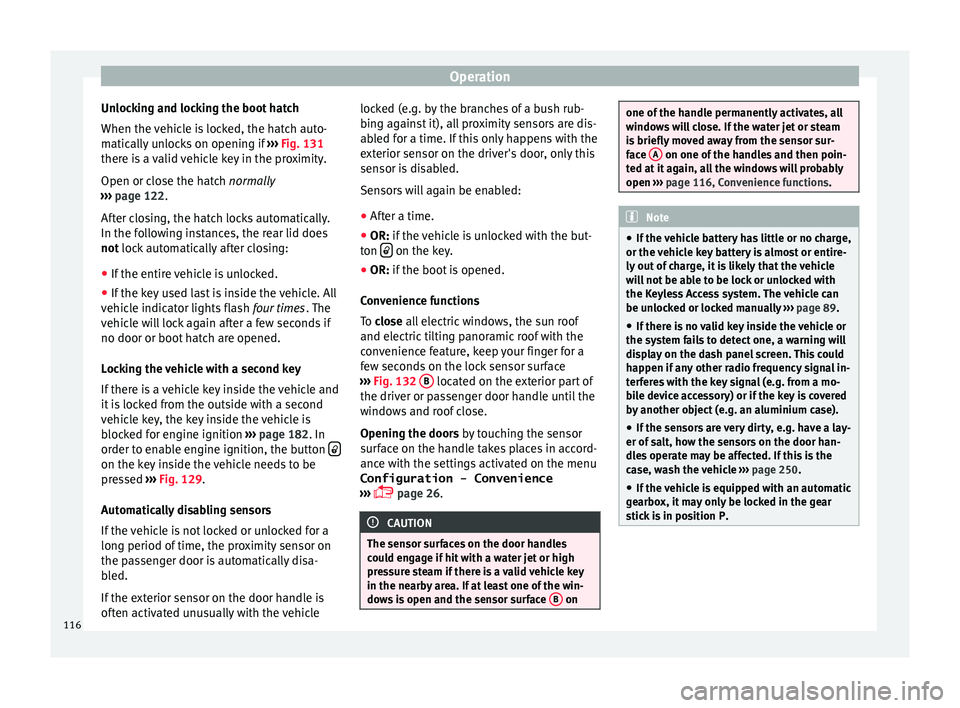
Operation
Unlocking and locking the boot hatch
When the v
ehic
le is locked, the hatch auto-
matically unlocks on opening if ››› Fig. 131
there is a valid vehicle key in the proximity.
Open or close the hatch normally
››› page 122.
After closing, the hatch locks automatically.
In the following instances, the rear lid does
not lock automatically after closing:
● If the entire vehicle is unlocked.
● If the key used last is inside the vehicle. All
vehicl
e indicator lights flash four times. The
vehicle will lock again after a few seconds if
no door or boot hatch are opened.
Locking the vehicle with a second key
If there is a vehicle key inside the vehicle and
it is locked from the outside with a second
vehicle key, the key inside the vehicle is
blocked for engine ignition ››› page 182. In
order to enable engine ignition, the button on the key inside the vehicle needs to be
pr
e
s
sed ››› Fig. 129.
Automatically disabling sensors
If the vehicle is not locked or unlocked for a
long period of time, the proximity sensor on
the passenger door is automatically disa-
bled.
If the exterior sensor on the door handle is
often activated unusually with the vehicle locked (e.g. by the branches of a bush rub-
bing ag
ainst it), all proximity sensors are dis-
abled for a time. If this only happens with the
exterior sensor on the driver's door, only this
sensor is disabled.
Sensors will again be enabled:
● After a time.
● OR: if the vehicle is unlocked with the but-
ton on the key.
● OR: if the boot is opened.
C on
venience functions
To close all electric windows, the sun roof
and electric tilting panoramic roof with the
convenience feature, keep your finger for a
few seconds on the lock sensor surface
››› Fig. 132 B located on the exterior part of
the driv er or p
a
ssenger door handle until the
windows and roof close.
Opening the doors by touching the sensor
surface on the handle takes places in accord-
ance with the settings activated on the menu
Configuration - Convenience
››› page 26. CAUTION
The sensor surfaces on the door handles
cou l
d engage if hit with a water jet or high
pressure steam if there is a valid vehicle key
in the nearby area. If at least one of the win-
dows is open and the sensor surface B on one of the handle permanently activates, all
windo
w
s will close. If the water jet or steam
is briefly moved away from the sensor sur-
face A on one of the handles and then poin-
ted at it
again, all the windows will probably
open ››› page 116, Convenience functions. Note
● If the v
ehicle battery has little or no charge,
or the vehicle key battery is almost or entire-
ly out of charge, it is likely that the vehicle
will not be able to be lock or unlocked with
the Keyless Access system. The vehicle can
be unlocked or locked manually ››› page 89.
● If there is no valid key inside the vehicle or
the syst
em fails to detect one, a warning will
display on the dash panel screen. This could
happen if any other radio frequency signal in-
terferes with the key signal (e.g. from a mo-
bile device accessory) or if the key is covered
by another object (e.g. an aluminium case).
● If the sensors are very dirty, e.g. have a lay-
er of sa
lt, how the sensors on the door han-
dles operate may be affected. If this is the
case, wash the vehicle ››› page 250.
● If the vehicle is equipped with an automatic
gearbo
x, it may only be locked in the gear
stick is in position P. 116