Page 32 Seat Alhambra 2017 Owner's Manual
[x] Cancel search | Manufacturer: SEAT, Model Year: 2017, Model line: Alhambra, Model: Seat Alhambra 2017Pages: 320, PDF Size: 6.88 MB
Page 2 of 320

SEAT S.A. is permanently concerned about continuous development of its t\
ypes and models. For this reason we ask you to under-
stand, that at any given time, changes regarding shape, equipment and te\
chnique may take place on the car delivered. For this reason
no right at all may derive based on the data, drawings and descriptions \
in this current handbook.
All texts, illustrations and standards in this handbook are based on the\
status of information at the time of printing. Except for error
or omission, the information included in the current handbook is valid a\
s of the date of closing print.
Re-printing, copying or translating, whether total or partial is not all\
owed unless SEAT allows it in written form.
SEAT reserves all rights in accordance with the “Copyright” Act.
All rights on changes are reserved.
❀This paper has been manufactured using bleached non-chlorine cellulose.
© SEAT S.A. - Reprint: 15.11.16
About this manual
This manual contains a description of the
equipment supplied with the vehicle at the
time this manual was published. Some of the
units described herein will not be available
until a later date or are only available in cer -
tain markets.
B ecause this is a general manual for the
ALHAMBRA range, some of the equipment
and functions that are described in this man-
ual are not included in all types or variants
of the model; they may vary or be modied
depending on the technical requirements and
on the market; this is in no way deceptive ad-
vertising.
The illustrations are intended as a general
guide and may vary from the equipment tted
in your vehicle in some details.
The steering indications (left, right, forward,
reverse) appearing in this manual refer to the
normal driving movements of the vehicle ex -
cept when otherwise indicated.
The audiovisual material only is intended to
help users to understand certain car function -
alities better. It does not replace the instruc -
tion manual. Please use the instruction manu-
al to obtain more comprehensive information
and indications.
The equipment marked with an aster -
isk* is tted as standard only in certain
versions, and is only supplied as op -
tional extras for some versions, or are
only offered in certain countries.
® All registered marks are indicated with
®. Although the copyright symbol does
not appear, it is a copyrighted mark.
>> The section is continued on the follow -
ing page.
Important warnings on a given page
Detailed contents on a given page
General information on a given page
Emergency information on a given page
Audiovisual material on a given page
WARNING
Texts preceded by this symbol contain infor -
mation on safety. They warn you about possi -
ble dangers of accident or injury.
CAUTION
Texts with this symbol draw your attention to
potential sources of damage to your vehicle.
For the sake of the environment
Texts preceded by this symbol contain rele-
vant information concerning environmental
protection.
Note
Texts preceded by this symbol contain additio -
nal information.
This manual is divided into six large parts,
which are:
1. The essentials
2. Safety
3. Emergencies
4. Operation
5. Tips
6. Technical data
At the end of this manual, there is a detailed
alphabetical index that will help you quickly
nd the information you require.
Page 3 of 320
Foreword
This Instruction Manual and its correspond-
in
g s
up
plements should be read carefully to
familiarise yourself with your vehicle.
Besides the regular care and maintenance of
the vehicle, its correct handling will help pre-
serve its value.
For safety reasons, always note the informa-
tion concerning accessories, modifications
and part replacements.
If selling the vehicle, give all of the on-board
documentation to the new owner, as it
should be kept with the vehicle. You can access the information in this man-
ual us
ing:
● Thematic table of contents that follows the
manual’s g
eneral chapter structure.
● Visual table of contents that uses graphics
to indicat
e the pages containing “essential”
information, which is detailed in the corre-
sponding chapters.
● Alphabetical index with many terms and
synonyms
to help you find information. WARNING
Read and always observe safety informa-
tion conc ernin
g the passenger's front air-
bag ››› page 75, Important information
regarding the front passenger's airbag .»
Page 4 of 320
Related videos
Park Assist››› page 211 Blind Spot Detector (BSD)››› page 222
Page 7 of 320
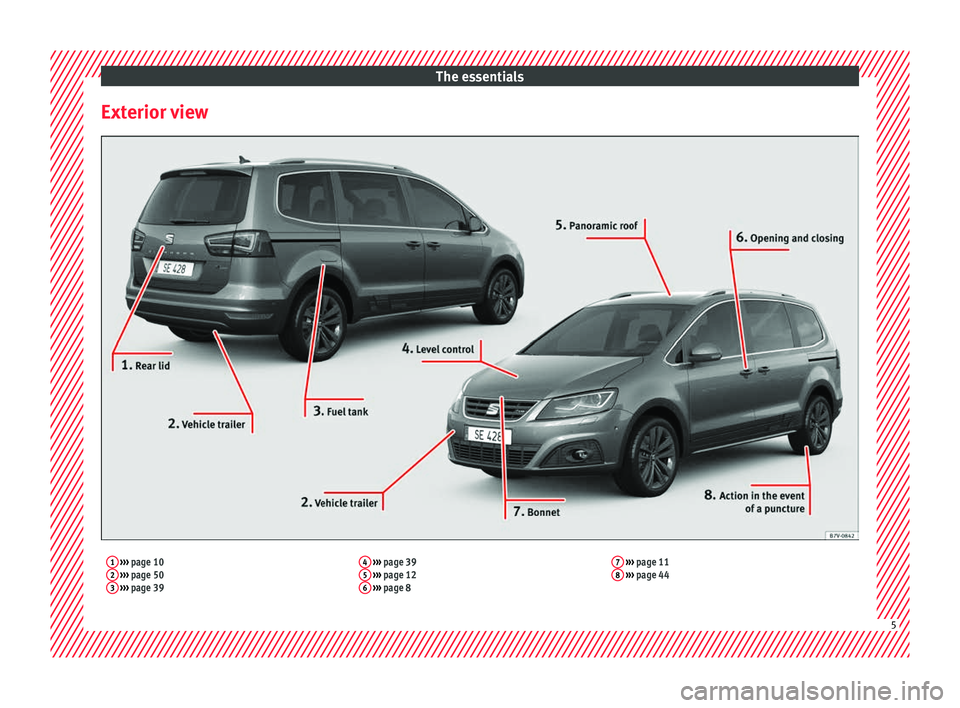
The essentials
Exterior view1 ››› page 10
2 ››› page 50
3 ››› page 39 4
››› page 39
5 ››› page 12
6 ››› page 8 7
››› page 11
8 ››› page 44 5
Page 8 of 320
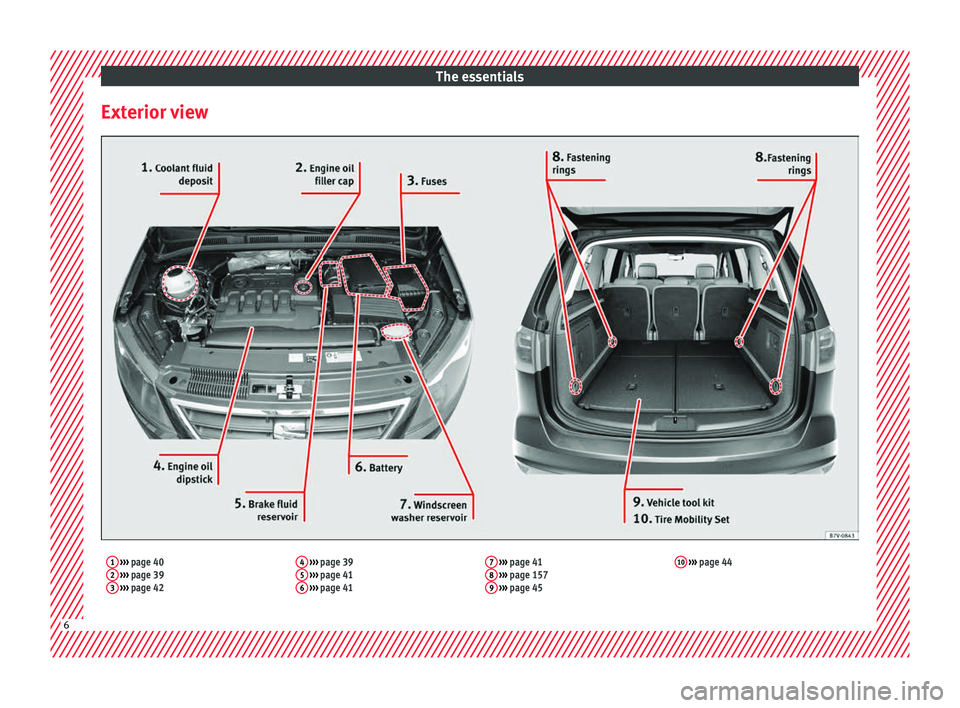
The essentials
Exterior view1 ››› page 40
2 ››› page 39
3 ››› page 42 4
››› page 39
5 ››› page 41
6 ››› page 41 7
››› page 41
8 ››› page 157
9 ››› page 45 10
››› page 44 6
Page 9 of 320
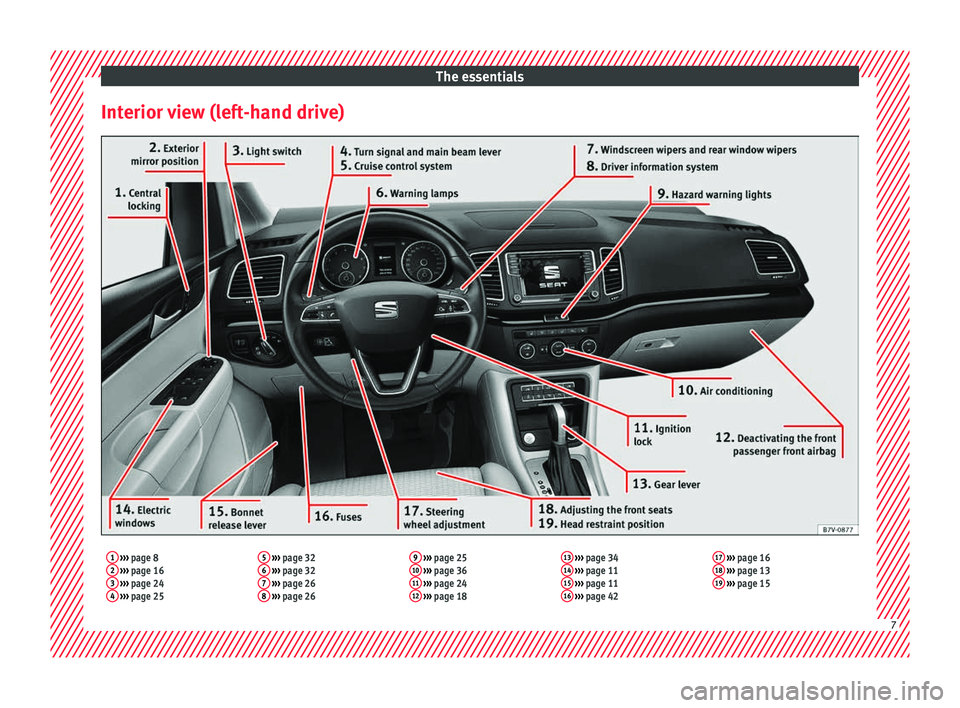
The essentials
Interior view (left-hand drive)1 ››› page 8
2 ››› page 16
3 ››› page 24
4 ››› page 25 5
››› page 32
6 ››› page 32
7 ››› page 26
8 ››› page 26 9
››› page 25
10 ››› page 36
11 ››› page 24
12 ››› page 18 13
››› page 34
14 ››› page 11
15 ››› page 11
16 ››› page 42 17
››› page 16
18 ››› page 13
19 ››› page 15 7
Page 10 of 320
The essentials
How it works
Un loc
k
ing and locking
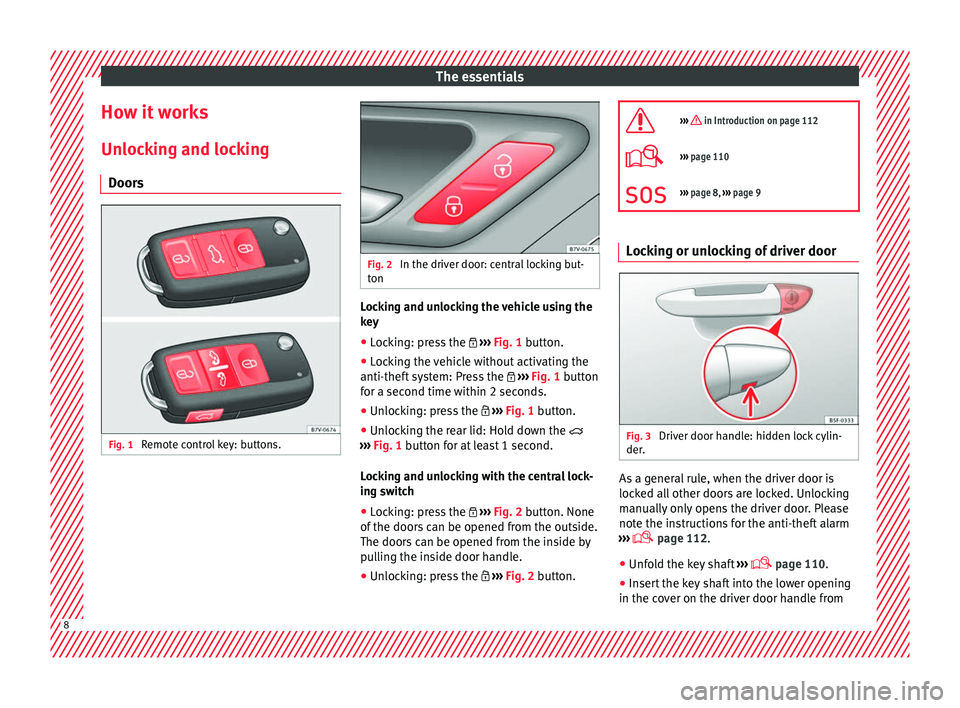
Doors Fig. 1
Remote control key: buttons. Fig. 2
In the driver door: central locking but-
ton Locking and unlocking the vehicle using the
k
ey
● Loc
king: press the ›››
Fig. 1 button.
● Locking the vehicle without activating the
anti-theft sy
stem: Press the ››› Fig. 1 button
for a second time within 2 seconds.
● Unlocking: press the ›››
Fig. 1 button.
● Unlocking the rear lid: Hold down the
›››
Fig. 1 button for at least 1 second.
Locking and unlocking with the central lock-
ing switch
● Locking: press the ›››
Fig. 2 button. None
of the doors can be opened from the outside.
The doors can be opened from the inside by
pulling the inside door handle.
● Unlocking: press the ›››
Fig. 2 button.
››› in Introduction on page 112
›››
page 110
››› page 8, ››› page 9 Locking or unlocking of driver door
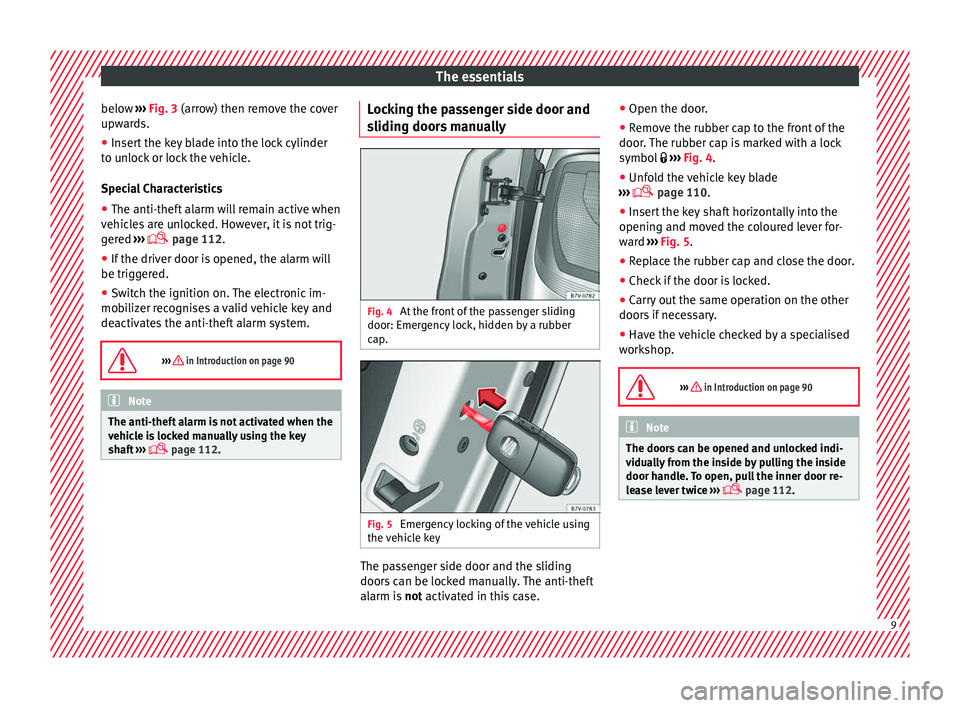
Fig. 3
Driver door handle: hidden lock cylin-
der . As a general rule, when the driver door is
loc
k
ed al
l other doors are locked. Unlocking
manually only opens the driver door. Please
note the instructions for the anti-theft alarm
››› page 112.
● Unfold the key shaft ›››
page 110.
● Insert the key shaft into the lower opening
in the cov
er on the driver door handle from8
Page 11 of 320
The essentials
below ›››
Fig. 3
(arr ow) then remove the cover
upwards.
● Insert the key blade into the lock cylinder
to un
lock or lock the vehicle.
Special Characteristics
● The anti-theft alarm will remain active when
vehicl
es are unlocked. However, it is not trig-
gered ›››
page 112.
● If the driver door is opened, the alarm will
be trigger
ed.
● Switch the ignition on. The electronic im-
mobi
lizer recognises a valid vehicle key and
deactivates the anti-theft alarm system.
››› in Introduction on page 90 Note
The anti-theft alarm is not activated when the
vehic l
e is locked manually using the key
shaft ›››
page 112. Locking the passenger side door and
s
lidin
g door
s manually Fig. 4
At the front of the passenger sliding
door: Emer g
ency
lock, hidden by a rubber
cap. Fig. 5
Emergency locking of the vehicle using
the v
ehic
le key The passenger side door and the sliding
door
s
c
an be locked manually. The anti-theft
alarm is not activated in this case. ●
Open the door.
● Remo
ve the rubber cap to the front of the
door. The rubber c
ap is marked with a lock
symbol ››› Fig. 4.
● Unfold the vehicle key blade
›››
page 110.
● Insert the key shaft horizontally into the
opening and mov
ed the coloured lever for-
ward ››› Fig. 5.
● Replace the rubber cap and close the door.
● Check if the door is locked.
● Carry out the same operation on the other
doors if
necessary.
● Have the vehicle checked by a specialised
workshop
.
››› in Introduction on page 90 Note
The doors can be opened and unlocked indi-
vidua l
ly from the inside by pulling the inside
door handle. To open, pull the inner door re-
lease lever twice ›››
page 112. 9
Page 12 of 320
The essentials
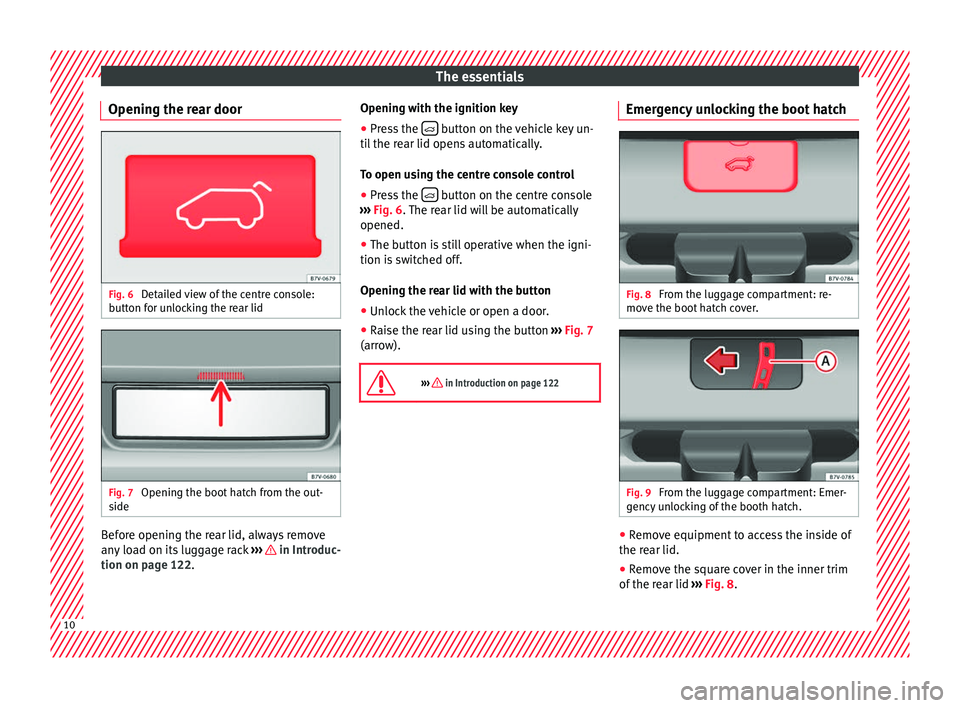
Opening the rear door Fig. 6
Detailed view of the centre console:
b utt
on f
or unlocking the rear lid Fig. 7
Opening the boot hatch from the out-
s ide Before opening the rear lid, always remove
an
y
lo
ad on its luggage rack ››› in Introduc-
tion on p ag
e 122
. Opening with the ignition key
●
Press the button on the vehicle key un-
ti l
the r
ear lid opens automatically.
To open using the centre console control ● Press the button on the centre console
› ›
›
Fig. 6. The rear lid will be automatically
opened.
● The button is still operative when the igni-
tion is sw
itched off.
Opening the rear lid with the button
● Unlock the vehicle or open a door.
● Raise the rear lid using the button ›››
Fig. 7
(arrow).
››› in Introduction on page 122 Emergency unlocking the boot hatch
Fig. 8
From the luggage compartment: re-
mo v
e the boot
hatch cover. Fig. 9
From the luggage compartment: Emer-
g ency
u
nlocking of the booth hatch. ●
Remove equipment to access the inside of
the r e
ar lid.
● R
emove the square cover in the inner trim
of the re
ar lid ››› Fig. 8.10
Page 13 of 320
The essentials
● Pu
sh the r
elease lever ››› Fig. 9 A in the di-
r ection of
the arr
ow to unlock the boot.
● Manually open the rear lid.
››› in Introduction on page 90 Bonnet
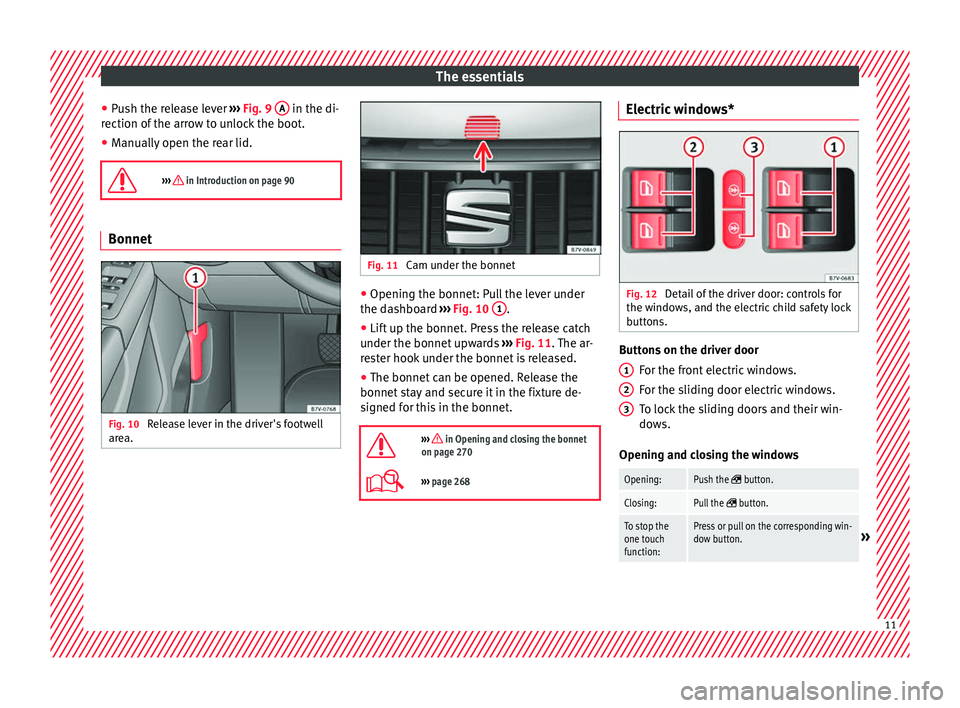
Fig. 10
Release lever in the driver's footwell
ar e
a. Fig. 11
Cam under the bonnet ●
Opening the bonnet: Pull the lever under
the d a
shbo
ard ››› Fig. 10 1 .
● Lift up the bonnet. Press the release catch
u nder the bonnet
up
wards ››› Fig. 11. The ar-
rester hook under the bonnet is released.
● The bonnet can be opened. Release the
bonnet st
ay and secure it in the fixture de-
signed for this in the bonnet.
››› in Opening and closing the bonnet
on page 270
››› page 268 Electric windows*
Fig. 12
Detail of the driver door: controls for
the w indo
w
s, and the electric child safety lock
buttons. Buttons on the driver door
For the fr
ont
electric windows.
For the sliding door electric windows.
To lock the sliding doors and their win-
dows.
Opening and closing the windows
Opening:Push the button.
Closing:Pull the button.
To stop the
one touch
function:Press or pull on the corresponding win-
dow button.» 1
2
3
11