brakes Seat Alhambra 2017 Owner's Manual
[x] Cancel search | Manufacturer: SEAT, Model Year: 2017, Model line: Alhambra, Model: Seat Alhambra 2017Pages: 320, PDF Size: 6.88 MB
Page 34 of 320
The essentials
■ Door u n
loc
k (individual opening, Auto
Lock)
■ Convenience handling of windows
■ Rear vision mirror adjustment
■ Lights & visibility settings
menu
■ Coming home and leaving home
■ Footwell light
■ Convenience turn signals
The stored settings are automatically activa-
ted, at the latest when the ignition is switch-
ed on. Please refer to the information and
tips relating to the seat memory
››› page 144. Cruise control
Operating the c ruise control system
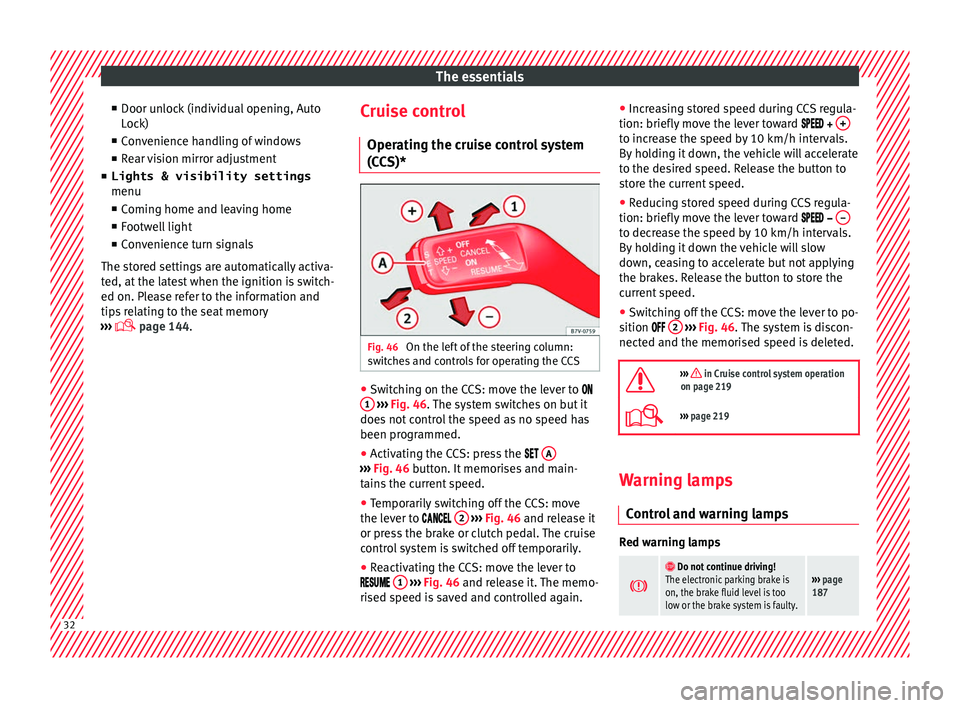
(CCS)* Fig. 46
On the left of the steering column:
sw it
c
hes and controls for operating the CCS ●
Switching on the CCS: move the lever to
1
› ›
› Fig. 46
. The system switches on but it
does not control the speed as no speed has
been programmed.
● Activating the CCS: press the A ›››
Fig. 46 butt on. It
memorises and main-
tains the current speed.
● Temporarily switching off the CCS: move
the lev er t
o 2
› ›
› Fig. 46 and release it
or press the brake or clutch pedal. The cruise
control system is switched off temporarily.
● Reactivating the CCS: move the lever to
1
› ›
› Fig. 46
and release it. The memo-
rised speed is saved and controlled again. ●
Incre
asing stored speed during CCS regula-
tion: briefly move the lever toward + to increase the speed by 10 km/h intervals.
B
y
ho
lding it down, the vehicle will accelerate
to the desired speed. Release the button to
store the current speed.
● Reducing stored speed during CCS regula-
tion: briefly mov
e the lever toward – to decrease the speed by 10 km/h intervals.
B
y
ho
lding it down the vehicle will slow
down, ceasing to accelerate but not applying
the brakes. Release the button to store the
current speed.
● Switching off the CCS: move the lever to po-
sition 2
› ›
› Fig. 46
. The system is discon-
nected and the memorised speed is deleted.
››› in Cruise control system operation
on page 219
››› page 219 Warning lamps
C ontr
o
l and warning lamps Red warning lamps
Do not continue driving!
The electronic parking brake is
on, the brake fluid level is too
low or the brake system is faulty.››› page
187 32
Page 122 of 320
Operation
WARNING
Opening sliding doors while driving is dan-
ger ou
s. These doors may be pushed open or
closed when the vehicle accelerates or brakes
and cause serious injuries.
● Never open the sliding doors when the ve-
hicle i
s in movement. Manually opening and closing the
slidin
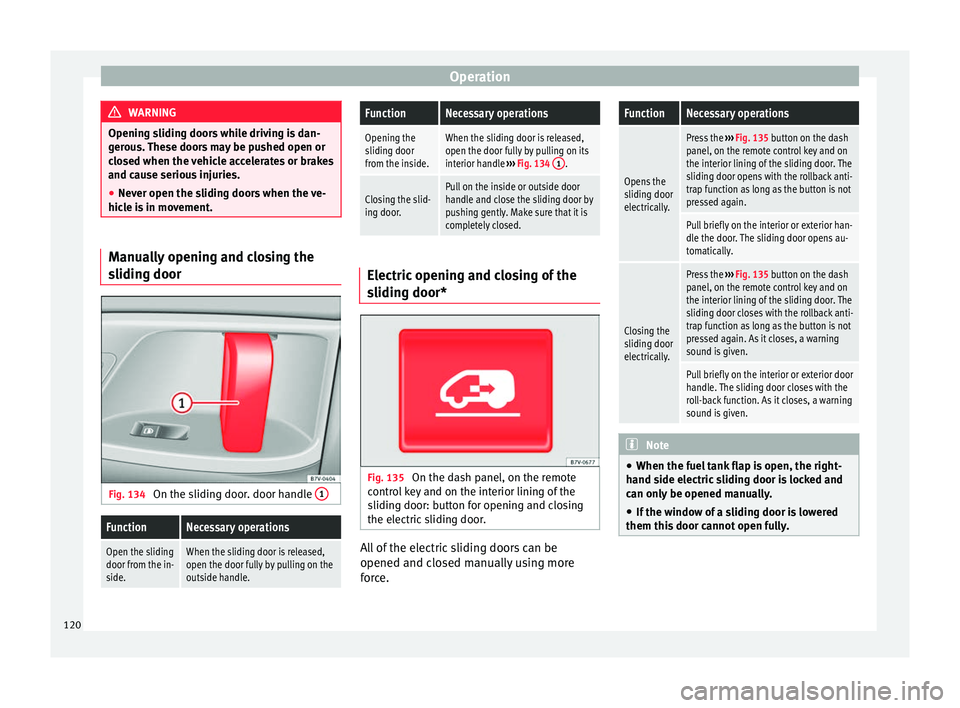
g door Fig. 134
On the sliding door. door handle 1
FunctionNecessary operations
Open the sliding
door from the in-
side.When the sliding door is released,
open the door fully by pulling on the
outside handle.
FunctionNecessary operations
Opening the
sliding door
from the inside.When the sliding door is released,
open the door fully by pulling on its
interior handle
››› Fig. 134 1
.
Closing the slid-
ing door.Pull on the inside or outside door
handle and close the sliding door by
pushing gently. Make sure that it is
completely closed. Electric opening and closing of the
slidin
g door* Fig. 135
On the dash panel, on the remote
c ontr
o
l key and on the interior lining of the
sliding door: button for opening and closing
the electric sliding door. All of the electric sliding doors can be
opened and c
lo
sed m
anually using more
force.
FunctionNecessary operations
Opens the
sliding door
electrically.
Press the ››› Fig. 135 button on the dash
panel, on the remote control key and on
the interior lining of the sliding door. The
sliding door opens with the rollback anti-
trap function as long as the button is not
pressed again.
Pull briefly on the interior or exterior han-
dle the door. The sliding door opens au-
tomatically.
Closing the
sliding door
electrically.
Press the ››› Fig. 135 button on the dash
panel, on the remote control key and on
the interior lining of the sliding door. The
sliding door closes with the rollback anti-
trap function as long as the button is not
pressed again. As it closes, a warning
sound is given.
Pull briefly on the interior or exterior door
handle. The sliding door closes with the
roll-back function. As it closes, a warning
sound is given. Note
● When the fuel t
ank flap is open, the right-
hand side electric sliding door is locked and
can only be opened manually.
● If the window of a sliding door is lowered
them this door c
annot open fully.120
Page 190 of 320
Operation
It lights up red
Fault in the brake
system
Stop the vehicle!
Seek professional assistance!
››› page 191.
Brake fluid level in-
adequate. Do not drive on!
Check brake fluid level
››› page 279.
Together with the
ABS control lamp
: ABS fault.
Contact a specialised workshop.
The vehicle can be braked with-
out ABS.
It lights up red
Brake pedal not
pressed!Press brake pedal to the floor.
It lights up yellow
Front brake pads
worn.Contact a specialised workshop
immediately. Inspect
all the
brake pads and replace as nec-
essary.
It lights up yellow
ESC disconnected
by the system.Switching the ignition on and off
If necessary, drive for a short dis-
tance.
Fault in the ESC.Contact a specialised workshop.
Together with the
ABS control lamp
: Fault in the ABS.
Contact a specialised workshop.
The vehicle can be braked with-
out ABS.
It lights up yellow
The battery has
been reconnected.›››
page 280
It lights up yellow
ASR manually deac-
tivated.Switch on ASR
››› page 205. ASR
is automatically activated when
the ignition is switched on or off.
It lights up yellow
Together with the
ESC control lamp :
Fault in the ABS.Contact a specialised workshop.
The vehicle can be braked with-
out ABS.
Together with the
warning lamp or: ABS fault.
It lights up yellow
Together with the
warning lamp flashing: electronic
parking brake faul-
ty.Contact a specialised workshop.
It lights up green
Brake pedal not
pressed.
Press the brake pedal to select a
gear range.
Press the brake pedal to discon-
nect the electronic parking brake
››› page 189.
Flashes red
Electronic parking
brake faulty. The
control lamp
may
light up at the same
time or the control
lamp
may flash
on the button.
Contact a specialised workshop,
as it may not be possible to park
the vehicle in safety.
It flashes yellow
ESC or ASR regulat-
ing.Take your foot off the accelera-
tor. Adjust your driving style to
the road conditions.
Several warning and control lamps light up
f
or a f
ew sec
onds when the ignition is switch-
ed on, signalling that the function is being
verified. They will switch off after a few sec-
onds. WARNING
Observe the safety warnings ›››
in Control
and warnin g l
amps on page 105. WARNING
Driving with brakes in bad condition could re-
su lt
in a serious accident.
● If the brake warning lamp does not
go
out, or if it lights up when driving, the brake
fluid level in the reservoir is too low or there 188
Page 192 of 320
Operation
because braking is only applied to the rear
wheels. A
lw
ays use the foot brake.
● Never accelerate from the engine compart-
ment with the en
gine running and a gear or a
gear range engaged. The vehicle could move,
even if the parking brake is applied. Note
● In vehic
les with a manual gearbox: when
the clutch pedal is released and the accelera-
tor pressed at the same time, the electronic
parking brake is automatically released.
● If the vehicle battery is flat, it will not be
poss
ible to disconnect the electronic parking
brake. Use the jump-start ›››
page 51.
● When the electronic parking brake is ap-
plied or rel
eased, noises may be heard.
● If the electronic parking brake has not been
used for a lon
g while, the system sometimes
performs automatic and audible checks while
the vehicle is at a standstill. Parking
When parking your vehicle, all legal require-
ments
shou
l
d be observed.
To park the vehicle
Complete operations only in the sequence
given. ● Park the vehicle on a suitable surface ›››
.●
Pr e
s
s and hold the brake pedal until the ve-
hicle comes to a standstill.
● Connect the electronic parking brake
›››
page 189.
● For an automatic gearbox, move the selec-
tor lev
er to position P.
● Switch off the engine and release the brake
pedal.
● R
emove the key from the ignition.
● If necessary, turn the steering wheel slight-
ly to loc
k the steering.
● With a manual gearbox, engage 1st gear on
flat gr
ound and slopes, or even reverse gear
on hills, and release the clutch pedal.
● Ensure that all passengers leave the vehi-
cle, e
specially children.
● When leaving the vehicle, take all keys with
you.
● Loc
k the vehicle.
Additiona
l information for steep ascents and
descents
Before switching off the engine, rotate the
steering wheel so that if the vehicle should
move, it will be held by the kerb.
● On slopes, turn the front wheels so that
they are ag
ainst the edge of the kerb.
● Uphill, turn the wheels towards the centre
of the r o
ad. WARNING
The components of the exhaust system reach
ver y
high temperatures. This could cause a
fire and considerable damage.
● Always park your vehicle so that no part of
the exhau
st system can come in contact with
flammable materials (such as wood,
leaves,dried grass, or spilled fuel). CAUTION
● Spec i
al care should be taken when parking
in areas with high kerbs or fixed barriers. Ob-
jects protruding from the ground may dam-
age the bumper or other parts of the vehicle
during manoeuvres. To avoid damage, stop
before the wheels touch the barrier or kerb.
● Special attention is required when driving
through entranc
es, over ramps, kerbs or oth-
er objects. The vehicle underbody, bumpers,
mudguards and running gear, and the engine
and exhaust system could be damaged as
you drive over these objects. Information on the brakes
For the first 200 to 300 km (100 to 200
mi
l
e
s), new brake pads have not yet reached
their maximum braking capacity, and need to
be “run in” first ››› . The slightly reduced
br ak in
g effect can be compensated for by in-
creasing pressure on the brake pedal. While
running in, the full braking distance or
190
Page 193 of 320
Driving
emergency braking distance is larger then
when the br ak
e p
ads have been run in. While
running in, avoid full power braking or situa-
tions requiring braking performance. For ex-
ample, in heavy traffic.
The rate of wear of the brake pads depends
to a great extent on the conditions in which
the vehicle is used and the way the vehicle is
driven. If the vehicle is used frequently in city
traffic or for short trips or driven sport style,
visit a specialised workshop regularly, more
frequently than advised in the Maintenance
Programme, to have the brake pads checked.
If you drive with wet brakes, for example, af-
ter crossing areas of water, in heavy rainfall
or even after washing the car, the effect of
the brakes is lessened as the brake discs are
wet or even frozen (in winter). At higher
speed, “dry” the brakes as quickly as possi-
ble by braking gently several times. Only do
this without endangering vehicles behind
you or any other road users ››› .
A l a
y
er of salt on the discs and brake pads
will reduce the effectiveness of the brakes
and increase braking distance. If you drive for
a prolonged period on salted roads without
braking then brake carefully several times to
eliminate the layer of salt on the brakes ››› .
If the
v
ehicle remains parked for considera-
ble lengths of time, is used little, or if the
brakes are not used, there may be corrosion
on the brake discs and a build up of dirt onthe brake pads. If the brakes are not used fre-
quently, or if ru
st has formed on the discs,
SEAT recommends cleaning the pads and
discs by braking firmly a few times at a mod-
erately high speed. Only do this without en-
dangering vehicles behind you or any other
road users ››› .
F au
lt
s in the brake system
During braking, if you notice that the vehicle
does not react as usual (that the braking dis-
tance has increased suddenly) it may be pos-
sible that there is a fault in the braking sys-
tem. The warning lamp lights up and a
text message displayed. Take the vehicle to a
specialised workshop immediately and have
the fault repaired. Drive at a moderate speed
and be prepared to use more pressure on the
brake pedal, and allow for longer stopping
distances.
Brake servo
The brake servo only operates when the en-
gine is running and the pressure applied by
the driver on the brake pedal increases.
If the brake servo does not operate or the ve-
hicle must be towed, then the brake pedal
will have to be pressed with more force given
that the braking distance will be increased
when the brake servo does not operate ››› . WARNING
New brake pads do not brake to full efficien-
cy.
● For the fir
st 320 km (200 miles), new brake
pad
s have not yet reached their maximum
braking capacity, and need to be “run in”
first. For this, to compensate for reduced
braking efficiency the brake pedal will have
to be pressed with more force.
● To avoid losing control of the vehicle and
caus
ing serious accidents, always take great
care when driving with new brake pads.
● When running in new brake pads, always
res
pect the safety distances between you and
other vehicles and do not cause situations re-
quiring extreme braking performance. WARNING
When brakes overheat, braking is less effi-
cient and br
aking distances increase.
● When driving on slopes, brakes can be
overlo
aded and overheat quickly.
● Reduce speed or change down a gear when
faced w
ith steep and long slopes. This allows
you to use the engine braking effect and to
reduce the strain on the brake system.
● Non-standard or damaged front spoilers
coul
d restrict the airflow to the brakes and
cause them to overheat. » 191
Technical data
Advice
Operation
Emergencies
Safety
Page 194 of 320
Operation
WARNING
Wet, frozen or salt-covered brakes take lon-
ger t o en
gage and this increases braking dis-
tances.
● Test the brakes carefully.
● Dry the brakes, free them of ice and salt by
brakin
g gently several times, when weather,
road and traffic conditions permit. WARNING
Driving without the brake servo may signifi-
cantly inc
rease the braking distance and re-
sult in a severe accident.
● Never allow the vehicle to move forwards
when the engine is
switched off.
● If the brake servo does not operate or the
vehicl
e must be towed, then the brake pedal
will have to be pressed with more force given
that the braking distance will be increased
when the brake servo does not operate. CAUTION
● Never m ak
e the brakes “slip” by pressing
the pedal gently, if it is not really necessary
to brake. Continuously pressing on the brake
pedal will heat the brakes. This could signifi-
cantly reduce braking power, increase brak-
ing distance or even result in the total failure
of the brake system.
● Reduce speed or change down a gear when
faced w
ith steep and long slopes. This allows
you to use the engine braking effect and to reduce the strain on the brake system. Other-
wi
se, the br
akes may overheat and fail. Only
use the brakes to reduce speed or to stop. Note
When checking the front brake pads, take the
time t o al
so check the rear brake pads. The
thickness of the brake pads should be
checked visually and regularly, by looking
through the openings in the wheel rims or
from underneath the vehicle. If necessary, re-
move the wheels to check them thoroughly.
SEAT recommends taking your car in for tech-
nical service. Gearbox
Intr oduction When reverse gear is engaged and the igni-
tion i
s
sw
itched on the following takes place:
● Reverse lights light up.
● When reversing, the air conditioner auto-
matical
ly changes to air recirculation mode.
● The rear window heater switches on when
the winds
creen wiper is activated.
● Also, the parking sensor system, the opti-
cal p
arking sensor and the camera for the re-
verse assist system are connected. WARNING
Rapid acceleration can cause loss of traction
and skid din
g, especially on slippery ground.
This could cause loss of control of the vehicle
resulting in an accident and considerable
damage.
● Only use the kick-down function or rapid
accel
eration if visibility, weather, road and
traffic conditions so permit. WARNING
Do not allow the brakes to “rub” for a pro-
long ed period of
time, or brake frequently or
for long periods of time. Continuous braking
heats up the brakes. This could significantly
reduce braking power, increase braking dis-
tance or even result in the total failure of the
brake system. Control and warning lamps
It lights up red
Brake pedal not
pressed!Press brake pedal to the floor.
It lights up green
Brake pedal not
pressed.To select a range of gears, press
the brake pedal.
Please also see "Electronic park-
ing brake"
››› page 187. 192
Page 199 of 320
DrivingDisplayMeaning
Optimum gear.
Recommendation to change up a gear.
Recommendation to change down a
gear.
Information for “cleaning” the diesel partic-
ul
at
e filter
The exhaust gas system control recognises
when the diesel particulate filter is blocked,
and helps to clean it by recommending a spe-
cific gear for driving. It may therefore be nec-
essary to drive with the engine at an excep-
tionally high speed ›››
page 200. WARNING
The recommended gear display is intended as
a guideline only; it shou
ld never replace the
driver's attention to driving carefully.
● Responsibility for selecting the correct gear
for eac
h situation continues to lie with the
driver, for example when overtaking, climb-
ing a hill or towing a trailer. For the sake of the environment
Selecting the most appropriate gear for the
sit uation w
ill help you to save fuel. Note
The recommended gear display is switched
off when the c lut
ch pedal is pressed. Run-in and economical driving
Ru nnin
g in Please observe the instructions for running-in
new components.
R u
nning-in the engine
The engine needs to be run-in over the first
1500 km (1000 miles). During its first few
hours of running, the internal friction in the
engine is greater than later on when all the
moving parts have bedded down.
How the vehicle is driven for the first
1500 km (1000 miles) influences the future
engine performance. Throughout the life of
the vehicle, it should be driven at a moderate
speed – especially when the engine is cold –
this will reduce engine wear and increase its
useful life. Never drive at extremely low en-
gine speeds. Always engage a lower gear
when the engine works “irregularly”. For the
first 1000 km or 600 miles, please note:
● Do not use full throttle.
● Do not force the engine above two thirds of
its m ax
imum speed. ●
Do not to
w a trailer.
Between 1000 and 1500 kilometres (600 to
1000 miles), gradually increase power until
reaching the maximum speed and high en-
gine speeds.
Running in new tyres and brake pads ● Replacement of wheel rims and new tyres
›››
page 284
● Notes on the brakes ›››
page 190 For the sake of the environment
If the engine is run in gently, the life of the
engine w i
ll be increased and the engine oil
consumption reduced. Environmental compatibility
Environmental protection is a top priority in
the de
s
ign, c
hoice of materials and manufac-
ture of your new SEAT.
Constructive measures to encourage recy-
cling
● Joints and connections designed for easy
dismantlin
g
● Modular construction to facilitate disman-
tling
● Incr
eased use of single-grade materials. »
197
Technical data
Advice
Operation
Emergencies
Safety
Page 204 of 320
Operation
WARNING
● Alw a
ys drive according to the road weather
conditions, the terrain and traffic. Driving rec-
ommendations should never lead to illegal
manoeuvres in surrounding traffic. For the sake of the environment
Even when the emission control system is
work in
g perfectly, there may be a smell of
sulphur under certain conditions. This de-
pends on the sulphur content of the fuel be-
ing used. Driving tips
Driv ing abr
oadIn some countries, certain safety regulations
and r
equir
ements
are in force relating to ex-
haust gas emissions, which differ from the
technical characteristics of the vehicle. Be-
fore travelling abroad, SEAT recommends you
consult a technical service about the legal re-
quirements and the following points:
● Does the vehicle need technical modifica-
tions f
or driving abroad, for example, adjust-
ment of the headlamps?
● Does the vehicle have all the tools, diag-
nostic
s equipment and spare parts required
for inspections and repairs? ●
Are there an
y SEAT dealers in the destina-
tion country?
● For petrol vehicles: Is unleaded petrol avail-
able at
the right octane rating?
● For diesel engines: Is diesel fuel available
with a low s
ulphur content?
● Are a suitable engine oil ( ›››
page 271) and
other engine fluids complying with SEAT
specifications available in the destination
country?
● Will the navigation system fitted at the fac-
tory
operate correctly in the destination coun-
try with the available navigation data?
● Are special tyres required in the destination
countr
y? CAUTION
SEAT does not accept liability for any damage
to the v
ehicle due to the use of a lower quali-
ty fuel, an inadequate service or the non-
availability of genuine spare parts. Driving along flooded roadways
To prevent damage to the vehicle when driv-
in
g thr
ough w
ater, for example, along a floo-
ded road, please observe the following:
● Check the depth of the water before enter-
ing the flooded z
one. The water should never
come above the lower edge of the bodywork
››› .●
Do not driv
e f
aster than a pedestrian.
● Do not stop in the water, use reverse gear
or switc
h off the engine.
● Oncoming traffic will cause waves which
raise the l
evel of the water, making it difficult
to cross the water.
The Start/Stop system must be deactivated
when driving through flooded areas WARNING
When driving through water, mud, melted
sno w
, etc., please remember that due to
damp or frozen brake discs and shoes in win-
ter, the braking effect may be delayed, there-
fore the required braking distance is greater.
● “Dry the brakes and remove ice” by braking
caref
ully. Ensure that you are not endanger-
ing other road-users or breaking traffic regu-
lations in the process.
● After driving through water, avoid sudden
sharp manoeu
vres. CAUTION
● Drivin g thr
ough flooded areas may severely
damage vehicle components such as the en-
gine, transmission, drive train or electrical
system.
● Never drive through salt water as salt cau-
ses c
orrosion. Always rinse any parts of the
vehicle which have been in contact with salt
water. 202
Page 206 of 320
Operation
front wheels are turned, the normal ABS is
activ at
ed.
Br
ake assist system (BAS)
The brake assist system may reduce the re-
quired braking distance. The brake assist
system boosts the braking force if you press
the brake pedal quickly in an emergency. As
a result, the braking pressure increases rap-
idly, the braking force is multiplied and the
braking distance is reduced. This enables the
ABS to be activated more quickly and effec-
tively.
¡Do not lift your foot off the brake pedal!
When the brake pedal is released or when
the brake force is reduced, braking assist au-
tomatically turns off the brake servo.
Traction control when accelerating (ASR)
In the event of wheelspin, the traction control
system reduces the engine torque to match
the amount of grip available. The ASR makes
some situations easier, for example, when
starting, accelerating or going uphill, even in
unfavourable road conditions.
The ASR can be switched on or off manually
››› page 205.
Electronic differential lock system (EDS)
EDL is available when driving in straight lines
under normal conditions. When the EDL de-
tects wheelspin, it brakes the spinning wheel and directs the power to the other drive
wheels. T
o prevent the disc brake of the
braked wheel from overheating, the EDL cuts
out automatically if subjected to excessive
loads. The EDL will switch on again automati-
cally when the brake has cooled down.
Electronic drive torque management (XDS)
When taking a curve, the driveshaft differen-
tial mechanism allows the outer wheel to turn
at a higher speed than the inner wheel. In
this way, the wheel that is turning faster (out-
er wheel) receives less drive torque than the
inner wheel. This may mean that in certain
situations the torque delivered to the inner
wheel is too high, causing the wheels to
spin. On the other hand, the outer wheel is
receiving a lower drive torque than it could
transmit. This causes an overall loss of lateral
grip on the front axle, resulting in understeer
or “lengthening” of the trajectory.
The XDS system can detect and correct this
effect via the sensors and signals of the ESC.
Via the ESC, the XDS will brake the inside
wheel and counter the excess driving torque
of that wheel. This means that the driver's
desired trajectory is much more precise.
The XDS system works in combination with
the ESC and is always active, even when ASR
traction control is disconnected. WARNING
Driving at high speed on icy, slippery wet
grou nd c
an result in loss of vehicle control
and serious injury to the driver and passen-
gers.
● Adjust your speed and driving style to visi-
bility
, road, traffic and weather conditions.
Even though the brake assist systems, ABS,
BAS, EDL, ASR and ESC, provide more securi-
ty, do not take unnecessary risks while driv-
ing.
● Brake assist systems can not overcome the
law
s of physics. Even with ESC and other sys-
tems, slippery and wet roads will always be
dangerous.
● Driving to quickly on wet ground can result
in the wheels lo
sing contact with the ground
in an effect known as “aquaplaning”. Without
adherence, it is impossible to brake, steer or
control the vehicle.
● Brake assist systems cannot avoid acci-
dents if
, for example, the driver does not re-
spect safety distances or drives to quickly in
difficult conditions.
● Even though brake assist systems are ex-
tremely eff
ective and help control the vehicle
in difficult situations, remember that the ve-
hicle stability depends on tyre grip.
● When accelerating on a slippery surface,
for ex
ample on ice or snow, press the acceler-
ator carefully. The wheels can still slip even
with brake assist systems resulting in loss of
vehicle control. 204
Page 207 of 320

Driver assistance systems
WARNING
The effectiveness of the ESC can be consider-
ably r
educed if other components and sys-
tems affecting driving dynamics are not main-
tained or are not functioning correctly. This
includes, among others, brakes, tyres and
other systems already mentioned.
● Remember that changing and fitting other
components
to the vehicle can affect opera-
tion of the ABS, BAS, ASL EDL and ESC.
● Changes to the vehicle suspension or using
unap
proved wheel/tyre combinations can af-
fect operation of the ABS, BAS, ASL EDL and
ESC, as well as their effectiveness.
● Likewise, the effectiveness of ESC depends
on the use of s
uitable tyres ››› page 284. Note
● To en s
ure that the ESC and ASR work prop-
erly, all four wheels must be fitted with iden-
tical tyres. Any differences in the rolling radi-
us of the tyres can cause the system to re-
duce engine power when this is not desired.
● If a malfunction should occur in the ABS,
the ESC, EDL and ASR w
ill also be out of ac-
tion.
● Noises may be heard while any of the
above sy
stems are operating. Switching ASR on and off
Fig. 205
Detailed view of the centre console:
b utt
on u
sed to switch ASR on and off (vehi-
cles with ESC) The electronic stability control ESC consists
of
ABS, EDL
and ASR and on
ly works when
the engine is running.
The ASR can be switched off while the engine
is running by pressing the OFF
› ›
› Fig. 205
b
utton. The ASR (and similar) is only switch-
ed off when the required traction is not ob-
tained:
● When driving through deep snow or on
loose grou
nd (gravel, etc.).
● When “freeing” a trapped vehicle.
Turn the ASR bac
k on by pressing the but-
ton OFF
›
› ›
Fig. 205
. Start assist systems
Introduction WARNING
The intelligent technology in the start assist
sys t
ems cannot change the laws of physics.
The improved comfort provided by start as-
sist systems should not prompt you to take
risks.
● Unintentional movements of the vehicle
coul
d cause serious injury.
● The start assist systems are not a replace-
ment for driv
er awareness.
● Always try to adapt the speed of the vehi-
cle and
your style of driving to the condition
of the ground or the road and to weather and
traffic conditions.
● The start assist system cannot keep the ve-
hicle s
tationary in all conditions on a gradi-
ent or cause it to brake on steep downhill
gradients, e.g. if the road is slippery or icy. 205
Technical data
Advice
Operation
Emergencies
Safety