fuel Seat Alhambra 2017 Owner's Manual
[x] Cancel search | Manufacturer: SEAT, Model Year: 2017, Model line: Alhambra, Model: Seat Alhambra 2017Pages: 320, PDF Size: 6.88 MB
Page 6 of 320
Table of Contents
Park Assist system* (Park Assist) . . . . . . . . . . . 211
Rear assist* (Rear View Camera) . . . . . . . . . . . . 215
Cruise control* (Cruise control system -
C C
S)
. . . . . . . . . . . . . . . . . . . . . . . . . . . . . . . . . . . 219
Lane Assist system* . . . . . . . . . . . . . . . . . . . . . . 220
Blind spot detector (BSD) with rear cross traffic
alert
(RTA) . . . . . . . . . . . . . . . . . . . . . . . . . . . . . . 222
Traffic signal detection (Sign Assist)* . . . . . . . . 227
Tiredness detection (recommendation to take
a break)
. . . . . . . . . . . . . . . . . . . . . . . . . . . . . . . . 229
Dynamic Chassis control (DCC)* . . . . . . . . . . . . 230
Tyre monitoring systems . . . . . . . . . . . . . . . . . . 231
Towing bracket device . . . . . . . . . . . . . . . . . . . . 234
Driving with a trailer . . . . . . . . . . . . . . . . . . . . . . 234
Advice . . . . . . . . . . . . . . . . . . . . . . . . . . . . . . . . 244
Care and maintenance . . . . . . . . . . . . . . . . . . . . 244
Accessories, replacement of parts and modifi-
cations
. . . . . . . . . . . . . . . . . . . . . . . . . . . . . . . . 244
Caring for and cleaning the vehicle exterior . . . 250
Caring for and cleaning the vehicle interior . . . 256
Notes for the user . . . . . . . . . . . . . . . . . . . . . . . . 260
Checking and refilling levels . . . . . . . . . . . . . . . 261
Filling the tank . . . . . . . . . . . . . . . . . . . . . . . . . . 261
Fuel . . . . . . . . . . . . . . . . . . . . . . . . . . . . . . . . . . . 264
Selective catalytic reduction* (AdBlue) . . . . . . 265
Working in the engine compartment . . . . . . . . 268
Engine oil . . . . . . . . . . . . . . . . . . . . . . . . . . . . . . 271
Engine coolant . . . . . . . . . . . . . . . . . . . . . . . . . . 274
Brake fluid . . . . . . . . . . . . . . . . . . . . . . . . . . . . . 278
Windscreen washer reservoir . . . . . . . . . . . . . . 280
Vehicle battery . . . . . . . . . . . . . . . . . . . . . . . . . . 280
Wheels and tyres . . . . . . . . . . . . . . . . . . . . . . . . 284
Tyres . . . . . . . . . . . . . . . . . . . . . . . . . . . . . . . . . . 284
Winter service . . . . . . . . . . . . . . . . . . . . . . . . . . . 292 Technical data
. . . . . . . . . . . . . . . . . . . . . . . . 294
Technical features . . . . . . . . . . . . . . . . . . . . . . . 294
Important information . . . . . . . . . . . . . . . . . . . . 294
Towing a trailer . . . . . . . . . . . . . . . . . . . . . . . . . . 295
Wheels . . . . . . . . . . . . . . . . . . . . . . . . . . . . . . . . 296
Engine data . . . . . . . . . . . . . . . . . . . . . . . . . . . . . 297
Dimensions . . . . . . . . . . . . . . . . . . . . . . . . . . . . . 302
Index . . . . . . . . . . . . . . . . . . . . . . . . . . . . . . . . . 303
4
Page 29 of 320
The essentials
A specialised workshop will be able to pro-
gr amme or modif
y
additional functions, ac-
cording to the vehicle equipment. SEAT rec-
ommends taking your car in for technical
service.
Some menu options can only be read when
the vehicle is at a standstill.
As long as a priority 1 warning is displayed, it
will not be possible to read the menus. To
display the menus, confirm the warning by
pressing OK .
Summary of the menu structure ■
Mu ltif
unction display (MFD) ››› page 29
■ Travelling time
■ Current fuel consumption
■ Average fuel consumption
■ Operating range
■ Distance covered
■ Average speed
■ Digital display of speed
■ Oil temperature digital display
■ Speed warning
■ Audio ›››
Booklet Radio or ›››
Booklet Navi-
gation system
■ Navigation ›››
Booklet Navigation system
■ Telephone ›››
Booklet Radio or ›››
Book-
let Navigation system
■ Auxiliary heating ›››
page 177 ■
Activ ation
■ Pr
ogramme On / Off
■ Disconnection
■ Timer 1-3
■ Day
■ Time
■ Minute
■ Activate
■ Duration
■ Operating mode
■ Heat
■ Ventilation
■ Day
■ Default setting
■ Vehicle condition ››› page 28
■ Configuration ››› page 30
■ Multifunction display data
■ Travelling time
■ Current fuel consumption
■ Average fuel consumption
■ Distance covered
■ Operating range
■ Average speed
■ Digital display of speed
■ Speed warning
■ Compass
■ Convenience ››› page 31
■ Central locking system (Central locking)
■Automatic lock (Auto. lock) On / Off ■
Automatic unlocking (Auto. unlock.)
On / Off
■ Unlocking doors (Door unlock.: All,
One door, Vehicle side, Individual)
■ Back
■ Electric windows
■ Off
■ All
■ Driver
■ Back
■ Mirror angle (Mirror angle) On / Off
■ Adjusting mirrors (Adjust. mirrors)
■ Individual
■ Synchronised
■ Back
■ Factory settings (Factory settings)
■ Back
■ Lights & visibility ››› page 31
■ Coming Home
■ Leaving Home
■ Footwell light
■ Convenience turn signals On / Off
■ Default setting
■ Tourist light On / Off
■ Time
■ Winter tyres
■ Language
■ Units
■ Second speed display On / Off » 27
Page 31 of 320
The essentialsNavigation
When the navigation to destination is
on, change of direction arrows and a
proximity bar are displayed. These
symbols are similar to those used in
the navigation system.
If navigation to destination is not on,
the direction of travel (compass) and
the name of the street on which you
are driving are displayed.
››› Booklet Navigation system
Telephone
Information and possible configura-
tions of the mobile phone preinstalla-
tion.
››› Booklet Radio or ››› Booklet Naviga-
tion system
Parking heat-
ing
Information and configurations of the
parking heating:
switching the parking heating on or
off. Select the operating mode and du-
ration.
››› page 177
Vehicle status
Current warning or information texts.
This option only appears when one of
the following texts is available. The
number of available messages is dis-
played. Example 1/1 or 2/2.
››› page 100
Configuration
Different setting options, for example,
the Convenience, Lighting & Visibility
menus, and the time, speed warning
with winter tyres, language, units of
measurement, or “Display off”.
››› page 30 MFD
(mu ltifunction display) menu The multifunction display (MFD) has two au-
tom
atic
memories: 1 - Partial memory and 2 -
Total memory . The selected memory will be
shown in the upper right-hand corner of the
display.
With the ignition switched on, and memory 1
or 2 displayed, briefly press OK to change
from one memor y
to another
1
Trip memo-
ry (for a sin-
gle jour-
ney).
The memory stores the values for the
journey and the consumption from the
moment the ignition is switched on until
it is switched off again.
If the journey is broken for more than 2
hours, the memory is automatically
erased. If the journey is continued in less
than 2 hours after the ignition is switch-
ed off, the new data is added to the data
already stored in the memory.
2 Total mem-
ory (for all
journeys).
The memory records the values for a spe-
cific number of partial trips, up to a total
of 19 hours and 59 minutes or 99 hours
and 59 minutes, or 1999.9 km (or miles)
for 9999 km (or miles), depending on the
model of instrument panel. On reaching
either of these limits, the memory is au-
tomatically erased and starts to count
from 0 again. Possible displays
Travelling timeThis indicates the hours (h) and mi-
nutes (min) since the ignition was
switched on.
Current fuel
consumption
The current fuel consumption while
driving is displayed in l/100 km (or
miles per gallon, mpg); when the en-
gine is running but the vehicle is not
moving, in l/h (or gallons per hour).
Average fuel
consumption
When the ignition is switched on, the
average consumption (in l/100 km or
in mpg) is displayed after the vehicle
has moved approximately 100 metres
(328 feet). Otherwise horizontal lines
are displayed. The value shown is up-
dated approximately every 5 seconds.
Operating
range
Approximate distance in km (or miles)
that can still be travelled with the fuel
remaining in the tank, assuming the
same style of driving is maintained.
This is calculated using the current
fuel consumption.
Distance cov-
eredDistance travelled, after ignition is
switched on, in km (or miles).
Average speed
After the ignition is switched on, the
average speed will be shown after a
distance of approximately 100 metres
(328 feet) has been travelled. Other-
wise horizontal lines are displayed.
The value shown is updated approxi-
mately every 5 seconds.
Digital display
of speedCurrent speed displayed digitally.
Oil tempera-
ture digital
displayUpdated engine oil temperature digi-
tal display»
29
Page 35 of 320
The essentials
Do not continue driving!
Fault in the engine cooling sys-
tem.››› page
274
Do not continue driving!
Engine oil pressure too low.››› page
271
Do not continue driving!
At least one of the vehicles doors
is open, or is not correctly
closed.››› page
119
Do not continue driving!
The rear lid is open or is incor-
rectly closed.››› page
122
Do not continue driving!
Fault in the steering.››› page
181
Engine cannot be started again!
"AdBlue" level too low.›››
page
265
Driver or passenger has not fas-
tened seat belt.›››
page
64
Use the foot brake!
Change
››› page
192
Brake
››› page
187
Faulty generator.›››
page
280 Yellow warning lamps
Front brake pads worn.
›››
page
187 lights up
: ESC malfunction or off.
flashes: ESC working.
ASR manually deactivated.
ABS faulty or does not work.
Electronic parking brake faulty.›››
page
187
Rear fog light switched on.›››
page
128
lights up
: Driving light totally or
partially faulty.››› page
91
flashes: Fault in the adaptive
light system.››› page
128
lights up or flashes
: fault in the
emission control system.
››› page
200
lights up
: pre-heating of diesel
engine.
flashes: fault in the diesel en-
gine management.
fault in the petrol engine man-
agement.
Diesel particulate filter blocked
Fault in the steering system.›››
page
181
Tyre pressure too low.›››
page
284
Fault in the tyre pressure gauge.››› page
231
Level of windscreen washer fluid
too low.›››
page
135
Fuel tank almost empty.›››
page
261
flashes: engine oil sensor faulty.›››
page
271
lights up : insufficient engine oil.
Fault in airbag system and seat
belt tensioners.›››
page
72
Front passenger front airbag is
disabled (
).
››› page
72
Top up "AdBlue", or there is a
fault in the "AdBlue" system.›››
page
265
Fuel tank not closed correctly.›››
page
261
Lane Assist is switched on, but
not active.›››
page
220 Other warning lamps
Left or right turn signal.›››
page
128
Hazard warning lights on.››› page
82» 33
Page 41 of 320
The essentials
Fluid Level control Fi l
lin
g capacities
Tank level
70 litres. 8 litre reserve
Capacity of the windscreen washer fluid con-
tainer
Versions without head-
light washer system3.5 litres
Versions with headlight
washer system6 litres Fuel
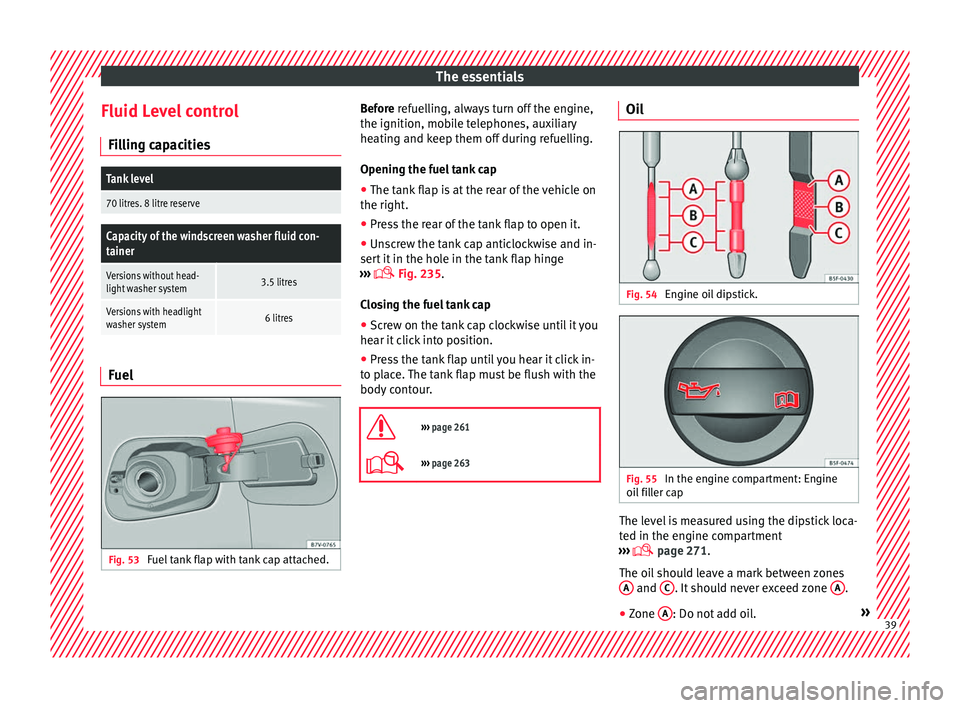
Fig. 53
Fuel tank flap with tank cap attached. Before r
efuelling, always turn off the engine,
the ignition, mo b
ile telephones, auxiliary
heating and keep them off during refuelling.
Opening the fuel tank cap
● The tank flap is at the rear of the vehicle on
the right.
● Pre
ss the rear of the tank flap to open it.
● Unscrew the tank cap anticlockwise and in-
sert it
in the hole in the tank flap hinge
››› Fig. 235.
Closing the fuel tank cap ● Screw on the tank cap clockwise until it you
hear it c
lick into position.
● Press the tank flap until you hear it click in-
to pl
ace. The tank flap must be flush with the
body contour.
››› page 261
››› page 263 Oil
Fig. 54
Engine oil dipstick. Fig. 55
In the engine compartment: Engine
oi l
fi
ller cap The level is measured using the dipstick loca-
t
ed in the en
gine c
ompartment
››› page 271.
The oil should leave a mark between zones A and
C . It should never exceed zone
A .
● Zone A : Do not add oil.
» 39
Page 56 of 320
The essentials
on battery). Failure to comply could result in
an exp
lo
sion.
● Never use jump leads when one of the bat-
teries
is frozen. Danger of explosion! Even af-
ter the battery has thawed, battery acid could
leak and cause chemical burns. If a battery
freezes, it should be replaced.
● Keep sparks, flames and lighted cigarettes
awa
y from batteries, danger of explosion.
Failure to comply could result in an explo-
sion.
● Observe the instructions provided by the
manufact
urer of the jump leads.
● Do not connect the negative cable from the
other vehic
le directly to the negative terminal
of the flat battery. The gas emitted from the
battery could be ignited by sparks. Danger of
explosion.
● Do not attach the negative cable from the
other vehic
le to parts of the fuel system or to
the brake line.
● The non-insulated parts of the battery
clamp
s must not be allowed to touch. The
jump lead attached to the positive battery
terminal must not touch metal parts of the ve-
hicle, this can cause a short circuit.
● Position the leads in such a way that they
cannot c
ome into contact with any moving
parts in the engine compartment.
● Do not lean on the batteries. This could re-
sult
in chemical burns. Note
The vehicles must not touch each other, oth-
erw i
se electricity could flow as soon as the
positive terminals are connected. Changing windscreen wipers
Wind s
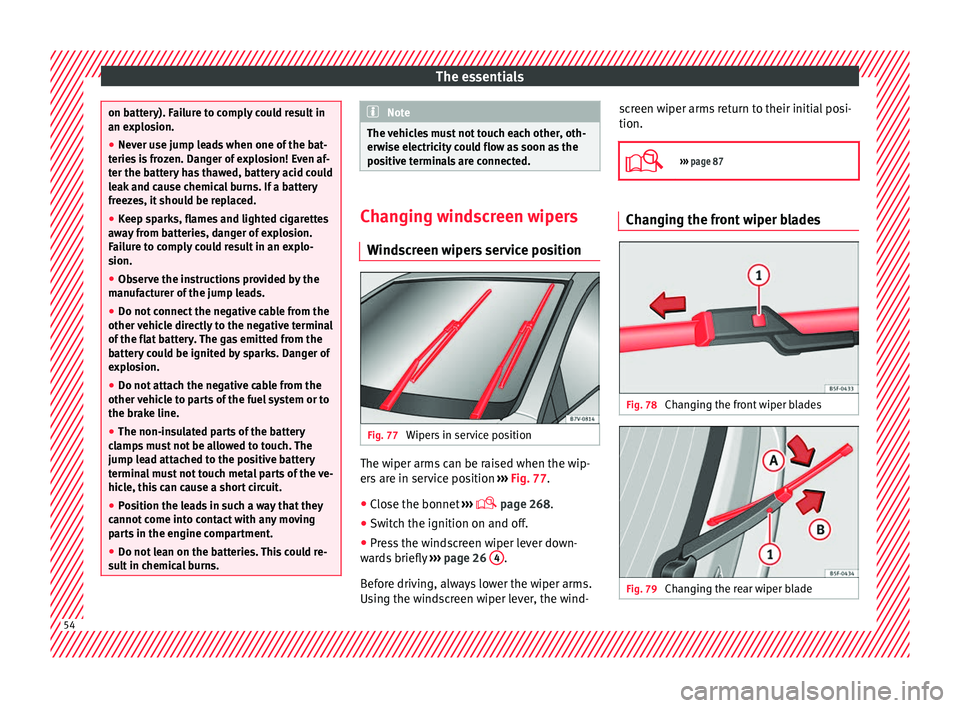
creen wipers service position Fig. 77
Wipers in service position The wiper arms can be raised when the wip-
er
s
ar
e in service position ››› Fig. 77.
● Close the bonnet ›››
page 268.
● Switch the ignition on and off.
● Press the windscreen wiper lever down-
ward
s briefly ››› page 26 4 .
B ef
or
e driving, always lower the wiper arms.
Using the windscreen wiper lever, the wind- screen wiper arms return to their initial posi-
tion.
››› page 87 Changing the front wiper blades
Fig. 78
Changing the front wiper blades Fig. 79
Changing the rear wiper blade54
Page 72 of 320
Safety
The airbag system operation is monitored
el ectr
onic
ally. The airbag control lamp will il-
luminate for a few seconds every time the ig-
nition is switched on (self-diagnosis).
There is a fault in the system if the control
lamp :
● does not light up when the ignition is
switc
hed on,
● turns off after 4 seconds after the ignition
is sw
itched on
● turns off and then lights up again after the
ignition is sw
itched on
● illuminates or flashes while the vehicle is
movin
g.
The airbag system is not triggered if:
● the ignition is switched off
● there is a minor frontal collision
● there is a minor side collision
● there is a rear-end collision
● the vehicle turns over. WARNING
● The seat belt
s and airbags can only provide
maximum protection if the occupants are
seated correctly ››› page 57.
● If a fault has occurred in the airbag system,
have the sy
stem checked immediately by a
specialised workshop. Otherwise there is a danger that during a collision, the system
ma
y
fail to trigger, or not trigger correctly. Airbag activation
The airbags deploy extremely rapidly, within
thous
andths
of a second, to provide addi-
tional protection in the event of an accident.
The airbag system is only ready to function
when the ignition is on.
In special accidents instances, several air-
bags may activate at the same time.
In the event of minor head-on and side colli-
sions, rear-end collisions, overturning or roll-
over of the vehicle, airbags do not activate.
Activation factors
The conditions that lead to the airbag system
activating in each situation cannot be gener-
alised. Some factors play an important role,
such as the properties of the object the vehi-
cle hits (hard/soft), angle of impact, vehicle
speed, etc.
Deceleration trajectory is key for airbag acti-
vation.
The control unit analyses the collision trajec-
tory and activates the respective restraint
system.
If the deceleration rate is below the prede-
fined reference value in the control unit the airbags will not be triggered, even though
the acc
ident
may cause extensive damage to
the car.
The following airbags are triggered in seri-
ous head-on collisions
● Driver airbag.
● Front passenger front airbag
● Knee airbag for the driver.
The fol
lowing airbags are triggered in seri-
ous side-on collisions
● Front side airbag on the side of the acci-
dent.
● Re
ar side airbag on the side of the acci-
dent.
● Cur
tain (head) airbag on the side of the ac-
cident.
In an ac
cident with airbag activation:
● the interior lights switch on (if the interior
light swit
ch is in the courtesy light position);
● the hazard warning lights switch on;
● all doors are unlocked;
● the fuel supply to the engine is cut.
70
Page 89 of 320

Self-help
Changing the windscreen wiper
b l
a
des
Changing the windscreen and rear
window wiper blades Read the additional information carefully
›› ›
page 54.
The windscreen wiper blades are supplied as
standard with a layer of graphite. This layer is
responsible for ensuring that the wipe is si-
lent. If the graphite layer is damaged, the
noise of the water as it is wiped across the
windscreen will be louder.
Check the condition of the wiper blades regu-
larly. If the wipers scrape across the glass
they should be changed if they are damaged,
or cleaned if they are dirty ››› .
Dam ag
ed w
iper blades should be replaced
immediately. These are available from quali-
fied workshops. WARNING
Worn or dirty wiper blades reduce visibility
and incr e
ase the risk of accident and serious
injury.
● Always replace damaged or worn blades or
bla
des which do not clean the windscreen
correctly. CAUTION
● Damag ed or dir
ty windscreen wipers could
scratch the glass.
● If products containing solvents, rough
spong
es or sharp objects are used to clean
the blades, the graphite layer will be dam-
aged.
● Never use fuel, nail varnish remover, paint
thinner or simil
ar products to clean the win-
dows.
● In icy conditions, always check that the
wiper bl
ades are not frozen to the glass be-
fore using the wipers. In cold weather, it may
help to leave the vehicle parked with the wip-
ers in service position ›››
page 54.
● To prevent damage to the bonnet and the
wiper arms, only
leave them in the service
position.
● Before driving, always lower the wiper
arms. Tow-starting and towing
Intr oduction Read the additional information carefully
› ›
›
page 50
When towing, always respect legal require-
ments.
For technical reasons, it is not possible to
tow a vehicle if the battery is flat. If the vehicle comes with the Keyless Access
syst
em, towing is only allowed with the igni-
tion on!
The vehicle battery drains if the vehicle is
towed with the engine switched off and the
ignition connected. Depending on the battery
charge status, the drop in voltage may be so
large, even after just a few minutes, that no
electrical device in the vehicle may work e.g.
the hazard warning lights. In vehicles with
the Keyless Access system, the steering
wheel could lock ››› .
WARNING
A vehicle with a flat battery should never be
to w
ed.
● Never remove the key from the ignition
lock. Otherw
ise, the steering wheel lock
could suddenly lock. The vehicle would not
be controlled and a serious accident could
ensue. WARNING
When towing the vehicle, the handling and
brak in
g efficiency change considerably.
Please observe the following instructions to
minimise the risk of serious accidents and in-
jury:
● As the driver of the vehicle being towed:
– The brake mu
st be depressed must hard-
er as the brake servo does not operate. » 87
Technical data
Advice
Operation
Emergencies
Safety
Page 90 of 320
Emergencies
Always remain aware to avoid collision
with the t
o
wing vehicle.
– More strength is required at the steering
wheel as the power steering does not op-
erate when the engine is switched off.
● As the driver of the towing vehicle:
– Acc
elerate gently and carefully.
– Avoid sudden braking and manoeuvres.
– Brake well in advance than usual and
brake gently. CAUTION
● Car ef
ully fit and remove the towline anchor-
age and its cover to avoid damage to the ve-
hicle (e.g. paintwork).
● When towing, fuel could enter the catalytic
conv
erter and cause damage! Note
● The v ehic
le can only be towed if the elec-
tronic parking brake and steering lock are de-
activated. If the vehicle has no power supply
or there is an electric system fault, the en-
gine must be started using jump leads to de-
activate the electronic parking brake and
electronic steering lock.
● Vehicles with the Keyless Access locking
and ignition syst
em should only be towed
with the ignition connected since, otherwise,
the electronic steering lock will not unlock. Fitting the front towline anchorage
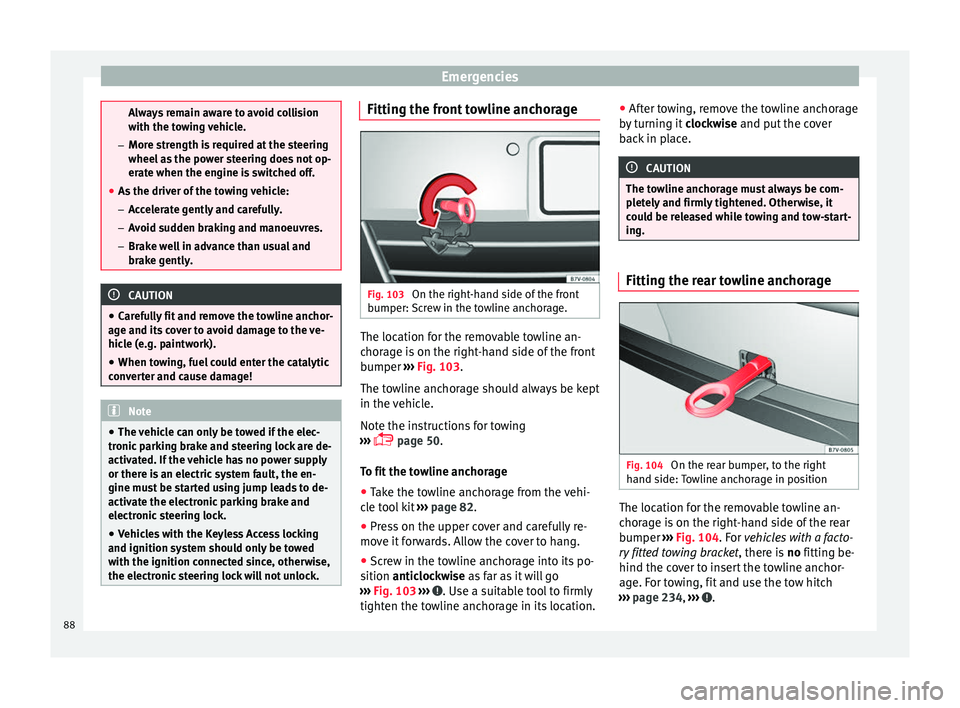
Fig. 103
On the right-hand side of the front
b umper:
Sc
rew in the towline anchorage. The location for the removable towline an-
c
hor
ag
e is on the right-hand side of the front
bumper ››› Fig. 103.
The towline anchorage should always be kept
in the vehicle.
Note the instructions for towing
››› page 50.
To fit the towline anchorage
● Take the towline anchorage from the vehi-
cle t
ool kit ››› page 82.
● Press on the upper cover and carefully re-
move it
forwards. Allow the cover to hang.
● Screw in the towline anchorage into its po-
sition antic
lockwise as far as it will go
››› Fig. 103 ››› . Use a suitable tool to firmly
tight en the t o
wline anchorage in its location. ●
After t
owing, remove the towline anchorage
by turning it clockwise and put the cover
back in place. CAUTION
The towline anchorage must always be com-
pl et
ely and firmly tightened. Otherwise, it
could be released while towing and tow-start-
ing. Fitting the rear towline anchorage
Fig. 104
On the rear bumper, to the right
h and s ide:
Towline anchorage in position The location for the removable towline an-
c
hor
ag
e is on the right-hand side of the rear
bumper ››› Fig. 104. For vehicles with a facto-
ry fitted towing bracket , there is no fitting be-
hind the cover to insert the towline anchor-
age. For towing, fit and use the tow hitch
››› page 234, ››› .
88
Page 103 of 320

General instrument panel
– To c
ontinue settin
g, press 0.0 / SET ›››
Fig. 118 7 . Hold button down to
s c
r
oll through the numbers quickly.
– Press button again to end the clock
settin g.
R ev
counter (with the engine running, in
thousands of revolutions per minute).
Together with the gear-change indicator,
the rev counter offers you the possibility
of using the engine of your vehicle at a
suitable speed. The start of the red area
››› Fig. 118 indicates the maximum en-
gine speed working at operating temper-
ature. However, it is advisable to change
up a gear or move the selector lever to D
(or lift your foot off the accelerator) before
the needle reaches the red zone ››› . We
r ec
ommend th
at you avoid high revs and
that you follow the recommendations on
the gear-change indicator. Consult the
additional information in ››› page 196.
Engine coolant temperature display
››› page 274.
Displays on the screen ››› page 101.
Fuel reserve display ››› page 261.
Speedometer.
Reset knob for trip recorder (trip ).
2
3
4
5
6
7 –
Pr e
s
s button 0.0 / SET to reset to zero.
WARNING
Any distraction may lead to an accident, with
the risk of
injury.
● Do not operate the instrument panel con-
trol
s when driving. CAUTION
To prevent damage to the engine, the rev
cou nt
er needle should only remain in the red
zone for a short period of time. For the sake of the environment
Changing up a gear in time reduces fuel con-
sumption and noi se. Indications on the display
A variety of information can be viewed on the
in
s
trument
panel display ›››
Fig. 118 4 , de-
pendin g on the
v
ehicle equipment:
● Warning and information text.
● Mileage.
● Time. ●
Outside temper
ature.
● Compass.
● Selector lever positions ›››
page 192.
● Recommended gear (manual gearbox)
›››
page 192.
● Multifunction display (MFD) and menus for
different
setting options ›››
page 26.
● Service interval display ›››
page 103 .
● Second speed display (menu Configura-
tion ) ›››
page 26.
● Start-Stop operation indicator ›››
page 102.
Warning and information texts
The system runs a check on certain compo-
nents and functions when the ignition is
switched on and while the vehicle is moving.
Faults in the operation are displayed on the
screen using red and yellow symbols and
messages on the instrument panel display
( ››› page 105) and, in some cases, with audi-
ble warnings. The display may vary according
to the type of instrument panel fitted. »1)
Depending on the vehicle equipment, it is also
pos s
ible to set the time using the settings menu
on the instrument panel display ›››
page 30.
101
Technical data
Advice
Operation
Emergencies
Safety