technical data Seat Alhambra 2018 Owner's Guide
[x] Cancel search | Manufacturer: SEAT, Model Year: 2018, Model line: Alhambra, Model: Seat Alhambra 2018Pages: 324, PDF Size: 7.04 MB
Page 93 of 324
Fuses and bulbs
WARNING
Opening and closing doors carelessly can
cau se seriou
s injury.
● If the vehicle is locked from outside, the
doors and w
indows cannot be opened from
the inside.
● Never leave children or disabled people
alone in the car
. They could be trapped in the
car in an emergency and will not be able to
get themselves to safety.
● Depending on the time of the year, temper-
ature
s inside a locked and closed vehicle can
be extremely high or extremely low resulting
in serious injuries and illness or even death,
particularly for young children. WARNING
Getting in the way of the doors and the pan-
oramic s
liding sunroof is dangerous and can
lead to serious injury.
● Open and close the doors and the panor-
amic slidin
g sunroof only when nobody is in
the way. CAUTION
When opening and closing in an emergency,
car ef
ully disassemble components and then
reassemble them carefully to avoid damage
to the vehicle. Fuses and bulbs
F u
se
s
Vehicle fuses Read the additional information carefully
›› ›
page 43
Due to the constant updating of vehicles,
fuse assignments based on equipment and
the use of the same fuse for various electrical
components, it is not possible to provide an
up-to-date summary of the fuse positions for
the electrical components at the time of
printing this manual. For detailed information
about the fuse positions, please consult a
technical service.
In general, a fuse can be assigned to various
electrical components. Likewise, an electrical
component can be protected by several
fuses.
Only replace fuses when the cause of the
problem has been solved. If a newly inserted
fuse blows after a short time, you must have
the electrical system checked by a special-
ised workshop as soon as possible. WARNING
The high voltages in the electrical system can
give seriou s
electrical shocks, causing burns
and even death! ●
Never t ouc
h the electrical wiring of the igni-
tion system.
● Take care not to cause short circuits in the
electrica
l system. WARNING
Using unsuitable fuses, repairing fuses or
bridgin g a curr
ent circuit without fuses can
cause a fire and serious injury.
● Never use a fuse with a higher value. Only
repl
ace fuses with a fuse of the same amper-
age (same colour and markings) and size.
● Never repair a fuse.
● Never replace a fuse by a metal strip, staple
or simil
ar. CAUTION
● To pr ev
ent damage to the vehicle's electric
system, before replacing a fuse always turn
off the ignition, the lights and all electrical
elements and remove the key from the igni-
tion.
● If you replace a fuse with higher-rating
fuse,
you could cause damage to another part
of the electrical system.
● Protect the fuse boxes when open to pre-
vent the entr
y of dust or humidity as they can
damage the electrical system.
● Always carefully remove the fuse box cov-
ers and r
efit them correctly to avoid problems
with your vehicle. » 91
Technical data
Advice
Operation
Emergencies
Safety
Page 95 of 324
Fuses and bulbs
Several warning and control lamps light up
f or a f
ew sec
onds when the ignition is switch-
ed on, signalling that the function is being
verified. They will switch off after a few sec-
onds.
Checking the bulbs of a trailer
For vehicles with the factory fitted towing
bracket, certain trailer lights are also control-
led if the power socket is correctly connected.
A fault on a trailer turn signal is indicated on
the instrument panel by the turn signal blink-
ing twice as fast ( or ) ››› page 130.
● General fault of all turn signals on one side.
● Fault in one rear light (on some models, al-
so the regi
stration light).
● Fault in two brake lights. WARNING
Observe the safety warnings ›››
in Control
and warnin g l
amps on page 107. Note
A fault in the LED on the rear lights will not be
indicat ed. Ho
wever, if the fault affects all the
LEDs then this will be indicated by the control
lamp . To replace halogen headlight bulbs
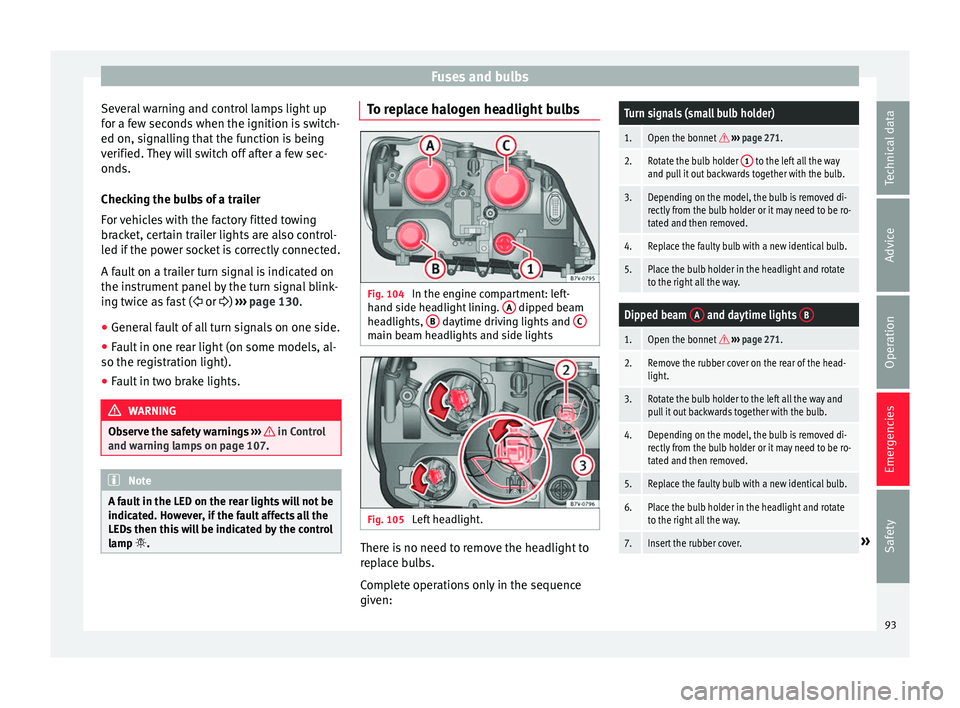
Fig. 104
In the engine compartment: left-
h and s
ide he
adlight lining. A dipped beam
he a
dlights, B daytime driving lights and
C main beam headlights and side lights
Fig. 105
Left headlight. There is no need to remove the headlight to
r
ep
l
ace bulbs.
Complete operations only in the sequence
given:
Turn signals (small bulb holder)
1.Open the bonnet ››› page 271.
2.Rotate the bulb holder 1 to the left all the way
and pull it out backwards together with the bulb.
3.Depending on the model, the bulb is removed di-
rectly from the bulb holder or it may need to be ro-
tated and then removed.
4.Replace the faulty bulb with a new identical bulb.
5.Place the bulb holder in the headlight and rotate
to the right all the way.
Dipped beam A and daytime lights B
1.Open the bonnet
››› page 271.
2.Remove the rubber cover on the rear of the head-
light.
3.Rotate the bulb holder to the left all the way and
pull it out backwards together with the bulb.
4.Depending on the model, the bulb is removed di-
rectly from the bulb holder or it may need to be ro-
tated and then removed.
5.Replace the faulty bulb with a new identical bulb.
6.Place the bulb holder in the headlight and rotate
to the right all the way.
7.Insert the rubber cover.» 93
Technical data
Advice
Operation
Emergencies
Safety
Page 97 of 324
Fuses and bulbs
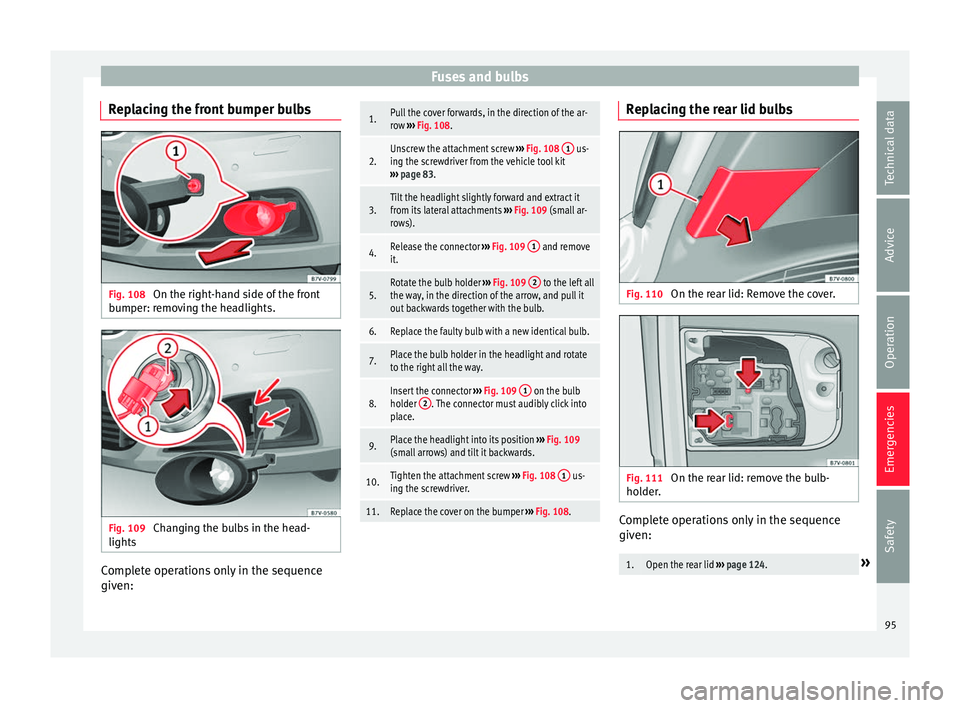
Replacing the front bumper bulbs Fig. 108
On the right-hand side of the front
b umper: r
emo
ving the headlights. Fig. 109
Changing the bulbs in the head-
lights Complete operations only in the sequence
giv
en:
1.Pull the cover forwards, in the direction of the ar-
row
››› Fig. 108.
2.Unscrew the attachment screw ››› Fig. 108 1 us-
ing the screwdriver from the vehicle tool kit
››› page 83.
3.Tilt the headlight slightly forward and extract it
from its lateral attachments ››› Fig. 109 (small ar-
rows).
4.Release the connector ››› Fig. 109 1 and remove
it.
5.Rotate the bulb holder ››› Fig. 109 2 to the left all
the way, in the direction of the arrow, and pull it
out backwards together with the bulb.
6.Replace the faulty bulb with a new identical bulb.
7.Place the bulb holder in the headlight and rotate
to the right all the way.
8.Insert the connector ››› Fig. 109 1 on the bulb
holder 2. The connector must audibly click into
place.
9.Place the headlight into its position ››› Fig. 109
(small arrows) and tilt it backwards.
10.Tighten the attachment screw ››› Fig. 108 1 us-
ing the screwdriver.
11.Replace the cover on the bumper ››› Fig. 108. Replacing the rear lid bulbs
Fig. 110
On the rear lid: Remove the cover. Fig. 111
On the rear lid: remove the bulb-
ho l
der
. Complete operations only in the sequence
giv
en:
1.Open the rear lid
››› page 124.» 95
Technical data
Advice
Operation
Emergencies
Safety
Page 99 of 324
Fuses and bulbs Rear light, leftRear light, right
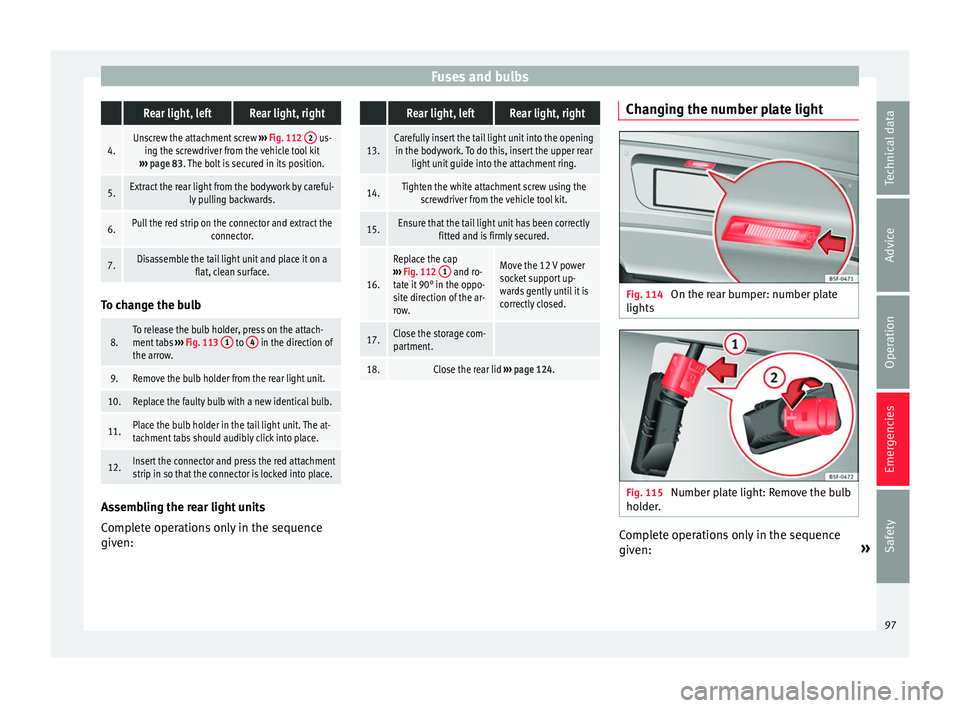
4.Unscrew the attachment screw
››› Fig. 112 2 us-
ing the screwdriver from the vehicle tool kit
››› page 83. The bolt is secured in its position.
5.Extract the rear light from the bodywork by careful-
ly pulling backwards.
6.Pull the red strip on the connector and extract the connector.
7.Disassemble the tail light unit and place it on aflat, clean surface.To change the bulb
8.To release the bulb holder, press on the attach-
ment tabs
››› Fig. 113 1 to 4 in the direction of
the arrow.
9.Remove the bulb holder from the rear light unit.
10.Replace the faulty bulb with a new identical bulb.
11.Place the bulb holder in the tail light unit. The at-
tachment tabs should audibly click into place.
12.Insert the connector and press the red attachment
strip in so that the connector is locked into place. Assembling the rear light units
C
omp
l
ete operations only in the sequence
given:
Rear light, leftRear light, right
13.Carefully insert the tail light unit into the opening in the bodywork. To do this, insert the upper rear light unit guide into the attachment ring.
14.Tighten the white attachment screw using the screwdriver from the vehicle tool kit.
15.Ensure that the tail light unit has been correctly fitted and is firmly secured.
16.
Replace the cap
››› Fig. 112 1 and ro-
tate it 90° in the oppo-
site direction of the ar-
row.Move the 12 V power
socket support up-
wards gently until it is
correctly closed.
17.Close the storage com-
partment.
18.Close the rear lid ››› page 124. Changing the number plate light
Fig. 114
On the rear bumper: number plate
lights Fig. 115
Number plate light: Remove the bulb
ho l
der
. Complete operations only in the sequence
giv
en: »
97
Technical data
Advice
Operation
Emergencies
Safety
Page 103 of 324
General instrument panel
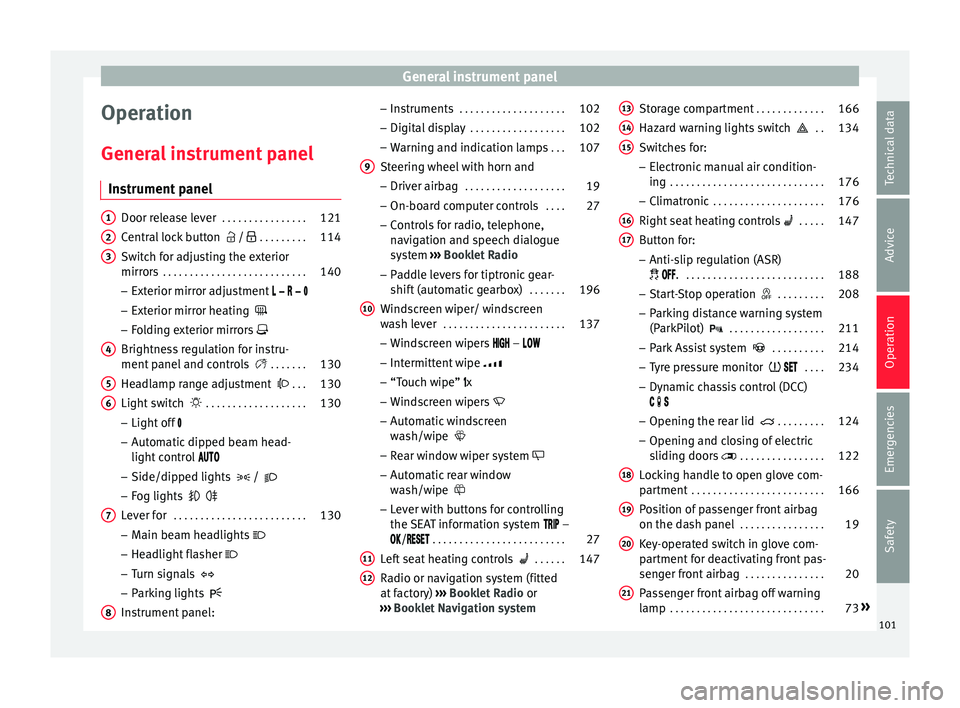
Operation
Gener a
l
instrument panel
Instrument panel Door release lever
. . . . . . . . . . . . . . . . 121
Central lock button / . . . . . . . . . 114
Switch for adjusting the exterior
mirror s . . . . . . . . . . . . . . . . . . . . . . . . . . . 140
– Exterior mirr or a
djustment
– Exterior mirror heating
– Folding exterior mirrors
Brightness regulation for instru-
ment panel and controls . . . . . . .130
Headlamp range adjustment . . .130
Light switch . . . . . . . . . . . . . . . . . . . 130
– Light off
– Aut
omatic dipped beam head-
light control
– Side/dipped lights /
– Fog lights
Lever for . . . . . . . . . . . . . . . . . . . . . . . . . 130
– Main beam he
adlights
– Headlight flasher
– Turn signals
– Parking lights
Instrument panel:
1 2
3
4
5
6
7
8 –
Ins
truments . . . . . . . . . . . . . . . . . . . . 102
– Digit
al di
splay . . . . . . . . . . . . . . . . . . 102
– Warning and indic
ation lamps . . .107
Steering wheel with horn and – Driver airbag . . . . . . . . . . . . . . . . . . . 19
– On-bo
ard c
omputer controls . . . .27
– Contro
ls for radio, telephone,
navigation and speech dialogue
system ››› Booklet Radio
– Paddle levers for tiptronic gear-
shift (automatic gearbox) . . . . . . .196
Windscreen wiper/ windscreen
wash l
ever . . . . . . . . . . . . . . . . . . . . . . . 137
– Wind s
creen wipers –
– Intermittent wipe
– “Touch wipe” x
– Windscreen wipers
– Automatic windscreen
wash/wipe
– Rear window wiper system
– Automatic rear window
wash/wipe
– Lever with buttons for controlling
the SEAT information system –
/ . . . . . . . . . . . . . . . . . . . . . . . . . 27
Left seat heating controls . . . . . .147
Radio or navigation system (fitted
at fact
ory) ››› Booklet Radio or
››› Booklet Navigation system
9
10
11
12 Storage compartment
. . . . . . . . . . . . .166
Hazard warning lights switch . .134
Switches for: – Electr
onic
manual air condition-
ing . . . . . . . . . . . . . . . . . . . . . . . . . . . . . 176
– Climatr
onic . . . . . . . . . . . . . . . . . . . . . 176
Right seat heating controls . . . . . 147
Button for:
– Anti-slip r
egulation (ASR)
. . . . . . . . . . . . . . . . . . . . . . . . . . . 188
– Star t
-Stop operation . . . . . . . . .208
– Parkin
g distance warning system
(ParkPilot) . . . . . . . . . . . . . . . . . . 211
– Park As
sist system . . . . . . . . . .214
– Tyr
e pressure monitor . . . .234
– Dyn
amic chassis control (DCC)
– Opening the rear lid . . . . . . . . .124
– Opening and clo
sing of electric
sliding doors . . . . . . . . . . . . . . . . 122
Locking handle to open glove com-
par tment . . . . . . . . . . . . . . . . . . . . . . . . . 166
P
osition of passenger front airbag
on the dash p
anel . . . . . . . . . . . . . . . . 19
Key-operated switch in glove com-
partment
for deactivating front pas-
senger front airbag . . . . . . . . . . . . . . .20
Passenger front airbag off warning
lamp . . . . . . . . . . . . . . . . . . . . . . . . . . . . . 73»
13 14
15
16
17
18
19
20
21
101
Technical data
Advice
Operation
Emergencies
Safety
Page 105 of 324
General instrument panel
– To c
ontinue settin
g, press 0.0 / SET ›››
Fig. 117 7 . Hold button down to
s c
r
oll through the numbers quickly.
– Press the button again to end the
clock setting.
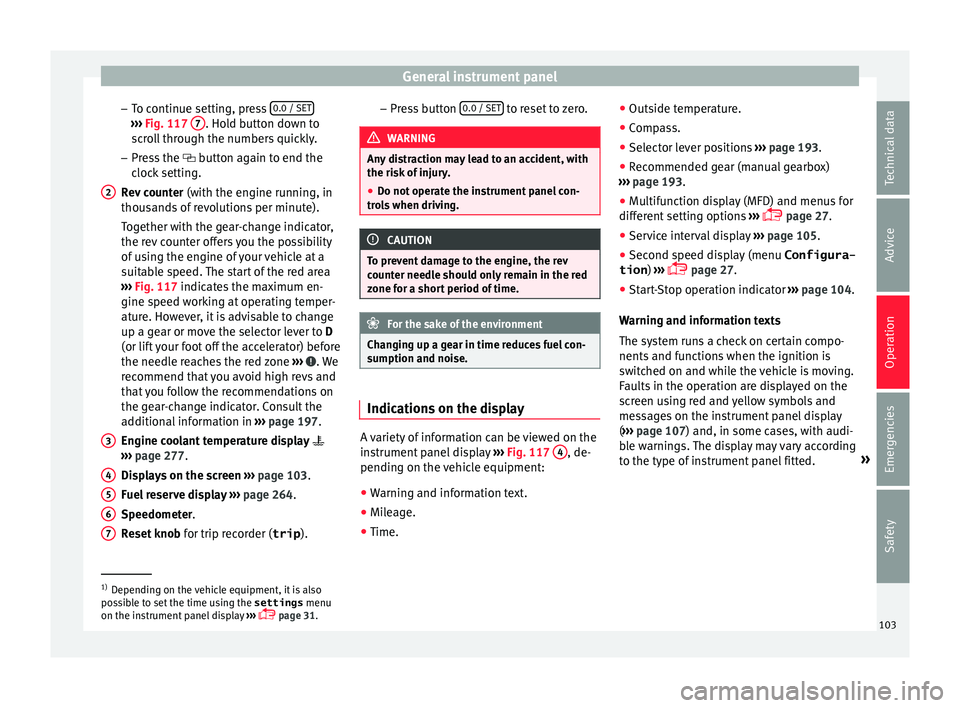
Rev counter (with the engine running, in
thousands of revolutions per minute).
Together with the gear-change indicator,
the rev counter offers you the possibility
of using the engine of your vehicle at a
suitable speed. The start of the red area
››› Fig. 117 indicates the maximum en-
gine speed working at operating temper-
ature. However, it is advisable to change
up a gear or move the selector lever to D
(or lift your foot off the accelerator) before
the needle reaches the red zone ››› . We
r ec
ommend th
at you avoid high revs and
that you follow the recommendations on
the gear-change indicator. Consult the
additional information in ››› page 197.
Engine coolant temperature display
››› page 277.
Displays on the screen ››› page 103.
Fuel reserve display ››› page 264.
Speedometer.
Reset knob for trip recorder (trip ).
2
3
4
5
6
7 –
Pr e
s
s button 0.0 / SET to reset to zero.
WARNING
Any distraction may lead to an accident, with
the risk of
injury.
● Do not operate the instrument panel con-
trol
s when driving. CAUTION
To prevent damage to the engine, the rev
cou nt
er needle should only remain in the red
zone for a short period of time. For the sake of the environment
Changing up a gear in time reduces fuel con-
sumption and noi se. Indications on the display
A variety of information can be viewed on the
in
s
trument
panel display ›››
Fig. 117 4 , de-
pendin g on the
v
ehicle equipment:
● Warning and information text.
● Mileage.
● Time. ●
Outside temper
ature.
● Compass.
● Selector lever positions ›››
page 193.
● Recommended gear (manual gearbox)
›››
page 193.
● Multifunction display (MFD) and menus for
different
setting options ›››
page 27.
● Service interval display ›››
page 105 .
● Second speed display (menu Configura-
tion ) ›››
page 27.
● Start-Stop operation indicator ›››
page 104.
Warning and information texts
The system runs a check on certain compo-
nents and functions when the ignition is
switched on and while the vehicle is moving.
Faults in the operation are displayed on the
screen using red and yellow symbols and
messages on the instrument panel display
( ››› page 107) and, in some cases, with audi-
ble warnings. The display may vary according
to the type of instrument panel fitted. »1)
Depending on the vehicle equipment, it is also
pos s
ible to set the time using the settings menu
on the instrument panel display ›››
page 31.
103
Technical data
Advice
Operation
Emergencies
Safety
Page 107 of 324
General instrument panel
WARNING
Even though outside temperatures are above
freez in
g, some roads and bridges may be icy.
● At outside temperatures above +4°C
(+39°F), even when the “ice c
rystal” symbol
is not visible, there may still be patches of ice
on the road.
● Do not rely on the outside temperature in-
dicator! Note
● Differ ent
versions of the instrument panel
are available and therefore the versions and
instructions on the display may vary. In the
case of displays without warning or informa-
tion texts, faults are indicated exclusively by
the warning lamps.
● When several warnings are active at the
same time, the symbol
s are shown succes-
sively for a few seconds and will stay on until
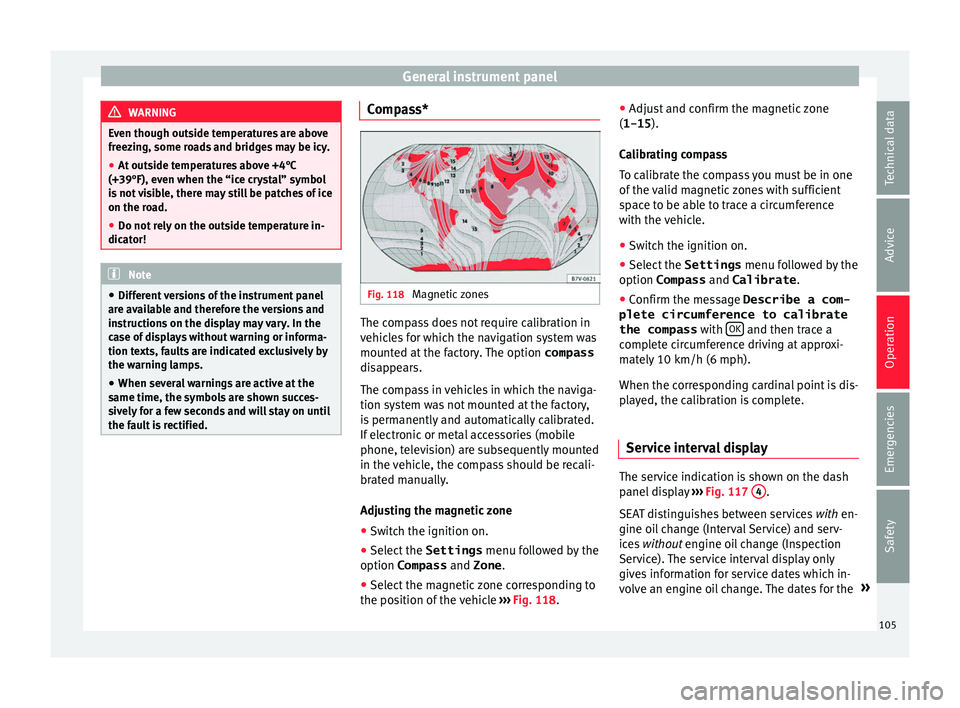
the fault is rectified. Compass*
Fig. 118
Magnetic zones The compass does not require calibration in
v
ehic
l
es for which the navigation system was
mounted at the factory. The option compass
disappears.
The compass in vehicles in which the naviga-
tion system was not mounted at the factory,
is permanently and automatically calibrated.
If electronic or metal accessories (mobile
phone, television) are subsequently mounted
in the vehicle, the compass should be recali-
brated manually.
Adjusting the magnetic zone
● Switch the ignition on.
● Select the Settings menu fol
lowed by the
option Compass and Zone.
● Select the magnetic zone corresponding to
the position of
the vehicle ››› Fig. 118. ●
Adjust
and confirm the magnetic zone
(1-15 ).
Calibrating compass
To calibrate the compass you must be in one
of the valid magnetic zones with sufficient
space to be able to trace a circumference
with the vehicle.
● Switch the ignition on.
● Select the Settings menu fol
lowed by the
option Compass and Calibrate .
● Confirm the message Describe a com-
plete circumference to calibrate
the compass with OK and then trace a
c omp
l
ete circumference driving at approxi-
mately 10 km/h (6 mph).
When the corresponding cardinal point is dis-
played, the calibration is complete.
Service interval display The service indication is shown on the dash
p
anel
di
splay ›››
Fig. 117 4 .
S EA
T di
stinguishes between services with en-
gine oil change (Interval Service) and serv-
ices without engine oil change (Inspection
Service). The service interval display only
gives information for service dates which in-
volve an engine oil change. The dates for the »
105
Technical data
Advice
Operation
Emergencies
Safety
Page 109 of 324
General instrument panel
reason we recommend that the service inter-
v al
di
splay be reset by a SEAT authorised
service ››› Booklet Maintenance schedule. Note
● The serv ic
e message disappears after a few
seconds, when the engine is started or when OK is pressed.
● In vehicles with the LongLife system in
which the b att
ery has been disconnected for
a long period of time, it is not possible to cal-
culate the date of the next service. Therefore
the service interval display may not be cor-
rect. In this case, bear in mind the maximum
service intervals permitted in the ››› Booklet
Maintenance Programme. Control lamps
C ontr
o
l and warning lamps Read the additional information carefully
› ›
›
page 34
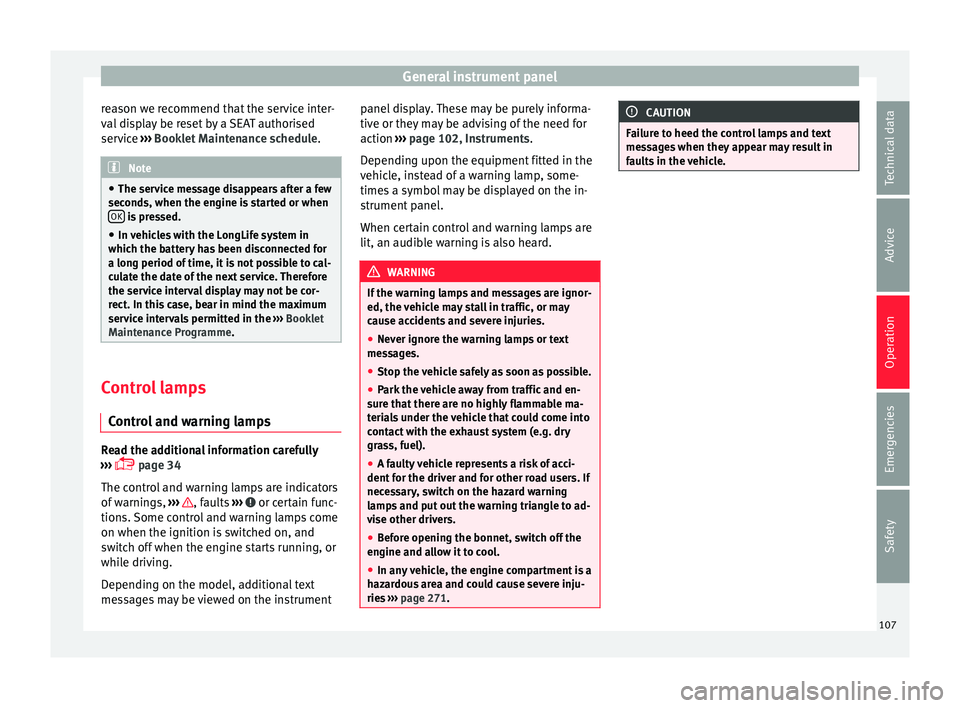
The control and warning lamps are indicators
of warnings, ››› , faults
››
›
or certain func-
tion s.
Some c
ontrol and warning lamps come
on when the ignition is switched on, and
switch off when the engine starts running, or
while driving.
Depending on the model, additional text
messages may be viewed on the instrument panel display. These may be purely informa-
tive or they m
ay be advising of the need for
action ››› page 102, Instruments.
Depending upon the equipment fitted in the
vehicle, instead of a warning lamp, some-
times a symbol may be displayed on the in-
strument panel.
When certain control and warning lamps are
lit, an audible warning is also heard. WARNING
If the warning lamps and messages are ignor-
ed, the v ehic
le may stall in traffic, or may
cause accidents and severe injuries.
● Never ignore the warning lamps or text
mess
ages.
● Stop the vehicle safely as soon as possible.
● Park the vehicle away from traffic and en-
sure th
at there are no highly flammable ma-
terials under the vehicle that could come into
contact with the exhaust system (e.g. dry
grass, fuel).
● A faulty vehicle represents a risk of acci-
dent for the driv
er and for other road users. If
necessary, switch on the hazard warning
lamps and put out the warning triangle to ad-
vise other drivers.
● Before opening the bonnet, switch off the
engine and al
low it to cool.
● In any vehicle, the engine compartment is a
hazar
dous area and could cause severe inju-
ries ››› page 271. CAUTION
Failure to heed the control lamps and text
mes s
ages when they appear may result in
faults in the vehicle. 107
Technical data
Advice
Operation
Emergencies
Safety
Page 111 of 324
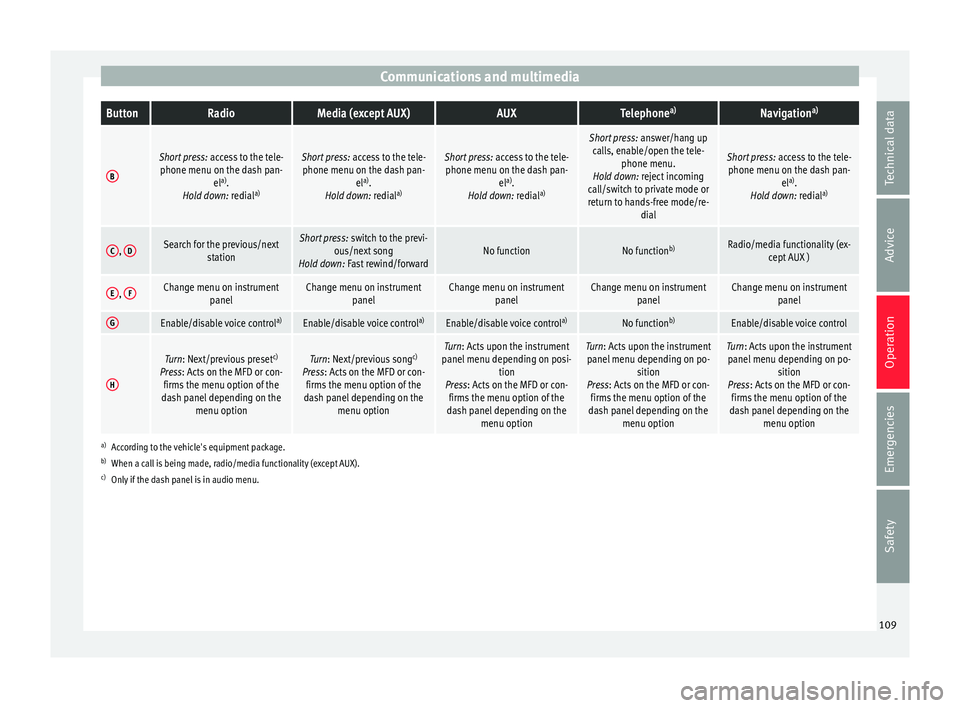
Communications and multimediaButtonRadioMedia (except AUX)AUXTelephone
a)Navigation a)
B
Short press:
access to the tele-
phone menu on the dash pan- ela)
.
Hold down: redial a)Short press:
access to the tele-
phone menu on the dash pan- ela)
.
Hold down: redial a)Short press:
access to the tele-
phone menu on the dash pan- ela)
.
Hold down: redial a)
Short press:
answer/hang up
calls, enable/open the tele- phone menu.
Hold down: reject incoming
call/switch to private mode or
return to hands-free mode/re- dial
Short press: access to the tele-
phone menu on the dash pan- ela)
.
Hold down: redial a)
C,
DSearch for the previous/next
stationShort press: switch to the previ-
ous/next song
Hold down: Fast rewind/forwardNo functionNo function b)Radio/media functionality (ex-
cept AUX )
E, FChange menu on instrument
panelChange menu on instrumentpanelChange menu on instrumentpanelChange menu on instrumentpanelChange menu on instrumentpanel
GEnable/disable voice control a)Enable/disable voice controla)Enable/disable voice controla)No functionb)Enable/disable voice control
H
Turn: Next/previous preset c)
Press: Acts on the MFD or con- firms the menu option of the
dash panel depending on the menu optionTurn: Next/previous song c)
Press: Acts on the MFD or con- firms the menu option of the
dash panel depending on the menu optionTurn: Acts upon the instrument
panel menu depending on posi- tion
Press: Acts on the MFD or con- firms the menu option of the
dash panel depending on the menu optionTurn: Acts upon the instrumentpanel menu depending on po- sition
Press: Acts on the MFD or con- firms the menu option of the
dash panel depending on the menu optionTurn: Acts upon the instrumentpanel menu depending on po- sition
Press: Acts on the MFD or con- firms the menu option of the
dash panel depending on the menu option
a)According to the vehicle's equipment package.
b) When a call is being made, radio/media functionality (except AUX).
c) Only if the dash panel is in audio menu.
109
Technical data
Advice
Operation
Emergencies
Safety
Page 113 of 324
Communications and multimedia
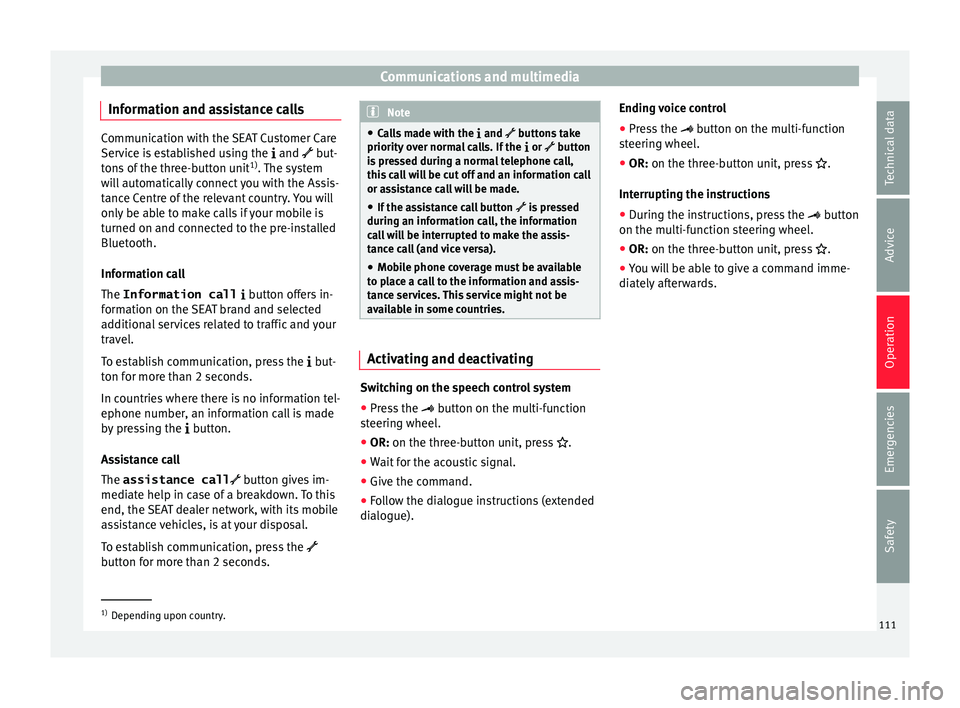
Information and assistance calls Communication with the SEAT Customer Care
Service is established using the
and but-
t
ons of the three-button unit 1)
. The system
will automatically connect you with the Assis-
tance Centre of the relevant country. You will
only be able to make calls if your mobile is
turned on and connected to the pre-installed
Bluetooth.
Information call
The Information call button offers in-
formation on the SEAT brand and selected
additional services related to traffic and your
travel.
To establish communication, press the but-
ton for more than 2 seconds.
In countries where there is no information tel-
ephone number, an information call is made
by pressing the button.
Assistance call
The assistance call button gives im-
mediate help in case of a breakdown. To this
end, the SEAT dealer network, with its mobile
assistance vehicles, is at your disposal.
To establish communication, press the
button for more than 2 seconds. Note
● Calls made with the and buttons take
priority over normal calls. If the or button
i
s pressed during a normal telephone call,
this call will be cut off and an information call
or assistance call will be made.
● If the assistance call button is pressed
during an information call, the information
call will be interrupted to make the assis-
tance call (and vice versa).
● Mobile phone coverage must be available
to place a call to the information and assis-
tance services. This service might not be
available in some countries. Activating and deactivating
Switching on the speech control system
● Press the button on the multi-function
steering wheel.
● OR: on the three-button unit, press
.
● Wait
for the acoustic signal.
● Give the command.
● Follow the dialogue instructions (extended
dialogue). Ending voice control
●
Press the
button on the multi-function
steering wheel.
● OR:
on the three-button unit, press .
Interrupting the instructions
● During the instructions, press the
button
on the multi-function steering wheel.
● OR:
on the three-button unit, press .
● You will be able to give a command imme-
diately afterwards. 1)
Depending upon country.
111
Technical data
Advice
Operation
Emergencies
Safety