change Seat Altea 2007 Owner's Manual
[x] Cancel search | Manufacturer: SEAT, Model Year: 2007, Model line: Altea, Model: Seat Altea 2007Pages: 302, PDF Size: 9.17 MB
Page 3 of 302
ForewordThis owner's manual and the corresponding supplements should be read carefully to familiarise yourself with
your vehicle.
Also, the regular care, maintenance and correct handling of the vehicle will contribute to preserve its value.
For safety reasons, note the information concerni ng accessories, modifications and parts exchange.
If selling the vehicle, give all of the onboard documentat ion to the new owner as this should be kept with the
vehicle.
altea_ingles_0706.book Seite 1 Mittwoch, 30. August 2006 3:48 15
Page 6 of 302
Contents
4Trailer towing . . . . . . . . . . . . . . . . . . . . . . . . . . . .
Driving economically and with respect for the
environment . . . . . . . . . . . . . . . . . . . . . . . . . . . . Cleaning and caring for your vehicle
. . . . . . .
General notes . . . . . . . . . . . . . . . . . . . . . . . . . . .
Care of the vehicle exterior . . . . . . . . . . . . . . . . .
Care of the vehicle interior . . . . . . . . . . . . . . . . .
Accessories, parts replacement and
modifications
. . . . . . . . . . . . . . . . . . . . . . . . . . . .
Accessories and parts . . . . . . . . . . . . . . . . . . . . .
Modifications . . . . . . . . . . . . . . . . . . . . . . . . . . . .
Roof aerial* . . . . . . . . . . . . . . . . . . . . . . . . . . . . .
Mobile telephones and two-way radios . . . . . . .
Fitting a towing bracket* . . . . . . . . . . . . . . . . . . .
Checking and refilling levels
. . . . . . . . . . . . . .
Refuelling . . . . . . . . . . . . . . . . . . . . . . . . . . . . . . .
Petrol . . . . . . . . . . . . . . . . . . . . . . . . . . . . . . . . . .
Diesel . . . . . . . . . . . . . . . . . . . . . . . . . . . . . . . . . .
Working in the engine compartment . . . . . . . . .
Engine oil . . . . . . . . . . . . . . . . . . . . . . . . . . . . . . .
Coolant . . . . . . . . . . . . . . . . . . . . . . . . . . . . . . . . .
Washer fluid and windscreen wiper blades . . . .
Brake fluid . . . . . . . . . . . . . . . . . . . . . . . . . . . . . .
Battery . . . . . . . . . . . . . . . . . . . . . . . . . . . . . . . . .
Wheels . . . . . . . . . . . . . . . . . . . . . . . . . . . . . . . . .
If and when
. . . . . . . . . . . . . . . . . . . . . . . . . . . . . .
Tools, tyre repair kit and spare wheel . . . . . . . .
Wheel change . . . . . . . . . . . . . . . . . . . . . . . . . . .
Tyre repair kit* (Tyre Mobility System) . . . . . . . .
Fuses . . . . . . . . . . . . . . . . . . . . . . . . . . . . . . . . . .
Bulb change . . . . . . . . . . . . . . . . . . . . . . . . . . . . .
Jump-starting . . . . . . . . . . . . . . . . . . . . . . . . . . . .
Towing and tow-starting . . . . . . . . . . . . . . . . . . .
Te c h n i c a l D a t a
. . . . . . . . . . . . . . . . . . . . . . .
General notes on the technical data
. . . . . . .
What you should be aware of . . . . . . . . . . . . . . .
How are the figures measured? . . . . . . . . . . . . .
Towing a trailer . . . . . . . . . . . . . . . . . . . . . . . . . .
Wheels . . . . . . . . . . . . . . . . . . . . . . . . . . . . . . . . .
Techn ical Data
. . . . . . . . . . . . . . . . . . . . . . . . . . . .
Checking fluid levels . . . . . . . . . . . . . . . . . . . . . .
Petrol engine 1.4 litre 63 kW (86 bhp) . . . . . . .
Petrol engine 1.6 litre 75 kW (102 bhp) . . . . . .
Petrol engine 2.0 litre 110 kW (150 hp). Manual
Petrol engine 2.0 litre 110 kW (150 hp).
Automatic . . . . . . . . . . . . . . . . . . . . . . . . . . . . . .
Petrol engine 2.0 litre 147 kW (200 hp). Manual
Petrol engine 2.0 litre 147 kW (200 hp).
Automatic . . . . . . . . . . . . . . . . . . . . . . . . . . . . . .
Diesel engine 1.9 litre TDI 77 kW (105 bhp) . . .
Diesel engine 2.0 litre TDI 100 kW (136 bhp) . .
Diesel engine 2.0 TDI 100 kW (136 bhp).
Automatic . . . . . . . . . . . . . . . . . . . . . . . . . . . . . .
Diesel engine 2.0 litre TDI 103 kW (140 bhp) . .
Diesel engine 2.0 TDI 103 kW (140 bhp).
Automatic . . . . . . . . . . . . . . . . . . . . . . . . . . . . . .
Diesel engine 2.0l 125 kW (170 bhp) . . . . . . . .
Dimensions and capacities . . . . . . . . . . . . . . . .
Index
. . . . . . . . . . . . . . . . . . . . . . . . . . . . . . . . . .
188
190
192
192
193
198
201
201
201
202
202
203
205
205
206
207
208
211
215
218
221
223
225
232
232
234
240
242
249
258
261 267
267
267
269
270
270
272
272
273
274
275
276
278
279
280
282
283
284
285
287
289
291
altea_ingles_0706.book Seite 4 Mittwoch, 30. August 2006 3:48 15
Page 19 of 302
Safe driving17
Safety First
Operating instructions
Tips and Maintenance
Te c h n i c a l D a t a
•
Never lay or fit floor mats or other floor coverings over the original floor
mats. This would reduce the pedal area and could obstruct the pedals. Risk
of accident.
Stowing luggageLoading the luggage compartment
All luggage and other loose object s must be safely secured in
the luggage compartment.Unsecured objects which shift back and forth could impair the
driving safety or driving characteristics of the vehicle by shifting the
centre of gravity.
– Distribute the load evenly in the luggage compartment.
– Lay and stow heavy luggage as far forward as possible in the luggage compartment.
– Stow heavy luggage as low as possible in the luggage compart- ment.
– Secure heavy objects to the fitted fastening rings ⇒page 18.
WARNING
•
Loose luggage and other objects in the luggage compartment can
cause serious injuries.
•
Always stow objects in the luggage compartment and secure them on
the fastening rings.
•
Use suitable specialist straps to secure heavy objects.
•
During sudden manoeuvres or accidents, loose objects can be thrown
forward, injuring vehicle occupants. Th is increased risk of injury will be
further increased if a loose object is struck by an inflating airbag. If this
happens, objects can be transformed into “missiles”. Risk of fatal injury.
•
Please note that the centre of gravity may shift when transporting
heavy objects; this may affect the vehicle's handling and lead to an acci-
dent. Therefore, it is essential to adjust your speed and driving style
accordingly, to avoid accidents.
•
Never exceed the allowed axle loads or allowed maximum weight. If the
allowed axle load or the allowed total weight is exceeded, the driving char-
acteristics of the vehicle may change, leading to accidents, injuries and
damage to the vehicle.
•
Never leave your vehicle unattended, especially when the tailgate is
open. Children could climb into the luggage compartment closing the door
behind them; they will remain trapped without help and there is a mortal
risk.
•
Never allow children to play in or around the vehicle. Close and lock
both the tailgate and all the doors when you leave the vehicle. Before you
lock the vehicle, make sure that ther e are no adults or children in the
vehicle.
•
Never transport passengers in the luggage compartment. Every
passenger must be properly belted in ⇒ page 19.Note
•
Air circulation in the vehicle helps reduce fogging of the windows. Used
air escapes through ventilation slits in the side trim of the luggage compart-
ment. Ensure that the ventil ation slits are never covered.
WARNING (continued)
WARNING (continued)
altea_ingles_0706.book Seite 17 Mittwoch, 30. August 2006 3:48 15
Page 60 of 302
Cockpit
58display
4). Stop the car and switch off the engine. Check the coolant level
⇒ page 215 ⇒ .
Even if the coolant level is correct do not continue driving. You should obtain
technical assistance.WARNING
When working in the engine compartment, always bear in mind the safety
warnings ⇒ page 208.
Caution
Accessories in front of the air inlet reduce the cooling effect of the coolant. At
high outside temperatures and high engine loads, there is a risk of the
engine overheating.Rev counter
The rev. counter displays the engine speed in revolutions per
minute.The start of the red zone on the dial ⇒page 56, fig. 33 indicates the
maximum engine speed which may be used briefly when the engine is warm
and after it has been run-in properly. Ho wever, it is advisable to change up a
gear or move the selector lever to D (or l ift your foot off the accelerator) before
the needle reaches the red zone.
Caution
The rev counter needle must never enter the red zone on the scale. Risk of
engine damage.
For the sake of the environment
Changing up a gear early will help you to save fuel and minimise engine
noise.Setting the digital clock*
The digital clock is located in the instrument panel display.– Turn the setting knob ⇒page 56, fig. 33 anti-clockwise to
the stop to set the hour. If the kn ob is turned briefly anti-clock-
wise the clock will advance one hour further.
– Turn the setting knob clockwise to the limit stop to set the minutes. If the knob is turned briefly clockwise the clock will
advance one minute further.
4)Depending on the model version
A4
A5
altea_ingles_0706.book Seite 58 Mittwoch, 30. August 2006 3:48 15
Page 62 of 302
Cockpit
60Displayed categories
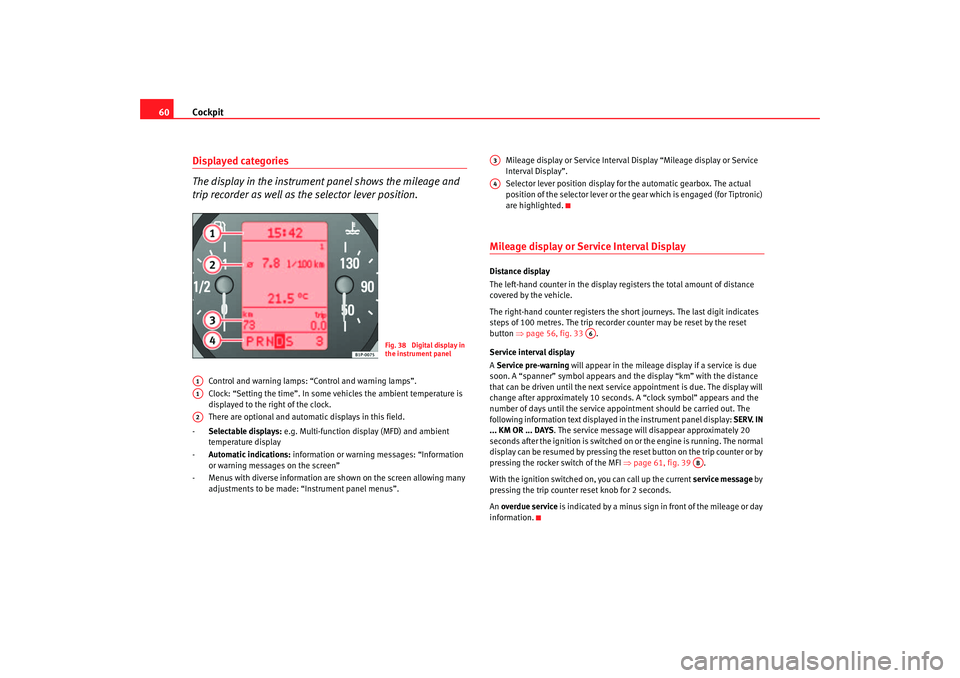
The display in the instrument panel shows the mileage and
trip recorder as well as the selector lever position.
Control and warning lamps: “Control and warning lamps”.
Clock: “Setting the time”. In some vehicles the ambient temperature is
displayed to the right of the clock.
There are optional and automatic displays in this field.
- Selectable displays: e.g. Multi-function display (MFD) and ambient
temperature display
- Automatic indications: information or warning messages: “Information
or warning messages on the screen”
- Menus with diverse information are shown on the screen allowing many adjustments to be made: “Instrument panel menus”. Mileage display or Service Interval Display “Mileage display or Service
Interval Display”.
Selector lever position display for the automatic gearbox. The actual
position of the selector lever or the gear which is engaged (for Tiptronic)
are highlighted.
Mileage display or Service Interval DisplayDistance display
The left-hand counter in the display registers the total amount of distance
covered by the vehicle.
The right-hand counter regi
sters the short journeys. The last digit indicates
steps of 100 metres. The trip recorder counter may be reset by the reset
button ⇒page 56, fig. 33 .
Service interval display
A Service pre-warning will appear in the mileage display if a service is due
soon. A “spanner” symbol appears and the display “km” with the distance
that can be driven until the next service appointment is due. The display will
change after approximately 10 seconds. A “clock symbol” appears and the
number of days until the service appointment should be carried out. The
following information text displaye d in the instrument panel display: SERV. IN
... KM OR ... DAYS . The service message will disappear approximately 20
seconds after the ignition is switched on or the engine is running. The normal
display can be resumed by pressing the re set button on the trip counter or by
pressing the rocker switch of the MFI ⇒page 61, fig. 39 .
With the ignition switched on, you can call up the current service message by
pressing the trip counter reset knob for 2 seconds.
An overdue service is indicated by a minus sign in front of the mileage or day
information.
Fig. 38 Digital display in
the instrument panel
A1A1A2
A3A4
A6
AB
altea_ingles_0706.book Seite 60 Mittwoch, 30. August 2006 3:48 15
Page 67 of 302
Cockpit65
Safety First
Operating instructions
Tips and Maintenance
Te c h n i c a l D a t a
Instrument panel menusMain menu
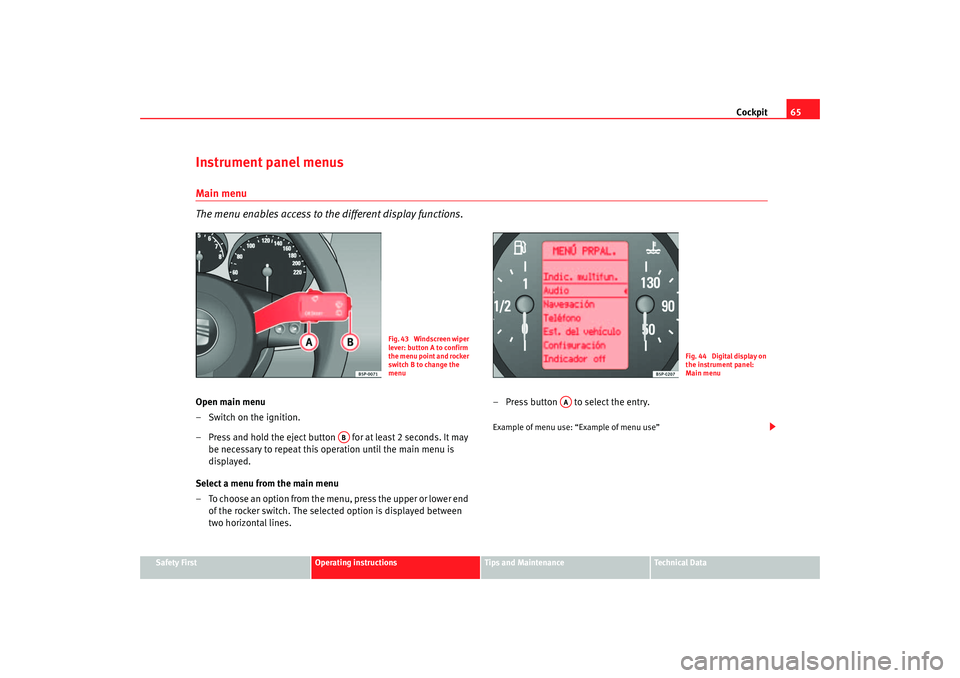
The menu enables access to the different display functions.Open main menu
– Switch on the ignition.
– Press and hold the eject button for at least 2 seconds. It may
be necessary to repeat this operation until the main menu is
displayed.
Select a menu from the main menu
– To choose an option from the menu, press the upper or lower end of the rocker switch. The selected option is displayed between
two horizontal lines. – Press button to select the entry.
Example of menu use: “Example of menu use”
Fig. 43 Windscreen wiper
lever: button A to confirm
the menu point and rocker
switch B to change the
menu
Fig. 44 Digital display on
the instrument panel:
Main menu
AB
AA
altea_ingles_0706.book Seite 65 Mittwoch, 30. August 2006 3:48 15
Page 68 of 302
Cockpit
66
NoteFor electronic and vehicle equipment on e or more of these menus will be
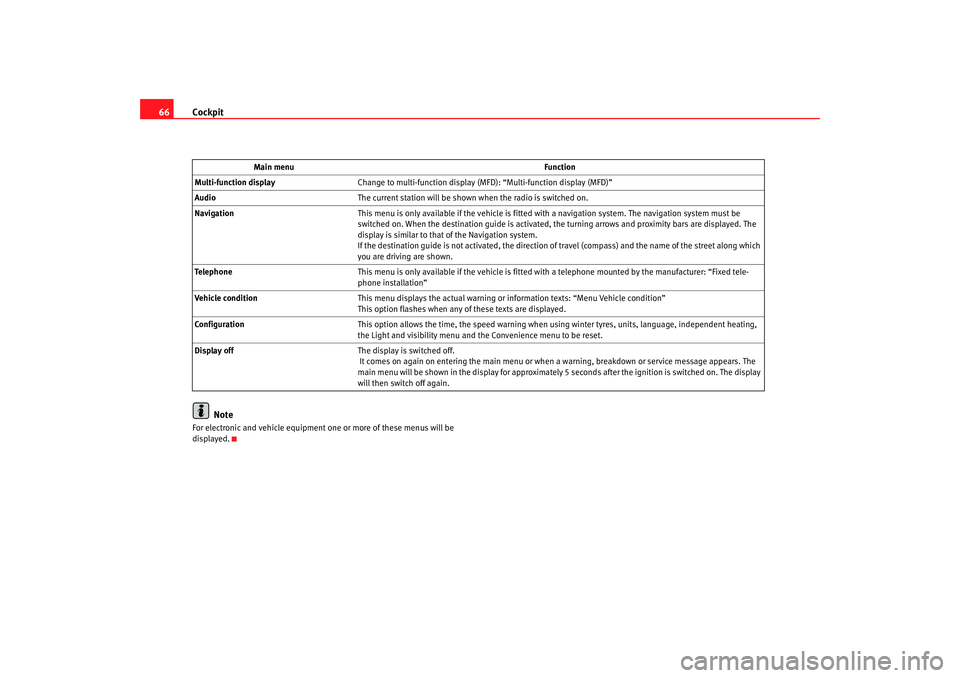
displayed. Main menu
Function
Multi-function display Change to multi-function display (MFD): “Multi-function display (MFD)”
Audio The current station will be shown when the radio is switched on.
Navigation This menu is only available if the vehicle is fitted with a navigation system. The navigation system must be
switched on. When the destination guide is activated, the turning arrows and proximity bars are displayed. The
display is similar to that of the Navigation system.
If the destination guide is not activated, the direction of travel (compass) and the name of the street along which
you are driving are shown.
Telephone This menu is only available if the vehicle is fitted wi th a telephone mounted by the manufacturer: “Fixed tele-
phone installation”
Vehicle condition This menu displays the actual warning or information texts: “Menu Vehicle condition”
This option flashes when any of these texts are displayed.
Configuration This option allows the time, the speed warning when using winter tyres, units, language, independent heating,
the Light and visibility menu and the Convenience menu to be reset.
Display off The display is switched off.
It comes on again on entering the main menu or when a warning, breakdown or service message appears. The
main menu will be shown in the display for approximately 5 seconds after the ignition is switched on. The display
will then switch off again.
altea_ingles_0706.book Seite 66 Mittwoch, 30. August 2006 3:48 15
Page 69 of 302
Cockpit67
Safety First
Operating instructions
Tips and Maintenance
Te c h n i c a l D a t a
Example of menu use
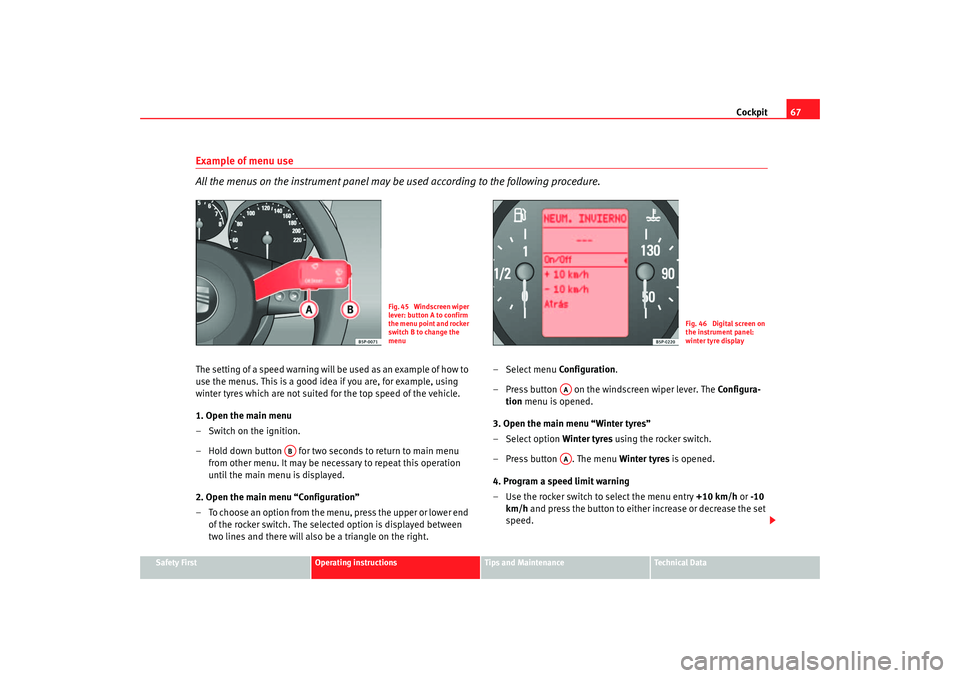
All the menus on the instrument panel may be used according to the following procedure.The setting of a speed warning will be used as an example of how to
use the menus. This is a good idea if you are, for example, using
winter tyres which are not suited for the top speed of the vehicle.
1. Open the main menu
– Switch on the ignition.
– Hold down button for two seconds to return to main menu
from other menu. It ma y be necessary to repeat this operation
until the main menu is displayed.
2. Open the main menu “Configuration”
– To choose an option from the menu, press the upper or lower end of the rocker switch. The selected option is displayed between
two lines and there will also be a triangle on the right. –Select menu
Configuration.
– Press button on the windscreen wiper lever. The Configura-
tion menu is opened.
3. Open the main menu “Winter tyres”
– Select option Winter tyres using the rocker switch.
– Press button . The menu Winter tyres is opened.
4. Program a speed limit warning
– Use the rocker switch to select the menu entry +10 km/h or -10
km/h and press the button to either increase or decrease the set
speed.
Fig. 45 Windscreen wiper
lever: button A to confirm
the menu point and rocker
switch B to change the
menu
Fig. 46 Digital screen on
the instrument panel:
winter tyre display
AB
AAAA
altea_ingles_0706.book Seite 67 Mittwoch, 30. August 2006 3:48 15
Page 71 of 302
Cockpit69
Safety First
Operating instructions
Tips and Maintenance
Te c h n i c a l D a t a
Vehicle status menu
This menu shows warning or information textsOpen Vehicle Condition menu
– Choose option Vehicle condition from main menu: “Main menu”
and press the button on the windscreen wiper lever.
Priority 2 warning messages and inform ation texts: “Warning and information
texts on the screen” automatically di sappear after a certain time and are
saved in the menu “Vehicle condition”.
The warning and information texts may be viewed in this menu. If there are no
messages, ok appears on the display. If there are several messages, each one
is shown for four seconds.
Configuration menu
This menu is used to make the settings for the vehicle functions.Open Configuration menu
– Choose the Configuration option from main menu “Main menu” and press the button on the windscreen wiper lever.
Example of use of menus: “E xample of use of menus”.
Configuration Function
Time The hours and minutes of the clock and the navigation system can be changed. Both 12- and 24-hour
formats are available and the time may be changed to summer time (an S appears in the upper part of
the screen)
Winter tyres The menu allows the setting of a speed at which an optical and acoustic warning will be given by the
system. You can use this function, for example, if you have fitted winter tyres which are not suited for the
top speed of your vehicle . See chapter “Wheels” in owner's manual
Settings: Language The display texts and the navigation system texts can be seen in seven different languages
Units This option allows you to select the units for displaying temperature, fuel consumption values and dis-
tances.
Convenience From this menu it is possible to alter the Comfort function settings.
altea_ingles_0706.book Seite 69 Mittwoch, 30. August 2006 3:48 15
Page 82 of 302
Cockpit
80Tyre pressure*
The tyre monitor indicator compares wheel revolutions and uses this informa-
tion to compare the diameter of each wheel using the ABS sensors. If the
diameter of a wheel changes, the tyre monitor indicator lights
. The wheel
diameter changes when:
•
Tyre pressure is insufficient.
•
The tyre structure is damaged.
•
The vehicle is unbalanced because of a load.
•
The wheels of one axle are under more pressure (for example, driving with
a trailer or on extreme slopes).
•
The vehicle is fitted with snow chains.
•
The emergency wheel is fitted.
•
The wheel on one axle is changed. Tyre pressure adjustment
Following the modification to tyre pressure or changing one or more wheels,
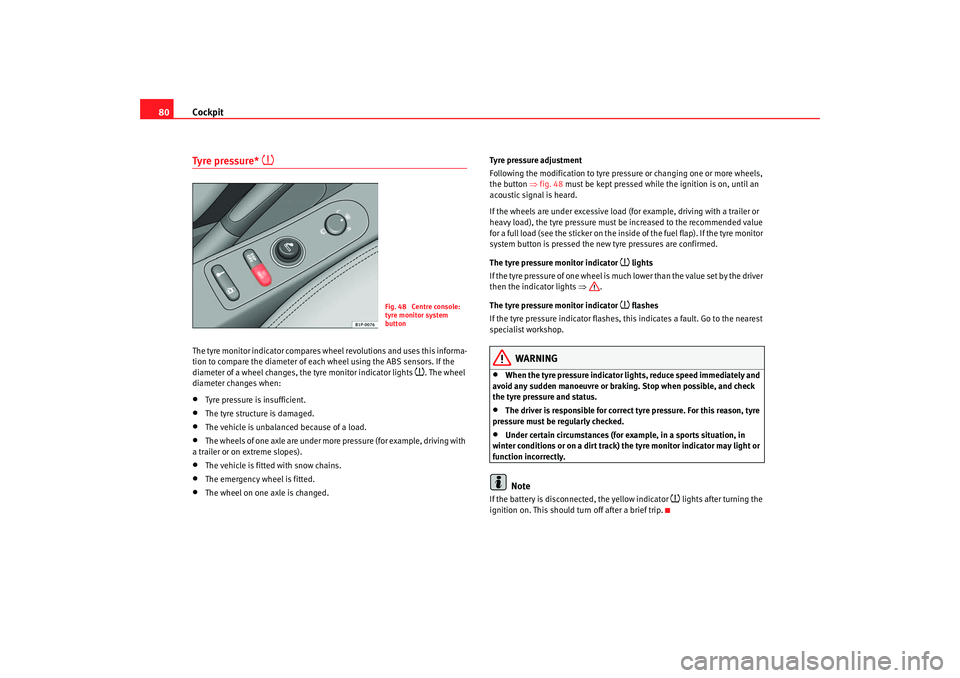
the button
⇒fig. 48 must be kept pressed while the ignition is on, until an
acoustic signal is heard.
If the wheels are under excessive load (for example, driving with a trailer or
heavy load), the tyre pressure must be increased to the recommended value
for a full load (see the sticker on the inside of the fuel flap). If the tyre monitor
system button is pressed the new tyre pressures are confirmed.
The tyre pressure monitor indicator
lights
If the tyre pressure of one wheel is much lower than the value set by the driver
then the indicator lights ⇒.
The tyre pressure monitor indicator flashes
If the tyre pressure indicator flashes, this indicates a fault. Go to the nearest
specialist workshop.
WARNING
•
When the tyre pressure indicator lights, reduce speed immediately and
avoid any sudden manoeuvre or braking. Stop when possible, and check
the tyre pressure and status.
•
The driver is responsible for correct tyre pressure. For this reason, tyre
pressure must be regularly checked.
•
Under certain circumstances (for example, in a sports situation, in
winter conditions or on a dirt track) the tyre monitor indicator may light or
function incorrectly.Note
If the battery is disconnected, the yellow indicator
lights after turning the
ignition on. This should turn off after a brief trip.
Fig. 48 Centre console:
tyre monitor system
button
altea_ingles_0706.book Seite 80 Mittwoch, 30. August 2006 3:48 15