change Seat Altea 2007 User Guide
[x] Cancel search | Manufacturer: SEAT, Model Year: 2007, Model line: Altea, Model: Seat Altea 2007Pages: 302, PDF Size: 9.17 MB
Page 86 of 302
Steering wheel controls
84Steering wheel controlsUsing these instructionsThe vehicle includes a multifunction modu le from where it is possible to
control the audio, telephone and radio / navigation functions and the auto-
matic gearbox* without needing to distract the driver.
There are three versions of the multifunction module:
•
Audio version, to control the available audio functions from the steering
wheel.
•
Audio + Telephone version, to control the available audio functions and
the telephone system from the steering wheel.
Both versions may be used to control the Audio system (Radio, CD Audio, CD
mp3, CD Changer) and the radio / navigation System, in which case they also
control the Navigation system.
•
Automatic gearbox version* ⇒page 170.
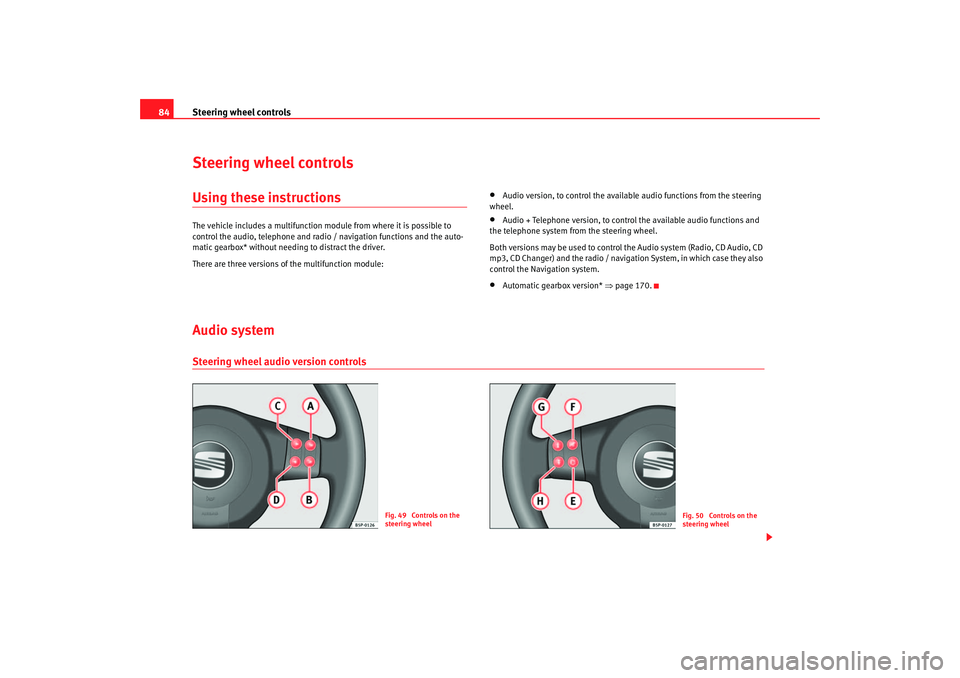
Audio systemSteering wheel audio version controls
Fig. 49 Controls on the
steering wheel
Fig. 50 Controls on the
steering wheel
altea_ingles_0706.book Seite 84 Mittwoch, 30. August 2006 3:48 15
Page 87 of 302
Steering wheel controls85
Safety First
Operating instructions
Tips and Maintenance
Te c h n i c a l D a t a
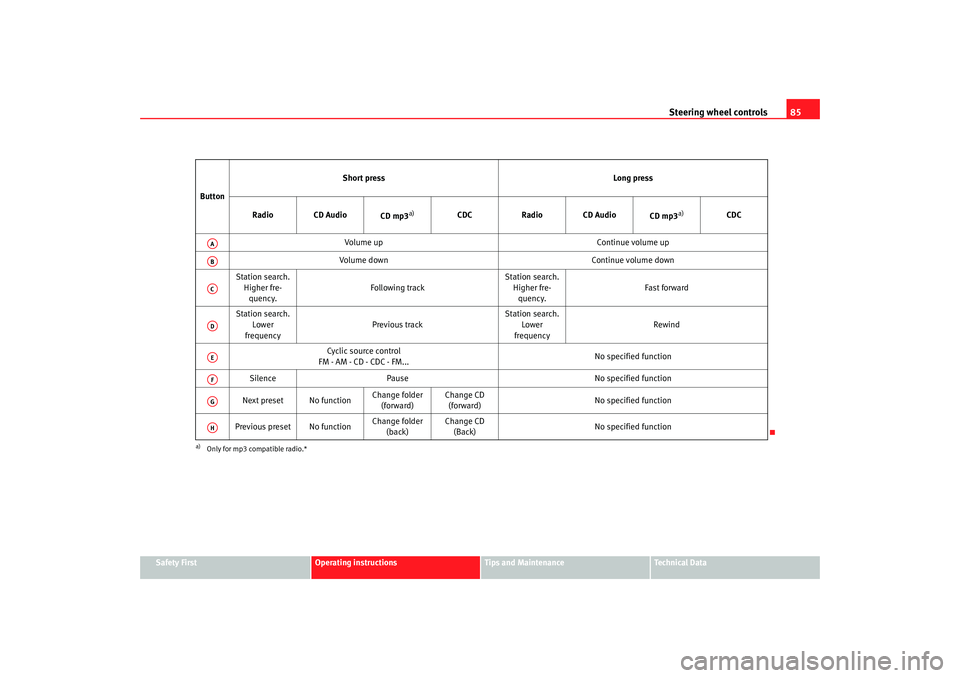
Button
Short press
Long press
Radio CD Audio CD mp3
a)
a)Only for mp3 compatible radio.*
CDCRadio CD Audio
CD mp3
a)
CDC
Volume up Continue volume up
Volume down Continue volume down
Station search. Higher fre-quency. Following track Station search.
Higher fre-quency. Fast forward
Station search. Lower
frequency Previous track Station search.
Lower
frequency Rewind
Cyclic source control
FM - AM - CD - CDC - FM... No specified function
Silence Pause No specified function
Next preset No function Change folder
(forward) Change CD
(forward) No specified function
Previous preset No function Change folder
(back) Change CD
(Back) No specified function
AAABACADAEAFAGAH
altea_ingles_0706.book Seite 85 Mittwoch, 30. August 2006 3:48 15
Page 88 of 302
Steering wheel controls
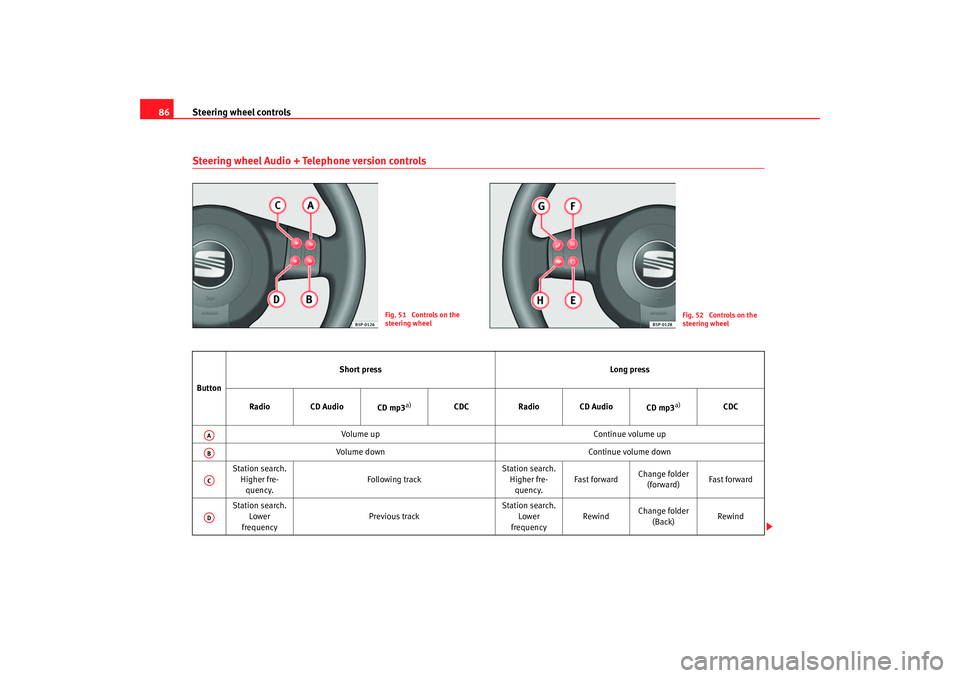
86Steering wheel Audio + Telephone version controls
Fig. 51 Controls on the
steering wheel
Fig. 52 Controls on the
steering wheel
Button Short press
Long press
Radio CD Audio CD mp3
a)
CDCRadio CD Audio
CD mp3
a)
CDC
Volume up Continue volume up
Volume down Continue volume down
Station search. Higher fre-quency. Following track Station search.
Higher fre-quency. Fast forward
Change folder
(forward) Fast forward
Station search. Lower
frequency Previous track Station search.
Lower
frequency Rewind
Change folder
(Back) Rewind
AAABACAD
altea_ingles_0706.book Seite 86 Mittwoch, 30. August 2006 3:48 15
Page 91 of 302
Steering wheel controls89
Safety First
Operating instructions
Tips and Maintenance
Te c h n i c a l D a t a
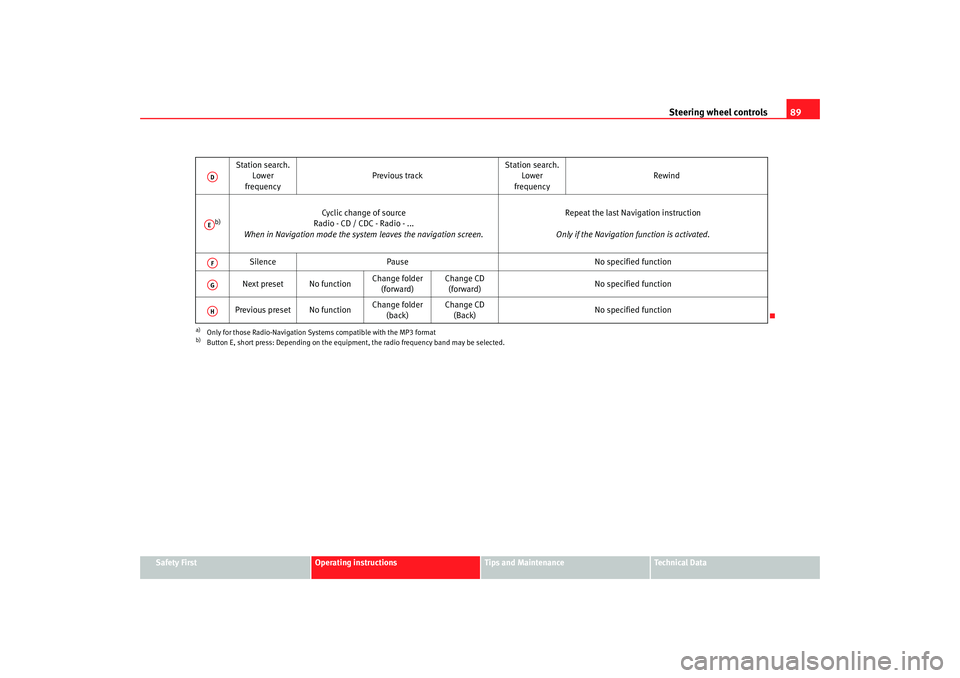
Station search.
Lower
frequency Previous track
Station search.
Lower
frequency Rewind
b)
Cyclic change of source
Radio - CD / CDC - Radio - ...
When in Navigation mode the system leaves the navigation screen. Repeat the last Navigation instruction
Only if the Navigation function is activated.
Silence Pause No specified function
Next preset No function Change folder
(forward) Change CD
(forward) No specified function
Previous preset No function Change folder
(back) Change CD
(Back) No specified function
a)Only for those Radio-Navigation Systems compatible with the MP3 formatb)Button E, short press: Depending on the equipment, the radio frequency band may be selected.ADAEAFAGAH
altea_ingles_0706.book Seite 89 Mittwoch, 30. August 2006 3:48 15
Page 92 of 302
Steering wheel controls
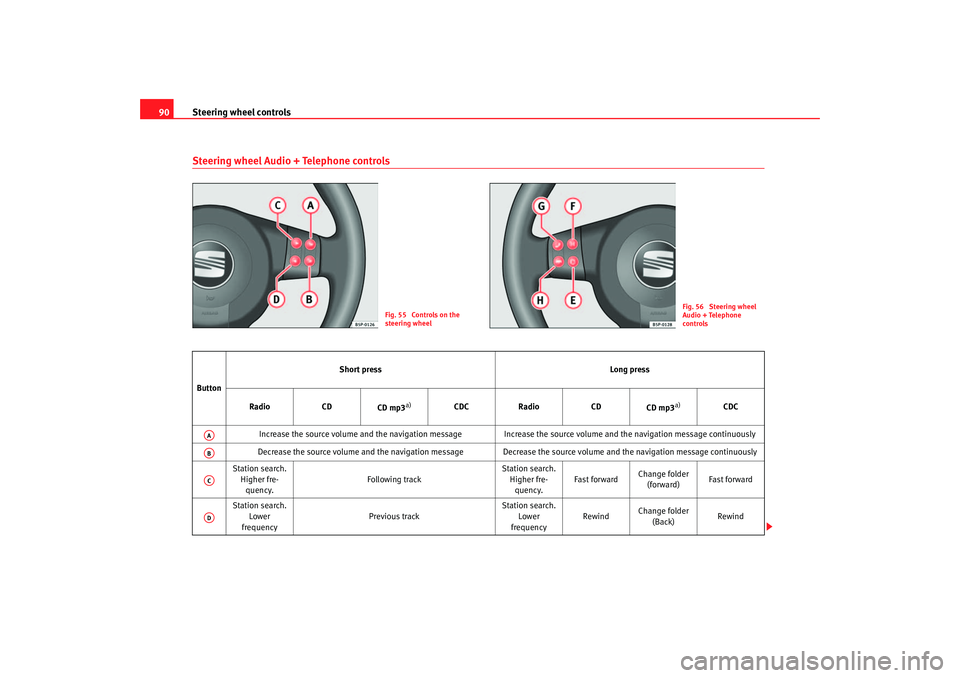
90Steering wheel Audio + Telephone controls
Fig. 55 Controls on the
steering wheel
Fig. 56 Steering wheel
Audio + Telephone
controls
Button Short press
Long press
Radio CD
CD mp3
a)
CDC Radio CD
CD mp3
a)
CDC
Increase the source volume and the navigation message Increa se the source volume and the navigation message continuously
Decrease the source volume and the navigation message Decrease the source volume and the navigation message continuously
Station search. Higher fre-quency. Following track Station search.
Higher fre-quency. Fast forward
Change folder
(forward) Fast forward
Station search. Lower
frequency Previous track Station search.
Lower
frequency Rewind
Change folder
(Back) Rewind
AAABACAD
altea_ingles_0706.book Seite 90 Mittwoch, 30. August 2006 3:48 15
Page 93 of 302
Steering wheel controls91
Safety First
Operating instructions
Tips and Maintenance
Te c h n i c a l D a t a
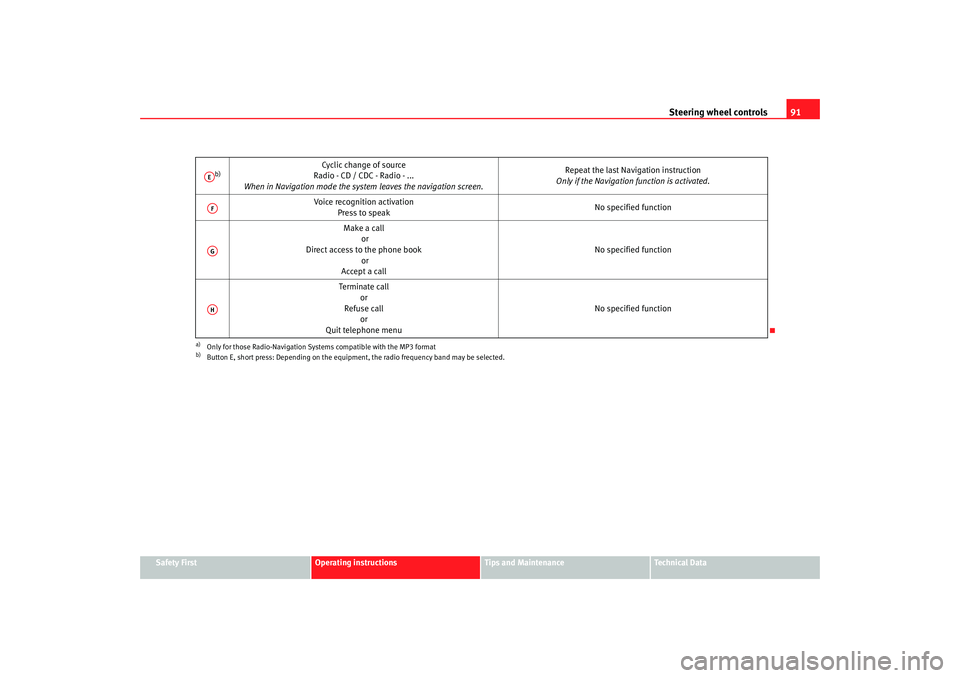
b)
Cyclic change of source
Radio - CD / CDC - Radio - ...
When in Navigation mode the system leaves the navigation screen. Repeat the last Navigation instruction
Only if the Navigation function is activated.
Voice recognition activation Press to speak No specified function
Make a call or
Direct access to the phone book or
Accept a call No specified function
Terminate call or
Refuse call or
Quit telephone menu No specified function
a)Only for those Radio-Navigation Systems compatible with the MP3 formatb)Button E, short press: Depending on the equipment, the radio frequency band may be selected.AEAFAGAH
altea_ingles_0706.book Seite 91 Mittwoch, 30. August 2006 3:48 15
Page 114 of 302
Lights and visibility
112•
If the coming home* feature is activated, the acoustic signal for the
dipped beam headlights will not sound, it will sound if the position lights are
activated.
•
The rear fog light is so bright that it can dazzle drivers behind you. You
should use the rear fog light only when visibility is very poor.
•
If you are towing a trailer equipped with a rear fog light on a vehicle with
a factory-fitted towing bracket, the rear fog light on the car will automatically
be switched off.
•
The use of the lighting described here is subject to the relevant statutory
requirements.
Automatic lightingActivation
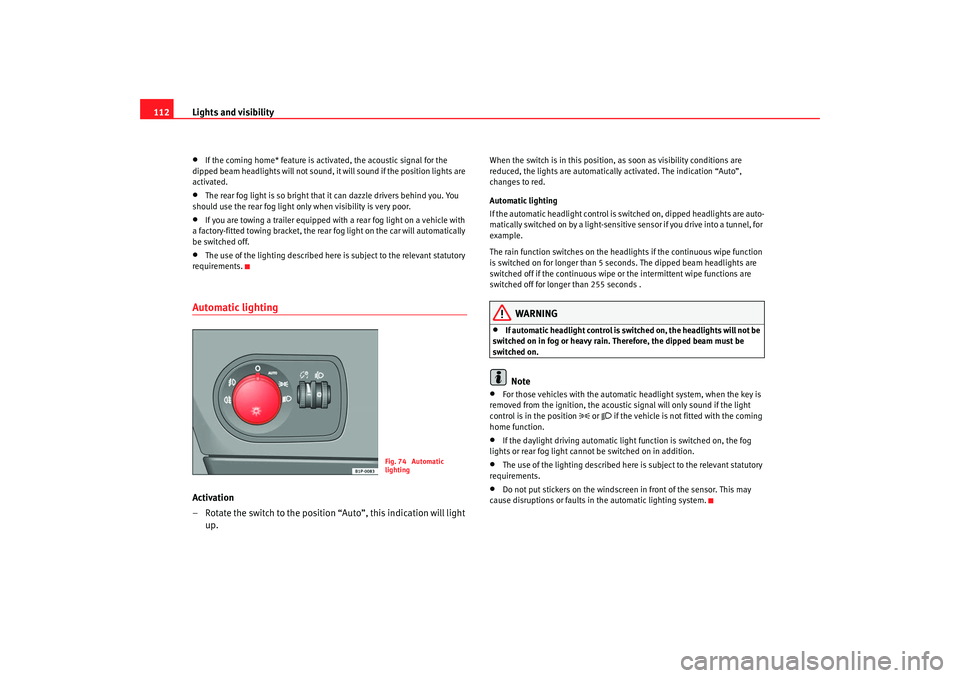
– Rotate the switch to the position “Auto”, this indication will light up.
When the switch is in this position, as soon as visibility conditions are
reduced, the lights are automaticall y activated. The indication “Auto”,
changes to red.
Automatic lighting
If the automatic headlight control is switched on, dipped headlights are auto-
matically switched on by a light-sensitive sensor if you drive into a tunnel, for
example.
The rain function switches on the headlights if the continuous wipe function
is switched on for longer than 5 seconds. The dipped beam headlights are
switched off if the continuous wipe or the intermittent wipe functions are
switched off for longer than 255 seconds .
WARNING
•
If automatic headlight control is switched on, the headlights will not be
switched on in fog or heavy rain. Therefore, the dipped beam must be
switched on.Note
•
For those vehicles with the automatic headlight system, when the key is
removed from the ignition, the acoustic signal will only sound if the light
control is in the position
or if the vehicle is not fitted with the coming
home function.
•
If the daylight driving automatic light function is switched on, the fog
lights or rear fog light cannot be switched on in addition.
•
The use of the lighting described here is subject to the relevant statutory
requirements.
•
Do not put stickers on the windscreen in front of the sensor. This may
cause disruptions or faults in the automatic lighting system.
Fig. 74 Automatic
lighting
altea_ingles_0706.book Seite 112 Mittwoch, 30. August 2006 3:48 15
Page 118 of 302
Lights and visibility
116
Signalling a lane change
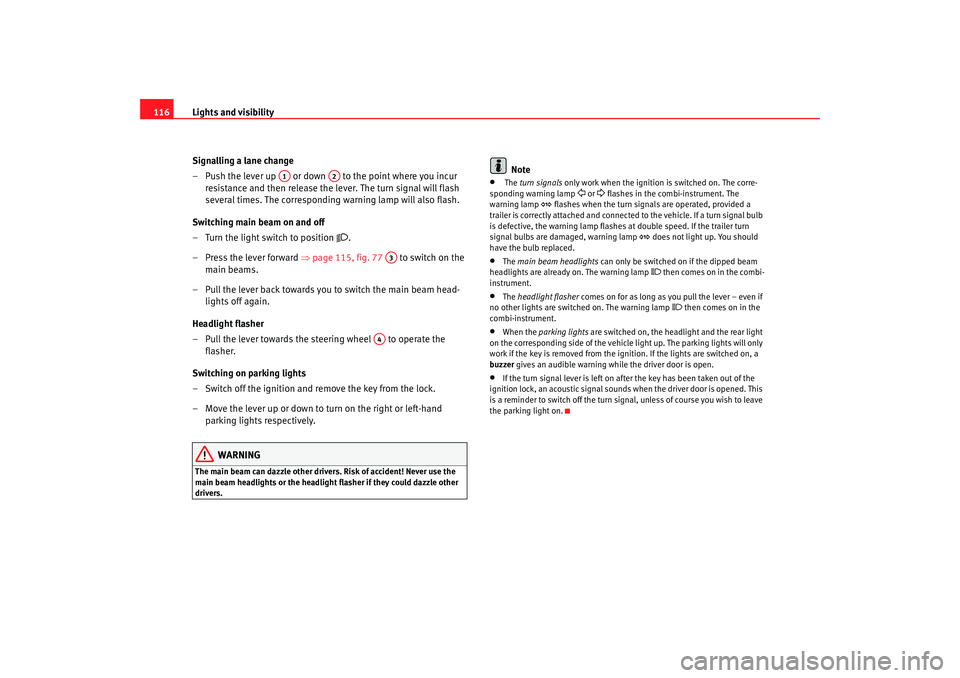
– Push the lever up or down to the point where you incur resistance and then release the lever. The turn signal will flash
several times. The corresponding warning lamp will also flash.
Switching main beam on and off
– Turn the light switch to position
.
– Press the lever forward ⇒page 115, fig. 77 to switch on the
main beams.
– Pull the lever back towards you to switch the main beam head- lights off again.
Headlight flasher
– Pull the lever towards the steering wheel to operate the flasher.
Switching on parking lights
– Switch off the ignition and remove the key from the lock.
– Move the lever up or down to turn on the right or left-hand parking lights respectively.
WARNING
The main beam can dazzle other drivers. Risk of accident! Never use the
main beam headlights or the headlight flasher if they could dazzle other
drivers.
Note
•
The turn signals only work when the ignition is switched on. The corre-
sponding warning lamp
or flashes in the combi-instrument. The
warning lamp
flashes when the turn signals are operated, provided a
trailer is correctly attached and connected to the vehicle. If a turn signal bulb
is defective, the warning lamp flashes at double speed. If the trailer turn
signal bulbs are damaged, warning lamp
does not light up. You should
have the bulb replaced.
•
The main beam headlights can only be switched on if the dipped beam
headlights are already on. The warning lamp
then comes on in the combi-
instrument.
•
The headlight flasher comes on for as long as you pull the lever – even if
no other lights are switch ed on. The warning lamp
then comes on in the
combi-instrument.
•
When the parking lights are switched on, the headlight and the rear light
on the corresponding side of the vehicle light up. The parking lights will only
work if the key is removed from the igni tion. If the lights are switched on, a
buzzer gives an audible warning while the driver door is open.
•
If the turn signal lever is left on after the key has been taken out of the
ignition lock, an acoustic signal sounds when the driver door is opened. This
is a reminder to switch off the turn signal, unless of course you wish to leave
the parking light on.
A1
A2
A3
A4
altea_ingles_0706.book Seite 116 Mittwoch, 30. August 2006 3:48 15
Page 136 of 302
Seats and stowage
134Centre arm rest at front with stowage area
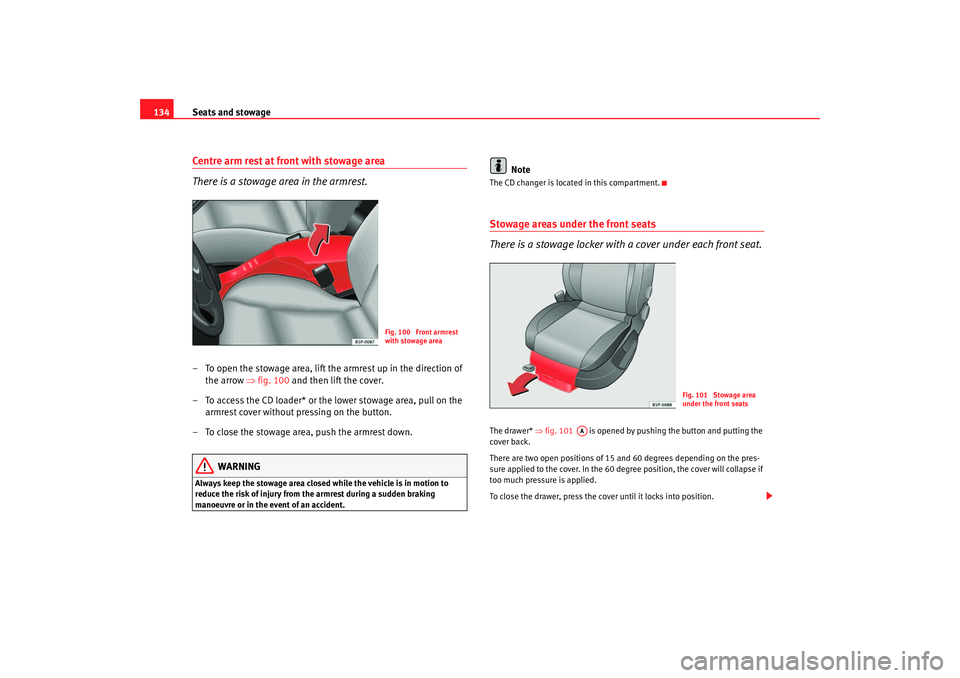
There is a stowage area in the armrest.– To open the stowage area, lift the armrest up in the direction of
the arrow ⇒fig. 100 and then lift the cover.
– To access the CD loader* or the lower stowage area, pull on the armrest cover without pressing on the button.
– To close the stowage area, push the armrest down.
WARNING
Always keep the stowage area closed while the vehicle is in motion to
reduce the risk of injury from the armrest during a sudden braking
manoeuvre or in the event of an accident.
Note
The CD changer is located in this compartment.Stowage areas under the front seats
There is a stowage locker with a cover under each front seat.The drawer* ⇒fig. 101 is opened by pushing the button and putting the
cover back.
There are two open positions of 15 and 60 degrees depending on the pres-
sure applied to the cover. In the 60 degree position, the cover will collapse if
too much pressure is applied.
To close the drawer, press the cover until it locks into position.
Fig. 100 Front armrest
with stowage area
Fig. 101 Stowage area
under the front seats
AA
altea_ingles_0706.book Seite 134 Mittwoch, 30. August 2006 3:48 15
Page 143 of 302
Seats and stowage141
Safety First
Operating instructions
Tips and Maintenance
Te c h n i c a l D a t a
Opening
– Lift the cover , in area ⇒ page 140, fig. 111.
Closing
– Push the cover down, until it clips into place.Uses of the mobile stowage compartment•
The front open glove box may be used to store small objects that will not
damage passengers in the event that the objects are flung around the interior
of the vehicle.
•
The drink holders are used for holding drink cans or cups .
•
The elastic belt on the side may be used for keeping papers and maga-
zines.
•
The tables may be used as a support for writing.
To use the table ⇒ page 140, fig. 112, it must be removed from its
compartment on the side of the mobile stowage compartment and fitted into
compartment ⇒page 140, fig. 112 on the front section of the mobile
stowage compartment.
The table in the right-hand compartment is fitted in the left-hand compart-
ment of the front of the mobile stowage compartment and the table in the left-
hand compartment is fitted in the right-hand compartment.
The tables have two positions for use and cannot be interchanged.
WARNING
•
The mobile stowage compartment supports a maximum load of 5 kg. Do
not overload.
•
Do not drive when the cover of the mobile stowage compartment is
open.
•
Do not drive when the tables are set up for use.
•
When the vehicle is moving, keep the tables stored inside the mobile
stowage compartment with the cover closed, and likewise when they are
not in use
•
Never place hot drinks in the drin k holders. The drink may spill and
cause burns when the vehicle is moving.
•
Do not leave cans in the drink holder when the vehicle is in motion,
there is a danger that the can may be flung around the vehicle and cause
injury.
•
Make sure that the mounting plate is correctly clipped onto the cushion
frame.
•
When the plate is not in use, store inside the stowage compartment.
•
When the mobile stowage compartment is not in use, it should always
be fastened by the retaining net in the luggage compartment.Note
•
Check that the mobile stowage compartment is correctly fitted, pulling it
forwards by the front glove box and checking that both safety clips are
correctly clipped onto the rings.
AB
AA
AC
AD
WARNING (continued)
altea_ingles_0706.book Seite 141 Mittwoch, 30. August 2006 3:48 15