service Seat Altea 2014 User Guide
[x] Cancel search | Manufacturer: SEAT, Model Year: 2014, Model line: Altea, Model: Seat Altea 2014Pages: 321, PDF Size: 4.52 MB
Page 65 of 321
63
Cockpit
Indications for vehicles with LongLife service
Technical progress has made it possible to considerably reduce servicing re-
quirements. With the LongLife System, SEAT ensures that your vehicle only
has an interval service when it is necessary. The length of the Interval Serv-
ices (max. two years) is determined by factors such as conditions under
which the vehicle is used and personal driving style.
The service pre-warning will first appear 20 days before the date on which
the service is due. The distance travelled is rounded off to the nearest
100 km (miles) and the time to full days. The current service message can
only be consulted 500 km (300 miles) after the last service. Until that time,
only dashes are displayed.
Note
● If you reset the display manually, the next service interval will be indica-
ted after 15 000 km (10 000 miles) or one year and will not be calculated
individually.
● Do not reset the display between service intervals as the display will
otherwise be incorrect.
● In LongLife Service vehicles, if the battery is disconnected for a long pe-
riod, the days remaining until the next service cannot be calculated. There-
fore, the service message displays on the instrument panel may be incor-
rect. Take into account the maximum authorised service intervals. Multifunction display (MFI)*
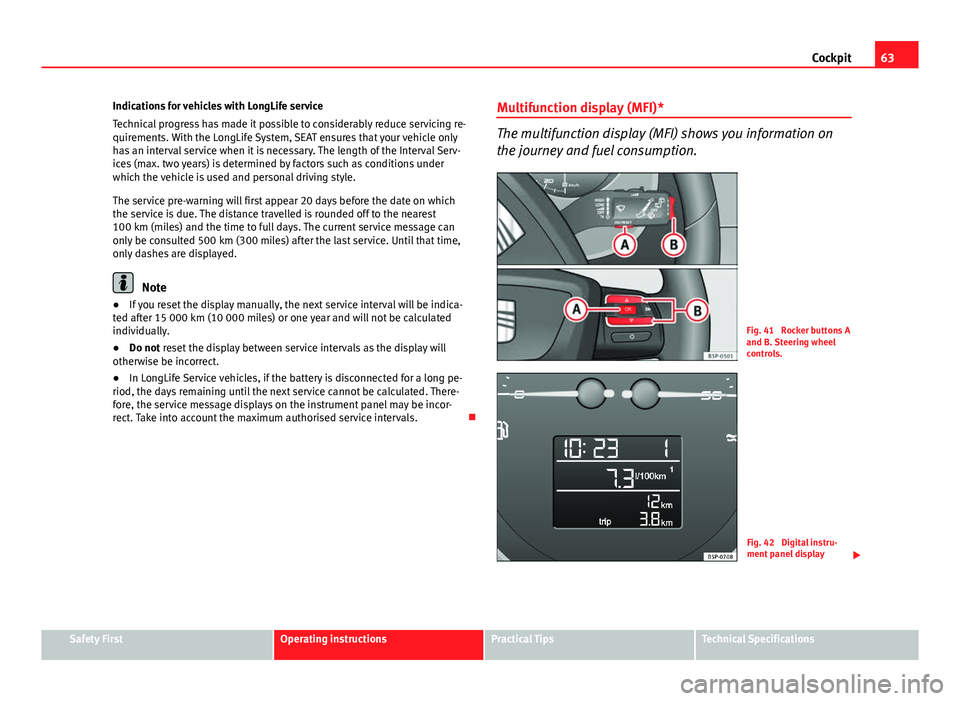
The multifunction display (MFI) shows you information on
the journey and fuel consumption.
Fig. 41 Rocker buttons A
and B. Steering wheel
controls.
Fig. 42 Digital instru-
ment panel display
Safety FirstOperating instructionsPractical TipsTechnical Specifications
Page 75 of 321
73
Cockpit
Configuration menu
This menu is used to make the settings for the vehicle func-
tions. Open Configuration menu
– Select the option Configuration from the main menu: “Main
menu” and press button OK
A ⇒ Fig. 45 on the windscreen
wiper lever. or
– Press button
or on the multifunction steering wheel*
⇒ Fig. 46 until the Configuration menu is displayed.
Example of menu use ⇒ page 68.
Displayed on the
screeneffect
Multifunction display
data.This menu is used to establish the data in the mul-
tifunction display menu to be displayed on the in-
strument panel ⇒ page 70
ConvenienceThis menu allows you to make the settings for the
convenience functions in the vehicle.
Lights and visibilityFrom this menu it is it possible to alter the vehicle
lighting settings.
TimeThe hours and minutes of the clock and the naviga-
tion system can be changed. Choose between 12
and 24-hour format and change to summer time.
Winter tyresThe menu allows the setting of a speed at which an
optical and acoustic warning will be given by the
system. You can use this function, for example, if
you have fitted winter tyres which are not suited for
the top speed of your vehicle. Please see the sec-
tion “Wheels and tyres”.
LanguageThe display texts and the navigation system texts
can be seen in different languages.
UnitsThis option allows you to select the units for dis-
playing temperature, fuel consumption values and
distances.
sel. speedThe instrument panel also displays the speed in
another different unit of measurement (mph or km/
h) to that given on the speedometer.
Inter ServiceConsult service messages and reset service interval
display here.
Factory settingsThe manufacturer's predefined values for the func-
tions of this menu are restored.
Backa)This returns to the main menu.a)
Only if the windscreen wiper lever is used (MFI).
Note
● For electronic and vehicle equipment one or more of these menus will be
displayed.
● SEAT dealerships are able to programme other functions or change the
existing functions depending upon the vehicle equipment.
● The Configuration menu is only accessible when the vehicle is at a
standstill.
Convenience menu
From this menu it is it possible to alter the vehicle conven-
ience settings.
Open menu Convenience
– Choose the option Configuration from the main menu and press
the button OK
A ⇒ Fig. 45 on the windscreen wiper lever.
Safety FirstOperating instructionsPractical TipsTechnical Specifications
Page 82 of 321
80Cockpit
Priority 2 warning messages will not be shown until all Priority 1 warning
messages have been dealt with!
Examples of priority 2 warning messages (yellow): 1)
● Fuel warning light with the information text PLEASE REFUEL.
● Windscreen washer fluid symbol with the information text REFILL
WINDSCREEN WASHER FLUID . Top up the washer fluid level.
Information messages displayed on the screen*
Message a)Description
SERVICEThe service interval has ended. Take the vehicle to a
Technical Service.
IMMOBILISERImmobiliser system active. The vehicle will not start. Take
the vehicle to a Technical Service.
ERRORInstrument panel faulty. Take the vehicle to a Technical
Service.
CLEAN AIR FIL-
TERWarning: The air filter must be cleaned
NO KEYWarning: Correct key cannot be found in the vehicle.KEY BATTERYWarning: Key battery low. Change the battery.
CLUTCHWarning: Press the clutch to start. In vehicles with man-
ual gearbox and Start-Stop system.
--> P/NWarning: Place the selector level in position P/N to start.
Only in vehicles with automatic gearbox.
--> PWarning: Place the selector lever in position P to stop the
engine.
STARTINGWarning: The engine starts automatically. Start-Stop sys-
tem activated.
START MANUAL- LYWarning: The engine must be started manually. Start-
Stop system activated.
ERROR START-STOPWarning: Start-Stop system error.
START-STOP IM-POSSIBLEWarning: Although the Start-Stop system is switched on,
the engine cannot be stopped automatically. Not all the
necessary conditions are met
START-STOP AC- TIVEWarning: Start-Stop system activated. Vehicle in Stop
mode.
SWITCH OFFWarning: Start-Stop system activated. Switch off the igni-
tion when you leave the vehicle.
STOP TRANS-
MISSION TOO HOTWarning: Stop the engine. Gearbox overheated.
BRAKEWarning: To start the engine, press the brake pedal. Only
in vehicles with automatic gearbox.
COASTINGFUNCTIONWarning: Coasting mode active. Transmission engaged.
Only in vehicles with automatic gearbox.
CHECK SAFE- LOCKNotification of central locking function activated.
a)These messages may vary according the version of the vehicle model.
Fuel level/reserve
This symbol lights up to indicate that the fuel tank is under
the reserve level.
It lights up when only 7 litres of fuel remain in the tank. You will also hear
an audible warning. It reminds you to fuel up the fuel tank as soon as possi-
ble ⇒ page 228.
1)
Depending on the version of the model.
Page 83 of 321
81
Cockpit
The instrument panel displays the following message 1)
: PLEASE REFUEL! .
Coolant level* / temperature (red)
The warning lamp lights up if the coolant temperature is too
high or if the coolant level is too low.
There is a fault if:
● The warning symbol does not go out again after a few seconds.
● The warning lamp lights up or flashes while the vehicle is moving, and
three acoustic warning signals ⇒
are emitted.
This means that either the coolant level is too low or the coolant tempera-
ture is too high.
Coolant temperature too high
The instrument panel displays the following message 1)
: CHECK COOLANT IN-
STRUCTION MANUAL ⇒ page 242.
First look at the coolant temperature gauge. The coolant temperature is too
high if the needle is over the warning area on the dial. Stop the vehicle,
switch the engine off and wait for it to cool down. Check the coolant level.
If the coolant level is correct, the overheating may be caused by a malfunc-
tion of the radiator fan. Check the radiator fan fuse and have it replaced if
necessary ⇒ page 272.
If the control lamp lights up again after driving on for a short distance, stop
the vehicle and switch the engine off . Contact a Technical Service or a spe-
cialised workshop. Coolant level too low
The instrument panel displays the following message
1)
: STOP CHECK COOL-
ANT INSTRUCTION MANUAL.
First look at the coolant temperature gauge. If the needle is in the normal
range, top up with coolant at the earliest opportunity ⇒
.
WARNING
● If your vehicle is immobilised for technical reasons, move it to a safe
distance from traffic. Turn the engine off, turn the hazard lights on and
place the warning triangle.
● Never open the bonnet if you can see or hear steam or coolant escap-
ing from the engine compartment. Risk of scalding. Wait until you can no
longer see or hear escaping steam or coolant.
● The engine compartment is a dangerous area. Before carrying out any
work in the engine compartment, switch off the engine and allow it to
cool down. Always note the corresponding warnings ⇒ page 235.
Applies to the model: ALTEA / ALTEA XL Coolant temperature (blue)
This lamp lights up when the coolant is below approximately +45 °C
(+113 °F). When it exceeds this temperature the lamp turns off.
1)
Depending on the version of the model.
Safety FirstOperating instructionsPractical TipsTechnical Specifications
Page 104 of 321
102Opening and closing
This function is independent of the vehicle electronic opening and
locking systems. It only affects rear doors. It can only be activated
and deactivated manually, as described below:
Activating the childproof lock
–Unlock the vehicle and open the door in which you wish to acti-
vate the childproof lock.
– With the door open, rotate the groove in the door using the igni-
tion key, clockwise for the left hand side doors, and anticlock-
wise for the right hand side doors ⇒ Fig. 59 ⇒ Fig. 60.
Deactivating the childproof lock
– Unlock the vehicle and open the door whose childproof lock you
want to deactivate.
– With the door open, rotate the groove in the door using the igni-
tion key, clockwise for the right hand side doors, and anticlock-
wise for the left hand side doors ⇒ Fig. 59 ⇒ Fig. 60.
Once the childproof lock is activated, the door can only be opened from the
outside. The childproof lock can be activated and deactivated by inserting
the key in the groove when the door is open, as described above. Keys
Set of keys
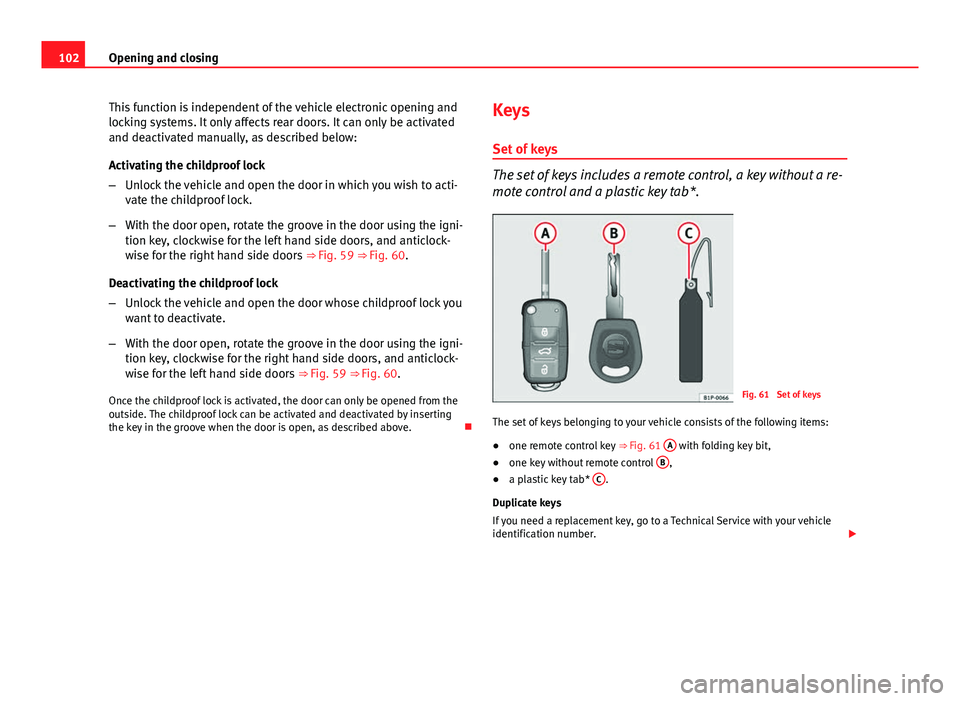
The set of keys includes a remote control, a key without a re-
mote control and a plastic key tab*.
Fig. 61 Set of keys
The set of keys belonging to your vehicle consists of the following items:
● one remote control key
⇒ Fig. 61 A
with folding key bit,
● one key without remote control B,
● a plastic key tab* C.
Duplicate keys
If you need a replacement key, go to a Technical Service with your vehicle
identification number.
Page 107 of 321
105
Opening and closing
WARNING
● An improper use of the key can cause serious injuries.
● Never leave children or disabled persons in the vehicle. In case of
emergency, they may not be able to leave the vehicle or manage on their
own.
● Never forget the keys inside the vehicle. Otherwise, this could result
in serious injuries, accidents or even the theft of your vehicle. Always
take the key with you when you leave the vehicle.
● An uncontrolled use of the key could start the engine or activate any
electric equipment (e.g. electric windows), causing risk of accident. The
vehicle can be locked when using the remote control key. This could com-
plicate the aid in case of emergency.
Note
● The radio frequency remote control can be programmed by means of
pressing the unlocking button once; as a result, only the driver door will un-
lock. When the button is pressed once more, all doors and the rear lid will
be unlocked.
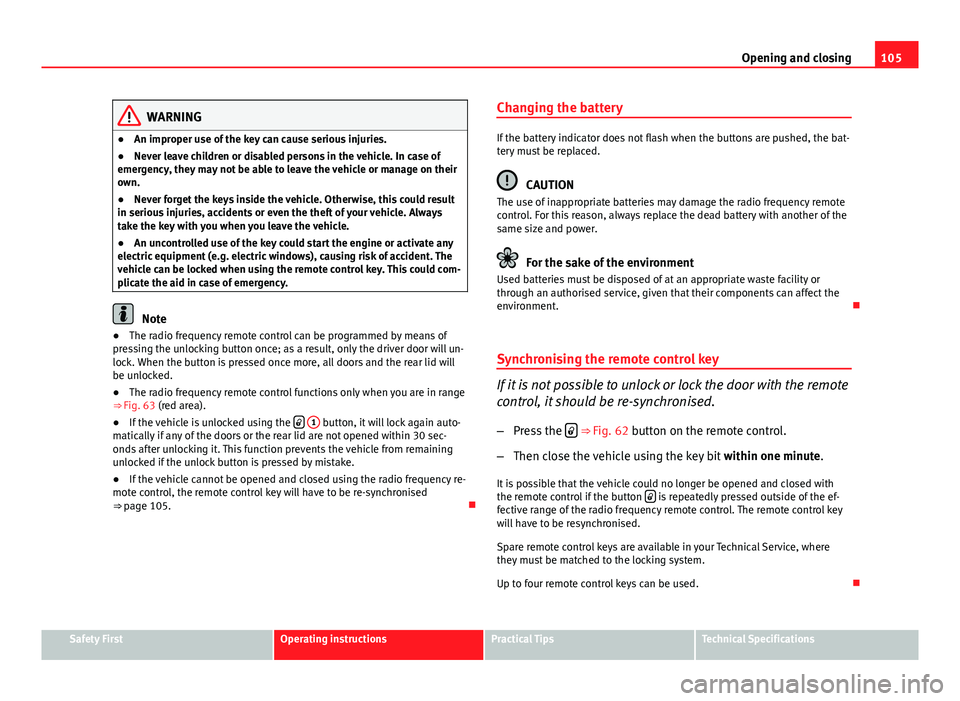
● The radio frequency remote control functions only when you are in range
⇒ Fig. 63 (red area).
● If the vehicle is unlocked using the
1 button, it will lock again auto-
matically if any of the doors or the rear lid are not opened within 30 sec-
onds after unlocking it. This function prevents the vehicle from remaining
unlocked if the unlock button is pressed by mistake.
● If the vehicle cannot be opened and closed using the radio frequency re-
mote control, the remote control key will have to be re-synchronised
⇒ page 105. Changing the battery
If the battery indicator does not flash when the buttons are pushed, the bat-
tery must be replaced.
CAUTION
The use of inappropriate batteries may damage the radio frequency remote
control. For this reason, always replace the dead battery with another of the
same size and power.
For the sake of the environment
Used batteries must be disposed of at an appropriate waste facility or
through an authorised service, given that their components can affect the
environment.
Synchronising the remote control key
If it is not possible to unlock or lock the door with the remote
control, it should be re-synchronised.
– Press the
⇒ Fig. 62 button on the remote control.
– Then close the vehicle using the key bit within one minute.
It is possible that the vehicle could no longer be opened and closed with
the remote control if the button
is repeatedly pressed outside of the ef-
fective range of the radio frequency remote control. The remote control key
will have to be resynchronised.
Spare remote control keys are available in your Technical Service, where
they must be matched to the locking system.
Up to four remote control keys can be used.
Safety FirstOperating instructionsPractical TipsTechnical Specifications
Page 130 of 321
128Lights and visibility
WARNING
● Worn and dirty wiper blades reduce visibility and safety levels while
driving.
● In cold conditions, you should not use the wash/wipe system unless
you have warmed the windscreen with the heating and ventilation sys-
tem. The windscreen washer fluid could otherwise freeze on the wind-
screen and obscure your view of the road.
● Always note the corresponding warnings on ⇒ page 245.
CAUTION
In icy conditions, always check that the wiper blades are not frozen to the
glass before using the wipers for the first time. If you switch on the wind-
screen wipers when the wiper blades are frozen to the windscreen, you
could damage both the wiper blades and the wiper motor.
Note
● The windscreen wipers will only work when the ignition is switched on.
● In certain versions of vehicles with alarms, the windscreen wiper will on-
ly work when the ignition is on and the bonnet closed.
● When in use, the wipers do not go as far as the rest position. When the
lever is moved to position 0, they are totally hidden.
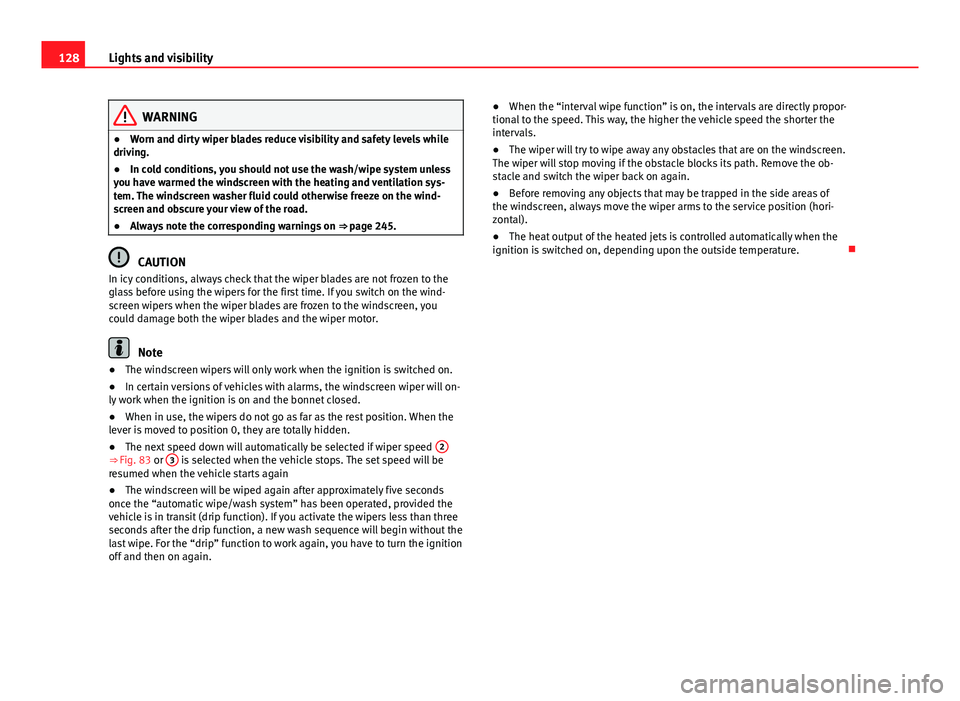
● The next speed down will automatically be selected if wiper speed 2
⇒ Fig. 83 or 3 is selected when the vehicle stops. The set speed will be
resumed when the vehicle starts again
● The windscreen will be wiped again after approximately five seconds
once the “automatic wipe/wash system” has been operated, provided the
vehicle is in transit (drip function). If you activate the wipers less than three
seconds after the drip function, a new wash sequence will begin without the
last wipe. For the “drip” function to work again, you have to turn the ignition
off and then on again. ●
When the “interval wipe function” is on, the intervals are directly propor-
tional to the speed. This way, the higher the vehicle speed the shorter the
intervals.
● The wiper will try to wipe away any obstacles that are on the windscreen.
The wiper will stop moving if the obstacle blocks its path. Remove the ob-
stacle and switch the wiper back on again.
● Before removing any objects that may be trapped in the side areas of
the windscreen, always move the wiper arms to the service position (hori-
zontal).
● The heat output of the heated jets is controlled automatically when the
ignition is switched on, depending upon the outside temperature.
Page 160 of 321
158Seats and storage
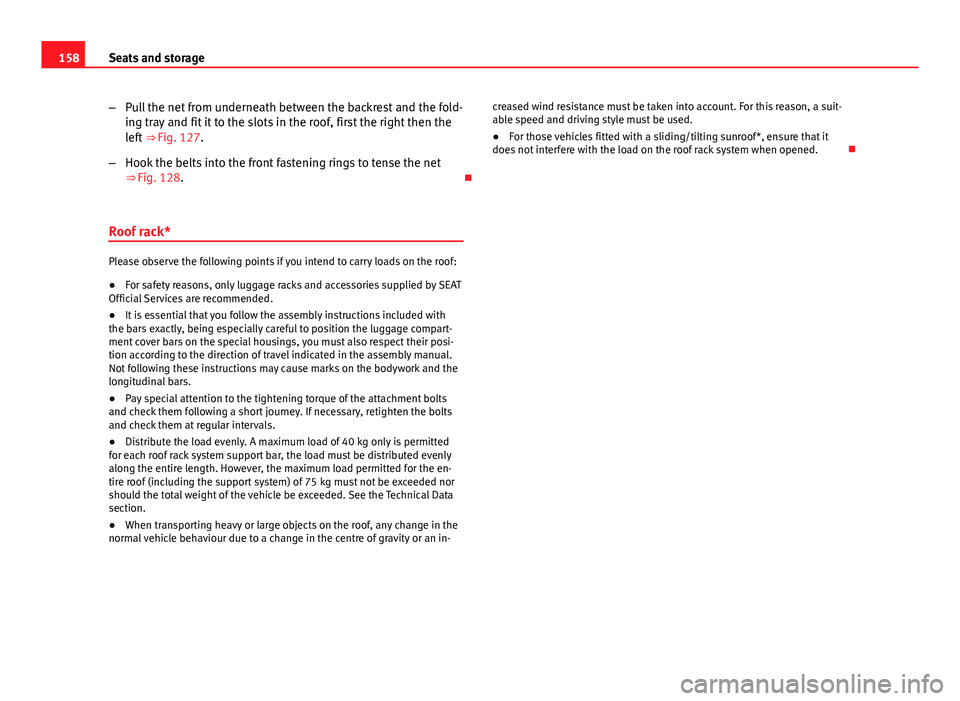
–Pull the net from underneath between the backrest and the fold-
ing tray and fit it to the slots in the roof, first the right then the
left ⇒ Fig. 127.
– Hook the belts into the front fastening rings to tense the net
⇒ Fig. 128.
Roof rack*
Please observe the following points if you intend to carry loads on the roof:
● For safety reasons, only luggage racks and accessories supplied by SEAT
Official Services are recommended.
● It is essential that you follow the assembly instructions included with
the bars exactly, being especially careful to position the luggage compart-
ment cover bars on the special housings, you must also respect their posi-
tion according to the direction of travel indicated in the assembly manual.
Not following these instructions may cause marks on the bodywork and the
longitudinal bars.
● Pay special attention to the tightening torque of the attachment bolts
and check them following a short journey. If necessary, retighten the bolts
and check them at regular intervals.
● Distribute the load evenly. A maximum load of 40 kg only is permitted
for each roof rack system support bar, the load must be distributed evenly
along the entire length. However, the maximum load permitted for the en-
tire roof (including the support system) of 75 kg must not be exceeded nor
should the total weight of the vehicle be exceeded. See the Technical Data
section.
● When transporting heavy or large objects on the roof, any change in the
normal vehicle behaviour due to a change in the centre of gravity or an in- creased wind resistance must be taken into account. For this reason, a suit-
able speed and driving style must be used.
●
For those vehicles fitted with a sliding/tilting sunroof*, ensure that it
does not interfere with the load on the roof rack system when opened.
Page 171 of 321
169
Air conditioning
With high outside temperatures, the air recirculation increases the effective-
ness of the air conditioning system by cooling the air inside the vehicle
rather than the ambient air.
If the windscreen air output is on and the air recirculation mode is pressed,
this remains active. When the recirculation mode is on, if the air distribution
towards the windscreen mode is selected, the recirculation mode is deacti-
vated. For safety reasons, the air recirculation mode should not be connec-
ted.
WARNING
In air recirculation mode, no cold air from the outside enters the vehicle
interior. If the air conditioning system is switched off, the windows can
quickly mist over. Therefore, never leave the air recirculation mode
switched on for a long time (risk of accident).
General notes
Pollution filter
The pollution filter (a combined particulate filter and active carbon filter)
serves as a barrier against impurities in the outside air, including dust and
pollen.
For the air conditioner to work with maximum efficiency, the pollution filter
must be replaced at the intervals specified in the Service Plan.
If the filter loses efficiency prematurely due to use in areas reaching very
high pollution levels, the pollen filter must be changed more frequently
than stated in the Service Schedule.
Air conditioner
When the air conditioning system is switched on, not only the temperature,
but also the air humidity in the vehicle interior is reduced. This improves comfort for the vehicle occupants and prevents misting of the windows
when the ambient air humidity is high.
If the air conditioning system cannot be switched on this may be caused by
the following reasons:
●
The engine is not running.
● The AC
button is disconnected.
● The outside temperature is lower than approximately +3 °C (+37 °F).
● The air conditioning system compressor has been temporarily switched
off because the engine coolant temperature is too high.
● The air conditioner fuse is faulty.
● Another fault in the vehicle. Have the air conditioner checked by a speci-
alised workshop.
CAUTION
● If you suspect that the air conditioner is damaged, switch it off with but-
ton AC
to prevent further damage and have it checked by a specialised
workshop.
● Repairs to the air conditioner require specialist knowledge and special
tools. Therefore, we recommend you to take the vehicle to a specialised
workshop.
Note
● If the humidity and temperature outside the vehicle are high, condensa-
tion can drip off the evaporator in the cooling system and so forming a pud-
dle underneath the vehicle. This is completely normal and there is no need
to suspect a leak.
● Keep the air intake slots in front of the windscreen free of snow, ice and
leaves to ensure heating and cooling are not impaired, and to prevent the
windows from misting over.
● The air from the vents flows through the vehicle interior and is extracted
by slots designed for this purpose. Therefore, do not cover these slots with
items of clothing or other objects.
Safety FirstOperating instructionsPractical TipsTechnical Specifications
Page 172 of 321
170Air conditioning
● The air conditioner operates most effectively with the windows and the
sliding/tilting sunroof* closed. However, if the temperature inside the vehi-
cle is excessive because of the sun, the air inside can be cooled faster by
opening the windows for a short time.
● Do not smoke while air recirculation mode is on, as smoke drawn into
the air conditioning system leaves a residue on the evaporator, producing a
permanent unpleasant odour.
● It is advisable to connect the air conditioning at least once a month, to
lubricate the system gaskets and prevent leaks. If a decrease in the cooling
capacity is detected, a Technical Service should be consulted to check the
system.