radio Seat Altea 2015 User Guide
[x] Cancel search | Manufacturer: SEAT, Model Year: 2015, Model line: Altea, Model: Seat Altea 2015Pages: 236, PDF Size: 4.23 MB
Page 65 of 236
Opening and closing
Opening and closing Central locking Basic functions The central locking system enables you to
lock and unlock all doors and the rear lid by
just pushing the button.
Description
Central locking can be activated by using any
of the following options:
● the key , by inserting it into the driver door
cylinder and r ot
ating it manually,
● the central lock button in the vehicle interi-
or ›››
page 65
.
● the radio frequency remote control , using
the buttons on the key ›››
page 67.
Various functions are available to improve
the vehicle safety: “Safe” locking system
Selective unlocking system*
Automatic speed-dependent locking and
unlocking system*
Self-locking system to prevent involunta-
ry unlocking
Emergency unlocking system
–
–
–
–
– Unlocking the vehicle*
Press button
››› Fig. 50 on remote
c ontr
ol to unlock all the doors and rear
lid.
Locking the vehicle* Press button
››› Fig. 50 on the remote
c ontr
ol to lock all doors and the rear lid
or turn the key in the door to lock all
doors and the rear lid. WARNING
● Never leave children or disabled persons in
the vehicle. In case of emergency, they may
not be able to leave the vehicle or manage on
their own.
● Never allow children to play in or around
the vehicle. A locked vehicle can be subjected
to extremely high and low temperatures, de-
pending on the time of year, thus causing se-
rious injuries/illness. It could even have fatal
consequences. Close and lock both the rear
lid and all the other doors when you are not
using the vehicle.
● Always take you car keys with you when
you leave the vehicle. Misuse of the keys, for
example, by children, may result in serious
damage and accident.
– The engine may accidentally be started
and be out of control.
– If the ignition is switched on, the electric
equipment could be activated with risk of –
– injury, for example, in the electric win-
dows.
– The doors can be locked using the remote
control key. This could become an obsta-
cle for assistance in an emergency situa-
tion.
– Always take the key with you when you
leave the vehicle.
● Never remove the key from the ignition if
the vehicle is in motion. The steering lock
could suddenly engage, and you would not be
able to steer the vehicle. Note
● While the driver door is open, the vehicle
cannot be locked with the remote control.
This avoids the user from forgetting his key
inside the vehicle.
● If the driver door is unlocked with the key
shaft, only the driver door is unlocked, the
rest of the doors remain locked. When the ig-
nition is switched on, the door “deadlock”
function is deactivated (although the doors
remain locked) and the central lock button is
activated. See ››› page 68.
● If the c
entral locking or anti-theft alarm are
faulty, the driver door control lamp remains
lit for approx. 30 seconds after the vehicle
locks.
● For anti-theft security, only the driver door
is fitted with a lock cylinder. 63
Technical specifications
Advice
Operation
Safety
Page 69 of 236
Opening and closing
The set of keys belonging to your vehicle con-
sists of the following items:
● one remote control key ››› Fig. 49 A with
folding key bit,
● one key without remote control B ,
● a plastic key tab* C .
Duplicate keys
If you need a replacement key, go to a Techni-
cal Service with your vehicle identification
number. WARNING
● An incorrect use of the keys can cause seri-
ous injuries.
● Never leave children or disabled persons in
the vehicle. In case of emergency, they may
not be able to leave the vehicle or manage on
their own.
● An uncontrolled use of the key could start
the engine or activate any electric equipment
(e.g. electric windows), causing risk of acci-
dent. The doors can be locked using the re-
mote control key. This could become an ob-
stacle for assistance in an emergency situa-
tion.
● Never forget the keys inside the vehicle. An
unauthorised use of your vehicle could result
in injury, damage or theft. Always take the
key with you when you leave the vehicle.
● Never remove the key from the ignition if
the vehicle is in motion. Otherwise, the steer- ing could suddenly block and it would be im-
possible to steer the vehicle.
CAUTION
There are electronic components in the re-
mote control key. Avoid wetting and hitting
the keys. Radio frequency remote control
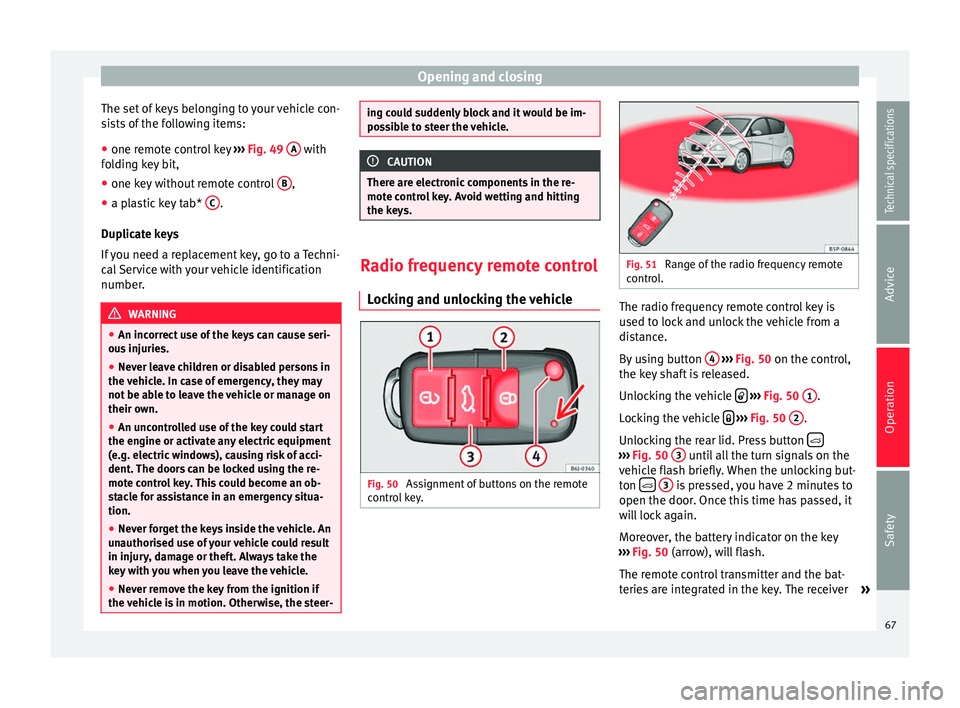
Locking and unlocking the vehicle Fig. 50
Assignment of buttons on the remote
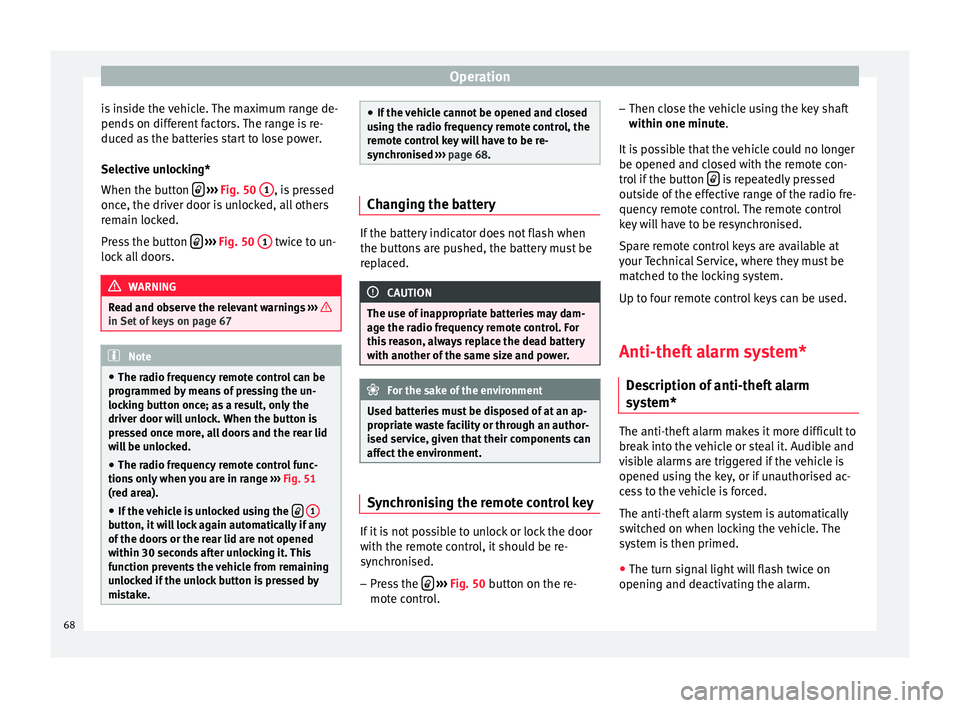
control key. Fig. 51
Range of the radio frequency remote
control. The radio frequency remote control key is
used to lock and unlock the vehicle from a
distance.
By using button
4
››› Fig. 50 on the control,
the k ey
shaft is released.
Unlocking the vehicle
››› Fig. 50 1 .
Locking the vehicle
››› Fig. 50 2 .
Unlocking the rear lid. Press button ›››
Fig. 50 3 until all the turn signals on the
vehicle flash briefly. When the unlocking but-
ton
3 is pressed, you have 2 minutes to
open the door. Once this time has passed, it
will lock again.
Moreover, the battery indicator on the key
››› Fig. 50 (arrow), will flash.
The r emot
e control transmitter and the bat-
teries are integrated in the key. The receiver »
67
Technical specifications
Advice
Operation
Safety
Page 70 of 236
Operation
is inside the vehicle. The maximum range de-
pends on different factors. The range is re-
duced as the batteries start to lose power.
Selective unlocking*
When the button
››› Fig. 50 1 , is pressed
once, the driver door is unlocked, all others
remain locked.
Press the button
››› Fig. 50 1 twice to un-
lock all doors. WARNING
Read and observe the relevant warnings ››› in Set of keys on page 67
Note
● The radio frequency remote control can be
programmed by means of pressing the un-
locking button once; as a result, only the
driver door will unlock. When the button is
pressed once more, all doors and the rear lid
will be unlocked.
● The radio frequency remote control func-
tions only when you are in range ››› Fig. 51
(red area).
● If the vehicle is unlocked using the
1 button, it will lock again automatically if any
of the doors or the rear lid are not opened
within 30 seconds after unlocking it. This
function prevents the vehicle from remaining
unlocked if the unlock button is pressed by
mistake. ●
If the vehicle cannot be opened and closed
using the radio frequency remote control, the
remote control key will have to be re-
synchronised ››› page 68. Changing the battery
If the battery indicator does not flash when
the buttons are pushed, the battery must be
replaced.
CAUTION
The use of inappropriate batteries may dam-
age the radio frequency remote control. For
this reason, always replace the dead battery
with another of the same size and power. For the sake of the environment
Used batteries must be disposed of at an ap-
propriate waste facility or through an author-
ised service, given that their components can
affect the environment. Synchronising the remote control key
If it is not possible to unlock or lock the door
with the remote control, it should be re-
synchronised.
– Press the
›››
Fig. 50 button on the re-
mot e c
ontrol. –
Then close the vehicle using the key shaft
within one minute.
It i
s possible that the vehicle could no longer
be opened and closed with the remote con-
trol if the button is repeatedly pressed
outside of the effective range of the radio fre-
quency remote control. The remote control
key will have to be resynchronised.
Spare remote control keys are available at
your Technical Service, where they must be
matched to the locking system.
Up to four remote control keys can be used.
Anti-theft alarm system* Description of anti-theft alarm
system* The anti-theft alarm makes it more difficult to
break into the vehicle or steal it. Audible and
visible alarms are triggered if the vehicle is
opened using the key, or if unauthorised ac-
cess to the vehicle is forced.
The anti-theft alarm system is automatically
switched on when locking the vehicle. The
system is then primed.
● The turn signal light will flash twice on
opening and deactivating the alarm.
68
Page 71 of 236

Opening and closing
● The turn signal light will flash once on clos-
ing and activating the alarm.
When does the system trigger an alarm?
The system triggers an alarm if the following
unauthorised actions are carried out when
the vehicle is locked:
● Opening the vehicle mechanically using
the key and with the ignition off.
● A door is opened.
● Opening the bonnet.
● The rear lid is opened.
● Ignition switched on with a non-validated
key.
● Movements in the driving compartment
(vehicles with interior monitoring).
● Undue manipulation of the alarm.
● Battery handling.
The acoustic signals sound and the turn sig-
nals flash for approx. 30 seconds. This cycle
may be repeated up to 10 times depending
on the country.
Opening the doors mechanically (emergency
opening)
If the radio frequency remote control function
fails, you will have to use the key to unlock
the vehicle. This is done as follows: ●
Use the lock on the driver door to unlock
the vehicle. The anti-theft alarm system re-
mains active, but an alarm is not triggered
immediately.
● Switch on the ignition within 15 seconds.
When the ignition is switched on, the elec-
tronic immobiliser recognises a valid vehicle
key and deactivates the anti-theft alarm sys-
tem. If you do not switch on the ignition with-
in 15 seconds, the alarm is triggered (in cer-
tain markets, such as the Netherlands, there
is no 15-second waiting time and the alarm
is activated immediately after opening the
door).
Opening all the doors in manual mode
In vehicles without an alarm, when opening
the driver door manually, all doors are
opened.
How to switch the alarm off
When the vehicle is unlocked via the unlock-
ing button of the radio frequency remote con-
trol or when the key is inserted in the ignition
lock. Note
● After 28 days, the indicator light will be
switched off to prevent the battery from
draining if the vehicle has been left parked
for a long period of time. The alarm system
remains activated. ●
If, after the audible warning turns off, an-
other monitored area is accessed (e.g. the
boot hatch is opened after a door has been
opened), the alarm is triggered again.
● The anti-theft alarm is not activated when
the vehicle is locked from within using the
central locking button .
● If the vehicle battery is run down or flat
then the anti-theft alarm will not operate cor-
rectly.
● Vehicle monitoring remains active even if
the battery is disconnected or not working for
any reason.
● The alarm is triggered immediately if one of
the battery cables is disconnected while the
alarm system is active. Interior monitoring*
This is a monitoring or control function incor-
porated in the anti-theft alarm* which de-
tects unauthorized vehicle entry by means of
ultrasound.
The system consists of 3 sensors, 2 emitters
and a receptor.
Activation
– It is automatically turned on with the anti-
theft alarm, when the vehicle is locked me-
chanically with the key and when the but-
ton on the remote control is used.
»
69Technical specifications
Advice
Operation
Safety
Page 102 of 236
Operation
MEDIA-IN* connector Fig. 101
Connection in central armrest com-
partment. For information concerning the use of this
equipment, please see the Radio handbook.
First-aid kit, warning triangle,
fire extinguisher
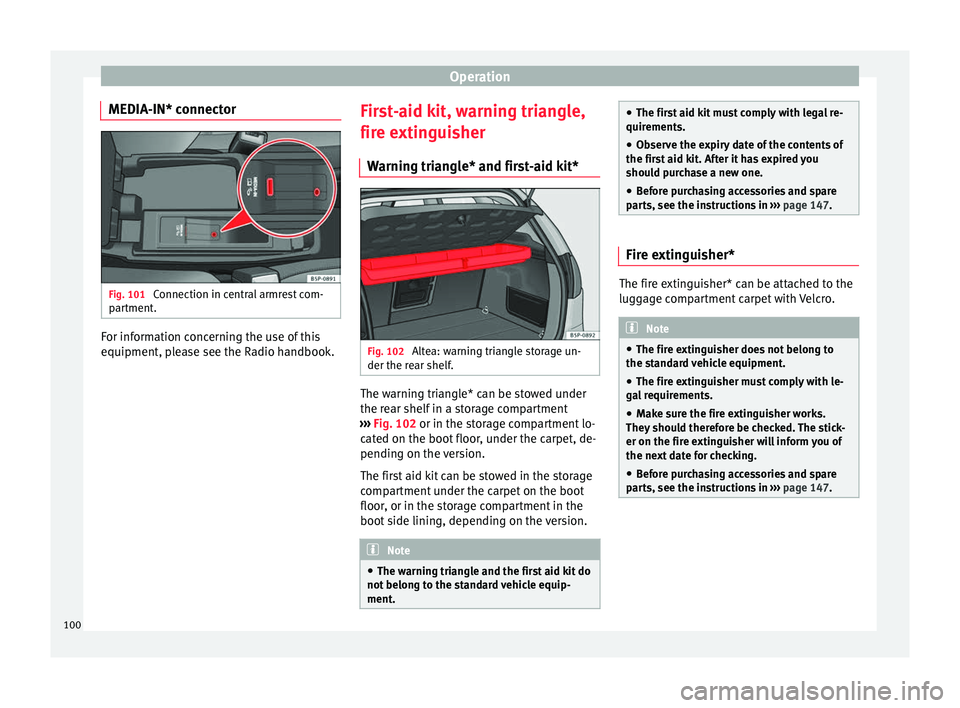
Warning triangle* and first-aid kit* Fig. 102
Altea: warning triangle storage un-
der the rear shelf. The warning triangle* can be stowed under
the rear shelf in a storage compartment
››› Fig. 102 or in the storage compartment lo-
c at
ed on the boot floor, under the carpet, de-
pending on the version.
The first aid kit can be stowed in the storage
compartment under the carpet on the boot
floor, or in the storage compartment in the
boot side lining, depending on the version. Note
● The warning triangle and the first aid kit do
not belong to the standard vehicle equip-
ment. ●
The first aid kit must comply with legal re-
quirements.
● Observe the expiry date of the contents of
the first aid kit. After it has expired you
should purchase a new one.
● Before purchasing accessories and spare
parts, see the instructions in ››› page 147. Fire extinguisher*
The fire extinguisher* can be attached to the
luggage compartment carpet with Velcro.
Note
● The fire extinguisher does not belong to
the standard vehicle equipment.
● The fire extinguisher must comply with le-
gal requirements.
● Make sure the fire extinguisher works.
They should therefore be checked. The stick-
er on the fire extinguisher will inform you of
the next date for checking.
● Before purchasing accessories and spare
parts, see the instructions in ››› page 147.100
Page 115 of 236
Air conditioning
yellow and the symbol appears in the dis-
play. AUTO button – Automatic temperature,
ventilation and air distribution control
››› page 113
SYNC button – Dual zone synchroniser
OFF button – Switches the 2C-Climatronic
on and off ››› page 114
Blower control ››› page 114
A/C button – To switch on the cooling
system WARNING
For road safety all windows must be clear of
ice, snow, and condensation. This is essential
to ensure good visibility. Please familiarise
yourself with the correct operation of the
heating and ventilation system, including the
anti-fog/defrost functions for the wind-
screens. 7
8
9
10
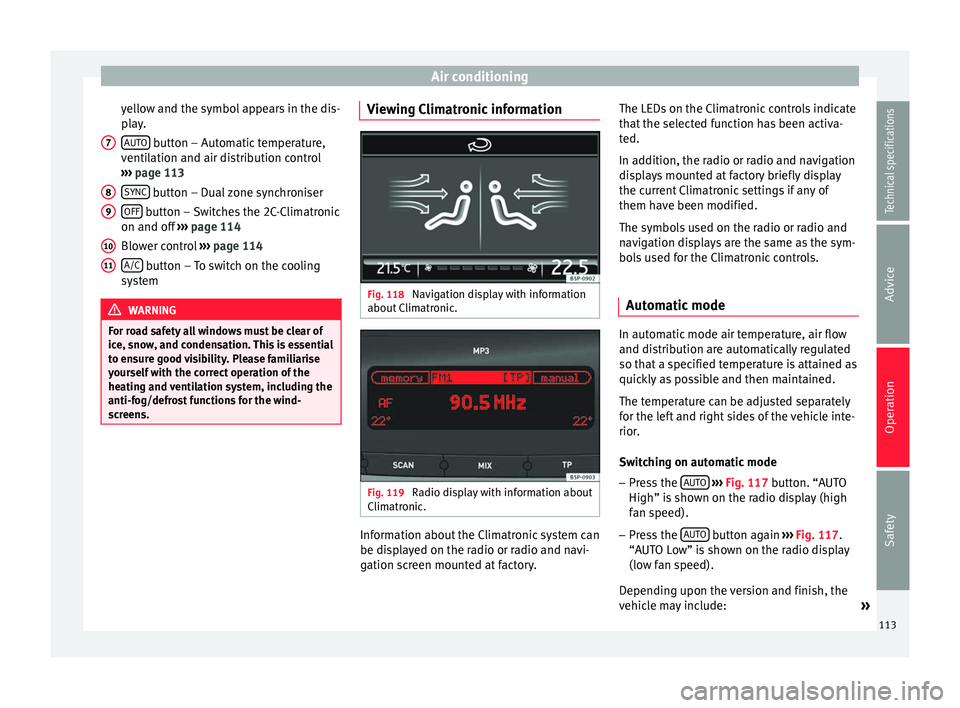
11 Viewing Climatronic information
Fig. 118
Navigation display with information
about Climatronic. Fig. 119
Radio display with information about
Climatronic. Information about the Climatronic system can
be displayed on the radio or radio and navi-
gation screen mounted at factory.The LEDs on the Climatronic controls indicate
that the selected function has been activa-
ted.
In addition, the radio or radio and navigation
displays mounted at factory briefly display
the current Climatronic settings if any of
them have been modified.
The symbols used on the radio or radio and
navigation displays are the same as the sym-
bols used for the Climatronic controls.
Automatic mode In automatic mode air temperature, air flow
and distribution are automatically regulated
so that a specified temperature is attained as
quickly as possible and then maintained.
The temperature can be adjusted separately
for the left and right sides of the vehicle inte-
rior.
Switching on automatic mode
– Press the AUTO
›››
Fig. 117 button. “AUTO
High” i s
shown on the radio display (high
fan speed).
– Press the AUTO button again
›››
Fig. 117 .
“A UT
O Low” is shown on the radio display
(low fan speed).
Depending upon the version and finish, the
vehicle may include: »
113
Technical specifications
Advice
Operation
Safety
Page 117 of 236
Air conditioning
In manual mode you can adjust the air tem-
perature, air flow and distribution as re-
quired.
Switching on manual mode – To enter manual mode, press one of the
buttons ››› Fig. 120 1 to
5 or press the
air flow control 10 . The selected function is
shown on the radio or navigator display.
Temperature
There are separate temperature selectors for
the left and right sides of the vehicle interior.
The selected temperature is displayed above
the selector. It is possible to select interior
temperatures from +18 °C (+64 °F) to +26 °C
(+80 °F). These are approximate tempera-
tures and the actual temperature may be
slightly higher or lower depending on the
outside ambient conditions.
If you select temperatures below +18 °C
(+64 °F), the indication: LO will appear on the
screen. In this setting the system runs at
maximum cooling output and the tempera-
ture is not regulated.
If a temperature above +26 °C (+80 °F) is se-
lected, the screen will show HI. In this setting
the system runs at maximum heating output
and the temperature is not regulated. Blower
The fan may be adjusted freely using the con-
trols
10 . Always have the blower running at a
low setting to ensure a constant flow of fresh
air into the vehicle. Pushing the button to
the minimum -1, t urn
s the Climatronic off.
Air distribution
The air distribution is adjusted using the but-
tons ,
and
. It is also possible to
open and close some of the air vents sepa-
rately.
Switching the air conditioning on and off
When the A/C button is on (LED lit), the air
conditioning system is on.
When the A/C button is off (LED off), the air
conditioning system is off.
When the A/C button is off, the air condition-
ing system is switched off to save fuel. The
temperature continues to self-regulate. The
set temperature can only be reached if it is
higher than the outside temperature.
Driver and passenger temperature control
The SYNC button controls the synchronisa-
tion of the 2 Climatronic climate zones.
When the SYNC button is off (LED off), the Cli-
matronic climate zone is personalised. For
example: driver side temperature +22 °C (+72 °F) and passenger side temperature +24
℃
(+23.89 ℃
).
When the S
YNC button is on (LED lit), the Cli-
matronic climate zone is synchronised. For
example: driver side temperature +22 °C
(+72 °F) and passenger side temperature +22
℃ (+22.22 ℃
).
If
the SYNC button is on and the passenger
side temperature is changed, the function is
automatically deactivated.
Air recirculation mode –
Press the button
››› Fig. 120 5 to
switch air recirculation mode on or off. It is
switched on if the following symbol ap-
pears in the display .
Air recirculation mode prevents strong
odours or contaminated air from the outside
from entering in the vehicle, for example
when passing through a tunnel or in a traffic
jam.
With low outside temperatures, the air recir-
culation increases the effectiveness of the
heating system by heating the air inside the
vehicle rather than the air from outside.
With high outside temperatures, the air recir-
culation increases the effectiveness of the air
conditioning system by cooling the air inside
the vehicle rather than the ambient air. »
115Technical specifications
Advice
Operation
Safety
Page 143 of 236

Driver assistance systems
SEAT Parking System Plus*:
description The Parking System Plus is an acoustic and
optical parking aid.
Sensors are located in the front and rear
bumpers. When the sensors detect an obsta-
cle, you are alerted by audible and optical
warnings. The measuring range of the sen-
sors starts at approximately:FrontSide0.90
Centre1.20
RearSide0.60
Centre1.60
The audible warnings sound with increasing
frequency as you approach the obstacle.
When the vehicle is less than 0.30 m away
from the obstacle, the warning tone will
sound continuously. Stop moving immediate-
ly!
The volume of the warning beeps will gradu-
ally decrease after about 4 seconds if the ve-
hicle remains at a constant distance from a
detected obstacle (it does not affect the per-
manent acoustic signal). Activating/deactivating
Fig. 134
Centre console: Switch for parking
aid. Activate
– Connects the radio navigator.
– Press the switch on the centre console
››› Fig. 134 or on the gear indicator. You will
he ar a brief
confirmation tone and the LED
on the switch will light up.
Deactivating – Drive forward faster than 10 km/h (6 mph),
or
– Press the switch or
– Switch the ignition off.
Segments in the optical display
Some colour segments in front and behind
and an audible warning enable the driver to
assess the distance with respect to an obsta- cle. The amber colour segments combined
with a discontinuous beep indicate the pres-
ence of an obstacle. As the vehicle gets clos-
er to the obstacle, the colour of the segment
changes to red and the acoustic signal beeps
continuously. When the penultimate segment
is displayed, this means that the vehicle has
reached the collision zone. Stop moving im-
mediately!
››› in SEAT Parking System: de-
scription on page 140. Note
● Please refer to the notes on towing
››› page 141.
● Ther e i
s a slight delay in the picture dis-
play. Towing bracket
In towing mode, the rear parking aid sensors
are not enabled when you select reverse gear
or press the switch
. This function may not
be guaranteed on towing brackets that are
not factory fitted. This results in the following
restrictions:
SEAT Parking System*
No warning is given.
SEAT Parking System Plus*
There is no rear distance warning. The system
will still give a warning when obstacles are »
141
Technical specifications
Advice
Operation
Safety
Page 150 of 236
Advice
To return to working position
Continue in the reverse order to the previous
instruction. CAUTION
If an automatic car wash tunnel is used, be-
fore entering the tunnel, put the aerial down
parallel to the roof and do not tighten to
avoid damage. Mobile phones and two-way radios
First consult your Technical Service if you
wish to use a mobile telephone or a two-way
radio with a transmitting power output in ex-
cess of 10 watts. Here you will receive infor-
mation concerning the technical possibilities
for retrofitting this equipment.
Mobile telephones and two-way radios
should be only fitted by a specialised work-
shop, for example a SEAT dealership.
WARNING
● Always concentrate primarily on driving. If
you are distracted while driving you could
have an accident.
● Never attach the telephone mountings to
the surfaces covering the airbag units or
within the range of the airbags. There is a
high danger of injury if the airbag is trig-
gered. Note
Please observe the operating instructions of
your mobile telephone/two-way radio. Care and cleaning
General information Vehicle maintenance
Regular care and washing help to maintain
the value
of the vehicle. This may also be one
of the requirements for acknowledging war-
ranty claims in the event of bodywork corro-
sion or paint defects.
The best way to protect your vehicle against
the harmful effects of the environment is
through correct maintenance and frequent
washing. The longer substances such as in-
sect remains, bird droppings, resinous tree
sap, road dirt, industrial deposits, tar, soot or
road salt and other aggressive materials re-
main on the vehicle, the more damage they
do to the paintwork. High temperatures, for
instance in strong sunlight, further intensify
the corrosive effect.
After winter, a period when salt is put on the
roads, it is important to have the underside
of the vehicle washed thoroughly. Products for vehicle maintenance
Car-care products are available in your Tech-
nical Services. Keep the product instructions
until you have used them up. WARNING
● Car-care products can be toxic. Because of
this, they must always be kept closed in their
original container. Keep them out of the reach
of children. Failure to comply could result in
poisoning.
● Always read and observe the instructions
and warnings on the package before using
car-care products. Improper use could cause
health problems or damage the vehicle. The
use of certain products may produce noxious
vapours; they should be used in well ventila-
ted areas.
● Never use fuel, turpentine, engine oil, nail
varnish remover or other volatile fluids.
These are toxic and highly flammable. Risk of
fire and explosion.
● Before washing your vehicle, or carrying
out any maintenance, switch the engine off,
apply the handbrake firmly and remove the
key from the ignition. CAUTION
Never attempt to remove dirt, mud or dust if
the surface of the vehicle is dry. Never use a
dry cloth or sponge for cleaning purposes.
This could damage the paintwork or the win-
dows of your vehicle. Soak dirt, mud or dust
with plenty of water. 148
Page 151 of 236
Care and maintenance
For the sake of the environment
● When purchasing products for your vehicle
maintenance, select the ones which are not
harmful to the environment.
● The waste from car-care products should
not be disposed of with ordinary household
waste. Observe the disposal information on
the package. Care of the vehicle exterior
Automatic car wash tunnel The vehicle paintwork is so durable that the
vehicle can normally be washed without
problems in an automatic car wash tunnel.
However, the paintwork wear depends to a
large extent on the kind of the car wash tun-
nel, the brushes used, its water filtering and
the type of cleaning and preservative prod-
ucts.
Before going through a vehicle wash, be sure
to take the usual precautions such as closing
the windows and sunroof.
If the vehicle has special accessories such as
spoilers or a roof rack or two-way radio aerial,
etc., it is advisable to consult the car wash
tunnel operator.
After washing,
the brakes
could take some
time t
o respond as the brake discs and pads could be wet, or even frozen in winter. “Dry”
the brakes by braking several times. WARNING
Water, ice and salt on the brake system can
reduce braking effectiveness. Risk of acci-
dent. CAUTION
Before putting the vehicle through the car
wash, do not tighten the aerial if it is folded
because it can be damaged. Washing by hand
Vehicle washing
– First soften the dirt and rinse it off with wa-
ter.
– Clean your vehicle from top to bottom with
a soft sponge, a glove or a brush. Use very
light pressure.
– Rinse the sponge or glove often with clean
water.
– Special car shampoo should only be used
for very stubborn dirt.
– Leave the wheels, sill panels etc. until last,
using a different sponge or glove.
– Rinse the vehicle thoroughly with water. –
Dry the vehicle surface gently with a cha-
mois leather.
– In cold temperature
, dry the rubber seals
and their s
urfaces to prevent them from
freezing. Apply silicone spray to the rubber
seals.
After washing the vehicle – After washing, avoid sudden and sharp
braking. “Dry” the brakes by braking sever-
al times ››› page 123, Braking capacity and
distance. WARNING
● Wash your vehicle with the ignition switch-
ed off.
● Protect your hands and arms from cuts on
sharp metal edges when cleaning the under-
body, the inside of the wheel housings etc.
Risk of injury.
● Water, ice and salt on the brake system can
reduce braking effectiveness. Risk of acci-
dent. CAUTION
● Never remove dirt, mud or dust if the vehi-
cle surface is dry. Never use a dry cloth or
sponge for cleaning purposes. This could
scratch the paintwork or glass on your vehi-
cle. » 149
Technical specifications
Advice
Operation
Safety