key Seat Altea 2015 Owner's Guide
[x] Cancel search | Manufacturer: SEAT, Model Year: 2015, Model line: Altea, Model: Seat Altea 2015Pages: 236, PDF Size: 4.23 MB
Page 78 of 236

Operation
Switching on front fog lights* – Pull the switch out of position or
to
the first stop. The symbol of the light
control lights up.
Switching on the rear fog lights (vehicles
with front fog lights) – Pull the switch out of position or
to
the second stop ››› . A control lamp lights
up on the dash panel.
Switching on the rear fog lights (vehicles
with no front fog lights) – Pull the light switch from position to the
last stop. A control lamp lights up in the
dash panel. WARNING
Never drive with just the side lights on. Risk
of accident. The side lights are not bright
enough to illuminate the road ahead and to
ensure that other road users are able to see
you. Always use your dipped beam head-
lights if it is dark or if visibility is poor. Note
● The dipped beam headlights will only work
with the ignition on. The side lights come on
automatically when the ignition is turned off.
● If the lights are left on after the key has
been taken out of the ignition lock, an audi-
ble warning will sound while the driver door remains open. This is a reminder to switch
the lights off.
● The rear fog light is so bright that it can
dazzle drivers behind you. You should use
the rear fog light only when visibility is very
poor.
● If you are towing a trailer equipped with a
rear fog light on a vehicle with a factory-fitted
towing bracket, the rear fog light on the vehi-
c l
e will automatically be switched off.
● The use of the lighting described here is
subject to the relevant statutory require-
ments.
● Depending on weather conditions (very
cold or wet), the front and rear lights and the
indicators may be temporarily misted. This
has no influence on the useful life of the
lighting system. The lights will soon demist
when they are switched on. Automatic lighting*
Fig. 59
Automatic lighting. Activation
– Rotate the switch to the position. It will
light up.
Deactivation – Turn the light switch to .
Automatic lighting
If automatic headlight control is switched on,
dipped beam headlights are automatically
switched on by a photosensor if you drive in-
to a tunnel, for example.
The rain sensor switches on the dipped beam
headlights when the windscreen wipers have
been operating continuously for a few sec-
onds and it switches the lights off when the
continuous or interval wipe is switched off for
some minutes ››› page 84.
76
Page 79 of 236

Lights and visibility
When the automatic dipped beam headlight
control is on but the dipped beam headlights
are off, the warning lamp lights up on
the light control ››› Fig. 59. If the automatic
control switches on the dipped lights, the in-
strument and control lighting is also switch-
ed on. WARNING
● Even if the automatic headlight control is
switched on, the dipped beam headlights will
not be switched on with fog. Therefore, the
dipped beam must be switched on manually. Note
● For those vehicles with the automatic head-
light system, when the key is removed from
the ignition, the audible warning will only
sound if the light control is in the position
or if the vehicle is not fitted with the com-
in g home f
unction.
● If the daylight driving automatic light func-
tion is switched on, the front fog lights or
rear fog light cannot be switched on in addi-
tion.
● The use of the lighting described here is
subject to the relevant statutory require-
ments.
● Do not put stickers on the windscreen in
front of the sensor. This may cause disrup-
tions or faults in the automatic lighting sys-
tem. ●
To avoid damage to the tail lights, the
lights mounted on the rear lid go off when the
rear lid is opened (depending on the country). Turn signal and main beam headlight
lever
Fig. 60
Turn signal and main beam lever The turn signal and main beam headlight lev-
er has the following functions:
Switching on the turn signals
– Move the lever all the way up ››› Fig. 60 1 to indicate
right
, and all the way down 2 to indicate
left
.
Sign
alling a lane change
– Push the lever up 1 or down
2 to the
point where you incur resistance and then
release it. The turn signal will flash several times. The corresponding control lamp will
also flash.
Switching main beam on and off – If the dipped lights are on, push the lever
forward ››› Fig. 60 3 to switch on the main
beam headlights.
– Push the lever towards the steering wheel
››› Fig. 60 4 to switch off the main beam.
Headlight flashers
– Pull the lever towards the steering wheel
4 to operate the flasher.
Switching on parking lights
– Switch the ignition off and remove the key
from the lock.
– Move the turn signal lever up or down to
turn the right or left-hand parking lights on,
respectively. WARNING
The main beam can dazzle other drivers. Risk
of accident! Never use the main beam head-
lights or the headlight flasher if they could
dazzle other drivers. Note
● The turn signals only
work when the igni-
tion is switched on. The corresponding warn-
ing lamp or flashes in the instrument
» 77
Technical specifications
Advice
Operation
Safety
Page 80 of 236
Operation
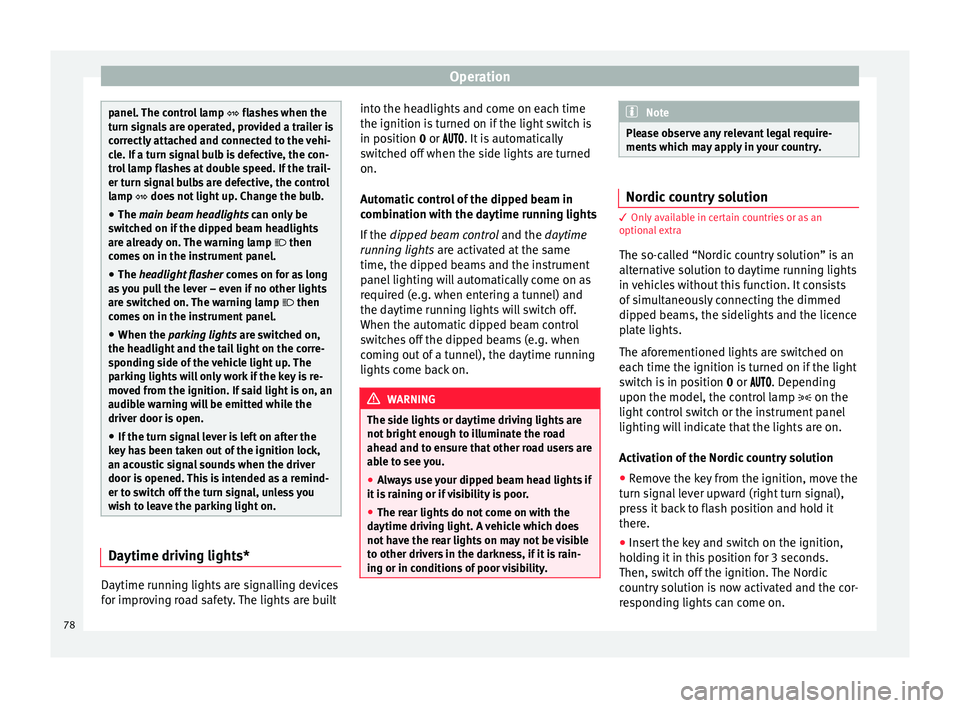
panel. The control lamp
flashes when the
t urn s
ignals are operated, provided a trailer is
correctly attached and connected to the vehi-
cle. If a turn signal bulb is defective, the con-
trol lamp flashes at double speed. If the trail-
er turn signal bulbs are defective, the control
lamp does not light up. Change the bulb.
● The main beam headlights can only be
sw
itched on if the dipped beam headlights
are already on. The warning lamp then
comes on in the instrument panel.
● The headlight flasher come
s on for as long
as you pull the lever – even if no other lights
are switched on. The warning lamp then
comes on in the instrument panel.
● When the parking lights are switched on,
the he
adlight and the tail light on the corre-
sponding side of the vehicle light up. The
parking lights will only work if the key is re-
moved from the ignition. If said light is on, an
audible warning will be emitted while the
driver door is open.
● If the turn signal lever is left on after the
key has been taken out of the ignition lock,
an acoustic signal sounds when the driver
door is opened. This is intended as a remind-
er to switch off the turn signal, unless you
wish to leave the parking light on. Daytime driving lights*
Daytime running lights are signalling devices
for improving road safety. The lights are built into the headlights and come on each time
the ignition is turned on if the light switch is
in position
0 or
. It is automatically
sw
itched off when the side lights are turned
on.
Automatic control of the dipped beam in
combination with the daytime running lights
If the dipped beam control and the daytime
running lights
are activated at the same
time, the dipped beams and the instrument
panel lighting will automatically come on as
required (e.g. when entering a tunnel) and
the daytime running lights will switch off.
When the automatic dipped beam control
switches off the dipped beams (e.g. when
coming out of a tunnel), the daytime running
lights come back on. WARNING
The side lights or daytime driving lights are
not bright enough to illuminate the road
ahead and to ensure that other road users are
able to see you.
● Always use your dipped beam head lights if
it is raining or if visibility is poor.
● The rear lights do not come on with the
daytime driving light. A vehicle which does
not have the rear lights on may not be visible
to other drivers in the darkness, if it is rain-
ing or in conditions of poor visibility. Note
Please observe any relevant legal require-
ments which may apply in your country. Nordic country solution
3 Only available in certain countries or as an
option
al
extra
The so-called “Nordic country solution” is an
alternative solution to daytime running lights
in vehicles without this function. It consists
of simultaneously connecting the dimmed
dipped beams, the sidelights and the licence
plate lights.
The aforementioned lights are switched on
each time the ignition is turned on if the light
switch is in position 0 or . Depending
upon the model, the control lamp on the
light control switch or the instrument panel
lighting will indicate that the lights are on.
Activation of the Nordic country solution
● Remove the key from the ignition, move the
turn signal lever upward (right turn signal),
press it back to flash position and hold it
there.
● Insert the key and switch on the ignition,
holding it in this position for 3 seconds.
Then, switch off the ignition. The Nordic
country solution is now activated and the cor-
responding lights can come on.
78
Page 81 of 236

Lights and visibility
Deactivation of the Nordic country solution
● Remove the key from the ignition, press the
turn signal lever down (left turn signal), press
it back to flash position and hold it here.
● Insert the key and switch on the ignition,
holding it in this position for 3 seconds.
Then, switch off the ignition. The Nordic
country solution is now deactivated and the
corresponding lights will not come on.
Coming Home/Leaving Home
function* The Coming Home function is controlled man-
ually. The Leaving Home function is control-
led with a photosensor.
If the Coming Home or Leaving Home func-
tion is connected, the front side and dipped
lights, the tail lights and the number plate
light will light up to provide assistance.
Coming home function
The Coming Home function is activated by
switching off the ignition and briefly flashing
the lights. When the driver door is opened,
the Coming Home lighting comes on. If the
driver door is already open when the lights
are flashed briefly, the Coming Home lighting
comes on
immediately .
When the l a
st door of the vehicle or the rear
lid is closed, the Coming Home function starts and the switching off the headlights is
delayed.
The Coming Home lighting switches off in the
following cases:
● On completion of the time period establish-
ed for the delay in switching off the lights af-
ter all the vehicle doors and the rear lid have
been closed.
● If, 30 seconds after being connected, any
doors or the rear lid remain open.
● If the light switch is turned to position
.
● If the ignition is switched on.
Leaving home function
The Leaving Home function is activated when
the vehicle is unlocked if:
● the light control is in position and
● the photosensor detects “darkness”.
The Leaving Home lighting switches off in the
following cases:
● If the time period for the delay in switching
off the headlights has ended
● If the vehicle is locked again.
● If the light switch is turned to position .
● If the ignition is switched on. Note
The setting for the delay in switching off the
headlights in the Coming Home and Leaving
Home function can be changed or the func-
tion can be connected or disconnected in the
menu Lights and visibility › ›
› page 56.
● If the ignition key is removed while the
lights are on, the lights flash briefly and the
driver door opens, no audible warning is
heard, since with the Coming Home function
on, the lights are automatically switched off
after a period of time (except when the light
switch is in position or . Instrument and switch lighting /
Headlight range control
Fig. 61
Dash panel: Instrument panel and
control dimmers and headlight range control. » 79
Technical specifications
Advice
Operation
Safety
Page 83 of 236
Lights and visibility
correct use of lights in all situations. “Auto-
matic headlight control” is merely a system
to support the driver. Where necessary,
switch on the lights manually using the light
switch.
Fog lights with cornering function*
3 Applies to the model: ALTEA / ALTEA XL
When the t urn s
ignal is switched on to turn or
on very tight bends, the right or left fog light
automatically comes on to function as a cor-
nering light. The cornering light only oper-
at e
s if the dipped beam lights are on. WARNING
Read and observe the relevant warnings ››› in Adaptive headlights* (for driving round
bends) on page 80 Hazard warning lights
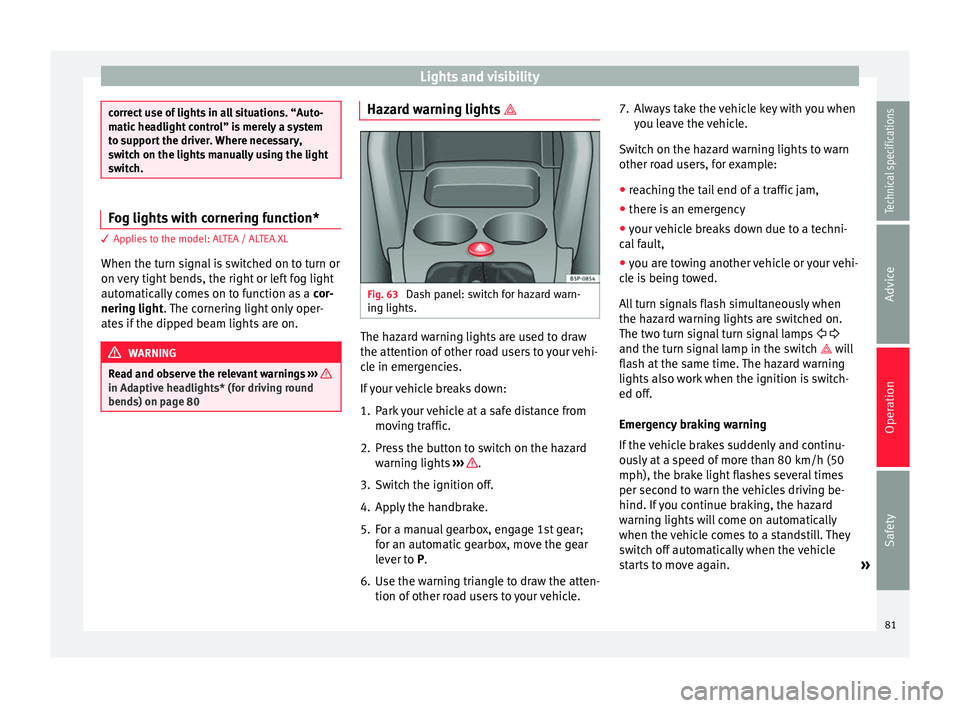
Fig. 63
Dash panel: switch for hazard warn-
ing lights. The hazard warning lights are used to draw
the attention of other road users to your vehi-
cle in emergencies.
If your vehicle breaks down:
1. Park your vehicle at a safe distance from
moving traffic.
2. Press the button to switch on the hazard warning lights ››› .
3. Switch the ignition off.
4. Apply the handbrake.
5. For a manual gearbox, engage 1st gear; for an automatic gearbox, move the gear
lever to P
.
6.
Use the warning triangle to draw the atten-
tion of other road users to your vehicle. 7. Always take the vehicle key with you when
you leave the vehicle.
Switch on the hazard warning lights to warn
other road users, for example:
● reaching the tail end of a traffic jam,
● there is an emergency
● your vehicle breaks down due to a techni-
cal fault,
● you are towing another vehicle or your vehi-
cle is being towed.
All turn signals flash simultaneously when
the hazard warning lights are switched on.
The two turn signal turn signal lamps
and the turn signal lamp in the switch will
flash at the same time. The hazard warning
lights also work when the ignition is switch-
ed off.
Emergency braking warning
If the vehicle brakes suddenly and continu-
ously at a speed of more than 80 km/h (50
mph), the brake light flashes several times
per second to warn the vehicles driving be-
hind. If you continue braking, the hazard
warning lights will come on automatically
when the vehicle comes to a standstill. They
switch off automatically when the vehicle
starts to move again. »
81
Technical specifications
Advice
Operation
Safety
Page 84 of 236
Operation
WARNING
● The risk of an accident increases if your ve-
hicle breaks down. Always use the hazard
warning lights and a warning triangle to draw
the attention of other road users to your sta-
tionary vehicle.
● Never park where the catalytic converter
could come into contact with inflammable
materials under the vehicle, for example dry
grass or spilt petrol. This could start a fire! Note
● The battery will run down if the hazard
warning lights are left on for a long time,
even if the ignition is switched off.
● The use of the hazard warning lights de-
scribed here is subject to the relevant statu-
tory requirements. Interior lights
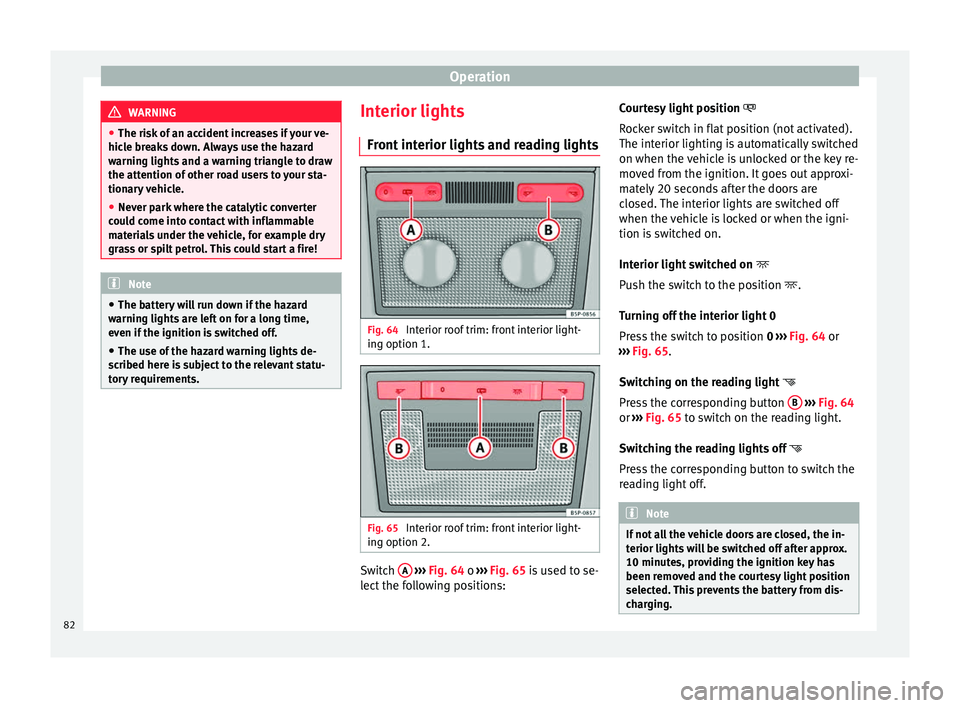
Front interior lights and reading lights Fig. 64
Interior roof trim: front interior light-
ing option 1. Fig. 65
Interior roof trim: front interior light-
ing option 2. Switch
A
››› Fig. 64 o
›
›› Fig. 65 is used to se-
lect the following positions: Courtesy light position
Rocker switch in flat position (not activated).
The interior lighting is automatically switched
on when the vehicle is unlocked or the key re-
moved from the ignition. It goes out approxi-
mately 20 seconds after the doors are
closed. The interior lights are switched off
when the vehicle is locked or when the igni-
tion is switched on.
Interior light switched on
Push the switch to the position
.
Turning off the interior light 0
Press the switch to position 0
››› Fig. 64 or
››› Fig. 65.
Swit
ching on the reading light
Press the corresponding button B
››› Fig. 64
or ››› Fig. 65 to switch on the reading light.
Sw it
ching the reading lights off
Press the corresponding button to switch the
reading light off. Note
If not all the vehicle doors are closed, the in-
terior lights will be switched off after approx.
10 minutes, providing the ignition key has
been removed and the courtesy light position
selected. This prevents the battery from dis-
charging. 82
Page 85 of 236
Lights and visibility
Rear interior lights and reading
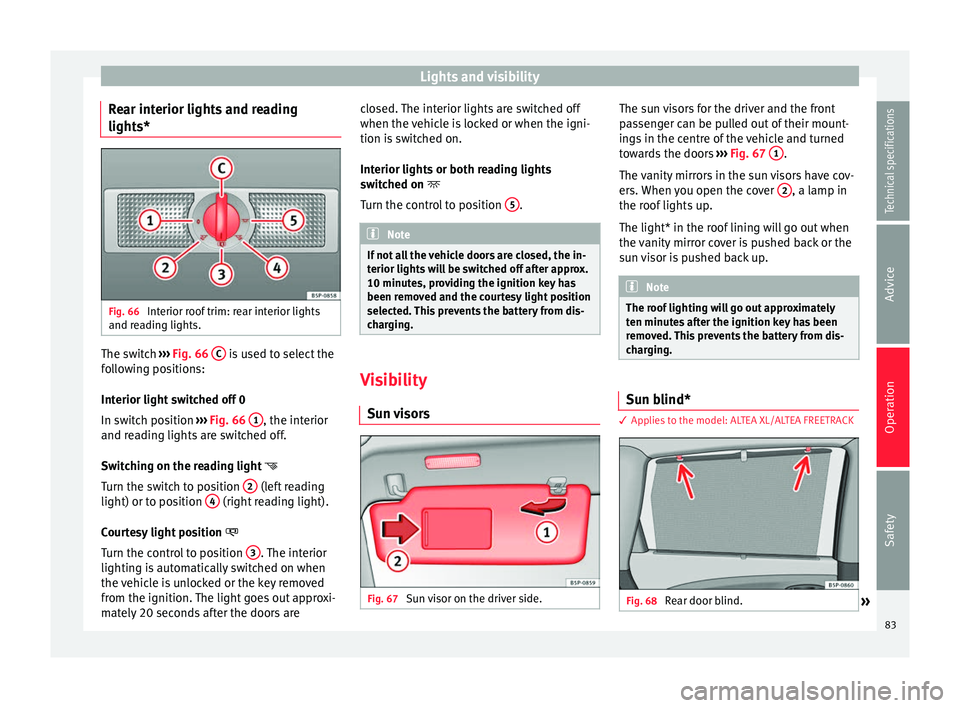
lights* Fig. 66
Interior roof trim: rear interior lights
and reading lights. The switch
››› Fig. 66 C is used to select the
following positions:
Interior light switched off 0
In switch position ››› Fig. 66 1 , the interior
and reading lights are switched off.
Switching on the reading light
Turn the switch to position 2 (left reading
light) or to position 4 (right reading light).
Courtesy light position
Turn the control to position 3 . The interior
lighting is automatically switched on when
the vehicle is unlocked or the key removed
from the ignition. The light goes out approxi-
mately 20 seconds after the doors are closed. The interior lights are switched off
when the vehicle is locked or when the igni-
tion is switched on.
Interior lights or both reading lights
switched on
T urn the c
ontrol to position 5 .
Note
If not all the vehicle doors are closed, the in-
terior lights will be switched off after approx.
10 minutes, providing the ignition key has
been removed and the courtesy light position
selected. This prevents the battery from dis-
charging. Visibility
Sun visors Fig. 67
Sun visor on the driver side. The sun visors for the driver and the front
passenger can be pulled out of their mount-
ings in the centre of the vehicle and turned
towards the doors
››› Fig. 67 1 .
The vanity mirrors in the sun visors have cov-
ers. When you open the cover 2 , a lamp in
the roof lights up.
The light* in the roof lining will go out when
the vanity mirror cover is pushed back or the
sun visor is pushed back up. Note
The roof lighting will go out approximately
ten minutes after the ignition key has been
removed. This prevents the battery from dis-
charging. Sun blind*
3 Applies to the model: ALTEA XL/ALTEA FREETRACK
Fig. 68
Rear door blind.
» 83
Technical specifications
Advice
Operation
Safety
Page 86 of 236

Operation
Rear window sun blind* – Pull out the visor and hook it onto the
hooks at the top of the door frame
››› Fig. 68 .
W ind
screen wiper and rear
window wiper systems
Windscreen wipers Fig. 69
Windscreen wiper lever. Fig. 70
Rain sensor on the windscreen seen
from the interior. The windscreen wiper lever
››› Fig. 69 has the
f o
llowing positions:
Initial position 0 Rest, windscreen disconnected.
Intermittent wipe / automatic wipe with rain
sensor*
– Move the lever up to position 1 .
– With switch A adjust the wipe interval or
sensitivity of the rain sensor*.
Switch A has 4 positions.
The rain sensor* is part of the intermittent
wipe function. You will have to switch the rain
sensor back on if you switch off the ignition.
This is done by switching the wiper interval
wipe function off and back on. Slow wipe
–
Push the lever up to position 2 .
Continuous wipe – Push the lever up to position 3 .
Short wipe – Move the lever down to position 4 to give
the windscreen a short wipe. The wiper will
s t
art to move faster if you keep the lever
pressed down for longer than two seconds.
Automatic wash/wipe
– Pull the lever towards the steering wheel,
position 5 . The wash function will start
immediately and the wipers will start with a
slight delay. The wash and wiper systems
will function at the same time at speeds of
over 120 km/h (75 mph).
– Release the lever. The wipers will keep run-
ning for approximately 4 seconds.
Heated windscreen in the wiper blade area*
In some countries and in some versions, it is
possible to heat the windscreen in the area
of the windscreen wiper blades in order to
aid de-icing in this area. The function is
switched on by pressing the heated rear win-
dow key .
84
Page 89 of 236

Lights and visibility
Switching off the anti-dazzle function
– Press button A
››› Fig. 72. Control lamp Bgoes off.
Switching on the anti-dazzle function
– Press button A
››› Fig. 72. The control
lamp lights up.
Anti-dazzle function
The anti-dazzle function is activated every
time the ignition is switched on. The green
warning lamp lights up in the rear vision mir-
ror housing.
When the anti-dazzle function is enabled, the
interior rear vision mirror will darken auto-
matically according to the amount of light it
r ec
eives. The anti-dazzle function is cancel-
led if reverse gear is engaged. Note
● The automatic anti-dazzle function will only
work properly if the sun blind* for the rear
window is retracted and there are no other
objects preventing light from reaching the in-
terior rear vision mirror.
● If you have to stick any type of sticker on
the windscreen, do not do so in front of the
sensors. Doing so could prevent the anti-daz-
zle function from working well or even from
working at all. Exterior mirrors
Fig. 73
Exterior mirror controls. The exterior mirrors can be adjusted using
the rotary knob in the centre console.
Basic setting of exterior mirrors
1. Turn knob
››› Fig. 73 to position L (left ex-
t erior mirr
or).
2. Turn the rotary knob to position the exteri- or mirror so that you have a good view to
the rear of the vehicle.
3. Turn the knob to position R (right exterior mirror
).
4. Swivel the rotary knob to position the ex- terior mirror so that you have a good view
to the rear of the vehicle ››› .
Heating the exterior mirrors* – Turn the knob forward ››› Fig. 73 so that the
he at
ed rear vision mirrors warm up and the heated windscreen* in the wiper blade rest
area is activated
››› page 84.
– Exterior mirror heating is not activated in
temperatures above approximately +20 °C
(+68 °F).
Folding in exterior mirrors*
– Turn the control ››› Fig. 73 to position to
fold in the exterior mirrors. You should al-
ways fold in the exterior mirrors if you are
driving through an automatic car wash.
This will help prevent damage.
Folding exterior mirrors with convenience
closing* – The exterior mirror will fold back automati-
cally with convenience closing (with the re-
mote or the key).
– To unfold it again, open the door and
switch on the ignition.
Folding exterior mirrors back out to the
extended position* – Turn the knob to another position to fold
the exterior mirrors back out ››› .
Synchronised mirror adjustment
1. Turn the control to the position L (
left ex-
t
erior mirror).
2. Turn the rotary knob to position the exteri- or mirror so that you have a good view to »
87
Technical specifications
Advice
Operation
Safety
Page 122 of 236
Operation
button while driving slowly and with low ac-
celeration. This procedure can be repeated
several times while driving carefully until all
the LPG left in the tank has been used up.
● Vehicles that display information or warn-
ing messages on the dash panel may show
information related to LPG operation.
● The notification LPG mode not possible may
be displayed. Journeys abroad
To drive abroad, the following must be taken
into consideration:
● For vehicles fitted with a catalytic converter
ensure that unleaded petrol is available for
the journey. See the chapter “Refuelling”. Au-
tomobile organisations will have information
about service station networks selling unlea-
ded fuel.
● In some countries, your vehicle model may
not be available, and therefore some spare
parts may not available or technical services
can only carry out limited repairs.
SEAT importers and distributors will gladly
provide information about the technical prep-
aration that your vehicle requires and also
about necessary maintenance and repair
possibilities. Adhesive strips for headlights
If you have to drive a right-hand drive vehicle
in a left-hand drive country, or vice versa, the
asymmetric dipped beam headlights will daz-
zle oncoming traffic.
To prevent dazzling, you must apply stickers
to certain parts of the headlight lenses. Fur-
ther information is available at any Technical
Service.
In vehicles with adaptive headlights, the ro-
tation system must previously be disconnec-
ted. To do this, please go to a specialised
workshop.
Ignition lock
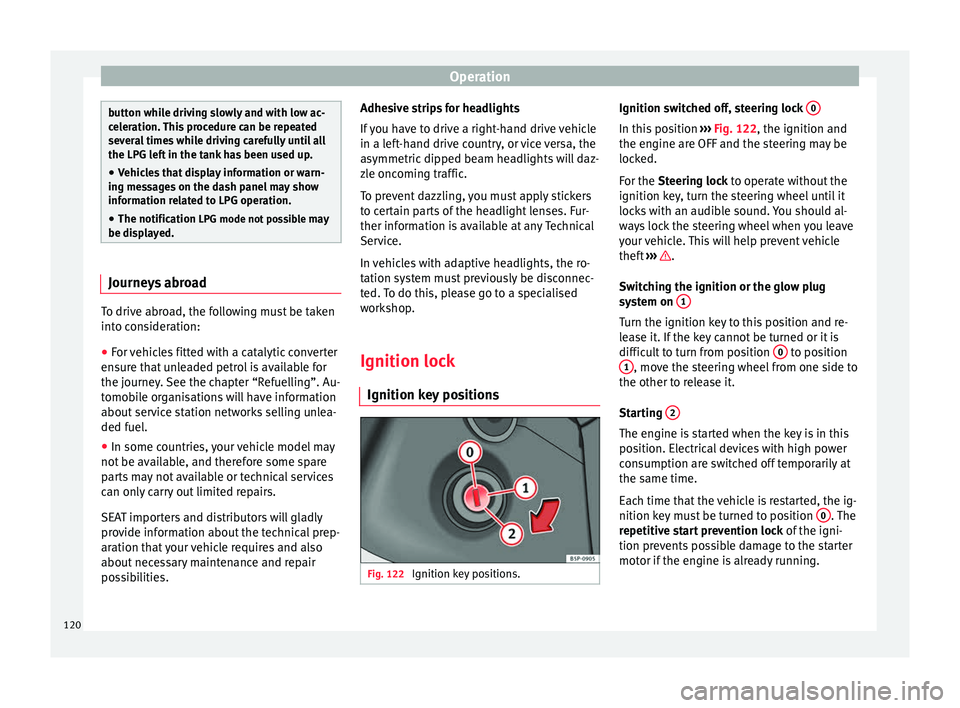
Ignition key positions Fig. 122
Ignition key positions. Ignition switched off, steering lock
0 In this position
››› Fig. 122, the ignition and
the engine are OFF and the steering may be
locked.
For the Steering lock
to operate without the
ignition k
ey, turn the steering wheel until it
locks with an audible sound. You should al-
ways lock the steering wheel when you leave
your vehicle. This will help prevent vehicle
theft ››› .
Switching the ignition or the glow plug
system on 1 Turn the ignition key to this position and re-
lease it. If the key cannot be turned or it is
difficult to turn from position
0 to position
1 , move the steering wheel from one side to
the other to release it.
Starting 2 The engine is started when the key is in this
position. Electrical devices with high power
consumption are switched off temporarily at
the same time.
Each time that the vehicle is restarted, the ig-
nition key must be turned to position
0 . The
repetitive start prevention lock of the igni-
tion prevents possible damage to the starter
motor if the engine is already running.
120