service interval Seat Altea 2015 Owner's Manual
[x] Cancel search | Manufacturer: SEAT, Model Year: 2015, Model line: Altea, Model: Seat Altea 2015Pages: 236, PDF Size: 4.23 MB
Page 35 of 236
Dash panel
Speedometer The speedometer is equipped with a digital
odometer and a trip odometer, in addition to
a service intervals display.
During the running-in period, the instructions
shown on
››› page 130 should be followed.
F uel
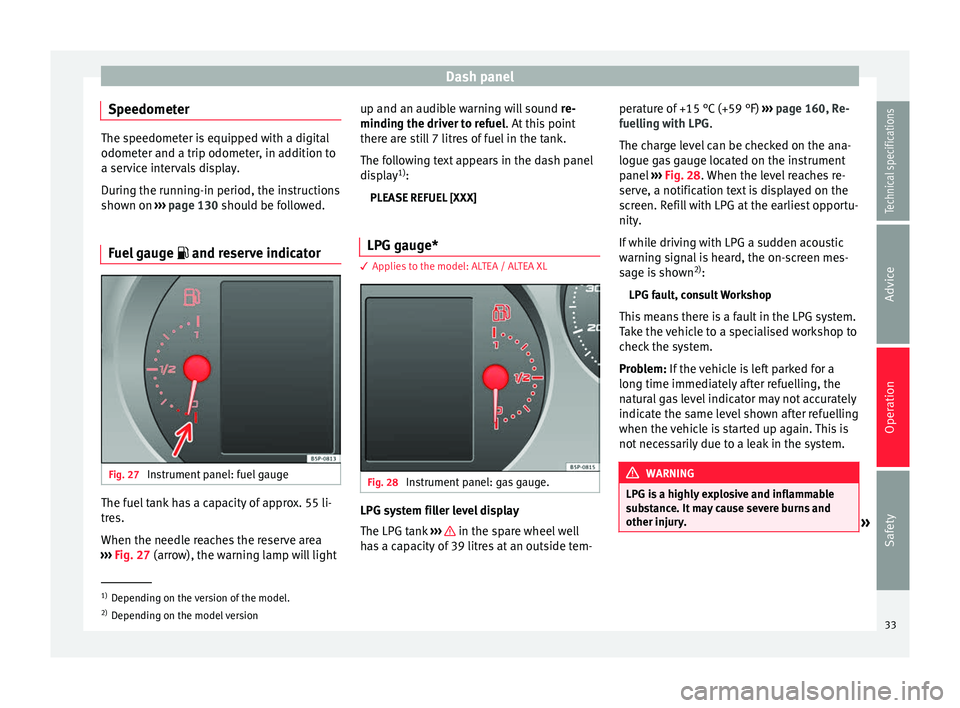
gauge and reserve indicator Fig. 27
Instrument panel: fuel gauge The fuel tank has a capacity of approx. 55 li-
tres.
When the needle reaches the reserve area
››› Fig. 27 (arrow), the warning lamp will light up and an audib
l
e warning will sound
re-
minding the driver to refuel. At this point
there are still 7 litres of fuel in the tank.
The following text appears in the dash panel
display 1)
:
PLEASE REFUEL [XXX]
LPG gauge* 3 Applies to the model: ALTEA / ALTEA XL
Fig. 28
Instrument panel: gas gauge. LPG system filler level display
The LPG tank
››› in the spare wheel well
has a capacity of 39 litres at an outside tem- perature of +15 °C (+59 °F)
››› page 160, Re-
fuelling with LPG .
The c h
arge level can be checked on the ana-
logue gas gauge located on the instrument
panel ››› Fig. 28. When the level reaches re-
serv
e, a notification text is displayed on the
screen. Refill with LPG at the earliest opportu-
nity.
If while driving with LPG a sudden acoustic
warning signal is heard, the on-screen mes-
sage is shown 2)
:
LPG fault, consult Workshop
This means there is a fault in the LPG system.
Take the vehicle to a specialised workshop to
check the system.
Problem: If the vehicle is left parked for a
long time immedi
ately after refuelling, the
natural gas level indicator may not accurately
indicate the same level shown after refuelling
when the vehicle is started up again. This is
not necessarily due to a leak in the system. WARNING
LPG is a highly explosive and inflammable
substance. It may cause severe burns and
other injury. »1)
Depending on the version of the model.
2) Depending on the model version
33
Technical specifications
Advice
Operation
Safety
Page 41 of 236
Dash panel
● Coolant symbol with the warning mes-
s ag
e STOP SEE COOLANT INSTRUCTION MAN-
UAL.
● Engine oil pressure symbol with the
warnin
g message STOP ENGINE OIL PRESSURE
LOW! INSTRUCTION MANUAL.
Warning messages, Priority 2 (yellow)
If one of these faults occurs, the correspond-
ing warning lamp lights up and is accompa-
nied by an audible warning. Check the corre-
sponding function as soon as possible al-
though the vehicle may be used without risk.
If several priority 2 warning messages are de-
tected at the same time, the symbols are dis-
played one after the other for about 2 sec-
onds at a time. After a set time, the informa-
tion text will disappear and the symbol will
be shown as a reminder at the side of the
display.
Priority 2 warning messages will not be
shown until all Priority 1 warning messages
have been dealt with!
Examples of priority 2 warning messages
(yellow): 1)
● Fuel warning light with the information text
PLEASE REFUEL . ●
Windscreen washer fluid symbol with the
inform
ation text REFILL WINDSCREEN WASHER
FLUID. Top up the washer fluid level.
Information messages displayed on
the screen*
Messages a)Description
SERVICEThe service interval has ended. Take
the vehicle to a Technical Service.
IMMOBILISERImmobiliser system active. The vehicle
will not start. Take the vehicle to a
Technical Service.
ERRORInstrument panel faulty. Take the vehi-
cle to a Technical Service.
CLEAN AIR FIL-
TERWarning: The air filter must be cleaned
NO KEYWarning: Correct key cannot be found
in the vehicle.
KEY BATTERYWarning: Key battery low. Change the
battery.
CLUTCHWarning: Press the clutch to start. In
vehicles with manual gearbox and
Start-Stop system.
--> P/NWarning: Place the selector level in po-
sition P/N to start. Only in vehicles
with automatic gearbox.
Messages a)Description
--> PWarning: Place the selector lever in po-
sition P to stop the engine.
STARTINGWarning: The engine starts automati-
cally. Start-Stop system activated.
START MAN-
UALLYWarning: The engine must be started
manually. Start-Stop system activated
ERROR START- STOPWarning: Start-Stop system error.
START-STOP
IMPOSSIBLEWarning: Although the Start-Stop sys-
tem is switched on, the engine cannot
be stopped automatically. Not all the
necessary conditions are met
START-STOP ACTIVEWarning: Start-Stop system activated.
Vehicle in Stop mode.
SWITCH OFFWarning: Start-Stop system activated.
Switch off the ignition when you leave
the vehicle.
STOP TRANS-
MISSION TOO HOTWarning: Stop the engine. Gearbox
overheated.
BRAKEWarning: To start the engine, press the
brake pedal. Only in vehicles with au-
tomatic gearbox.
COASTINGFUNCTIONWarning: Coasting mode active. Trans-
mission engaged. Only in vehicles with
automatic gearbox.
» 1)
Depending on the version of the model.
39
Technical specifications
Advice
Operation
Safety
Page 49 of 236
Dash panel
The engine can, however, be started if the
appropriate coded SEAT genuine key is used. Note
A perfect operation of the vehicle is ensured
if genuine SEAT keys are used. Digital instrument panel
display
Display (without warning or
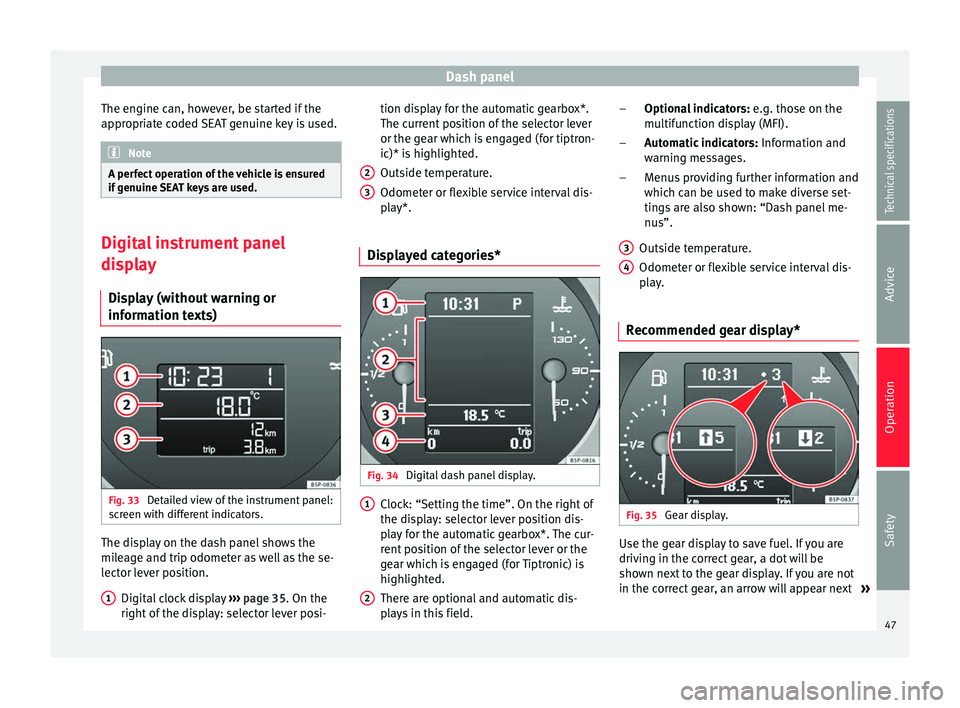
information texts) Fig. 33
Detailed view of the instrument panel:
screen with different indicators. The display on the dash panel shows the
mileage and trip odometer as well as the se-
lector lever position.
Digital clock display ››› page 35. On the
right of the display: selector lever posi-
1 tion display for the automatic gearbox*.
The current position of the selector lever
or the gear which is engaged (for tiptron-
ic)* is highlighted.
Outside temperature.
Odometer or flexible service interval dis-
play*.
Displayed categories* Fig. 34
Digital dash panel display. Clock: “Setting the time”. On the right of
the display: selector lever position dis-
play for the automatic gearbox*. The cur-
rent position of the selector lever or the
gear which is engaged (for Tiptronic) is
highlighted.
There are optional and automatic dis-
plays in this field.
2 3
1
2 Optional indicators:
e.g. those on the
multifunction display (MFI).
Automatic indicators: Information and
warning messages.
Menus providing further information and
which can be used to make diverse set-
tings are also shown: “Dash panel me-
nus”.
Outside temperature.
Odometer or flexible service interval dis-
play.
Recommended gear display* Fig. 35
Gear display. Use the gear display to save fuel. If you are
driving in the correct gear, a dot will be
shown next to the gear display. If you are not
in the correct gear, an arrow will appear next
»
–
–
–
3 4
47Technical specifications
Advice
Operation
Safety
Page 50 of 236
Operation
to the gear display indicating whether you
should change up or down. Note
The gear change indication should not be tak-
en into account when quick acceleration is re-
quired (for example when overtaking). Odometer
The left-hand counter in the display registers
the total amount of distance covered by the
vehicle.
The right-hand counter registers the short
journeys. The last digit indicates steps of 100
metres. The trip recorder counter may be re-
set by holding down the reset button for a
few seconds.
Flexible service interval display Vehicles with
Service intervals dependent on
time/distance travelled already have certain
service intervals set. The intervals are calcu-
lated individually in vehicles with LongLife
service .
The ser v
ice interval display only indicates the
dates of services that include engine oil
change. The dates of all other services, such
as the Inspection Service or brake fluid change, appear in the sticker on the door pil-
lar or in the Maintenance Programme.
A
Service pre-warning will appear in the od-
ometer if a service is due soon. A “spanner”
symbol appears and the display “km” with
the distance that can be driven until the next
service appointment is due. This signal
changes after around 10 seconds. A “clock
symbol” appears and the number of days un-
til the service appointment should be carried
out. The following message is shown in the
instrument panel display*:
Service in
[XXXX]
kmor
[XXXX]
days
The service message will disappear approxi-
mately 20 seconds after the ignition is
switched on or the engine is running. The
normal display can be resumed by briefly
pressing the reset button on the trip counter
or by pressing the OK button on the steering
wheel controls.
With the ignition on, you can check the cur-
rent service message at any moment in the
Vehicle status menu or turning the reset but-
ton to access the service display. An
overdue service
is indicated by a minus
s
ign in front of the mileage or day informa-
tion.
Indications for vehicles with LongLife service
Technical progress has made it possible to
considerably reduce servicing requirements.
With the LongLife System, SEAT ensures that
your vehicle only has an Interval Service
when it is necessary. The length of the Inter-
val Services (max. 2 years) is determined by
factors such as conditions under which the
vehicle is used and personal driving style.
The service pre-warning will first appear 20
days before the date on which the service is
due. The distance travelled is rounded off to
the nearest 100 km and the time to full days.
The current service message can only be con-
sulted 500 km after the last service. Until
that time, only dashes are displayed. Note
● If you reset the display manually, the next
service interval will be indicated after
15,000 km or one year and will not be calcu-
lated individually.
● Do not reset the display between service
intervals as the display will otherwise be in-
correct. 48
Page 51 of 236
Dash panel
●
In LongLife Service vehicles, if the battery
is disconnected for a long period, the days re-
maining until the next service cannot be cal-
culated. Therefore, the service message dis-
plays on the instrument panel may be incor-
rect. Take into account the maximum author-
ised service intervals. Warning or information message in
the display
The system runs a check on certain compo-
nents and functions when the ignition is
switched on and while the vehicle is moving.
Functional faults are indicated by symbols
with warning or information messages in the
display. An audible warning is given in cer-
tain cases.
Warning symbols
There are red warning symbols (priority 1)
and yellow warning symbols (priority 2).
Information text
In addition to warning messages given on a
fault, you will receive information in the dis-
play on procedures or will be asked to carry
out certain tasks. Note
In the case of screens without warning or in-
formation messages, faults are indicated ex-
clusively by the control lamps. Warning messages, Priority 1 (red)
If one of these faults occurs, the warning
lamp will light up or flash and will be accom-
panied by
three audible warnings. This is a
danger warning. Stop the vehicle and switch
off the en
gine. Check the fault and correct it.
Obtain professional assistance if necessary.
If several priority 1 faults are detected at the
same time, the symbols will be displayed one
after the other for about 2 seconds at a time
and will continue until the fault is corrected.
No menus will be shown in the display for the
duration of a priority 1 warning message.
Examples of priority 1 warning messages
(red)
● Brake system symbol with the warning
message STOP BRAKE FLUID INSTRUCTION
MANUAL or STOP BRAKE FAULT INSTRUCTION
MANUAL . ●
Coolant symbol with the warning mes-
s ag
e STOP SEE COOLANT INSTRUCTION MAN-
UAL.
● Engine oil pressure symbol with the
warnin
g message STOP ENGINE OIL PRESSURE
LOW! INSTRUCTION MANUAL.
Warning messages, Priority 2 (yellow) If one of these faults occurs, the correspond-
ing warning lamp lights up and is accompa-
nied by
an audible warning. The function
should be checked as soon as possible.
If several priority 2 warning messages are de-
tected at the same time, the symbols are dis-
played one after the other for about 2 sec-
onds at a time. After a set time, the informa-
tion text will disappear and the symbol will
be shown as a reminder at the side of the
display.
Priority 2 warning messages will not be
shown until all Priority 1 warning messages
have been dealt with!
Examples of priority 2 warning messages
(yellow): 1)
● Fuel warning light with the information text
PLEASE REFUEL .
»1)
Depending on the version of the model.
49
Technical specifications
Advice
Operation
Safety
Page 57 of 236
Dash panelDisplayed on
the screenFunction
TimeThe hours and minutes of the clock
and the navigation system can be
changed. Choose between 12 and 24-
hour format and change to summer
time.
Winter tyresThe menu allows the setting of a
speed at which an optical and acous-
tic warning will be given by the sys-
tem. You can use this function, for ex-
ample, if you have fitted winter tyres
which are not suited for the top speed
of your vehicle. Please see the section
“Wheels and tyres”.
LanguageThe display texts and the navigation
system texts can be seen in different
languages.
UnitsThis option allows you to select the
units for displaying temperature, fuel
consumption values and distances.
sel. speedThe instrument panel also displays
the speed in another different unit of
measurement (mph or km/h) to that
given on the speedometer.
Inter. ServiceConsult service messages and reset
service interval display here.
Factory set-
tingsThe manufacturer's predefined values
for the functions of this menu are re-
stored.
Back a)This returns to the main menu.
a)
Only if the windscreen wiper lever is used (MFI). Note
● For electronic and vehicle equipment one or
more of these menus will be displayed.
● SEAT dealerships are able to programme
other functions or change the existing func-
tions depending upon the vehicle equipment.
● The Configuration menu is only accessible
when the vehicle is at a standstill. Convenience menu
Open menu Convenience
– Choose the option Configuration
from the
m
ain menu and press the button OK
A ›››
Fig. 36 on the windscreen wiper lever.
– Pr e
ss button or
on the multifunction
steering wheel* ›››
Fig. 37 until the
C
onfigu-
r
ation menu is displayed.
– Choose the option
Convenience from the
main menu and press the button A on the
windscreen wiper lever.
Example of menu use ›››
page 50
Displayed on
the screenFunction
Central lock-
ing.One door: Individual unlocking activa-
ted.
Auto lock: The doors are automatically
locked when the vehicle is travelling
at more than approx. 15 km/h
(10 mph).
Auto unlock: the doors are unlocked
when the key is removed from the ig-
nition.
Elec. window
controlOpening and closing electric win-
dows: this determines whether to
open or close all the windows when
the vehicle is unlocked or locked. The
open function can also be activated
for the driver door only.
Exterior mirror
adjust.If synchronised adjustment is selec-
ted, when the driver side exterior mir-
ror is adjusted, the passenger exterior
mirror is also moved.
Factory set-
tingsThe predefined factory values for the
functions of this menu are restored.
BackThis returns to the Configuration
menu. Note
For electronic and vehicle equipment one or
more of these menus will be displayed. 55
Technical specifications
Advice
Operation
Safety
Page 87 of 236

Lights and visibility
WARNING
● Worn and dirty wiper blades reduce visibili-
ty and safety levels while driving.
● In cold conditions, you should not use the
wash/wipe system unless you have warmed
the windscreen with the heating and ventila-
tion system. The windscreen washer fluid
could otherwise freeze on the windscreen and
obscure your view of the road.
● The rain sensor may not detect enough rain
to switch on the wipers. If necessary, switch
on the wipers manually when water on the
windscreen impedes visibility.
● Always note the corresponding warnings
››› page 194. CAUTION
In icy conditions, always check that the wiper
blades are not frozen to the glass before us-
ing the wipers for the first time. If you switch
on the windscreen wipers when the wiper
blades are frozen to the windscreen, you
could damage both the wiper blades and the
wiper motor. Note
● The windscreen wipers will only work when
the ignition is switched on.
● In certain versions of vehicles with alarms,
the windscreen wiper will only work when the
ignition is on and the bonnet closed. ●
When in use, the wipers do not go as far as
the rest position. When the lever is moved to
position 0, they are totally hidden.
● If the vehicle stops when wiper speed 2 ›››
Fig. 69 or 3 is selected, the next speed
down will be selected automatically. The set
speed will be resumed when the vehicle pulls
away.
● The windscreen will be wiped again after
approximately five seconds once the “auto-
matic wash/wipe system” has been activa-
ted, provided the vehicle is moving (drip func-
tion). If you activate the wipers less than 3
seconds after the drip function, a new wash
sequence will begin without performing the
last wipe. For the “drip” function to work
again, you have to turn the ignition off and
then on again.
● When the “interval wipe function” is on,
the intervals are directly proportional to the
speed. This way, the higher the vehicle speed
the shorter the intervals.
● The wiper will try to wipe away any obsta-
cles that are on the windscreen. The wiper
will stop moving if the obstacle continues to
block its path. Remove the obstacle and
switch the wiper back on again.
● Before removing any objects that may be
trapped in the side areas of the windscreen,
always move the wiper arms to the service
position (horizontal).
● The heat output of the heated jets is con-
trolled automatically when the ignition is
switched on, depending upon the outside
temperature. ●
Do not put stickers on the windscreen in
front of the rain sensor*. This may cause sen-
sor disruption or faults. Rear window wiper
Fig. 71
Windscreen wiper lever: rear window
wiper. Switching on the interval wipe
– Press the lever forward to position 6 ›››
Fig. 71 . The wiper will wipe the window
ap pr
oximately every 6 seconds.
Switching off the interval wipe function
– Pull the lever back from position 6 toward
the steering wheel. The wiper will continue
to function for a short period if you switch
off whilst the wipers are in motion. »
85
Technical specifications
Advice
Operation
Safety
Page 106 of 236
Operation
Storage in the boot floor* Fig. 109
Variable storage in the boot floor. Fig. 110
Boot floor partition. There is a variable storage compartment* in
the boot floor.
–
Lift the boot floor and fold it back all the
way ››› Fig. 109 .
– Fit the sep
arator A
››› Fig. 110
, into the
s ide gr
ooves depending on the size of the
objects to be transported. The on-board tool kit and the spare wheel are located un-
derneath the luggage compartment.
– Secure objects in the luggage compart-
ment with suitable straps on the fastening
rings. Note
● The maximum weight capacity of the varia-
ble boot floor is 100 kg distributed evenly
over the whole floor. Luggage compartment net*
Fig. 111
Boot storage net. There is a storage net in the luggage com-
partment for securing objects.
– Use the fastening rings located on the side
of the boot to attach the retaining net
››› Fig. 111 . Note
● Do not exceed the maximum authorised
weight for the vehicle ››› page 207. Roof carrier/rack system*
Introduction Please observe the following points if you in-
tend to carry loads on the roof:
● For safety reasons, only luggage racks and
accessories supplied by SEAT official services
are recommended.
● It is essential that you strictly follow the as-
sembly instructions included with the bars,
being especially careful to position the boot
cover bars on the special housings; you must
also respect their position according to the
direction of travel indicated in the assembly
manual. Not following these instructions may
cause marks on the bodywork and the longi-
tudinal bars.
● Pay special attention to the tightening tor-
que of the attachment bolts and check them
following a short journey. If necessary, re-
tighten the bolts and check them at regular
intervals.
● Distribute the load evenly. A maximum load
of 40 kg is permitted for each roof rack sys-
tem support bar, the load must be
104
Page 118 of 236
Operation
If the windscreen air output is on and air re-
circulation mode is pressed, this remains ac-
tive. When the recirculation mode is on, if the
air distribution towards the windscreen mode
is selected, the recirculation mode is deacti-
vated. For safety reasons, the air recirculation
mode should not be connected. WARNING
In air recirculation mode, no cold air from the
outside enters the vehicle interior. If the air
conditioning system is switched off, the win-
dows can quickly mist over. Therefore, never
leave the air recirculation mode switched on
for a long time (risk of accident). General notes
Pollution filter
The pollution filter (a combined particulate
filter and active carbon filter) serves as a bar-
rier against impurities in the outside air, in-
cluding dust and pollen.
For the climate control system to work with
maximum efficiency, the pollution filter must
be replaced at the specified intervals in the
Maintenance Programme.
If the filter loses efficiency prematurely due
to use in areas reaching very high pollution
levels, the pollen filter must be changed
more frequently than stated in the Service
Schedule. Air conditioner
When the air conditioning system is switched
on, not only the temperature, but also the air
humidity in the vehicle interior is reduced.
This improves comfort for the vehicle occu-
pants and prevents misting of the windows
when the ambient air humidity is high.
If the air conditioning system cannot be
switched on this may be caused by the fol-
lowing reasons:
● The engine is not running.
● The A/C button is switched off.
● The outside temperature is lower than ap-
proximately +3 °C (+37 °F).
● The air conditioning system compressor
has been temporarily switched off because
the engine coolant temperature is too high.
● The air conditioner fuse is faulty.
● Another fault in the vehicle. Have the air
conditioner checked by a specialised work-
shop. CAUTION
● If you suspect that the air conditioner is
damaged, switch it off with the A/C button to
prevent further damage and have it checked
by a specialised workshop.
● Repairs to the air conditioner require spe-
cialist knowledge and special tools. There-
fore, we recommend you to take the vehicle
to a specialised workshop. Note
● If the humidity and temperature outside the
vehicle are high, condensation can drip off
the evaporator in the cooling system and
form a pool underneath the vehicle. This is
normal and does not indicate a leak.
● Keep the air intake slots in front of the
windscreen free of snow, ice and leaves to en-
sure heating and cooling are not impaired,
and to prevent the windows from misting
over.
● The air from the vents flows through the ve-
hicle interior and is extracted by slots de-
signed for this purpose. Therefore, do not
cover these slots with items of clothing or
other objects.
● The air conditioner operates most effective-
ly with the windows and the sliding/tilting
sunroof* closed. However, if the temperature
inside the vehicle is excessive because of the
sun, the air inside can be cooled faster by
opening the windows for a short time.
● Do not smoke while air recirculation mode
is on, as smoke drawn into the air condition-
ing system leaves residue on the evaporator,
producing a permanent unpleasant odour.
● It is advisable to turn on the air condition-
ing at least once a month, to lubricate the
system gaskets and prevent leaks. If a de-
crease in the cooling capacity is detected, a
Technical Service should be consulted to
check the system. 116
Page 168 of 236
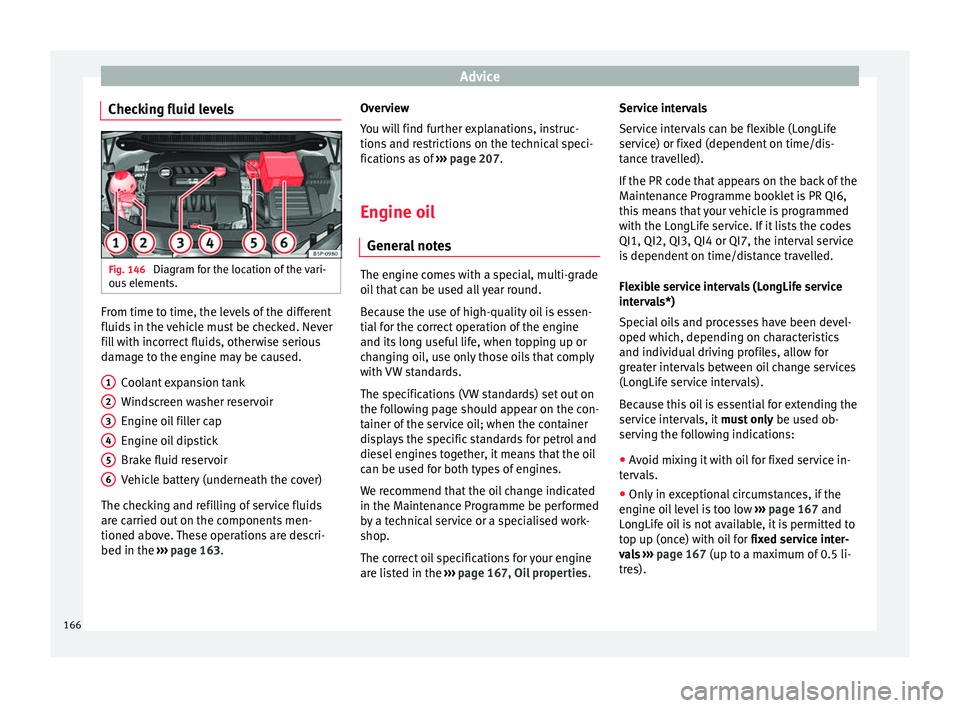
Advice
Checking fluid levels Fig. 146
Diagram for the location of the vari-
ous elements. From time to time, the levels of the different
fluids in the vehicle must be checked. Never
fill with incorrect fluids, otherwise serious
damage to the engine may be caused.
Coolant expansion tank
Windscreen washer reservoir
Engine oil filler cap
Engine oil dipstick
Brake fluid reservoir
Vehicle battery (underneath the cover)
The checking and refilling of service fluids
are carried out on the components men-
tioned above. These operations are descri-
bed in the ››› page 163 .
1 2
3
4
5
6 Overview
You will find further explanations, instruc-
tions and restrictions on the technical speci-
fications as of
››› page 207 .
En gine oi
l
General notes The engine comes with a special, multi-grade
oil that can be used all year round.
Because the use of high-quality oil is essen-
tial for the correct operation of the engine
and its long useful life, when topping up or
changing oil, use only those oils that comply
with VW standards.
The specifications (VW standards) set out on
the following page should appear on the con-
tainer of the service oil; when the container
displays the specific standards for petrol and
diesel engines together, it means that the oil
can be used for both types of engines.
We recommend that the oil change indicated
in the Maintenance Programme be performed
by a technical service or a specialised work-
shop.
The correct oil specifications for your engine
are listed in the
›››
page 167, Oil properties .Service intervals
Service intervals can be flexible (LongLife
service) or fixed (dependent on time/dis-
tance travelled).
If the PR code that appears on the back of the
Maintenance Programme booklet is PR QI6,
this means that your vehicle is programmed
with the LongLife service. If it lists the codes
QI1, QI2, QI3, QI4 or QI7, the interval service
is dependent on time/distance travelled.
Flexible service intervals (LongLife service
intervals*)
Special oils and processes have been devel-
oped which, depending on characteristics
and individual driving profiles, allow for
greater intervals between oil change services
(LongLife service intervals).
Because this oil is essential for extending the
service intervals, it
must only be used ob-
serving the following indications:
● Avoid mixing it with oil for fixed service in-
tervals.
● Only in exceptional circumstances, if the
engine oil level is too low ››› page 167 and
LongLife oil is not available, it is permitted to
top up (once) with oil for fixed service inter-
vals › ›
›
page 167 (up to a maximum of 0.5 li-
tres).
166