steering wheel Seat Altea Freetrack 2010 Owner's Guide
[x] Cancel search | Manufacturer: SEAT, Model Year: 2010, Model line: Altea Freetrack, Model: Seat Altea Freetrack 2010Pages: 294, PDF Size: 7.71 MB
Page 127 of 294

Lights and visibility125
Safety First
Controls and equipment
Practical tips
Technical Data
Rear window wiper
The windscreen wiper lever operates the windscreen wiper
and the wash and wipe system for the rear window.
Switching on the interval wipe
– Press the lever forwards to position ⇒fig. 88 . The wiper will
wipe the window approximately every 6 seconds.
Switching off the interval wipe function
– Pull the lever back from position towards the steering wheel. The wiper will continue to function for a short period if you switch
off whilst the wipers are in motion. Switching on the windscreen wiper and washer system
– Press the lever fully forwards to position
⇒fig. 88 . The wash
function will start immediately and the wiper will start with a
slight delay. The windscreen wash system will function as long as
you hold the lever in this position.
– Release the lever. The wiper then wipes for approximately 4 seconds, and then in intervals again.
– Release the lever. The washer system stops and the wipers func- tion.
WARNING
•Worn and dirty wiper blades obstruct visibility and reduce safety levels.•Always note the corresponding warnings on ⇒page 223, “Changing
windscreen wiper blades”.Caution
In icy conditions, always check that the wiper blade is not frozen to the glass
before using the wiper for the first time. If you switch on the wiper when the
wiper blade is frozen to the glass, this could damage both the wiper blade
and the wiper motor.
Note
•The windscreen wiper will only function when the ignition is switched on
and the tailgate is closed.•In reverse gear, with the windscreen wipers switched on, the rear wind-
screen wiper will make one wipe.
Fig. 88 Windscreen wiper
and windscreen wash
lever: rear window wiper
A6
A6
A7
Freetrack_EN.book Seite 125 Donnerstag, 10. September 2009 10:33 10
Page 128 of 294
Lights and visibility
126Headlight washer system
The headlight washers clean the headlight lenses.The headlight washers are activated automatically when the windscreen
washer is used and the windscreen wiper lever is pulled towards the steering
wheel for at least 1.5 seconds – provided the dipped headlights or main
beams are switched on. Clean off stubborn dirt (insects, etc.) from the head-
lights at regular intervals, for instance when filling the fuel tank.
Note
•To ensure that the headlight washers work properly in winter, keep the
nozzle holders in the bumper free of snow and remove any ice with a de-icer
spray.•To remove water, the windscreen wipers will be activated from time to
time, the headlight wipers will be activated every three cycles.MirrorsInterior mirror
It is dangerous to drive if yo u cannot see clearly through the
rear window.Manual anti-dazzle function for interior mirror
In the basic mirror position, the lever at the bottom edge of the mirror should
be at the front. Pull the lever to the back to select the anti-dazzle function.
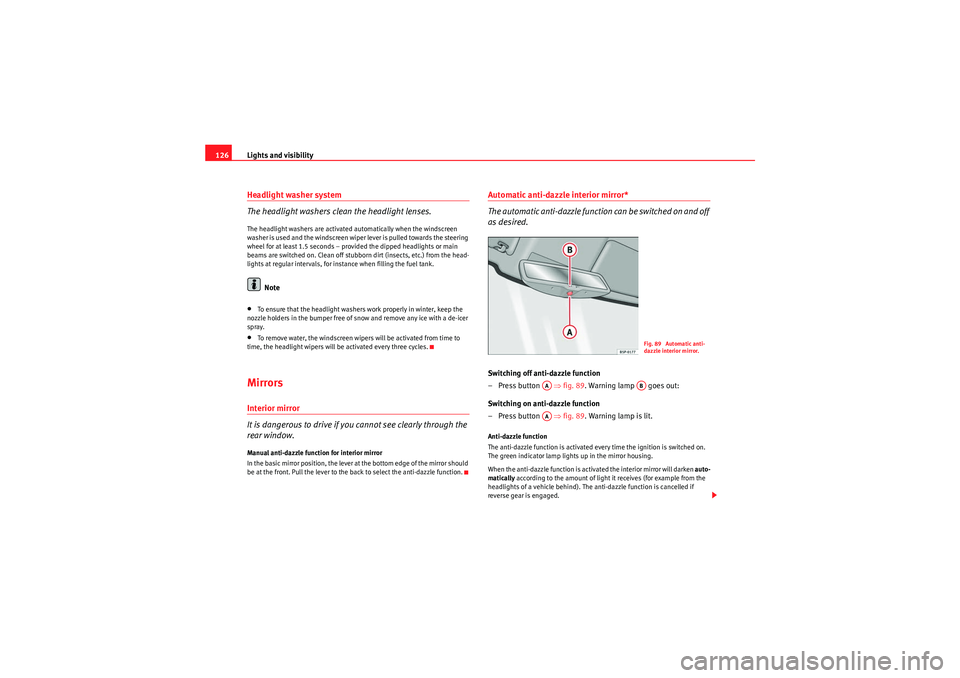
Automatic anti-dazzle interior mirror*
The automatic anti-dazzle function can be switched on and off
as desired.Switching off anti-dazzle function
–Press button ⇒ fig. 89. Warning lamp goes out:
Switching on anti-dazzle function
–Press button ⇒ fig. 89. Warning lamp is lit.Anti-dazzle function
The anti-dazzle function is activated every time the ignition is switched on.
The green indicator lamp lights up in the mirror housing.
When the anti-dazzle function is activated the interior mirror will darken auto-
matically according to the amount of light it receives (for example from the
headlights of a vehicle behind). The anti-dazzle function is cancelled if
reverse gear is engaged.
Fig. 89 Automatic anti-
dazzle interior mirror.
AA
AB
AA
Freetrack_EN.book Seite 126 Donnerstag, 10. September 2009 10:33 10
Page 131 of 294

Seats and stowage129
Safety First
Controls and equipment
Practical tips
Technical Data
Seats and stowageThe importance of correct seat adjustmentProper seat adjustment optimises the level of protection
offered by seat belts and airbags.Your vehicle has five seats, two on the front part and three on the rear part.
Each seat is equipped with a three-point seat belt.
The driver seat and the front passenger seat can be adjusted in many ways to
suit the physical requirements of the vehicle occupants. The correct seat
position is very important for:•a fast and easy operation of all controls on the instrument panel,•a relaxed posture which does not cause drowsiness,•a safe driving ⇒ page 7,•ensuring that the seat belts and airbag system provide maximum protec-
tion ⇒page 19.WARNING
•If the driver and passengers assume improper sitting positions, they
may sustain critical injuries.•More people than available seats must never be transported in your
vehicle.•Every passenger in the vehicle must properly fasten and wear the seat
belt belonging to his or her seat. Chil dren must be protected with an appro-
priate child restraint system ⇒page 46, “Child safety”.•The front seats and all head restraints must always be adjusted to body
size and the seat belt must always be properly adjusted to provide you and
your passengers with optimum protection.
•Always keep your feet on the foot well when the vehicle is moving;
never rest them on the dash panel, out of the window or on the seat. This
is also applied to passengers. An incorrect sitting position exposes you to
an increased risk of injury in case of a sudden braking or an accident. If the
airbag is triggered, you could sustain severe injuries due to an incorrect
sitting position.•It is important for the driver and front passenger to keep a distance of
at least 25 cm from the steering wheel or dash panel. Failure to respect the
minimum distance means that the airbag will not protect you. Risk of fatal
injury. The distance between the driver and the steering wheel or between
the front passenger and the dash panel should always be as great as
possible.•Adjust the driver or front passenger seat only when the vehicle is
stationary. This also applies to the forwards/backwards adjustment of the
rear seats. Otherwise, your seat could move unexpectedly while the vehicle
is moving. This could increase the risk of an accident and therefore, injury.
In addition, while adjusting your seat, you will assume an incorrect sitting
position. Risk of fatal accidents.•Special guidelines apply to installing a child seat on the front
passenger seat. When installing a child seat, observe the warning note in
the ⇒page 46, “Child safety”.WARNING (continued)
Freetrack_EN.book Seite 129 Donnerstag, 10. September 2009 10:33 10
Page 166 of 294
Driving
164DrivingAddressAdjusting the steering wheel position
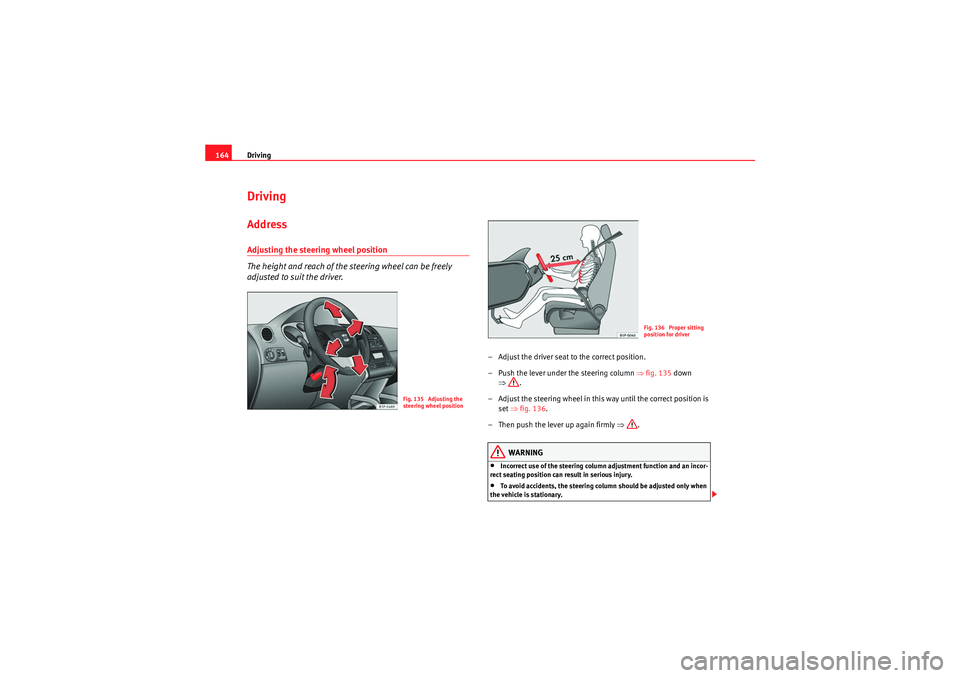
The height and reach of the steering wheel can be freely
adjusted to suit the driver.
– Adjust the driver seat to the correct position.
– Push the lever under the steering column ⇒fig. 135 down
⇒ .
– Adjust the steering wheel in this way until the correct position is set ⇒fig. 136 .
– Then push the lever up again firmly ⇒.
WARNING
•Incorrect use of the steering column adjustment function and an incor-
rect seating position can result in serious injury.•To avoid accidents, the steering column should be adjusted only when
the vehicle is stationary.
Fig. 135 Adjusting the
steering wheel position
Fig. 136 Proper sitting
position for driver
Freetrack_EN.book Seite 164 Donnerstag, 10. September 2009 10:33 10
Page 167 of 294

Driving165
Safety First
Controls and equipment
Practical tips
Technical Data
•Adjust the driver seat or steering wheel so that there is a distance of at
least 25 cm between the steering wheel and your chest ⇒page 164,
fig. 136 . If you fail to observe the minimum distance, the airbag will not
protect you. Risk of fatal injury.•If your physical constitution does not allow you to maintain the
minimum distance of 25 cm, contact an Authorised Service Centre. The
Authorised Service Centre will help you to decide if special specific modifi-
cations are necessary.•If you adjust the steering wheel so that it points towards your face, the
driver airbag will not protect you properly in the event of an accident. Make
sure that the steering wheel points towards your chest.•When driving, always hold the steering wheel with both hands on the
outside of the ring at the 9 o'clock and 3 o'clock positions. Never hold the
steering wheel at the 12 o'clock position, or in any other manner (e.g. in
the centre of the steering wheel, or on the inside of the rim). In such cases,
you could receive severe injuries to the arms, hands and head.
SafetyElectronic stabilisation programme (ESP)*
ESP helps make driving safer in certain situations.The Electronic Stabilisation Program (ESP) contains the electronic differential
lock (EDL) and the traction control system (TCS). The ESP function works
together with the ABS. Both warning lamps will light up if the ESP or ABS
systems are faulty.
The ESP is started automatically when the engine is started.
The ESP is always active, and cannot be switched off. With the ESP switch it is
only possible to switch TCS off.
The TCS can be deactivated when in cases where wheel sliding is desirable.
For example:•When driving with snow chains,
WARNING (continued)
Fig. 137 Detail of the
centre console: ESP
button
Freetrack_EN.book Seite 165 Donnerstag, 10. September 2009 10:33 10
Page 168 of 294

Driving
166•when driving in deep snow or on loose surfaces,•when rocking the vehicle backwards and forwards to free it from mud, for
example.
Next, the button should be pressed to reactivate the TCS.
When does the warning light switch on or flash ?•On switching the ignition on, it lights up for about two seconds to carry
out a function control.•The warning lamp will start flashing when the vehicle is moving if the ESP
or the TCS is activated. The warning lamp will light up slowly if the TCS is
switched off.•It will light up continuously if there is a malfunction in the ESP.WARNING
•The electronic stabilisation programme (ESP) cannot defy the laws of
physics. This should be kept in mi nd, particularly on slippery and wet
roads and when towing a trailer.•Always adapt your driving style to suit the condition of the roads and
the traffic situation. Do not let the extra safety afforded by ESP tempt you
into taking any risks when driving, this can cause accidents.•Please refer to the corresponding warning notes on ESP in ⇒page 183,
“Intelligent technology”.
Ignition lockPosition of the ignition keyIgnition switched off, steering lock
In this position ⇒fig. 138 the ignition and the engine are OFF and the
steering may be locked.
For the Steering lock to operate without the ignition key, turn the steering
wheel until it locks with an audible sound. You should always lock the
steering wheel when you leave your vehicle. This will help prevent vehicle
theft ⇒ .
Switching the ignition or the glow plug system on
Turn the ignition key to this position and release it. If the key cannot be turned
or it is difficult to turn from position to position , move the steering
wheel back and forth until it loosens up.
Fig. 138 Ignition key
positions
A0
A1
A0
A12
Freetrack_EN.book Seite 166 Donnerstag, 10. September 2009 10:33 10
Page 174 of 294
Driving
172the full power of the engine. This programme is not recommended for use on
the motorway or in the city.
Selecting the manual programme (tiptronic)
This programme allows driving similar to a manual gearbox.
This programme may be accessed using the selector lever or from the
steering wheel controls when this option is fitted ⇒page 174.Selector lever locking
The selector lever lock prevents gears from being engaged
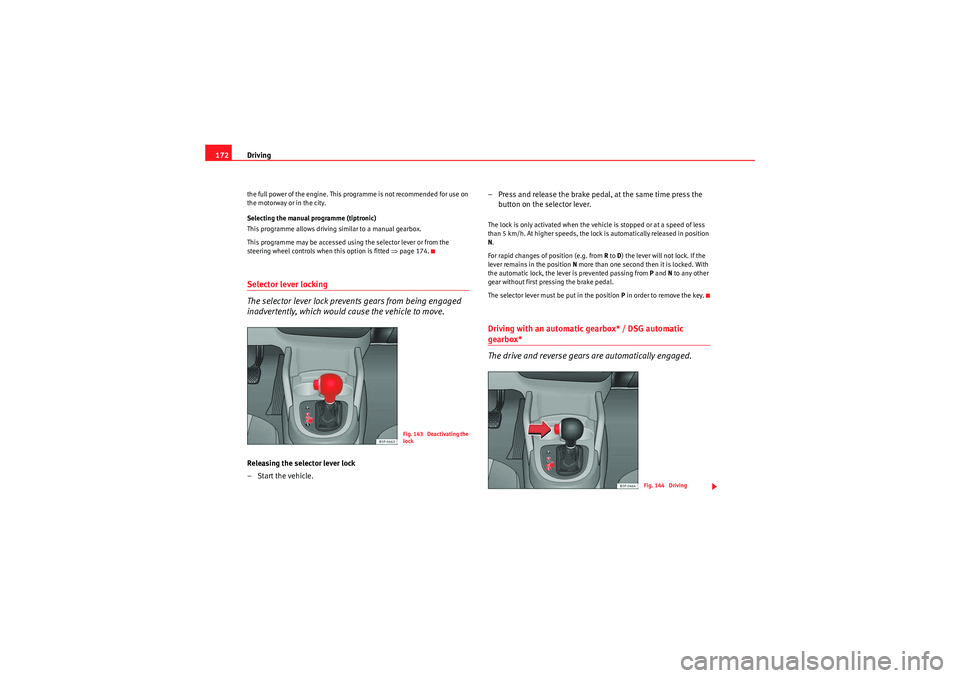
inadvertently, which would cause the vehicle to move.Releasing the selector lever lock
–Start the vehicle. – Press and release the brake pedal, at the same time press the
button on the selector lever.
The lock is only activated when the vehicle is stopped or at a speed of less
than 5 km/h. At higher speeds, the lock is automatically released in position
N.
For rapid changes of position (e.g. from R to D) the lever will not lock. If the
lever remains in the position N more than one second then it is locked. With
the automatic lock, the lever is prevented passing from P and N to any other
gear without first pressing the brake pedal.
The selector lever must be put in the position P in order to remove the key.Driving with an automatic gearbox* / DSG automatic gearbox*
The drive and reverse gears are automatically engaged.
Fig. 143 Deactivating the
lock
Fig. 144 Driving
Freetrack_EN.book Seite 172 Donnerstag, 10. September 2009 10:33 10
Page 176 of 294
Driving
174•If you must stop on a hill, always hold the vehicle using the footbrake
to avoid rolling back.•The footbrake must not be held for a long period of time, not even
lightly; continuous braking will cause overheating of the brakes and a
reduction or even a loss of braking power and a significant increase in
braking distances.•Never allow the vehicle to coast down a gradient with the selector lever
in positions N or D, even when the engine is not running. For descents, the
use of the Tiptronic programme is recommended to keep the speed
reduced.Caution
•Never use the automatic gearbox to hold the vehicle stationary on a hill,
even for short periods, as this may overheat the gearbox and cause damage.
Apply the handbrake or depress the foot brake to hold the vehicle in position.•If the vehicle is allowed to roll with the engine stopped but the selector in
position N then the gearbox may be damaged because it will not be
lubricated.
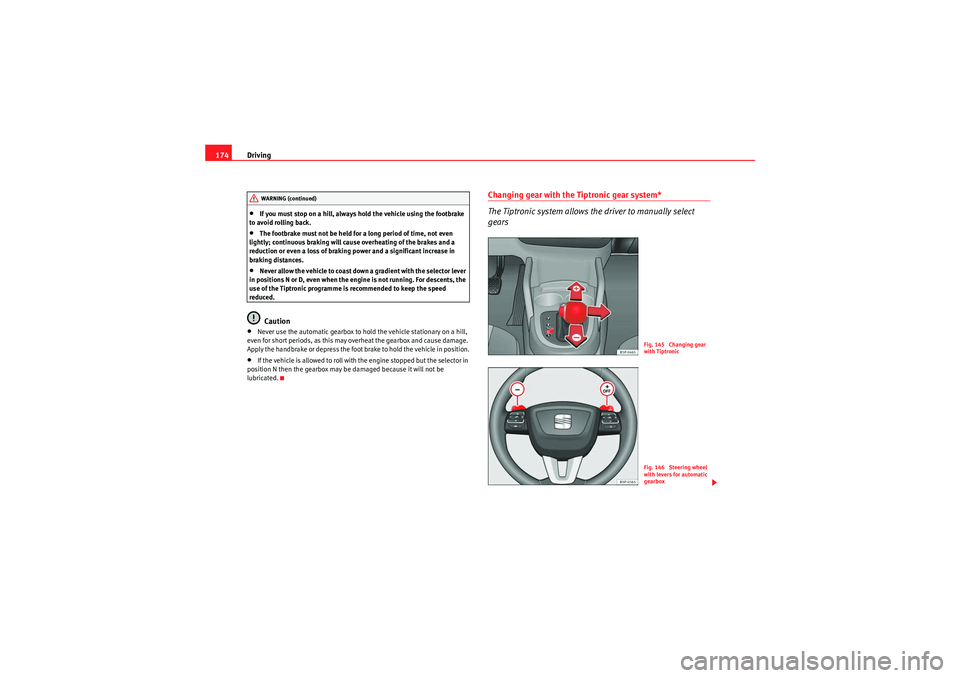
Changing gear with the Tiptronic gear system*
The Tiptronic system allows the driver to manually select
gears
WARNING (continued)
Fig. 145 Changing gear
with TiptronicFig. 146 Steering wheel
with levers for automatic
gearbox
Freetrack_EN.book Seite 174 Donnerstag, 10. September 2009 10:33 10
Page 177 of 294

Driving175
Safety First
Controls and equipment
Practical tips
Technical Data
General information about driving in Tiptronic mode.
Changing gear with the gear stick
–Put the lever in position D and press towards the right to enter
the Tiptronic gate ⇒page 174, fig. 145 .
– Press the gear lever forwards ⇒page 174, fig. 145 to select
a higher gear.
– Press the gear lever back ⇒page 174, fig. 145 to select a
lower gear.
Changing gear with the steering wheel levers
– Press the right paddle lever ( +OFF) towards the steering
wheel to change up ⇒ page 174, fig. 146.
– Press the left paddle towards the steering wheel to change
down ⇒page 174, fig. 146 .Using the levers on the steering wheel, you can access manual driving mode
regardless of the driving mode pre-selected.
General information about driving in Tiptronic mode
When accelerating, the automatic gearbox / direct shift gearbox goes into a
higher gear a little before it reaches the maximum permitted revolutions.
If a lower gear is selected, the automatic gearbox / direct shift gearbox does
not change down until the point is reached where the engine could no longer
overrev.
If the “Tiptronic” is selected whilst the vehicle is in motion and the automatic
gearbox / direct shift gearbox is in 3rd gear in selector lever position D, the
“Tiptronic” will then also be in 3rd gear. Changing gears in the normal or sport programme using the steering wheel
paddle levers
If the paddle levers ⇒
page 174, fig. 146 are used in the normal or sport
programme, the system switches temporarily to “Tiptronic” mode. To exit
“Tiptronic” mode again, press the right paddle lever towards the
steering wheel for approximately one second. You will also leave “Tiptronic”
mode if the paddle levers are not moved for a certain time.
Note
•The gearbox controls on the steering wheel can operate with the gear stick
in any position and with the vehicle in motion.Kickdown feature
The kickdown feature is designed to give maximum accelera-
tion.If you press the accelerator down thoroughly, the gearbox automatically
changes down, depending on speed and e ngine speed, into a lower gear to
take full advantage of the maximum acceleration of the vehicle.
The gearbox does not change gear until the engine reaches the maximum
determined engine speed for the gear.
WARNING
You could lose control of the vehicle if you accelerate on slippery road
surfaces. Risk of serious injury.•Be particularly careful when using the kickdown features on slippery
road surfaces. With fast acceleration, the vehicle could lose traction and
skid.
A+
A–A+
A–
+ OFF
Freetrack_EN.book Seite 175 Donnerstag, 10. September 2009 10:33 10
Page 179 of 294
Driving177
Safety First
Controls and equipment
Practical tips
Technical Data
Parking
The handbrake should always be firmly applied when the
vehicle is parked.Always note the following points when parking the vehicle:
– Use the foot brake to stop the vehicle.
– Apply the handbrake.
– The first gear should also be selected.
– Switch the engine off and remove the key from the ignition lock.
Turn the steering wheel slightly to engage the steering lock.
– Always take you car keys with you when you leave the vehicle ⇒ .Additional notes on parking the vehicle on gradients:
Turn the steering wheel so that the vehicle rolls against the kerb if it started
to roll.•If the vehicle is parked facing downhill, turn the front wheels so that they
point towards the kerb .•If the vehicle is parked facing uphill, turn the front wheels so that they
point away from the kerb .•Secure the vehicle as normal by applying the handbrake firmly and
engaging first gear.WARNING
•Take measures to reduce the risk of injury when you leave your vehicle
unattended.
•Never park where the hot exhaust system could ignite inflammable
materials, such as dry grass, low bushes, spilt fuel etc.•Never allow vehicle occupants to remain in the vehicle when it is
locked. They would be unable to open the vehicle from the inside, and
could become trapped in the vehicle in an emergency. In the event of an
emergency, locked doors will delay assistance to occupants.•Never leave children alone in the vehicle. They could set the vehicle in
motion, for example, by releasing the handbrake or the gear lever /
selector lever.•Depending on weather conditions, it may become extremely hot or cold
inside the vehicle. This can be fatal.
Hill-start aid*
This function is only included in vehicles fitted with ESP.This device helps when starting uphill.
These are the basic operation conditions: doors closed, brake pedal pressed
down and vehicle in neutral. The system gets activated on engaging gear.
After removing your foot from the brake pedal, the braking force is maintained
for a few seconds to prevent the vehicle from moving backward when put into
gear. This short space of time is enough to start the vehicle with ease.
This system also works when reversing uphill.
WARNING
•If you do not start the vehicle immediately after taking your foot off the
brake pedal, the vehicle may start to roll back under certain conditions.
Depress the brake pedal or use the hand brake immediately.WARNING (continued)
Freetrack_EN.book Seite 177 Donnerstag, 10. September 2009 10:33 10