clutch Seat Arona 2017 User Guide
[x] Cancel search | Manufacturer: SEAT, Model Year: 2017, Model line: Arona, Model: Seat Arona 2017Pages: 308, PDF Size: 6.66 MB
Page 175 of 308
Driving
●
If the v
ehicle is stationary for a long time
with the ignition on, the vehicle battery
might be discharged and it might not be pos-
sible to start the engine.
● In diesel vehicles, there may be a delay in
the engine st
arting if it requires preheating.
● If during the STOP phase you press the
STAR
T ENGINE STOP button, the ignition is
swit c
hed off and the button flashes.
● If the indication “Start-Stop system deacti-
vated:
Start the engine manually” is dis-
played on the dash panel display, the START ENGINE STOP button will blink.
Starting the engine
3 V
alid for vehicles: with starter button
StepStarting the engine with the starter
button ››› page 171.
1.Press and hold the brake pedal until step 5
is performed.
1a.In vehicles with a manual gearbox: press
and hold the clutch down until the engine
starts.
2.Put the gearbox lever in neutral or the selec-
tor lever in position P or N.
StepStarting the engine with the starter
button ››› page 171.
3.
Briefly press the starter button ››› Fig. 174
without pressing the accelerator. For the en-
gine to start there must be a valid key in the
vehicle.
After starting the engine, the light of the START ENGINE STOP
button changes to a fixed
light indicating that the engine has started.
4.
If the engine does not start, stop and wait for
approx. 1 minute before trying again. If nec-
essary, perform an emergency start
››› page 172.
5.Disconnect the hand brake when you are
about to start driving ››› page 174. WARNING
Never leave the vehicle with the engine run-
ning, e s
pecially if a gear or gear range is en-
gaged. The vehicle could then suddenly move
or something strange could happen that
would cause damage, fire or serious injury. WARNING
Cold start sprays could explode or cause a
sud den inc
rease in the engine speed.
● Never use sprays to cold start the engine. CAUTION
● The st ar
ter motor or the engine may be
damaged if you try to start the engine while driving or if you restart it immediately after
swit
c
hing it off.
● If the engine is cold, avoid high engine
speeds, p
ushing the engine too hard and rap-
id acceleration.
● Do not start the engine by pushing the ve-
hicle or t
owing it. Unburnt fuel could enter
the catalytic converter and damage it. Note
● Do not wait
until the engine warms up with
the vehicle stationary; if you have good visi-
bility through the windows, start driving im-
mediately. This helps the engine reach oper-
ating temperature faster and reduces emis-
sions.
● Electrical components with a high power
cons
umption are switched off temporarily
when the engine starts.
● When starting with a cold engine, noise
level
s may briefly increase. This is quite nor-
mal, and no cause for concern.
● When the outside temperature is below
+5°C (+41°F), if the en
gine is diesel, some
smoke may appear under the vehicle when
the fuel-operated auxiliary heater is on. 173
Technical data
Advice
Operation
Emergencies
Safety
Page 184 of 308
Operation
Via the ESC, the XDS will brake the inside
wheel and c
ou
nter the excess driving torque
of that wheel. This means that the driver's
desired trajectory is much more precise.
The XDS system works in combination with
the ESC and is always active, even when ASR
traction control is disconnected or the ESC is
in Sport mode.
Brake servo The brake servo increases the pressure you
ap
p
ly
to the brake pedal. It works only when
the engine is running .
If the brake servo is not functioning, e.g. due
to a malfunction, or if the vehicle is being
towed, you will have to press the brake pedal
considerably harder to make up for the lack
of servo assistance. WARNING
The braking distance can also be affected by
ext ern
al factors.
● Never let the vehicle coast with the engine
switc
hed off. Failure to follow this instruction
could result in an accident. The braking dis-
tance is increased considerably when the
brake servo is not active.
● If the brake servo is not working, for exam-
ple when the
vehicle is being towed, you will
have to press the brake pedal considerably
harder than normal. Hill driving assistant*
Fig. 177
Related video This function is only included in vehicles with
ESC.
The hi l
l driving assistant helps the driver to
move off and upward on a hill when the vehi-
cle is stationary.
The system maintains brake pressure for ap-
proximately two seconds after the driver
takes his foot off the brake pedal to prevent
the vehicle from lurching backward when it is
started. During these 2 seconds, the driver
has enough time to release the clutch pedal
and accelerate without the vehicle moving
and without having to use the handbrake,
making start-up easier, more comfortable
and safer.
These are the basic operation conditions:
● being on a ramp or hill/slope,
● doors closed,
● vehicle completely stationary,
● engine running and foot on the brake, ●
bes ide
s having a gear engaged or being in
neutral for manual gear change and with the
selector lever at position S, D or R for an au-
tomatic gearbox.
This system is also active when reversing up-
hill. WARNING
● If y
ou do not start the vehicle immediately
after taking your foot off the brake pedal, the
vehicle may start to roll back under certain
conditions. Depress the brake pedal or use
the hand brake immediately.
● If the engine stalls, depress the brake ped-
al or u
se the hand brake immediately.
● When following a line of traffic uphill, if you
want t
o prevent the vehicle from rolling back
accidentally when starting off, hold the brake
pedal down for a few seconds before starting
off. Note
The Official Service or a specialist workshop
can t el
l you if your vehicle is equipped with
this system. 182
Page 185 of 308
Driving
Manual gearbox Driv in
g w
ith manual gearboxRead the additional information carefully
›› ›
page 47
Certain versions of the model may include a
6-speed manual gearbox, and its diagram is
shown on the gearbox lever.
The reverse gear can only be engaged when
the car is stationary. When the engine is run-
ning and before engaging this gear, wait
about 6 seconds with the clutch pressed
down thoroughly in order to protect the gear-
box.
The reverse lights switch on when the reverse
gear is selected and the ignition is on. WARNING
● When the engine i s
running, the vehicle
will start to move as soon as a gear is engag-
ed and the clutch released.
● Never select the reverse gear when the ve-
hicle i
s in motion. Risk of accident. Note
● Do not r e
st your hand on the gear lever
while driving. The pressure of your hand
could cause premature wear on the selector
forks in the gearbox. ●
When ch an
ging gear, you should always
depress the clutch fully to avoid unnecessary
wear and damage.
● Do not “slip” the clutch to hold the vehicle
on a hill
. This causes premature wear and
damage to the clutch.
● Do not leave your foot on the clutch pedal;
although the pre
ssure may seem insignifi-
cant, it can cause the premature wear of the
clutch plate. Use the foot rest when you do
not need to change gear. Automatic gearbox/DSG auto-
m
atic
g
earbox*
Introduction Your vehicle is equipped with an electronical-
ly
c
ontr
olled manual gearbox. Torque be-
tween the engine and the gearbox is trans-
mitted via two independent clutches. They re-
place the torque converter found on conven-
tional automatic gearboxes and allow for
smooth, uninterrupted acceleration of the ve-
hicle.
The tiptronic system allows the driver to
change gears manually if desired
››› page 185, Changing gears in tiptronic
mode*. Selector lever positions Read the additional information carefully
›› ›
page 47
The selector lever position engaged is high-
lighted on the display in the instrument clus-
ter. With the selector lever in the manual
gearbox positions G, D, E and S, the engaged
gear is also indicated on the display.
P – Parking lock
When the selector lever is in this position,
the driven wheels are locked mechanically.
The parking lock must be engaged only when
the vehicle is stationary ››› .
The int erloc
k
button (the button on the selec-
tor lever handle) must be pressed in and si-
multaneously the brake pedal must be de-
pressed before moving the selector lever ei-
ther in or out of position P.
R – Reverse gear
Reverse gear must be engaged only when the
vehicle is stationary and the engine is idling
››› .
T o mo
v
e the selector lever to position R, the
interlock button must be pressed in and at
the same time the brake pedal must be de-
pressed. The reverse lights come on when
the selector lever is in the R position with the
ignition on. »
183
Technical data
Advice
Operation
Emergencies
Safety
Page 191 of 308
Driving
Inertia mode The inertia mode enables the kinetic energy
of the
v
ehicle to be harnessed enabling cer-
tain stretches to be driven without using the
accelerator. This enables fuel to be saved.
Use the inertia mode to “let the vehicle roll”
before, for example, arriving in a town.
Switching on inertia mode
Important: selector lever must be in position
D, gradients below 12 %.
– Select, in SEAT Drive Profile*, Eco mode
›› ›
page 225.
– Take your foot off the accelerator.
The driver mes
sage Inertia will be dis-
played. At speeds higher than 20 km/h (12
mph), the gearbox will automatically disen-
gage and the vehicle will roll freely, without
the effect of the engine brake. While the vehi-
cle rolls, the engine runs at idling speed.
Stopping inertia mode
– Press the brake or the accelerator pedal.
To mak
e use of the braking force and switch
off the engine again, simply press the brake
pedal briefly.
Applying both the inertia mode (= prolonged
section with less energy) and the switching
off using inertia (= shorter section without the need for fuel) facilitates improved fuel
cons
umption and emission balance. WARNING
● If the iner ti
a mode has been switched on,
take into account, when approaching an ob-
stacle and releasing the accelerator pedal,
that the vehicle will not decelerate in the usu-
al manner: risk of accident!
● When using inertia mode while travelling
down hil
ls, the vehicle can increase speed:
risk of accident!
● If other users drive your vehicle, warn them
about inerti
a mode. Note
● Inerti a mode i
s only available in eco (SEAT
Drive Profile*) driving mode.
● The driver message Inertia is on
ly dis-
played with the current consumption. In iner-
tia mode the gear will no longer be displayed
(for example “E” will appear instead of “E7”).
● On downhill sections with gradients above
15 %, the inertia mode w
ill automatically be
switched off temporarily. Backup programme
A backup programme is in place if a fault
shou
l
d oc
cur in the control system. If all the positions of the selector lever are
shown ov
er a light background on the instru-
ment panel display, there is a system fault
and the automatic gearbox will operate in
with the backup programme. When the back-
up programme is activated, it is possible to
drive the vehicle, however, at low speeds and
within a selected range of gears. In some ca-
ses driving in reverse gear may not be possi-
ble. CAUTION
If the gearbox operates with the backup pro-
gramme, t ak
e the vehicle to a specialised
workshop and have the fault repaired without
delay. Clutch
Clutch overheating! Please
stop!
The c lut
ch has overheated and could be dam-
aged. Stop the vehicle and wait for the gear-
box to cool with the engine at idling speed
and the selector lever in position P. When the
warning lamp and the driver message switch
off, have the fault corrected by a specialised
workshop without delay. If the warning lamp
and the driver message do not switch off, do
not continue driving. Seek specialist assis-
tance.
189
Technical data
Advice
Operation
Emergencies
Safety
Page 195 of 308
Driving
Maintain the correct tyre pressures
B e
ar in mind th
at keeping the tyres at an ad-
equate pressure saves fuel. If the tyre pres-
sure is just one bar (14.5 psi/100 kPa) too
low, fuel consumption can increase by as
much as 5%. Due to the greater rolling resist-
ance, under-inflation also increases tyre wear
wear and impairs handling.
The tyre pressures should always be checked
when the tyres are cold.
Do not use winter tyres all year round as they
increase fuel consumption by up to 10%.
Avoid unnecessary weight
Given that every kilo of extra weight will in-
crease the fuel consumption, it is advisable
to always check the luggage compartment to
make sure that no unnecessary loads are be-
ing transported.
A roof rack is often left in place for the sake
of convenience, even when it is no longer
needed. At a speed of 100 km/h (62 mph)
and 120 km/h (75 mph) your vehicle will use
about 12% more fuel as a result of the extra
wind resistance caused by the roof rack even
when it is not in use.
Save electricity
The engine activates the alternator, which
produces electricity. With the need for elec-
tricity, fuel consumption also increases. Be-
cause of this, always turn off electrical devi- ces when you do not need them. Examples of
device
s that use a lot of electricity are: the
blower at high speeds, the rear window heat-
ing or the seat heaters*. Note
● If y
our vehicle has Start-Stop, it is not rec-
ommended that you switch this function off.
● It is recommended that you close
the win-
dows when driving at more than 60 km/h
(37 mph).
● Do not drive with your foot resting on the
clutc
h pedal,, as the pressure can make the
plate spin, more fuel will be used and it can
burn the clutch plate lining, causing a serious
fault.
● Do not hold the car on a hill with the clutch,
use the foot
brake or hand brake, using the
latter to start. The fuel consumption will be
lower and you will prevent the clutch plate
from being damaged.
● On descents, use the engine brake, chang-
ing to the g
ear that is more suitable for the
slope. Fuel consumption will be “zero” and
the brakes will not suffer. Engine management and ex-
h
au
s
t gas purification system
Introduction WARNING
● Bec au
se of the high temperatures which
can occur in the exhaust purification system
(catalytic converter or diesel particulate fil-
ter), do not park the vehicle where the ex-
haust can come into contact with flammable
materials under the car (e.g. on grass or at
the forest edge). Fire hazard!
● Do not apply wax underneath the vehicle
around the ar
ea of the exhaust system: Fire
hazard! Note
While the control lamps , , or re-
m ain lit, ther
e may be engine problems, fuel
consumption may increase and the engine
may lose power. Catalytic converter
To maintain the useful life of the catalytic
c
on
v
erter
– Use only unleaded petrol with petrol en-
gines, as
lead damages the catalytic con-
verter.
– Do not let the fuel get too low in the tank. »
193
Technical data
Advice
Operation
Emergencies
Safety
Page 198 of 308
Operation
Driver assistance systems
St ar
t
-Stop System*
Related video Fig. 181
Convenience Description and operation
The Start-Stop system helps save fuel and re-
duc
e C
O
2 emi
ssions.
In Start-Stop mode, the engine will automati-
cally switch off when the vehicle stops or is
stopping; for example when stopping at traf-
fic lights. The ignition remains switched on
during the stopping phase. The engine auto-
matically switches back on when required. In
this situation, the light of the START ENGINE STOP button stays on
1)
.
As soon a
s
the ignition is switched on, the
Start-Stop function is automatically activa-
ted. Further information about the Start-Stop sys-
tem can be f
ound in the Easy Connect sys-
tem: by pressing the button in the Vehi-
cle status menu.
B a
s
ic requirements for the Start-Stop mode
● The driver door must be closed.
● The driver must have their seat belt fas-
tened.
● The bonnet mu
st be closed.
● The engine must have reached a minimum
servic
e temperature.
● The reverse gear must not be engaged.
● The vehicle must not be on a very steep
slope. WARNING
● Never sw it
ch the engine off until the vehi-
cle is stationary. The brake servo and power
steering functions will not be completely cov-
ered under warranty. More force may also be
needed to turn the steering wheel or to brake.
As you cannot steer and brake in the normal
manner, there is a greater risk of accidents
and serious injury.
● Never remove the key from the ignition if
the vehic
le is in motion. Otherwise, the steer-
ing could lock making it impossible to steer
the vehicle. ●
To av oid injur
y, make sure that the Start-
Stop system is switched off when working in
the engine compartment ››› page 198. CAUTION
The Start-Stop system must always be
sw itc
hed off when driving through flooded
areas ››› page 198. Stopping/Starting the engine
Vehicles with a manual gearbox
– Before stopping the vehicle or when it is
st
op
ped, put it into neutral and release the
clutch pedal. The engine will switch off. The
warning lamp will appear on the instru-
ment panel display. The engine may stop
before the vehicle comes to a halt in the
deceleration phase (at 7 km/h).
– When the clutch pedal is pressed the en-
gine wil
l start up again. The warning lamp
will switch off.
Vehicles with an automatic gearbox – Use the foot brake to bring the vehicle to a
stop and k
eep the brake pedal pressed
down with your foot. The engine will switch
off. The warning lamp will appear in the1)
Only in vehicles with Keyless Access.
196
Page 199 of 308
Driver assistance systems
display. The engine may stop before the ve-
hic l
e c
omes to a halt in the deceleration
phase (at 7 km/h or 2 km/h, depending on
the vehicle’s gearbox).
– When you take your foot off the brake pedal
the engine wi
ll start up again. The warning
lamp will switch off.
Additional information related to the auto-
matic gearbox
The engine stops when the selector lever is in
the positions P, D, N and S, in addition to
when in manual mode. With the selector lev-
er in position P, the engine will also remain
switched off when you take your foot off the
brake pedal. In order to start the engine up
again the accelerator must be pressed, or an-
other gear engaged or the brake released.
If the selector lever is placed in position R
during the stopping phase, the engine will
start up again.
Change from position D to P to prevent the
engine from accidentally starting when
changing and passing by position R.
Additional information about vehicles with
Adaptive Cruise Control (ACC)
In vehicles with an automatic gearbox and
the ACC function, if the vehicle ahead drives
off again, the engine will start up again in
certain operating conditions. Note
● In v ehic
les with an automatic gearbox, you
can control whether the engine should switch
off or not by reducing or increasing the brake
force applied. While the vehicle remains stop-
ped, the engine will not stop if the brake ped-
al is slightly pressed, in traffic jams with fre-
quent stopping and starting for example. As
soon as strong pressure is applied to the
brake pedal, the engine will stop.
● In vehicles with manual gearbox, during
the stop
ping phases the brake pedal must re-
main depressed to prevent the vehicle from
moving.
● If the engine “stalls” in vehicles with man-
ual g
earbox, it can be directly started up
again by immediately pressing the clutch
pedal. General notes
The system can interrupt the Start-Stop mode
fr
equently
f
or different reasons.
The engine does not switch off
Before the stopping phase, the system veri-
fies whether certain conditions are met. The
engine does not switch off, in the following
situations for example:
● The engine has not yet reached the mini-
mum required t
emperature for the Start-Stop
mode. ●
The interior temper
ature selected for the air
conditioner has not yet been reached.
● The interior temperature is very high/low.
● Defrost function button activated
›››
page 48.
● The parking aid* is switched on.
● The battery is very low.
● The steering wheel is overly turned or is be-
ing turned.
● If
there is a danger of misting.
● After engaging reverse gear.
● In case of a very steep gradient.
The indication is
shown on the instrument
panel display, and in addition, the driver in-
formation system* shows, .
The engine starts by itself
During a stopping phase the normal Start-
Stop mode can be interrupted in the follow-
ing situations: The engine restarts by itself
without involvement from the driver.
● The interior temperature differs from the
value select
ed on the air conditioner.
● Defrost function button activated
›››
page 48.
● The brake has been pressed several times
consec
utively.
● The battery is too low.
● High power consumption. »
197
Technical data
Advice
Operation
Emergencies
Safety
Page 201 of 308
Driver assistance systems
Control lamp Lights up
The Cruise Control System (GRA) is switched on and ac-
tive.
OR: The Adaptive Cruise Control system (CCS) is switch-
ed on and active.
OR: the speed limiter is switched on and active. Several warning and control lamps light up
for a f
ew sec
onds when the ignition is switch-
ed on, signalling that the function is being
verified. They will switch off after a few sec-
onds.
Displayed on the CCS screen
Status Fig. 183:
CCS temporarily switched off. The set
speed is displayed in small or darkened
figures.
System error. Contact a specialised work-
shop.
CCS switched on. The speed memory is
empty.
The CCS is switched on. The set speed is
displayed in large figures. WARNING
Use of the cruise control could cause acci-
dents and sev
ere injuries if it is not possibleA
B
C
D to drive at a constant speed maintaining the
saf
ety
distance.
● Do not use the cruise control in heavy traf-
fic, if the dis
tance from the vehicle in front is
insufficient, on steep roads, with several
bends or in slippery circumstances (snow,
ice, rain or loose gravel), or on flooded roads.
● Never use the CCS when driving off-road or
on unpav
ed roads.
● Always adapt your speed and the distance
to the v
ehicles ahead in line with visibility,
weather conditions, the condition of the road
and the traffic situation.
● To avoid unexpected operation of the cruise
contro
l system, turn it off every time you fin-
ish using it.
● It is dangerous to use a set speed which is
too high for the pr
evailing road, traffic or
weather conditions.
● When travelling down hills, the CCS cannot
maintain a c
onstant speed. The vehicle tends
to accelerate under its own weight. Select a
lower gear or use the foot brake to slow the
vehicle. WARNING
Observe the safety warnings ›››
in Warning
symbol s on p
age 117. Operating the cruise control system*
Read the additional information carefully
›› ›
page 42
The value indicated in the table in brackets
(in mph, miles per hour) only refers to instru-
ment panels with indications in miles.
Changing gear in CCS mode
The CCS decelerates as soon as the clutch
pedal is pressed, intervening again automati-
cally after a gear is engaged.
Travelling down hills with the CCS
When travelling down hills the CCS cannot
maintain a constant speed. Slow the vehicle
down using the brake pedal and reduce
gears if required.
Automatic off
The cruise control system (CCS) is switched
off automatically or temporarily:
● If the system detects a fault that could af-
fect the w
orking order of the CCS.
● If you press and maintain the accelerator
pedal f
or a certain time, driving faster than
the stored speed.
● If the dynamic driving control systems in-
terv
ene (e.g. ASR or ESC).
● If the brake pedal is pressed.
● If the airbag is triggered. »
199
Technical data
Advice
Operation
Emergencies
Safety
Page 202 of 308
Operation
● If the g
e
ar lever of the DSG ®
dual clutch
gearbox is removed from the D/S position.WARNING
After use, always switch off the speed limiter
to pr ev
ent the speed being regulated against
your wishes.
● The speed limiter does not relieve the driv-
er of their re
sponsibility to drive at the appro-
priate speed. Do not drive at high speed if not
necessary.
● Using the speed limiter with adverse
weather c
onditions is dangerous and can
cause serious accidents, e.g. because of
aquaplaning, snow, ice, leaves, etc. You
should use the speed limiter function only
when traffic, road and weather conditions al-
low it to be used safely.
● When driving downhill, the speed limiter
cannot limit
the vehicle speed. Its speed will
increase due to its own weight. In this case,
select a lower gear or use the foot brake to
slow the vehicle. Speed limiter
Di s
p
lay messages and warning and
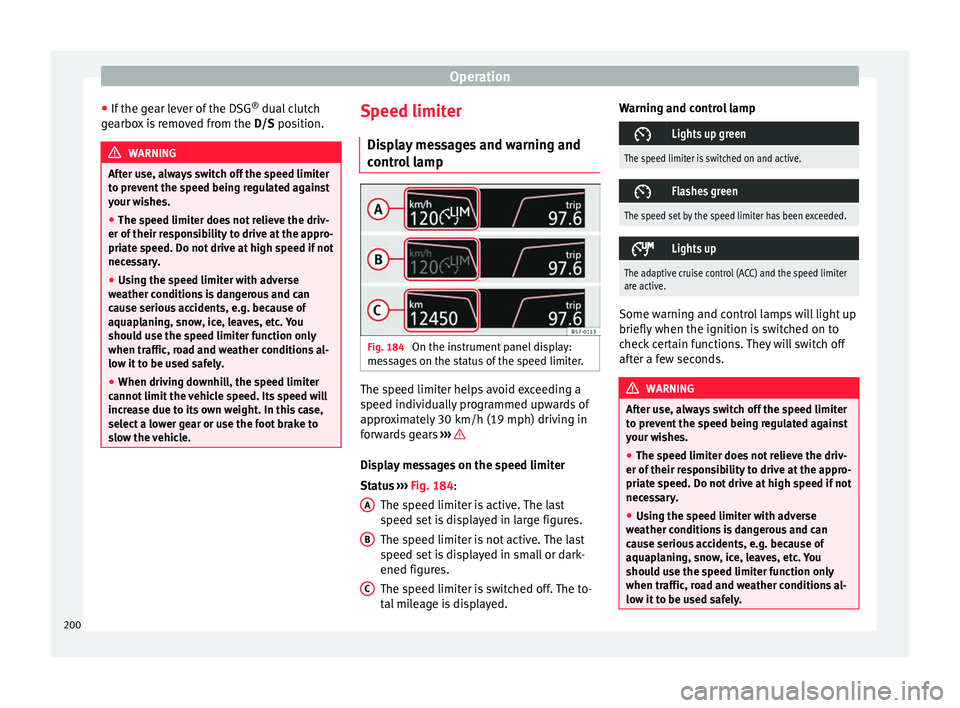
control lamp Fig. 184
On the instrument panel display:
me s
s
ages on the status of the speed limiter. The speed limiter helps avoid exceeding a
s peed indiv
idual
ly programmed upwards of
approximately 30 km/h (19 mph) driving in
forwards gears ››› Display messages on the speed limiter
St
at
u
s ››› Fig. 184:
The speed limiter is active. The last
speed set is displayed in large figures.
The speed limiter is not active. The last
speed set is displayed in small or dark-
ened figures.
The speed limiter is switched off. The to-
tal mileage is displayed.
A B
C Warning and control lamp
Lights up green
The speed limiter is switched on and active.
Flashes green
The speed set by the speed limiter has been exceeded.
Lights up
The adaptive cruise control (ACC) and the speed limiter
are active.
Some warning and control lamps will light up
briefly
when the ignition i
s
switched on to
check certain functions. They will switch off
after a few seconds. WARNING
After use, always switch off the speed limiter
to pr ev
ent the speed being regulated against
your wishes.
● The speed limiter does not relieve the driv-
er of their re
sponsibility to drive at the appro-
priate speed. Do not drive at high speed if not
necessary.
● Using the speed limiter with adverse
weather c
onditions is dangerous and can
cause serious accidents, e.g. because of
aquaplaning, snow, ice, leaves, etc. You
should use the speed limiter function only
when traffic, road and weather conditions al-
low it to be used safely. 200
Page 206 of 308
Operation
Distance warning
If the sy
s
tem detects that safety is endan-
gered by the proximity of the vehicle in front,
it may warn the driver by means of a message
on the instrument panel when driving at a
speed of between approximately 60 km/h
(37 mph) and 250 km/h (156 mph)
››› Fig. 187.
The warning moment varies depending on
the traffic situation and driver behaviour.
Advance warning
If the system detects a possible collision with
the vehicle in front, it may warn the driver by
means of an audible warning and an indica-
tion on the instrument panel when driving at
a speed of between approximately 30 km/h
(18 mph) and 250 km/h (156 mph)
››› Fig. 187.
The warning moment varies depending on
the traffic situation and driver behaviour. At
the same time, the vehicle will prepare for a
possible emergency braking ››› .
C ritic
a
l warning
If the driver fails to react to the advance
warning, the system may actively intervene in
the brakes when driving at a speed of be-
tween approximately 30 km/h (18 mph) and
250 km/h (156 mph), generating a brief jolt
to warn of the imminent collision. Automatic braking
If the driver al
so fails to react to the advance
warning, the system may brake the vehicle
automatically, by progressively increasing
braking effect driving at a speed of between
approximately 4 km/h (2.5 mph) and
250 km/h (156 mph). By reducing speed in
case of a possible collision, the system may
contribute to reducing the consequences of
an accident.
Front assist
If the Front Assist notices that the driver is
not braking sufficiently in case of a collision
hazard, the system can increase braking ef-
fect and thus avert the collision when driving
at a speed of between approximately 4 km/h
(2.5 mph) and 250 km/h (156 mph). Front
assist only acts while the brake pedal is
pressed down hard. WARNING
The intelligent technology in the Front Assist
cannot c
hange the laws of physics. The driver
is always responsible for braking in time. If
the Front Assist issues a warning, then, de-
pending on the traffic circumstances, you
must brake immediately or dodge the obsta-
cle.
● Adapt your speed and safe distance to the
vehicl
e in front of you at all times to suit visi-
bility, weather, road and traffic conditions. ●
The Front As
sist alone cannot avoid acci-
dents and serious injuries.
● In complex driving situations, the Front As-
sis
t may issue unnecessary warnings and in-
tervene unnecessarily in braking, such as in
traffic islands.
● If the operation of the Front Assist is im-
paired, f
or example, by dirt or because the ra-
dar sensor has lost its settings, the system
may issue unnecessary warnings and inter-
vene inopportunely in the braking.
● During driving, the Front Assist does not re-
act to peop
le or animals or vehicles crossing
your path or which approach you head-on in
the same lane.
● The driver must always be ready to take
over the c
ontrol of the vehicle. Note
● When the Front As
sist causes a braking,
the brake pedal is “harder”.
● Automatic interventions by the Front Assist
on the brake
s may be interrupted by pressing
the clutch, accelerator or moving the wheel.
● If the Front Assist does not work as descri-
bed in this c
hapter (e.g. in intervenes several
times unnecessarily), switch it off. Have the
system checked by a specialised workshop.
SEAT recommends visiting a SEAT dealership. 204