warning Seat Arona 2017 Workshop Manual
[x] Cancel search | Manufacturer: SEAT, Model Year: 2017, Model line: Arona, Model: Seat Arona 2017Pages: 308, PDF Size: 6.66 MB
Page 113 of 308
Controls and displays
Operation
C ontr
o
ls and displays
General instrument panel Electric window controls*
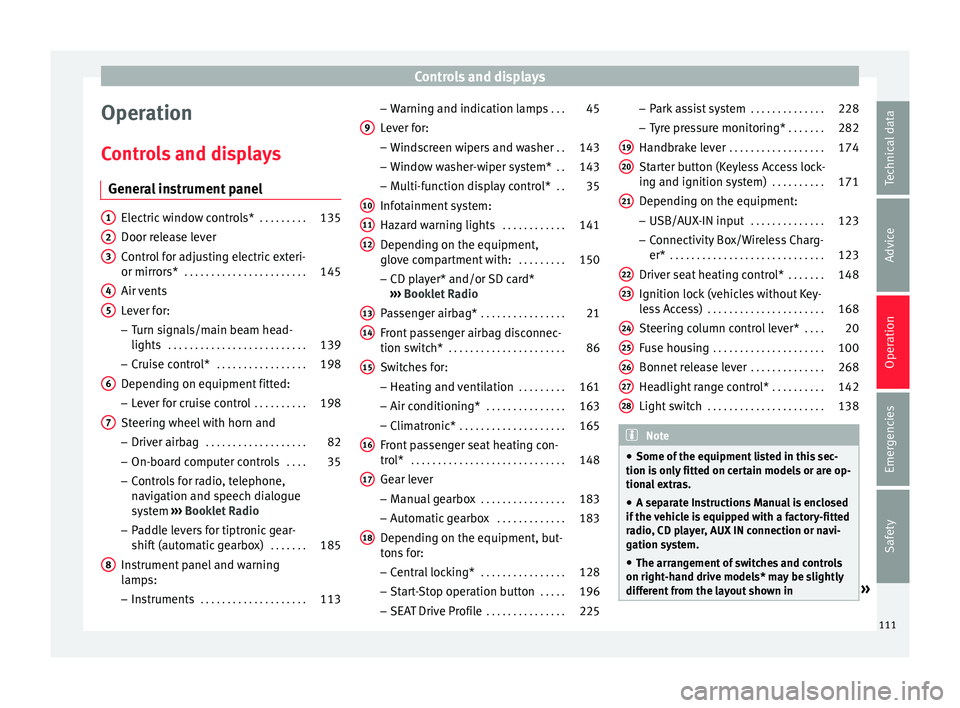
. . . . . . . . .135
Door release lever
Contr o
l for adjusting electric exteri-
or mirrors* . . . . . . . . . . . . . . . . . . . . . . . 145
Air vents
Lev er f
or:
– Turn signals/main beam head-
lights . . . . . . . . . . . . . . . . . . . . . . . . . . 139
– Crui se c
ontrol* . . . . . . . . . . . . . . . . . 198
Depending on equipment fitted:
– Lev er f
or cruise control . . . . . . . . . .198
Steering wheel with horn and – Driver airbag . . . . . . . . . . . . . . . . . . . 82
– On-boar d c
omputer controls . . . .35
– Contro
ls for radio, telephone,
navigation and speech dialogue
system ›››
Booklet Radio
– Paddle levers for tiptronic gear-
shift (automatic gearbox) . . . . . . .185
Instrument panel and warning
lamp s:
– In
struments . . . . . . . . . . . . . . . . . . . . 113
1 2
3
4
5
6
7
8 –
Warnin
g and indic
ation lamps . . .45
Lever for:
– Winds
creen wipers and washer . .143
– Window w
asher-wiper system* . .143
– Multi-f
unction display control* . .35
Infotainment system:
Hazard w
arning lights . . . . . . . . . . . . 141
Depending on the equipment,
glove c
ompartment with: . . . . . . . . .150
– CD pla
yer* and/or SD card*
››› Booklet Radio
Passenger airbag* . . . . . . . . . . . . . . . . 21
Front passenger airbag disconnec-
tion switc
h* . . . . . . . . . . . . . . . . . . . . . . 86
Switches for:
– Heating and
ventilation . . . . . . . . . 161
– Air conditionin g* . . . . . . . . . . . . . . . 163
– C
limatr
onic* . . . . . . . . . . . . . . . . . . . . 165
Front passenger seat heating con-
tro l* . . . . . . . . . . . . . . . . . . . . . . . . . . . . . 148
Ge
ar lever
– Manual g
earbox . . . . . . . . . . . . . . . . 183
– Autom atic
gearbox . . . . . . . . . . . . . 183
Depending on the equipment, but-
ton s
for:
– Central locking* . . . . . . . . . . . . . . . . 128
– Star t
-Stop operation button . . . . .196
– SEAT Driv
e Profile . . . . . . . . . . . . . . . 225
9
10
11
12
13
14
15
16
17
18 –
Park
a
ssist system . . . . . . . . . . . . . . 228
– Tyr
e pressure monitoring* . . . . . . .282
Handbrake lever . . . . . . . . . . . . . . . . . . 174
Starter button (Keyless Access lock-
ing and ignition sys
tem) . . . . . . . . . . 171
Depending on the equipment:
– USB/AUX-IN inp
ut . . . . . . . . . . . . . . 123
– Connectivity
Box/Wireless Charg-
er* . . . . . . . . . . . . . . . . . . . . . . . . . . . . . 123
Driver seat heating control* . . . . . . .148
Ignition lock (vehicles without Key-
les
s Access) . . . . . . . . . . . . . . . . . . . . . . 168
Steering column control lever* . . . .20
Fuse housing . . . . . . . . . . . . . . . . . . . . . 100
Bonnet release lever . . . . . . . . . . . . . .268
Headlight range control* . . . . . . . . . .142
Light switch . . . . . . . . . . . . . . . . . . . . . . 138 Note
● Some of the equipment li
sted in this sec-
tion is only fitted on certain models or are op-
tional extras.
● A separate Instructions Manual is enclosed
if the v
ehicle is equipped with a factory-fitted
radio, CD player, AUX IN connection or navi-
gation system.
● The arrangement of switches and controls
on right-hand driv
e models* may be slightly
different from the layout shown in » 19
20
21
22
23
24
25
26
27
28
111
Technical data
Advice
Operation
Emergencies
Safety
Page 115 of 308
Instruments and warning/control lamps
Instruments and warning/control lamps
In s
trument
s
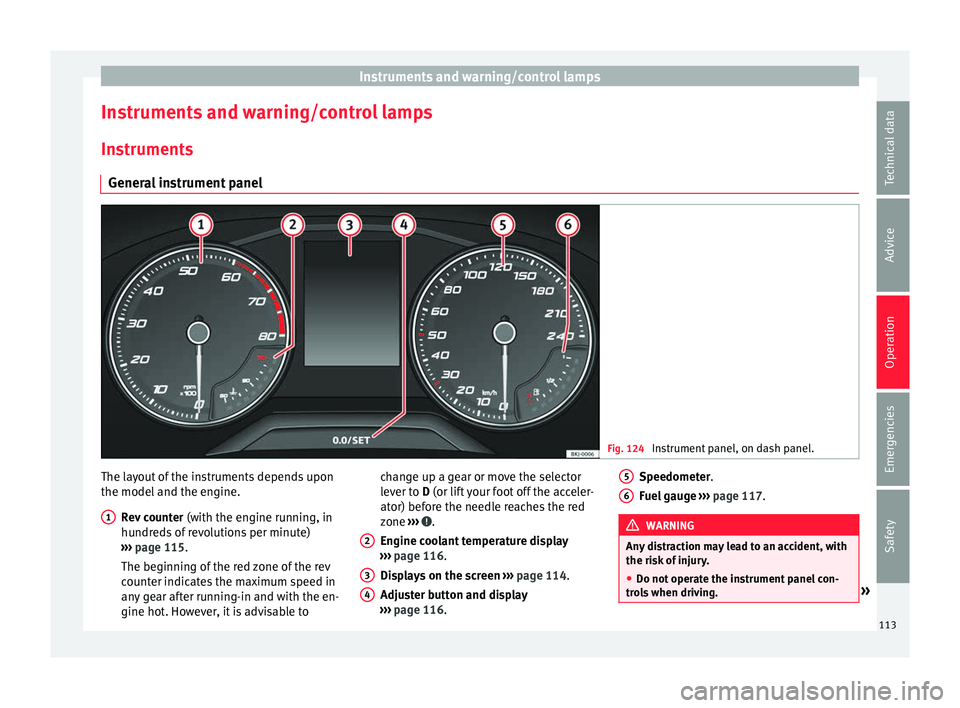
General instrument panel Fig. 124
Instrument panel, on dash panel. The layout of the instruments depends upon
the model
and the en
gine.
R
ev counter (with the engine running, in
hundreds of revolutions per minute)
››› page 115.
The beginning of the red zone of the rev
counter indicates the maximum speed in
any gear after running-in and with the en-
gine hot. However, it is advisable to
1 change up a gear or move the selector
l
ev
er t
o D (or lift your foot off the acceler-
ator) before the needle reaches the red
zone ››› .
En gine c
oo
lant temperature display
››› page 116.
Displays on the screen ››› page 114.
Adjuster button and display
››› page 116.
2 3
4 Speedometer.
F
uel
g
auge ››› page 117. WARNING
Any distraction may lead to an accident, with
the risk of
injury.
● Do not operate the instrument panel con-
trol
s when driving. » 5
6
113
Technical data
Advice
Operation
Emergencies
Safety
Page 116 of 308
Operation
CAUTION
● When the engine i s
cold, avoid high revs
and heavy acceleration and do not make the
engine work hard. Indications on the display
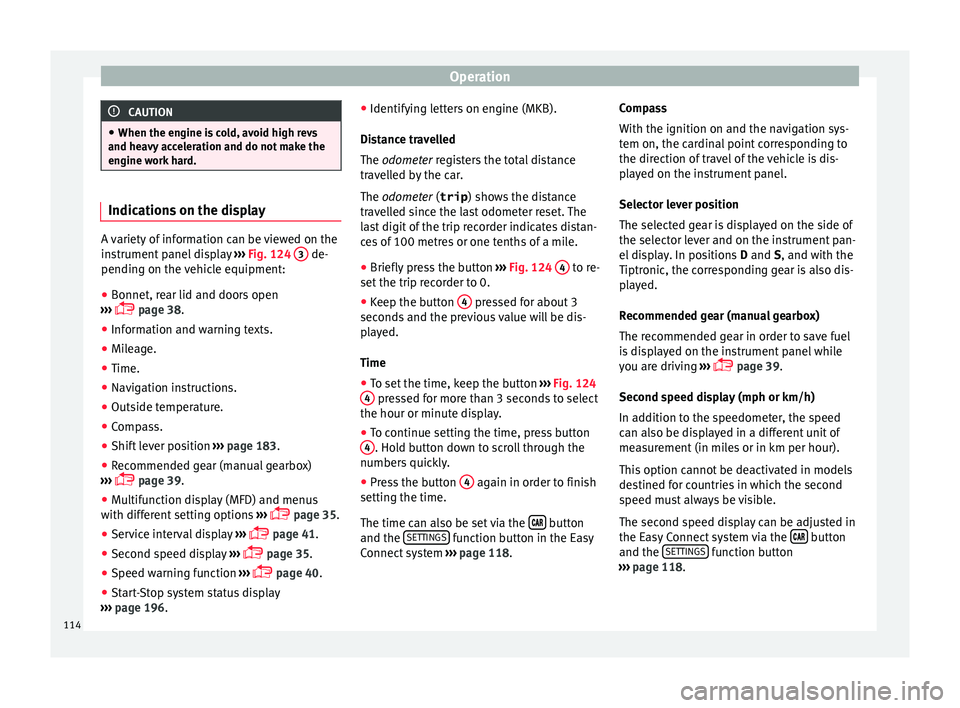
A variety of information can be viewed on the
ins
trument
panel display ››› Fig. 124 3 de-
pending on the v
ehicle equipment:
● Bonnet, rear lid and doors open
›› ›
page 38.
● Information and warning texts.
● Mileage.
● Time.
● Navigation instructions.
● Outside temperature.
● Compass.
● Shift lever position ›››
page 183.
● Recommended gear (manual gearbox)
›››
page 39.
● Multifunction display (MFD) and menus
with differ
ent setting options ›››
page 35.
● Service interval display ›››
page 41.
● Second speed display ›››
page 35.
● Speed warning function ›››
page 40.
● Start-Stop system status display
›››
page 196. ●
Identifyin
g letters on engine (MKB).
Distance travelled
The odometer registers the total distance
travelled by the car.
The odometer (trip ) shows the distance
travelled since the last odometer reset. The
last digit of the trip recorder indicates distan-
ces of 100 metres or one tenths of a mile.
● Briefly press the button ›››
Fig. 124 4 to re-
set the trip r
ec
order to 0.
● Keep the button 4 pressed for about 3
sec ond
s
and the previous value will be dis-
played.
Time
● To set the time, keep the button ›››
Fig. 124
4 pressed for more than 3 seconds to select
the hour or minut e di
s
play.
● To continue setting the time, press button
4 . Hold button down to scroll through the
number s
quic
kly.
● Press the button 4 again in order to finish
settin g the time.
The time c an al
so be set via the button
and the S
ET
TINGS function button in the Easy
C onnect
sy
stem ››› page 118. Compass
With the ignition on and the nav
igation sys-
tem on, the cardinal point corresponding to
the direction of travel of the vehicle is dis-
played on the instrument panel.
Selector lever position
The selected gear is displayed on the side of
the selector lever and on the instrument pan-
el display. In positions D and S, and with the
Tiptronic, the corresponding gear is also dis-
played.
Recommended gear (manual gearbox)
The recommended gear in order to save fuel
is displayed on the instrument panel while
you are driving ›››
page 39.
Second speed display (mph or km/h)
In addition to the speedometer, the speed
can also be displayed in a different unit of
measurement (in miles or in km per hour).
This option cannot be deactivated in models
destined for countries in which the second
speed must always be visible.
The second speed display can be adjusted in
the Easy Connect system via the button
and the S
ET
TINGS function button
› ›
›
page 118.
114
Page 117 of 308
Instruments and warning/control lamps
Speed warning
When the s peed settin
g i
s exceeded, this will
be indicated on the instrument panel display.
This is very useful, for example when using
winter tyres that are not designed for driving
at the maximum speed of the vehicle
››› page 40.
The speed warning settings can be adjusted
in the Easy Connect system via the button
and the S
ET
TINGS function button
› ›
›
page 118.
Start-Stop operating display
Updated information relating to the status is
displayed on the instrument panel
››› page 196.
Identifying letters on engine (MKB)
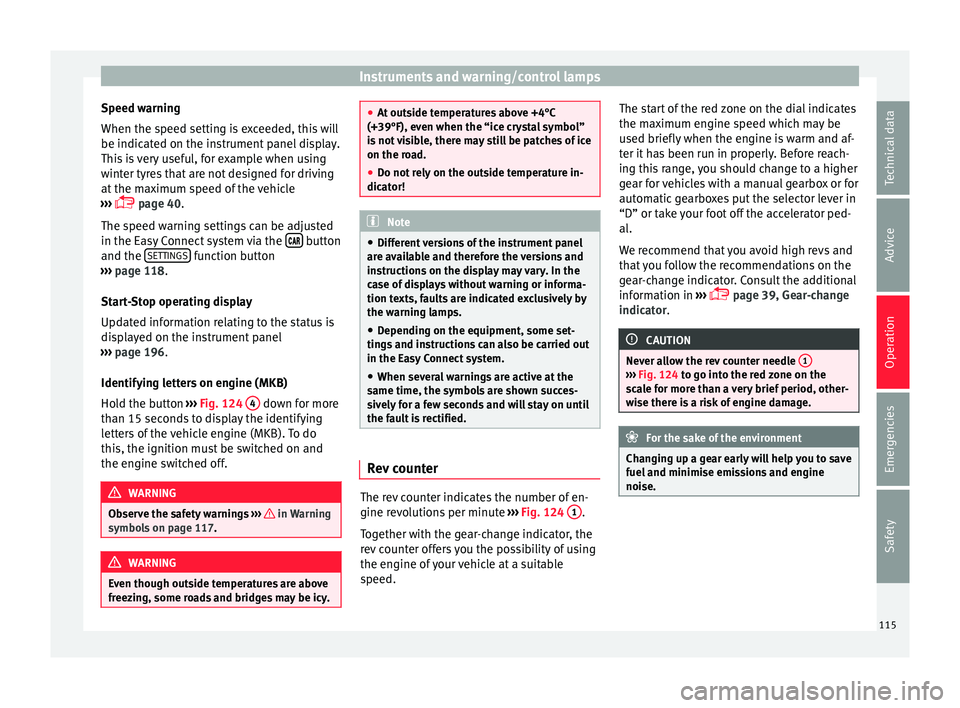
Hold the button ››› Fig. 124 4 down for more
th an 15 sec
ond
s to display the identifying
letters of the vehicle engine (MKB). To do
this, the ignition must be switched on and
the engine switched off. WARNING
Observe the safety warnings ›››
in Warning
symbol s on p
age 117. WARNING
Even though outside temperatures are above
freez in
g, some roads and bridges may be icy. ●
At out s
ide temperatures above +4°C
(+39°F), even when the “ice crystal symbol”
is not visible, there may still be patches of ice
on the road.
● Do not rely on the outside temperature in-
dicator! Note
● Diff erent
versions of the instrument panel
are available and therefore the versions and
instructions on the display may vary. In the
case of displays without warning or informa-
tion texts, faults are indicated exclusively by
the warning lamps.
● Depending on the equipment, some set-
tings
and instructions can also be carried out
in the Easy Connect system.
● When several warnings are active at the
same time, the symbol
s are shown succes-
sively for a few seconds and will stay on until
the fault is rectified. Rev counter
The rev counter indicates the number of en-
gine r
ev
o
lutions per minute ››› Fig. 124 1 .
T og
ether w
ith the gear-change indicator, the
rev counter offers you the possibility of using
the engine of your vehicle at a suitable
speed. The start of the red zone on the dial indicates
the maximum en
gine speed which may be
used briefly when the engine is warm and af-
ter it has been run in properly. Before reach-
ing this range, you should change to a higher
gear for vehicles with a manual gearbox or for
automatic gearboxes put the selector lever in
“D” or take your foot off the accelerator ped-
al.
We recommend that you avoid high revs and
that you follow the recommendations on the
gear-change indicator. Consult the additional
information in ›››
page 39, Gear-change
indicator. CAUTION
Never allow the rev counter needle 1 ›››
Fig. 124 to g o int
o the red zone on the
scale for more than a very brief period, other-
wise there is a risk of engine damage. For the sake of the environment
Changing up a gear early will help you to save
fuel and minimi
se emissions and engine
noise. 115
Technical data
Advice
Operation
Emergencies
Safety
Page 119 of 308
Instruments and warning/control lamps
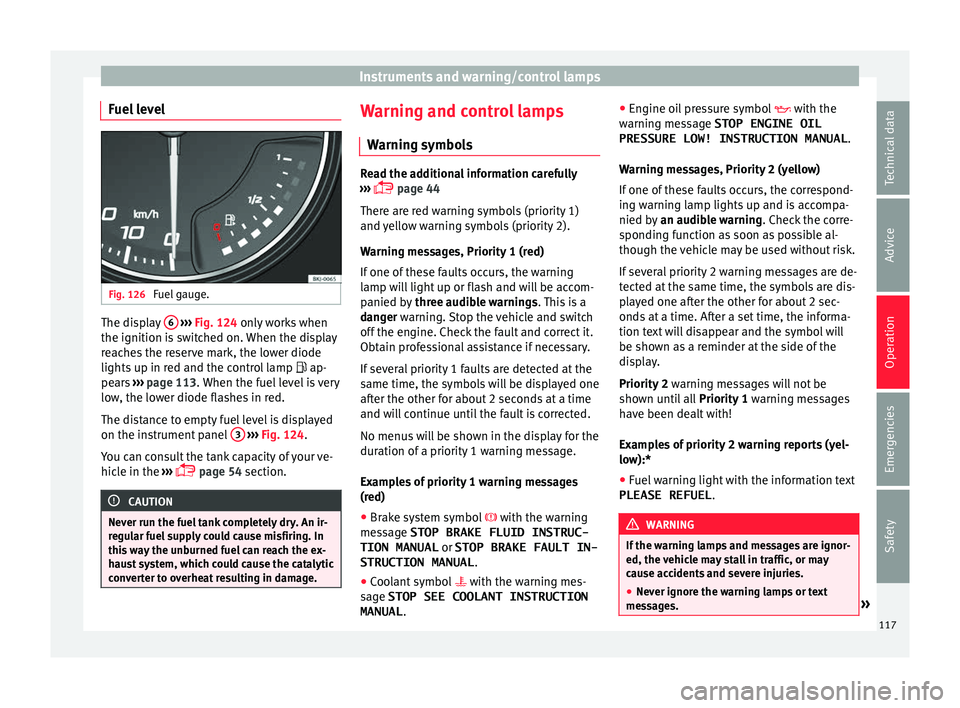
Fuel level Fig. 126
Fuel gauge. The display
6
› ›
› Fig. 124 only works when
the ignition is switched on. When the display
reaches the reserve mark, the lower diode
lights up in red and the control lamp ap-
pears ››› page 113. When the fuel level is very
low, the lower diode flashes in red.
The distance to empty fuel level is displayed
on the instrument panel 3
› ›
› Fig. 124
.
You can consult the tank capacity of your ve-
hicle in the ›››
page 54 section. CAUTION
Never run the fuel tank completely dry. An ir-
re gu
lar fuel supply could cause misfiring. In
this way the unburned fuel can reach the ex-
haust system, which could cause the catalytic
converter to overheat resulting in damage. Warning and control lamps
W arnin
g symbo
ls Read the additional information carefully
›› ›
page 44
There are red warning symbols (priority 1)
and yellow warning symbols (priority 2).
Warning messages, Priority 1 (red)
If one of these faults occurs, the warning
lamp will light up or flash and will be accom-
panied by three audible warnings. This is a
danger warning. Stop the vehicle and switch
off the engine. Check the fault and correct it.
Obtain professional assistance if necessary.
If several priority 1 faults are detected at the
same time, the symbols will be displayed one
after the other for about 2 seconds at a time
and will continue until the fault is corrected.
No menus will be shown in the display for the
duration of a priority 1 warning message.
Examples of priority 1 warning messages
(red)
● Brake system symbol with the warnin
g
message STOP BRAKE FLUID INSTRUC-
TION MANUAL or STOP BRAKE FAULT IN-
STRUCTION MANUAL .
● Coolant symbol with the warnin
g mes-
sage STOP SEE COOLANT INSTRUCTION
MANUAL . ●
Engine oil
pressure symbol with the
warning message STOP ENGINE OIL PRESSURE LOW! INSTRUCTION MANUAL .
Warning messages, Priority 2 (yellow)
If one of these faults occurs, the correspond-
ing warning lamp lights up and is accompa-
nied by an audible warning. Check the corre-
sponding function as soon as possible al-
though the vehicle may be used without risk.
If several priority 2 warning messages are de-
tected at the same time, the symbols are dis-
played one after the other for about 2 sec-
onds at a time. After a set time, the informa-
tion text will disappear and the symbol will
be shown as a reminder at the side of the
display.
Priority 2 warning messages will not be
shown until all Priority 1 warning messages
have been dealt with!
Examples of priority 2 warning reports (yel-
low):*
● Fuel warning light with the information text
PLEASE REFUEL . WARNING
If the warning lamps and messages are ignor-
ed, the v ehic
le may stall in traffic, or may
cause accidents and severe injuries.
● Never ignore the warning lamps or text
mess
ages. » 117
Technical data
Advice
Operation
Emergencies
Safety
Page 120 of 308
Operation
●
Stop the v
ehicle safely as soon as possible.
● Park the vehicle away from traffic and en-
sure th
at there are no highly flammable ma-
terials under the vehicle that could come into
contact with the exhaust system (e.g. dry
grass, fuel).
● A faulty vehicle represents a risk of acci-
dent for the driv
er and for other road users. If
necessary, switch on the hazard warning
lamps and put out the warning triangle to ad-
vise other drivers.
● Before opening the bonnet, switch off the
engine and al
low it to cool.
● In any vehicle, the engine compartment is a
hazar
dous area and could cause severe inju-
ries ››› page 267. CAUTION
Failure to heed the control lamps and text
mes s
ages when they appear may result in
faults in the vehicle. Introduction to the Easy
C
onnect
sy
stem*
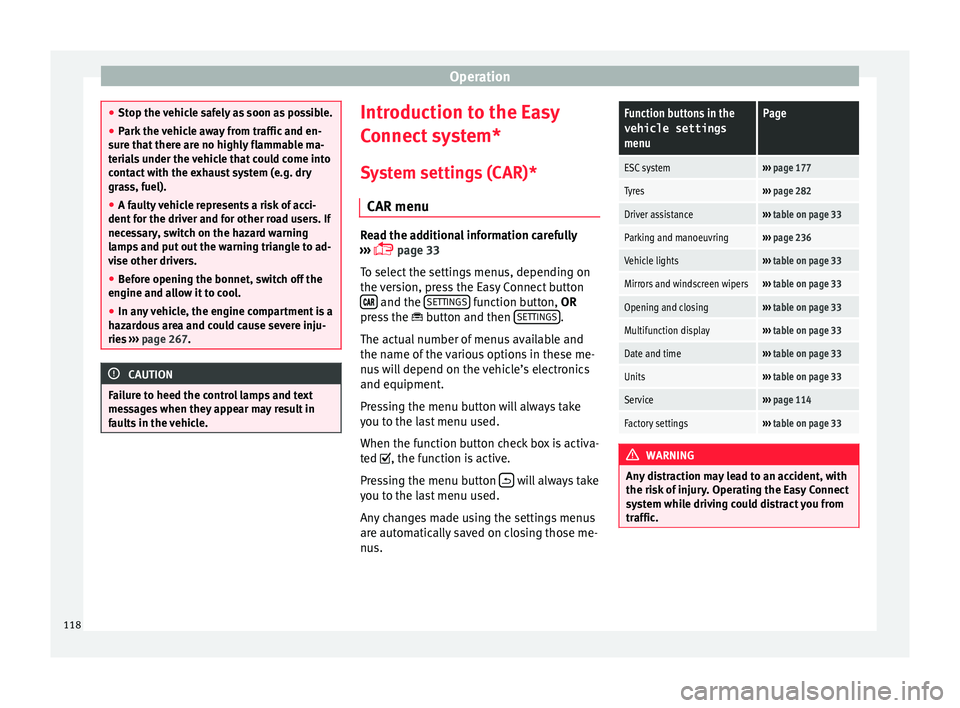
System settings (CAR)* CAR menu Read the additional information carefully
›› ›
page 33
To select the settings menus, depending on
the version, press the Easy Connect button and the
S
ET
TINGS function button, OR
pr e
s
s the button and then SETTINGS .
The act ual
number of
menus available and
the name of the various options in these me-
nus will depend on the vehicle’s electronics
and equipment.
Pressing the menu button will always take
you to the last menu used.
When the function button check box is activa-
ted , the function is active.
Pressing the menu button will always take
y ou t
o the l
ast menu used.
Any changes made using the settings menus
are automatically saved on closing those me-
nus.
Function buttons in the vehicle settings
menuPage
ESC system››› page 177
Tyres››› page 282
Driver assistance››› table on page 33
Parking and manoeuvring››› page 236
Vehicle lights››› table on page 33
Mirrors and windscreen wipers››› table on page 33
Opening and closing››› table on page 33
Multifunction display››› table on page 33
Date and time››› table on page 33
Units››› table on page 33
Service››› page 114
Factory settings››› table on page 33 WARNING
Any distraction may lead to an accident, with
the risk of
injury. Operating the Easy Connect
system while driving could distract you from
traffic. 118
Page 126 of 308
Operation
Opening and closing K ey
s
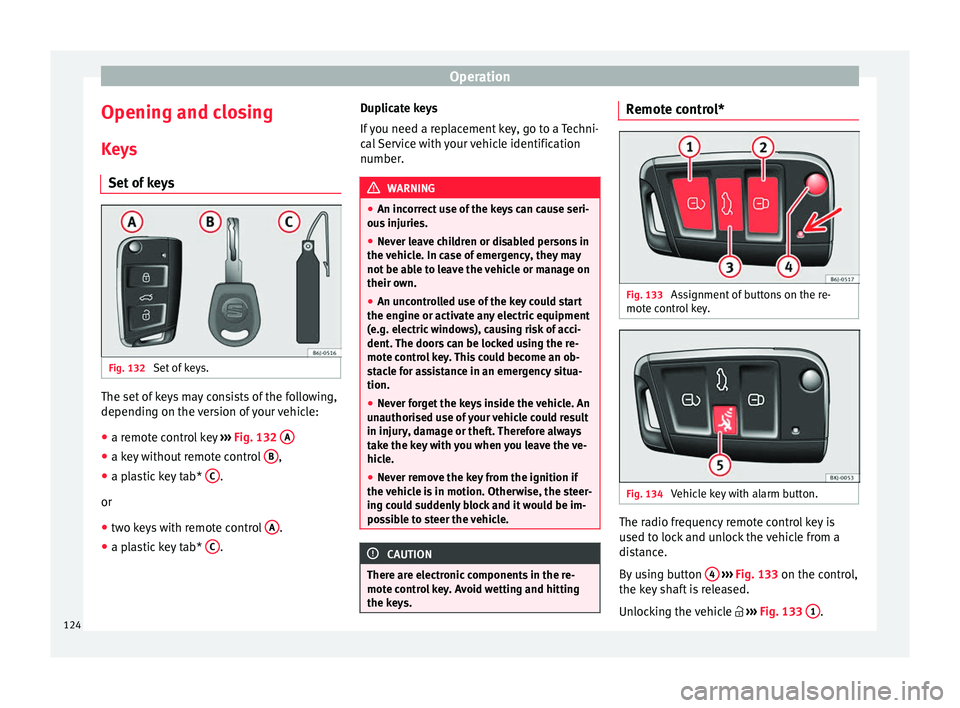
Set
of keys Fig. 132
Set of keys. The set of keys may consists of the following,
dependin
g on the
v
ersion of your vehicle:
● a remote control key ›››
Fig. 132 A ●
a key without remote control B ,
● a plastic key tab* C .
or
● two keys with remote control A .
● a plastic key tab* C .Duplicate keys
If
y
ou need a replacement key, go to a Techni-
cal Service with your vehicle identification
number. WARNING
● An incorr ect
use of the keys can cause seri-
ous injuries.
● Never leave children or disabled persons in
the vehic
le. In case of emergency, they may
not be able to leave the vehicle or manage on
their own.
● An uncontrolled use of the key could start
the engine or activat
e any electric equipment
(e.g. electric windows), causing risk of acci-
dent. The doors can be locked using the re-
mote control key. This could become an ob-
stacle for assistance in an emergency situa-
tion.
● Never forget the keys inside the vehicle. An
unauthori
sed use of your vehicle could result
in injury, damage or theft. Therefore always
take the key with you when you leave the ve-
hicle.
● Never remove the key from the ignition if
the vehic
le is in motion. Otherwise, the steer-
ing could suddenly block and it would be im-
possible to steer the vehicle. CAUTION
There are electronic components in the re-
mote c ontr
ol key. Avoid wetting and hitting
the keys. Remote control*
Fig. 133
Assignment of buttons on the re-
mot e c
ontr
ol key. Fig. 134
Vehicle key with alarm button. The radio frequency remote control key is
u
sed t
o loc
k and unlock the vehicle from a
distance.
By using button 4
› ›
› Fig. 133
on the control,
the key shaft is released.
Unlocking the vehicle ››› Fig. 133 1 .
124
Page 127 of 308
Opening and closing
Locking the vehicle ››
› Fig. 133 2 .
Un loc
k
ing the rear lid. Press button
››› Fig. 133 3 until all the turn signals on the
v ehic
l
e flash briefly. When the unlocking but-
ton 3 is pressed, you have 2 minutes to
open the door . Onc
e thi
s time has passed, it
will lock again.
Moreover, the battery indicator on the key
››› Fig. 133 (arrow), will flash.
The remote control transmitter and the bat-
teries are integrated in the key. The receiver
is inside the vehicle. The maximum range de-
pends on different factors. The range is re-
duced as the batteries start to lose power.
Alarm button*
Only press alarm button in the event of an
emergency ››› Fig. 134 5 ! When the al
arm
b utt
on is pressed, the vehicle horn is heard
and the turn signals are switched on for a
short time. When the alarm button is pressed
again, the alarm is switched off. WARNING
Read and observe the relevant warnings ›››
in Set of keys on page 124.
Note
● The remot e c
ontrol key works only when
you are in its scope. ●
If the v
ehicle cannot be unlocked or locked
by using the radio frequency remote control,
the remote control key will have to be re-
synchronised. For this, go to your technical
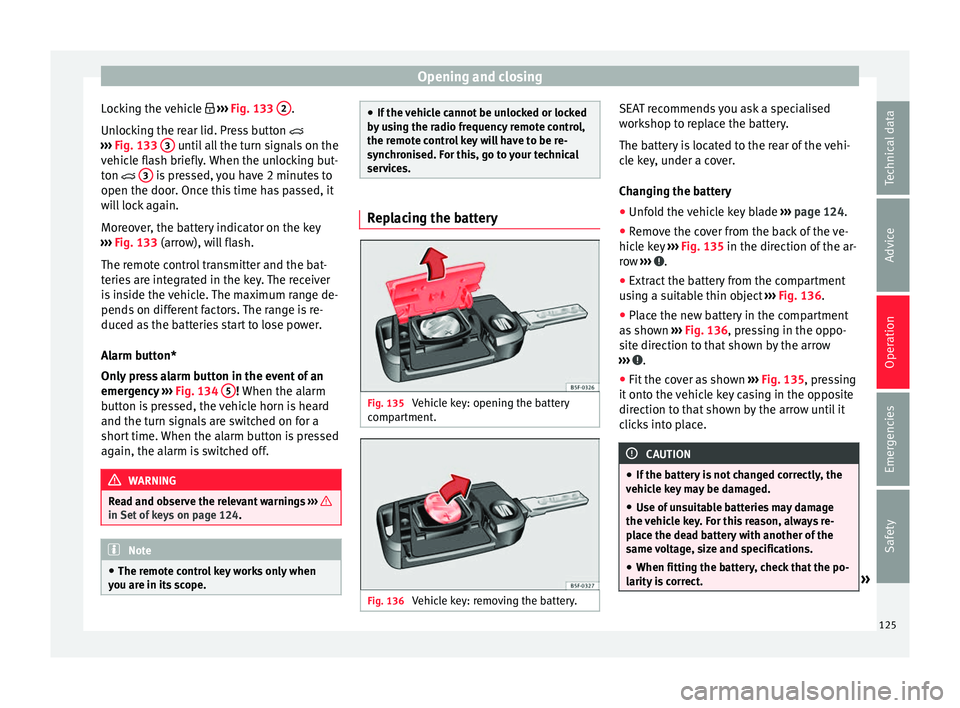
services. Replacing the battery
Fig. 135
Vehicle key: opening the battery
c omp
ar
tment. Fig. 136
Vehicle key: removing the battery. SEAT recommends you ask a specialised
w
ork
shop t
o replace the battery.
The battery is located to the rear of the vehi-
cle key, under a cover.
Changing the battery ● Unfold the vehicle key blade ›››
page 124.
● Remove the cover from the back of the ve-
hicle k
ey ››› Fig. 135 in the direction of the ar-
row ››› .
● Extract the battery from the compartment
u s
in
g a suitable thin object ››› Fig. 136.
● Place the new battery in the compartment
as sho
wn ››› Fig. 136, pressing in the oppo-
site direction to that shown by the arrow
››› .
● Fit the cover as shown ››
›
Fig. 135 , pressing
it onto the vehicle key casing in the opposite
direction to that shown by the arrow until it
clicks into place. CAUTION
● If the b att
ery is not changed correctly, the
vehicle key may be damaged.
● Use of unsuitable batteries may damage
the vehic
le key. For this reason, always re-
place the dead battery with another of the
same voltage, size and specifications.
● When fitting the battery, check that the po-
larity i
s correct. » 125
Technical data
Advice
Operation
Emergencies
Safety
Page 128 of 308
Operation
For the sake of the environment
Please dispose of your used batteries correct-
ly and w ith r
espect for the environment.Synchronising the remote control key
If it is not possible to unlock or lock the door
with the r
emot
e control, it should be re-
synchronised.
While the vehicle is open:
– Press the button 2
› ›
›
Fig. 133 on the re-
mote control.
– Then close the vehicle using the key shaft
within one minute.
Whi
le the vehicle is closed:
– Press the button 1
› ›
›
Fig. 133 on the re-
mote control.
– Then close the vehicle using the key shaft
within one minute.
It
is possible that the vehicle could no longer
be opened and closed with the remote con-
trol if the button is repeatedly pressed out-
side of the effective range of the radio fre-
quency remote control. The remote control
key will have to be resynchronised. Spare remote control keys are available at
your T
echnical Service, where they must be
matched to the locking system.
Up to five remote control keys can be used.
Central locking system Des
cription Read the additional information carefully
›› ›
page 15.
The central locking system enables you to
lock and unlock all doors and the rear lid by
just pushing the button.
Central locking can be activated by using any
of the following options:
● the key, by inserting it into the driver door
cylinder and r ot
ating it in the opening direc-
tion. Depending on the vehicle version, ei-
ther all doors will be unlocked or only the
driver door will be unlocked. All doors will be
locked on locking the vehicle using the key.
● the interior central lock button
›››
page 128.
● the radio frequency remote control , usin
g
the buttons on the key ›››
page 124.
Various functions are available to improve
the vehicle safety: Locking system “Safe*”
Selective* u
nlocking system
Self-locking system to prevent involunta-
ry unlocking
Automatic speed dependent locking and
unlocking system*
Emergency unlocking system
Unlocking the vehicle* Press button ››› Fig. 133 on remote
control to unlock all the doors and rear
lid.
Locking the vehicle* Press button ››› Fig. 133 on the remote
control to lock all doors and the rear lid
or turn the key in the door to lock all
doors and the rear lid. WARNING
● Loc k
ing from the outside carelessly or with-
out good visibility may lead to bruising, par-
ticularly in the case of children.
● When locking a vehicle, never leave chil-
dren un
accompanied inside, as from the out-
side it will be difficult to provide assistance if
required.
● Having the doors locked prevents intruders
from gettin
g in, for example when stopped at
a traffic light. –
–
–
–
–
–
–
126
Page 129 of 308
Opening and closing
Note
For anti-theft security, only the driver door is
fitted w ith a loc
k cylinder.“Safe” security system*
This is an anti-theft device which consists of
a doubl
e loc
k for the door locks and a deacti-
vation function for the boot in order to pre-
vent forced entry.
Activation
The “safe” system is activated when the vehi-
cle is locked using the key or the remote con-
trol.
To activate it with the key, rotate once it is in-
serted in the door lock cylinder in the locking
direction.
To activate the system using the remote con-
trol, press the lock button once on the re-
mote.
Once this system is activated, opening doors
from the outside and the inside is not possi-
ble. The rear lid can not be opened. The cen-
tral lock button does not work.
When the ignition is switched off, the instru-
ment panel display indicates that the “Safe”
system is on. Deactivation
Rot
at
e the key inserted in the lock cylinder
twice towards the locking direction.
To activate the system using the remote con-
trol, press the lock button on the remote
twice in less than five seconds.
On deactivating the “Safe” system, the alarm
volumetric sensor is also deactivated.
With the “Safe” switched off, doors can be
opened from the interior but not from the ex-
terior.
See “Selective unlocking system*”
“Safe” status
On the driver door, there is warning lamp visi-
ble from outside the vehicle through the win-
dow which shows the “Safe” system status.
We will know that “Safe” system is activated
by the flashing warning lamp. The indicator
will flash on all vehicles, fitted and nor fitted
with an alarm, until they unlock.
Remember:
Safe activated with or without an alarm:
warning lamp flashes continuously.
Safe deactivated without an alarm: the warn-
ing lamp stays off.
Safe deactivated with an alarm: the warning
lamp stays off. WARNING
No one should remain inside the vehicle if the
“Safe” sy s
tem is activated because opening
the doors will not be possible in the event of
an emergency neither from the inside nor the
outside and help from the outside is made
difficult. Danger of death. Passengers could
become trapped inside in case of emergency. Selective unlocking system*
This system allows to unlock either just the
driv
er door or al
l
the vehicle.
Driver door unlock button
Unlock once. Use either the key or the remote
control.
Once the key is inserted in the lock cylinder,
rotate once in the unlock direction. The driver
door will remain without “Safe” and un-
locked. In vehicles fitted with an alarm, see
the Anti-theft Alarm section ›››
page 132.
Using the remote control, press the unlock
button on the remote once. The “Safe” sys-
tem for all the vehicle is deactivated, only the
driver door is unlocked and both the alarm
and the warning lamp are also turned off. »
127
Technical data
Advice
Operation
Emergencies
Safety