warning Seat Arona 2017 Repair Manual
[x] Cancel search | Manufacturer: SEAT, Model Year: 2017, Model line: Arona, Model: Seat Arona 2017Pages: 308, PDF Size: 6.66 MB
Page 130 of 308
Operation
Unlocking all doors and the luggage com-
p ar
tment
The u
nlock button on the remote control
must be pressed twice so that all doors
and the luggage compartment can be
opened.
Press twice within 5 seconds to deactivate
the “Safe” system for all vehicle, to unlock all
doors and to use the luggage compartment.
The warning lamp and the alarm (only vehi-
cles fitted with one) are turned off.
Unlocking the luggage compartment
See ›››
page 16.
Self-locking system to prevent invol-
untar
y unlocking It is an anti-theft system and prevents the un-
int
ention
al
unlocking of the vehicle.
If the vehicle is unlocked and none of the
doors (including the boot) are opened within
30 seconds, it re-locks automatically.
Automatic speed-dependent locking
and unloc
king system*This is a safety system which prevents access
t
o the
v
ehicle from the outside when it is run-
ning (e.g. when stopped at a traffic light). Locking
The doors w
ill lock automatically if the speed
of 15 km/h (9 mph) is exceeded. The rear lid
will lock automatically if the speed of 6 km/h
(4 mph) is exceeded.
If the vehicle is stopped and any of its doors
open, when starting again and exceeding the
mentioned speed, all doors will lock again.
Unlocking
On withdrawing the ignition key, the vehicle
will returns to its status prior to self-locking.
Each door can be unlocked and opened inde-
pendently from the inside (for example, when
a passenger gets out). To do it, simply oper-
ate the lever inside the door. WARNING
The door handles must not be operated when
the v ehic
le is running: the door would open. Note
If the airbags are triggered during an acci-
dent, the v ehic
le is unlocked, except for the
luggage compartment. It is possible to lock
the vehicle from inside with the central lock-
ing, after turning the ignition off and back on
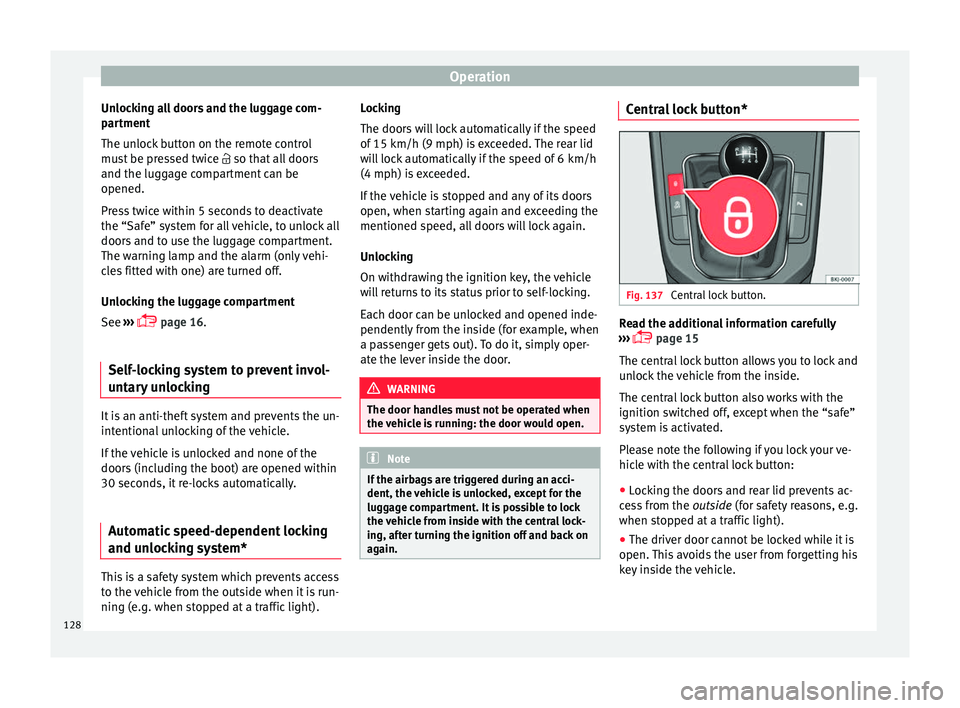
again. Central lock button*
Fig. 137
Central lock button. Read the additional information carefully
› ›
›
page 15
The central lock button allows you to lock and
unlock the vehicle from the inside.
The central lock button also works with the
ignition switched off, except when the “safe”
system is activated.
Please note the following if you lock your ve-
hicle with the central lock button:
● Locking the doors and rear lid prevents ac-
ces
s from the outside (for safety reasons, e.g.
when stopped at a traffic light).
● The driver door cannot be locked while it is
open. This
avoids the user from forgetting his
key inside the vehicle.
128
Page 131 of 308
Opening and closing
● Al
l
doors can be unlocked separately from
inside the vehicle. To do so, pull the door re-
lease lever once. WARNING
● If the v
ehicle is locked, children and disa-
bled people may be trapped inside it.
● Repeated operation of central locking will
prevent
the central lock button from working
for a few seconds. Then, it can only be un-
locked in case it has been previously locked.
After few seconds, the central locking be-
comes operative again.
● The central lock button is not operative
when the vehic
le is locked from the outside
(with the remote control or the key). Note
● Vehic l
e locked, button.
● Vehicle unlocked, button.Related videos Keyless Access
Fig. 138
Convenience Fig. 139
Technology Unlocking and locking the vehicle
with K
eyl
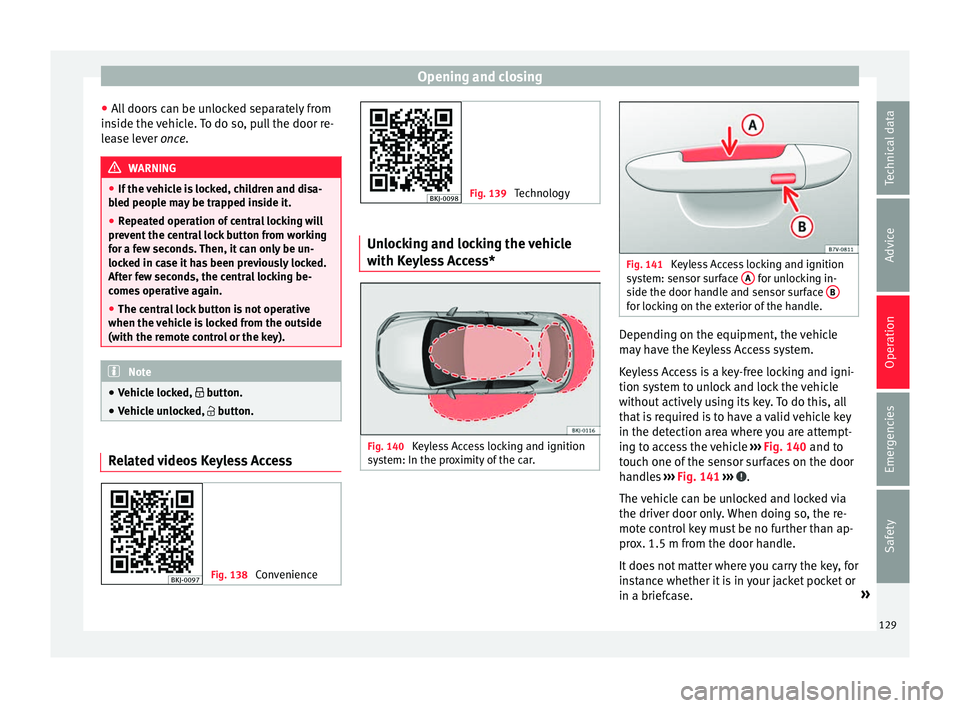
ess Access* Fig. 140
Keyless Access locking and ignition
sy s
t
em: In the proximity of the car. Fig. 141
Keyless Access locking and ignition
sys t
em: sensor surface A for unlocking in-
side the door h andl
e and sensor surface B for locking on the exterior of the handle.
Depending on the equipment, the vehicle
m
a
y
have the Keyless Access system.
Keyless Access is a key-free locking and igni-
tion system to unlock and lock the vehicle
without actively using its key. To do this, all
that is required is to have a valid vehicle key
in the detection area where you are attempt-
ing to access the vehicle ››› Fig. 140 and to
touch one of the sensor surfaces on the door
handles ››› Fig. 141 ››› .
The v
ehic
le can be unlocked and locked via
the driver door only. When doing so, the re-
mote control key must be no further than ap-
prox. 1.5 m from the door handle.
It does not matter where you carry the key, for
instance whether it is in your jacket pocket or
in a briefcase. »
129
Technical data
Advice
Operation
Emergencies
Safety
Page 133 of 308
Opening and closing
blocked for engine ignition ››
› page 168. In
order to enable engine ignition, the button
on the key inside the vehicle needs to be
pr e
s
sed.
Automatically disabling sensors
If the vehicle is not locked or unlocked for a
long period of time, the proximity sensors on
the passenger doors are automatically disa-
bled.
If one of the sensor surfaces on the door han-
dles is often activated in an unusual manner
with the vehicle locked (e.g. by the branches
of a bush rubbing against it), all proximity
sensors are disabled for a certain period of
time.
Sensors will again be enabled: ● After a time.
● OR: if the vehicle is unlocked with the but-
ton on the key.
● OR: if the rear lid is open.
● OR: if
the vehicle is unlocked manually with
the key
.
Keyless Access temporary disconnection
function
There is a sequence of actions to be followed
if you wish to temporarily deactivate Keyless
Access. First of all, lock the vehicle with the
key. As of this moment, you have 5 seconds to perform the second locking action through
the door handle sen
sor.
If this second action is performed more than
5 seconds after the vehicle is locked with the
key, it will not be possible to deactivate Key-
less Access.
Once Keyless Access has been temporarily
deactivated, the vehicle can only be unlocked
using the key. The Keyless Access function
will be reactivated once it has been unlocked.
Convenience functions
To close all the electric windows using the
convenience function, keep a finger on the
locking sensor surface ››› Fig. 141 B (arrow)
of the door h
andl
e for a few seconds until the
windows have closed.
The doors opened by touching the sensor
surface of the door handle depend on the
settings that have been activated in the Easy
Connect system with the button and the
S ET
TINGS and
Openin
g and c
lo
sing function but-
t on
s. CAUTION
The sensor surfaces on the door handles
cou l
d engage if hit with a water jet or high
pressure steam if there is a valid vehicle key
in the proximity. If at least one of the electric
windows is open and the sensor surface B (arrow) on the handle is activated continu-
ous
ly
, all windows will close. Note
● If the v
ehicle battery has little or no charge,
or the vehicle key battery is almost or entire-
ly out of charge, you will probably not be able
to lock or unlock the vehicle with the Keyless
Access system. The vehicle can be unlocked
or locked manually.
● To control the proper locking of the vehicle,
the rele
ase function is disabled for approx. 2
seconds.
● If the message Keyless access system
faulty is di
splayed on the screen of the
dash panel, abnormalities may occur in the
operation of the Keyless Access system. Con-
tact a specialised workshop. SEAT recom-
mends visiting a SEAT dealership for this.
● Depending on the function set on the info-
tainment sy
stem for the mirrors, the exterior
mirrors will unfold and the surround lighting
will come on when unlocking the vehicle us-
ing the sensor surface on the driver door han-
dle.
● If there is no valid key inside the vehicle or
the syst
em fails to detect one, a warning will
display on the dash panel screen. This could
happen if any other radio frequency signal in-
terferes with the key signal (e.g. from a mo-
bile device accessory) or if the key is covered
by another object (e.g. an aluminium case).
● If the sensors are very dirty, e.g. have a lay-
er of sa
lt, the correct functioning of the sen-
sors on the door handles may be affected. In
this case, clean the vehicle. » 131
Technical data
Advice
Operation
Emergencies
Safety
Page 134 of 308
Operation
●
If the v
ehicle is equipped with an automatic
gearbox, it may only be locked in the gear
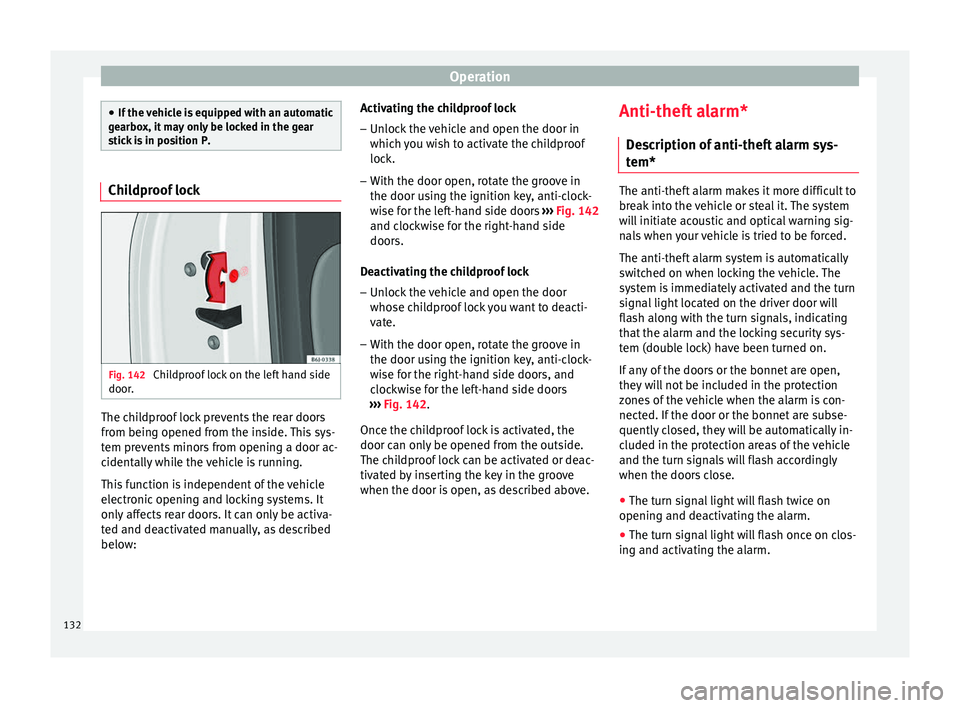
stick is in position P. Childproof lock
Fig. 142
Childproof lock on the left hand side
door . The childproof lock prevents the rear doors
fr
om bein
g opened fr
om the inside. This sys-
tem prevents minors from opening a door ac-
cidentally while the vehicle is running.
This function is independent of the vehicle
electronic opening and locking systems. It
only affects rear doors. It can only be activa-
ted and deactivated manually, as described
below: Activating the childproof lock
– Unlock the vehicle and open the door in
which y
ou wish to activate the childproof
lock.
– With the door open, rotate the groove in
the door usin
g the ignition key, anti-clock-
wise for the left-hand side doors ››› Fig. 142
and clockwise for the right-hand side
doors.
Deactivating the childproof lock – Unlock the vehicle and open the door
whose chi
ldproof lock you want to deacti-
vate.
– With the door open, rotate the groove in
the door usin
g the ignition key, anti-clock-
wise for the right-hand side doors, and
clockwise for the left-hand side doors
››› Fig. 142.
Once the childproof lock is activated, the
door can only be opened from the outside.
The childproof lock can be activated or deac-
tivated by inserting the key in the groove
when the door is open, as described above. Anti-theft alarm*
Des
cription of anti-theft alarm sys-
tem* The anti-theft alarm makes it more difficult to
bre
ak
into the vehicle or steal it. The system
will initiate acoustic and optical warning sig-
nals when your vehicle is tried to be forced.
The anti-theft alarm system is automatically
switched on when locking the vehicle. The
system is immediately activated and the turn
signal light located on the driver door will
flash along with the turn signals, indicating
that the alarm and the locking security sys-
tem (double lock) have been turned on.
If any of the doors or the bonnet are open,
they will not be included in the protection
zones of the vehicle when the alarm is con-
nected. If the door or the bonnet are subse-
quently closed, they will be automatically in-
cluded in the protection areas of the vehicle
and the turn signals will flash accordingly
when the doors close.
● The turn signal light will flash twice on
opening and de activ
ating the alarm.
● The turn signal light will flash once on clos-
ing and activatin
g the alarm.
132
Page 136 of 308
Operation
mechanically, the time period from when
the door i s
opened u
ntil the key is inserted
into the contact should not exceed 15 sec-
onds, otherwise the alarm will be triggered.
– Press the button on the remote c
ontrol
twice. The volumetric sensor and tilt sen-
sors will be deactivated. The alarm system
remains activated.
The vehicle interior monitoring and the anti-
tow system are automatically switched on
again next time the vehicle is locked.
The vehicle interior monitoring and anti-tow
sensor (tilt sensor) are automatically switch-
ed on when the anti-theft alarm is switched
on. In order to activate it, all the doors and
the rear lid must be closed.
If you wish to switch off the vehicle interior
monitoring and the anti-tow system, it must
be done each time that the vehicle is locked;
if not, they will be automatically switched on.
The vehicle interior monitoring and the anti-
tow system should be switched off if animals
are left inside the locked vehicle (otherwise,
their movements will trigger the alarm) or
when, for example, the vehicle is transported
or has to be towed with only one axle on the
ground. False alarms
Interior monitorin
g will only operate correctly
if the vehicle is completely closed. Please ob-
serve related legal requirements.
The following cases may cause a false alarm:
● Open windows (partially or fully),
● Movement of objects inside the vehicle,
such a
s loose papers, items hanging from
the rear vision mirror (air fresheners), etc. Note
● If the v
ehicle is relocked and the alarm is
activated without the volumetric sensor func-
tion, relocking will activate the alarm with all
its functions, except the volumetric sensor.
This function is reactivated when the alarm is
switched on again, unless it is deliberately
switched off.
● If the alarm has been triggered by the volu-
metric sensor
, this will be indicated by a
flashing of the warning lamp on the driver
door when the vehicle is opened. The flash is
different to the flash indicating the alarm is
activated.
● The vibration of a mobile phone left inside
the vehic
le may cause the vehicle interior
monitoring alarm to trigger, as both sensors
react to movements and shakes inside the ve-
hicle.
● If on activating the alarm, any door or the
rear lid i
s open, only the alarm will be activa-
ted. The vehicle interior monitoring and the anti-tow system will only be activated once
al
l
the doors are closed (including the rear
lid). Deactivating the vehicle interior moni-
torin
g and anti-t
ow systems* When the vehicle is locked, the alarm will be
trigg
er
ed if movements are detected in the
interior (e.g. by animals) or if the vehicle's in-
clination is changed (e.g. during transport).
You can prevent the alarm from being trig-
gered accidentally by switching off the vehi-
cle interior monitoring and/or tow-away pro-
tection.
– To switch off the interior monitoring and
to w-
away protection, switch off the ignition
and, using the Infotainment system, select: button >
S
ET
TINGS function button >
Openin g and c
lo
sing > Central locking >
Switch off alarm.
– When the vehicle is locked now, the vehicle
interior monitorin
g and the tow-away pro-
tection are switched off until the next time
the door is opened.
If the anti-theft security system (Safelock)*
››› page 127 is switched off, the vehicle interi-
or monitoring and the tow-away protection
are automatically switched off.
134
Page 137 of 308
Opening and closing
WARNING
Observe the safety warnings ››› in Descrip-
tion on pag e 126
. Boot hatch
Opening and c lo
singRead the additional information carefully
›› ›
page 16 WARNING
● Alw a
ys close the rear lid properly. Risk of
accident or injury.
● The rear lid must not be opened when the
rever
se or rear fog lights are lit. This may
damage the tail lights.
● Do not close the rear lid by pushing it down
with y
our hand on the rear window. The glass
could smash. Risk of injury!
● Ensure the rear lid is locked after closing it.
If not, it m
ay open unexpectedly while driv-
ing.
● Never allow children to play in or around
the vehic
le. A locked vehicle can be subjected
to extremely high and low temperatures, de-
pending on the time of year, thus causing se-
rious injuries/illness. It could even have fatal
consequences. Close and lock both the rear
lid and all the other doors when you are not
using the vehicle. ●
Clo s
ing the rear lid without observing and
ensuring it is clear could cause serious injury
to you and to third parties. Make sure that no
one is in the path of the rear lid.
● Never drive with the rear lid open or half-
closed, e
xhaust gases may enter into the in-
terior of the vehicle. Danger of poisoning!
● If you only open the rear lid, do not leave
the key in
side. The vehicle cannot be opened
if the key is left inside. Electric windows
Openin g and c
lo
sing of the electric
windows* Fig. 143
Detail of the driver door: controls for
the fr ont
and r
ear windows (5-door vehicles
with front and rear electric windows). Read the additional information carefully
› ›
›
page 18 The front and rear electric windows can be
operated b
y using the controls on the driver
door. The other doors each have a switch for
their own window.
Always close the windows fully if you park
the vehicle or leave it unattended ››› .
Y ou c
an u
se the electric windows for approx.
10 minutes after switching off the ignition if
neither the driver door nor the front passen-
ger door has been opened and the key has
not been removed from the ignition.
Safety switch *
Safety switch 5 on the driver door can be
u sed t
o di
sable the electric window buttons
in the rear doors.
Safety switch not pressed: buttons on rear
doors are activated.
Safety switch pressed: buttons on rear doors
are deactivated. The safety control symbol
lights up in yellow if the buttons on the rear
doors are switched off. WARNING
Observe the safety warnings ›››
in Set of
key s on p
age 124.
● Incorrect use of the electric windows can
res
ult in injury.
● Never close the rear lid without observing
and ensurin
g it is clear, to do otherwise could
cause serious injury to you and third parties. » 135
Technical data
Advice
Operation
Emergencies
Safety
Page 138 of 308
Operation
Make sure that no one is in the path of a win-
dow
.
● If
the ignition is switched on, the electric
equipment cou
ld be activated with risk of in-
jury, for example, in the electric windows.
● The doors can be locked using the remote
contro
l key. This could become an obstacle
for assistance in an emergency situation.
● Therefore always take the key with you
when you l
eave the vehicle.
● The electric windows will work until the ig-
nition has
been switched off and one of the
front doors has been opened.
● If necessary, use the safety switch to disa-
ble the r
ear electric windows. Make sure that
they have been disabled. Note
If the window is not able to close because it
is s
tiff or because of an obstruction, the win-
dow will automatically open again
››› page 136. If this happens, check why the
window could not be closed before attempt-
ing to close it again. Roll-back function
The roll-back function reduces the risk of in-
jur
y
when the el
ectric windows close. ●
If a windo
w is obstructed when closing au-
tomatically, the window stops at this point
and lowers immediately ››› .
● Next, check why the window does not close
bef or
e att
empting it again.
● If you try within the following 10 seconds
and the window c
loses again with difficulty
or there is an obstruction, the automatic clos-
ing will stop working for 10 seconds.
● If the window is still obstructed, the win-
dow wi
ll stop at this point.
● If there is no obvious reason why the win-
dow cannot
be closed, try to close it again by
pulling the tab within ten seconds. The win-
dow closes with maximum force. The roll-
back function is now deactivated.
If more than 10 seconds pass, the window
will open fully when you operate one of the
buttons. One-touch closing is reactivated. WARNING
● Alw a
ys take the ignition key with you when
leaving the vehicle, even if you only intend to
be gone for a short time. Please ensure that
children are never left alone inside the vehi-
cle.
● The electric windows will work until the ig-
nition has
been switched off and one of the
front doors has been opened.
● Closing the windows without observing and
ensurin
g it is clear could cause serious injury to you and third parties. Make sure that no
one is
in the p
ath of a window.
● Never allow people to remain in the vehicle
when you c
lose the vehicle from the outside.
The windows cannot be opened even in an
emergency.
● The roll-back function does not prevent fin-
gers
or other parts of the body getting
pinched against the window frame. Risk of
accident. Convenience opening and closing
Use the convenience opening/closing func-
tion t
o e
a
sily open/close all the windows
from the outside.
Convenience open function
– Press and hold the button on the r
emote
control key until all the windows have
reached the desired position, or
– First unlock the vehicle using the button
on the r
emote control key and then keep
the key in the driver door lock until all the
windows have reached the required posi-
tion.
Convenience close function – Press and hold the button on the r
emote
control key until all the windows are closed
››› , or
136
Page 139 of 308
Lights and visibility
– Loc
k
the driver's door with the key and hold
the key in the
Programming convenience opening in the
Easy Connect*
– Select: button > SETTINGS
fu
nction
b
utton > Opening and closing > Elec-
tric windows > Convenience open-
ing , to choose between all the windows
(All ), only the driver’s window ( Driver)
or none (Deactivated ).WARNING
● Never c lo
se the windows without due care
or proper control. There is a risk of suffering
injury.
● For safety reasons, you should only use the
remote c
ontrol open and close functions with-
in about 2 metres of the vehicle. To avoid in-
juries, always keep an eye on the windows
when pressing the button to close them. The
windows stop moving as soon as the button
is released. One-touch opening and closing*
One-touch opening and closing means you
do not
h
av
e to hold down the button.
Buttons ›››
Fig. 143 1 ,
2 ,
3 and
4 have
tw o po
s
itions for opening windows and two for closing them. This makes it easier to open
and close w
indows to the desired position.
One-touch closing
– Pull up the window button briefly up to the
second pos
ition. The window closes fully.
One-touch opening
– Push down the window button briefly up to
the second pos
ition. The window opens
fully.
Resetting one-touch opening and closing
– The automatic open and close function will
not work
if the battery has been temporari-
ly disconnected. The function can be re-
stored as follows:
– Close the window as far as it will go by lift-
ing and hol
ding the electric window switch.
– Release the switch and then lift it again for
1 second. Thi
s will re-enable the automatic
function.
If you push (or pull) a button to the first
stage, the window will open (or close) until
you release the button. If you push or lift the
button briefly to the second stage, the win-
dow will open (one-touch opening) or close
(one-touch closing) automatically. If you op-
erate the button while the window is opening
or closing, it stops at this position. Lights and visibility
Light s
C ontr
ol lamps
It lights up
Rear fog light switched on
››› page 139.
It lights up
Left or right turn signal.
The control lamp flashes twice as fast when a turn signal
is faulty.
It lights up
Main beam on or flasher on
››› page 139. Several warning and control lamps light up
f
or a f
ew sec
onds when the ignition is switch-
ed on, signalling that the function is being
verified. They will switch off after a few sec-
onds. WARNING
Observe the safety warnings ›››
in Warning
symbol s on p
age 117. 137
Technical data
Advice
Operation
Emergencies
Safety
Page 140 of 308
Operation
Switching lights on and off Read the additional information carefully
›› ›
page 30
The driver is personally responsible for the
correct use and adjustment of the lights in all
situations. Note
● The le g
al requirements regarding the use of
vehicle lights in each country must be ob-
served.
● The dipped beam headlights will only work
with the ignition on. The s
ide lights come on
automatically when the ignition is turned off.
● If the lights are left on after the key has
been taken out
of the ignition lock, an audi-
ble warning sounds while the driver door re-
mains open. This is a reminder to switch the
lights off.
● The rear fog light can dazzle drivers behind
you. Y
ou should use the rear fog light only
when visibility is very poor. For this reason, if
you exceed approximately 60 km/h (38 mph),
the instrument panel will display the follow-
ing warming: Switch off the fog light!
● The use of the lighting described here is
subj
ect to the relevant statutory require-
ments. Automatic lighting*
Activation
– Rotate the switch to the po
sition, this
indication will light up.
Deactivation
– Turn the light switch to .
Automatic
lighting
If automatic headlight control is switched on,
dipped beam headlights are automatically
switched on by a photosensor if you drive in-
to a tunnel, for example. WARNING
● Ev en if
the automatic headlight control is
switched on, the dipped beam headlights will
not be switched on with fog. Therefore, the
dipped beam must be switched on manually. Note
● For v
ehicles with the automatic headlight
system, when the key is removed from the ig-
nition, the audible warning will only sound if
the light knob is in position .
● The use of the lighting described here is
subj
ect to the relevant statutory require-
ments. ●
Do not p ut
stickers on the windscreen in
front of the sensor. This may cause disrup-
tions or faults in the automatic lighting sys-
tem.
● The rain sensor switches on the dipped
beam hea
dlights when the windscreen wipers
have been operating continuously for a few
seconds and it switches the lights off when
the continuous or interval wipe is switched
off for some minutes. Daytime running lights
The daytime running lights consist of individ-
ual
lights, int
e
grated in the front headlights.
By connecting the daytime running lights,
these lights are switched on 1)
››› .
The d a
ytime ru
nning lights switch on every
time the ignition is switched on, if the switch
is in positions or , according to the level
of exterior lighting.
When the light switch is in position , a
light sensor automatically switches dipped
beam on and off (including the control and
instrument lighting) or the daytime running
lights depending on the level of exterior
lighting. 1)
On vehicles equipped with rear LED lights, the rear
side light i
s switched on as well.
138
Page 141 of 308
Lights and visibility
WARNING
● Never driv e w
ith daytime lights if the road
is not well lit due to weather or lighting con-
ditions. Daytime lights do not provide
enough light to illuminate the road properly
or be seen by other road users.
● On vehicles with rear lights with bulbs,
when activating the d
aytime running light
the rear lights are not switched on. A vehicle
which does not have the rear lights on may
not be visible to other drivers in the dark-
ness, in the case of heavy rain or in condi-
tions of poor visibility. Fog lights
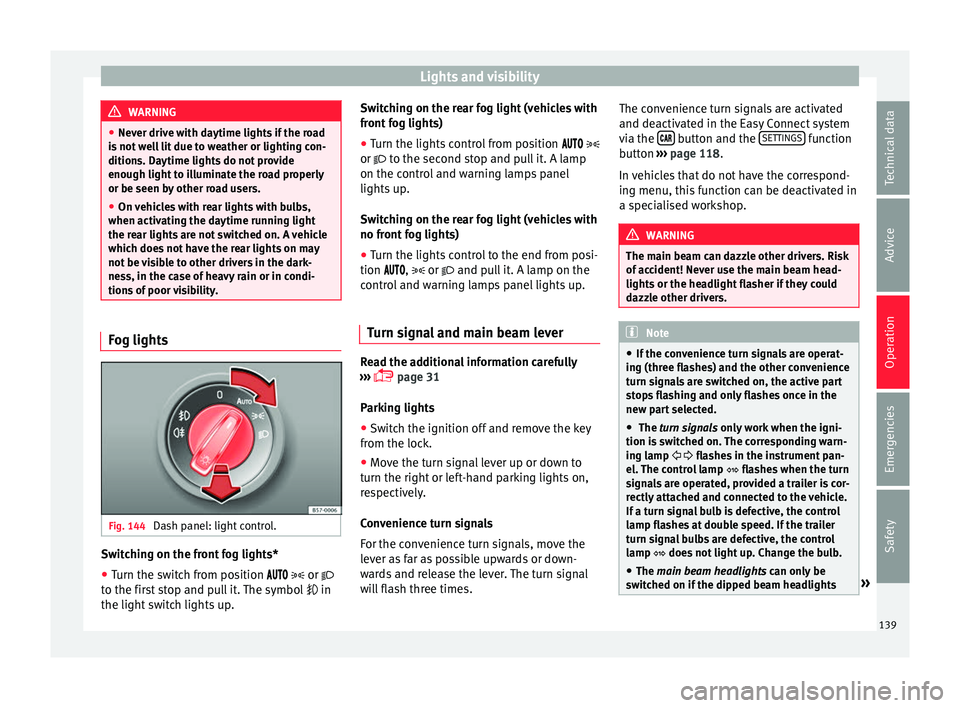
Fig. 144
Dash panel: light control. Switching on the front fog lights*
● Turn the switch from position
or
t o the fir
st stop and pull it. The symbol in
the light switch lights up. Switching on the rear fog light (vehicles with
front f
og lights)
● Turn the lights control from position
or to the second stop and pull it. A lamp
on the control and warning lamps panel
lights up.
Switching on the rear fog light (vehicles with
no front fog lights)
● Turn the lights control to the end from posi-
tion ,
or and pull it. A lamp on the
control and warning lamps panel lights up.
Turn signal and main beam lever Read the additional information carefully
› ›
›
page 31
Parking lights
● Switch the ignition off and remove the key
from the lock.
● Mo
ve the turn signal lever up or down to
turn the right or l
eft-hand parking lights on,
respectively.
Convenience turn signals
For the convenience turn signals, move the
lever as far as possible upwards or down-
wards and release the lever. The turn signal
will flash three times. The convenience turn signals are activated
and deactivat
ed in the Easy Connect system
via the button and the
S
ET
TINGS function
b utt
on ›
›› page 118.
In vehicles that do not have the correspond-
ing menu, this function can be deactivated in
a specialised workshop. WARNING
The main beam can dazzle other drivers. Risk
of ac c
ident! Never use the main beam head-
lights or the headlight flasher if they could
dazzle other drivers. Note
● If the c on
venience turn signals are operat-
ing (three flashes) and the other convenience
turn signals are switched on, the active part
stops flashing and only flashes once in the
new part selected.
● The turn signals only
work when the igni-
tion is switched on. The corresponding warn-
ing lamp flashes in the instrument pan-
el. The control lamp flashes when the turn
signals are operated, provided a trailer is cor-
rectly attached and connected to the vehicle.
If a turn signal bulb is defective, the control
lamp flashes at double speed. If the trailer
turn signal bulbs are defective, the control
lamp does not light up. Change the bulb.
● The main beam headligh
ts can only be
switched on if the dipped beam headlights » 139
Technical data
Advice
Operation
Emergencies
Safety