interior lights Seat Arona 2017 Owner's Manual
[x] Cancel search | Manufacturer: SEAT, Model Year: 2017, Model line: Arona, Model: Seat Arona 2017Pages: 308, PDF Size: 6.66 MB
Page 5 of 308
Convenience: Kessy keyless access and starting system, Full LED (+ Vision Pack): Full LED + Welcome light + LED day-
time running lights + Lights sensor + LED interior lighting.››› page 129
››› page 140
››› page 142
››› page 196
Technology: SEAT Navi System Plus 8” + Full Link / + Wireless charger in centre console + / Kessy keyless access and
starting system.››› page 123
››› page 129
››› Booklet Navigation system
Safety: Adaptive cruise control + City Safety Assist with pedestrian monitoring, fatigue detector, Hill driving assistant
includes on-board computer and rear view camera.››› page 182
››› page 209
››› page 227
››› page 242
Page 7 of 308
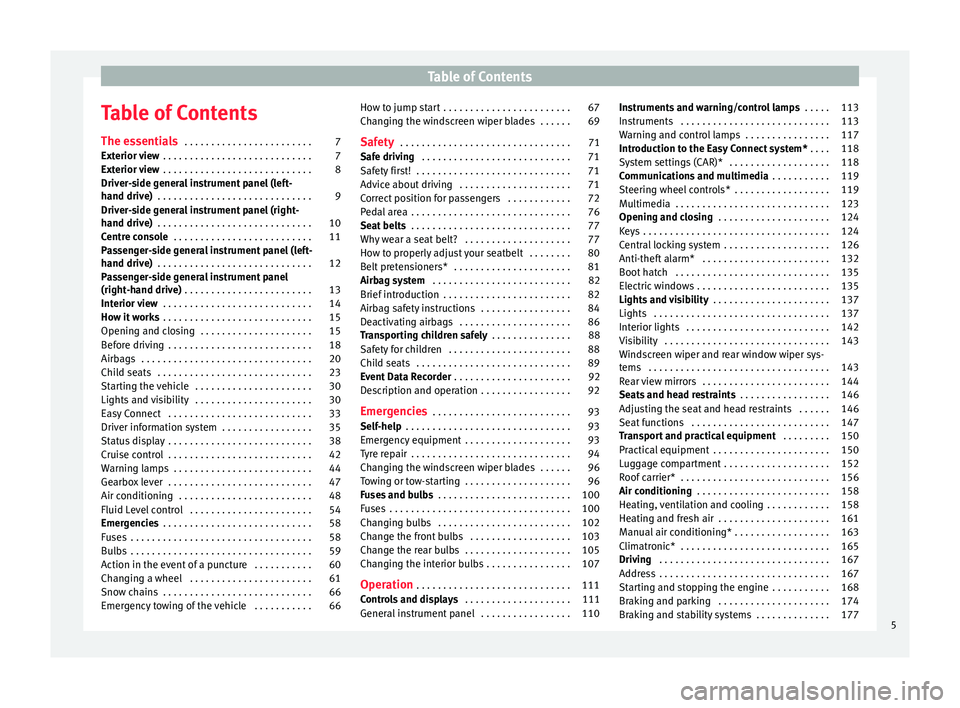
Table of Contents
Table of Contents
The e s
senti
als . . . . . . . . . . . . . . . . . . . . . . . . 7
Exterior view . . . . . . . . . . . . . . . . . . . . . . . . . . . . 7
Exterior view . . . . . . . . . . . . . . . . . . . . . . . . . . . . 8
Driver-side general instrument panel (left-
hand drive) . . . . . . . . . . . . . . . . . . . . . . . . . . . . .
9
Driver-side general instrument panel (right-
hand drive) . . . . . . . . . . . . . . . . . . . . . . . . . . . . .
10
Centre console . . . . . . . . . . . . . . . . . . . . . . . . . . 11
Passenger-side general instrument panel (left-
hand drive) . . . . . . . . . . . . . . . . . . . . . . . . . . . . .
12
Passenger-side general instrument panel
(right-hand driv
e) . . . . . . . . . . . . . . . . . . . . . . . . 13
Interior view . . . . . . . . . . . . . . . . . . . . . . . . . . . . 14
How it works . . . . . . . . . . . . . . . . . . . . . . . . . . . . 15
Opening and closing . . . . . . . . . . . . . . . . . . . . . 15
Before driving . . . . . . . . . . . . . . . . . . . . . . . . . . . 18
Airbags . . . . . . . . . . . . . . . . . . . . . . . . . . . . . . . . 20
Child seats . . . . . . . . . . . . . . . . . . . . . . . . . . . . . 23
Starting the vehicle . . . . . . . . . . . . . . . . . . . . . . 30
Lights and visibility . . . . . . . . . . . . . . . . . . . . . . 30
Easy Connect . . . . . . . . . . . . . . . . . . . . . . . . . . . 33
Driver information system . . . . . . . . . . . . . . . . . 35
Status display . . . . . . . . . . . . . . . . . . . . . . . . . . . 38
Cruise control . . . . . . . . . . . . . . . . . . . . . . . . . . . 42
Warning lamps . . . . . . . . . . . . . . . . . . . . . . . . . . 44
Gearbox lever . . . . . . . . . . . . . . . . . . . . . . . . . . . 47
Air conditioning . . . . . . . . . . . . . . . . . . . . . . . . . 48
Fluid Level control . . . . . . . . . . . . . . . . . . . . . . . 54
Emergencies . . . . . . . . . . . . . . . . . . . . . . . . . . . . 58
Fuses . . . . . . . . . . . . . . . . . . . . . . . . . . . . . . . . . . 58
Bulbs . . . . . . . . . . . . . . . . . . . . . . . . . . . . . . . . . . 59
Action in the event of a puncture . . . . . . . . . . . 60
Changing a wheel . . . . . . . . . . . . . . . . . . . . . . . 61
Snow chains . . . . . . . . . . . . . . . . . . . . . . . . . . . . 66
Emergency towing of the vehicle . . . . . . . . . . . 66 How to jump start . . . . . . . . . . . . . . . . . . . . . . . . 67
Changing the windscreen wiper blades . . . . . . 69
Safety . . . . . . . . . . . . . . . . . . . . . . . . . . . . . . . . 71
Safe driving . . . . . . . . . . . . . . . . . . . . . . . . . . . . 71
Safety first! . . . . . . . . . . . . . . . . . . . . . . . . . . . . . 71
Advice about driving . . . . . . . . . . . . . . . . . . . . . 71
Correct position for passengers . . . . . . . . . . . . 72
Pedal area . . . . . . . . . . . . . . . . . . . . . . . . . . . . . . 76
Seat belts . . . . . . . . . . . . . . . . . . . . . . . . . . . . . . 77
Why wear a seat belt? . . . . . . . . . . . . . . . . . . . . 77
How to properly adjust your seatbelt . . . . . . . . 80
Belt pretensioners* . . . . . . . . . . . . . . . . . . . . . . 81
Airbag system . . . . . . . . . . . . . . . . . . . . . . . . . . 82
Brief introduction . . . . . . . . . . . . . . . . . . . . . . . . 82
Airbag safety instructions . . . . . . . . . . . . . . . . . 84
Deactivating airbags . . . . . . . . . . . . . . . . . . . . . 86
Transporting children safely . . . . . . . . . . . . . . . 88
Safety for children . . . . . . . . . . . . . . . . . . . . . . . 88
Child seats . . . . . . . . . . . . . . . . . . . . . . . . . . . . . 89
Event Data Recorder . . . . . . . . . . . . . . . . . . . . . . 92
Description and operation . . . . . . . . . . . . . . . . . 92
Emergencies . . . . . . . . . . . . . . . . . . . . . . . . . . 93
Self-help . . . . . . . . . . . . . . . . . . . . . . . . . . . . . . . 93
Emergency equipment . . . . . . . . . . . . . . . . . . . . 93
Tyre repair . . . . . . . . . . . . . . . . . . . . . . . . . . . . . . 94
Changing the windscreen wiper blades . . . . . . 96
Towing or tow-starting . . . . . . . . . . . . . . . . . . . . 96
Fuses and bulbs . . . . . . . . . . . . . . . . . . . . . . . . . 100
Fuses . . . . . . . . . . . . . . . . . . . . . . . . . . . . . . . . . . 100
Changing bulbs . . . . . . . . . . . . . . . . . . . . . . . . . 102
Change the front bulbs . . . . . . . . . . . . . . . . . . . 103
Change the rear bulbs . . . . . . . . . . . . . . . . . . . . 105
Changing the interior bulbs . . . . . . . . . . . . . . . . 107
Operation . . . . . . . . . . . . . . . . . . . . . . . . . . . . . 111
Controls and displays . . . . . . . . . . . . . . . . . . . . 111
General instrument panel . . . . . . . . . . . . . . . . . 110 Instruments and warning/control lamps
. . . . . 113
Instruments . . . . . . . . . . . . . . . . . . . . . . . . . . . . 113
Warning and control lamps . . . . . . . . . . . . . . . . 117
Introduction to the Easy Connect system* . . . . 118
System settings (CAR)* . . . . . . . . . . . . . . . . . . . 118
Communications and multimedia . . . . . . . . . . . 119
Steering wheel controls* . . . . . . . . . . . . . . . . . . 119
Multimedia . . . . . . . . . . . . . . . . . . . . . . . . . . . . . 123
Opening and closing . . . . . . . . . . . . . . . . . . . . . 124
Keys . . . . . . . . . . . . . . . . . . . . . . . . . . . . . . . . . . . 124
Central locking system . . . . . . . . . . . . . . . . . . . . 126
Anti-theft alarm* . . . . . . . . . . . . . . . . . . . . . . . . 132
Boot hatch . . . . . . . . . . . . . . . . . . . . . . . . . . . . . 135
Electric windows . . . . . . . . . . . . . . . . . . . . . . . . . 135
Lights and visibility . . . . . . . . . . . . . . . . . . . . . . 137
Lights . . . . . . . . . . . . . . . . . . . . . . . . . . . . . . . . . 137
Interior lights . . . . . . . . . . . . . . . . . . . . . . . . . . . 142
Visibility . . . . . . . . . . . . . . . . . . . . . . . . . . . . . . . 143
Windscreen wiper and rear window wiper sys-
tems . . . . . . . . . . . . . . . . . . . . . . . . . . . . . . . . . . 143 R
ear view mirrors . . . . . . . . . . . . . . . . . . . . . . . . 144
Seats and head restraints . . . . . . . . . . . . . . . . . 146
Adjusting the seat and head restraints . . . . . . 146
Seat functions . . . . . . . . . . . . . . . . . . . . . . . . . . 147
Transport and practical equipment . . . . . . . . . 150
Practical equipment . . . . . . . . . . . . . . . . . . . . . . 150
Luggage compartment . . . . . . . . . . . . . . . . . . . . 152
Roof carrier* . . . . . . . . . . . . . . . . . . . . . . . . . . . . 156
Air conditioning . . . . . . . . . . . . . . . . . . . . . . . . . 158
Heating, ventilation and cooling . . . . . . . . . . . . 158
Heating and fresh air . . . . . . . . . . . . . . . . . . . . . 161
Manual air conditioning* . . . . . . . . . . . . . . . . . . 163
Climatronic* . . . . . . . . . . . . . . . . . . . . . . . . . . . . 165
Driving . . . . . . . . . . . . . . . . . . . . . . . . . . . . . . . . 167
Address . . . . . . . . . . . . . . . . . . . . . . . . . . . . . . . . 167
Starting and stopping the engine . . . . . . . . . . . 168
Braking and parking . . . . . . . . . . . . . . . . . . . . . 174
Braking and stability systems . . . . . . . . . . . . . . 177 5
Page 34 of 308
The essentials
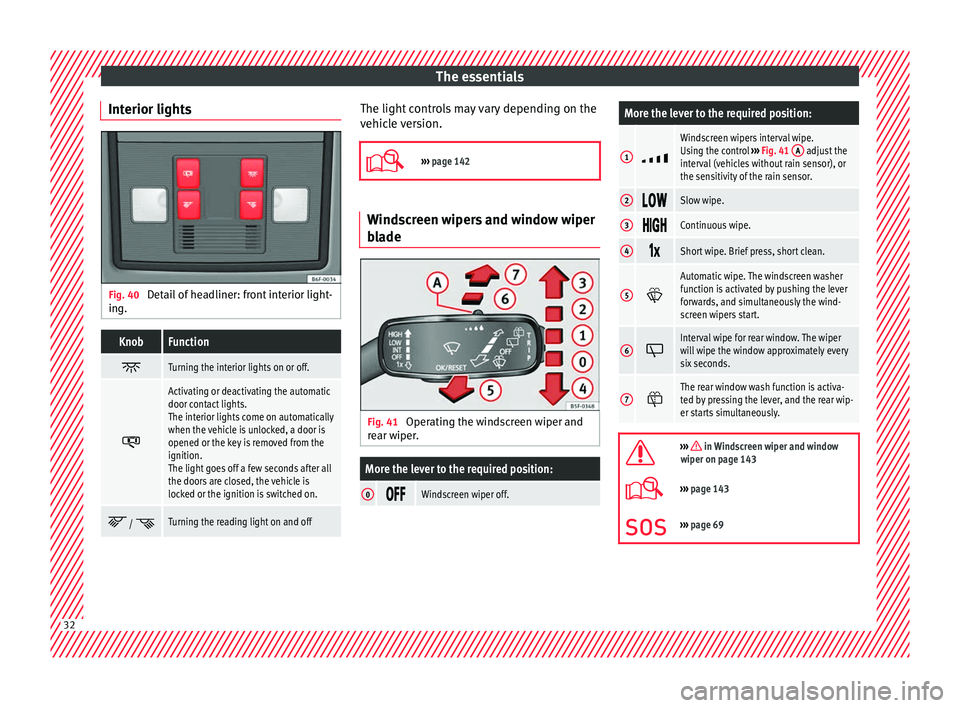
Interior lights Fig. 40
Detail of headliner: front interior light-
in g.KnobFunction
Turning the interior lights on or off.
Activating or deactivating the automatic
door contact lights.
The interior lights come on automatically
when the vehicle is unlocked, a door is
opened or the key is removed from the
ignition.
The light goes off a few seconds after all
the doors are closed, the vehicle is
locked or the ignition is switched on.
/ Turning the reading light on and off The light controls may vary depending on the
v
ehic
l
e version.
››› page 142 Windscreen wipers and window wiper
bla
de Fig. 41
Operating the windscreen wiper and
r e
ar w
iper.
More the lever to the required position:
0 Windscreen wiper off.
More the lever to the required position:
1
Windscreen wipers interval wipe.
Using the control
››› Fig. 41 A adjust the
interval (vehicles without rain sensor), or
the sensitivity of the rain sensor.
2 Slow wipe.
3
Continuous wipe.
4
Short wipe. Brief press, short clean.
5
Automatic wipe. The windscreen washer
function is activated by pushing the lever
forwards, and simultaneously the wind-
screen wipers start.
6
Interval wipe for rear window. The wiper
will wipe the window approximately every
six seconds.
7
The rear window wash function is activa-
ted by pressing the lever, and the rear wip-
er starts simultaneously.
››› in Windscreen wiper and window
wiper on page 143
››› page 143
››› page 69 32
Page 36 of 308
The essentialsMenuSubmenuPossible settingDescription
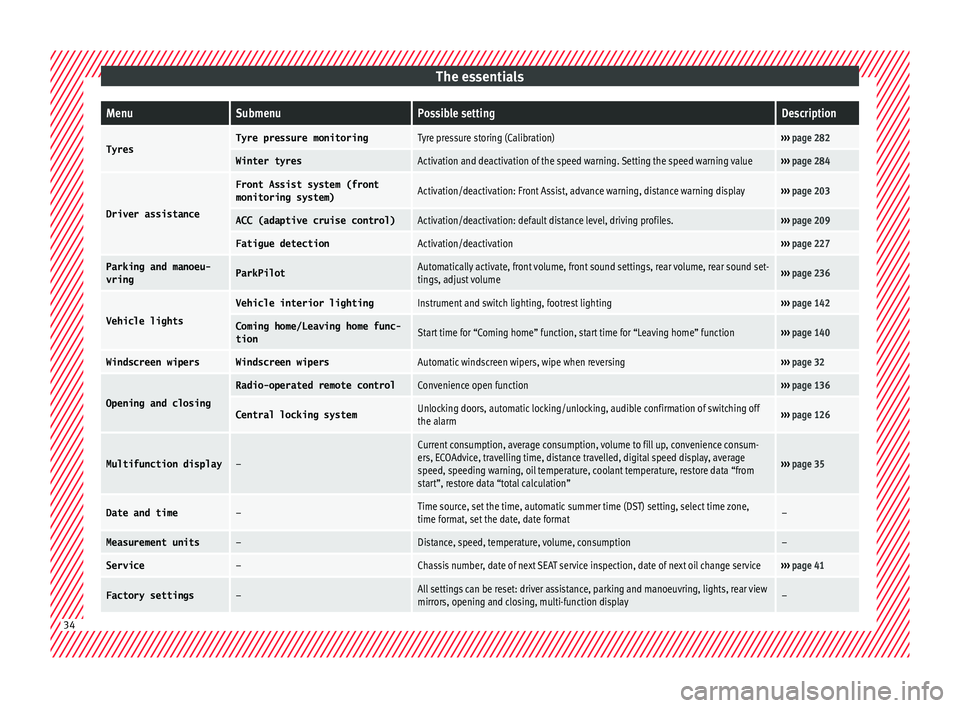
TyresTyre pressure monitoringTyre pressure storing (Calibration)›››
page 282
Winter tyresActivation and deactivation of the speed warning. Setting the speed warning value››› page 284
Driver assistance
Front Assist system (front
monitoring system)Activation/deactivation: Front Assist, advance warning, distance warning display››› page 203
ACC (adaptive cruise control)Activation/deactivation: default distance level, driving profiles.››› page 209
Fatigue detectionActivation/deactivation››› page 227
Parking and manoeu-
vringParkPilotAutomatically activate, front volume, front sound settings, rear volume, rear sound set-
tings, adjust volume››› page 236
Vehicle lights
Vehicle interior lightingInstrument and switch lighting, footrest lighting››› page 142
Coming home/Leaving home func‐
tionStart time for “Coming home” function, start time for “Leaving home” function››› page 140
Windscreen wipersWindscreen wipersAutomatic windscreen wipers, wipe when reversing››› page 32
Opening and closing
Radio-operated remote controlConvenience open function››› page 136
Central locking systemUnlocking doors, automatic locking/unlocking, audible confirmation of switching off
the alarm››› page 126
Multifunction display–
Current consumption, average consumption, volume to fill up, convenience consum-
ers, ECOAdvice, travelling time, distance travelled, digital speed display, average
speed, speeding warning, oil temperature, coolant temperature, restore data “from
start”, restore data “total calculation”
››› page 35
Date and time–Time source, set the time, automatic summer time (DST) setting, select time zone,
time format, set the date, date format–
Measurement units–Distance, speed, temperature, volume, consumption–
Service–Chassis number, date of next SEAT service inspection, date of next oil change service››› page 41
Factory settings–All settings can be reset: driver assistance, parking and manoeuvring, lights, rear view
mirrors, opening and closing, multi-function display– 34
Page 61 of 308
The essentials
Identifying a blown fuse
A f u
se i
s blown if its metal strip is ruptured
››› Fig. 71.
● Point a lamp at the fuse to see if it has
blown.
T
o replace a fuse
● Remove the fuse.
● Replace the blown fuse by one with an
identica
l amperage rating (same colour and
markings) and identical size.
● Replace the cover again or close the fuse
box lid.
B
ulbs
Bul
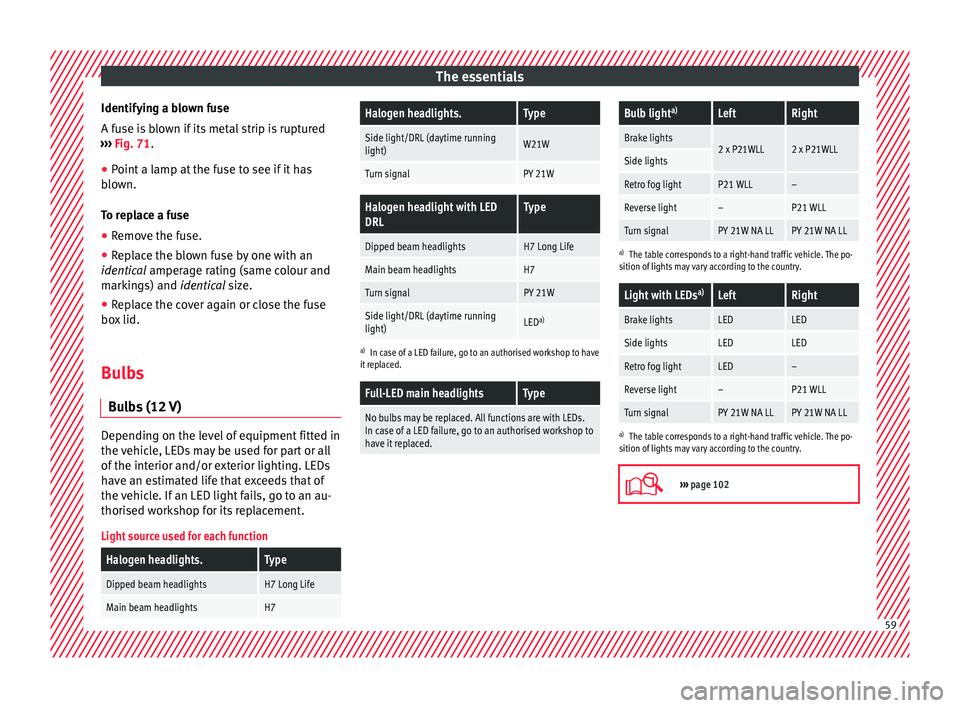
bs (12 V) Depending on the level of equipment fitted in
the
v
ehic
le, LEDs may be used for part or all
of the interior and/or exterior lighting. LEDs
have an estimated life that exceeds that of
the vehicle. If an LED light fails, go to an au-
thorised workshop for its replacement.
Light source used for each function
Halogen headlights.Type
Dipped beam headlightsH7 Long Life
Main beam headlightsH7
Halogen headlights.Type
Side light/DRL (daytime running
light)W21W
Turn signalPY 21W
Halogen headlight with LED
DRLType
Dipped beam headlightsH7 Long Life
Main beam headlightsH7
Turn signalPY 21W
Side light/DRL (daytime running
light)LED a)
a)
In case of a LED failure, go to an authorised workshop to have
it replaced.
Full-LED main headlightsType
No bulbs may be replaced. All functions are with LEDs.
In case of a LED failure, go to an authorised workshop to
have it replaced.
Bulb light a)LeftRight
Brake lights2 x P21WLL2 x P21WLLSide lights
Retro fog lightP21 WLL–
Reverse light–P21 WLL
Turn signalPY 21W NA LLPY 21W NA LL
a)
The table corresponds to a right-hand traffic vehicle. The po-
sition of lights may vary according to the country.
Light with LEDs a)LeftRight
Brake lightsLEDLED
Side lightsLEDLED
Retro fog lightLED–
Reverse light–P21 WLL
Turn signalPY 21W NA LLPY 21W NA LL
a)
The table corresponds to a right-hand traffic vehicle. The po-
sition of lights may vary according to the country.
››› page 102 59
Page 86 of 308
Safety
such as the properties of the object the vehi-
c l
e hits
(hard/soft), angle of impact, vehicle
speed, etc.
Deceleration trajectory is key for airbag acti-
vation.
The control unit analyses the collision trajec-
tory and activates the respective restraint
system.
If the deceleration rate is below the prede-
fined reference value in the control unit the
airbags will not be triggered, even though
the accident may cause extensive damage to
the car.
The following airbags are triggered in seri-
ous head-on collisions
● Driver airbag.
● Front passenger front airbag
The fol
lowing airbags are triggered in seri-
ous side-on collisions
● Front side airbag on the side of the acci-
dent.
● Re
ar side airbag on the side of the acci-
dent.
● Cur
tain (head) airbag on the side of the ac-
cident.
In an ac
cident with airbag activation:
● the interior lights switch on (if the interior
light swit
ch is in the courtesy light position); ●
the hazar
d warning lights switch on;
● all doors are unlocked;
● the fuel supply to the engine is cut.
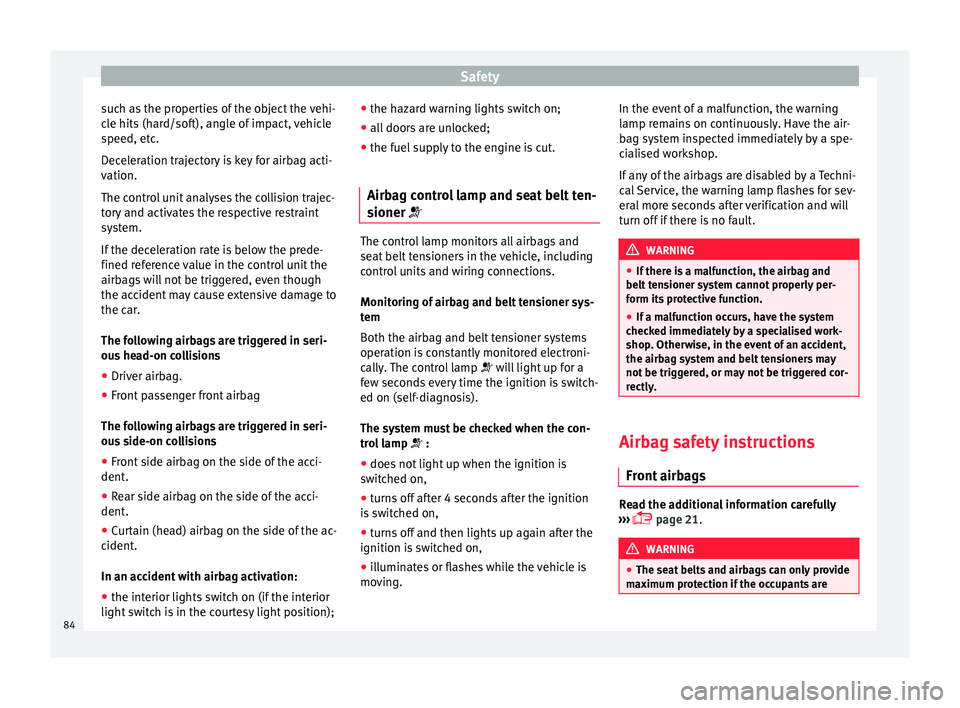
Airbag control lamp and seat belt ten-
sioner The control lamp monitors all airbags and
seat
belt
tensioners in the vehicle, including
control units and wiring connections.
Monitoring of airbag and belt tensioner sys-
tem
Both the airbag and belt tensioner systems
operation is constantly monitored electroni-
cally. The control lamp will light up for a
few seconds every time the ignition is switch-
ed on (self-diagnosis).
The system must be checked when the con-
trol lamp :
● does not light up when the ignition is
swit c
hed on,
● turns off after 4 seconds after the ignition
is sw
itched on,
● turns off and then lights up again after the
ignition is sw
itched on,
● illuminates or flashes while the vehicle is
movin
g. In the event of a malfunction, the warning
lamp rem
ains on continuously. Have the air-
bag system inspected immediately by a spe-
cialised workshop.
If any of the airbags are disabled by a Techni-
cal Service, the warning lamp flashes for sev-
eral more seconds after verification and will
turn off if there is no fault. WARNING
● If ther e i
s a malfunction, the airbag and
belt tensioner system cannot properly per-
form its protective function.
● If a malfunction occurs, have the system
check
ed immediately by a specialised work-
shop. Otherwise, in the event of an accident,
the airbag system and belt tensioners may
not be triggered, or may not be triggered cor-
rectly. Airbag safety instructions
Fr ont
airb
ags Read the additional information carefully
› ›
›
page 21. WARNING
● The seat belt
s and airbags can only provide
maximum protection if the occupants are 84
Page 105 of 308
Fuses and bulbs
CAUTION
● Remo v
e the ignition key before working on
the electric system. Otherwise, a short circuit
could occur.
● Switch off the lights or parking lights be-
fore
you change a bulb. For the sake of the environment
Please ask your specialist retailer how to dis-
pose of u
sed bulbs in the proper manner. Note
● Dependin g on w
eather conditions (cold or
wet), the front lights, the fog lights, the tail
lights and the turn signals may be temporari-
ly misted. This has no influence on the useful
life of the lighting system. By switching on
the lights, the area through which the beam
of light is projected will quickly be demisted.
However, the edges may continue to be mis-
ted.
● Please check at regular intervals that all
lighting (es
pecially the exterior lighting) on
your vehicle is functioning properly. This is
not only in the interest of your own safety,
but also that of all other road users.
● Before changing a bulb, make sure you
have the c
orrect new bulb.
● Do not touch the glass part of the bulb with
your bar
e hands, use a cloth or paper towel
instead. The residue left by the fingerprints
would vaporise as a result of the heat gener- ated by the bulb, they will be deposited on
the refl
ect
or and will impair its surface.
● Depending on the level of equipment fitted
in the vehic
le, LEDs may be used for part or
all of the interior and/or exterior lighting.
LEDs have an estimated life that exceeds that
of the vehicle. If an LED light fails, go to an
authorised workshop for its replacement. Change the front bulbs
Main be am he
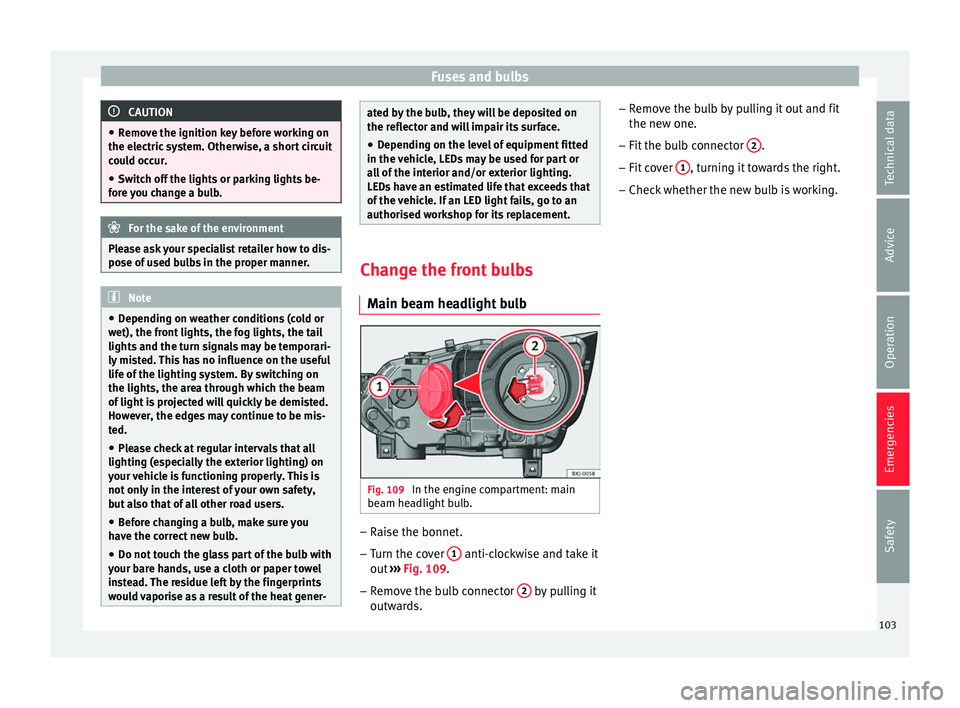
adlight bulb Fig. 109
In the engine compartment: main
be am he
a
dlight bulb. –
Raise the bonnet.
– Turn the cover 1 anti-clockwise and take it
out
›
›
› Fig. 109.
– Remove the bulb connector 2 by pulling it
outw ar
d
s. –
Remov
e the bulb by pulling it out and fit
the new one.
– Fit the bulb connector 2 .
– Fit cover 1 , turning it towards the right.
– Check whether the new bulb is working.
103
Technical data
Advice
Operation
Emergencies
Safety
Page 109 of 308

Fuses and bulbs
Side turn signals Fig. 119
Turn signal integrated in the rear
v iew mirr
or The side turn signals are LEDS and are inte-
gr
at
ed in the r
ear view mirrors.
In case of failure, go to an authorised work-
shop to have it replaced.
Additional brake light Given the difficulty involved in the replace-
ment
of
thi
s light it should be done by Tech-
nical Services. Changing the interior bulbs
Interior light and fr
ont reading lights Fig. 120
Front reading light. To remove the glass
– Insert a fine screwdriver between the cas-
ing and the gl
a
ss ››› Fig. 120.
– Carefully remove the glass, levering it to
avoid pos
sible damage.
To replace the bulbs
– Pull the bulbs outwards.
– To remove the central bulb, hold and press
to one side.
As
sembly
– Proceed in the reverse order, pressing gen-
tly on the outer edg
e of the side light. –
First
fit the glass with the fastening tabs
over the frame of the switch. Next press the
front part until the two long tabs click on
the support. Note
In LED courtesy lights it is not possible to re-
pl ac
e the light sources. If the light does not
work, take the vehicle to an official Service. 107
Technical data
Advice
Operation
Emergencies
Safety
Page 144 of 308
Operation
All turn signals flash simultaneously when
the h az
ar
d warning lights are switched on.
The two turn signal turn signal lamps
and the turn signal lamp in the switch will
flash at the same time. The simultaneous
hazard warning lights also work when the ig-
nition is switched off. WARNING
● The risk of
an accident increases if your ve-
hicle breaks down. Always use the hazard
warning lights and a warning triangle to draw
the attention of other road users to your sta-
tionary vehicle.
● Due to the high temperatures that the cata-
lytic con
verter can reach, never park in an
area where the catalytic converter could come
into contact with highly inflammable materi-
als, for example dry grass or spilt petrol. This
could start a fire. Note
● The batt er
y will run down if the hazard
warning lights are left on for a long time,
even if the ignition is switched off.
● The use of the hazard warning lights de-
scribed her
e is subject to the relevant statu-
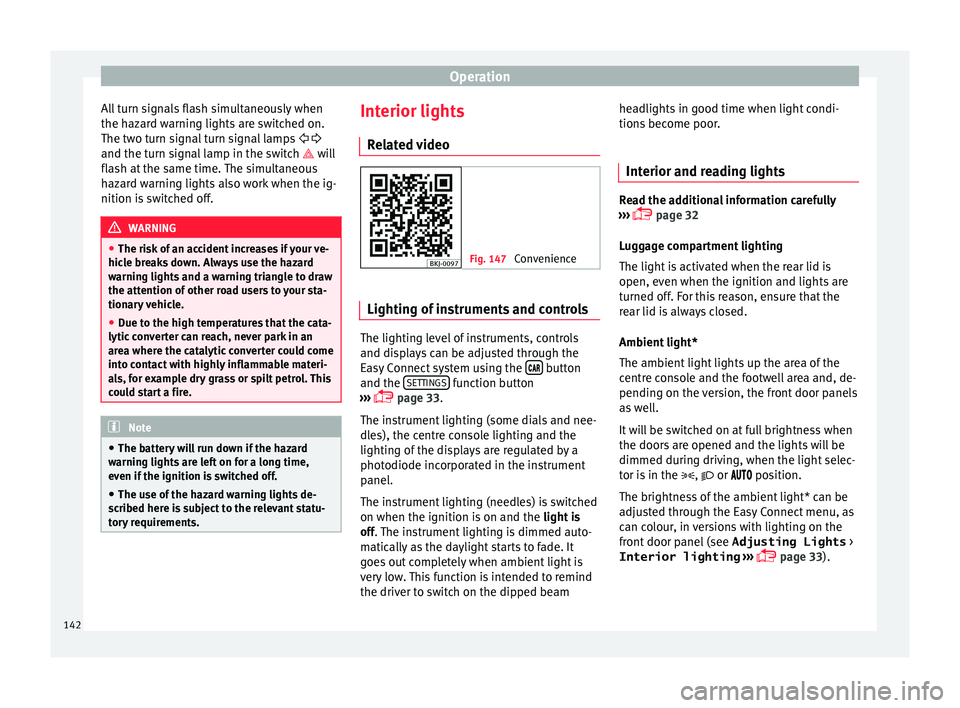
tory requirements. Interior lights
R el
at
ed video Fig. 147
Convenience Lighting of instruments and controls
The lighting level of instruments, controls
and di
s
p
lays can be adjusted through the
Easy Connect system using the button
and the S
ET
TINGS function button
› ›
›
page 33.
The instrument lighting (some dials and nee-
dles), the centre console lighting and the
lighting of the displays are regulated by a
photodiode incorporated in the instrument
panel.
The instrument lighting (needles) is switched
on when the ignition is on and the light is
off. The instrument lighting is dimmed auto-
matically as the daylight starts to fade. It
goes out completely when ambient light is
very low. This function is intended to remind
the driver to switch on the dipped beam headlights in good time when light condi-
tions bec
ome poor.
Interior and reading lights Read the additional information carefully
›› ›
page 32
Luggage compartment lighting
The light is activated when the rear lid is
open, even when the ignition and lights are
turned off. For this reason, ensure that the
rear lid is always closed.
Ambient light*
The ambient light lights up the area of the
centre console and the footwell area and, de-
pending on the version, the front door panels
as well.
It will be switched on at full brightness when
the doors are opened and the lights will be
dimmed during driving, when the light selec-
tor is in the , or position.
The brightness of the ambient light* can be
adjusted through the Easy Connect menu, as
can colour, in versions with lighting on the
front door panel (see Adjusting Lights >
Interior lighting ›››
page 33).
142
Page 253 of 308

Towing bracket device
Hitching and connecting the trailer Fig. 233
Schematic diagram: assignment of
the pins of the trailer's electrical socket.
Key of the Schematic diagram ››› Fig. 233:
PinMeaning
1Left turn signal
2Rear fog light
3Earth, pins 1, 2, 4 to 8
4Right turn signal
5Rear light, right
6Brake lights
7Rear light, left
8Reverse lights
9Permanent live
10Cable without positive charge
11Earth, pin 10
Key of the Schematic diagram ››› Fig. 233:
PinMeaning
12Unassigned
13Earth, pin 9 Electrical socket for trailer
The v
ehic
le is fitted with a 13-pole power
socket for the electrical connection between
the trailer and the vehicle. If the system de-
tects that a trailer has been connected elec-
trically, the electrical equipment on the trailer
will receive voltage through this connection.
Pin 9 has a permanent live. This powers, for
example, the trailer's interior lighting. Pin 10
is only powered when the engine is running.
The charge wire (pin 10) charges, for exam-
ple, a caravan battery.
Pin 9 and 10 should not be connected to
each other to avoid discharging or damaging
the vehicle's battery.
The earth wires, pin 3, pin 11 and pin 13,
should never be connected to each other to
avoid overloading the electrical system.
If the trailer has a 7-contact connector , you
will need to use an adapter cable. In this case
the function corresponding to pin 10 will not
be available. Trailer maximum electricity consumption
Brake lights (total)84 Watts
Turn signal, on each side42 Watts
Side lights (total)100 Watts
Rear lights (total)42 Watts
Rear fog light42 Watts
Never exceed the values indicated!
Note
● If the r e
ar lights of the trailer are not cor-
rectly connected, the vehicle electronics may
be damaged.
● If the trailer absorbs excessive electric cur-
rent, the v
ehicle electronics may be dam-
aged.
● Never connect the trailer's electric system
directly t
o the electrical connections of the
tail lights or any other power sources. Only
use the connections intended for providing
electric current to the trailer. Ball coupling of towing bracket de-
v
ic
e* The ball coupling is provided with instruc-
tion
s
on fittin
g and removing the ball cou-
pling of the towing bracket. »
251
Technical data
Advice
Operation
Emergencies
Safety