cruise control Seat Arona 2018 User Guide
[x] Cancel search | Manufacturer: SEAT, Model Year: 2018, Model line: Arona, Model: Seat Arona 2018Pages: 316, PDF Size: 6.77 MB
Page 117 of 316
Controls and displays
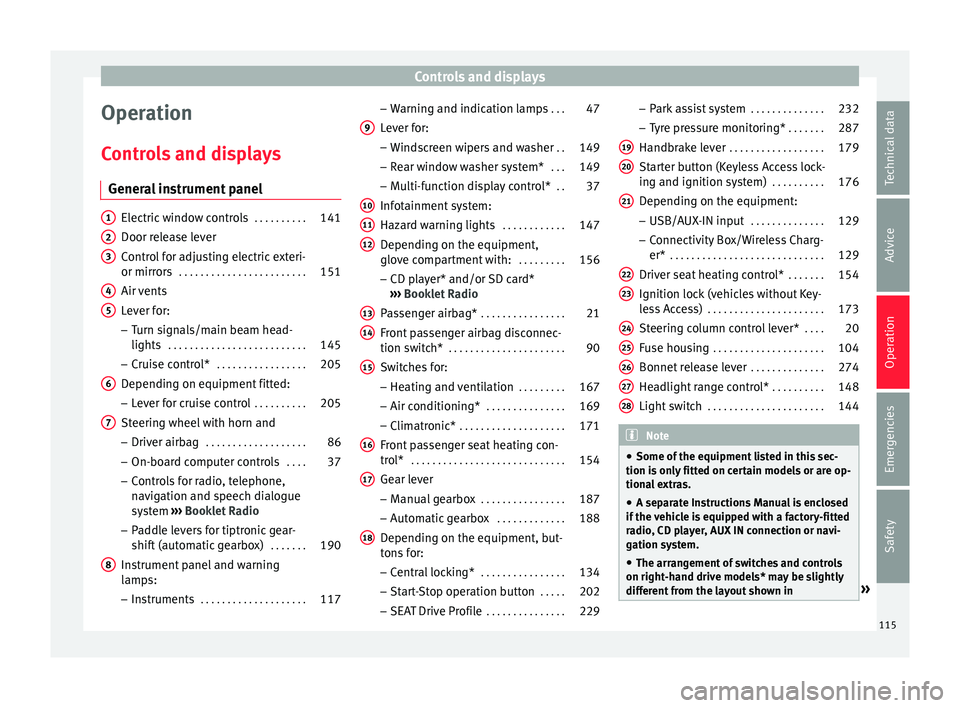
Operation
C ontr
o
ls and displays
General instrument panel Electric window controls
. . . . . . . . . .141
Door release lever
Contr o
l for adjusting electric exteri-
or mirrors . . . . . . . . . . . . . . . . . . . . . . . . 151
Air vents
Lev er f
or:
– Turn signals/main beam head-
lights . . . . . . . . . . . . . . . . . . . . . . . . . . 145
– Crui se c
ontrol* . . . . . . . . . . . . . . . . . 205
Depending on equipment fitted:
– Lev er f
or cruise control . . . . . . . . . .205
Steering wheel with horn and – Driver airbag . . . . . . . . . . . . . . . . . . . 86
– On-boar d c
omputer controls . . . .37
– Contro
ls for radio, telephone,
navigation and speech dialogue
system ›››
Booklet Radio
– Paddle levers for tiptronic gear-
shift (automatic gearbox) . . . . . . .190
Instrument panel and warning
lamp s:
– In
struments . . . . . . . . . . . . . . . . . . . . 117
1 2
3
4
5
6
7
8 –
Warnin
g and indic
ation lamps . . .47
Lever for:
– Winds
creen wipers and washer . .149
– Rear w
indow washer system* . . .149
– Multi-f
unction display control* . .37
Infotainment system:
Hazard w
arning lights . . . . . . . . . . . . 147
Depending on the equipment,
glove c
ompartment with: . . . . . . . . .156
– CD pla
yer* and/or SD card*
››› Booklet Radio
Passenger airbag* . . . . . . . . . . . . . . . . 21
Front passenger airbag disconnec-
tion switc
h* . . . . . . . . . . . . . . . . . . . . . . 90
Switches for: – Heating and
ventilation . . . . . . . . . 167
– Air conditionin g* . . . . . . . . . . . . . . . 169
– C
limatr
onic* . . . . . . . . . . . . . . . . . . . . 171
Front passenger seat heating con-
tro l* . . . . . . . . . . . . . . . . . . . . . . . . . . . . . 154
Ge
ar lever
– Manual g
earbox . . . . . . . . . . . . . . . . 187
– Autom atic
gearbox . . . . . . . . . . . . . 188
Depending on the equipment, but-
ton s
for:
– Central locking* . . . . . . . . . . . . . . . . 134
– Star t
-Stop operation button . . . . .202
– SEAT Driv
e Profile . . . . . . . . . . . . . . . 229
9
10
11
12
13
14
15
16
17
18 –
Park
a
ssist system . . . . . . . . . . . . . . 232
– Tyr
e pressure monitoring* . . . . . . .287
Handbrake lever . . . . . . . . . . . . . . . . . . 179
Starter button (Keyless Access lock-
ing and ignition sys
tem) . . . . . . . . . . 176
Depending on the equipment:
– USB/AUX-IN inp
ut . . . . . . . . . . . . . . 129
– Connectivity
Box/Wireless Charg-
er* . . . . . . . . . . . . . . . . . . . . . . . . . . . . . 129
Driver seat heating control* . . . . . . .154
Ignition lock (vehicles without Key-
les
s Access) . . . . . . . . . . . . . . . . . . . . . . 173
Steering column control lever* . . . .20
Fuse housing . . . . . . . . . . . . . . . . . . . . . 104
Bonnet release lever . . . . . . . . . . . . . .274
Headlight range control* . . . . . . . . . .148
Light switch . . . . . . . . . . . . . . . . . . . . . . 144 Note
● Some of the equipment li
sted in this sec-
tion is only fitted on certain models or are op-
tional extras.
● A separate Instructions Manual is enclosed
if the v
ehicle is equipped with a factory-fitted
radio, CD player, AUX IN connection or navi-
gation system.
● The arrangement of switches and controls
on right-hand driv
e models* may be slightly
different from the layout shown in » 19
20
21
22
23
24
25
26
27
28
115
Technical data
Advice
Operation
Emergencies
Safety
Page 186 of 316
Operation
the
button and the
S
ET
TINGS and
E SC
System function buttons.
WARNING
You should switch on the ESC Sport mode on-
ly if the tr
affic conditions and your driving
ability allow you to do so safely: risk of skid-
ding!
● With ESC in Sport mode, the stabilising
function w
ill be limited to allow for a sportier
drive. The driving wheels could spin and the
vehicle could skid. Note
If the ASR is disconnected or the ESC’s Sport
mode is sel
ected, cruise control* will be
switched off. Electronic differential lock (EDS)*
The EDL operates along with the ABS in vehi-
c
l
e
s equipped with Electronic Stability Con-
trol (ESC)*.
EDL helps the vehicle to start moving, accel-
erate and climb a gradient in slippery condi-
tions where this may otherwise be difficult or
even impossible.
It uses the ABS sensors to monitor the speed
of the driven wheels.
At speeds of up to approximately 80 km/h
(50 mph), it is able to balance out differences in the speed of the driven wheels of approxi-
mately
100 rpm/min caused by a partially
slippery road surface. It does this by braking
the wheel which has lost traction and distrib-
uting more driving force to the other driven
wheel via the differential.
To prevent the disc brake of the braking
wheel from overheating, the EDL cuts out au-
tomatically if subjected to excessive loads.
The vehicle will continue to function normally
without EDL. For this reason, the driver is not
informed that the EDL has been switched off.
The EDL will switch on again automatically
when the brake has cooled down.
Control lamp
A malfunction in the EDL is indicated by the
ESC control lamp . Take the vehicle to a
specialised workshop as soon as possible. WARNING
● When acc el
erating on a slippery surface,
for example on ice and snow, press the accel-
erator carefully. Despite EDL, the driven
wheels may start to spin. This could impair
the vehicle's stability.
● Always adapt your driving style to suit road
conditions
and the traffic situation. Do not let
the extra safety afforded by EDL tempt you in-
to taking any risks when driving, this can
cause accidents. CAUTION
Modifications to the vehicle (e.g. to the en-
gine, the brak e sy
stem, running gear or any
components affecting the wheels and tyres)
could affect the efficiency of the EDL
››› page 259. Hydraulic Brake Assist (HBA)*
The function (Hydraulic Brake Assist HBA) is
only
inc
luded in vehicles with ESC.
In an emergency, most drivers brake in time,
but not with maximum force. This results in
unnecessarily long braking distances.
This is when the brake assist system comes
into action. When pressing the brake pedal
rapidly, the assistant interprets it as an emer-
gency. It very quickly builds up the full brake
pressure so that the ABS can be activated
more quickly and efficiently, thus reducing
braking distance.
Do not reduce the pressure on the brake ped-
al, since the brake assist system switches off
automatically as soon as you release the
brake.
Automatic hazard warning lights activation
The brake lights flash automatically to indi-
cate that the vehicle is braking suddenly or in
an emergency situation. If the emergency
braking continues until the vehicle comes to
184
Page 195 of 316
Driving
– Turn the sel
ect
or lever to the position “S”
or tiptronic, or else select the sport driv-
ing mode from the SEAT Drive Profile*
››› page 229.
– Press the brake pedal firmly with your left
foot and ho
ld it down for at least one sec-
ond.
– With your right foot, press the accelerator
down to the f
ull throttle or kick-down posi-
tion. The engine speed will stabilise at
about 3,200 rpm (petrol engine) or about
2,000 rpm (diesel engine).
– Take your left foot off the brake pedal. WARNING
● Alw a
ys adapt your driving style to the traf-
fic conditions.
● Only use the launch control programme
when roa
d and traffic conditions permit, and
make sure your manner of driving and accel-
erating the vehicle does not inconvenience or
endanger other road users.
● Make sure that the ESC remains switched
on. Plea
se note that when the ASR and ESC
are deactivated, the wheels may start to spin,
causing the vehicle to lose grip. Risk of acci-
dent!
● After moving off, the ESC “sport” mode
should be de
activated by briefly pressing the
button. Note
● Aft er u
sing the Launch control programme,
the temperature in the gearbox may have in-
creased considerably. In this case, the pro-
gramme could be disabled for several mi-
nutes. The programme can be used again af-
ter the cooling phase.
● Accelerating with the Launch control pro-
gramme pl
aces a heavy load on all parts of
the vehicle. This can result in increased wear
and tear. Downhill speed control*
The downhill speed control function helps
the driv
er when driv
in
g down steep gradi-
ents.
Downhill speed control is activated when the
selector lever is in D/S and the driver applies
the foot brake. The automatic gearbox auto-
matically engages a lower gear that is suita-
ble for the slope. The downhill speed control
function attempts to maintain the speed at
which the vehicle was travelling when the
foot brake was applied (subject to the laws of
physics and technical drive limitations). It
may be necessary to adjust the speed again
using the foot brake in certain situations. Giv-
en that the downhill speed control can only
change down to 3rd gear, on very steep de-
scents the tiptronic mode may be required. In
this case, manually reduce the tiptronic to 2nd or 1st gear to use the engine brake and
reduce the c
harge on the brakes.
Downhill speed control is deactivated as
soon as the road levels out again or you
press the accelerator pedal.
On vehicles with cruise control system*
››› page 205, downhill speed control is acti-
vated when you set a cruising speed. WARNING
The downhill speed control cannot defy the
la w
s of physics. Therefore, speed cannot be
maintained constant in all situations. Always
be prepared to use the brakes! Inertia mode
The inertia mode enables the kinetic energy
of
the
v
ehicle to be harnessed enabling cer-
tain stretches to be driven without using the
accelerator. This enables fuel to be saved.
Use the inertia mode to “let the vehicle roll”
before, for example, arriving in a town.
Switching on inertia mode
Important: selector lever must be in position
D, gradients below 12 %.
– Select, in SEAT Drive Profile*, Eco mode
›››
page 229.
– Take your foot off the accelerator. »
193
Technical data
Advice
Operation
Emergencies
Safety
Page 207 of 316
Driver assistance systems
Manually switching on/off the Start-
St op sy
s
tem Fig. 184
Centre console: Start-Stop system
b utt
on. If you do not wish to use the system, you can
sw
it
c
h it off manually.
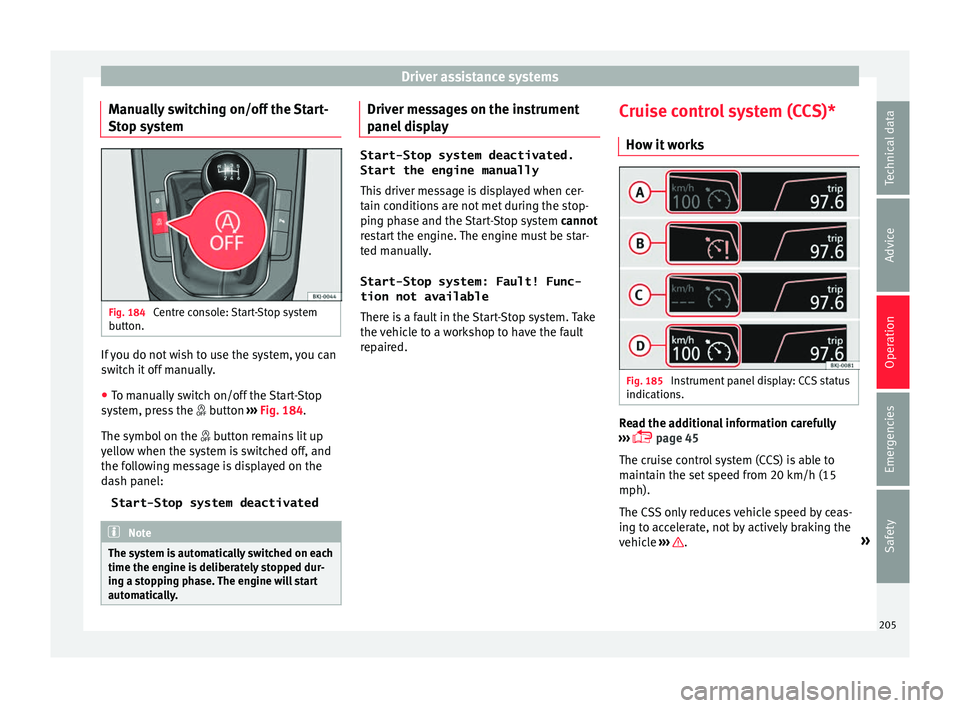
● To manually switch on/off the Start-Stop
syst
em, press the button ››› Fig. 184.
The symbol on the button remains lit up
yellow when the system is switched off, and
the following message is displayed on the
dash panel:
Start-Stop system deactivated Note
The system is automatically switched on each
time the engine i s
deliberately stopped dur-
ing a stopping phase. The engine will start
automatically. Driver messages on the instrument
p
anel
di
splay Start-Stop system deactivated.
Start the engine manually
This driv
er message is displayed when cer-
tain conditions are not met during the stop-
ping phase and the Start-Stop system cannot
restart the engine. The engine must be star-
ted manually.
Start-Stop system: Fault! Func-
tion not available There is a fault in the Start-Stop system. Take
the vehicle to a workshop to have the fault
repaired. Cruise control system (CCS)*
How it w
orks Fig. 185
Instrument panel display: CCS status
indic ation
s. Read the additional information carefully
› ›
›
page 45
The cruise control system (CCS) is able to
maintain the set speed from 20 km/h (15
mph).
The CSS only reduces vehicle speed by ceas-
ing to accelerate, not by actively braking the
vehicle ››› .
»
205
Technical data
Advice
Operation
Emergencies
Safety
Page 208 of 316
Operation
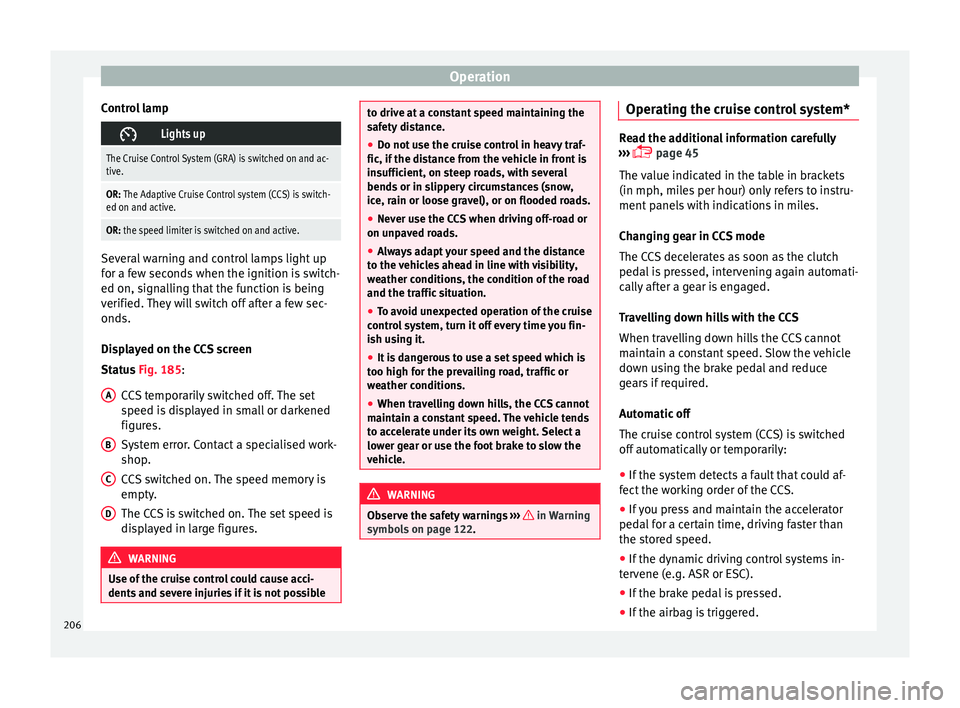
Control lamp Lights up
The Cruise Control System (GRA) is switched on and ac-
tive.
OR: The Adaptive Cruise Control system (CCS) is switch-
ed on and active.
OR: the speed limiter is switched on and active. Several warning and control lamps light up
for a f
ew sec
onds when the ignition is switch-
ed on, signalling that the function is being
verified. They will switch off after a few sec-
onds.
Displayed on the CCS screen
Status Fig. 185:
CCS temporarily switched off. The set
speed is displayed in small or darkened
figures.
System error. Contact a specialised work-
shop.
CCS switched on. The speed memory is
empty.
The CCS is switched on. The set speed is
displayed in large figures. WARNING
Use of the cruise control could cause acci-
dents and sev
ere injuries if it is not possibleA
B
C
D to drive at a constant speed maintaining the
saf
ety
distance.
● Do not use the cruise control in heavy traf-
fic, if the dis
tance from the vehicle in front is
insufficient, on steep roads, with several
bends or in slippery circumstances (snow,
ice, rain or loose gravel), or on flooded roads.
● Never use the CCS when driving off-road or
on unpav
ed roads.
● Always adapt your speed and the distance
to the v
ehicles ahead in line with visibility,
weather conditions, the condition of the road
and the traffic situation.
● To avoid unexpected operation of the cruise
contro
l system, turn it off every time you fin-
ish using it.
● It is dangerous to use a set speed which is
too high for the pr
evailing road, traffic or
weather conditions.
● When travelling down hills, the CCS cannot
maintain a c
onstant speed. The vehicle tends
to accelerate under its own weight. Select a
lower gear or use the foot brake to slow the
vehicle. WARNING
Observe the safety warnings ›››
in Warning
symbol s on p
age 122. Operating the cruise control system*
Read the additional information carefully
›› ›
page 45
The value indicated in the table in brackets
(in mph, miles per hour) only refers to instru-
ment panels with indications in miles.
Changing gear in CCS mode
The CCS decelerates as soon as the clutch
pedal is pressed, intervening again automati-
cally after a gear is engaged.
Travelling down hills with the CCS
When travelling down hills the CCS cannot
maintain a constant speed. Slow the vehicle
down using the brake pedal and reduce
gears if required.
Automatic off
The cruise control system (CCS) is switched
off automatically or temporarily:
● If the system detects a fault that could af-
fect the w
orking order of the CCS.
● If you press and maintain the accelerator
pedal f
or a certain time, driving faster than
the stored speed.
● If the dynamic driving control systems in-
terv
ene (e.g. ASR or ESC).
● If the brake pedal is pressed.
● If the airbag is triggered.
206
Page 209 of 316
Driver assistance systems
● If the g
e
ar lever of the DSG ®
dual clutch
gearbox is removed from the D/S position.WARNING
After use, always switch off the speed limiter
to pr ev
ent the speed being regulated against
your wishes.
● The speed limiter does not relieve the driv-
er of their re
sponsibility to drive at the appro-
priate speed. Do not drive at high speed if not
necessary.
● Using the speed limiter with adverse
weather c
onditions is dangerous and can
cause serious accidents, e.g. because of
aquaplaning, snow, ice, leaves, etc. You
should use the speed limiter function only
when traffic, road and weather conditions al-
low it to be used safely.
● When driving downhill, the speed limiter
cannot limit
the vehicle speed. Its speed will
increase due to its own weight. In this case,
select a lower gear or use the foot brake to
slow the vehicle. Speed limiter
Di s
p
lay messages and warning and
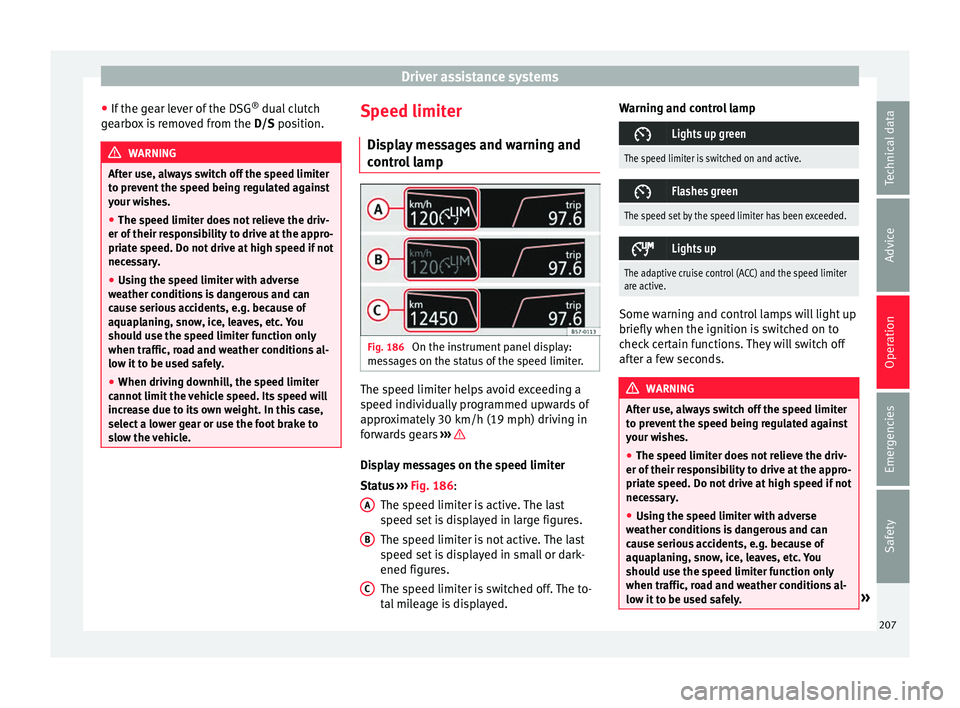
control lamp Fig. 186
On the instrument panel display:
me s
s
ages on the status of the speed limiter. The speed limiter helps avoid exceeding a
s peed indiv
idual
ly programmed upwards of
approximately 30 km/h (19 mph) driving in
forwards gears ››› Display messages on the speed limiter
St
at
u
s ››› Fig. 186:
The speed limiter is active. The last
speed set is displayed in large figures.
The speed limiter is not active. The last
speed set is displayed in small or dark-
ened figures.
The speed limiter is switched off. The to-
tal mileage is displayed.
A B
C Warning and control lamp
Lights up green
The speed limiter is switched on and active.
Flashes green
The speed set by the speed limiter has been exceeded.
Lights up
The adaptive cruise control (ACC) and the speed limiter
are active.
Some warning and control lamps will light up
briefly
when the ignition i
s
switched on to
check certain functions. They will switch off
after a few seconds. WARNING
After use, always switch off the speed limiter
to pr ev
ent the speed being regulated against
your wishes.
● The speed limiter does not relieve the driv-
er of their re
sponsibility to drive at the appro-
priate speed. Do not drive at high speed if not
necessary.
● Using the speed limiter with adverse
weather c
onditions is dangerous and can
cause serious accidents, e.g. because of
aquaplaning, snow, ice, leaves, etc. You
should use the speed limiter function only
when traffic, road and weather conditions al-
low it to be used safely. » 207
Technical data
Advice
Operation
Emergencies
Safety
Page 210 of 316
Operation
●
When drivin g do
wnhill, the speed limiter
cannot limit the vehicle speed. Its speed will
increase due to its own weight. In this case,
select a lower gear or use the foot brake to
slow the vehicle. WARNING
Observe the safety warnings ›
››
in Warning
symbol s on p
age 122. Note
● Differ ent
versions of the instrument panel
are available and therefore the versions and
instructions on the display may vary.
● If when switching the ignition off, the
cruise c
ontrol system (CCS), the adaptive
cruise control (ACC) or the speed limiter were
switched on, then the cruise control system or the adaptive cruise control will automati-
ca
l
ly switch themselves on when the ignition
is back on. However, no speed will be stored.
The last set speed of the speed limiter will be
stored. Operate the speed limiter
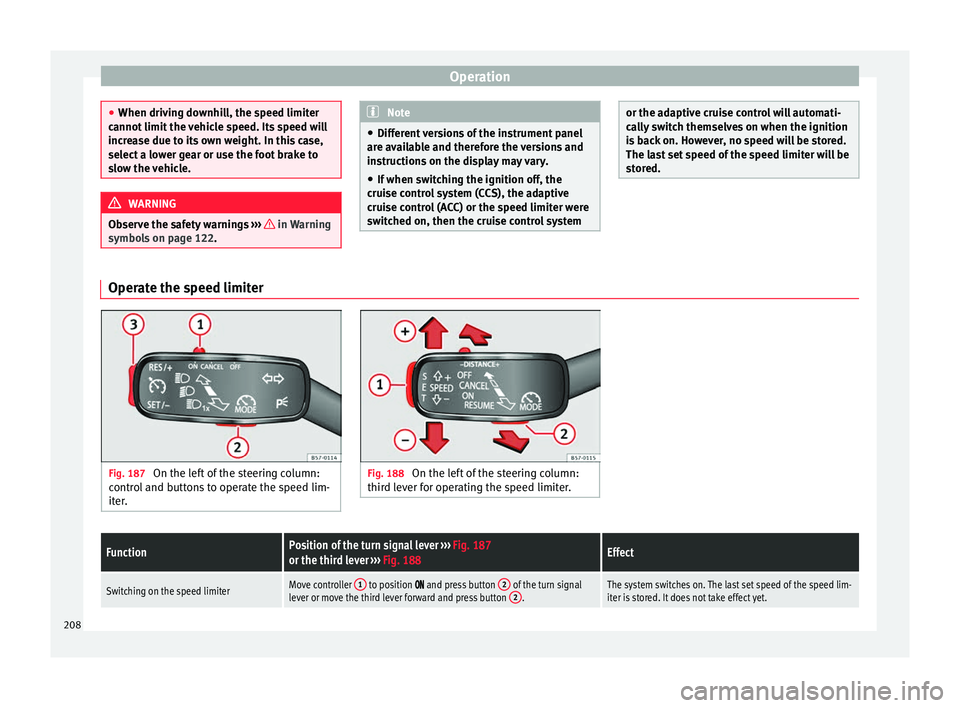
Fig. 187
On the left of the steering column:
contr o
l and buttons to operate the speed lim-
iter. Fig. 188
On the left of the steering column:
third l ev
er for operating the speed limiter.
FunctionPosition of the turn signal lever ››› Fig. 187
or the third lever ››› Fig. 188Effect
Switching on the speed limiterMove controller 1 to position and press button 2 of the turn signal
lever or move the third lever forward and press button 2.The system switches on. The last set speed of the speed lim-
iter is stored. It does not take effect yet.208
Page 211 of 316
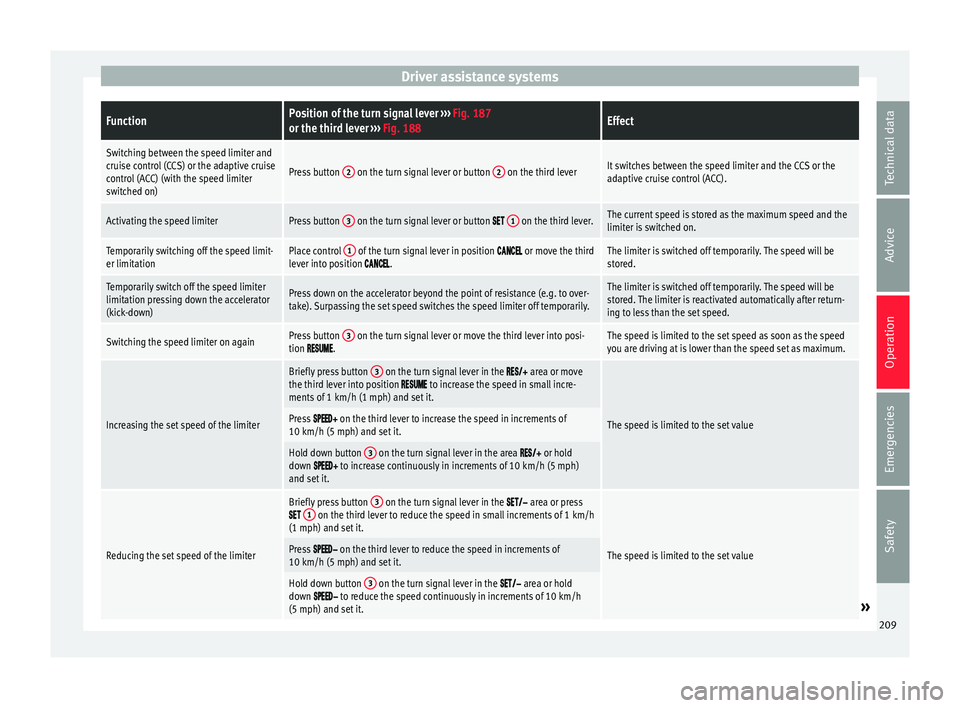
Driver assistance systemsFunctionPosition of the turn signal lever
››› Fig. 187
or the third lever ››› Fig. 188Effect
Switching between the speed limiter and
cruise control (CCS) or the adaptive cruise
control (ACC) (with the speed limiter
switched on)
Press button 2 on the turn signal lever or button 2 on the third leverIt switches between the speed limiter and the CCS or the
adaptive cruise control (ACC).
Activating the speed limiterPress button 3 on the turn signal lever or button 1 on the third lever.The current speed is stored as the maximum speed and the
limiter is switched on.
Temporarily switching off the speed limit-
er limitationPlace control 1 of the turn signal lever in position or move the third
lever into position .The limiter is switched off temporarily. The speed will be
stored.
Temporarily switch off the speed limiter
limitation pressing down the accelerator
(kick-down)Press down on the accelerator beyond the point of resistance (e.g. to over-
take). Surpassing the set speed switches the speed limiter off temporarily.The limiter is switched off temporarily. The speed will be
stored. The limiter is reactivated automatically after return-
ing to less than the set speed.
Switching the speed limiter on againPress button 3 on the turn signal lever or move the third lever into posi-
tion .The speed is limited to the set speed as soon as the speed
you are driving at is lower than the speed set as maximum.
Increasing the set speed of the limiter
Briefly press button 3 on the turn signal lever in the area or move
the third lever into position to increase the speed in small incre-
ments of 1 km/h (1 mph) and set it.
The speed is limited to the set valuePress on the third lever to increase the speed in increments of
10 km/h (5 mph) and set it.
Hold down button 3 on the turn signal lever in the area or hold
down to increase continuously in increments of 10 km/h (5 mph)
and set it.
Reducing the set speed of the limiter
Briefly press button 3 on the turn signal lever in the area or press 1 on the third lever to reduce the speed in small increments of 1 km/h
(1 mph) and set it.
The speed is limited to the set valuePress on the third lever to reduce the speed in increments of
10 km/h (5 mph) and set it.
Hold down button 3 on the turn signal lever in the area or hold
down to reduce the speed continuously in increments of 10 km/h
(5 mph) and set it.» 209
Technical data
Advice
Operation
Emergencies
Safety
Page 216 of 316
Operation
Switching the Front Assist off tempo-
r ari
ly
in the following situations In the following situations the Front Assist
shoul
d be de
activated due to the system's
limitations:
● When the vehicle is to be towed.
● If the vehicle is on a test bed.
● When the radar sensor is damaged.
● If the radar sensor takes a heavy knock, for
examp
le in a rear collision.
● If it intervenes several times unnecessarily.
● If the radar sensor is covered temporarily
with some k ind of
accessory, such as an ad-
ditional headlight or the like.
● When the vehicle is to be loaded on a lorry,
ferry
or train.
System limitations The Front Assist has certain physical limita-
tion
s
inher
ent to the system. Thus, in certain
circumstances, some of the system's reac-
tions may be inopportune from the driver's
standpoint. So pay attention in order to inter-
vene if necessary. The following conditions may cause the Front
Assi
st not to react or to do so too late:
● In the first few instants of driving after
switc
hing on the ignition, due to the system’s
initial auto-calibration.
● On taking tight bends or complex paths.
● Pressing the accelerator all the way down.
● If the Front Assist is switched off or dam-
aged.
● If the ASR h
as been disconnected or the
ESC activ
ated in Sport mode manually
››› page 183.
● If the ESC is controlling.
● If several brake lights of the vehicle or elec-
trically
connected trailer are damaged.
● If the radar sensor is dirty or covered.
● If there are metal objects, e.g. rails on the
roa
d or sheets used in road works.
● If the vehicle is reversing.
● If the vehicle over-accelerates.
● In case of snow or heavy rain.
● In case of narrow vehicles, such as motor-
bike
s.
● Misaligned vehicles.
● Vehicles crossing the other's path.
● Vehicles approaching in the opposite direc-
tion. ●
Speci
al loads and accessories of other ve-
hicles that jut out over the sides, backwards
or over the top.
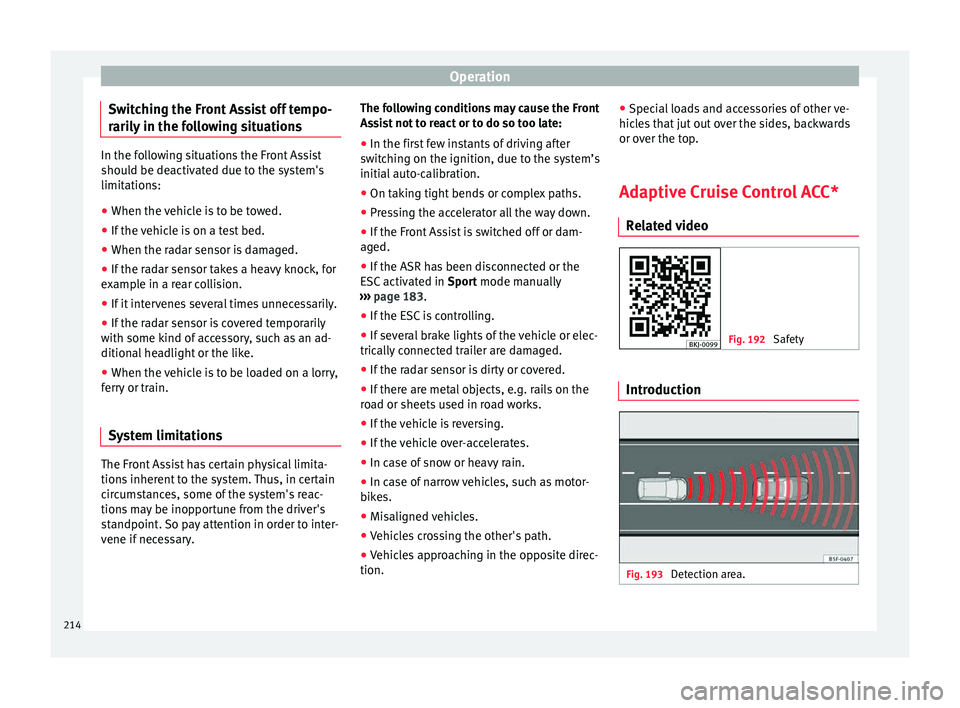
Adaptive Cruise Control ACC* Relat
ed video Fig. 192
Safety Introduction
Fig. 193
Detection area.214
Page 217 of 316
Driver assistance systems
The adaptive cruise control (ACC) is
an e xten-
sion of the normal cruise control system
(CCS) ››› .
The A C
C
function allows the driver to program
a cruise speed of between 30 and 210 km/h
(18 and 150 mph) and to select the distance
required with regard to the vehicle in front.
The ACC will adapt the vehicle's cruise speed
at all times, maintaining a safe distance with
the vehicle in front based on its speed.
When driving behind another vehicle, the
ACC function reduces speed until it is the
same as that of the vehicle ahead and main-
tains the set distance between the vehicles.
If the vehicle ahead accelerates, the adaptive
cruise control also accelerates, going no
higher than the target speed programmed.
If the vehicle is equipped with automatic
gearbox, the ACC can brake the vehicle until
it stops completely if a vehicle in front of it
stops.
The distance programmed should be in-
creased when the road surface is wet.
Driver intervention prompt
During driving, the ACC is subject to certain
limitations inherent in the system. In other
words, in certain circumstances the driver will
have to adjust speed him or herself, as well
as the distance from other vehicles. In this case, the instrument panel screen
will
warn
you to intervene by applying the brake
and a warning tone will be heard
››› page 216. WARNING
The intelligent technology in the ACC cannot
ov er
come the system's inherent limitations
or change the laws of physics. If used negli-
gently or involuntarily, it may cause serious
accidents and injuries. The system is not a re-
placement for driver awareness.
● Adapt your speed and safe distance to the
vehicl
e in front of you at all times to suit visi-
bility, weather, road and traffic conditions.
● Do not use the ACC when visibility is bad,
on steep r
oads, with several bends or in slip-
pery circumstances such as snow, ice, rain or
loose gravel, or on flooded roads.
● Never use the ACC when driving off-road or
on unpav
ed roads. The ACC has been de-
signed for use on paved roads only.
● The ACC does not react on approaching a
fixed o
bstacle, such as the tail of a traffic
jam, a damaged vehicle or a vehicle stopped
at the traffic lights.
● The ACC only reacts to people if a pedes-
trian monitorin
g system is available. In addi-
tion, the system does not react to animals or
vehicles crossing your path or approaching
head-on down the same lane.
● If the ACC does not reduce speed sufficient-
ly, brak
e the vehicle immediately by applying
the pedal. ●
If y
ou are driving using the spare wheel,
the ACC function could automatically switch
off during your journey. Switch off the system
when starting off.
● If the vehicle continues to move involuntar-
ily af
ter a driver intervention prompt, brake
the vehicle by applying the pedal.
● If the dash panel displays a driv
er interven-
tion prompt, adjust the distance yourself.
● The driver should be ready to accelerate or
brake b
y him/herself at all times. CAUTION
If you have the sensation that the radar sen-
sor is d
amaged, disconnect the ACC. This will
avoid possible damage. If this occurs have it
adjusted.
● Repairs to the radar sensor require special-
ist
knowledge and special tools. SEAT recom-
mends visiting a SEAT dealership for this pur-
pose. Note
● If the A C
C system does not work as descri-
bed in this chapter, do not use it until it has
been checked by a specialised workshop.
SEAT recommends visiting a SEAT dealership
for this purpose.
● Maximum speed with the ACC activated is
limited to 210 km/h (150 mph). » 215
Technical data
Advice
Operation
Emergencies
Safety