ECU Seat Arona 2018 Owner's Guide
[x] Cancel search | Manufacturer: SEAT, Model Year: 2018, Model line: Arona, Model: Seat Arona 2018Pages: 316, PDF Size: 6.77 MB
Page 111 of 316
Fuses and bulbs
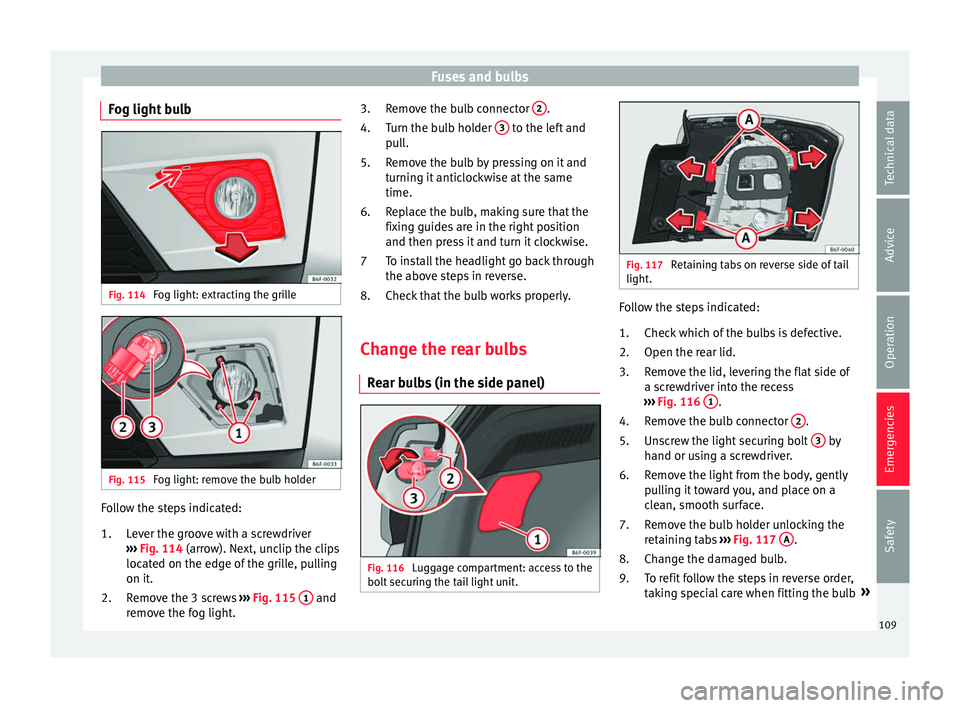
Fog light bulb Fig. 114
Fog light: extracting the grille Fig. 115
Fog light: remove the bulb holder Follow the steps indicated:
Lev
er the gr
oove with a screwdriver
››› Fig. 114 (arrow). Next, unclip the clips
located on the edge of the grille, pulling
on it.
Remove the 3 screws ››› Fig. 115 1 and
r emo
v
e the fog light.
1.
2. Remove the bulb connector
2 .
T urn the b
u
lb holder 3 to the left and
p u
l
l.
Remove the bulb by pressing on it and
turning it anticlockwise at the same
time.
Replace the bulb, making sure that the
fixing guides are in the right position
and then press it and turn it clockwise.
To install the headlight go back through
the above steps in reverse.
Check that the bulb works properly.
Change the rear bulbs Rear b
ulbs (in the side panel) Fig. 116
Luggage compartment: access to the
bo lt
sec
uring the tail light unit. 3.
4.
5.
6.
7
8.
Fig. 117
Retaining tabs on reverse side of tail
light. Follow the steps indicated:
Chec k
whic
h of the bulbs is defective.
Open the rear lid.
Remove the lid, levering the flat side of
a screwdriver into the recess
››› Fig. 116 1 .
R emo
v
e the bulb connector 2 .
Un s
c
rew the light securing bolt 3 by
h and or u
s
ing a screwdriver.
Remove the light from the body, gently
pulling it toward you, and place on a
clean, smooth surface.
Remove the bulb holder unlocking the
retaining tabs ››› Fig. 117 A .
Ch an
g
e the damaged bulb.
To refit follow the steps in reverse order,
taking special care when fitting the bulb »
1.
2.
3.
4.
5.
6.
7.
8.
9.
109
Technical data
Advice
Operation
Emergencies
Safety
Page 112 of 316
Emergencies
holder. The securing tabs must click into
p l
ac
e. CAUTION
Take care when removing the rear light unit to
mak e s
ure there is no damage to the paint-
work or any of its components. Note
● Mak e s
ure you have a soft cloth ready to
place under the glass on the rear light unit, to
avoid any scratches.
● For LED lights, you can only change the turn
signa
l and reverse light bulbs. Rear lights (in the rear lid)
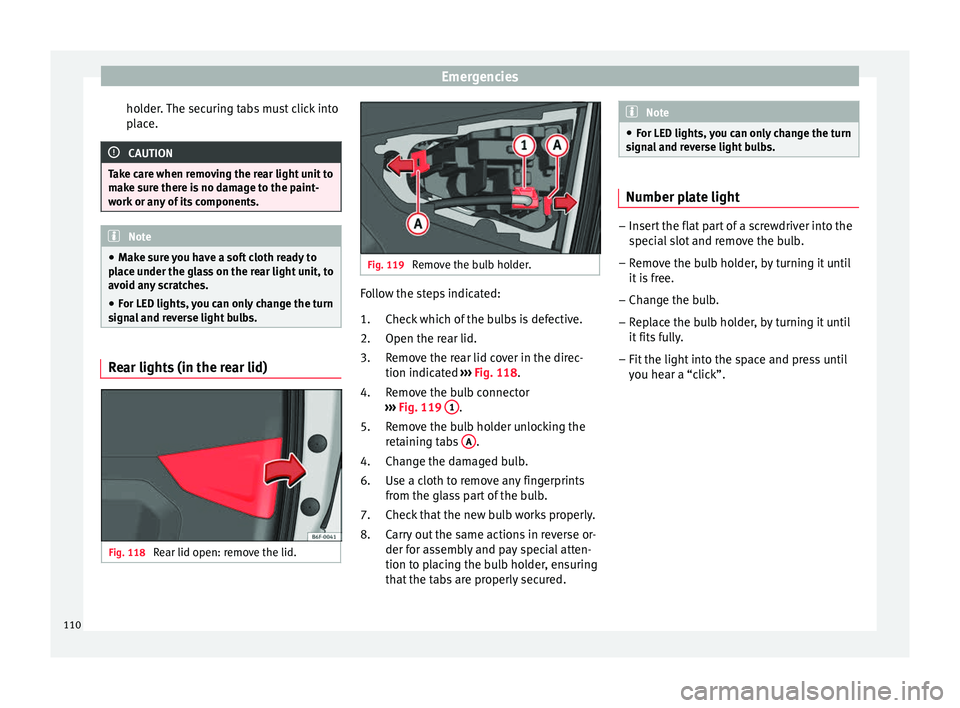
Fig. 118
Rear lid open: remove the lid. Fig. 119
Remove the bulb holder. Follow the steps indicated:
Chec k
whic
h of the bulbs is defective.
Open the rear lid.
Remove the rear lid cover in the direc-
tion indicated ››› Fig. 118.
Remove the bulb connector
››› Fig. 119 1 .
R emo
v
e the bulb holder unlocking the
retaining tabs A .
Ch an
g
e the damaged bulb.
Use a cloth to remove any fingerprints
from the glass part of the bulb.
Check that the new bulb works properly.
Carry out the same actions in reverse or-
der for assembly and pay special atten-
tion to placing the bulb holder, ensuring
that the tabs are properly secured.
1.
2.
3.
4.
5.
4.
6.
7.
8. Note
● For LED light s,
you can only change the turn
signal and reverse light bulbs. Number plate light
–
Insert the flat part of a screwdriver into the
spec i
al slot and remove the bulb.
– Remove the bulb holder, by turning it until
it is
free.
– Change the bulb.
– Replace the bulb holder, by turning it until
it fits f
ully.
– Fit the light into the space and press until
you hear a “c
lick”.
110
Page 135 of 316
Opening and closing
Note
For anti-theft security, only the driver door is
fitted w ith a loc
k cylinder.Safe security system*
1)This is an anti-theft device which consists of
a doubl
e loc
k for the door locks and a deacti-
vation function for the boot in order to pre-
vent forced entry.
Activation
The “safe” system is activated when the vehi-
cle is locked using the key or the remote con-
trol.
To activate it with the key, rotate once it is in-
serted in the door lock cylinder in the locking
direction.
To activate the system using the remote con-
trol, press the lock button once on the re-
mote.
Once this system is activated, opening doors
from the outside and the inside is not possi-
ble. The rear lid can not be opened. The cen-
tral lock button does not work.
When the ignition is switched off, the instru-
ment panel display indicates that the “Safe”
system is on. Deactivation
Rot
at
e the key inserted in the lock cylinder
twice towards the locking direction.
To activate the system using the remote con-
trol, press the lock button on the remote
twice in less than five seconds.
On deactivating the “Safe” system, the alarm
volumetric sensor is also deactivated.
With the “Safe” switched off, doors can be
opened from the interior but not from the ex-
terior.
See “Selective unlocking system*”
“Safe” status
On the driver door, there is warning lamp visi-
ble from outside the vehicle through the win-
dow which shows the “Safe” system status.
We will know that “Safe” system is activated
by the flashing warning lamp. The indicator
will flash on all vehicles, fitted and nor fitted
with an alarm, until they unlock.
Remember:
Safe activated with or without an alarm:
warning lamp flashes continuously.
Safe deactivated without an alarm: the warn-
ing lamp stays off. Safe deactivated with an alarm: the warning
l amp stays off. WARNING
No one should remain inside the vehicle if the
“Safe” sy s
tem is activated because opening
the doors will not be possible in the event of
an emergency neither from the inside nor the
outside and help from the outside is made
difficult. Danger of death. Passengers could
become trapped inside in case of emergency. Selective unlocking system*
This system allows to unlock either just the
driv
er door or al
l
the vehicle.
Driver door unlock button
Unlock once. Use either the key or the remote
control.
Once the key is inserted in the lock cylinder,
rotate once in the unlock direction. The driver
door will remain without “Safe” and un-
locked. In vehicles fitted with an alarm, see
the Anti-theft Alarm section ›››
page 138.
Using the remote control, press the unlock
button on the remote once. The “Safe” sys-
tem for all the vehicle is deactivated, only the »1)
Available depending on market and version.
133
Technical data
Advice
Operation
Emergencies
Safety
Page 138 of 316
Operation
Once the doors have been locked, they can-
not be opened ag
ain immedi
ately. This will
enable you to check that the doors are prop-
erly closed.
If you wish, when unlocking, you can unlock
only the driver’s door, the side being un-
locked, or the entire vehicle. The necessary
adjustments can be performed in vehicles
with a driver information system
››› page 34.
General information
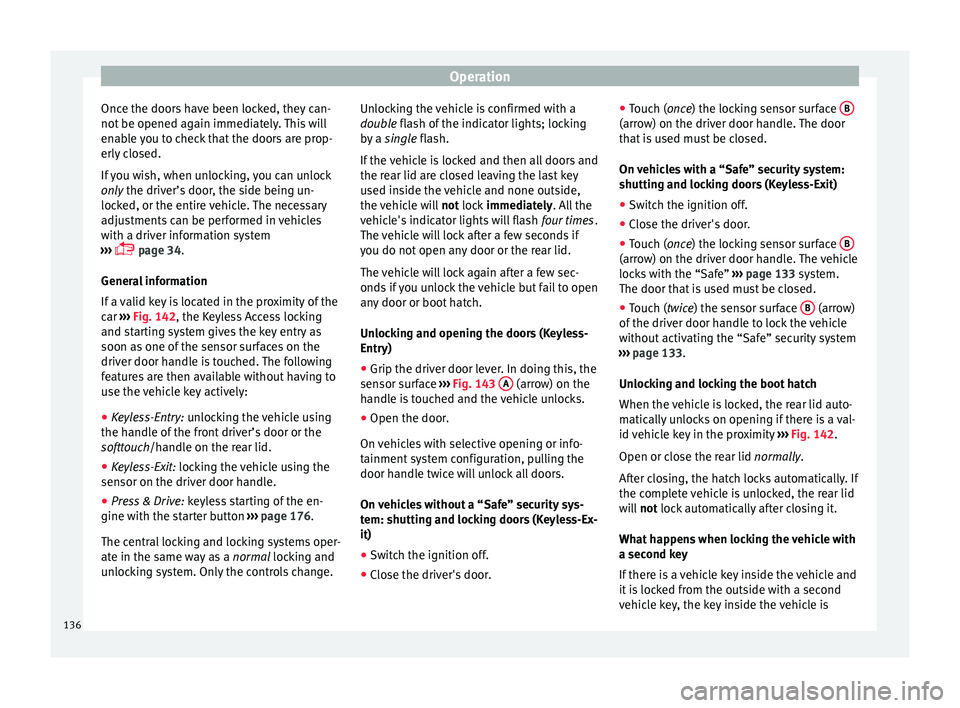
If a valid key is located in the proximity of the
car ››› Fig. 142, the Keyless Access locking
and starting system gives the key entry as
soon as one of the sensor surfaces on the
driver door handle is touched. The following
features are then available without having to
use the vehicle key actively:
● Keyless-Entry: unloc
king the vehicle using
the handle of the front driver’s door or the
softtouch/handle on the rear lid.
● Keyless-Exit: lockin
g the vehicle using the
sensor on the driver door handle.
● Press & Drive: keyle
ss starting of the en-
gine with the starter button ››› page 176.
The central locking and locking systems oper-
ate in the same way as a normal locking and
unlocking system. Only the controls change. Unlocking the vehicle is confirmed with a
double fl
ash of the indicator lights; locking
by a single flash.
If the vehicle is locked and then all doors and
the rear lid are closed leaving the last key
used inside the vehicle and none outside,
the vehicle will not lock immediately. All the
vehicle's indicator lights will flash four times.
The vehicle will lock after a few seconds if
you do not open any door or the rear lid.
The vehicle will lock again after a few sec-
onds if you unlock the vehicle but fail to open
any door or boot hatch.
Unlocking and opening the doors (Keyless-
Entry)
● Grip the driver door lever. In doing this, the
sensor sur
face ››› Fig. 143 A (arrow) on the
h andl
e i
s touched and the vehicle unlocks.
● Open the door.
On vehic
les with selective opening or info-
tainment system configuration, pulling the
door handle twice will unlock all doors.
On vehicles without a “Safe” security sys-
tem: shutting and locking doors (Keyless-Ex-
it)
● Switch the ignition off.
● Close the driver's door. ●
Touch (
once) the locking sensor surface B (arrow) on the driver door handle. The door
th
at
i
s used must be closed.
On vehicles with a “Safe” security system:
shutting and locking doors (Keyless-Exit)
● Switch the ignition off.
● Close the driver's door.
● Touch (once) the locking sensor surface B (arrow) on the driver door handle. The vehicle
loc
k
s
with the “Safe” ››› page 133 system.
The door that is used must be closed.
● Touch (twice) the sensor surface B (arrow)
of the driv
er door h
andle to lock the vehicle
without activating the “Safe” security system
››› page 133.
Unlocking and locking the boot hatch
When the vehicle is locked, the rear lid auto-
matically unlocks on opening if there is a val-
id vehicle key in the proximity ››› Fig. 142.
Open or close the rear lid normally.
After closing, the hatch locks automatically. If
the complete vehicle is unlocked, the rear lid
will not lock automatically after closing it.
What happens when locking the vehicle with
a second key
If there is a vehicle key inside the vehicle and
it is locked from the outside with a second
vehicle key, the key inside the vehicle is
136
Page 140 of 316
Operation
●
If ther e i
s no valid key inside the vehicle or
the system fails to detect one, a warning will
display on the dash panel screen. This could
happen if any other radio frequency signal in-
terferes with the key signal (e.g. from a mo-
bile device accessory) or if the key is covered
by another object (e.g. an aluminium case).
● If the sensors are very dirty, e.g. have a lay-
er of sa
lt, the correct functioning of the sen-
sors on the door handles may be affected. In
this case, clean the vehicle.
● If the vehicle is equipped with an automatic
gearbo
x, it may only be locked in the gear
stick is in position P. Childproof lock
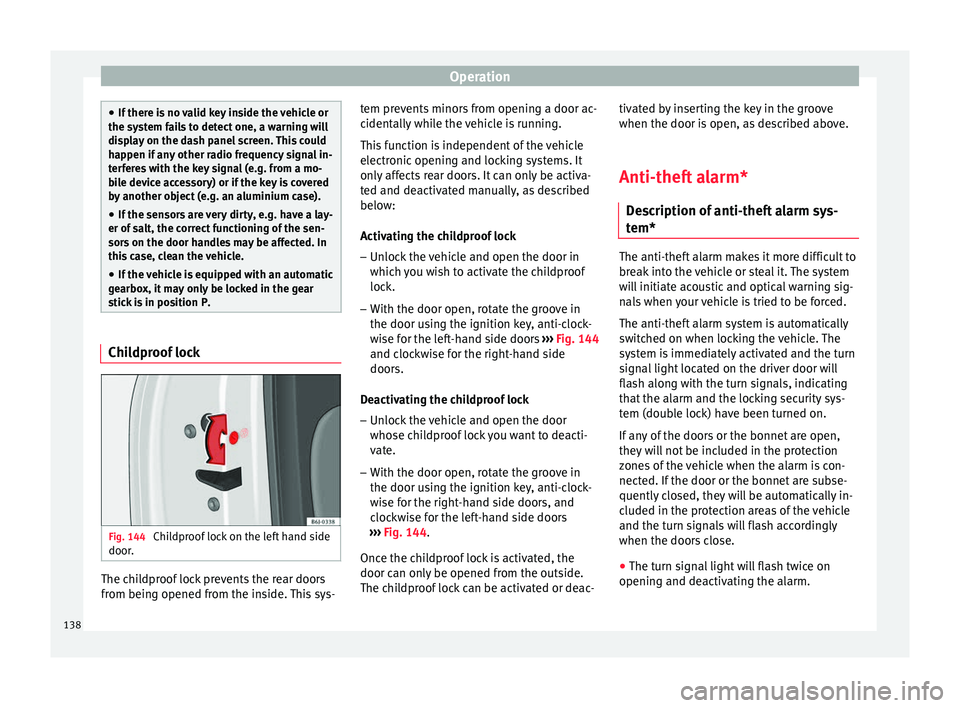
Fig. 144
Childproof lock on the left hand side
door . The childproof lock prevents the rear doors
fr
om bein
g opened fr
om the inside. This sys- tem prevents minors from opening a door ac-
cidental
ly while the vehicle is running.
This function is independent of the vehicle
electronic opening and locking systems. It
only affects rear doors. It can only be activa-
ted and deactivated manually, as described
below:
Activating the childproof lock – Unlock the vehicle and open the door in
which y
ou wish to activate the childproof
lock.
– With the door open, rotate the groove in
the door usin
g the ignition key, anti-clock-
wise for the left-hand side doors ››› Fig. 144
and clockwise for the right-hand side
doors.
Deactivating the childproof lock – Unlock the vehicle and open the door
whose chi
ldproof lock you want to deacti-
vate.
– With the door open, rotate the groove in
the door usin
g the ignition key, anti-clock-
wise for the right-hand side doors, and
clockwise for the left-hand side doors
››› Fig. 144.
Once the childproof lock is activated, the
door can only be opened from the outside.
The childproof lock can be activated or deac- tivated by inserting the key in the groove
when the door is open, a
s described above.
Anti-theft alarm* Des
cription of anti-theft alarm sys-
tem* The anti-theft alarm makes it more difficult to
bre
ak
into the vehicle or steal it. The system
will initiate acoustic and optical warning sig-
nals when your vehicle is tried to be forced.
The anti-theft alarm system is automatically
switched on when locking the vehicle. The
system is immediately activated and the turn
signal light located on the driver door will
flash along with the turn signals, indicating
that the alarm and the locking security sys-
tem (double lock) have been turned on.
If any of the doors or the bonnet are open,
they will not be included in the protection
zones of the vehicle when the alarm is con-
nected. If the door or the bonnet are subse-
quently closed, they will be automatically in-
cluded in the protection areas of the vehicle
and the turn signals will flash accordingly
when the doors close.
● The turn signal light will flash twice on
opening and de activ
ating the alarm.
138
Page 142 of 316
Operation
mechanically, the time period from when
the door i s
opened u
ntil the key is inserted
into the contact should not exceed 15 sec-
onds, otherwise the alarm will be triggered.
– Press the button on the remote c
ontrol
twice. The volumetric sensor and tilt sen-
sors will be deactivated. The alarm system
remains activated.
The vehicle interior monitoring and the anti-
tow system are automatically switched on
again next time the vehicle is locked.
The vehicle interior monitoring and anti-tow
sensor (tilt sensor) are automatically switch-
ed on when the anti-theft alarm is switched
on. In order to activate it, all the doors and
the rear lid must be closed.
If you wish to switch off the vehicle interior
monitoring and the anti-tow system, it must
be done each time that the vehicle is locked;
if not, they will be automatically switched on.
The vehicle interior monitoring and the anti-
tow system should be switched off if animals
are left inside the locked vehicle (otherwise,
their movements will trigger the alarm) or
when, for example, the vehicle is transported
or has to be towed with only one axle on the
ground. False alarms
Interior monitorin
g will only operate correctly
if the vehicle is completely closed. Please ob-
serve related legal requirements.
The following cases may cause a false alarm:
● Open windows (partially or fully),
● Movement of objects inside the vehicle,
such a
s loose papers, items hanging from
the rear vision mirror (air fresheners), etc. Note
● If the v
ehicle is relocked and the alarm is
activated without the volumetric sensor func-
tion, relocking will activate the alarm with all
its functions, except the volumetric sensor.
This function is reactivated when the alarm is
switched on again, unless it is deliberately
switched off.
● If the alarm has been triggered by the volu-
metric sensor
, this will be indicated by a
flashing of the warning lamp on the driver
door when the vehicle is opened. The flash is
different to the flash indicating the alarm is
activated.
● The vibration of a mobile phone left inside
the vehic
le may cause the vehicle interior
monitoring alarm to trigger, as both sensors
react to movements and shakes inside the ve-
hicle.
● If on activating the alarm, any door or the
rear lid i
s open, only the alarm will be activa-
ted. The vehicle interior monitoring and the anti-tow system will only be activated once
al
l
the doors are closed (including the rear
lid). Deactivating the vehicle interior moni-
torin
g and anti-t
ow system* When the vehicle is locked, the alarm will be
trigg
er
ed if movements are detected in the
interior (e.g. by animals) or if the vehicle's in-
clination is changed (e.g. during transport).
You can prevent the alarm from being trig-
gered accidentally by switching off the vehi-
cle interior monitoring and/or tow-away pro-
tection.
– To switch off the interior monitoring and
to w-
away protection, switch off the ignition
and, using the Infotainment system, select: button >
S
ET
TINGS function button >
Openin g and c
lo
sing > Central locking >
Switch off alarm.
– When the vehicle is locked now, the vehicle
interior monitorin
g and the tow-away pro-
tection are switched off until the next time
the door is opened.
If the anti-theft security system (Safelock)*
››› page 133 is switched off, the vehicle interi-
or monitoring and the tow-away protection
are automatically switched off.
140
Page 154 of 316
Operation
Note
● If the el ectric
al adjustment ever fails to op-
erate, the mirrors can be adjusted by hand by
lightly pressing the edge of the mirror glass.
● In vehicles with electric exterior mirrors,
the fol
lowing points should be observed: if,
due to an external force (e.g. being knocked
while manoeuvring), the adjustment of the
mirror housing is altered, the mirror will have
to be fully folded electrically. Do not readjust
the rear vision mirror housing by hand, as
this will interfere with the mirror adjuster
function.
● The fold-in function on the exterior mirrors
wil
l not activate at speeds over 40 km/h
(25 mph). Seats and head restraints
Adju
s
tin
g the seat and head re-
straints
Adjusting the front seats Read the additional information carefully
›› ›
page 18 WARNING
The safe driving chapter contains important
inform ation, tip
s, suggestions and warnings
that you should read and observe for your
own safety and the safety of your passengers
››› page 75. WARNING
● Never a dju
st the driver or front passenger
seat while the vehicle is in motion. While ad-
justing your seat, you will assume an incor-
rect sitting position. Risk of accidents. Adjust
the driver or front passenger seat only when
the vehicle is stationary.
● To reduce the risk of injury to the driver and
front p
assenger in case of a sudden braking
or an accident, never drive with the backrest
tilted towards the rear. The maximum protec-
tion of the seat belt can be achieved only
when the backrests are in an upright position
and the driver and front passenger have prop-
erly adjusted their seat belts. The further the backrests are tilted to the rear, the greater
the risk
of
injury due to improper positioning
of the belt web!
● Exercise caution when securing the seat
height into f
orwards/backwards position. In-
juries can be caused if the seat height is ad-
justed without due care and attention.
● To move the seat forwards and backwards,
pul
l upwards and not sideways on the lever,
as the force exerted on it in that direction
could damage it. Adjusting the front head restraints
Read the additional information carefully
› ›
›
page 19
Adjust the head restraint ›››
page 19 so
that as far as possible the top of the head re-
straint is level with the top of your head.
When this is not possible, try to get as close
as possible to this position. WARNING
● Never driv e if
the head restraints have been
removed. Risk of injury.
● After refitting the head restraint, you must
alwa
ys adjust it properly for height to achieve
optimal protection.
● Please observe the safety warnings ›››
in
Corr ect
adjustment of front head restraints on
page 79. 152
Page 155 of 316
Seats and head restraints
Note
● When fitting the he a
d restraints again, in-
sert the tubes as far as possible into the
guides without pressing the button. Adjustment of the rear head restraints
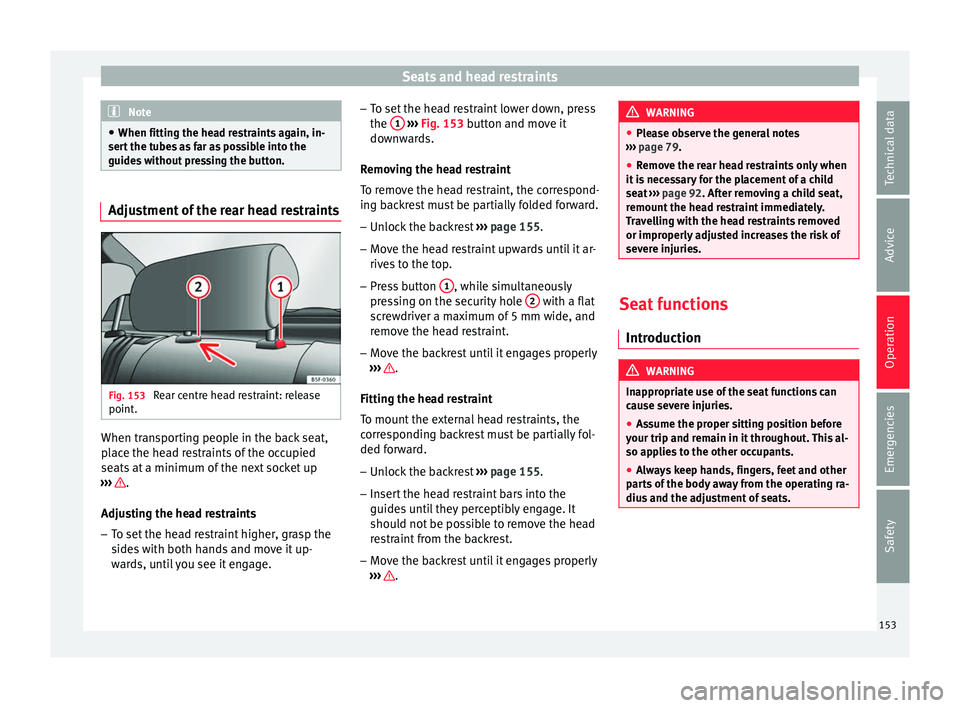
Fig. 153
Rear centre head restraint: release
point . When transporting people in the back seat,
p
l
ac
e the head restraints of the occupied
seats at a minimum of the next socket up
››› .
Adju s
tin
g the head restraints
– To set the head restraint higher, grasp the
sides
with both hands and move it up-
wards, until you see it engage. –
To set the he
ad restraint lower down, press
the 1
› ››
Fig. 153
b utton and move it
downwards.
Removing the head restraint
To remove the head restraint, the correspond-
ing backrest must be partially folded forward. – Unlock the backrest ›››
page 155.
– Move the head restraint upwards until it ar-
rives
to the top.
– Press button 1 , while simultaneously
pr e
s
sing on the security hole 2 with a flat
s c
r
ewdriver a maximum of 5 mm wide, and
remove the head restraint.
– Move the backrest until it engages properly
›››
.
Fittin g the he
a
d restraint
To mount the external head restraints, the
corresponding backrest must be partially fol-
ded forward.
– Unlock the backrest ›››
page 155.
– Insert the head restraint bars into the
guides u
ntil they perceptibly engage. It
should not be possible to remove the head
restraint from the backrest.
– Move the backrest until it engages properly
›››
. WARNING
● Ple a
se observe the general notes
››› page 79.
● Remove the rear head restraints only when
it is
necessary for the placement of a child
seat ››› page 92. After removing a child seat,
remount the head restraint immediately.
Travelling with the head restraints removed
or improperly adjusted increases the risk of
severe injuries. Seat functions
Intr oduction WARNING
Inappropriate use of the seat functions can
cau se sev
ere injuries.
● Assume the proper sitting position before
your trip and rem
ain in it throughout. This al-
so applies to the other occupants.
● Always keep hands, fingers, feet and other
part
s of the body away from the operating ra-
dius and the adjustment of seats. 153
Technical data
Advice
Operation
Emergencies
Safety
Page 157 of 316
Seats and head restraints
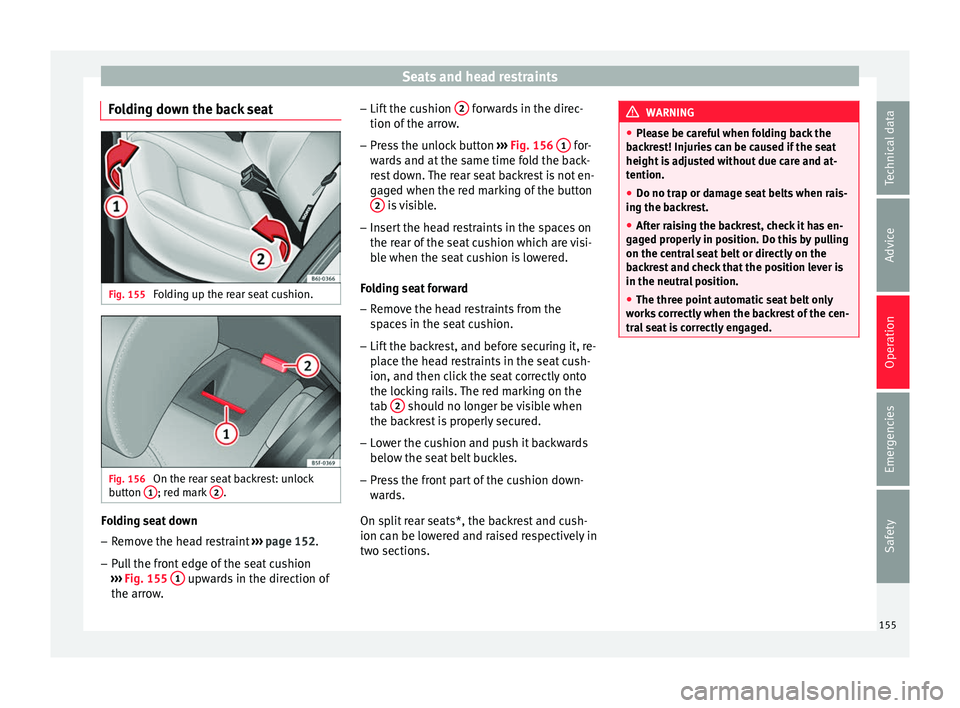
Folding down the back seat Fig. 155
Folding up the rear seat cushion. Fig. 156
On the rear seat backrest: unlock
b utt
on 1 ; red mark
2 .
Folding seat down
– Remove the head restraint ››
› page 152.
– Pull the front edge of the seat cushion
›››
Fig. 155 1 upwards in the direction of
the arr o
w
. –
Lift the c
ushion 2 forwards in the direc-
tion of the arr
o
w.
– Press the unlock button ›››
Fig. 156 1 for-
w ar
d
s and at the same time fold the back-
rest down. The rear seat backrest is not en-
gaged when the red marking of the button 2 is visible.
– Insert the head restraints in the spaces on
the r e
ar of
the seat cushion which are visi-
ble when the seat cushion is lowered.
Folding seat forward
– Remove the head restraints from the
spac
es in the seat cushion.
– Lift the backrest, and before securing it, re-
plac
e the head restraints in the seat cush-
ion, and then click the seat correctly onto
the locking rails. The red marking on the
tab 2 should no longer be visible when
the b ac
k
rest is properly secured.
– Lower the cushion and push it backwards
below the seat
belt buckles.
– Press the front part of the cushion down-
ward
s.
On split rear seats*, the backrest and cush-
ion can be lowered and raised respectively in
two sections. WARNING
● Ple a
se be careful when folding back the
backrest! Injuries can be caused if the seat
height is adjusted without due care and at-
tention.
● Do no trap or damage seat belts when rais-
ing the bac
krest.
● After raising the backrest, check it has en-
gaged pr
operly in position. Do this by pulling
on the central seat belt or directly on the
backrest and check that the position lever is
in the neutral position.
● The three point automatic seat belt only
works
correctly when the backrest of the cen-
tral seat is correctly engaged. 155
Technical data
Advice
Operation
Emergencies
Safety
Page 160 of 316
Operation
Note
● The use of el
ectrical appliances with the
engine switched off will cause a battery dis-
charge.
● Before using any electrical accessories, see
the instruction
s in ››› page 259. Cigarette lighter*
Fig. 163
Lighter. –
Press on the cigarette lighter ››
›
Fig. 163 to
activate it ››› .
– Wait for the lighter to spring out.
– Pull out the cigarette lighter and light the
cig
ar
ette on the glowing coil. WARNING
● Improper u se of
the cigarette lighter can
lead to serious injuries or start a fire. ●
Us in
g the lighter carefully. Carelessness or
negligence when using the cigarette lighter
can cause burns and serious injuries.
● The lighter only works when the ignition is
turned on or the engine i
s running. To avoid
the risk of fire, never leave children alone in-
side the vehicle. Luggage compartment
Lo a
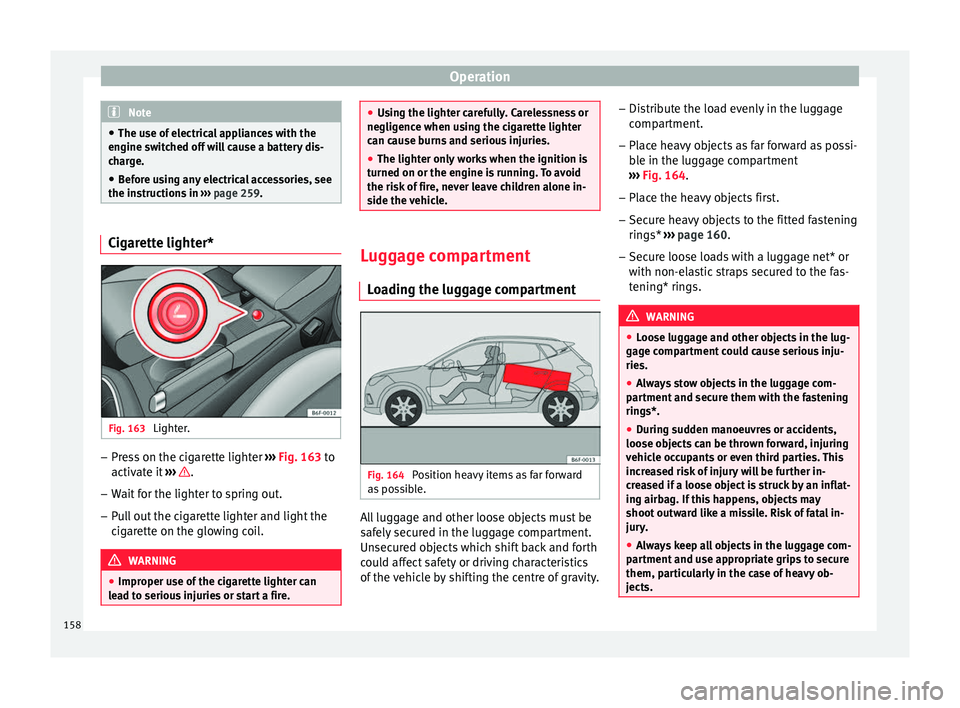
ding the luggage compartment Fig. 164
Position heavy items as far forward
a s
po
ssible. All luggage and other loose objects must be
s
af
ely
secured in the luggage compartment.
Unsecured objects which shift back and forth
could affect safety or driving characteristics
of the vehicle by shifting the centre of gravity. –
Distrib
ute the load evenly in the luggage
compartment.
– Place heavy objects as far forward as possi-
ble in the lug
gage compartment
››› Fig. 164.
– Place the heavy objects first.
– Secure heavy objects to the fitted fastening
rings* ›
›› page 160.
– Secure loose loads with a luggage net* or
with non-ela
stic straps secured to the fas-
tening* rings. WARNING
● Loo se lug
gage and other objects in the lug-
gage compartment could cause serious inju-
ries.
● Always stow objects in the luggage com-
partment
and secure them with the fastening
rings*.
● During sudden manoeuvres or accidents,
loose ob
jects can be thrown forward, injuring
vehicle occupants or even third parties. This
increased risk of injury will be further in-
creased if a loose object is struck by an inflat-
ing airbag. If this happens, objects may
shoot outward like a missile. Risk of fatal in-
jury.
● Always keep all objects in the luggage com-
partment
and use appropriate grips to secure
them, particularly in the case of heavy ob-
jects. 158