page 65 Seat Arona 2018 Owner's Guide
[x] Cancel search | Manufacturer: SEAT, Model Year: 2018, Model line: Arona, Model: Seat Arona 2018Pages: 316, PDF Size: 6.77 MB
Page 24 of 316
The essentials
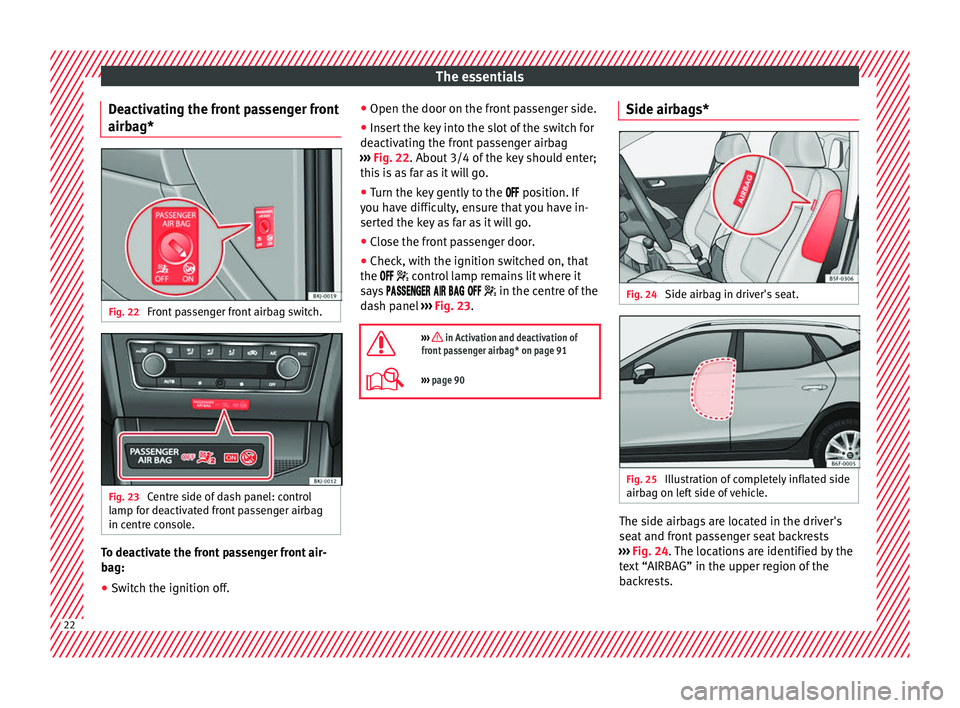
Deactivating the front passenger front
airbag* Fig. 22
Front passenger front airbag switch. Fig. 23
Centre side of dash panel: control
lamp for deactivated front passenger airbag
in centre console. To deactivate the front passenger front air-
bag:
● Switch the ignition off. ●
Open the door on the front passenger side.
● Insert the key into the slot of the switch for
deactivating the front passenger airbag
››› Fig. 22 . About 3/4 of the key should enter;
thi s
is as far as it will go.
● Turn the key gently to the
position. If
you have difficulty, ensure that you have in-
serted the key as far as it will go.
● Close the front passenger door.
● Check, with the ignition switched on, that
the
control lamp remains lit where it
says in the centre of the
dash panel ››› Fig. 23.
››› in Activation and deactivation of
front passenger airbag* on page 91
››› page 90 Side airbags*
Fig. 24
Side airbag in driver's seat. Fig. 25
Illustration of completely inflated side
airbag on left side of vehicle. The side airbags are located in the driver's
seat and front passenger seat backrests
››› Fig. 24 . The locations are identified by the
t e
xt “AIRBAG” in the upper region of the
backrests. 22
Page 25 of 316
The essentials
In conjunction with the seat belts, the side
airb ag sy
s
tem provides additional protection
for the upper body in the event of a severe
side collision.
In a side collision, the side airbags reduce
the risk of injury to passengers to the areas
of the body facing the impact. In addition to
their normal function of protecting the occu-
pants in a collision, the front and rear outer
seat belts also hold the passengers in the
event of a side collision; this is how these air-
bags provide maximum protection.
››› in Side airbags* on page 88 Head-protection airbags*
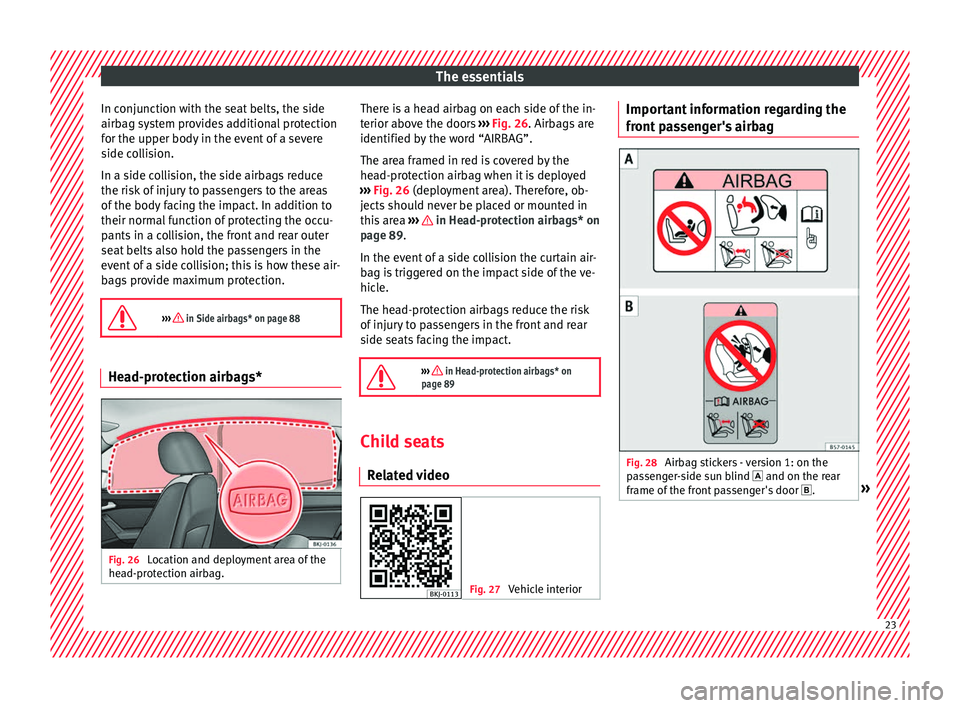
Fig. 26
Location and deployment area of the
he a
d-pr
otection airbag. There is a head airbag on each side of the in-
t
erior abo
v
e the doors ››› Fig. 26. Airbags are
identified by the word “AIRBAG”.
The area framed in red is covered by the
head-protection airbag when it is deployed
››› Fig. 26 (deployment area). Therefore, ob-
jects should never be placed or mounted in
this area ››› in Head-protection airbags* on
p ag
e 89
.
In the event of a side collision the curtain air-
bag is triggered on the impact side of the ve-
hicle.
The head-protection airbags reduce the risk
of injury to passengers in the front and rear
side seats facing the impact.
››› in Head-protection airbags* on
page 89 Child seats
R el at
ed video Fig. 27
Vehicle interior Important information regarding the
fr
ont
p
assenger's airbag Fig. 28
Airbag stickers - version 1: on the
p a
s
senger-side sun blind and on the rear
frame of the front passenger's door .» 23
Page 26 of 316
The essentials
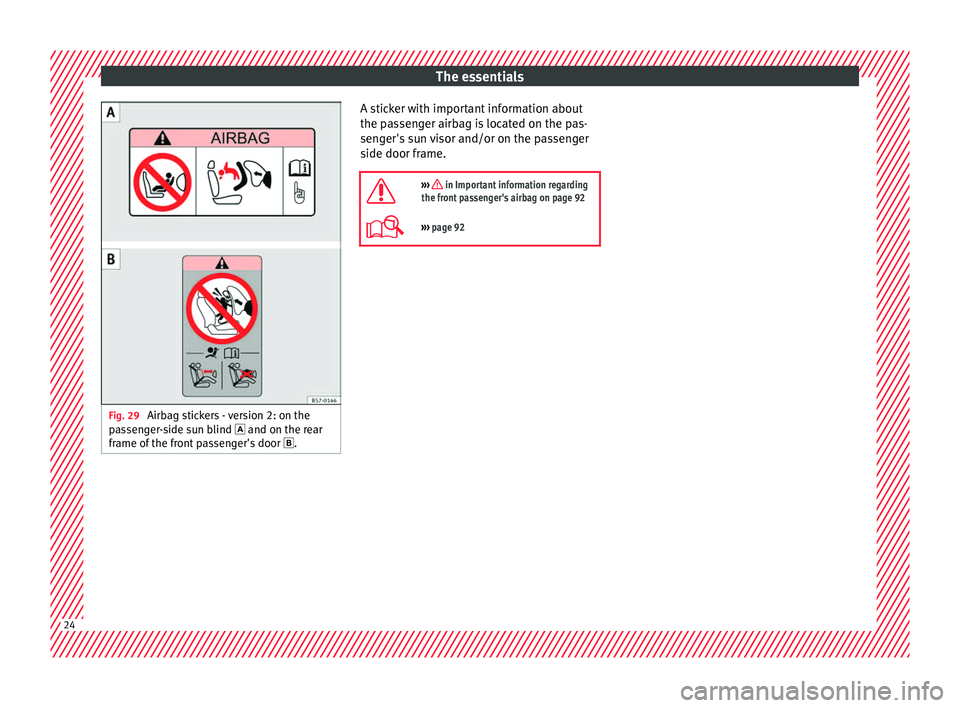
Fig. 29
Airbag stickers - version 2: on the
p a
s
senger-side sun blind and on the rear
frame of the front passenger's door . A sticker with important information about
the p
a
s
senger airbag is located on the pas-
senger's sun visor and/or on the passenger
side door frame.
››› in Important information regarding
the front passenger's airbag on page 92
››› page 92 24
Page 28 of 316
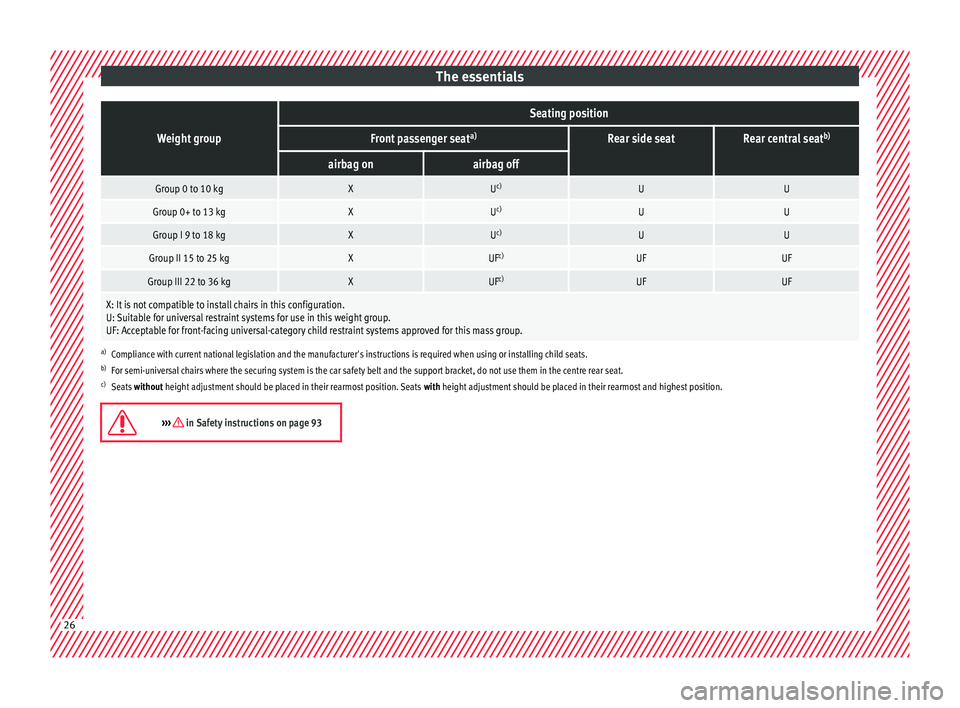
The essentialsWeight group
Seating position
Front passenger seat
a)Rear side seatRear central seatb)
airbag onairbag off
Group 0 to 10 kgXU
c)UU
Group 0+ to 13 kgXUc)UU
Group I 9 to 18 kgXUc)UU
Group II 15 to 25 kgXUF c)UFUF
Group III 22 to 36 kgXUFc)UFUF
X: It is not compatible to install chairs in this configuration.
U: Suitable for universal restraint systems for use in this weight group.
UF: Acceptable for front-facing universal-category child restraint systems approved for this mass group.
a)
Compliance with current national legislation and the manufacturer's instructions is required when using or installing child seats.
b) For semi-universal chairs where the securing system is the car safety belt and the support bracket, do not use them in the centre rear seat.
c) Seats without height adjustment should be placed in their rearmost position. Seats with height adjustment should be placed in their rearmost and highest position.
››› in Safety instructions on page 9326
Page 30 of 316
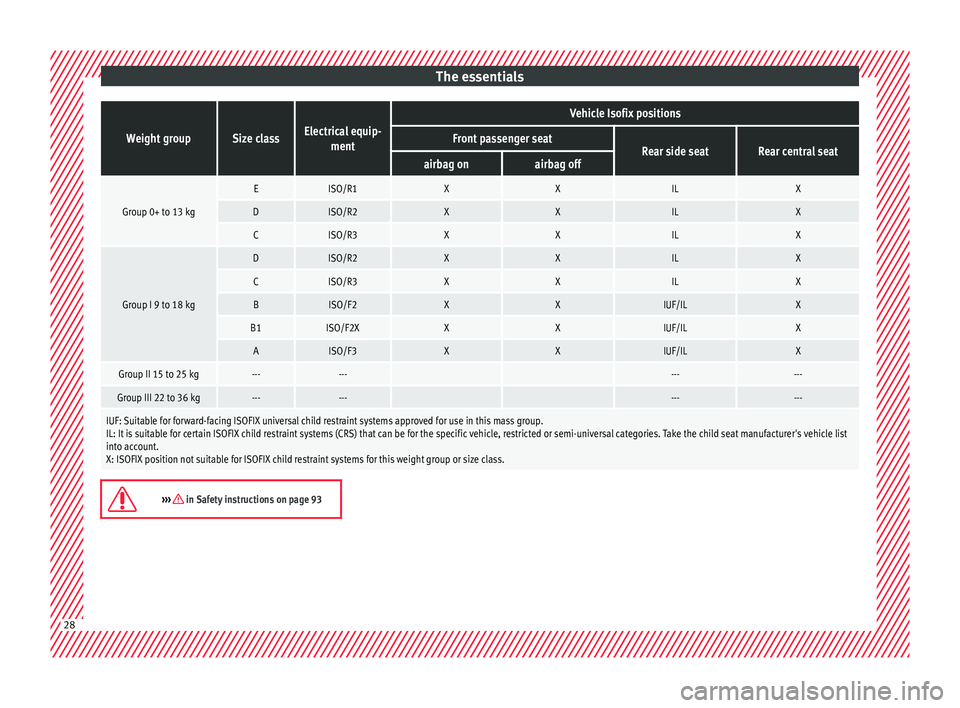
The essentialsWeight groupSize classElectrical equip-
ment
Vehicle Isofix positions
Front passenger seatRear side seatRear central seatairbag onairbag off
Group 0+ to 13 kg
EISO/R1XXILX
DISO/R2XXILX
CISO/R3XXILX
Group I 9 to 18 kg
DISO/R2XXILX
CISO/R3XXILX
BISO/F2XXIUF/ILX
B1ISO/F2XXXIUF/ILX
AISO/F3XXIUF/ILX
Group II 15 to 25 kg------ ------
Group III 22 to 36 kg------ ------
IUF: Suitable for forward-facing ISOFIX universal child restraint systems approved for use in this mass group.
IL: It is suitable for certain ISOFIX child restraint systems (CRS) that can be for the specific vehicle, restricted or semi-universal categories. Take the child seat manufacturer's vehicle list
into account.
X: ISOFIX position not suitable for ISOFIX child restraint systems for this weight group or size class.
››› in Safety instructions on page 93
28
Page 32 of 316
The essentials
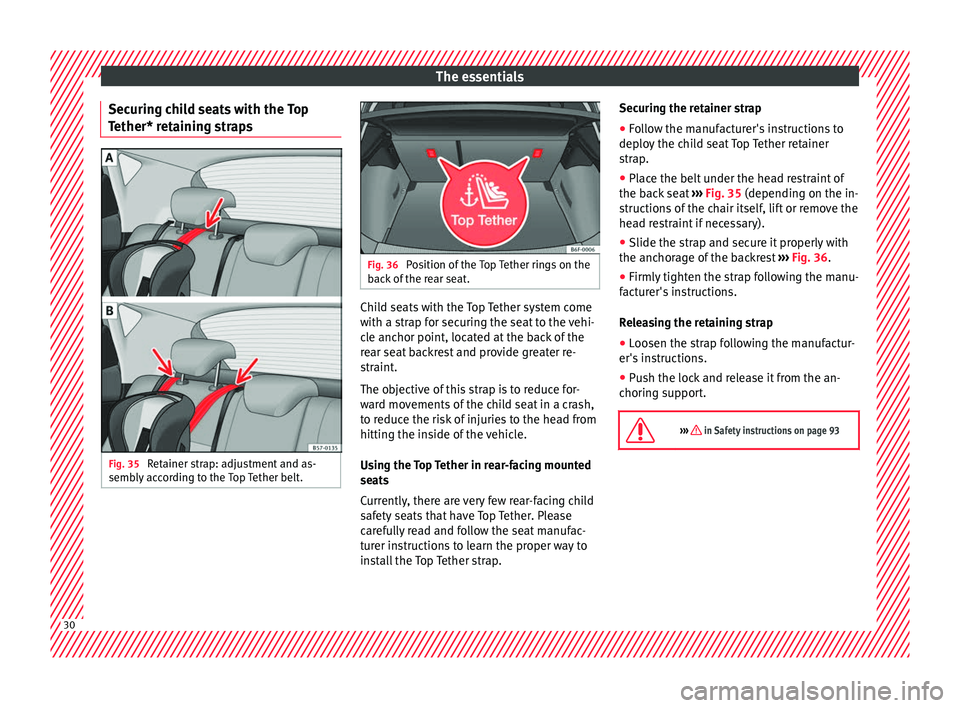
Securing child seats with the Top
T ether* r
et
aining strapsFig. 35
Retainer strap: adjustment and as-
semb ly
ac
cording to the Top Tether belt. Fig. 36
Position of the Top Tether rings on the
bac k
of the rear seat. Child seats with the Top Tether system come
w
ith a s
tr
ap for securing the seat to the vehi-
cle anchor point, located at the back of the
rear seat backrest and provide greater re-
straint.
The objective of this strap is to reduce for-
ward movements of the child seat in a crash,
to reduce the risk of injuries to the head from
hitting the inside of the vehicle.
Using the Top Tether in rear-facing mounted
seats
Currently, there are very few rear-facing child
safety seats that have Top Tether. Please
carefully read and follow the seat manufac-
turer instructions to learn the proper way to
install the Top Tether strap. Securing the retainer strap
● Follow the manufacturer's instructions to
deploy
the child seat Top Tether retainer
strap.
● Place the belt under the head restraint of
the back
seat ››› Fig. 35 (depending on the in-
structions of the chair itself, lift or remove the
head restraint if necessary).
● Slide the strap and secure it properly with
the anchorag
e of the backrest ››› Fig. 36.
● Firmly tighten the strap following the manu-
factur
er's instructions.
Releasing the retaining strap
● Loosen the strap following the manufactur-
er's ins
tructions.
● Push the lock and release it from the an-
choring s
upport.
››› in Safety instructions on page 93 30
Page 33 of 316
The essentials
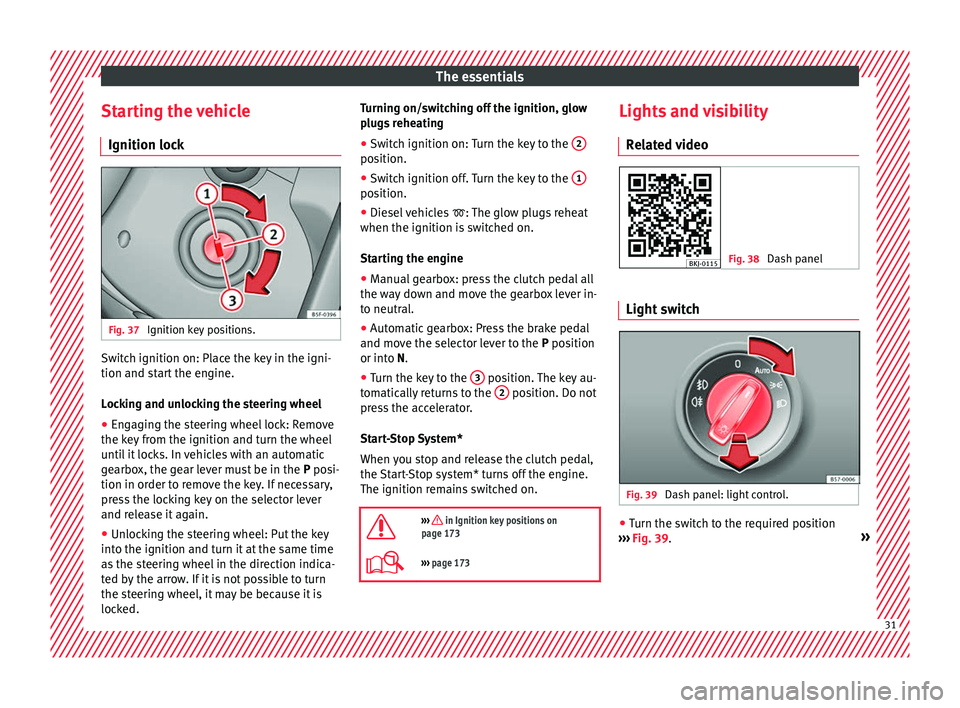
Starting the vehicle Ignition loc kFig. 37
Ignition key positions. Switch ignition on: Place the key in the igni-
tion and s
t
ar
t the engine.
Locking and unlocking the steering wheel
● Engaging the steering wheel lock: Remove
the key fr
om the ignition and turn the wheel
until it locks. In vehicles with an automatic
gearbox, the gear lever must be in the P posi-
tion in order to remove the key. If necessary,
press the locking key on the selector lever
and release it again.
● Unlocking the steering wheel: Put the key
into the ignition and turn it
at the same time
as the steering wheel in the direction indica-
ted by the arrow. If it is not possible to turn
the steering wheel, it may be because it is
locked. Turning on/switching off the ignition, glow
plugs
reheating
● Switch ignition on: Turn the key to the 2 position.
●
Switch ignition off. Turn the key to the 1 position.
●
Diesel vehicles : The glo
w p
lugs reheat
when the ignition is switched on.
Starting the engine
● Manual gearbox: press the clutch pedal all
the way
down and move the gearbox lever in-
to neutral.
● Automatic gearbox: Press the brake pedal
and move the sel
ector lever to the P position
or into N.
● Turn the key to the 3 position. The key au-
t om
atic
ally returns to the 2 position. Do not
pr e
s
s the accelerator.
Start-Stop System*
When you stop and release the clutch pedal,
the Start-Stop system* turns off the engine.
The ignition remains switched on.
››› in Ignition key positions on
page 173
››› page 173 Lights and visibility
R el
at
ed video Fig. 38
Dash panel Light switch
Fig. 39
Dash panel: light control. ●
Turn the switch to the required position
› ›
›
Fig. 39. » 31
Page 34 of 316
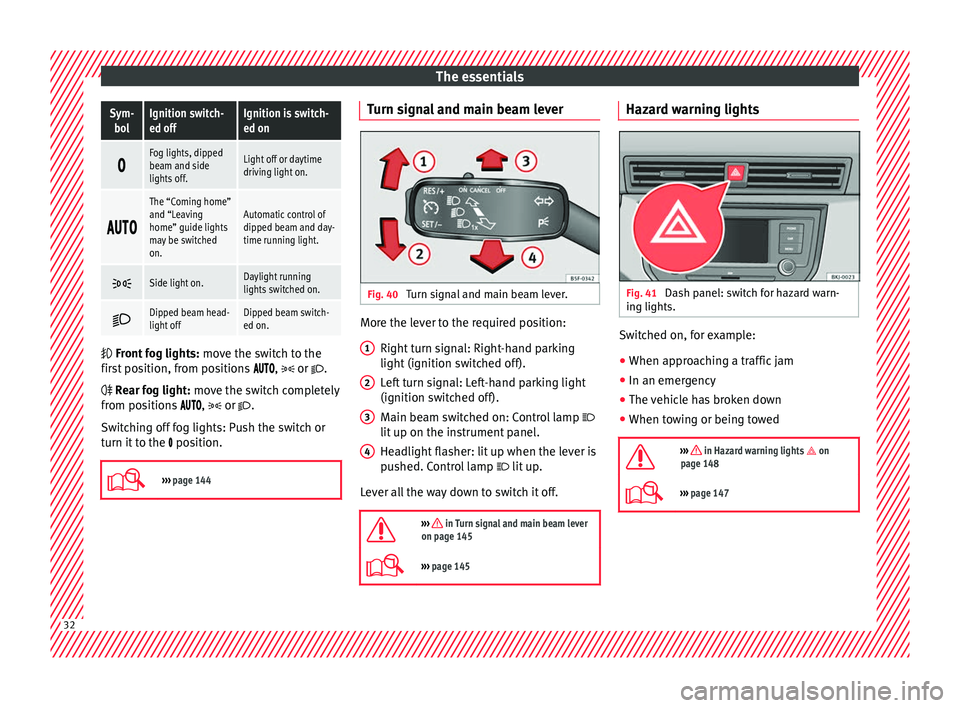
The essentialsSym-
bolIgnition switch-
ed offIgnition is switch-
ed on
Fog lights, dipped
beam and side
lights off.Light off or daytime
driving light on.
The “Coming home”
and “Leaving
home” guide lights
may be switched
on.Automatic control of
dipped beam and day-
time running light.
Side light on.Daylight running
lights switched on.
Dipped beam head-
light offDipped beam switch-
ed on.
Front
fog lights: mo
ve the switch to the
first position, from positions , or .
Rear fog light: move the switch completely
from positions ,
or
.
Switching off fog lights: Push the switch or
turn it to the position.
››› page 144 Turn signal and main beam lever
Fig. 40
Turn signal and main beam lever. More the lever to the required position:
Right t
urn s
ignal: Right-hand parking
light (ignition switched off).
Left turn signal: Left-hand parking light
(ignition switched off).
Main beam switched on: Control lamp
lit up on the instrument panel.
Headlight flasher: lit up when the lever is
pushed. Control lamp lit up.
Lever all the way down to switch it off.
››› in Turn signal and main beam lever
on page 145
››› page 145 1
2
3
4 Hazard warning lights
Fig. 41
Dash panel: switch for hazard warn-
in g lights. Switched on, for example:
●
When approaching a traffic jam
● In an emergency
● The vehicle has broken down
● When towing or being towed
››› in Hazard warning lights on
page 148
››› page 147 32
Page 35 of 316
The essentials
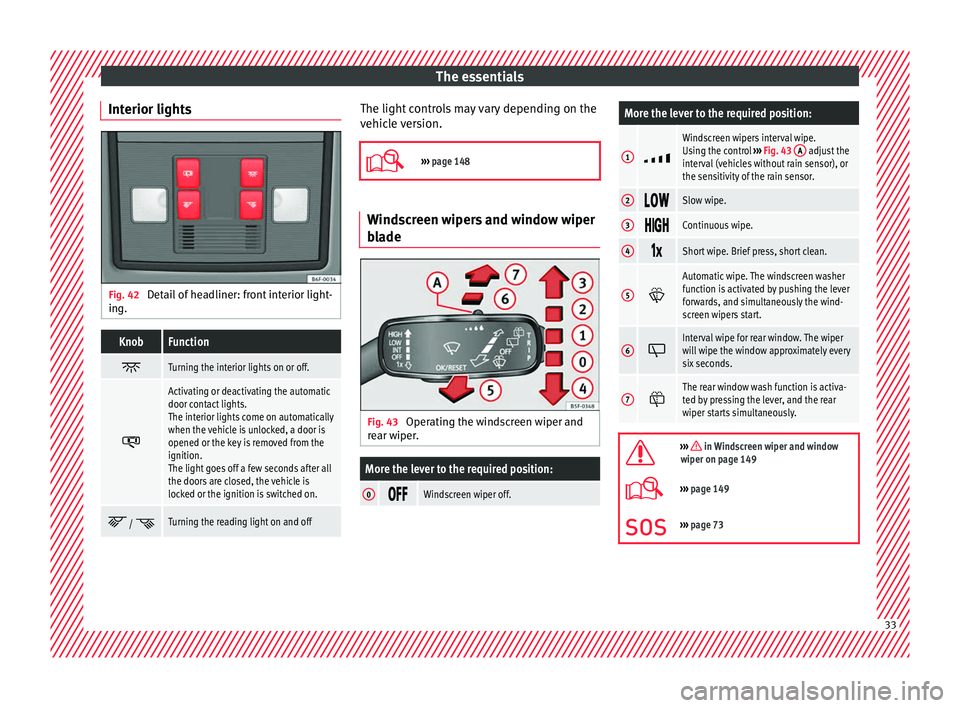
Interior lights Fig. 42
Detail of headliner: front interior light-
in g.KnobFunction
Turning the interior lights on or off.
Activating or deactivating the automatic
door contact lights.
The interior lights come on automatically
when the vehicle is unlocked, a door is
opened or the key is removed from the
ignition.
The light goes off a few seconds after all
the doors are closed, the vehicle is
locked or the ignition is switched on.
/ Turning the reading light on and off The light controls may vary depending on the
v
ehic
l
e version.
››› page 148 Windscreen wipers and window wiper
bla
de Fig. 43
Operating the windscreen wiper and
r e
ar w
iper.
More the lever to the required position:
0 Windscreen wiper off.
More the lever to the required position:
1
Windscreen wipers interval wipe.
Using the control
››› Fig. 43 A adjust the
interval (vehicles without rain sensor), or
the sensitivity of the rain sensor.
2 Slow wipe.
3
Continuous wipe.
4
Short wipe. Brief press, short clean.
5
Automatic wipe. The windscreen washer
function is activated by pushing the lever
forwards, and simultaneously the wind-
screen wipers start.
6
Interval wipe for rear window. The wiper
will wipe the window approximately every
six seconds.
7
The rear window wash function is activa-
ted by pressing the lever, and the rear
wiper starts simultaneously.
››› in Windscreen wiper and window
wiper on page 149
››› page 149
››› page 73 33
Page 37 of 316
The essentialsMenuSubmenuPossible settingDescription
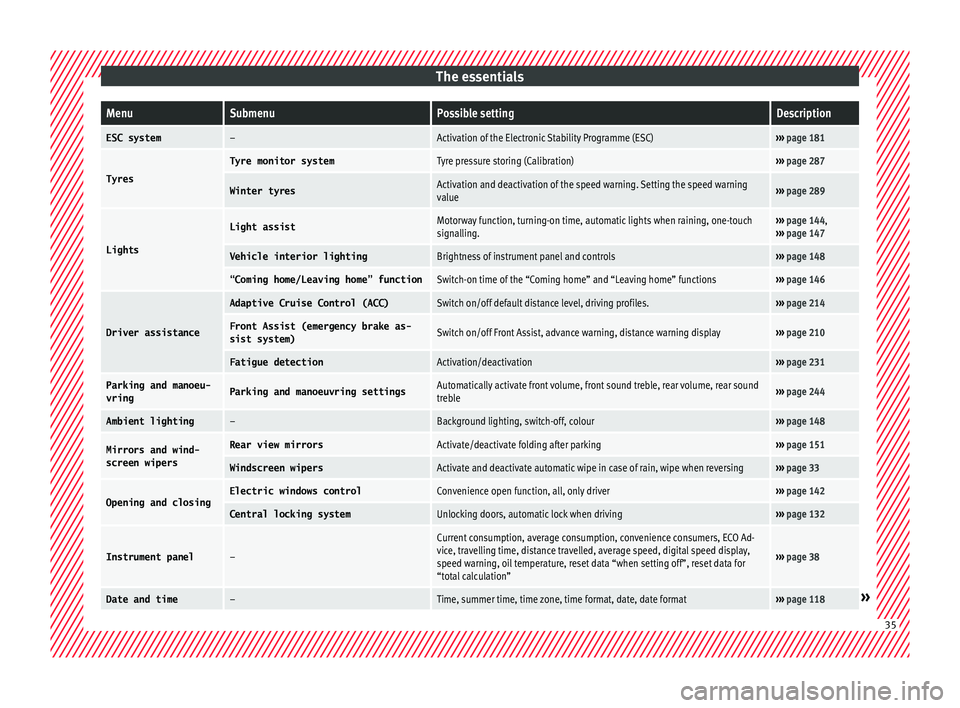
ESC system–Activation of the Electronic Stability Programme (ESC)›››
page 181
Tyres
Tyre monitor systemTyre pressure storing (Calibration)››› page 287
Winter tyresActivation and deactivation of the speed warning. Setting the speed warning
value››› page 289
Lights
Light assistMotorway function, turning-on time, automatic lights when raining, one-touch
signalling.››› page 144,
››› page 147
Vehicle interior lightingBrightness of instrument panel and controls››› page 148
“Coming home/Leaving home” functionSwitch-on time of the “Coming home” and “Leaving home” functions››› page 146
Driver assistance
Adaptive Cruise Control (ACC)Switch on/off default distance level, driving profiles.››› page 214
Front Assist (emergency brake as-
sist system)Switch on/off Front Assist, advance warning, distance warning display››› page 210
Fatigue detectionActivation/deactivation››› page 231
Parking and manoeu-
vringParking and manoeuvring settingsAutomatically activate front volume, front sound treble, rear volume, rear sound
treble››› page 244
Ambient lighting–Background lighting, switch-off, colour››› page 148
Mirrors and wind-
screen wipersRear view mirrorsActivate/deactivate folding after parking››› page 151
Windscreen wipersActivate and deactivate automatic wipe in case of rain, wipe when reversing››› page 33
Opening and closingElectric windows controlConvenience open function, all, only driver››› page 142
Central locking systemUnlocking doors, automatic lock when driving››› page 132
Instrument panel–
Current consumption, average consumption, convenience consumers, ECO Ad-
vice, travelling time, distance travelled, average speed, digital speed display,
speed warning, oil temperature, reset data “when setting off”, reset data for
“total calculation”
››› page 38
Date and time–Time, summer time, time zone, time format, date, date format››› page 118» 35