warning lights Seat Arona 2018 Service Manual
[x] Cancel search | Manufacturer: SEAT, Model Year: 2018, Model line: Arona, Model: Seat Arona 2018Pages: 316, PDF Size: 6.77 MB
Page 204 of 316
Operation
To prevent dazzling, you must apply stickers
t o c
er
tain parts of the headlight lenses. Fur-
ther information is available at any Technical
Service.
Driving on flooded roads To prevent damage to the vehicle when driv-
ing thr
ough w
ater, for example, along a floo-
ded road, please observe the following:
● The water should never come above the
low er edg
e of the bodywork.
● Drive at pedestrian speed. WARNING
After driving through water, mud, sludge,
etc ., the br
aking effect can be delayed slight-
ly due to moisture build-up on the discs and
brake pads. Applying the brakes carefully
several times will remove the moisture and
restore the full braking effect. CAUTION
● Drivin g thr
ough flooded areas may severely
damage vehicle components such as the en-
gine, transmission, running gear or electrical
system.
● Whenever driving through water, the Start-
Stop sys
tem* must be switched off
››› page 202. Note
● Check the depth of
the water before enter-
ing the flooded zone.
● Do not stop in the water, drive in reverse, or
stop the en
gine in any situation.
● Note that vehicles travelling in the opposite
direction ma
y splash water that could exceed
the maximum permitted water height for your
vehicle.
● Avoid driving through salt water (corro-
sion). Driver assistance systems
St ar
t
-Stop System*
Related video Fig. 183
Convenience Description and operation
The Start-Stop system helps save fuel and re-
duc
e C
O
2 emi
ssions.
In Start-Stop mode, the engine will automati-
cally switch off when the vehicle stops or is
stopping; for example when stopping at traf-
fic lights. The ignition remains switched on
during the stopping phase. The engine auto-
matically switches back on when required. In
202
Page 208 of 316
Operation
Control lamp Lights up
The Cruise Control System (GRA) is switched on and ac-
tive.
OR: The Adaptive Cruise Control system (CCS) is switch-
ed on and active.
OR: the speed limiter is switched on and active. Several warning and control lamps light up
for a f
ew sec
onds when the ignition is switch-
ed on, signalling that the function is being
verified. They will switch off after a few sec-
onds.
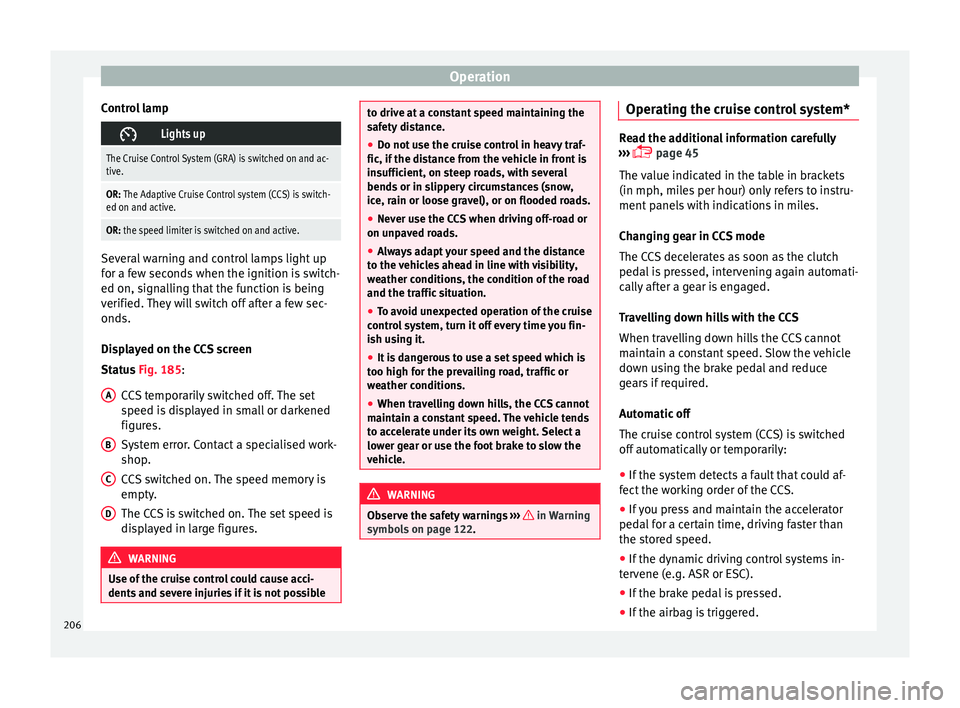
Displayed on the CCS screen
Status Fig. 185:
CCS temporarily switched off. The set
speed is displayed in small or darkened
figures.
System error. Contact a specialised work-
shop.
CCS switched on. The speed memory is
empty.
The CCS is switched on. The set speed is
displayed in large figures. WARNING
Use of the cruise control could cause acci-
dents and sev
ere injuries if it is not possibleA
B
C
D to drive at a constant speed maintaining the
saf
ety
distance.
● Do not use the cruise control in heavy traf-
fic, if the dis
tance from the vehicle in front is
insufficient, on steep roads, with several
bends or in slippery circumstances (snow,
ice, rain or loose gravel), or on flooded roads.
● Never use the CCS when driving off-road or
on unpav
ed roads.
● Always adapt your speed and the distance
to the v
ehicles ahead in line with visibility,
weather conditions, the condition of the road
and the traffic situation.
● To avoid unexpected operation of the cruise
contro
l system, turn it off every time you fin-
ish using it.
● It is dangerous to use a set speed which is
too high for the pr
evailing road, traffic or
weather conditions.
● When travelling down hills, the CCS cannot
maintain a c
onstant speed. The vehicle tends
to accelerate under its own weight. Select a
lower gear or use the foot brake to slow the
vehicle. WARNING
Observe the safety warnings ›››
in Warning
symbol s on p
age 122. Operating the cruise control system*
Read the additional information carefully
›› ›
page 45
The value indicated in the table in brackets
(in mph, miles per hour) only refers to instru-
ment panels with indications in miles.
Changing gear in CCS mode
The CCS decelerates as soon as the clutch
pedal is pressed, intervening again automati-
cally after a gear is engaged.
Travelling down hills with the CCS
When travelling down hills the CCS cannot
maintain a constant speed. Slow the vehicle
down using the brake pedal and reduce
gears if required.
Automatic off
The cruise control system (CCS) is switched
off automatically or temporarily:
● If the system detects a fault that could af-
fect the w
orking order of the CCS.
● If you press and maintain the accelerator
pedal f
or a certain time, driving faster than
the stored speed.
● If the dynamic driving control systems in-
terv
ene (e.g. ASR or ESC).
● If the brake pedal is pressed.
● If the airbag is triggered.
206
Page 209 of 316
Driver assistance systems
● If the g
e
ar lever of the DSG ®
dual clutch
gearbox is removed from the D/S position.WARNING
After use, always switch off the speed limiter
to pr ev
ent the speed being regulated against
your wishes.
● The speed limiter does not relieve the driv-
er of their re
sponsibility to drive at the appro-
priate speed. Do not drive at high speed if not
necessary.
● Using the speed limiter with adverse
weather c
onditions is dangerous and can
cause serious accidents, e.g. because of
aquaplaning, snow, ice, leaves, etc. You
should use the speed limiter function only
when traffic, road and weather conditions al-
low it to be used safely.
● When driving downhill, the speed limiter
cannot limit
the vehicle speed. Its speed will
increase due to its own weight. In this case,
select a lower gear or use the foot brake to
slow the vehicle. Speed limiter
Di s
p
lay messages and warning and
control lamp Fig. 186
On the instrument panel display:
me s
s
ages on the status of the speed limiter. The speed limiter helps avoid exceeding a
s peed indiv
idual
ly programmed upwards of
approximately 30 km/h (19 mph) driving in
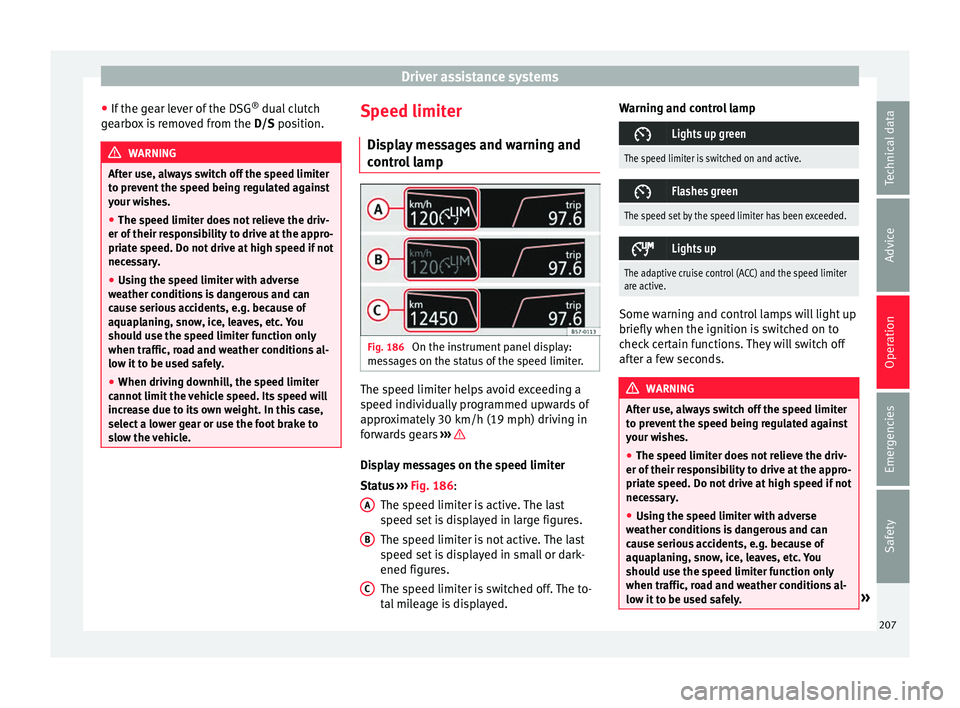
forwards gears ››› Display messages on the speed limiter
St
at
u
s ››› Fig. 186:
The speed limiter is active. The last
speed set is displayed in large figures.
The speed limiter is not active. The last
speed set is displayed in small or dark-
ened figures.
The speed limiter is switched off. The to-
tal mileage is displayed.
A B
C Warning and control lamp
Lights up green
The speed limiter is switched on and active.
Flashes green
The speed set by the speed limiter has been exceeded.
Lights up
The adaptive cruise control (ACC) and the speed limiter
are active.
Some warning and control lamps will light up
briefly
when the ignition i
s
switched on to
check certain functions. They will switch off
after a few seconds. WARNING
After use, always switch off the speed limiter
to pr ev
ent the speed being regulated against
your wishes.
● The speed limiter does not relieve the driv-
er of their re
sponsibility to drive at the appro-
priate speed. Do not drive at high speed if not
necessary.
● Using the speed limiter with adverse
weather c
onditions is dangerous and can
cause serious accidents, e.g. because of
aquaplaning, snow, ice, leaves, etc. You
should use the speed limiter function only
when traffic, road and weather conditions al-
low it to be used safely. » 207
Technical data
Advice
Operation
Emergencies
Safety
Page 214 of 316
Operation
●
In comp l
ex driving situations, occasionally
the Front Assist may issue warnings and in-
tervene in braking unnecessarily, for example
at traffic islands.
● If the operation of the Front Assist is im-
paired, f
or example, by dirt or because the ra-
dar sensor has lost its settings, the system
may issue unnecessary warnings and inter-
vene inopportunely in the braking.
● The Front Assist does not react to animals
or vehic
les crossing your path or approaching
head-on down the same lane.
● The Front Assist does not react to pedes-
trians
walking in the same direction or ap-
proaching head-on down the same lane.
● The driver must always be ready to take
over the c
ontrol of the vehicle. Note
● When the Front As
sist is connected, the in-
dications on the instrument panel screen may
be concealed by warnings from other func-
tions, such as an incoming call.
● When the Front Assist causes a braking,
the brake ped
al is “harder”.
● Automatic interventions by the Front Assist
on the brake
s may be interrupted by pressing
the clutch, accelerator or moving the wheel.
● The Front Assist may brake the vehicle until
it st
ops completely. However, the brake sys-
tem does not halt the vehicle permanently.
Use the foot brake! ●
If the Fr ont
Assist does not work as descri-
bed in this chapter (e.g. in intervenes several
times unnecessarily), switch it off. Have the
system checked by a specialised workshop.
SEAT recommends visiting a SEAT dealership. Radar sensor
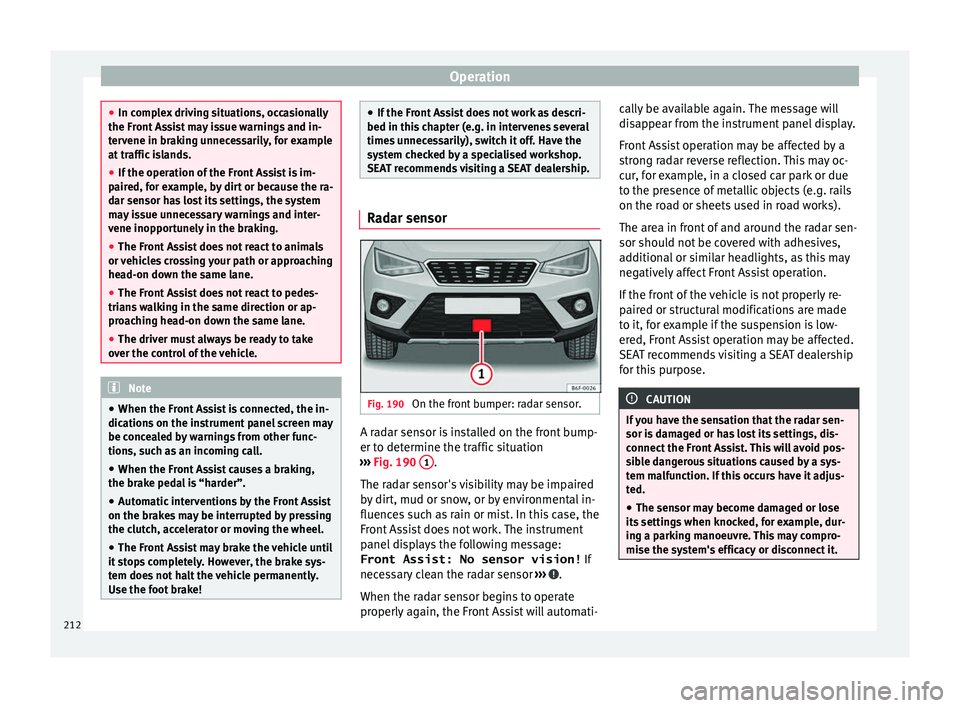
Fig. 190
On the front bumper: radar sensor. A radar sensor is installed on the front bump-
er t
o det
ermine the tr
affic situation
››› Fig. 190 1 .
The r a
d
ar sensor's visibility may be impaired
by dirt, mud or snow, or by environmental in-
fluences such as rain or mist. In this case, the
Front Assist does not work. The instrument
panel displays the following message:
Front Assist: No sensor vision! If
necessary clean the radar sensor ››› .
When the r a
d
ar sensor begins to operate
properly again, the Front Assist will automati- cally be available again. The message will
disap
pear from the instrument panel display.
Front Assist operation may be affected by a
strong radar reverse reflection. This may oc-
cur, for example, in a closed car park or due
to the presence of metallic objects (e.g. rails
on the road or sheets used in road works).
The area in front of and around the radar sen-
sor should not be covered with adhesives,
additional or similar headlights, as this may
negatively affect Front Assist operation.
If the front of the vehicle is not properly re-
paired or structural modifications are made
to it, for example if the suspension is low-
ered, Front Assist operation may be affected.
SEAT recommends visiting a SEAT dealership
for this purpose. CAUTION
If you have the sensation that the radar sen-
sor is d
amaged or has lost its settings, dis-
connect the Front Assist. This will avoid pos-
sible dangerous situations caused by a sys-
tem malfunction. If this occurs have it adjus-
ted.
● The sensor may become damaged or lose
its settin
gs when knocked, for example, dur-
ing a parking manoeuvre. This may compro-
mise the system's efficacy or disconnect it. 212
Page 217 of 316
Driver assistance systems
The adaptive cruise control (ACC) is
an e xten-
sion of the normal cruise control system
(CCS) ››› .
The A C
C
function allows the driver to program
a cruise speed of between 30 and 210 km/h
(18 and 150 mph) and to select the distance
required with regard to the vehicle in front.
The ACC will adapt the vehicle's cruise speed
at all times, maintaining a safe distance with
the vehicle in front based on its speed.
When driving behind another vehicle, the
ACC function reduces speed until it is the
same as that of the vehicle ahead and main-
tains the set distance between the vehicles.
If the vehicle ahead accelerates, the adaptive
cruise control also accelerates, going no
higher than the target speed programmed.
If the vehicle is equipped with automatic
gearbox, the ACC can brake the vehicle until
it stops completely if a vehicle in front of it
stops.
The distance programmed should be in-
creased when the road surface is wet.
Driver intervention prompt
During driving, the ACC is subject to certain
limitations inherent in the system. In other
words, in certain circumstances the driver will
have to adjust speed him or herself, as well
as the distance from other vehicles. In this case, the instrument panel screen
will
warn
you to intervene by applying the brake
and a warning tone will be heard
››› page 216. WARNING
The intelligent technology in the ACC cannot
ov er
come the system's inherent limitations
or change the laws of physics. If used negli-
gently or involuntarily, it may cause serious
accidents and injuries. The system is not a re-
placement for driver awareness.
● Adapt your speed and safe distance to the
vehicl
e in front of you at all times to suit visi-
bility, weather, road and traffic conditions.
● Do not use the ACC when visibility is bad,
on steep r
oads, with several bends or in slip-
pery circumstances such as snow, ice, rain or
loose gravel, or on flooded roads.
● Never use the ACC when driving off-road or
on unpav
ed roads. The ACC has been de-
signed for use on paved roads only.
● The ACC does not react on approaching a
fixed o
bstacle, such as the tail of a traffic
jam, a damaged vehicle or a vehicle stopped
at the traffic lights.
● The ACC only reacts to people if a pedes-
trian monitorin
g system is available. In addi-
tion, the system does not react to animals or
vehicles crossing your path or approaching
head-on down the same lane.
● If the ACC does not reduce speed sufficient-
ly, brak
e the vehicle immediately by applying
the pedal. ●
If y
ou are driving using the spare wheel,
the ACC function could automatically switch
off during your journey. Switch off the system
when starting off.
● If the vehicle continues to move involuntar-
ily af
ter a driver intervention prompt, brake
the vehicle by applying the pedal.
● If the dash panel displays a driv
er interven-
tion prompt, adjust the distance yourself.
● The driver should be ready to accelerate or
brake b
y him/herself at all times. CAUTION
If you have the sensation that the radar sen-
sor is d
amaged, disconnect the ACC. This will
avoid possible damage. If this occurs have it
adjusted.
● Repairs to the radar sensor require special-
ist
knowledge and special tools. SEAT recom-
mends visiting a SEAT dealership for this pur-
pose. Note
● If the A C
C system does not work as descri-
bed in this chapter, do not use it until it has
been checked by a specialised workshop.
SEAT recommends visiting a SEAT dealership
for this purpose.
● Maximum speed with the ACC activated is
limited to 210 km/h (150 mph). » 215
Technical data
Advice
Operation
Emergencies
Safety
Page 218 of 316
Operation
●
When the AC C
is switched on, strange
noises may be heard during automatic
braking cause by the braking system. Indications on the display, warning
and contr
o
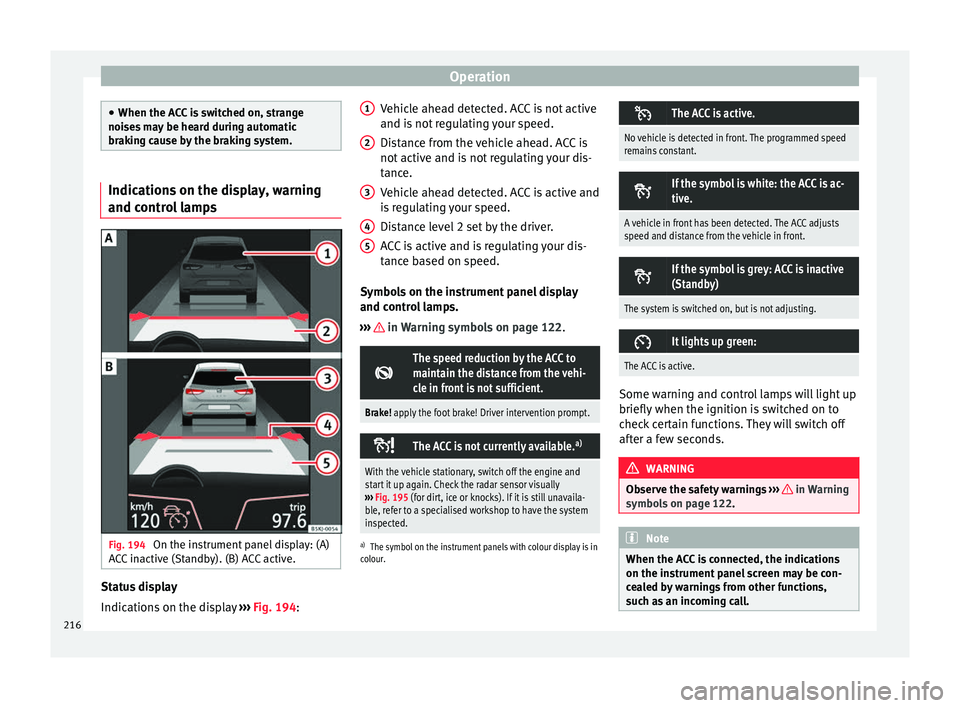
l lampsFig. 194
On the instrument panel display: (A)
A C
C
inactive (Standby). (B) ACC active. Status display
Indic
ation
s
on the display ›››
Fig. 194: Vehicle ahead detected. ACC is not active
and is not
regulating your speed.
Distance from the vehicle ahead. ACC is
not active and is not regulating your dis-
tance.
Vehicle ahead detected. ACC is active and
is regulating your speed.
Distance level 2 set by the driver.
ACC is active and is regulating your dis-
tance based on speed.
Symbols on the instrument panel display
and control lamps.
››› in Warning symbols on page 122.
The speed reduction by the ACC to
maintain the distance from the vehi-
cle in front is not sufficient.
Brake! apply the foot brake! Driver intervention prompt.
The ACC is not currently available.
a)
With the vehicle stationary, switch off the engine and
start it up again. Check the radar sensor visually
››› Fig. 195 (for dirt, ice or knocks). If it is still unavaila-
ble, refer to a specialised workshop to have the system
inspected.
a) The symbol on the instrument panels with colour display is in
colour.
1 2
3
4
5 The ACC is active.
No vehicle is detected in front. The programmed speed
remains constant.
If the symbol is white: the ACC is ac-
tive.
A vehicle in front has been detected. The ACC adjusts
speed and distance from the vehicle in front.
If the symbol is grey: ACC is inactive
(Standby)
The system is switched on, but is not adjusting.
It lights up green:
The ACC is active.
Some warning and control lamps will light up
briefly
when the ignition i
s
switched on to
check certain functions. They will switch off
after a few seconds. WARNING
Observe the safety warnings ›››
in Warning
symbol s on p
age 122. Note
When the ACC is connected, the indications
on the ins trument
panel screen may be con-
cealed by warnings from other functions,
such as an incoming call. 216
Page 224 of 316
Operation
When the ACC halts the vehicle (e.g. traffic
j am), the in
s
trument panel display shows the
ACC ready to start message. If the ve-
hicle ahead drives off again, the ACC will also
do so automatically.
If the vehicle ahead does not drive off again,
the vehicle can be kept indefinitely in the
ACC ready to start status by operating
the third lever repeatedly towards position 2
› ››
Fig. 196
or b
y pressing the brake pedal.
If the Press the brake message is shown
on the instrument panel, press the brake. If
you do not, an acoustic warning will be heard
and the ACC will switch to inactive mode
(Standby). At this point, the vehicle may be-
gin to move towards the stopped vehicle
ahead ››› .
Ov er
t
aking
When the turn signal lights up before the ve-
hicle begins an overtaking manoeuvre, the
ACC accelerates the vehicle automatically
and thus reduces the distance from the vehi-
cle in front.
When the vehicle enters the overtaking lane,
if the ACC does not detect another vehicle in
front, it accelerates until it reaches the pro-
grammed speed and maintains it.
System acceleration can be interrupted at
any time by pressing the brake or moving the
third lever backwards ››› page 217. Driving through a bend
On entering or e
xiting bends, the radar sen-
sor may no longer determine the vehicle in
front or react to a vehicle in the adjacent lane
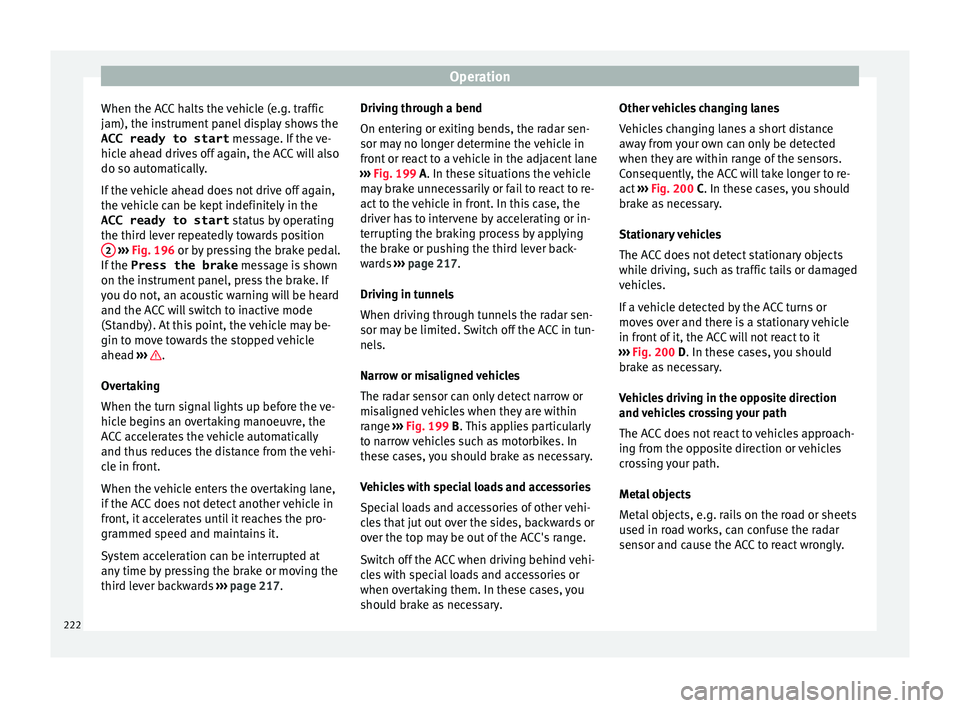
››› Fig. 199 A. In these situations the vehicle
may brake unnecessarily or fail to react to re-
act to the vehicle in front. In this case, the
driver has to intervene by accelerating or in-
terrupting the braking process by applying
the brake or pushing the third lever back-
wards ››› page 217.
Driving in tunnels
When driving through tunnels the radar sen-
sor may be limited. Switch off the ACC in tun-
nels.
Narrow or misaligned vehicles
The radar sensor can only detect narrow or
misaligned vehicles when they are within
range ››› Fig. 199 B. This applies particularly
to narrow vehicles such as motorbikes. In
these cases, you should brake as necessary.
Vehicles with special loads and accessories
Special loads and accessories of other vehi-
cles that jut out over the sides, backwards or
over the top may be out of the ACC's range.
Switch off the ACC when driving behind vehi-
cles with special loads and accessories or
when overtaking them. In these cases, you
should brake as necessary. Other vehicles changing lanes
Vehicl
es changing lanes a short distance
away from your own can only be detected
when they are within range of the sensors.
Consequently, the ACC will take longer to re-
act ››› Fig. 200 C. In these cases, you should
brake as necessary.
Stationary vehicles
The ACC does not detect stationary objects
while driving, such as traffic tails or damaged
vehicles.
If a vehicle detected by the ACC turns or
moves over and there is a stationary vehicle
in front of it, the ACC will not react to it
››› Fig. 200 D. In these cases, you should
brake as necessary.
Vehicles driving in the opposite direction
and vehicles crossing your path
The ACC does not react to vehicles approach-
ing from the opposite direction or vehicles
crossing your path.
Metal objects
Metal objects, e.g. rails on the road or sheets
used in road works, can confuse the radar
sensor and cause the ACC to react wrongly.
222
Page 226 of 316
Operation
Blind spot detector (BSD) with
p ark
in
g assistance (RCTA)*
Introduction The blind spot detector (BSD) helps to detect
the traffic
s
ituation behind the vehicle.
The integrated parking assistant (RCTA) helps
the driver when backing out of a parallel
parking spot and in manoeuvring.
The blind spot detector has been developed
for driving on paved roads. WARNING
The smart technology incorporated into the
blind s pot
detector (BSD) with parking assis-
tance (RCTA) included cannot overcome the
limits imposed by the laws of physics; it only
works within the limits of the system. Acci-
dents and severe injury may occur if the blind
spot detection system or the rear cross traffic
alert are used negligently or involuntarily.
The system is not a replacement for driver
awareness.
● Adapt your speed and safe distance to the
vehicl
e in front of you at all times to suit visi-
bility, weather, road and traffic conditions.
● Keep your hands on the wheel at all times
to be re
ady to intervene in the steering at any
time.
● Pay attention to the control lamps that may
come on in the ext
ernal rear view mirrors and on the instrument panel, and follow any in-
struction
s
they may give.
● The blind spot assistant could react to any
speci
al constructions that might be present
on the sides of the vehicle: e.g. high or irreg-
ular dividers. This may cause erroneous warn-
ings.
● Never use the blind spot detector with rear
cro
ss traffic alert on unpaved roads. The blind
spot detector with rear cross traffic alert has
been designed for use on paved roads.
● Always pay attention to the vehicle's sur-
roundin
gs.
● Never use the blind spot detector or the
parkin
g assistant if the radar sensors are
dirty.
● The external rear view mirror control lamps
may
have limited functionality due to solar
radiation. CAUTION
● The ra d
ar sensors on the rear bumper may
be damaged or shifted in the event of a colli-
sion, for example, when entering or exiting a
parking space. This may result in the system
disconnecting itself, or at least possibly hav-
ing its functionality diminished.
● In order to ensure that the radar sensors
work pr
operly, keep the rear bumper free of
snow and ice and do not cover it.
● The rear bumper should only be painted
with paint
authorised by SEAT. The blind spot detector's functions may be limited or work
incorr
ectly
if other paints are used. Note
If the blind spot detector with parking assis-
t ant doe
s not work as described in this chap-
ter, do not use it and contact a specialised
workshop. Control lamps
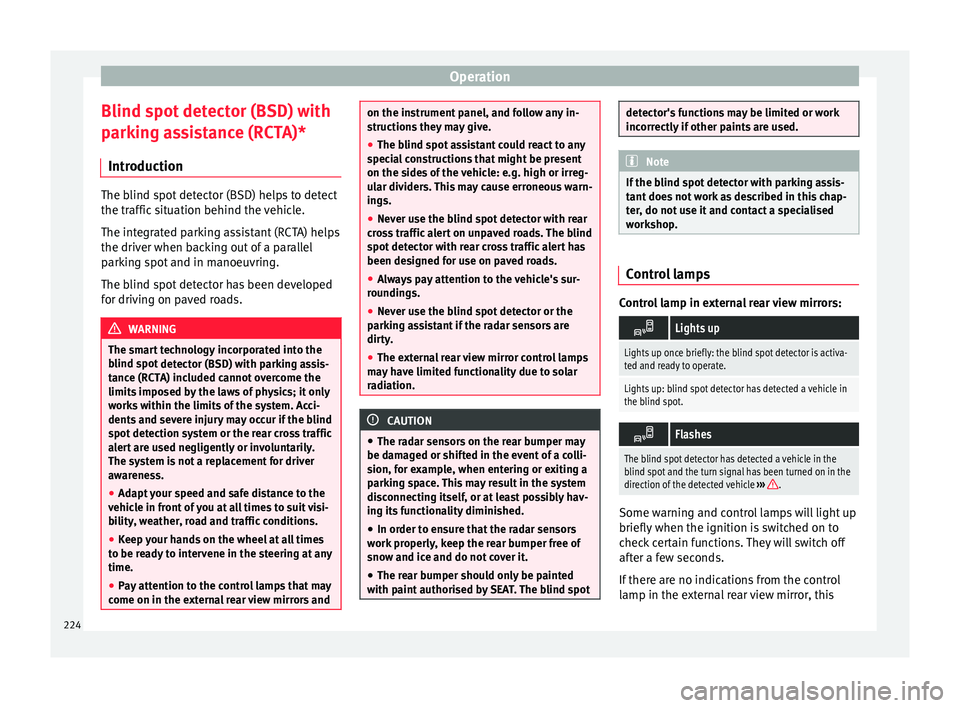
Control lamp in external rear view mirrors:
Lights up
Lights up once briefly: the blind spot detector is activa-
ted and ready to operate.
Lights up: blind spot detector has detected a vehicle in
the blind spot.
Flashes
The blind spot detector has detected a vehicle in the
blind spot and the turn signal has been turned on in the
direction of the detected vehicle
›››
. Some warning and control lamps will light up
briefly
when the ignition i
s
switched on to
check certain functions. They will switch off
after a few seconds.
If there are no indications from the control
lamp in the external rear view mirror, this
224
Page 256 of 316
Operation
Trailer towing Wh at
do
you need to bear in mind
when towing a trailer? Your vehicle may be used to tow a trailer
when fitted w
ith the c
orrect equipment.
If you wish to retrofit a towing bracket, con-
sult ››› page 257.
Connectors
Your vehicle is fitted with a 13-pin connector
for the electrical connection between the
trailer and the vehicle.
If the trailer has a 7-pin plug you will need to
use an adapter cable. It is available at any
Technical Service.
Trailer weight/drawbar load
Never exceed the authorised trailer weight. If
you do not load the trailer up to the maxi-
mum permitted trailer weight, you can then
climb correspondingly steeper slopes.
The maximum trailer weights listed are only
applicable for altitudes up to 1000 m above
sea level. With increasing altitude the engine
power and therefore the vehicle climbing
ability are impaired because of the reduced
air density. The maximum trailer weight has
to be reduced accordingly. The weight of the
vehicle and trailer combination must be re- duced by 10% for every further 1000 m (or
par
t
thereof). The gross combination weight
is the actual weight of the laden vehicle plus
the actual weight of the laden trailer. When
possible, operate the trailer with the maxi-
mum permitted drawbar load on the ball joint
of the towing bracket, but do not exceed the
specified limit.
The figures for trailer weights and drawbar
loads that are given on the data plate of the
towing bracket are for certification purposes
only. The correct towing bracket figures for
your specific model, which may be lower than
these figures, are given in the vehicle docu-
mentation or on ››› page 291, Technical
specifications.
Distributing the load
Distribute loads in the trailer so that heavy
objects are as near to the axle as possible.
Loads carried in the trailer must be secured
to prevent them moving.
Tyre pressure
The maximum permissible tyre pressure val-
ues are shown on the sticker on the rear part
of the left front door frame. Set the tyre pres-
sure of the trailer tyres in accordance with the
trailer manufacturer's recommendations. Exterior mirrors
Check whether
you can see enough of the
road behind the trailer with the standard rear
vision mirrors. If this is not the case, you
should have additional exterior mirrors fitted.
Both exterior mirrors should be mounted on
hinged extension brackets. Adjust the mirrors
to give sufficient vision to the rear.
Tow rope
Always use a cable between the vehicle and
the trailer ››› page 255.
Trailer rear lights
The trailer's rear lights should comply with
the statutory safety regulations ››› page 255. WARNING
Never transport people in a trailer. This could
re s
ult in fatal accidents. Note
● To w
ing a trailer places additional demands
on the vehicle. We recommend additional
services between the normal inspection inter-
vals if the vehicle is used frequently for tow-
ing a trailer.
● Find out whether special regulations apply
to to
wing a trailer in your country. 254
Page 258 of 316
Operation
WARNING
The towing bracket ball coupling must be
st or
ed securely in the luggage compartment
to prevent them being flung through the vehi-
cle and causing injury. Note
● By l
aw, the ball coupling must be removed
if a trailer is not being towed if it obscures
the number plate. Driving with a trailer
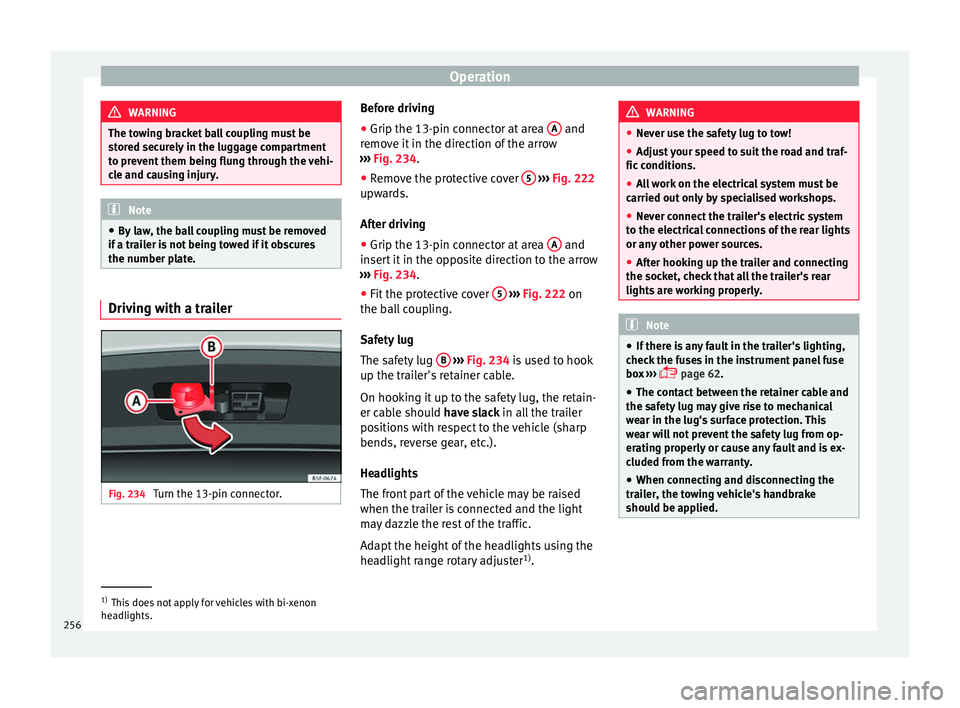
Fig. 234
Turn the 13-pin connector. Before driving
●
Grip the 13-pin connector at area A and
r emo
v
e it in the direction of the arrow
››› Fig. 234.
● Remove the protective cover 5
› ››
Fig. 222
up w
ards.
After driving
● Grip the 13-pin connector at area A and
in ser
t
it in the opposite direction to the arrow
››› Fig. 234.
● Fit the protective cover 5
› ›
› Fig. 222
on
the ball coupling.
Safety lug
The safety lug B
› ›
› Fig. 234
is used to hook
up the trailer's retainer cable.
On hooking it up to the safety lug, the retain-
er cable should have slack in all the trailer
positions with respect to the vehicle (sharp
bends, reverse gear, etc.).
Headlights
The front part of the vehicle may be raised
when the trailer is connected and the light
may dazzle the rest of the traffic.
Adapt the height of the headlights using the
headlight range rotary adjuster 1)
. WARNING
● Never u se the s
afety lug to tow!
● Adjust your speed to suit the road and traf-
fic condition
s.
● All work on the electrical system must be
carried out on
ly by specialised workshops.
● Never connect the trailer's electric system
to the electric
al connections of the rear lights
or any other power sources.
● After hooking up the trailer and connecting
the socket, c
heck that all the trailer's rear
lights are working properly. Note
● If ther e i
s any fault in the trailer's lighting,
check the fuses in the instrument panel fuse
box ›››
page 62.
● The contact between the retainer cable and
the safety
lug may give rise to mechanical
wear in the lug's surface protection. This
wear will not prevent the safety lug from op-
erating properly or cause any fault and is ex-
cluded from the warranty.
● When connecting and disconnecting the
trail
er, the towing vehicle's handbrake
should be applied. 1)
This does not apply for vehicles with bi-xenon
hea dlights.
256