ACC Seat Arona 2018 Owner's Manual
[x] Cancel search | Manufacturer: SEAT, Model Year: 2018, Model line: Arona, Model: Seat Arona 2018Pages: 316, PDF Size: 6.77 MB
Page 2 of 316

SEAT S.A. is permanently concerned about continuous development of its t\
ypes and models. For this reason we ask you to under-
stand, that at any given time, changes regarding shape, equipment and te\
chnique may take place on the car delivered. For this reason
no right at all may derive based on the data, drawings and descriptions \
in this current handbook.
All texts, illustrations and standards in this handbook are based on the\
status of information at the time of printing. Except for error
or omission, the information included in the current handbook is valid a\
s of the date of closing print.
Re-printing, copying or translating, whether total or partial is not all\
owed unless SEAT allows it in written form.
SEAT reserves all rights in accordance with the “Copyright” Act.
All rights on changes are reserved.
❀This paper has been manufactured using bleached non-chlorine cellulose.
© SEAT S.A. - Reprint: 15.11.17
About this manual
This manual contains a description of the
equipment supplied with the vehicle at the
time this manual was published. Some of the
units described herein will not be available
until a later date or are only available in cer -
tain markets.
Because this is a general manual for the
ARONA , some of the equipment and functions
that are described in this manual are not in-
cluded in all types or variants of the model;
they may vary or be modied depending on
the technical requirements and on the mar -
ket; this is in no way deceptive advertising.
The illustrations are intended as a general
guide and may vary from the equipment tted
in your vehicle in some details.
The steering indications (left, right, forward,
reverse) appearing in this manual refer to the
normal driving movements of the vehicle ex -
cept when otherwise indicated.
The audiovisual material only is intended to
help users to understand certain car function -
alities better. It does not replace the instruc -
tion manual. Please use the instruction manu -
al to obtain more comprehensive information
and indications.
The equipment marked with an aster -
isk* is tted as standard only in certain
versions, and is only supplied as op -
tional extras for some versions, or are
only offered in certain countries.
® All registered marks are indicated with
®. Although the copyright symbol does
not appear, it is a copyrighted mark.
>> The section is continued on the follow -
ing page.
Important warnings on a given page
Detailed contents on a given page
General information on a given page
Emergency information on a given page
WARNING
Texts preceded by this symbol contain infor -
mation on safety. They warn you about possi -
ble dangers of accident or injury.
CAUTION
Texts with this symbol draw your attention to
potential sources of damage to your vehicle.
For the sake of the environment
Texts preceded by this symbol contain rele-
vant information concerning environmental
protection.
Note
Texts preceded by this symbol contain additio -
nal information.
This manual is divided into six large parts,
which are:
1. The essentials
2. Safety
3. Emergencies
4. Operation
5. Tips
6. Technical data
At the end of this manual, there is a detailed
alphabetical index that will help you quickly
nd the information you require.
Page 3 of 316
Foreword
Thi s
In
struction Manual and its correspond-
ing supplements should be read carefully to
familiarise yourself with your vehicle.
Besides the regular care and maintenance of
the vehicle, its correct handling will help pre-
serve its value.
For safety reasons, always note the informa-
tion concerning accessories, modifications
and part replacements.
If selling the vehicle, give all of the on-board
documentation to the new owner, as it
should be kept with the vehicle.
You can access the information in this man-
ual using:
● Thematic table of contents that follows the
manual’s g
eneral chapter structure.
● Visual table of contents that uses graphics
to indicat
e the pages containing “essential”
information, which is detailed in the corre-
sponding chapters.
● Alphabetical index with many terms and
synonyms
to help you find information. WARNING
Read and always observe safety informa-
tion conc ernin
g the passenger's front air-
bag ››› page 92, Important information
regarding the front passenger's airbag .
Thank you for trusting in us.
We wish you safe and enjoya-
ble motoring.
SEAT, S.A.
Page 5 of 316
Convenience: Kessy keyless access and starting system, Full LED (+ Vision Pack): Full LED + Welcome light + LED day-
time running lights + Lights sensor + LED interior lighting.
www.seat.com/youtube-af/ibiza/comfort››› page 135
››› page 146
››› page 148
››› page 202
Technology: SEAT Navi System Plus 8” + Full Link / + Wireless charger in centre console + / Kessy keyless access and
starting system.
www.seat.com/youtube-af/ibiza/technology››› page 129
››› page 135
››› Booklet Navigation system
Safety: Adaptive cruise control + city safety assist with pedestrian monitoring, drowsiness detection, hill-start assist
system; includes on-board computer and rear view camera.
www.seat.com/youtube-af/safety››› page 187
››› page 214
››› page 231
››› page 246
Page 8 of 316
Table of Contents
Automatic gearbox/DSG automatic gear-
bo x*
. . . . . . . . . . . . . . . . . . . . . . . . . . . . . . . . . . . 188
Ge
ar-change indicator . . . . . . . . . . . . . . . . . . . . 195
Steering . . . . . . . . . . . . . . . . . . . . . . . . . . . . . . . 195
Run-in and economical driving . . . . . . . . . . . . . 197
Engine management and emission control sys-
tem . . . . . . . . . . . . . . . . . . . . . . . . . . . . . . . . . . . 200
Driv
ing tips . . . . . . . . . . . . . . . . . . . . . . . . . . . . . 201
Driver assistance systems . . . . . . . . . . . . . . . . . 202
Start-Stop System* . . . . . . . . . . . . . . . . . . . . . . . 202
Cruise control system (CCS)* . . . . . . . . . . . . . . . 205
Speed limiter . . . . . . . . . . . . . . . . . . . . . . . . . . . 207
Emergency brake assist system (Front As-
sis
t)* . . . . . . . . . . . . . . . . . . . . . . . . . . . . . . . . . . 210
Adaptive Cruise Control ACC* . . . . . . . . . . . . . . 214
Blind spot detector (BSD) with parking assis-
tance (RCT
A)* . . . . . . . . . . . . . . . . . . . . . . . . . . . 224
SEAT Drive Profile* . . . . . . . . . . . . . . . . . . . . . . . 229
Fatigue detection (break recommendation)* . . 231
Park Assist* . . . . . . . . . . . . . . . . . . . . . . . . . . . . 232
Parking aid (Park Pilot) . . . . . . . . . . . . . . . . . . . 240
Rear Assist “Rear View Camera”* . . . . . . . . . . . 246
Towing bracket device . . . . . . . . . . . . . . . . . . . . 249
Towing bracket device* . . . . . . . . . . . . . . . . . . . 249
Trailer towing . . . . . . . . . . . . . . . . . . . . . . . . . . . 254
Advice . . . . . . . . . . . . . . . . . . . . . . . . . . . . . . . . 259
Care and maintenance . . . . . . . . . . . . . . . . . . . . 259
Accessories and modifications to the vehi-
cle
. . . . . . . . . . . . . . . . . . . . . . . . . . . . . . . . . . . . 259
Care and cleaning . . . . . . . . . . . . . . . . . . . . . . . 260
Care of the vehicle exterior . . . . . . . . . . . . . . . . 261
Caring for the vehicle interior . . . . . . . . . . . . . . 266
Checking and refilling levels . . . . . . . . . . . . . . . 269
Refuelling . . . . . . . . . . . . . . . . . . . . . . . . . . . . . . 269
Fuel . . . . . . . . . . . . . . . . . . . . . . . . . . . . . . . . . . . 269
AdBlue ®
. . . . . . . . . . . . . . . . . . . . . . . . . . . . . . . 271
Working in the engine compartment . . . . . . . . 273 Engine oil . . . . . . . . . . . . . . . . . . . . . . . . . . . . . . 275
Cooling system . . . . . . . . . . . . . . . . . . . . . . . . . . 278
Brake fluid . . . . . . . . . . . . . . . . . . . . . . . . . . . . . 280
Windscreen washer reservoir . . . . . . . . . . . . . . 281
Vehicle battery . . . . . . . . . . . . . . . . . . . . . . . . . . 281
Wheels . . . . . . . . . . . . . . . . . . . . . . . . . . . . . . . . 283
Wheels and tyres . . . . . . . . . . . . . . . . . . . . . . . . 283
Spare wheel (temporary spare wheel)* . . . . . . 288
Winter service . . . . . . . . . . . . . . . . . . . . . . . . . . . 289
Technical data . . . . . . . . . . . . . . . . . . . . . . . . 291
Technical specifications . . . . . . . . . . . . . . . . . . 291
Important information . . . . . . . . . . . . . . . . . . . . 291
Information on fuel consumption . . . . . . . . . . . 292
Trailer mode . . . . . . . . . . . . . . . . . . . . . . . . . . . . 292
Wheels . . . . . . . . . . . . . . . . . . . . . . . . . . . . . . . . 293
Engine data . . . . . . . . . . . . . . . . . . . . . . . . . . . . . 294
Dimensions . . . . . . . . . . . . . . . . . . . . . . . . . . . . . 299
Index . . . . . . . . . . . . . . . . . . . . . . . . . . . . . . . . . 301
6
Page 19 of 316
The essentials
● Openin g the r
e
ar lid: exert slight pressure
on the handle ››› Fig. 6. The rear lid opens au-
tomatically.
● Closing the rear lid: hold it by one of the
handle
s on the interior lining and close it by
pushing gently.
››› in Opening and closing on
page 141
››› page 17 Unlocking the rear lid manually
Fig. 7
Unlocking the rear lid manually. This allows the vehicle to be opened if the
c
entr
al
locking does not work (for example, if
the battery is flat). There is a groove in the luggage compart-
ment allo
wing access to the emergency
opening mechanism.
Opening the rear lid from inside the luggage
compartment
● Insert the key in the groove and unlock the
lockin
g system, turning the key from right to
left, as shown by the arrow ››› Fig. 7.
Related video Fig. 8
Bonnet Bonnet
Fig. 9
Release lever in the driver's footwell
ar e
a. Fig. 10
Lever under the bonnet. Before opening the bonnet, make sure that
the w
ind
s
creen wiper arms are in place
against the windscreen.
● Open the door and pull the lever under the
dashbo
ard ››› Fig. 9 1 .
» 17
Page 27 of 316
The essentials
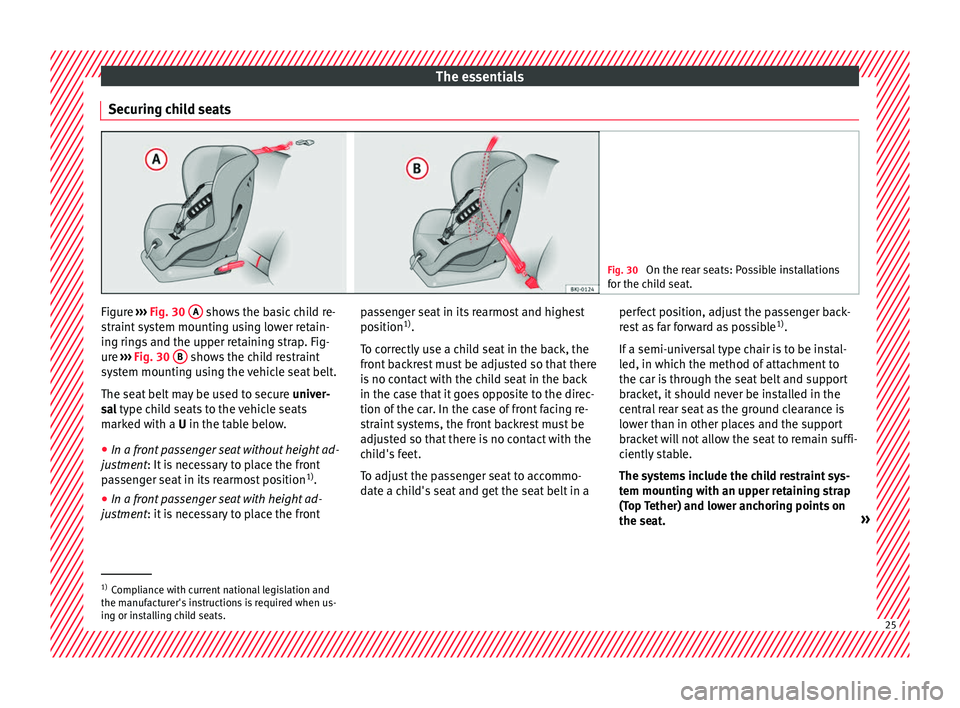
Securing child seats Fig. 30
On the rear seats: Possible installations
for the c hi
ld seat. Figure
›››
Fig. 30
A shows the basic child re-
s tr
aint
system mounting using lower retain-
ing rings and the upper retaining strap. Fig-
ure ››› Fig. 30 B shows the child restraint
sy s
t
em mounting using the vehicle seat belt.
The seat belt may be used to secure univer-
sal type child seats to the vehicle seats
marked with a U in the table below.
● In a front passenger seat without height ad-
justment
: It is necessary to place the front
passenger seat in its rearmost position 1)
.
● In a front passenger seat with height ad-
justment
: it is necessary to place the front passenger seat in its rearmost and highest
position
1)
.
T
o correctly use a child seat in the back, the
front backrest must be adjusted so that there
is no contact with the child seat in the back
in the case that it goes opposite to the direc-
tion of the car. In the case of front facing re-
straint systems, the front backrest must be
adjusted so that there is no contact with the
child's feet.
To adjust the passenger seat to accommo-
date a child's seat and get the seat belt in a perfect position, adjust the passenger back-
res
t as far forward as possible 1)
.
If a semi-universal type chair is to be instal-
led, in which the method of attachment to
the car is through the seat belt and support
bracket, it should never be installed in the
central rear seat as the ground clearance is
lower than in other places and the support
bracket will not allow the seat to remain suffi-
ciently stable.
The systems include the child restraint sys-
tem mounting with an upper retaining strap
(Top Tether) and lower anchoring points on
the seat. »1)
Compliance with current national legislation and
the manuf act
urer's instructions is required when us-
ing or installing child seats. 25
Page 28 of 316
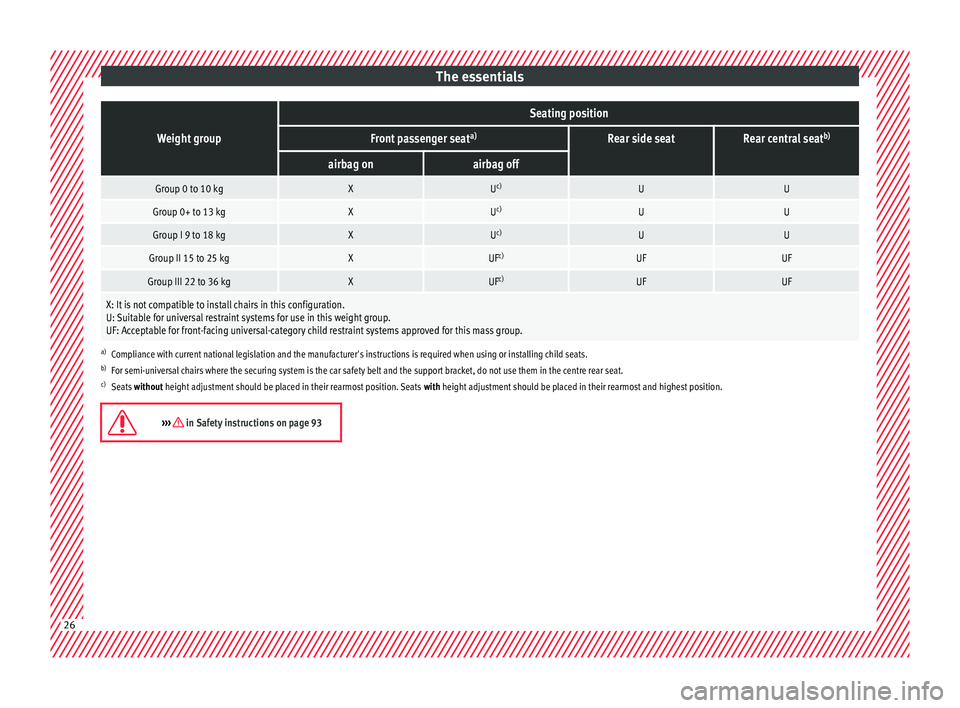
The essentialsWeight group
Seating position
Front passenger seat
a)Rear side seatRear central seatb)
airbag onairbag off
Group 0 to 10 kgXU
c)UU
Group 0+ to 13 kgXUc)UU
Group I 9 to 18 kgXUc)UU
Group II 15 to 25 kgXUF c)UFUF
Group III 22 to 36 kgXUFc)UFUF
X: It is not compatible to install chairs in this configuration.
U: Suitable for universal restraint systems for use in this weight group.
UF: Acceptable for front-facing universal-category child restraint systems approved for this mass group.
a)
Compliance with current national legislation and the manufacturer's instructions is required when using or installing child seats.
b) For semi-universal chairs where the securing system is the car safety belt and the support bracket, do not use them in the centre rear seat.
c) Seats without height adjustment should be placed in their rearmost position. Seats with height adjustment should be placed in their rearmost and highest position.
››› in Safety instructions on page 9326
Page 30 of 316
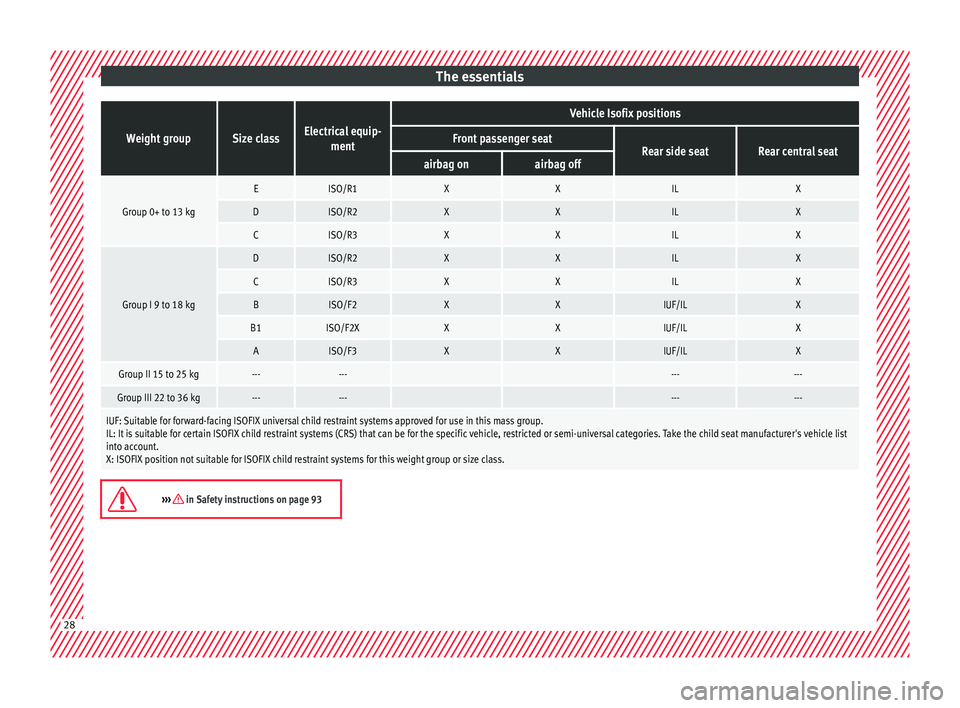
The essentialsWeight groupSize classElectrical equip-
ment
Vehicle Isofix positions
Front passenger seatRear side seatRear central seatairbag onairbag off
Group 0+ to 13 kg
EISO/R1XXILX
DISO/R2XXILX
CISO/R3XXILX
Group I 9 to 18 kg
DISO/R2XXILX
CISO/R3XXILX
BISO/F2XXIUF/ILX
B1ISO/F2XXXIUF/ILX
AISO/F3XXIUF/ILX
Group II 15 to 25 kg------ ------
Group III 22 to 36 kg------ ------
IUF: Suitable for forward-facing ISOFIX universal child restraint systems approved for use in this mass group.
IL: It is suitable for certain ISOFIX child restraint systems (CRS) that can be for the specific vehicle, restricted or semi-universal categories. Take the child seat manufacturer's vehicle list
into account.
X: ISOFIX position not suitable for ISOFIX child restraint systems for this weight group or size class.
››› in Safety instructions on page 93
28
Page 31 of 316
The essentials
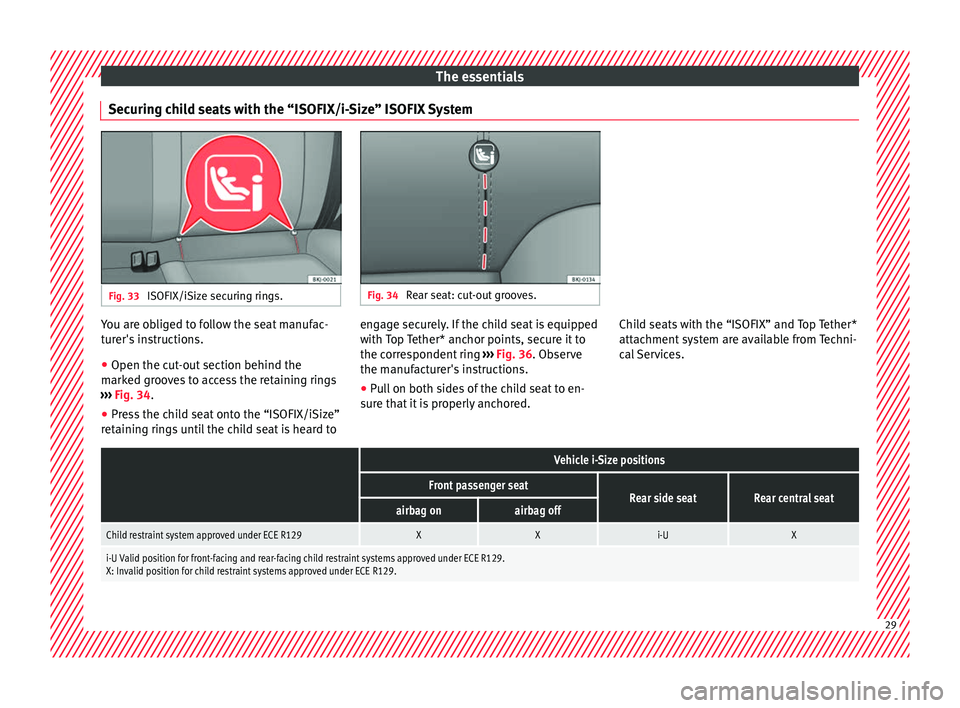
Securing child seats with the “ISOFIX/i-Size” ISOFIX System Fig. 33
ISOFIX/iSize securing rings. Fig. 34
Rear seat: cut-out grooves. You are obliged to follow the seat manufac-
t
ur
er's
instructions.
● Open the cut-out section behind the
marked gr
ooves to access the retaining rings
››› Fig. 34.
● Press the child seat onto the “ISOFIX/iSize”
retainin
g rings until the child seat is heard to engage securely. If the child seat is equipped
with Top
Tether* anchor points, secure it to
the correspondent ring ››› Fig. 36. Observe
the manufacturer's instructions.
● Pull on both sides of the child seat to en-
sure th
at it is properly anchored. Child seats with the “ISOFIX” and Top Tether*
attachment
system are available from Techni-
cal Services.
Vehicle i-Size positions
Front passenger seatRear side seatRear central seatairbag onairbag off
Child restraint system approved under ECE R129XXi-UX
i-U Valid position for front-facing and rear-facing child restraint systems approved under ECE R129.
X: Invalid position for child restraint systems approved under ECE R129. 29
Page 33 of 316
The essentials
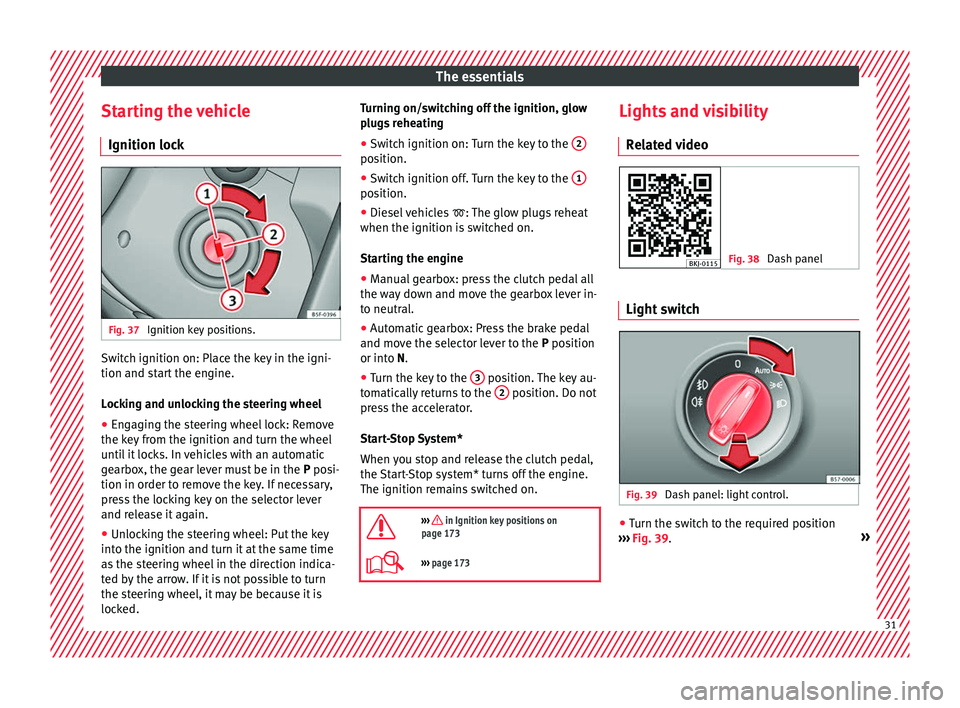
Starting the vehicle Ignition loc kFig. 37
Ignition key positions. Switch ignition on: Place the key in the igni-
tion and s
t
ar
t the engine.
Locking and unlocking the steering wheel
● Engaging the steering wheel lock: Remove
the key fr
om the ignition and turn the wheel
until it locks. In vehicles with an automatic
gearbox, the gear lever must be in the P posi-
tion in order to remove the key. If necessary,
press the locking key on the selector lever
and release it again.
● Unlocking the steering wheel: Put the key
into the ignition and turn it
at the same time
as the steering wheel in the direction indica-
ted by the arrow. If it is not possible to turn
the steering wheel, it may be because it is
locked. Turning on/switching off the ignition, glow
plugs
reheating
● Switch ignition on: Turn the key to the 2 position.
●
Switch ignition off. Turn the key to the 1 position.
●
Diesel vehicles : The glo
w p
lugs reheat
when the ignition is switched on.
Starting the engine
● Manual gearbox: press the clutch pedal all
the way
down and move the gearbox lever in-
to neutral.
● Automatic gearbox: Press the brake pedal
and move the sel
ector lever to the P position
or into N.
● Turn the key to the 3 position. The key au-
t om
atic
ally returns to the 2 position. Do not
pr e
s
s the accelerator.
Start-Stop System*
When you stop and release the clutch pedal,
the Start-Stop system* turns off the engine.
The ignition remains switched on.
››› in Ignition key positions on
page 173
››› page 173 Lights and visibility
R el
at
ed video Fig. 38
Dash panel Light switch
Fig. 39
Dash panel: light control. ●
Turn the switch to the required position
› ›
›
Fig. 39. » 31