reset Seat Arona 2018 Owner's Manual
[x] Cancel search | Manufacturer: SEAT, Model Year: 2018, Model line: Arona, Model: Seat Arona 2018Pages: 316, PDF Size: 6.77 MB
Page 37 of 316
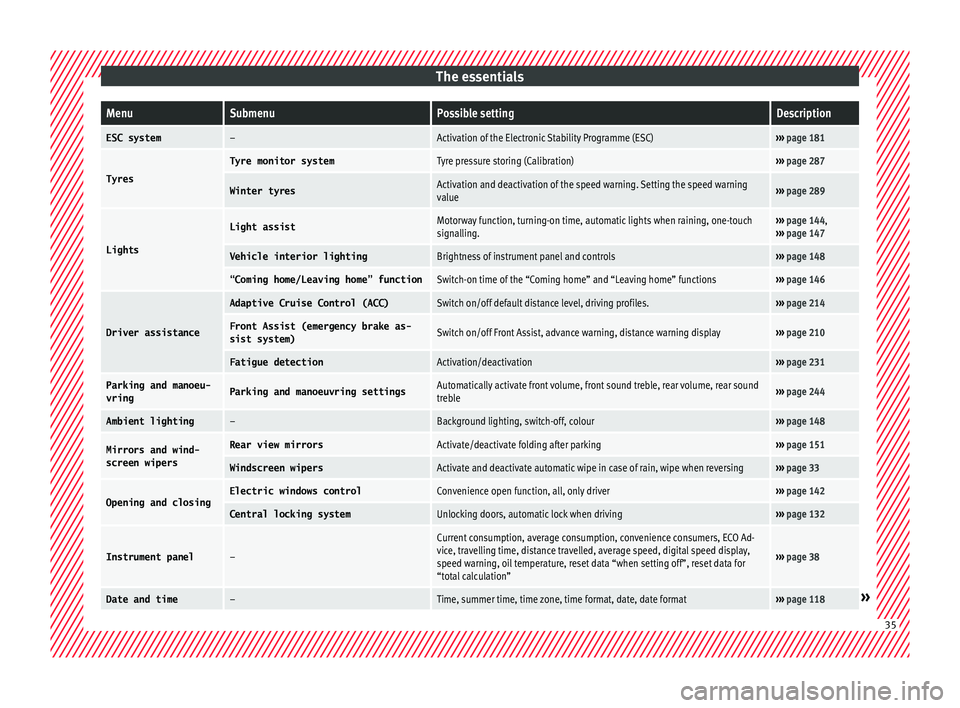
The essentialsMenuSubmenuPossible settingDescription
ESC system–Activation of the Electronic Stability Programme (ESC)›››
page 181
Tyres
Tyre monitor systemTyre pressure storing (Calibration)››› page 287
Winter tyresActivation and deactivation of the speed warning. Setting the speed warning
value››› page 289
Lights
Light assistMotorway function, turning-on time, automatic lights when raining, one-touch
signalling.››› page 144,
››› page 147
Vehicle interior lightingBrightness of instrument panel and controls››› page 148
“Coming home/Leaving home” functionSwitch-on time of the “Coming home” and “Leaving home” functions››› page 146
Driver assistance
Adaptive Cruise Control (ACC)Switch on/off default distance level, driving profiles.››› page 214
Front Assist (emergency brake as-
sist system)Switch on/off Front Assist, advance warning, distance warning display››› page 210
Fatigue detectionActivation/deactivation››› page 231
Parking and manoeu-
vringParking and manoeuvring settingsAutomatically activate front volume, front sound treble, rear volume, rear sound
treble››› page 244
Ambient lighting–Background lighting, switch-off, colour››› page 148
Mirrors and wind-
screen wipersRear view mirrorsActivate/deactivate folding after parking››› page 151
Windscreen wipersActivate and deactivate automatic wipe in case of rain, wipe when reversing››› page 33
Opening and closingElectric windows controlConvenience open function, all, only driver››› page 142
Central locking systemUnlocking doors, automatic lock when driving››› page 132
Instrument panel–
Current consumption, average consumption, convenience consumers, ECO Ad-
vice, travelling time, distance travelled, average speed, digital speed display,
speed warning, oil temperature, reset data “when setting off”, reset data for
“total calculation”
››› page 38
Date and time–Time, summer time, time zone, time format, date, date format››› page 118» 35
Page 42 of 316
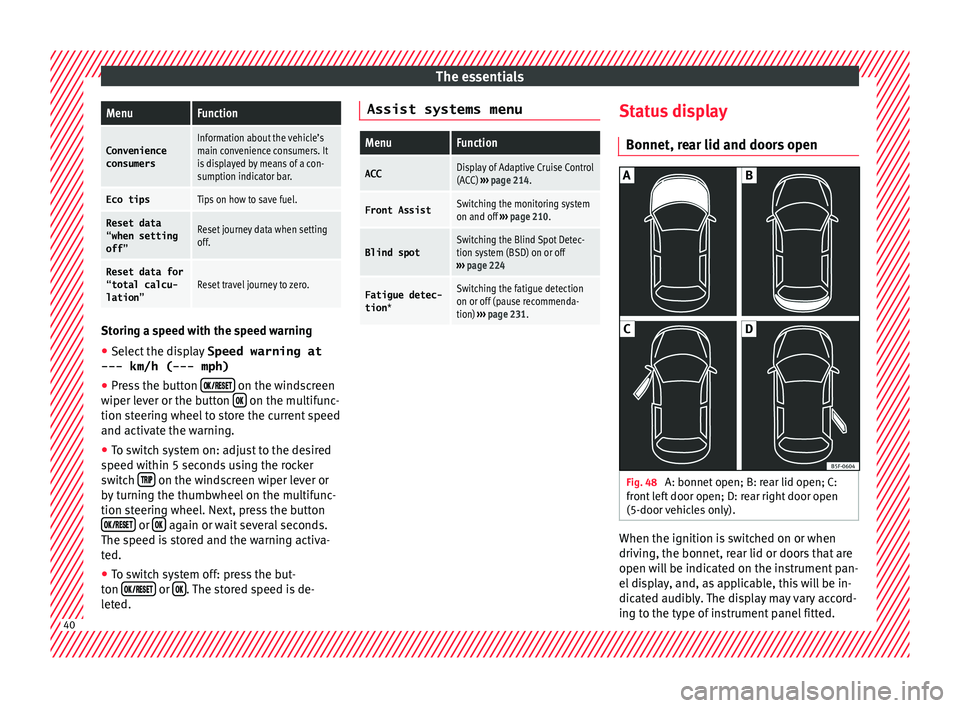
The essentialsMenuFunction
Convenience
consumersInformation about the vehicle’s
main convenience consumers. It
is displayed by means of a con-
sumption indicator bar.
Eco tipsTips on how to save fuel.
Reset data “when setting
off”Reset journey data when setting
off.
Reset data for“total calcu-
lation”Reset travel journey to zero. Storing a speed with the speed warning
● Select the display Speed warning at
--- km/h (---
mph)
● Press the button
on the windscreen
w iper l
ev
er or the button on the multifunc-
tion s t
eerin
g wheel to store the current speed
and activate the warning.
● To switch system on: adjust to the desired
speed within 5 sec
onds using the rocker
switch on the windscreen wiper lever or
b y
t
urning the thumbwheel on the multifunc-
tion steering wheel. Next, press the button or
again or wait several seconds.
The s peed i
s
stored and the warning activa-
ted.
● To switch system off: press the but-
ton or
. The stored speed is de-
l et
ed. Assist systems menu
MenuFunction
ACCDisplay of Adaptive Cruise Control
(ACC)
››› page 214.
Front AssistSwitching the monitoring system
on and off ››› page 210.
Blind spotSwitching the Blind Spot Detec-
tion system (BSD) on or off
››› page 224
Fatigue detec-
tion *Switching the fatigue detection
on or off (pause recommenda-
tion) ››› page 231. Status display
Bonnet, r e
ar lid and door
s open Fig. 48
A: bonnet open; B: rear lid open; C:
fr ont
l
eft door open; D: rear right door open
(5-door vehicles only). When the ignition is switched on or when
driv
in
g, the bonnet, r
ear lid or doors that are
open will be indicated on the instrument pan-
el display, and, as applicable, this will be in-
dicated audibly. The display may vary accord-
ing to the type of instrument panel fitted. 40
Page 46 of 316
The essentials
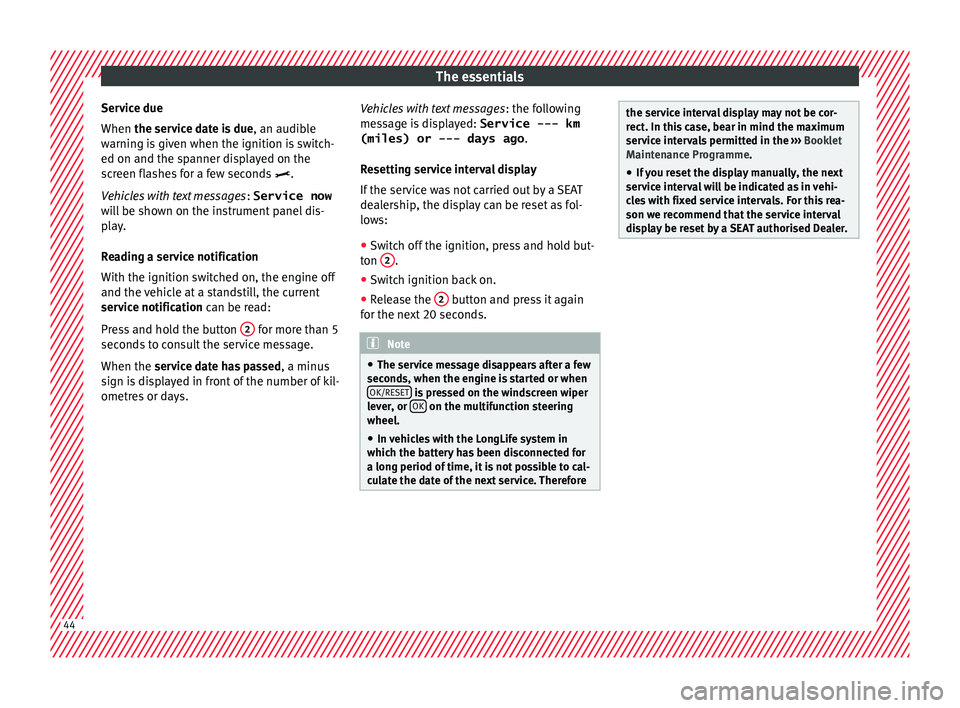
Service due
When the ser v
ic
e date is due, an audible
warning is given when the ignition is switch-
ed on and the spanner displayed on the
screen flashes for a few seconds .
Vehicles with text messages : Service now
will be shown on the instrument panel dis-
play.
Reading a service notification
With the ignition switched on, the engine off
and the vehicle at a standstill, the current
service notification can be read:
Press and hold the button 2 for more than 5
sec ond
s
to consult the service message.
When the service date has passed , a minus
sign is displayed in front of the number of kil-
ometres or days. Vehicles with text messages
: the fol
lowing
message is displayed: Service --- km
(miles) or --- days ago .
Resetting service interval display
If the service was not carried out by a SEAT
dealership, the display can be reset as fol-
lows: ● Switch off the ignition, press and hold but-
ton 2 .
● Switch ignition back on.
● Release the 2 button and press it again
f or the ne
xt
20 seconds. Note
● The serv ic
e message disappears after a few
seconds, when the engine is started or when OK/RESET is pressed on the windscreen wiper
lev er
, or OK on the multifunction steering
wheel.
● In v
ehicles with the LongLife system in
which the batt
ery has been disconnected for
a long period of time, it is not possible to cal-
culate the date of the next service. Therefore the service interval display may not be cor-
rect
. In thi
s case, bear in mind the maximum
service intervals permitted in the ››› Booklet
Maintenance Programme.
● If you reset the display manually, the next
servic
e interval will be indicated as in vehi-
cles with fixed service intervals. For this rea-
son we recommend that the service interval
display be reset by a SEAT authorised Dealer. 44
Page 120 of 316
Operation
CAUTION
● When the engine i s
cold, avoid high revs
and heavy acceleration and do not make the
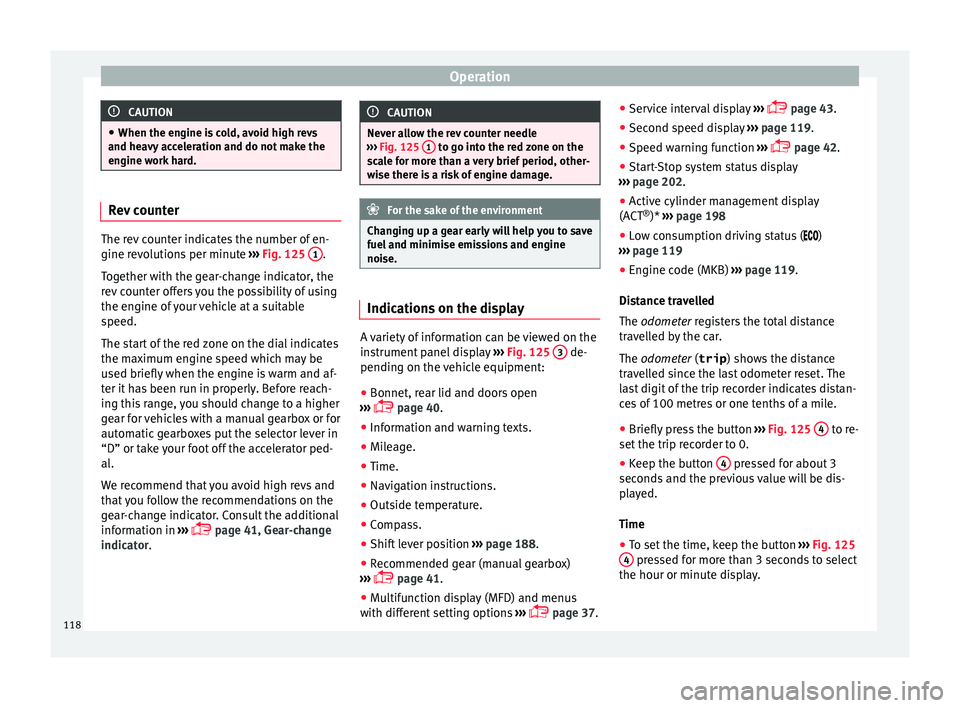
engine work hard. Rev counter
The rev counter indicates the number of en-
gine rev
o
lutions per minute ››› Fig. 125 1 .
Tog ether w
ith the gear-change indicator, the
rev counter offers you the possibility of using
the engine of your vehicle at a suitable
speed.
The start of the red zone on the dial indicates
the maximum engine speed which may be
used briefly when the engine is warm and af-
ter it has been run in properly. Before reach-
ing this range, you should change to a higher
gear for vehicles with a manual gearbox or for
automatic gearboxes put the selector lever in
“D” or take your foot off the accelerator ped-
al.
We recommend that you avoid high revs and
that you follow the recommendations on the
gear-change indicator. Consult the additional
information in ›››
page 41, Gear-change
indicator. CAUTION
Never allow the rev counter needle
›› ›
Fig. 125 1 to go into the red zone on the
sc a
le for more than a very brief period, other-
wise there is a risk of engine damage. For the sake of the environment
Changing up a gear early will help you to save
fuel and minimi
se emissions and engine
noise. Indications on the display
A variety of information can be viewed on the
in
s
trument
panel display ›››
Fig. 125 3 de-
pendin g on the
v
ehicle equipment:
● Bonnet, rear lid and doors open
›››
page 40.
● Information and warning texts.
● Mileage.
● Time.
● Navigation instructions.
● Outside temperature.
● Compass.
● Shift lever position ›››
page 188.
● Recommended gear (manual gearbox)
›››
page 41.
● Multifunction display (MFD) and menus
with differ
ent setting options ›››
page 37. ●
Servic
e interval display ›››
page 43.
● Second speed display ›››
page 119.
● Speed warning function ›››
page 42.
● Start-Stop system status display
›››
page 202.
● Active cylinder management display
(ACT ®
)* ››
› page 198
● Low consumption driving status ( )
›
›› page 119
● Engine code (MKB) ›››
page 119.
Distance travelled
The odometer registers the total distance
travelled by the car.
The odometer (trip ) shows the distance
travelled since the last odometer reset. The
last digit of the trip recorder indicates distan-
ces of 100 metres or one tenths of a mile.
● Briefly press the button ›››
Fig. 125 4 to re-
set the trip r
ec
order to 0.
● Keep the button 4 pressed for about 3
sec ond
s
and the previous value will be dis-
played.
Time
● To set the time, keep the button ›››
Fig. 125
4 pressed for more than 3 seconds to select
the hour or minut e dis
play.
118
Page 122 of 316
Operation
Note
● Differ ent
versions of the instrument panel
are available and therefore the versions and
instructions on the display may vary. In the
case of displays without warning or informa-
tion texts, faults are indicated exclusively by
the warning lamps.
● Depending on the equipment, some set-
tings
and instructions can also be carried out
in the Easy Connect system.
● When several warnings are active at the
same time, the symbol
s are shown succes-
sively for a few seconds and will stay on until
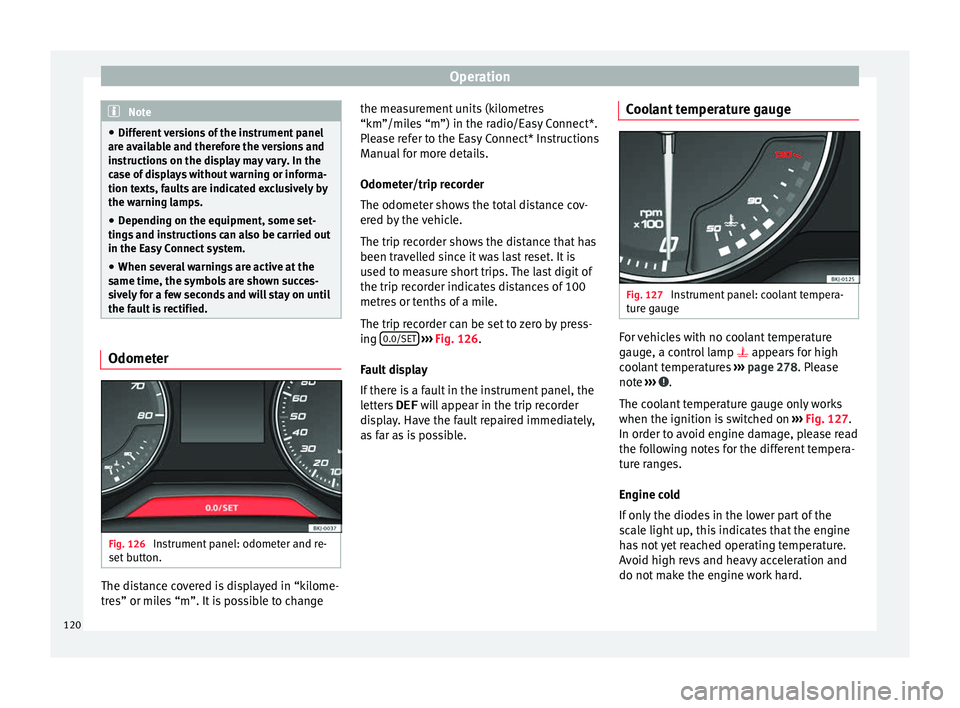
the fault is rectified. Odometer
Fig. 126
Instrument panel: odometer and re-
set b
utt
on. The distance covered is displayed in “kilome-
tr
e
s” or mi
les “m”. It is possible to change the measurement units (kilometres
“km”/mile
s “m”) in the radio/Easy Connect*.
Please refer to the Easy Connect* Instructions
Manual for more details.
Odometer/trip recorder
The odometer shows the total distance cov-
ered by the vehicle.
The trip recorder shows the distance that has
been travelled since it was last reset. It is
used to measure short trips. The last digit of
the trip recorder indicates distances of 100
metres or tenths of a mile.
The trip recorder can be set to zero by press-
ing 0.0/SET
› ›
› Fig. 126
.
Fault display
If there is a fault in the instrument panel, the
letters DEF will appear in the trip recorder
display. Have the fault repaired immediately,
as far as is possible. Coolant temperature gauge Fig. 127
Instrument panel: coolant tempera-
t ur
e g
auge For vehicles with no coolant temperature
g
aug
e, a c
ontrol lamp appears for high
coolant temperatures ››› page 278. Please
note ››› .
The c oo
l
ant temperature gauge only works
when the ignition is switched on ››› Fig. 127.
In order to avoid engine damage, please read
the following notes for the different tempera-
ture ranges.
Engine cold
If only the diodes in the lower part of the
scale light up, this indicates that the engine
has not yet reached operating temperature.
Avoid high revs and heavy acceleration and
do not make the engine work hard.
120
Page 145 of 316
Lights and visibility
– Loc
k
the driver's door with the key and hold
the key in the
Programming convenience opening in the
Easy Connect*
– Select: button > function button SET-
TINGS > Opening and closing > Con-
trols for electric windows to
c hoo
se between all the windows ( All), on-
ly the driver's ( Driver) or none (Deacti-
vated ). WARNING
● Never c lo
se the windows without due care
or proper control. There is a risk of suffering
injury.
● For safety reasons, you should only use the
remote c
ontrol open and close functions with-
in about 2 metres of the vehicle. To avoid in-
juries, always keep an eye on the windows
when pressing the button to close them. The
windows stop moving as soon as the button
is released. One-touch opening and closing*
One-touch opening and closing means you
do not
h
av
e to hold down the button.
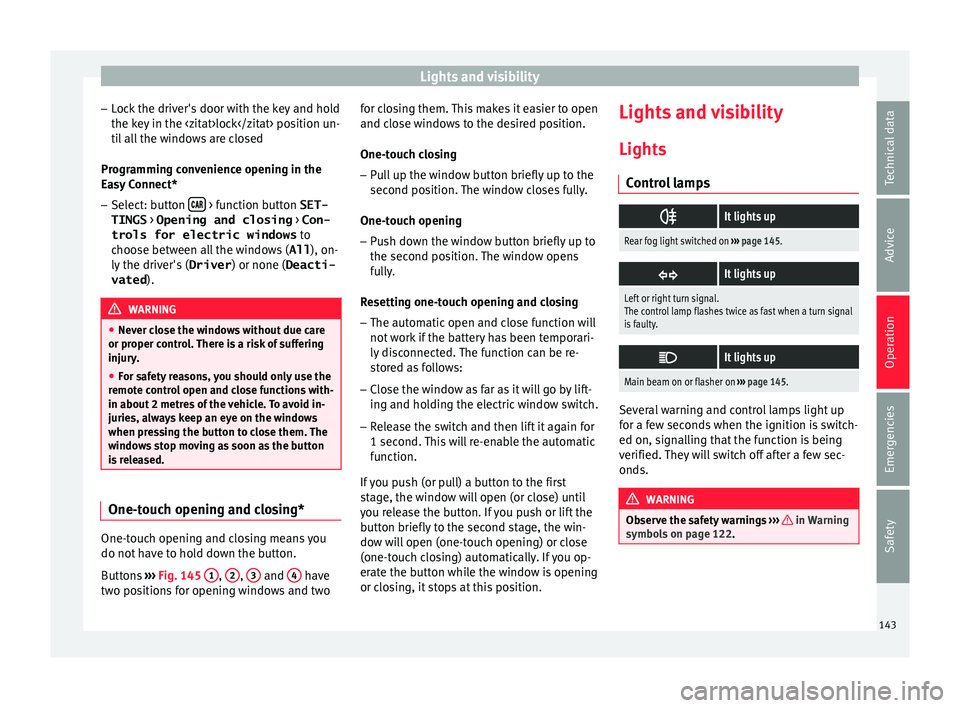
Buttons ›››
Fig. 145 1 ,
2 ,
3 and
4 have
tw o po
s
itions for opening windows and two for closing them. This makes it easier to open
and close w
indows to the desired position.
One-touch closing
– Pull up the window button briefly up to the
second pos
ition. The window closes fully.
One-touch opening
– Push down the window button briefly up to
the second pos
ition. The window opens
fully.
Resetting one-touch opening and closing
– The automatic open and close function will
not work
if the battery has been temporari-
ly disconnected. The function can be re-
stored as follows:
– Close the window as far as it will go by lift-
ing and hol
ding the electric window switch.
– Release the switch and then lift it again for
1 second. Thi
s will re-enable the automatic
function.
If you push (or pull) a button to the first
stage, the window will open (or close) until
you release the button. If you push or lift the
button briefly to the second stage, the win-
dow will open (one-touch opening) or close
(one-touch closing) automatically. If you op-
erate the button while the window is opening
or closing, it stops at this position. Lights and visibility
Light s
C ontr
ol lamps
It lights up
Rear fog light switched on
››› page 145.
It lights up
Left or right turn signal.
The control lamp flashes twice as fast when a turn signal
is faulty.
It lights up
Main beam on or flasher on
››› page 145. Several warning and control lamps light up
f
or a f
ew sec
onds when the ignition is switch-
ed on, signalling that the function is being
verified. They will switch off after a few sec-
onds. WARNING
Observe the safety warnings ›››
in Warning
symbol s on p
age 122. 143
Technical data
Advice
Operation
Emergencies
Safety
Page 149 of 316
Lights and visibility
Motorway light* The motorway light is available on vehicles
equipped w
ith f
ull-LED lights.
The function is connected/disconnected via
the corresponding Easy Connect system
menu.
● Activation: when going abo
ve 110 km/h
(68 mph) for more than 10 seconds, the dip-
ped beam raises slightly to increase the driv-
er's visibility distance.
● Deactivation: when reduc in
g the speed of
the car below 100 km/h (62 mph), the dip-
ped beam returns to its normal position.
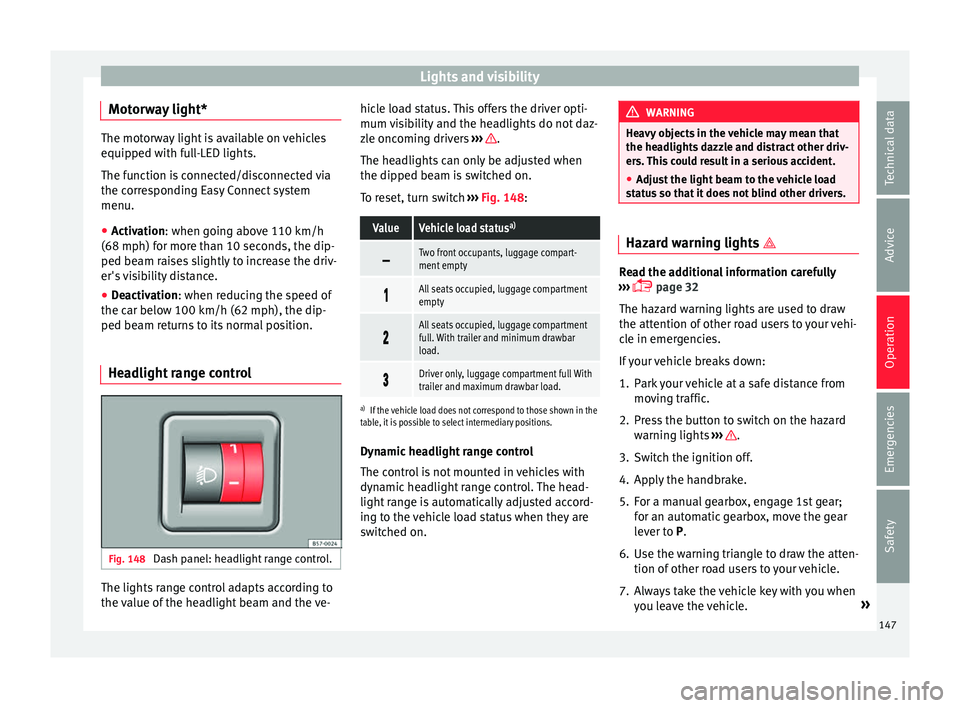
Headlight range control Fig. 148
Dash panel: headlight range control. The lights range control adapts according to
the
v
alue of
the headlight beam and the ve- hicle load status. This offers the driver opti-
mum vi
sibility and the headlights do not daz-
zle oncoming drivers ››› .
The he a
dlights
can only be adjusted when
the dipped beam is switched on.
To reset, turn switch ››› Fig. 148:
ValueVehicle load status a)
Two front occupants, luggage compart-
ment empty
All seats occupied, luggage compartment
empty
All seats occupied, luggage compartment
full. With trailer and minimum drawbar
load.
Driver only, luggage compartment full With
trailer and maximum drawbar load.
a)
If the vehicle load does not correspond to those shown in the
table, it is possible to select intermediary positions.
Dynamic headlight range control
The control is not mounted in vehicles with
dynamic headlight range control. The head-
light range is automatically adjusted accord-
ing to the vehicle load status when they are
switched on. WARNING
Heavy objects in the vehicle may mean that
the hea dlight
s dazzle and distract other driv-
ers. This could result in a serious accident.
● Adjust the light beam to the vehicle load
stat
us so that it does not blind other drivers. Hazard warning lights
Read the additional information carefully
›› ›
page 32
The hazard warning lights are used to draw
the attention of other road users to your vehi-
cle in emergencies.
If your vehicle breaks down:
1. Park your vehicle at a safe distance from mov in
g traffic.
2. Press the button to switch on the hazard warning lights
››› .
3. Switch the ignition off.
4. Apply the handbrake.
5. For a manual gearbox, engage 1st gear; for an aut
om
atic gearbox, move the gear
lever to P.
6. Use the warning triangle to draw the atten- tion of other ro
ad users to your vehicle.
7. Always take the vehicle key with you when you le
ave the vehicle. »
147
Technical data
Advice
Operation
Emergencies
Safety
Page 178 of 316
Operation
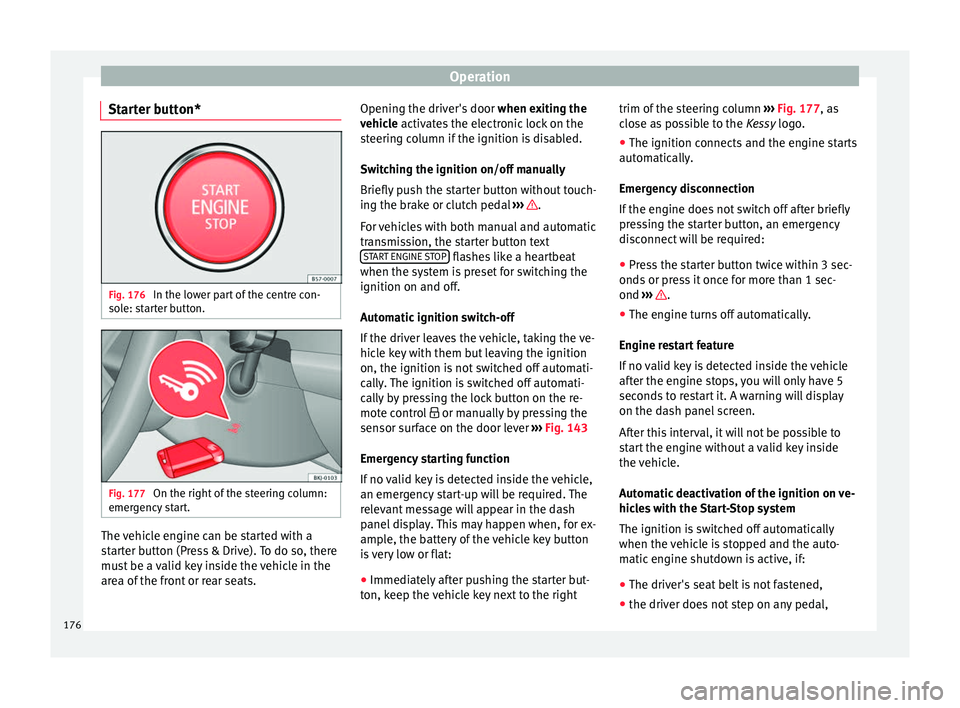
Starter button* Fig. 176
In the lower part of the centre con-
so l
e: s
tarter button. Fig. 177
On the right of the steering column:
emer gency
start. The vehicle engine can be started with a
s
t
ar
ter button (Press & Drive). To do so, there
must be a valid key inside the vehicle in the
area of the front or rear seats. Opening the driver's door
when exitin
g the
vehicle activates the electronic lock on the
steering column if the ignition is disabled.
Switching the ignition on/off manually
Briefly push the starter button without touch-
ing the brake or clutch pedal ››› .
F or
v
ehicles with both manual and automatic
transmission, the starter button text START ENGINE STOP flashes like a heartbeat
when the sy s
t
em is preset for switching the
ignition on and off.
Automatic ignition switch-off
If the driver leaves the vehicle, taking the ve-
hicle key with them but leaving the ignition
on, the ignition is not switched off automati-
cally. The ignition is switched off automati-
cally by pressing the lock button on the re-
mote control or manually by pressing the
sensor surface on the door lever ››› Fig. 143
Emergency starting function
If no valid key is detected inside the vehicle,
an emergency start-up will be required. The
relevant message will appear in the dash
panel display. This may happen when, for ex-
ample, the battery of the vehicle key button
is very low or flat:
● Immediately after pushing the starter but-
ton, k eep the
vehicle key next to the right trim of the steering column
›››
Fig. 177, as
close as possible to the Kessy logo.
● The ignition connects and the engine starts
automatic
ally.
Emergency disconnection
If the engine does not switch off after briefly
pressing the starter button, an emergency
disconnect will be required:
● Press the starter button twice within 3 sec-
onds or pr
ess it once for more than 1 sec-
ond ››› .
● The engine turns off automatically.
En gine r
e
start feature
If no valid key is detected inside the vehicle
after the engine stops, you will only have 5
seconds to restart it. A warning will display
on the dash panel screen.
After this interval, it will not be possible to
start the engine without a valid key inside
the vehicle.
Automatic deactivation of the ignition on ve-
hicles with the Start-Stop system
The ignition is switched off automatically
when the vehicle is stopped and the auto-
matic engine shutdown is active, if:
● The driver's seat belt is not fastened,
● the driver does not step on any pedal,
176
Page 310 of 316
Index
emergency braking assistance system (Front As s
i
st) . . . . . . . . . . . . . . . . . . . . . . . . . . . . . . 212
gearbox . . . . . . . . . . . . . . . . . . . . . . . . . . . . . . . 194
Manual air conditioning . . . . . . . . . . . . . . . . . . . 169
Manual gearbox . . . . . . . . . . . . . . . . . . . . . . . . . . 187
MFD see Driver information system . . . . . . . . . . . . . . 37
Mobile . . . . . . . . . . . . . . . . . . . . . . . . . . . . . . . . . . 259
Mobile telephones . . . . . . . . . . . . . . . . . . . . . . . . 259
Multi-collision Brake . . . . . . . . . . . . . . . . . . . . . . 186
Multi-function display (MFD) . . . . . . . . . . . . . . . . . 37
Multimedia . . . . . . . . . . . . . . . . . . . . . . . . . . . . . . 129
My Beat . . . . . . . . . . . . . . . . . . . . . . . . . . . . . . . . . 178
N Noises adaptive cruise control . . . . . . . . . . . . . . . . . . . 216
tyres . . . . . . . . . . . . . . . . . . . . . . . . . . . . . . . . . . . 69
Number of seats . . . . . . . . . . . . . . . . . . . . . . . . . . . 81
O
Odometer . . . . . . . . . . . . . . . . . . . . . . . . . . . . . . . 120 reset button . . . . . . . . . . . . . . . . . . . . . . . . . . . 120
total . . . . . . . . . . . . . . . . . . . . . . . . . . . . . . . . . . 117
trip recorder . . . . . . . . . . . . . . . . . . . . . . . . . . . 117
Oil change . . . . . . . . . . . . . . . . . . . . . . . . . . . . . . . 278
Oil properties . . . . . . . . . . . . . . . . . . . . . . . . . . . . . 58
On-board computer see Driver information system . . . . . . . . . . . . . . 37
One-touch opening and closing electric windows . . . . . . . . . . . . . . . . . . . . . . . . 143
Open and close . . . . . . . . . . . . . . . . . . . . . . . . . . 130 rear lid . . . . . . . . . . . . . . . . . . . . . . . . . . . . . . . . 141
Opening . . . . . . . . . . . . . . . . . . . . . . . . . . . . . . . . 130 bonnet . . . . . . . . . . . . . . . . . . . . . . . . . . . . . . . . . 17
the fuel tank flap . . . . . . . . . . . . . . . . . . . . . . . 269
windows . . . . . . . . . . . . . . . . . . . . . . . . . . . . . . 141 Opening and closing
bonnet . . . . . . . . . . . . . . . . . . . . . . . . . . . . . . . . . 17
by
remote control . . . . . . . . . . . . . . . . . . . . . . . 130
fuel cap . . . . . . . . . . . . . . . . . . . . . . . . . . . . . . . . 57
in the door cylinder . . . . . . . . . . . . . . . . . . . . . . 15
in the lock cylinder . . . . . . . . . . . . . . . . . . . . . . . 15
rear lid . . . . . . . . . . . . . . . . . . . . . . . . . . . . 16, 141
windows . . . . . . . . . . . . . . . . . . . . . . . . . . . . . . 141
with the central lock button . . . . . . . . . . . . . . . 134
Operating malfunction Park Assist . . . . . . . . . . . . . . . . . . . . . . . . . . . . 232
Outside temperature . . . . . . . . . . . . . . . . . . . . . . . 41
P Park Assist . . . . . . . . . . . . . . . . . . . . . . . . . . . . . . 232 automatic braking intervention . . . . . . . . . . . . 240
automatic interruption . . . . . . . . . . . . . . . . . . . 234
conditions for exiting a parking space . . . . . . 239
exiting a parking space (only for parallelspaces) . . . . . . . . . . . . . . . . . . . . . . . . . . . . . 239
operating malfunction . . . . . . . . . . . . . . . . . . . 232
parallel parking . . . . . . . . . . . . . . . . . . . . . . . . 237
parking conditions . . . . . . . . . . . . . . . . . . . . . . 237
perpendicular parking . . . . . . . . . . . . . . . . . . . 237
see Park Assist . . . . . . . . . . . . . . . . . . . . . . . . . 232
stopping prematurely . . . . . . . . . . . . . . . . . . . . 234
Parking . . . . . . . . . . . . . . . . . . . . . . . . . . . . 180, 191 with Park Assist . . . . . . . . . . . . . . . . . . . . . . . . 237
Parking aid . . . . . . . . . . . . . . . . . . . . . . . . . . . . . . 240 adjusting the display and audible warnings . 244
parking aid plus . . . . . . . . . . . . . . . . . . . . . . . . 242
sensors and camera: cleaning . . . . . . . . . . . . . 263
towing bracket . . . . . . . . . . . . . . . . . . . . . . . . . 245
Parking Aid automatic activation . . . . . . . . . . . . . . . . . . . . 243
braking while manoeuvring . . . . . . . . . . . . . . . 245
malfunction . . . . . . . . . . . . . . . . . . . . . . . . . . . . 245 rear parking aid . . . . . . . . . . . . . . . . . . . . . . . . 241
vis
ual indication . . . . . . . . . . . . . . . . . . . . . . . . 244
Parking aid system see Parking aid . . . . . . . . . . . . . . . . . . . . 240, 242
Parking assistant . . . . . . . . . . . . . . . . . . . . . . . . . 228 see Park Assist . . . . . . . . . . . . . . . . . . . . . . . . . 232
Parking assistant (RCTA) . . . . . . . . . . . . . . 224, 228 control lamp . . . . . . . . . . . . . . . . . . . . . . . . . . . 224
Parking distance warning system see Parking aid . . . . . . . . . . . . . . . . . . . . 240, 242
Parking (automatic gearbox) . . . . . . . . . . . . . . . . 191
ParkPilot see Parking aid . . . . . . . . . . . . . . . . . . . . 240, 242
Particulate filter (diesel) . . . . . . . . . . . . . . . . . . . 200
Parts . . . . . . . . . . . . . . . . . . . . . . . . . . . . . . . . . . . 259
Passenger see Correct sitting position . . . . . . . . . 76, 77, 78
Passenger-side instrument panel left-hand drive . . . . . . . . . . . . . . . . . . . . . . . . . . 12
right-hand drive . . . . . . . . . . . . . . . . . . . . . . . . . 13
Pedals . . . . . . . . . . . . . . . . . . . . . . . . . . . . . . . . . . . 80
Petrol additives . . . . . . . . . . . . . . . . . . . . . . . . . . . . . . 269
refuelling . . . . . . . . . . . . . . . . . . . . . . . . . . . . . . 269
Plastic parts: cleaning . . . . . . . . . . . . . . . . 263, 266
Pollution filter . . . . . . . . . . . . . . . . . . . . . . . . . . . . 164
Positioning seat belts during pregnancy . . . . . . . . . . . . . . . . . . . . . . . . 85
seat belts . . . . . . . . . . . . . . . . . . . . . . . . . . . . . . 85
Power-assisted steering . . . . . . . . . . . . . . . . . . . . 197
Power steering . . . . . . . . . . . . . . . . . . . . . . . . . . . 195
Pre-heating system control lamp . . . . . . . . . . . . . . . . . . . . . . . . . . . 201
Preheating the engine . . . . . . . . . . . . . . . . . . . . . 177
Press & Drive starter button . . . . . . . . . . . . . . . . . . . . . . . . . . 176
starting the engine . . . . . . . . . . . . . . . . . . . . . . 177
308
Page 311 of 316
Index
Products for vehicle maintenance . . . . . . . . . . . . 260
P u
nct
ure
action . . . . . . . . . . . . . . . . . . . . . . . . . . . . . . . . . 64
R Radar sensor . . . . . . . . . . . . . . . . . . . . . . . . 212, 217
Radio screen: cleaning . . . . . . . . . . . . . . . . . . . . 266
Radio transmitters . . . . . . . . . . . . . . . . . . . . . . . . 259
Raising the vehicle . . . . . . . . . . . . . . . . . . . . . . . . . 68
RCTA . . . . . . . . . . . . . . . . . . . . . . . . . . . . . . . . . . . 228 see Parking assistant (RCTA) . . . . . . . . . . . . . . 224
Rear Assist . . . . . . . . . . . . . . . . . . . . . . . . . . . . . . 246 instructions for use . . . . . . . . . . . . . . . . . . . . . 247
parking . . . . . . . . . . . . . . . . . . . . . . . . . . . . . . . 248
screen . . . . . . . . . . . . . . . . . . . . . . . . . . . . . . . . 247
special characteristics . . . . . . . . . . . . . . . . . . . 247
Rear Assist system . . . . . . . . . . . . . . . . . . . . . . . . 246
Rear bulbs in the side panel disassemble the rear light . . . . . . . . . . . . . . . . 109
Rear fog light control lamp . . . . . . . . . . . . . . . . . . . . . . . . . . . 143
Rear lid . . . . . . . . . . . . . . . . . . . . . . . . . . 16, 17, 141
Rear lights in the rear lid disassemble the bulb holder . . . . . . . . . . . . . . 110
Rear seat passengers see Correct sitting position . . . . . . . . . 76, 77, 78
Rear shelf store . . . . . . . . . . . . . . . . . . . . . . . . . . . . . . . . . 159
Rear View Camera . . . . . . . . . . . . . . . . . . . . . . . . . 246
Rear view mirror . . . . . . . . . . . . . . . . . . . . . . . . . . 150
Rear window wiper blades changing . . . . . . . . . . . . . . . . . . . . . . . . . . . . . . . 74
cleaning . . . . . . . . . . . . . . . . . . . . . . . . . . . . . . . 74
Refuelling . . . . . . . . . . . . . . . . . . . . . . . . . . . . . . . 269 fuel gauge . . . . . . . . . . . . . . . . . . . . . . . . . . . . . 121
opening the fuel tank flap . . . . . . . . . . . . . . . . 269
Remote control . . . . . . . . . . . . . . . . . . . . . . . . . . . 130 Removing and attaching head restraints . . . . . . 153
Repair w
ork . . . . . . . . . . . . . . . . . . . . . . . . . . . . . . 259
Replacement parts . . . . . . . . . . . . . . . . . . . . . . . . . . . . . . . . . 259
Replacement keys . . . . . . . . . . . . . . . . . . . . . . . . 130
Replacement parts . . . . . . . . . . . . . . . . . . . . . . . . 259
Replacing the battery of the vehicle key . . . . . . . . . . . . . . . . . . . . . . . 131
Reset the trip recorder . . . . . . . . . . . . . . . . . . . . . 120
Rev counter . . . . . . . . . . . . . . . . . . . . . . . . . . . . . . 118
Reverse gear (automatic gearbox) . . . . . . . . . . . 188
Revolution counter . . . . . . . . . . . . . . . . . . . . . . . . 117
Rims changing a wheel . . . . . . . . . . . . . . . . . . . . . . . . 65
Roll-back function windows . . . . . . . . . . . . . . . . . . . . . . . . . . . . . . 142
RON (petrol) . . . . . . . . . . . . . . . . . . . . . . . . . . . . . 269
Roof carrier . . . . . . . . . . . . . . . . . . . . . . . . . . . . . . 162
Roof carrier system . . . . . . . . . . . . . . . . . . . . . . . . 162
Roof load . . . . . . . . . . . . . . . . . . . . . . . . . . . . . . . . 163 technical data . . . . . . . . . . . . . . . . . . . . . . . . . . 163
Roof luggage rack attach the cross bars . . . . . . . . . . . . . . . . . . . . 162
Roof rack . . . . . . . . . . . . . . . . . . . . . . . . . . . . . . . . 162
Rubber seals care . . . . . . . . . . . . . . . . . . . . . . . . . . . . . . . . . . 264
Run-in . . . . . . . . . . . . . . . . . . . . . . . . . . . . . . . . . . 283
Running in brake pads . . . . . . . . . . . . . . . . . . . . . . . . . . . . 197
engine . . . . . . . . . . . . . . . . . . . . . . . . . . . . . . . . 197
tyres . . . . . . . . . . . . . . . . . . . . . . . . . . . . . . . . . . 197
S
Safe . . . . . . . . . . . . . . . . . . . . . . . . . . . . . . . . . . . . 133
SAFE . . . . . . . . . . . . . . . . . . . . . . . . . . . . . . . . . . . 175
Safe driving . . . . . . . . . . . . . . . . . . . . . . . . . . . . . . 75
Safe Security system . . . . . . . . . . . . . . . . . . . . . . 133 Safety
chil d safety . . . . . . . . . . . . . . . . . . . . . . . . . . . . . 92
child seats . . . . . . . . . . . . . . . . . . . . . . . . . . . . . . 92
deactivating the front passenger airbag . . . . . . 22
safe driving . . . . . . . . . . . . . . . . . . . . . . . . . . . . . 75
Safety equipment . . . . . . . . . . . . . . . . . . . . . . . . . . 75
Safety instructions belt tensioners . . . . . . . . . . . . . . . . . . . . . . . . . . 85
coolant temperature . . . . . . . . . . . . . . . . . . . . . 279
front airbags . . . . . . . . . . . . . . . . . . . . . . . . . . . . 88
head-protection airbags . . . . . . . . . . . . . . . . . . 23
side airbags . . . . . . . . . . . . . . . . . . . . . . . . . . . . 88
use of seat belts . . . . . . . . . . . . . . . . . . . . . . . . . 82
using child seats . . . . . . . . . . . . . . . . . . . . . 23, 92
Saving fuel inertia mode . . . . . . . . . . . . . . . . . . . . . . . . . . . 193
Saving tips (efficiency program) . . . . . . . . . . . . . . 42
Seat heating . . . . . . . . . . . . . . . . . . . . . . . . . . . . . . . 154
Seat belt position for pregnant women . . . . . . . . . . . . . . . . . . . . . . 19
seat belts . . . . . . . . . . . . . . . . . . . . . . . . . . . . . . 19
Seat belts . . . . . . . . . . . . . . . . . . . . . . . . . . . . . . . . 81 adjustment . . . . . . . . . . . . . . . . . . . . . . . . . . 19, 84
control lamp . . . . . . . . . . . . . . . . . . . . . . . . . . . . 81
protective function . . . . . . . . . . . . . . . . . . . . . . . 82
purpose . . . . . . . . . . . . . . . . . . . . . . . . . . . . . 81, 86
safety instructions . . . . . . . . . . . . . . . . . . . . . . . 82
unfastened . . . . . . . . . . . . . . . . . . . . . . . . . . . . . 83
Seat belt tensioners . . . . . . . . . . . . . . . . . . . . . 20, 85
SEAT Drive Profile . . . . . . . . . . . . . . . . . . . . . . . . . 229
Seat heating . . . . . . . . . . . . . . . . . . . . . . . . . . . . . 154
Selective catalytic reduction see Exhaust purification system (diesel) . . . . 271
Selective opening . . . . . . . . . . . . . . . . . . . . . . . . 133
Selector lever lock . . . . . . . . . . . . . . . . . . . . . . . . 189
309