change time Seat Ateca 2017 User Guide
[x] Cancel search | Manufacturer: SEAT, Model Year: 2017, Model line: Ateca, Model: Seat Ateca 2017Pages: 328, PDF Size: 6.36 MB
Page 98 of 328
Emergencies
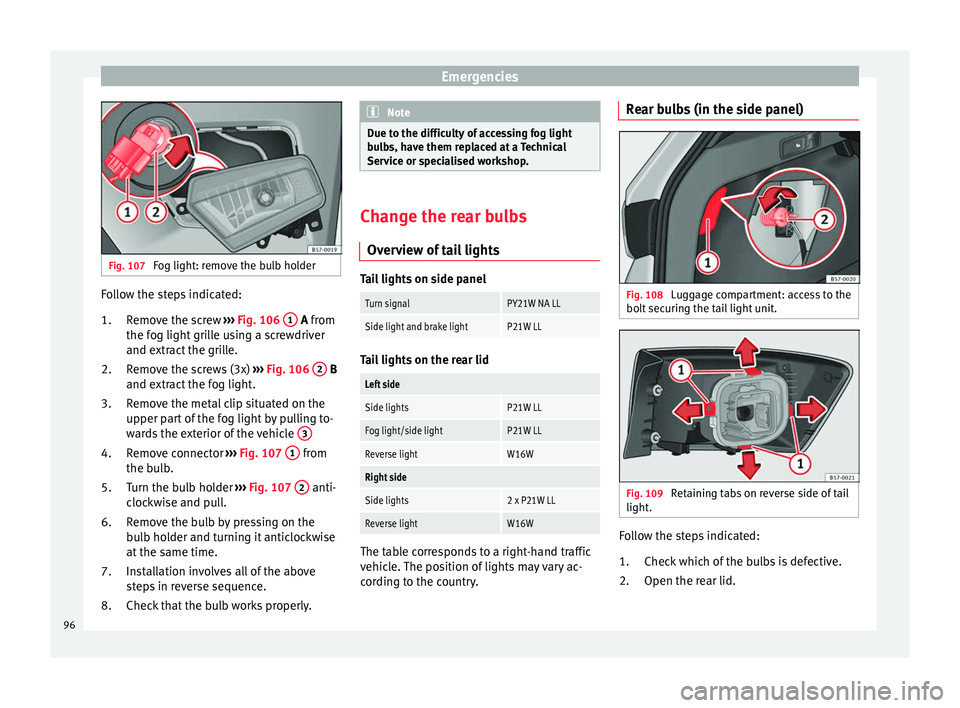
Fig. 107
Fog light: remove the bulb holder Follow the steps indicated:
Remo
ve the screw ››› Fig. 106 1 A fr
om
the f
og light grille using a screwdriver
and extract the grille.
Remove the screws (3x) ››› Fig. 106 2 B
and e xtr
act the fog light.
Remove the metal clip situated on the
upper part of the fog light by pulling to-
wards the exterior of the vehicle 3Remove connector
››
›
Fig. 107 1 from
the b u
lb.
Turn the bulb holder ›››
Fig. 107 2 anti-
c loc
kwise and pull.
Remove the bulb by pressing on the
bulb holder and turning it anticlockwise
at the same time.
Installation involves all of the above
steps in reverse sequence.
Check that the bulb works properly.
1.
2.
3.
4.
5.
6.
7.
8. Note
Due to the difficulty of accessing fog light
b u
lbs, have them replaced at a Technical
Service or specialised workshop. Change the rear bulbs
Ov er
view of tail lights Tail lights on side panel
Turn signalPY21W NA LL
Side light and brake lightP21W LL
Tail lights on the rear lid
Left side
Side lightsP21W LL
Fog light/side lightP21W LL
Reverse lightW16W
Right side
Side lights2 x P21W LL
Reverse lightW16W
The table corresponds to a right-hand traffic
v
ehic
le. The position of lights may vary ac-
cording to the country. Rear bulbs (in the side panel)
Fig. 108
Luggage compartment: access to the
bo lt
securing the tail light unit. Fig. 109
Retaining tabs on reverse side of tail
light . Follow the steps indicated:
Chec k
which of the bulbs is defective.
Open the rear lid.
1.
2.
96
Page 105 of 328
Instruments and warning/control lamps
engine hot. However, it is advisable to
c h
ange up a gear or move the selector
lever to D (or lift your foot off the acceler-
ator) before the needle reaches the red
zone ››› .
En gine c
oolant temperature display
››› page 105.
Displays on the screen ››› page 103.
Adjuster button and display
››› page 105.
Speedometer.
Fuel gauge ››› page 106. WARNING
Any distraction may lead to an accident, with
the ri sk
of injury.
● Do not operate the instrument panel con-
tro
ls when driving. CAUTION
● To pr
event damage to the engine, the rev
counter needle should only remain in the red
zone for a short period of time.
● When the engine is cold, avoid high revs
and heavy
acceleration and do not make the
engine work hard. For the sake of the environment
Changing up a gear in time reduces fuel con-
s umption and noi
se.2
3
4
5
6 Rev counter
The rev counter indicates the number of en-
gine r
ev
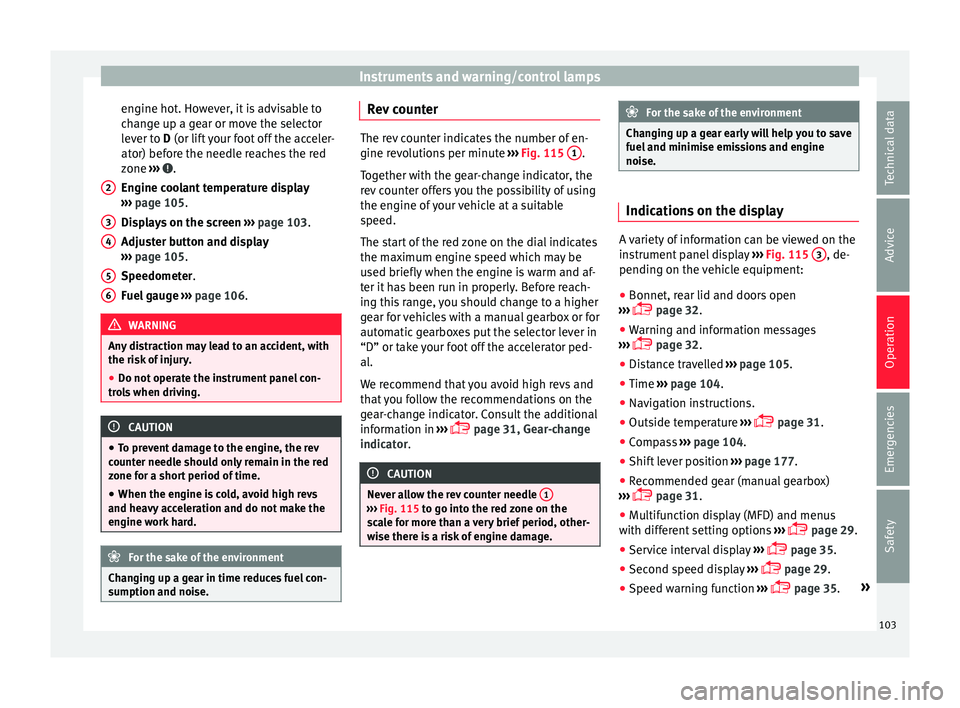
olutions per minute ››› Fig. 115 1 .
T og
ether with the gear-change indicator, the
rev counter offers you the possibility of using
the engine of your vehicle at a suitable
speed.
The start of the red zone on the dial indicates
the maximum engine speed which may be
used briefly when the engine is warm and af-
ter it has been run in properly. Before reach-
ing this range, you should change to a higher
gear for vehicles with a manual gearbox or for
automatic gearboxes put the selector lever in
“D” or take your foot off the accelerator ped-
al.
We recommend that you avoid high revs and
that you follow the recommendations on the
gear-change indicator. Consult the additional
information in ›››
page 31, Gear-change
indicator. CAUTION
Never allow the rev counter needle 1 ›››
Fig. 115 t o g
o into the red zone on the
scale for more than a very brief period, other-
wise there is a risk of engine damage. For the sake of the environment
Changing up a gear early will help you to save
f uel
and minimise emissions and engine
noise. Indications on the display
A variety of information can be viewed on the
in
s
trument panel display ››› Fig. 115 3 , de-
pendin g on the
vehicle equipment:
● Bonnet, rear lid and doors open
› ›
› page 32.
● Warning and information messages
››
› page 32.
● Distance travelled ››
›
page 105.
● Time ››
›
page 104.
● Navigation instructions.
● Outside temperature ››
›
page 31.
● Compass ››
›
page 104.
● Shift lever position ››
›
page 177.
● Recommended gear (manual gearbox)
››
› page 31.
● Multifunction display (MFD) and menus
with diff
erent setting options ›››
page 29.
● Service interval display ››
›
page 35.
● Second speed display ››
›
page 29.
● Speed warning function ››
›
page 35. »
103
Technical data
Advice
Operation
Emergencies
Safety
Page 107 of 328

Instruments and warning/control lamps
Identifying letters on engine (MKB)
Ho l
d the button ››› Fig. 115 4 down for more
th an 15 sec
onds to display the identifying
letters of the vehicle engine (MKB). To do
this, the ignition must be switched on and
the engine switched off. WARNING
Observe the safety warnings ››
› in Warning
and c ontr
ol lamps on page 107. WARNING
Even though outside temperatures are above
fr eez
ing, some roads and bridges may be icy.
● At outside temperatures above +4°C
(+39°F), even when the “ic
e crystal” symbol
is not visible, there may still be patches of ice
on the road.
● Do not rely on the outside temperature in-
dicat
or! Note
● Diff er
ent versions of the instrument panel
are available and therefore the versions and
instructions on the display may vary. In the
case of displays without warning or informa-
tion texts, faults are indicated exclusively by
the warning lamps.
● Depending on the equipment, some set-
ting
s and instructions can also be carried out
in the Easy Connect system. ●
When sev er
al warnings are active at the
same time, the symbols are shown succes-
sively for a few seconds and will stay on until
the fault is rectified. Odometer
Fig. 116
Instrument panel: odometer and re-
set b
utton. The distance covered is displayed in “kilome-
tr
e
s” or miles “m”. It is possible to change
the measurement units (kilometres
“km”/miles “m”) in the radio/Easy Connect*.
Please refer to the Easy Connect* Instructions
Manual for more details.
Odometer/trip recorder
The odometer shows the total distance cov-
ered by the vehicle.
The trip recorder shows the distance that has
been travelled since it was last reset. It is used to measure short trips. The last digit of
the trip rec
order indicates distances of 100
metres or tenths of a mile.
The trip recorder can be set to zero by press-
ing 0.0/SET
› ››
Fig. 116
.
Fault display
If there is a fault in the instrument panel, the
letters DEF will appear in the trip recorder
display. Have the fault repaired immediately,
as far as is possible.
Coolant temperature gauge For vehicles with no coolant temperature
g
aug
e, a control lamp appears for high
coolant temperatures ››› page 286. Please
note ››› .
The c oo
lant temperature gauge 2 ›››
Fig. 115 on ly
works when the ignition is
switched on. In order to avoid engine dam-
age, please read the following notes for the
different temperature ranges.
Engine cold
If only the diodes in the lower part of the
scale light up, this indicates that the engine
has not yet reached operating temperature.
Avoid high revs and heavy acceleration and
do not make the engine work hard. »
105
Technical data
Advice
Operation
Emergencies
Safety
Page 110 of 328
Operation
Introduction to the Easy
C onnect
system*
System settings (CAR)* CAR menu (Setup) Read the additional information carefully
› ›
› page 26
To select the settings menus, press the Easy
Connect button and the
Set
up function
b utt
on.
The actual number of menus available and
the name of the various options in these me-
nus will depend on the vehicle’s electronics
and equipment.
Pressing the menu button will always take
you to the last menu used.
When the function button check box is activa-
ted , the function is active.
Pressing the menu button will always take
y ou t
o the last menu used.
Any changes made using the settings menus
are automatically saved on closing those me-
nus.
Function buttons in the vehicle settings
menuPage
ESC system››› page 173
Tyres››› page 295
Driver assistance››› table on page 26
Parking and manoeuvring››› page 244
Vehicle lights››› table on page 26
Mirrors and windscreen wipers››› table on page 26
Opening and closing››› table on page 26
Multifunction display››› table on page 26
Date and time››› table on page 26
Units››› table on page 26
Service››› page 103
Factory settings››› table on page 26 WARNING
Any distraction may lead to an accident, with
the ri sk
of injury. Operating the Easy Connect
system while driving could distract you from
traffic. 108
Page 115 of 328
Opening and closing
Note
● Nev er l
eave any valuable items in the vehi-
cle unattended. Even a locked vehicle is not a
safe.
● If the diode on the driver door sill lights up
for about
30 seconds when the vehicle is
locked, the central locking system or anti-
theft alarm* is not working properly. You
should have the fault repaired at a SEAT Offi-
cial Service or specialised workshop.
● The vehicle interior monitoring of the anti-
theft
alarm* system will only function as in-
tended if the windows and the sunroof* are
closed. Car key
Fig. 121
Vehicle key Fig. 122
Vehicle key with alarm button Vehicle key
W
ith the
vehicle key the vehicle may be
locked or unlocked remotely ››› page 112.
The vehicle key includes an emitter and bat-
tery. The receiver is in the interior of the vehi-
cle. The range of the vehicle key with remote
control and new battery is several metres around the vehicle.
If it is not possible to open or close the vehi-
cle using the remote control key, this should
be re-synchronised ››› page 120 or the bat-
tery changed ››› page 120.
Different keys belonging to the vehicle may
be used.
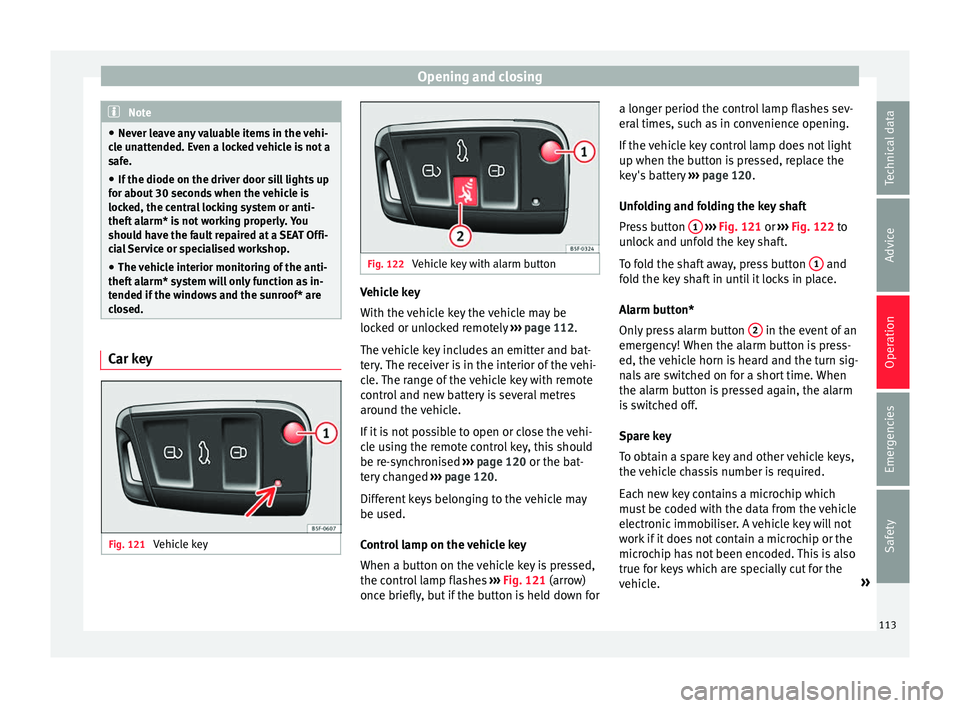
Control lamp on the vehicle key
When a button on the vehicle key is pressed,
the control lamp flashes ››› Fig. 121 (arrow)
once briefly, but if the button is held down for a longer period the control lamp flashes sev-
eral
times, such as in convenience opening.
If the vehicle key control lamp does not light
up when the button is pressed, replace the
key's battery ››› page 120.
Unfolding and folding the key shaft
Press button 1
› ››
Fig. 121
or ››› Fig. 122 to
unlock and unfold the key shaft.
To fold the shaft away, press button 1 and
f o
ld the key shaft in until it locks in place.
Alarm button*
Only press alarm button 2 in the event of an
emer g
ency! When the alarm button is press-
ed, the vehicle horn is heard and the turn sig-
nals are switched on for a short time. When
the alarm button is pressed again, the alarm
is switched off.
Spare key
To obtain a spare key and other vehicle keys,
the vehicle chassis number is required.
Each new key contains a microchip which
must be coded with the data from the vehicle
electronic immobiliser. A vehicle key will not
work if it does not contain a microchip or the
microchip has not been encoded. This is also
true for keys which are specially cut for the
vehicle. »
113
Technical data
Advice
Operation
Emergencies
Safety
Page 119 of 328
Opening and closing
● Pr e
ss & Drive: keyless starting of the en-
gine with the starter button ››› page 165.
The central locking and locking systems oper-
ate in the same way as a normal locking and
unlocking system. Only the controls change.
Unlocking the vehicle is confirmed with a
double flash of the indicator lights; locking
by a single flash.
If the vehicle is locked and then all doors and
the rear lid are closed leaving the last key
used inside the vehicle and none outside,
the vehicle will not lock immediately. All the
vehicle's indicator lights will flash four times.
The vehicle will lock again after a few sec-
onds if you fail to open any door or the rear
lid.
If you unlock the vehicle but fail to open any
door or the rear lid, the vehicle will lock again
after a few seconds.
Unlocking and opening the doors (Keyless-
Entry)
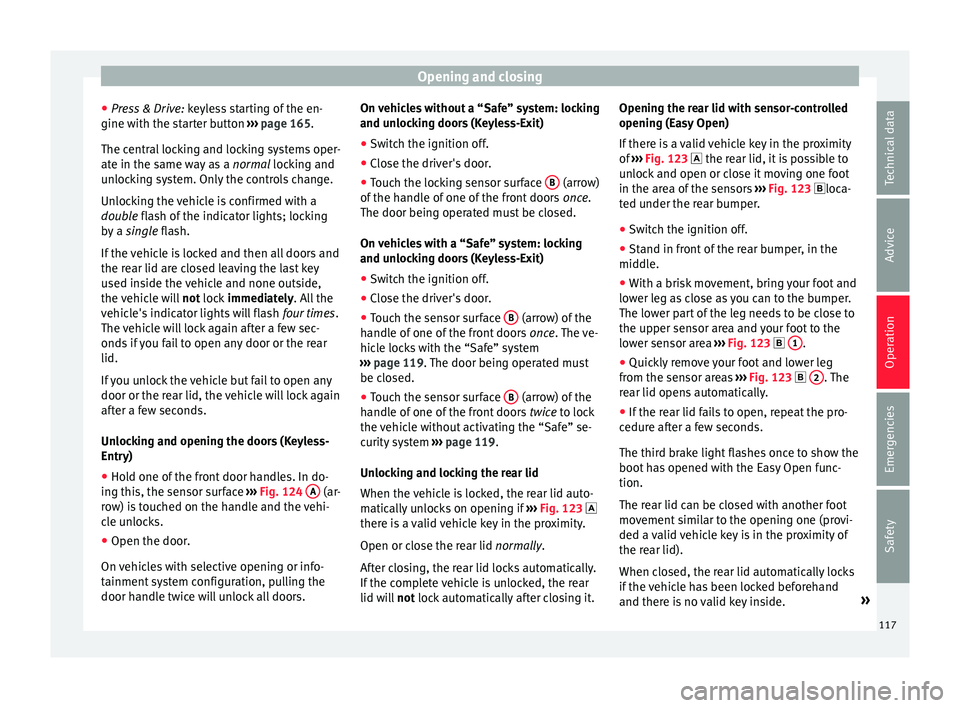
● Hold one of the front door handles. In do-
ing thi
s, the sensor surface ››› Fig. 124 A (ar-
r o
w) is touched on the handle and the vehi-
cle unlocks.
● Open the door.
On v
ehicles with selective opening or info-
tainment system configuration, pulling the
door handle twice will unlock all doors. On vehicles without a “Safe” system: locking
and un
locking doors (Keyless-Exit)
● Switch the ignition off.
● Close the driver's door.
● Touch the locking sensor surface B (arrow)
of the h
andle of one of the front doors once.
The door being operated must be closed.
On vehicles with a “Safe” system: locking
and unlocking doors (Keyless-Exit)
● Switch the ignition off.
● Close the driver's door.
● Touch the sensor surface B (arrow) of the
h andl
e of one of the front doors once. The ve-
hicle locks with the “Safe” system
››› page 119. The door being operated must
be closed.
● Touch the sensor surface B (arrow) of the
h andl
e of one of the front doors twice to lock
the vehicle without activating the “Safe” se-
curity system ››› page 119.
Unlocking and locking the rear lid
When the vehicle is locked, the rear lid auto-
matically unlocks on opening if ››› Fig. 123
there is a valid vehicle key in the proximity.
Open or close the rear lid normally.
After closing, the rear lid locks automatically.
If the complete vehicle is unlocked, the rear
lid will not lock automatically after closing it. Opening the rear lid with sensor-controlled
opening (E
asy Open)
If there is a valid vehicle key in the proximity
of ››› Fig. 123 the rear lid, it is possible to
unlock and open or close it moving one foot
in the area of the sensors ››› Fig. 123 loca-
ted under the rear bumper.
● Switch the ignition off.
● Stand in front of the rear bumper, in the
middl
e.
● With a brisk movement, bring your foot and
low
er leg as close as you can to the bumper.
The lower part of the leg needs to be close to
the upper sensor area and your foot to the
lower sensor area ››› Fig. 123 1 .
● Quickly remove your foot and lower leg
fr om the sen
sor areas ››› Fig. 123 2 . The
r e
ar lid opens automatically.
● If the rear lid fails to open, repeat the pro-
cedur
e after a few seconds.
The third brake light flashes once to show the
boot has opened with the Easy Open func-
tion.
The rear lid can be closed with another foot
movement similar to the opening one (provi-
ded a valid vehicle key is in the proximity of
the rear lid).
When closed, the rear lid automatically locks
if the vehicle has been locked beforehand
and there is no valid key inside. »
117
Technical data
Advice
Operation
Emergencies
Safety
Page 125 of 328
Opening and closing
●
The v
ibration of a mobile phone left inside
the vehicle may cause the vehicle interior
monitoring alarm to trigger, as both sensors
react to movements and shakes inside the ve-
hicle.
● If on activating the alarm, any door or the
re
ar lid is open, only the alarm will be activa-
ted. The vehicle interior monitoring and the
anti-tow system will only be activated once
all the doors are closed (including the rear
lid). Deactivating the vehicle interior moni-
t
orin
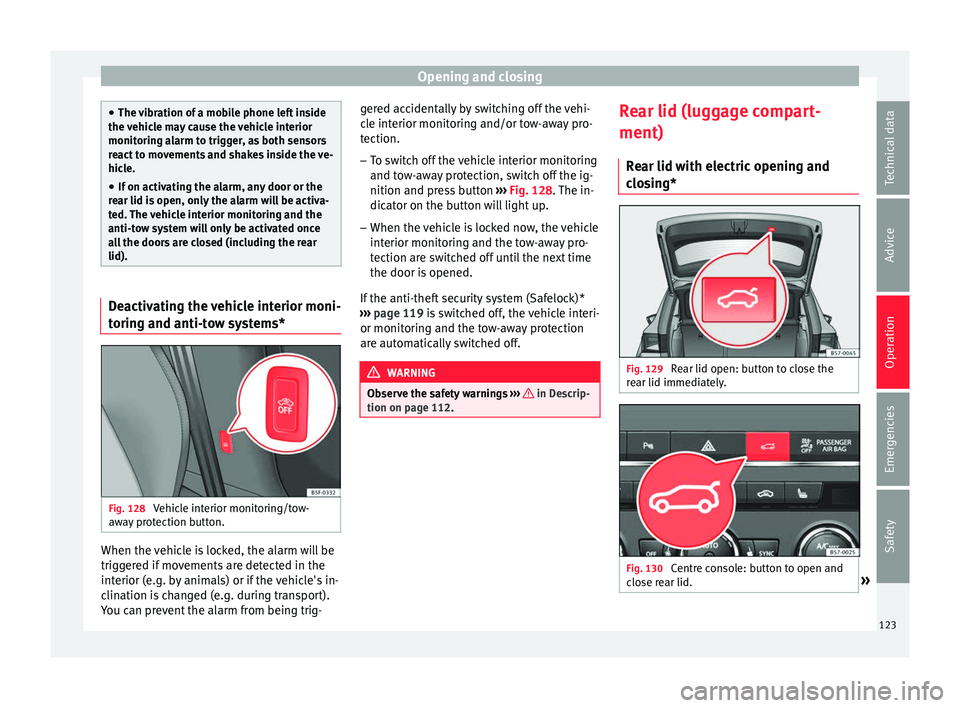
g and anti-tow systems* Fig. 128
Vehicle interior monitoring/tow-
a w
ay protection button. When the vehicle is locked, the alarm will be
trig
g
ered if movements are detected in the
interior (e.g. by animals) or if the vehicle's in-
clination is changed (e.g. during transport).
You can prevent the alarm from being trig- gered accidentally by switching off the vehi-
cl
e interior monitoring and/or tow-away pro-
tection.
– To switch off the vehicle interior monitoring
and to
w-away protection, switch off the ig-
nition and press button ››› Fig. 128. The in-
dicator on the button will light up.
– When the vehicle is locked now, the vehicle
interior monit
oring and the tow-away pro-
tection are switched off until the next time
the door is opened.
If the anti-theft security system (Safelock)*
››› page 119 is switched off, the vehicle interi-
or monitoring and the tow-away protection
are automatically switched off. WARNING
Observe the safety warnings ››
› in Descrip-
tion on p ag
e 112. Rear lid (luggage compart-
ment)
R e
ar lid with electric opening and
closing* Fig. 129
Rear lid open: button to close the
r e
ar lid immediately. Fig. 130
Centre console: button to open and
c lo
se rear lid. » 123
Technical data
Advice
Operation
Emergencies
Safety
Page 134 of 328
Operation
Convenience turn signals
F or the c
onvenience turn signals, move the
lever as far as possible upwards or down-
wards and release the lever. The turn signal
will flash three times.
The convenience turn signals are activated
and deactivated in the Easy Connect system
via the key and the
Set
up function button
› ›
› page 108.
In vehicles that do not have the correspond-
ing menu, this function can be deactivated in
a specialised workshop. WARNING
Improper or lack of use of the turn signals, or
f or
getting to deactivate them can confuse
other road users. This could result in a seri-
ous accident.
● Always give warning when you are going to
ch
ange lane, overtake or when turning, acti-
vating the turn signal in good time.
● As soon as you have finished changing
lane, o
vertaking or turning, switch the turn
signal off. WARNING
Incorrect use of the headlights may cause ac-
c ident
s and serious injury, as the main beam
may distract or dazzle other drivers. Note
● If the c
onvenience turn signals are operat-
ing (three flashes) and the other convenience
turn signals are switched on, the active part
stops flashing and only flashes once in the
new part selected.
● The turn signal only works when the igni-
tion is
switched on. The hazard warning
lights also work when the ignition is switch-
ed off.
● If a trailer turn signal malfunctions, the
contr
ol lamp will stop flashing (trailer turn
signals) and the vehicle turn signal will flash
at double speed.
● The main beam he
adlights can only be
switched on if the dipped beam headlights
are already on.
● In cold or damp weather conditions, the
hea
dlights, tail lights and turn signals may
mist up inside temporarily. This is normal and
in no way effects the useful life of the vehicle
lighting system. Automatic dipped beam control
* The automatic dipped beam control is merely
int
ended a
s an aid and is not able to recog-
nise all driving situations.
When the light switch is in position , the
vehicle lights and the instrument panel and
switch lighting switch on and off automatical- ly in the following situations
››
› in Daytime
ru nnin
g lights on page 131:
Automatic switching
onAutomatic switching
off
The photo sensor detects
darkness, for example,
when driving through a
tunnel.When adequate lighting is
detected.
The rain sensor detects
rain and activates the
windscreen wipers.When the windscreen wip-
ers have been inactive for
a few minutes. WARNING
If the road is not well lit and other road users
c annot
see the vehicle well enough or at all,
accidents may occur.
● The automatic dipped beam control ( )
only
switches on the dipped beam when
there are no changes in brightness, and not,
for example when it is foggy. Main beam assist*
Main beam assist (Light Assist)
The m
ain be
am assist acts within the limits
of the system and depending on environmen-
tal and traffic conditions. Once switched on,
the system is activated as of a speed of
about 60 km/h (37 mph) and is deactivated
below about 30 km/h (18 mph) ››› .
132
Page 135 of 328
Lights and visibility
When the system is activated and the camera
det ects
other vehicles that may be dazzled,
the main beam is automatically switched off.
Otherwise, the main beam is automatically
switched on.
The main beam assist generally detects illu-
minated areas and deactivates the main
beam when passing through a town, for ex-
ample.
Switching the main beam assist on and off
Func-
tionUse
Activate:
– Switch the ignition on and turn the light
switch to position .
– From the base position, move the main
beam and turn signal lever forwards
››› page 131. When the warning lamp
is
displayed on the instrument panel display,
the main beam assist is switched on.
To switch system off:
– Switch off the ignition.
– OR: turn the light switch to a different po-
sition to
››› page 131.
– OR: with main beam on, move the main
beam and turn signal lever backwards.
– OR: move the main beam and turn the
signal lever forwards to manually switch
the main beam on. The main beam assist
will then be deactivated. Malfunctions
The f
o
llowing conditions may prevent the
main beam headlight control from turning off the headlights in time or from turning off al-
tog
ether:
● In poorly lit towns with highly reflective
sign
s.
● Other insufficiently lit road users (such as
pedes
trians or cyclists).
● On tight bends and steep slopes (bumps)
and when oncomin
g vehicles are partially ob-
scured.
● When the drivers of other oncoming vehi-
cl
es (such as a truck) can see over a guard
rail in the centre of the road.
● If the camera is damaged or the power sup-
ply
is cut off.
● In fog, snow and heavy rain.
● With dust and sand turbulence.
● With loose gravel in the field of vision of
the camer
a.
● When the field of vision of the camera is
mis
ted up, dirty or covered by stickers, snow,
ice, etc. WARNING
The convenience features of the main beam
a s
sist should not encourage the taking of
risks. The system is not a replacement for
driver concentration.
● You are always in control of the main beam
and ad
apting it to the light, visibility and traf-
fic conditions. ●
It i
s possible that the main beam headlight
control does not recognise all driving situa-
tions and is limited under certain circumstan-
ces.
● When the field of vision of the camera is
dirty
, covered or damaged, operation of the
main beam control may be affected. This also
applies when changes are made to the vehi-
cle lighting system, for example, if additional
headlights are installed. CAUTION
To avoid affecting the operation of the sys-
t em, t
ake the following points into considera-
tion:
● Clean the field of vision of the camera regu-
larly
and make sure it is free of snow and ice.
● Do not cover the field of vision of the cam-
era.
● Chec
k that the windscreen is not damaged
in the are
a of the field of vision of the camera. Note
Main beam and headlight flasher can be
t urned on and off
manually at any time with
the turn signal and main beam lever
››› page 131. 133
Technical data
Advice
Operation
Emergencies
Safety
Page 138 of 328
Operation
6. Use the warning triangle to draw the atten- tion of other r
oad users to your vehicle.
7. Always take the vehicle key with you when you l
eave the vehicle.
All turn signals flash simultaneously when
the hazard warning lights are switched on.
The two turn signal turn signal lamps
and the turn signal lamp in the switch will
flash at the same time. The simultaneous
hazard warning lights also work when the ig-
nition is switched off.
Emergency braking warning
If the vehicle brakes suddenly and continu-
ously at a speed of more than 80 km/h (50
mph), the brake light flashes several times
per second to warn the vehicles driving be-
hind. If you continue braking, the hazard
warning lights will come on automatically
when the vehicle comes to a standstill. They
switch off automatically when the vehicle
starts to move again. WARNING
● The ri sk
of an accident increases if your ve-
hicle breaks down. Always use the hazard
warning lights and a warning triangle to draw
the attention of other road users to your sta-
tionary vehicle.
● Due to the high temperatures that the cata-
lytic c
onverter can reach, never park in an
area where the catalytic converter could come into contact with highly inflammable materi-
a
l
s, for example dry grass or spilt petrol. This
could start a fire. Note
● The b att
ery will run down if the hazard
warning lights are left on for a long time,
even if the ignition is switched off.
● The use of the hazard warning lights de-
sc
ribed here is subject to the relevant statu-
tory requirements. Parking lights
When the parking light is switched on, (right
or l
ef
t turn signal), the front side light and
the rear light on the corresponding side of
the vehicle stay lit. The parking lights can on-
ly be activated with the ignition switched off
and the turn signal and main beam lever in
the central position, before being triggered.
Parking light on both sides With the ignition switched off and the light
sw
it
ch in position , when locking the vehi-
cle from the outside, the parking lights on
both sides of the vehicle light up. In doing
so, only the side lights of both headlights
light up, and additionally the tail lights will
do so partially. Motorway light* The motorway light is available on vehicles
equip
ped w
ith full-LED lights.
The function is connected/disconnected via
the corresponding Easy Connect system
menu.
● Activation: when goin
g above 110 km/h
(68 mph) for more than 30 seconds, the dip-
ped beam raises slightly to increase the driv-
er's visibility distance.
● Deactivation: when r educ
ing the speed of
the car below 100 km/h (62 mph), the dip-
ped beam returns to its normal position.
Driving abroad The light beam of the dipped beam lights is
a
symmetric: the s
ide of the road on which
you are driving is lit more intensely.
When a car that is manufactured in a country
that drives on the right travels to a country
that drives on the left (or vice versa), it is nor-
mally necessary to cover part of the headlight
bulbs with stickers or to change the adjust-
ment of the headlights to avoid dazzling oth-
er drivers.
In such cases, the regulations specify certain
light values that must be complied with for
designated points of the light distribution.
This is known as “Tourist light”.
136