headlight Seat Ateca 2017 User Guide
[x] Cancel search | Manufacturer: SEAT, Model Year: 2017, Model line: Ateca, Model: Seat Ateca 2017Pages: 328, PDF Size: 6.36 MB
Page 134 of 328
Operation
Convenience turn signals
F or the c
onvenience turn signals, move the
lever as far as possible upwards or down-
wards and release the lever. The turn signal
will flash three times.
The convenience turn signals are activated
and deactivated in the Easy Connect system
via the key and the
Set
up function button
› ›
› page 108.
In vehicles that do not have the correspond-
ing menu, this function can be deactivated in
a specialised workshop. WARNING
Improper or lack of use of the turn signals, or
f or
getting to deactivate them can confuse
other road users. This could result in a seri-
ous accident.
● Always give warning when you are going to
ch
ange lane, overtake or when turning, acti-
vating the turn signal in good time.
● As soon as you have finished changing
lane, o
vertaking or turning, switch the turn
signal off. WARNING
Incorrect use of the headlights may cause ac-
c ident
s and serious injury, as the main beam
may distract or dazzle other drivers. Note
● If the c
onvenience turn signals are operat-
ing (three flashes) and the other convenience
turn signals are switched on, the active part
stops flashing and only flashes once in the
new part selected.
● The turn signal only works when the igni-
tion is
switched on. The hazard warning
lights also work when the ignition is switch-
ed off.
● If a trailer turn signal malfunctions, the
contr
ol lamp will stop flashing (trailer turn
signals) and the vehicle turn signal will flash
at double speed.
● The main beam he
adlights can only be
switched on if the dipped beam headlights
are already on.
● In cold or damp weather conditions, the
hea
dlights, tail lights and turn signals may
mist up inside temporarily. This is normal and
in no way effects the useful life of the vehicle
lighting system. Automatic dipped beam control
* The automatic dipped beam control is merely
int
ended a
s an aid and is not able to recog-
nise all driving situations.
When the light switch is in position , the
vehicle lights and the instrument panel and
switch lighting switch on and off automatical- ly in the following situations
››
› in Daytime
ru nnin
g lights on page 131:
Automatic switching
onAutomatic switching
off
The photo sensor detects
darkness, for example,
when driving through a
tunnel.When adequate lighting is
detected.
The rain sensor detects
rain and activates the
windscreen wipers.When the windscreen wip-
ers have been inactive for
a few minutes. WARNING
If the road is not well lit and other road users
c annot
see the vehicle well enough or at all,
accidents may occur.
● The automatic dipped beam control ( )
only
switches on the dipped beam when
there are no changes in brightness, and not,
for example when it is foggy. Main beam assist*
Main beam assist (Light Assist)
The m
ain be
am assist acts within the limits
of the system and depending on environmen-
tal and traffic conditions. Once switched on,
the system is activated as of a speed of
about 60 km/h (37 mph) and is deactivated
below about 30 km/h (18 mph) ››› .
132
Page 135 of 328
Lights and visibility
When the system is activated and the camera
det ects
other vehicles that may be dazzled,
the main beam is automatically switched off.
Otherwise, the main beam is automatically
switched on.
The main beam assist generally detects illu-
minated areas and deactivates the main
beam when passing through a town, for ex-
ample.
Switching the main beam assist on and off
Func-
tionUse
Activate:
– Switch the ignition on and turn the light
switch to position .
– From the base position, move the main
beam and turn signal lever forwards
››› page 131. When the warning lamp
is
displayed on the instrument panel display,
the main beam assist is switched on.
To switch system off:
– Switch off the ignition.
– OR: turn the light switch to a different po-
sition to
››› page 131.
– OR: with main beam on, move the main
beam and turn signal lever backwards.
– OR: move the main beam and turn the
signal lever forwards to manually switch
the main beam on. The main beam assist
will then be deactivated. Malfunctions
The f
o
llowing conditions may prevent the
main beam headlight control from turning off the headlights in time or from turning off al-
tog
ether:
● In poorly lit towns with highly reflective
sign
s.
● Other insufficiently lit road users (such as
pedes
trians or cyclists).
● On tight bends and steep slopes (bumps)
and when oncomin
g vehicles are partially ob-
scured.
● When the drivers of other oncoming vehi-
cl
es (such as a truck) can see over a guard
rail in the centre of the road.
● If the camera is damaged or the power sup-
ply
is cut off.
● In fog, snow and heavy rain.
● With dust and sand turbulence.
● With loose gravel in the field of vision of
the camer
a.
● When the field of vision of the camera is
mis
ted up, dirty or covered by stickers, snow,
ice, etc. WARNING
The convenience features of the main beam
a s
sist should not encourage the taking of
risks. The system is not a replacement for
driver concentration.
● You are always in control of the main beam
and ad
apting it to the light, visibility and traf-
fic conditions. ●
It i
s possible that the main beam headlight
control does not recognise all driving situa-
tions and is limited under certain circumstan-
ces.
● When the field of vision of the camera is
dirty
, covered or damaged, operation of the
main beam control may be affected. This also
applies when changes are made to the vehi-
cle lighting system, for example, if additional
headlights are installed. CAUTION
To avoid affecting the operation of the sys-
t em, t
ake the following points into considera-
tion:
● Clean the field of vision of the camera regu-
larly
and make sure it is free of snow and ice.
● Do not cover the field of vision of the cam-
era.
● Chec
k that the windscreen is not damaged
in the are
a of the field of vision of the camera. Note
Main beam and headlight flasher can be
t urned on and off
manually at any time with
the turn signal and main beam lever
››› page 131. 133
Technical data
Advice
Operation
Emergencies
Safety
Page 136 of 328
Operation
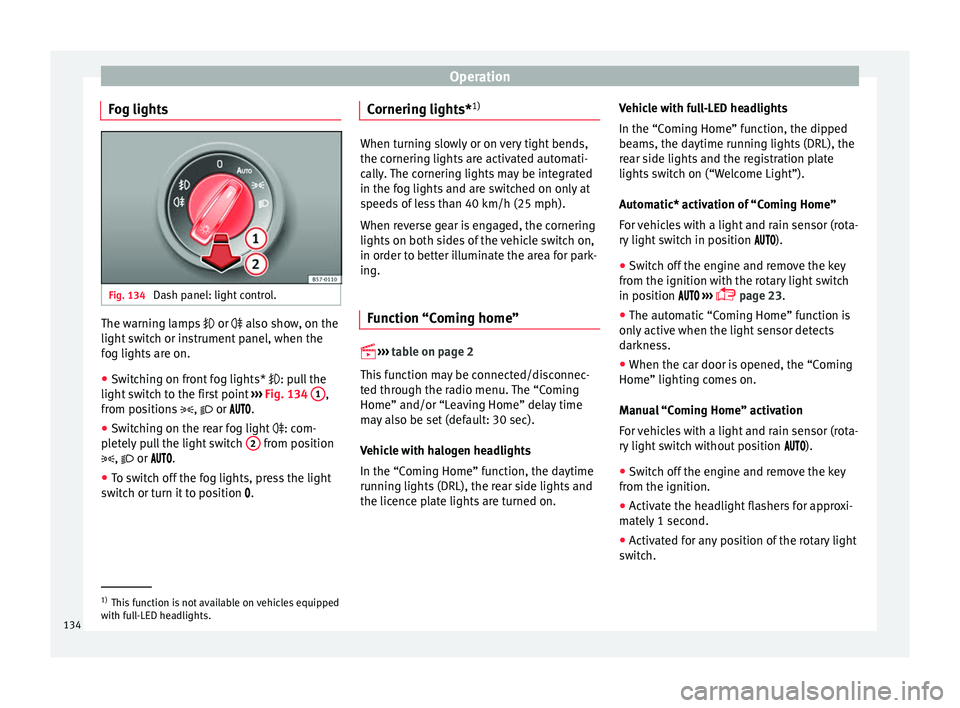
Fog lights Fig. 134
Dash panel: light control. The warning lamps
or also sho
w, on the
light switch or instrument panel, when the
fog lights are on.
● Switching on front fog lights* : pu
ll the
light switch to the first point ››› Fig. 134 1 ,
fr om po
sitions , or .
● Switching on the rear fog light : com-
p
letely pull the light switch 2 from position
, or .
● T
o switch off the fog lights, press the light
swit
ch or turn it to position .Cornering lights*
1) When turning slowly or on very tight bends,
the c
ornerin
g lights are activated automati-
cally. The cornering lights may be integrated
in the fog lights and are switched on only at
speeds of less than 40 km/h (25 mph).
When reverse gear is engaged, the cornering
lights on both sides of the vehicle switch on,
in order to better illuminate the area for park-
ing.
Function “Coming home”
› ›
›
table on page 2
This function may be connected/disconnec-
ted through the radio menu. The “Coming
Home” and/or “Leaving Home” delay time
may also be set (default: 30 sec).
Vehicle with halogen headlights
In the “Coming Home” function, the daytime
running lights (DRL), the rear side lights and
the licence plate lights are turned on. Vehicle with full-LED headlights
In the “C
omin
g Home” function, the dipped
beams, the daytime running lights (DRL), the
rear side lights and the registration plate
lights switch on (“Welcome Light”).
Automatic* activation of “Coming Home”
For vehicles with a light and rain sensor (rota-
ry light switch in position ).
● Switch off the engine and remove the key
from the ignition w
ith the rotary light switch
in position ›››
page 23.
● The automatic “Coming Home” function is
only
active when the light sensor detects
darkness.
● When the car door is opened, the “Coming
Home” lighting c
omes on.
Manual “Coming Home” activation
For vehicles with a light and rain sensor (rota-
ry light switch without position ).
● Switch off the engine and remove the key
from the ignition.
● A
ctivate the headlight flashers for approxi-
mat
ely 1 second.
● Activated for any position of the rotary light
swit
ch. 1)
This function is not available on vehicles equipped
w ith f
ull-LED headlights.
134
Page 137 of 328
Lights and visibility
● When the c ar door i
s opened, the “Coming
Home” lighting comes on. The headlights are
turned off 60 seconds after the vehicle door
is opened.
Deactivation
● If no door has been closed, they go out au-
tom
atically after 60 seconds.
● After the last door has been closed, the
hea
dlights will be switched off after the
“Coming Home” delay (as established in the
radio menu) has elapsed.
● On turning the light switch to position
››
› page 23.
● When the ignition is switched on (when
st
arting the engine).
Function “Leaving Home” The “Leaving Home” function is only availa-
b
l
e for vehicles with a light and rain sensor
(rotary light switch in position ).
This function may be connected/disconnec-
ted through the radio menu. The “Leaving
Home” function switch-off delay may also be
set (default: 30 sec).
Vehicle with halogen headlights
In the “Leaving Home” function, the daytime
running lights (DRL), the rear side lights and
the licence plate lights are switched on. Vehicle with full-LED headlights
In the “Le
aving Home” function, the dipped
beams, the daytime running lights (DRL), the
rear side lights and the registration plate
lights switch on (“Welcome Light”).
Activation
● When the vehicle is unlocked using the re-
mote c
ontrol.
● The “Leaving Home” function is only activa-
ted when the r
otary light switch is in position
and the light sensor detects darkness.
Deactivation
● When the “Leaving Home” delay period
ends
(default: 30 sec).
● When the vehicle is locked using the re-
mote c
ontrol.
● When the light control is switched into a
pos
ition other than .
● With the ignition is switched on. Hazard warning lights
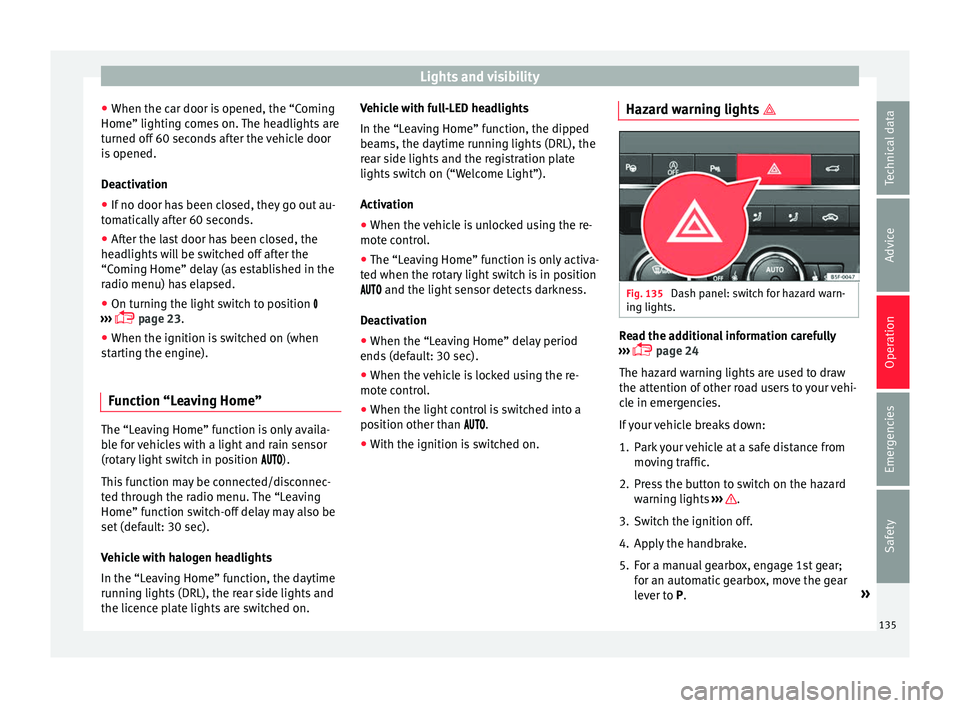
Fig. 135
Dash panel: switch for hazard warn-
in g lights. Read the additional information carefully
› ›
› page 24
The hazard warning lights are used to draw
the attention of other road users to your vehi-
cle in emergencies.
If your vehicle breaks down:
1. Park your vehicle at a safe distance from mov
ing traffic.
2. Press the button to switch on the hazard warnin
g lights ››› .
3. Switch the ignition off.
4. Apply the handbrake.
5. For a manual gearbox, engage 1st gear; for an aut
omatic gearbox, move the gear
lever to P. »
135
Technical data
Advice
Operation
Emergencies
Safety
Page 138 of 328
Operation
6. Use the warning triangle to draw the atten- tion of other r
oad users to your vehicle.
7. Always take the vehicle key with you when you l
eave the vehicle.
All turn signals flash simultaneously when
the hazard warning lights are switched on.
The two turn signal turn signal lamps
and the turn signal lamp in the switch will
flash at the same time. The simultaneous
hazard warning lights also work when the ig-
nition is switched off.
Emergency braking warning
If the vehicle brakes suddenly and continu-
ously at a speed of more than 80 km/h (50
mph), the brake light flashes several times
per second to warn the vehicles driving be-
hind. If you continue braking, the hazard
warning lights will come on automatically
when the vehicle comes to a standstill. They
switch off automatically when the vehicle
starts to move again. WARNING
● The ri sk
of an accident increases if your ve-
hicle breaks down. Always use the hazard
warning lights and a warning triangle to draw
the attention of other road users to your sta-
tionary vehicle.
● Due to the high temperatures that the cata-
lytic c
onverter can reach, never park in an
area where the catalytic converter could come into contact with highly inflammable materi-
a
l
s, for example dry grass or spilt petrol. This
could start a fire. Note
● The b att
ery will run down if the hazard
warning lights are left on for a long time,
even if the ignition is switched off.
● The use of the hazard warning lights de-
sc
ribed here is subject to the relevant statu-
tory requirements. Parking lights
When the parking light is switched on, (right
or l
ef
t turn signal), the front side light and
the rear light on the corresponding side of
the vehicle stay lit. The parking lights can on-
ly be activated with the ignition switched off
and the turn signal and main beam lever in
the central position, before being triggered.
Parking light on both sides With the ignition switched off and the light
sw
it
ch in position , when locking the vehi-
cle from the outside, the parking lights on
both sides of the vehicle light up. In doing
so, only the side lights of both headlights
light up, and additionally the tail lights will
do so partially. Motorway light* The motorway light is available on vehicles
equip
ped w
ith full-LED lights.
The function is connected/disconnected via
the corresponding Easy Connect system
menu.
● Activation: when goin
g above 110 km/h
(68 mph) for more than 30 seconds, the dip-
ped beam raises slightly to increase the driv-
er's visibility distance.
● Deactivation: when r educ
ing the speed of
the car below 100 km/h (62 mph), the dip-
ped beam returns to its normal position.
Driving abroad The light beam of the dipped beam lights is
a
symmetric: the s
ide of the road on which
you are driving is lit more intensely.
When a car that is manufactured in a country
that drives on the right travels to a country
that drives on the left (or vice versa), it is nor-
mally necessary to cover part of the headlight
bulbs with stickers or to change the adjust-
ment of the headlights to avoid dazzling oth-
er drivers.
In such cases, the regulations specify certain
light values that must be complied with for
designated points of the light distribution.
This is known as “Tourist light”.
136
Page 139 of 328
Lights and visibility
The light distribution of the halogen and full-
LED he a
dlights allows the specific “tourist
light” values to be met without the need for
stickers or changes in the settings. Note
“Tourist light” is only allowed temporarily. If
y ou ar
e planning a long stay in a country that
drives on the other side, you should take the
vehicle to an Authorised Technical Service to
change the headlights. Headlight range control, lighting of
the in
s
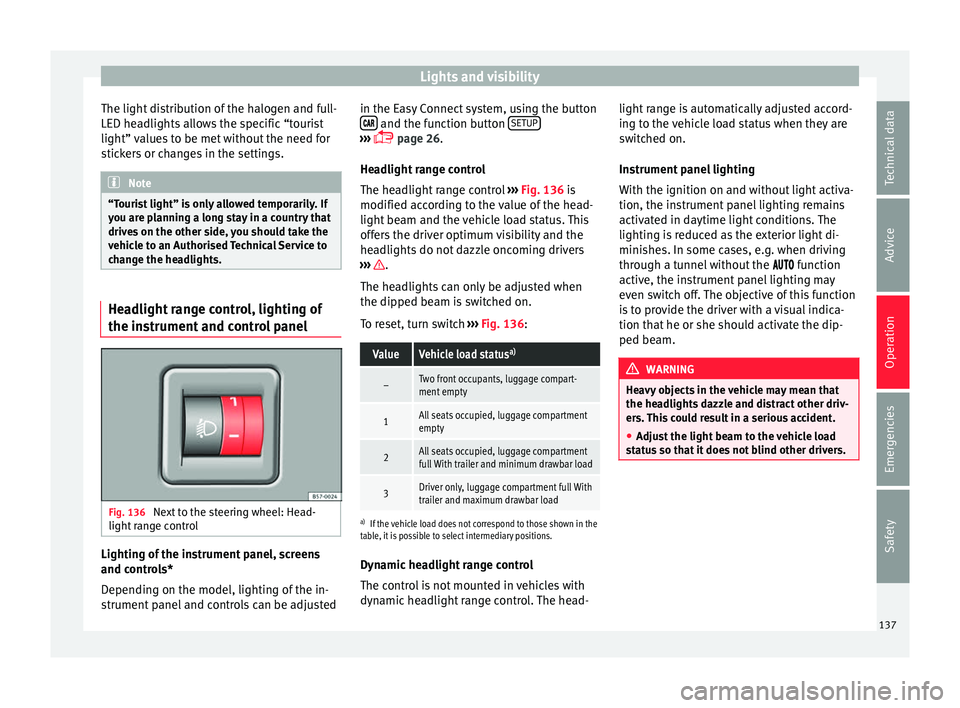
trument and control panel Fig. 136
Next to the steering wheel: Head-
light r
ange control Lighting of the instrument panel, screens
and c
ontr
ols*
Depending on the model, lighting of the in-
strument panel and controls can be adjusted in the Easy Connect system, using the button
and the function button
S
ETUP ›››
p
age 26.
He
adlight range control
The headlight range control ››› Fig. 136 is
modified according to the value of the head-
light beam and the vehicle load status. This
offers the driver optimum visibility and the
headlights do not dazzle oncoming drivers
››› .
The he a
dlights can only be adjusted when
the dipped beam is switched on.
To reset, turn switch ››› Fig. 136:
ValueVehicle load status a)
–Two front occupants, luggage compart-
ment empty
1All seats occupied, luggage compartment
empty
2All seats occupied, luggage compartment
full With trailer and minimum drawbar load
3Driver only, luggage compartment full With
trailer and maximum drawbar load
a)
If the vehicle load does not correspond to those shown in the
table, it is possible to select intermediary positions.
Dynamic headlight range control
The control is not mounted in vehicles with
dynamic headlight range control. The head- light range is automatically adjusted accord-
ing t
o the vehicle load status when they are
switched on.
Instrument panel lighting
With the ignition on and without light activa-
tion, the instrument panel lighting remains
activated in daytime light conditions. The
lighting is reduced as the exterior light di-
minishes. In some cases, e.g. when driving
through a tunnel without the function
active, the instrument panel lighting may
even switch off. The objective of this function
is to provide the driver with a visual indica-
tion that he or she should activate the dip-
ped beam. WARNING
Heavy objects in the vehicle may mean that
the he a
dlights dazzle and distract other driv-
ers. This could result in a serious accident.
● Adjust the light beam to the vehicle load
st
atus so that it does not blind other drivers. 137
Technical data
Advice
Operation
Emergencies
Safety
Page 141 of 328
Lights and visibility
Note
The light above the sun visor automatically
sw it
ches off after a few minutes in certain
conditions. This prevents the battery from
discharging. Windscreen wiper and window
w
iper sy
stems
Window wiper lever Read the additional information carefully
› ›
› page 25 CAUTION
If the ignition is switched off with the wind-
s c
reen wipers active, they complete their
wipe before returning to the rest position.
When switching the ignition back on, the
windscreen wiper will continue to operate at
the same wiping level. Ice, snow and other
obstacles on the windscreen may damage the
wiper and the windscreen wiper motor.
● If necessary, remove snow and ice from the
wind
screen wipers before starting your jour-
ney.
● Carefully lift the frozen windscreen wipers
from the gl
ass. SEAT recommends a de-icer
spray for this operation.
● Do not switch on the windscreen wipers if
the wind
screen is dry. Cleaning with the windscreen wipers while dry can cause dam-
ag
e.
● In icy
conditions, always check that the
wiper b
lades are not frozen to the glass be-
fore using the wipers. In cold weather, it may
help to leave the vehicle parked with the wip-
ers in service position ›››
page 60. Note
● The w ind
screen and window wipers only
function when the ignition is switched on and
the bonnet or rear lid, respectively, are
closed.
● The interval wipe speed varies according to
the v
ehicle speed. The faster the vehicle is
moving, the more often the windscreen is
cleaned.
● The rear wiper is automatically switched on
when the wind
screen wiper is on and the car
is in reverse gear. Windscreen wiper functions
Windscreen wiper performance in different sit-
uations
If the vehicle is at a
standstillThe activated position provision-
ally changes to the previous posi-
tion.
Windscreen wiper performance in different sit-
uations
During automatic
wipe
The air conditioner comes on for
approximately 30 seconds in air
recirculation mode to prevent the
smell of the windscreen washer
fluid entering the inside the vehi-
cle.
For the interval wipe
Intervals between wipes depend
on the vehicle's speed. The high-
er the vehicle speed the shorter
the intervals. Heated windscreen washer jets
The he
atin
g only thaws the frozen jets, it
does not thaw the water in the washer hoses.
When the ignition is switched on the heated
windscreen washer jets automatically adjust
the heat depending on the ambient tempera-
ture.
Headlight wash/wipe system
The headlight washers/wipers clean the
headlight lenses.
After the ignition is switched on, the first and
every fifth time the windscreen washer is
switched on, the headlights are also washed.
Therefore, the windscreen wiper lever should
be pulled towards the steering wheel when
the dipped beam or main beam are on. Any
incrusted dirt (such as insects) should be
cleaned regularly (e.g. when refuelling). »
139
Technical data
Advice
Operation
Emergencies
Safety
Page 142 of 328
Operation
To ensure the headlight washers work cor-
r ectly
in winter, any snow which has got into
the bumper jet supports should be cleaned
away. If necessary, remove snow with an anti-
icing spray. Note
The wiper will try to wipe away any obstacles
th at
are on the windscreen. The wiper will
stop moving if the obstacle blocks its path.
Remove the obstacle and switch the wiper
back on again. Rain sensor*
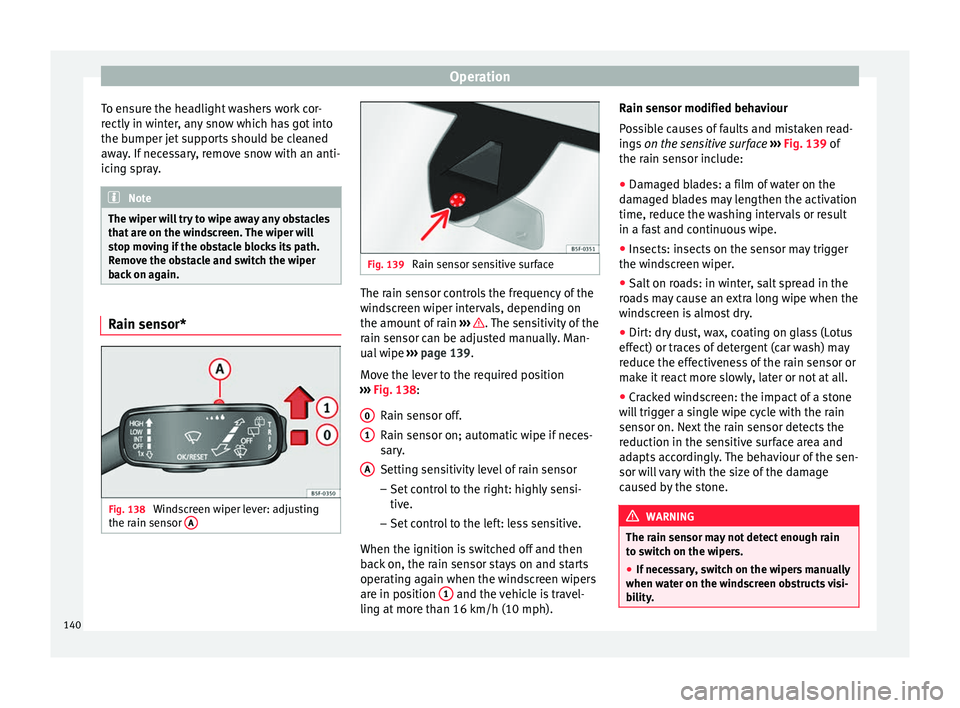
Fig. 138
Windscreen wiper lever: adjusting
the r ain sen
sor A Fig. 139
Rain sensor sensitive surface The rain sensor controls the frequency of the
w
ind
screen wiper intervals, depending on
the amount of rain ››› . The sensitivity of the
r ain sen
sor can be adjusted manually. Man-
ual wipe ››› page 139.
Move the lever to the required position
››› Fig. 138:
Rain sensor off.
Rain sensor on; automatic wipe if neces-
sary.
Setting sensitivity level of rain sensor
– Set control to the right: highly sensi-
tive.
– Set control to the left: less sensitive.
When the ignition is switched off and then
back on, the rain sensor stays on and starts
operating again when the windscreen wipers
are in position 1 and the vehicle is travel-
lin g at
more than 16 km/h (10 mph).
0 1
A Rain sensor modified behaviour
P
o
ssible causes of faults and mistaken read-
ings on the sensitive surface ››› Fig. 139 of
the rain sensor include:
● Damaged blades: a film of water on the
dam
aged blades may lengthen the activation
time, reduce the washing intervals or result
in a fast and continuous wipe.
● Insects: insects on the sensor may trigger
the wind
screen wiper.
● Salt on roads: in winter, salt spread in the
ro
ads may cause an extra long wipe when the
windscreen is almost dry.
● Dirt: dry dust, wax, coating on glass (Lotus
effect) or tr
aces of detergent (car wash) may
reduce the effectiveness of the rain sensor or
make it react more slowly, later or not at all.
● Cracked windscreen: the impact of a stone
wi
ll trigger a single wipe cycle with the rain
sensor on. Next the rain sensor detects the
reduction in the sensitive surface area and
adapts accordingly. The behaviour of the sen-
sor will vary with the size of the damage
caused by the stone. WARNING
The rain sensor may not detect enough rain
t o sw
itch on the wipers.
● If necessary, switch on the wipers manually
when wat
er on the windscreen obstructs visi-
bility. 140
Page 166 of 328
Operation
WARNING
Never programme the auxiliary heater so that
it sw
itches itself on and is running in an en-
closed space or an area with no ventilation.
The auxiliary heater exhaust fumes contain
carbon monoxide, an odourless and colour-
less toxic gas. Carbon monoxide can cause
people to lose consciousness. It can also
cause death. Operating instructions
The auxiliary heater exhaust system located
belo
w the
vehicle must be kept clear of snow,
mud and other objects. The exhaust fumes
must be able to exit freely. The emissions
generated by the auxiliary heater are re-
moved via an exhaust pipe fitted underneath
the vehicle.
On heating the vehicle interior, depending on
the outside temperature, the warm air is first
directed at the windscreen and then to the
rest of the vehicle interior through the air
vents. Directing the diffusers – towards the
windows for example – can affect air distribu-
tion.
When will the auxiliary heater not be activa-
ted?
● The auxiliary heater requires about as
muc h po
wer as the dipped beam headlights.
If the 12-volt battery charge is too low, the auxiliary heater switches off automatically
and c
annot
be switched on. This avoids prob-
lems when starting the engine.
● The heating must be activated every time
you w
ant to set off. Similarly, the departure
time must reactivate each time.
● The control lamp (fuel
level indicator)
lights up. Note
● Noi se
s will be heard while the auxiliary
heater is running.
● When the air humidity is high and the in-
side t
emperature low, condensation from the
heating and ventilating system may evapo-
rate when the auxiliary heater is switched on.
In this case, steam may be released from un-
derneath the vehicle. This does not mean
that there is a vehicle malfunction.
● If the vehicle is tilted, e.g. if parked on a
slope, the oper
ation of the auxiliary heater
may be restricted if the fuel tank level is low
(just above the reserve level).
● If the auxiliary heater is used a number of
times
for a long period of time, the 12-volt
battery will lose its charge. To recharge the
battery, the vehicle must be driven for a num-
ber of kilometres from time to time. As a
guideline: The journey should last approxi-
mately as long as the heater was connected.
● At temperatures below +5°C (+41°F), the
auxi
liary heater may switch itself on automat-
ically when the engine is switched on. The auxiliary heater is switched off again after a
c
er
tain time.164
Page 202 of 328
Operation
WARNING
Observe the safety warnings ›› › in Warning
and c ontr
ol lamps on page 107. Note
When the ACC is connected, the indications
on the in s
trument panel screen may be con-
cealed by warnings from other functions,
such as an incoming call. Radar sensor
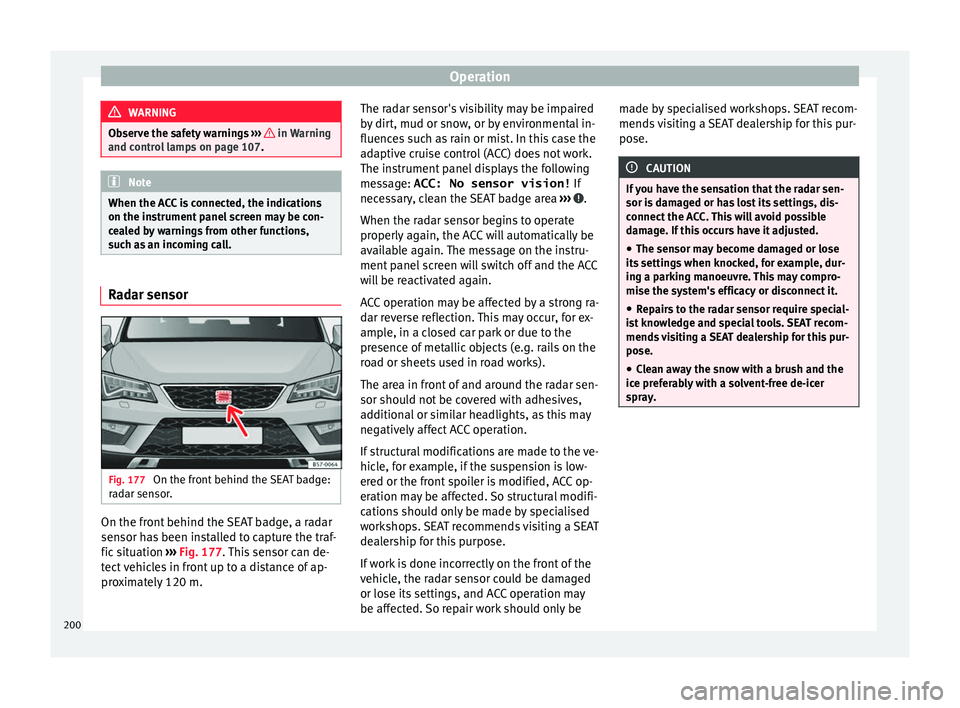
Fig. 177
On the front behind the SEAT badge:
r a
dar sensor. On the front behind the SEAT badge, a radar
sen
sor h
as been installed to capture the traf-
fic situation ›››
Fig. 177. This sensor can de-
tect vehicles in front up to a distance of ap-
proximately 120 m. The radar sensor's visibility may be impaired
by
dirt, mud or snow, or by environmental in-
fluences such as rain or mist. In this case the
adaptive cruise control (ACC) does not work.
The instrument panel displays the following
message: ACC: No sensor vision! If
necessary, clean the SEAT badge area ››› .
When the r a
dar sensor begins to operate
properly again, the ACC will automatically be
available again. The message on the instru-
ment panel screen will switch off and the ACC
will be reactivated again.
ACC operation may be affected by a strong ra-
dar reverse reflection. This may occur, for ex-
ample, in a closed car park or due to the
presence of metallic objects (e.g. rails on the
road or sheets used in road works).
The area in front of and around the radar sen-
sor should not be covered with adhesives,
additional or similar headlights, as this may
negatively affect ACC operation.
If structural modifications are made to the ve-
hicle, for example, if the suspension is low-
ered or the front spoiler is modified, ACC op-
eration may be affected. So structural modifi-
cations should only be made by specialised
workshops. SEAT recommends visiting a SEAT
dealership for this purpose.
If work is done incorrectly on the front of the
vehicle, the radar sensor could be damaged
or lose its settings, and ACC operation may
be affected. So repair work should only be made by specialised workshops. SEAT recom-
mends
visiting a SEAT dealership for this pur-
pose. CAUTION
If you have the sensation that the radar sen-
sor i s
damaged or has lost its settings, dis-
connect the ACC. This will avoid possible
damage. If this occurs have it adjusted.
● The sensor may become damaged or lose
its
settings when knocked, for example, dur-
ing a parking manoeuvre. This may compro-
mise the system's efficacy or disconnect it.
● Repairs to the radar sensor require special-
is
t knowledge and special tools. SEAT recom-
mends visiting a SEAT dealership for this pur-
pose.
● Clean away the snow with a brush and the
ice pr
eferably with a solvent-free de-icer
spray. 200