lock Seat Ateca 2017 Owner's Manual
[x] Cancel search | Manufacturer: SEAT, Model Year: 2017, Model line: Ateca, Model: Seat Ateca 2017Pages: 328, PDF Size: 6.36 MB
Page 5 of 328
Table of Contents
Table of Contents
The e s
sentials . . . . . . . . . . . . . . . . . . . . . . . . 5
Exterior view . . . . . . . . . . . . . . . . . . . . . . . . . . . . 5
Exterior view . . . . . . . . . . . . . . . . . . . . . . . . . . . . 6
Interior view (left-hand drive) . . . . . . . . . . . . . . 7
Interior view (right-hand drive) . . . . . . . . . . . . . 8
How it works . . . . . . . . . . . . . . . . . . . . . . . . . . . . 9
Unlocking and locking . . . . . . . . . . . . . . . . . . . . 9
Before driving . . . . . . . . . . . . . . . . . . . . . . . . . . . 12
Airbags . . . . . . . . . . . . . . . . . . . . . . . . . . . . . . . . 15
Child seats . . . . . . . . . . . . . . . . . . . . . . . . . . . . . 17
Starting the vehicle . . . . . . . . . . . . . . . . . . . . . . 23
Lights and visibility . . . . . . . . . . . . . . . . . . . . . . 23
Easy Connect . . . . . . . . . . . . . . . . . . . . . . . . . . . 26
Driver information system . . . . . . . . . . . . . . . . . 29
Driving data . . . . . . . . . . . . . . . . . . . . . . . . . . . . 33
Cruise control . . . . . . . . . . . . . . . . . . . . . . . . . . . 36
Warning lamps . . . . . . . . . . . . . . . . . . . . . . . . . . 38
Gearbox lever . . . . . . . . . . . . . . . . . . . . . . . . . . . 40
Air conditioning . . . . . . . . . . . . . . . . . . . . . . . . . 42
Fluid Level control . . . . . . . . . . . . . . . . . . . . . . . 48
Emergencies . . . . . . . . . . . . . . . . . . . . . . . . . . . . 51
Fuses . . . . . . . . . . . . . . . . . . . . . . . . . . . . . . . . . . 51
Bulbs . . . . . . . . . . . . . . . . . . . . . . . . . . . . . . . . . . 52
Action in the event of a puncture . . . . . . . . . . . 52
Changing a wheel . . . . . . . . . . . . . . . . . . . . . . . 54
Snow chains . . . . . . . . . . . . . . . . . . . . . . . . . . . . 56
Emergency towing of the vehicle . . . . . . . . . . . 57
How to jump start . . . . . . . . . . . . . . . . . . . . . . . . 58
Changing the wiper blades . . . . . . . . . . . . . . . . 60
Safety . . . . . . . . . . . . . . . . . . . . . . . . . . . . . . . . 62
Safe driving . . . . . . . . . . . . . . . . . . . . . . . . . . . . 62
Safety first! . . . . . . . . . . . . . . . . . . . . . . . . . . . . . 62
Advice about driving . . . . . . . . . . . . . . . . . . . . . 62 Correct position for passengers . . . . . . . . . . . . 63
Pedal area . . . . . . . . . . . . . . . . . . . . . . . . . . . . . . 67
Seat belts
. . . . . . . . . . . . . . . . . . . . . . . . . . . . . . 68
Why wear a seat belt? . . . . . . . . . . . . . . . . . . . . 68
How to properly adjust your seatbelt . . . . . . . . 71
Seat belt tensioners . . . . . . . . . . . . . . . . . . . . . . 72
Airbag system . . . . . . . . . . . . . . . . . . . . . . . . . . 73
Brief introduction . . . . . . . . . . . . . . . . . . . . . . . . 73
Airbag safety instructions . . . . . . . . . . . . . . . . . 75
Deactivating airbags . . . . . . . . . . . . . . . . . . . . . 77
Transporting children safely . . . . . . . . . . . . . . . 79
Safety for children . . . . . . . . . . . . . . . . . . . . . . . 79
Child seats . . . . . . . . . . . . . . . . . . . . . . . . . . . . . 80
Emergencies . . . . . . . . . . . . . . . . . . . . . . . . . . 83
Self-help . . . . . . . . . . . . . . . . . . . . . . . . . . . . . . . 83
Vehicle tool kit, anti-puncture kit* . . . . . . . . . . 83
Tyre repair . . . . . . . . . . . . . . . . . . . . . . . . . . . . . . 83
Manual unlocking/locking . . . . . . . . . . . . . . . . . 85
Changing the windscreen wiper blades . . . . . . 85
Tow-starting and towing . . . . . . . . . . . . . . . . . . 86
Fuses and bulbs . . . . . . . . . . . . . . . . . . . . . . . . . 90
Fuses . . . . . . . . . . . . . . . . . . . . . . . . . . . . . . . . . . 90
Changing bulbs . . . . . . . . . . . . . . . . . . . . . . . . . 93
Change the front bulbs . . . . . . . . . . . . . . . . . . . 94
Change the rear bulbs . . . . . . . . . . . . . . . . . . . . 96
Operation . . . . . . . . . . . . . . . . . . . . . . . . . . . . . 101
Controls and displays . . . . . . . . . . . . . . . . . . . . 101
General instrument panel . . . . . . . . . . . . . . . . . 100
Instruments and warning/control lamps . . . . . 102
Instruments . . . . . . . . . . . . . . . . . . . . . . . . . . . . 102
Control lamps . . . . . . . . . . . . . . . . . . . . . . . . . . . 106
Introduction to the Easy Connect system* . . . . 108
System settings (CAR)* . . . . . . . . . . . . . . . . . . . 108
Communications and multimedia . . . . . . . . . . . 109
Steering wheel controls* . . . . . . . . . . . . . . . . . . 109
Multimedia . . . . . . . . . . . . . . . . . . . . . . . . . . . . . 111 Opening and closing
. . . . . . . . . . . . . . . . . . . . . 112
Central locking system . . . . . . . . . . . . . . . . . . . . 112
Anti-theft alarm system* . . . . . . . . . . . . . . . . . . 121
Rear lid (luggage compartment) . . . . . . . . . . . . 123
Electric windows . . . . . . . . . . . . . . . . . . . . . . . . . 126
Sunroof* . . . . . . . . . . . . . . . . . . . . . . . . . . . . . . . 128
Lights and visibility . . . . . . . . . . . . . . . . . . . . . . 131
Lights . . . . . . . . . . . . . . . . . . . . . . . . . . . . . . . . . 131
Visibility . . . . . . . . . . . . . . . . . . . . . . . . . . . . . . . 138
Windscreen wiper and window wiper sys-
tems
. . . . . . . . . . . . . . . . . . . . . . . . . . . . . . . . . . 139
Mirror . . . . . . . . . . . . . . . . . . . . . . . . . . . . . . . . . 141
Seats and head restraints . . . . . . . . . . . . . . . . . 143
Adjusting the seats and headrests . . . . . . . . . . 143
Seat functions . . . . . . . . . . . . . . . . . . . . . . . . . . 144
Transport and practical equipment . . . . . . . . . 147
Storage compartments . . . . . . . . . . . . . . . . . . . 147
Storing objects . . . . . . . . . . . . . . . . . . . . . . . . . . 149
Roof carrier . . . . . . . . . . . . . . . . . . . . . . . . . . . . . 154
Air conditioning . . . . . . . . . . . . . . . . . . . . . . . . . 156
Heating, ventilation and cooling . . . . . . . . . . . . 156
Auxiliary heater (additional heater) . . . . . . . . . 161
Driving . . . . . . . . . . . . . . . . . . . . . . . . . . . . . . . . 165
Start and stop the engine . . . . . . . . . . . . . . . . . 165
Braking and parking . . . . . . . . . . . . . . . . . . . . . 170
Manual gearbox . . . . . . . . . . . . . . . . . . . . . . . . . 176
Automatic gearbox/DSG automatic gear-
box*
. . . . . . . . . . . . . . . . . . . . . . . . . . . . . . . . . . . 177
Run-in and economical driving . . . . . . . . . . . . . 184
Engine management and exhaust gas purifica-
tion sys
tem . . . . . . . . . . . . . . . . . . . . . . . . . . . . . 186
Driving tips . . . . . . . . . . . . . . . . . . . . . . . . . . . . . 187
Driver assistance systems . . . . . . . . . . . . . . . . . 188
Start-Stop System* . . . . . . . . . . . . . . . . . . . . . . . 188
Hill Descent Control (HDC) . . . . . . . . . . . . . . . . . 190
Auto Hold Function . . . . . . . . . . . . . . . . . . . . . . . 191
Cruise control system (CCS)* . . . . . . . . . . . . . . . 193
Speed limiter . . . . . . . . . . . . . . . . . . . . . . . . . . . 194 3
Page 11 of 328
The essentials
How it works
Un loc
king and locking
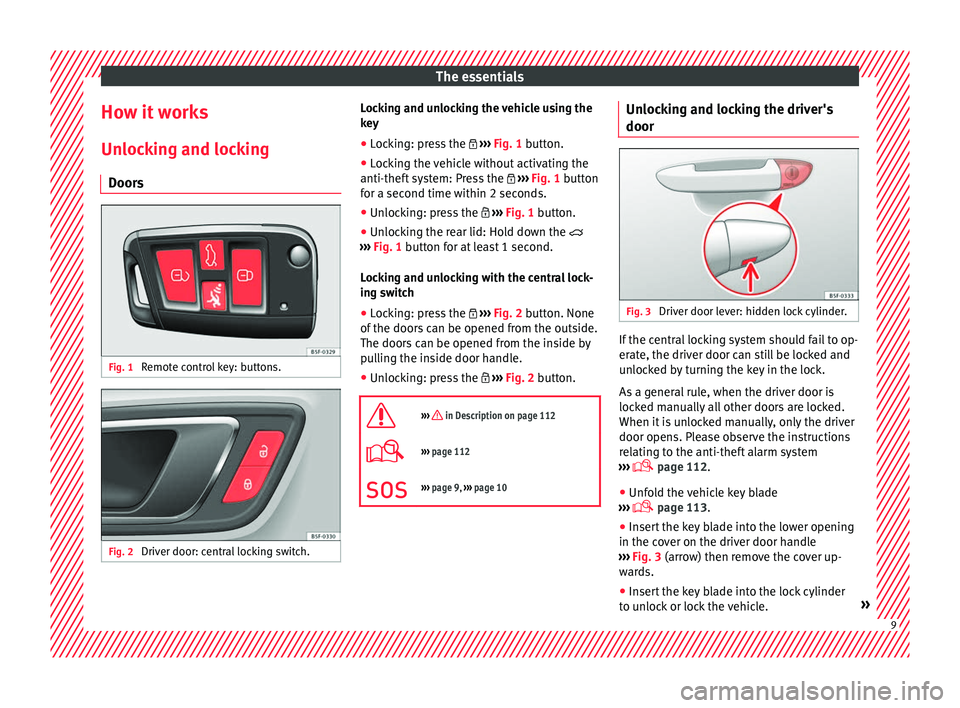
Doors Fig. 1
Remote control key: buttons. Fig. 2
Driver door: central locking switch. Locking and unlocking the vehicle using the
k
ey
● L
ocking: press the ››
› Fig. 1 button.
● Locking the vehicle without activating the
anti-theft
system: Press the ››› Fig. 1 button
for a second time within 2 seconds.
● Unlocking: press the ››
› Fig. 1 button.
● Unlocking the rear lid: Hold down the
››
› Fig. 1 button for at least 1 second.
Locking and unlocking with the central lock-
ing switch
● Locking: press the ››
› Fig. 2 button. None
of the doors can be opened from the outside.
The doors can be opened from the inside by
pulling the inside door handle.
● Unlocking: press the ››
› Fig. 2 button.
››› in Description on page 112
››› page 112
››› page 9, ››› page 10 Unlocking and locking the driver's
door
Fig. 3
Driver door lever: hidden lock cylinder. If the central locking system should fail to op-
er
at
e, the driver door can still be locked and
unlocked by turning the key in the lock.
As a general rule, when the driver door is
locked manually all other doors are locked.
When it is unlocked manually, only the driver
door opens. Please observe the instructions
relating to the anti-theft alarm system
››› page 112.
● Unfold the vehicle key blade
››
› page 113.
● Insert the key blade into the lower opening
in the co
ver on the driver door handle
››› Fig. 3 (arrow) then remove the cover up-
wards.
● Insert the key blade into the lock cylinder
to u
nlock or lock the vehicle. » 9
Page 12 of 328
The essentials
Special Characteristics
● The anti-theft alarm will remain active when
v ehic
les are unlocked. However, the alarm
will not be triggered ›››
page 112.
● After the driver door is opened, you have
15 second
s to switch on the ignition. Once
this time has elapsed, the alarm is triggered.
● Switch the ignition on. The electronic im-
mob
ilizer recognises a valid vehicle key and
deactivates the anti-theft alarm system. Note
The anti-theft alarm is not activated when the
v ehic
le is locked manually using the key
shaft ›››
page 112. Manual locking of the doors with no
loc
k
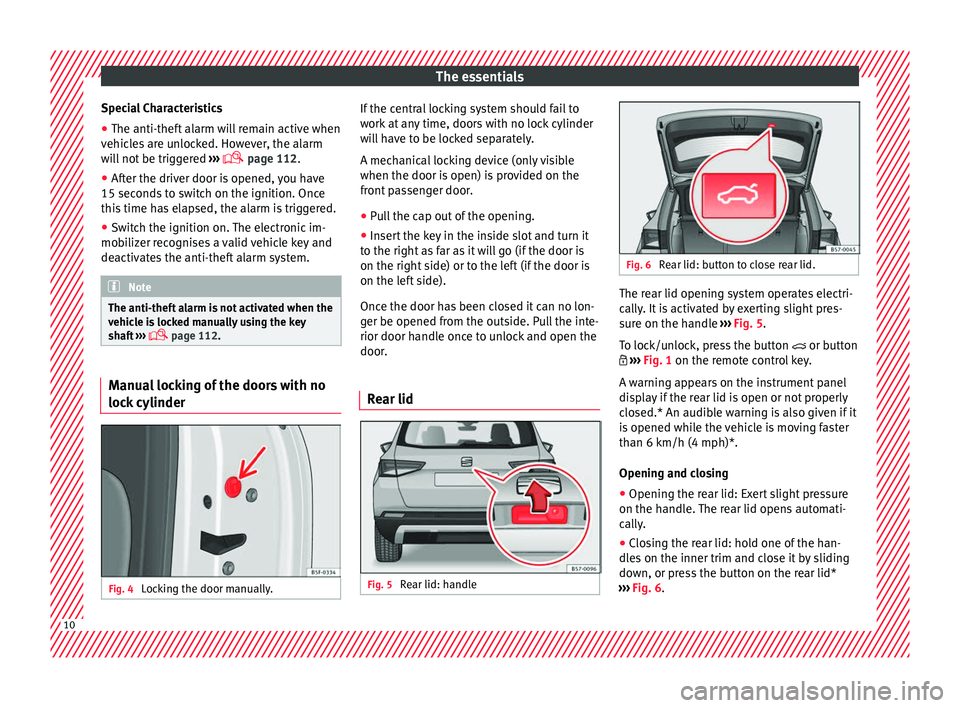
cylinder Fig. 4
Locking the door manually. If the central locking system should fail to
w
ork
at any time, doors with no lock cylinder
will have to be locked separately.
A mechanical locking device (only visible
when the door is open) is provided on the
front passenger door.
● Pull the cap out of the opening.
● Insert the key in the inside slot and turn it
to the right
as far as it will go (if the door is
on the right side) or to the left (if the door is
on the left side).
Once the door has been closed it can no lon-
ger be opened from the outside. Pull the inte-
rior door handle once to unlock and open the
door.
Rear lid Fig. 5
Rear lid: handle Fig. 6
Rear lid: button to close rear lid. The rear lid opening system operates electri-
c
al
ly. It is activated by exerting slight pres-
sure on the handle ››› Fig. 5.
To lock/unlock, press the button or button
››› Fig. 1 on the remote control key.
A warning appears on the instrument panel
display if the rear lid is open or not properly
closed.* An audible warning is also given if it
is opened while the vehicle is moving faster
than 6 km/h (4 mph)*.
Opening and closing
● Opening the rear lid: Exert slight pressure
on the handl
e. The rear lid opens automati-
cally.
● Closing the rear lid: hold one of the han-
dle
s on the inner trim and close it by sliding
down, or press the button on the rear lid*
››› Fig. 6.10
Page 13 of 328
The essentials
››› in Tailgate automatic lock on
page 125
››› page 123
››› page 11 Manual release of the rear lid
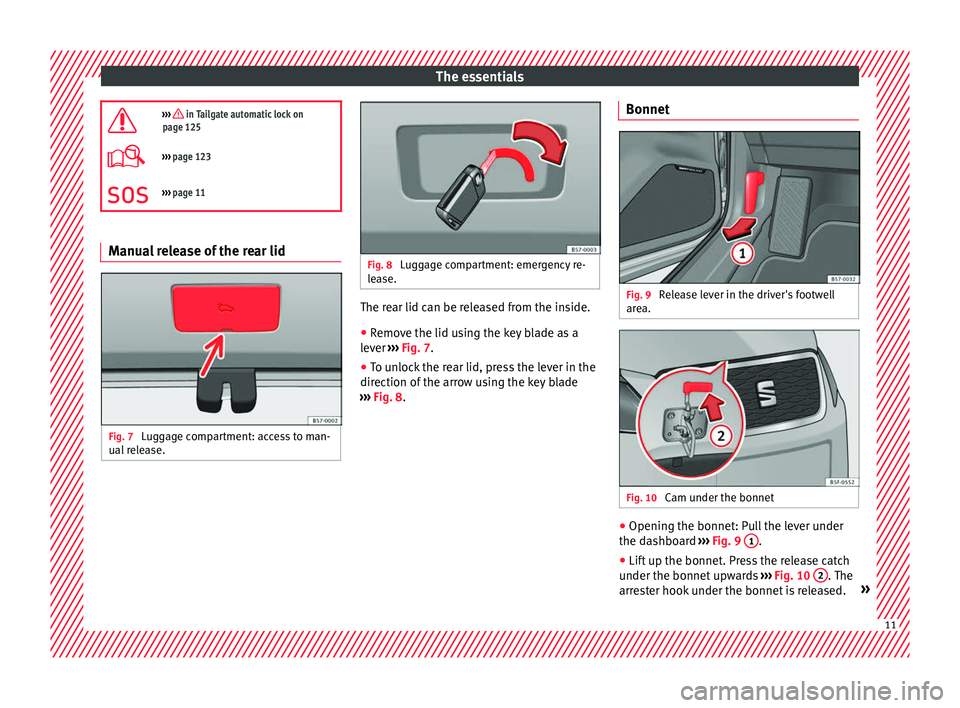
Fig. 7
Luggage compartment: access to man-
ual r
elease. Fig. 8
Luggage compartment: emergency re-
l e
ase. The rear lid can be released from the inside.
●
Remove the lid using the key blade as a
l ev
er ››› Fig. 7.
● To unlock the rear lid, press the lever in the
direction of
the arrow using the key blade
››› Fig. 8. Bonnet Fig. 9
Release lever in the driver's footwell
ar e
a. Fig. 10
Cam under the bonnet ●
Opening the bonnet: Pull the lever under
the d a
shboard ››› Fig. 9 1 .
● Lift up the bonnet. Press the release catch
u nder the bonnet
upwards ››› Fig. 10 2 . The
arr e
ster hook under the bonnet is released. » 11
Page 16 of 328
The essentials
Fig. 17
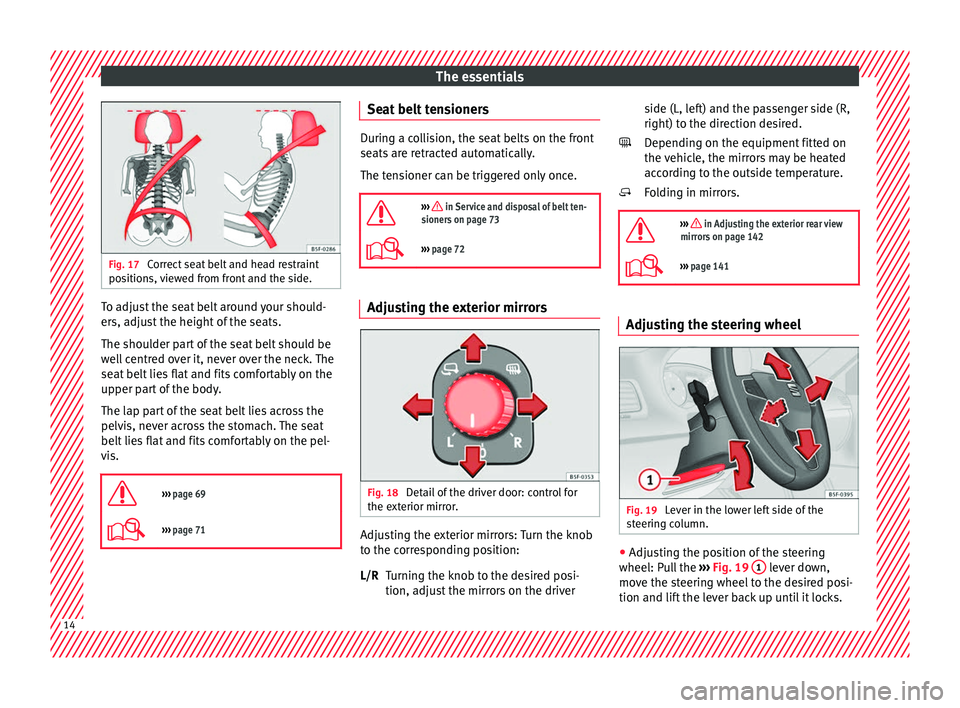
Correct seat belt and head restraint
po s
itions, viewed from front and the side. To adjust the seat belt around your should-
er
s, a
djust the height of the seats.
The shoulder part of the seat belt should be
well centred over it, never over the neck. The
seat belt lies flat and fits comfortably on the
upper part of the body.
The lap part of the seat belt lies across the
pelvis, never across the stomach. The seat
belt lies flat and fits comfortably on the pel-
vis.
››› page 69
››› page 71 Seat belt tensioners
During a collision, the seat belts on the front
se
ats
are retracted automatically.
The tensioner can be triggered only once.
››› in Service and disposal of belt ten-
sioners on page 73
››› page 72 Adjusting the exterior mirrors
Fig. 18
Detail of the driver door: control for
the e xt
erior mirror. Adjusting the exterior mirrors: Turn the knob
t
o the c
orresponding position:
Turning the knob to the desired posi-
tion, adjust the mirrors on the driver
L/R side (L, left) and the passenger side (R,
right) to the dir
ection desired.
Depending on the equipment fitted on
the vehicle, the mirrors may be heated
according to the outside temperature.
Folding in mirrors.
››› in Adjusting the exterior rear view
mirrors on page 142
››› page 141 Adjusting the steering wheel
Fig. 19
Lever in the lower left side of the
s t
eering column. ●
Adjusting the position of the steering
wheel: P u
ll the ››› Fig. 19 1 lever down,
mo v
e the steering wheel to the desired posi-
tion and lift the lever back up until it locks.
14
Page 24 of 328
The essentials
Attachment of the child seat with the
T op
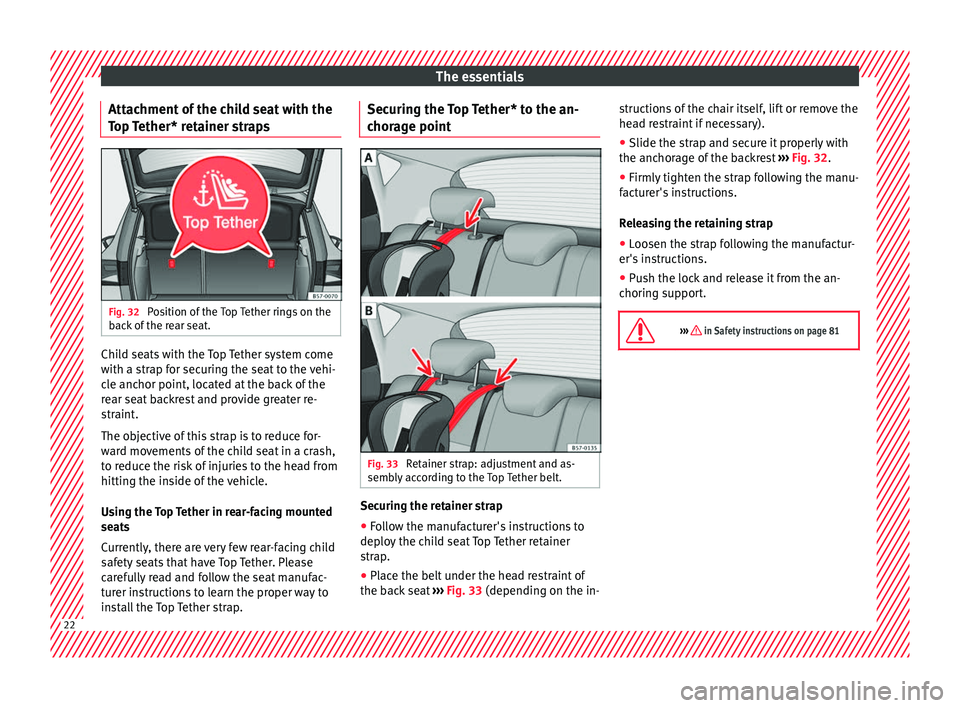
Tether* retainer straps Fig. 32
Position of the Top Tether rings on the
b ac
k of the rear seat. Child seats with the Top Tether system come
w
ith a s
trap for securing the seat to the vehi-
cle anchor point, located at the back of the
rear seat backrest and provide greater re-
straint.
The objective of this strap is to reduce for-
ward movements of the child seat in a crash,
to reduce the risk of injuries to the head from
hitting the inside of the vehicle.
Using the Top Tether in rear-facing mounted
seats
Currently, there are very few rear-facing child
safety seats that have Top Tether. Please
carefully read and follow the seat manufac-
turer instructions to learn the proper way to
install the Top Tether strap. Securing the Top Tether* to the an-
chor
age point Fig. 33
Retainer strap: adjustment and as-
semb ly
according to the Top Tether belt. Securing the retainer strap
●
Follow the manufacturer's instructions to
dep lo
y the child seat Top Tether retainer
strap.
● Place the belt under the head restraint of
the bac
k seat ››› Fig. 33 (depending on the in- structions of the chair itself, lift or remove the
hea
d restraint if necessary).
● Slide the strap and secure it properly with
the anchor
age of the backrest ››› Fig. 32.
● Firmly tighten the strap following the manu-
fact
urer's instructions.
Releasing the retaining strap
● Loosen the strap following the manufactur-
er's in
structions.
● Push the lock and release it from the an-
chorin
g support.
››› in Safety instructions on page 81 22
Page 25 of 328
The essentials
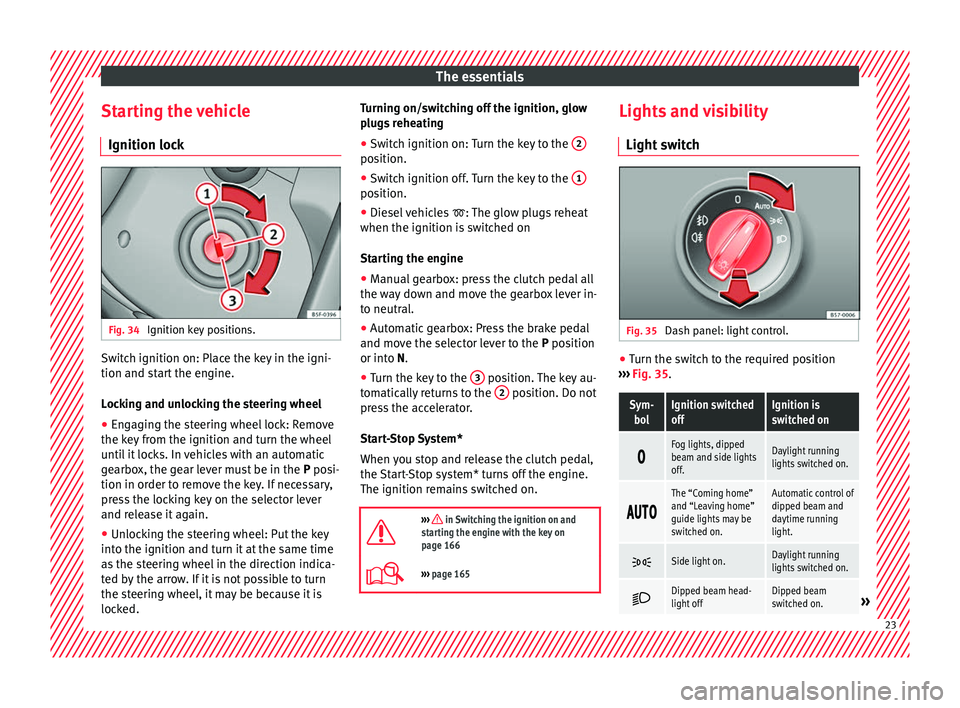
Starting the vehicle Ignition loc kFig. 34
Ignition key positions. Switch ignition on: Place the key in the igni-
tion and s
t
art the engine.
Locking and unlocking the steering wheel
● Engaging the steering wheel lock: Remove
the key
from the ignition and turn the wheel
until it locks. In vehicles with an automatic
gearbox, the gear lever must be in the P posi-
tion in order to remove the key. If necessary,
press the locking key on the selector lever
and release it again.
● Unlocking the steering wheel: Put the key
into the ignition and t
urn it at the same time
as the steering wheel in the direction indica-
ted by the arrow. If it is not possible to turn
the steering wheel, it may be because it is
locked. Turning on/switching off the ignition, glow
plug
s reheating
● Switch ignition on: Turn the key to the 2 position.
●
Switch ignition off. Turn the key to the 1 position.
●
Diesel vehicles : The glo
w plugs reheat
when the ignition is switched on
Starting the engine
● Manual gearbox: press the clutch pedal all
the wa
y down and move the gearbox lever in-
to neutral.
● Automatic gearbox: Press the brake pedal
and mov
e the selector lever to the P position
or into N.
● Turn the key to the 3 position. The key au-
t om
atically returns to the 2 position. Do not
pr e
ss the accelerator.
Start-Stop System*
When you stop and release the clutch pedal,
the Start-Stop system* turns off the engine.
The ignition remains switched on.
››› in Switching the ignition on and
starting the engine with the key on
page 166
››› page 165 Lights and visibility
Light sw
itch Fig. 35
Dash panel: light control. ●
Turn the switch to the required position
› ›
› Fig. 35.
Sym-
bolIgnition switched
offIgnition is
switched on
Fog lights, dipped
beam and side lights
off.Daylight running
lights switched on.
The “Coming home”
and “Leaving home”
guide lights may be
switched on.Automatic control of
dipped beam and
daytime running
light.
Side light on.Daylight running
lights switched on.
Dipped beam head-
light offDipped beam
switched on.»
23
Page 27 of 328
The essentialsKnobFunction
Switches door contact control on (central po-
sition).
The interior lights come on automatically
when the vehicle is unlocked, a door is
opened or the key is removed from the igni-
tion.
The lights go off a few seconds after all the
doors are closed, the vehicle is locked or the
ignition is switched on.
Turning the reading light on and off
Ambient light*: light guide on door panel.
Lightin
g c
an be selected from 8 possible col-
ours via the menu and the Setup function
b utt
on.
››› page 138 Windscreen wipers and window wiper
b
l
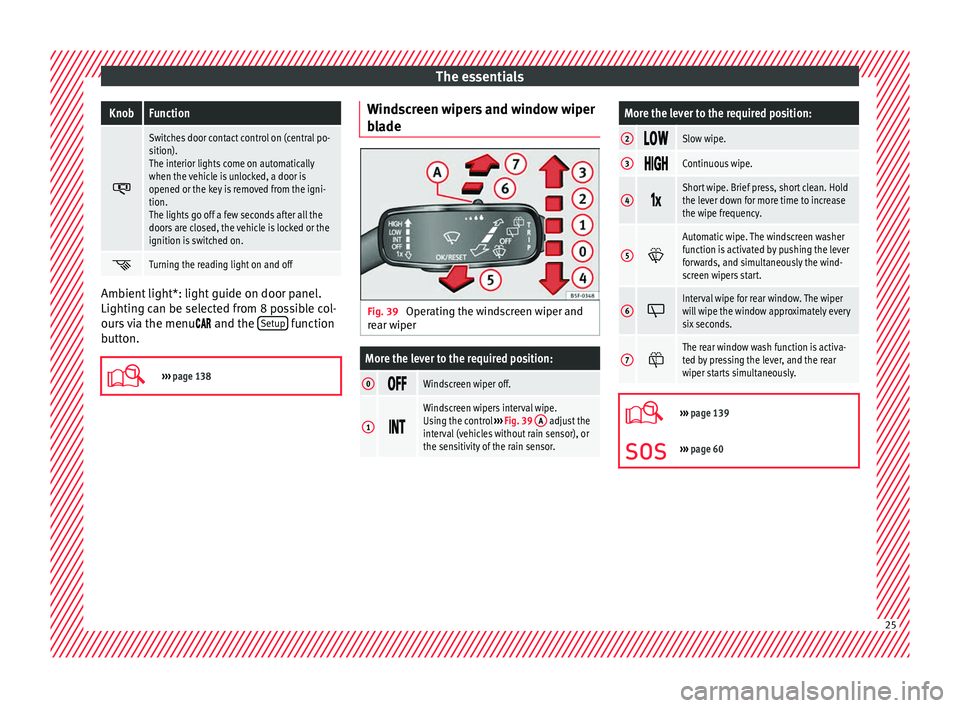
ade Fig. 39
Operating the windscreen wiper and
r e
ar wiper
More the lever to the required position:
0 Windscreen wiper off.
1
Windscreen wipers interval wipe.
Using the control
››› Fig. 39 A adjust the
interval (vehicles without rain sensor), or
the sensitivity of the rain sensor.
More the lever to the required position:
2 Slow wipe.
3
Continuous wipe.
4
Short wipe. Brief press, short clean. Hold
the lever down for more time to increase
the wipe frequency.
5
Automatic wipe. The windscreen washer
function is activated by pushing the lever
forwards, and simultaneously the wind-
screen wipers start.
6
Interval wipe for rear window. The wiper
will wipe the window approximately every
six seconds.
7
The rear window wash function is activa-
ted by pressing the lever, and the rear
wiper starts simultaneously.
›››
page 139
››› page 60 25
Page 29 of 328
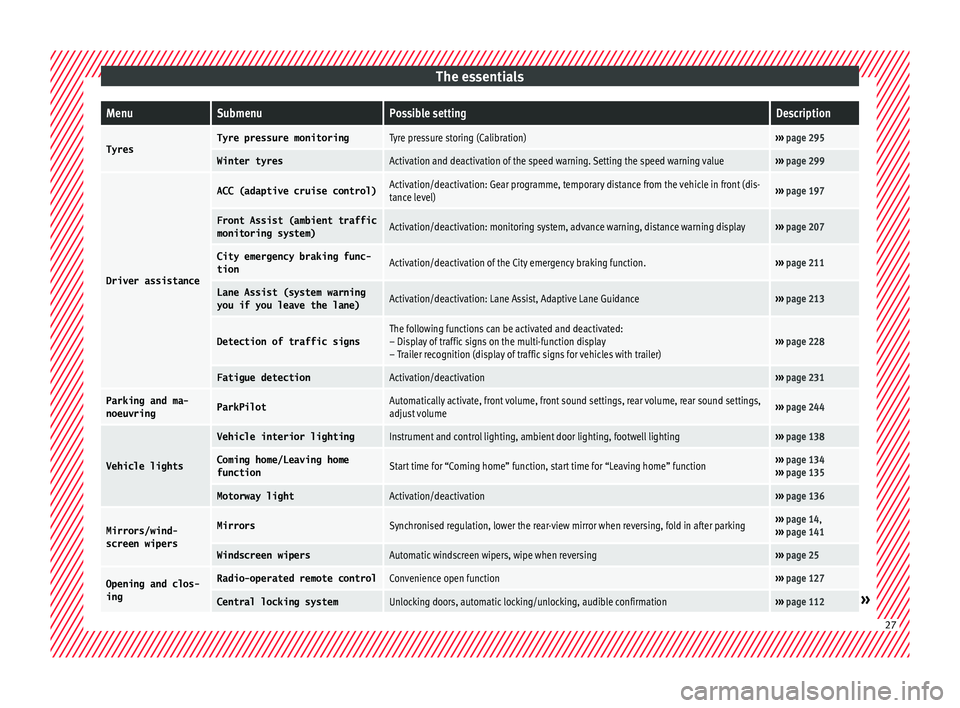
The essentialsMenuSubmenuPossible settingDescription
TyresTyre pressure monitoringTyre pressure storing (Calibration)›››
page 295
Winter tyresActivation and deactivation of the speed warning. Setting the speed warning value››› page 299
Driver assistance
ACC (adaptive cruise control)Activation/deactivation: Gear programme, temporary distance from the vehicle in front (dis-
tance level)››› page 197
Front Assist (ambient traffic
monitoring system)Activation/deactivation: monitoring system, advance warning, distance warning display››› page 207
City emergency braking func-
tionActivation/deactivation of the City emergency braking function.››› page 211
Lane Assist (system warning
you if you leave the lane)Activation/deactivation: Lane Assist, Adaptive Lane Guidance››› page 213
Detection of traffic signsThe following functions can be activated and deactivated:
– Display of traffic signs on the multi-function display
– Trailer recognition (display of traffic signs for vehicles with trailer)››› page 228
Fatigue detectionActivation/deactivation››› page 231
Parking and ma-
noeuvringParkPilotAutomatically activate, front volume, front sound settings, rear volume, rear sound settings,
adjust volume››› page 244
Vehicle lights
Vehicle interior lightingInstrument and control lighting, ambient door lighting, footwell lighting››› page 138
Coming home/Leaving home
functionStart time for “Coming home” function, start time for “Leaving home” function››› page 134
››› page 135
Motorway lightActivation/deactivation››› page 136
Mirrors/wind‐
screen wipersMirrorsSynchronised regulation, lower the rear-view mirror when reversing, fold in after parking››› page 14,
››› page 141
Windscreen wipersAutomatic windscreen wipers, wipe when reversing››› page 25
Opening and clos-
ingRadio-operated remote controlConvenience open function››› page 127
Central locking systemUnlocking doors, automatic locking/unlocking, audible confirmation››› page 112» 27
Page 38 of 328
The essentials
the display mode changes. A clock symbol
ap pe
ars and the number of days until the
next service is due.
Vehicles with text messages : Service in
--- km or --- days will be shown on the
instrument panel display.
Service due
When the service date is due , an audible
warning is given when the ignition is switch-
ed on and the spanner displayed on the
screen flashes for a few seconds .
Vehicles with text messages : Service now
will be shown on the instrument panel dis-
play.
Reading a service notification
With the ignition switched on, the engine off
and the vehicle at a standstill, the current
service notification can be read:
Press and hold the button ›››
Fig. 115
4 for more than 5 seconds to consult the serv-
ic
e me
ssage.
When the service date has passed , a minus
sign is displayed in front of the number of kil-
ometres or days.
Vehicles with text messages : the following
message is displayed: Service --- km
(miles) or --- days ago .The time can also be set via the
key and
Set up function button in the Easy Connect
sy s
tem ›››
page 108.
Resetting service interval display
If the service was not carried out by a SEAT
dealership, the display can be reset as fol-
lows: ● Switch off the ignition, press and hold but-
ton ›
›› Fig. 115
4 .
● Switch ignition back on.
● Release THE 4
› ›
›
Fig. 115 button and
press it again for the next 20 seconds. Note
● The ser v
ice message disappears after a few
seconds, when the engine is started or when OK/RESET is pressed on the windscreen wiper
l ev
er, or OK on the multifunction steering
wheel .
● In
vehicles with the LongLife system in
which the b
attery has been disconnected for
a long period of time, it is not possible to cal-
culate the date of the next service. Therefore
the service interval display may not be cor- rect. In this case, bear in mind the maximum
service intervals permitted in the ››› Book-
let Maintenance Programme.
● If you reset the display manually, the next
serv
ice interval will be indicated as in vehi-
cles with fixed service intervals. For this rea-
son we recommend that the service interval
display be reset by a SEAT authorised Dealer. Cruise control
Oper atin
g the cruise control system
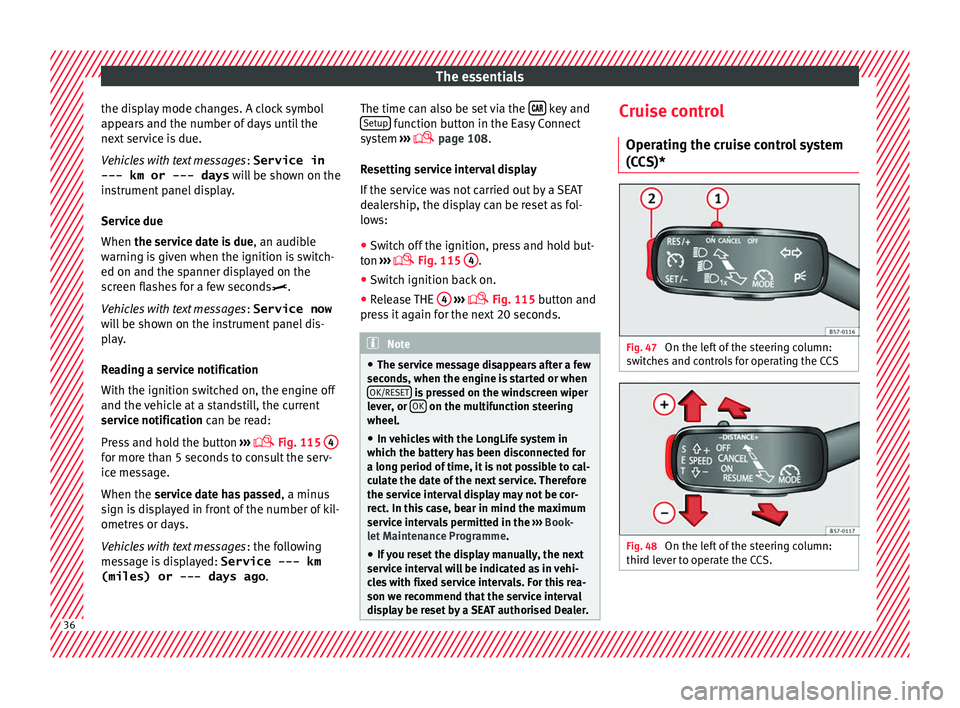
(CCS)* Fig. 47
On the left of the steering column:
sw it
ches and controls for operating the CCS Fig. 48
On the left of the steering column:
thir d l
ever to operate the CCS. 36