airbag Seat Ateca 2017 Owner's Guide
[x] Cancel search | Manufacturer: SEAT, Model Year: 2017, Model line: Ateca, Model: Seat Ateca 2017Pages: 328, PDF Size: 6.36 MB
Page 80 of 328
Safety
If an airbag was disabled using a diagnostics
sy s
tem:
● the airbag system warning lamp il
lumi-
nates after switching on the ignition for
about 4 seconds, and then flashes for about
12 seconds.
If the airbag has been disabled with the air-
bag switch on the side of the dash panel:
● the airbag control lamp wi
ll illuminate
for about 4 seconds after the ignition is
switched on,
● The airbag is disabled, signalled with the
warnin
g lamp which lights up with the
word placed in the cen-
tre part of the dash panel ››› Fig. 93. WARNING
In the event of a fault in the airbag system,
the airb ag m
ay not trigger correctly, may fail
to trigger or may even trigger unexpectedly,
leading to severe or fatal injuries.
● Have the airbag system checked immedi-
ately
by a specialised workshop.
● Never mount a child seat in the front pas-
seng
er seat or remove the mounted child
seat! The front passenger front airbag may
deploy during an accident in spite of the
fault. CAUTION
Always pay attention to any lit control lamps
and t o the c
orresponding descriptions and in-
structions to avoid damage to the vehicle. Note
● Fo
llow the current legislation in your coun-
try regarding the disabling of airbags.
● At your authorised SEAT dealer you can find
inform
ation on which vehicle airbags can be
disabled. Front passenger front airbag switch
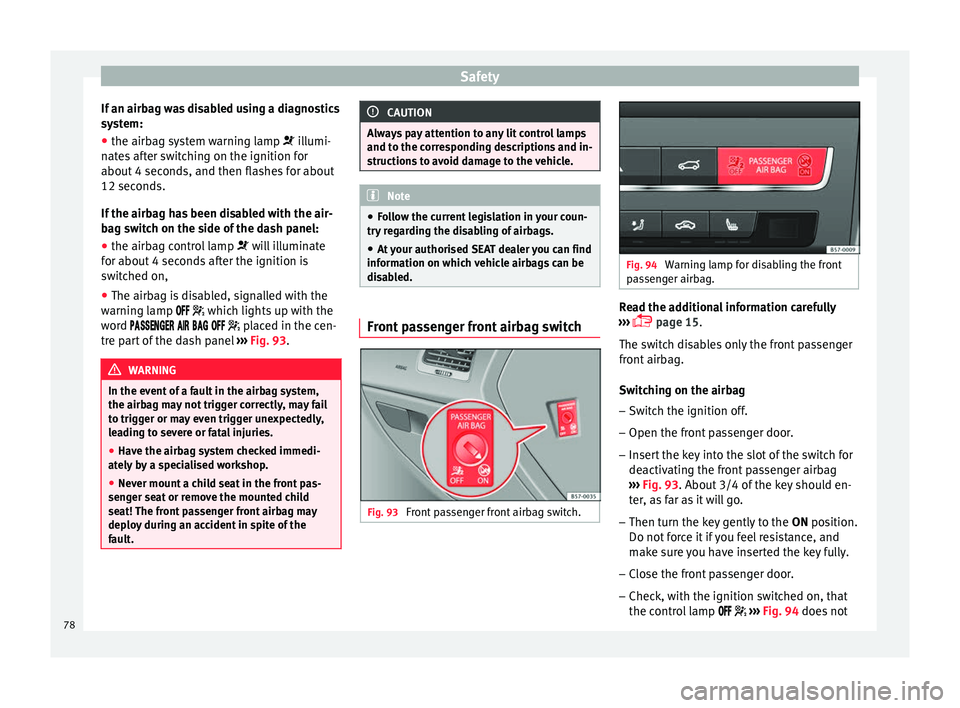
Fig. 93
Front passenger front airbag switch. Fig. 94
Warning lamp for disabling the front
p a
ssenger airbag. Read the additional information carefully
› ›
› page 15.
The switch disables only the front passenger
front airbag.
Switching on the airbag
– Switch the ignition off.
– Open the front passenger door.
– Insert the key into the slot of the switch for
deactiv
ating the front passenger airbag
››› Fig. 93. About 3/4 of the key should en-
ter, as far as it will go.
– Then turn the key gently to the ON pos
ition.
Do not force it if you feel resistance, and
make sure you have inserted the key fully.
– Close the front passenger door.
– Check, with the ignition switched on, that
the contr
ol lamp ››› Fig. 94 does not
78
Page 81 of 328
Transporting children safely
light up, with the word
in the centre part of the dash panel.
– The warning lamp is
illuminated for
60 seconds in the centre part of the dash
panel.
Control lamp with the word
(front passenger airbag disabled)
If the front passenger front airbag is disa-
bled, after switching on the ignition, the con-
trol lamp will light up for several seconds,
then it will switch off for about 1 s and then
switch on again.
If the control lamp is flashing, there is a fault
in the disabling of the airbag system ››› .
Pl e
ase go immediately to an Official Service. WARNING
● The driv er of
the vehicle is responsible for
disabling or switching on the airbag.
● Always switch off the ignition before disa-
blin
g the front passenger airbag! Failure to do
so could result in a fault in the airbag deacti-
vation system.
● Never leave the key in the airbag disabling
swit
ch as it could get damaged or enable or
disable the airbag during driving.
● If the (airbag di
sabled) control lamp
flashes, the front passenger front airbag will
not trigger in the event of an accident! Have
the system immediately checked by an Offi-
cial Service. Transporting children safely
Saf ety
for children
Introduction For safety reasons, as we have learned from
ac
c
ident statistics, we recommend that chil-
dren under 12 years of age travel in the rear
seats. Depending on their age, height and
weight, children travelling in rear seats must
use a child seat or a seat belt. For safety rea-
sons, the child seat should be installed in the
rear seat, behind the front passenger seat or
in the centre back seat.
The physical laws involved and the forces
acting in a collision apply also to children
››› page 70. But unlike adults, children do not
have fully developed muscle and bone struc-
tures. This means that children are subject to
a greater risk of injury.
To reduce the risk of injuries, children must
always use special child restraint systems
when travelling in the vehicle.
We recommend the use of child safety prod-
ucts from the SEAT Original Accessories Pro-
gramme, which includes systems for all ages
made by “Peke” (not for all countries) (see
www.seat.com). These systems have been especially de-
s
igned and ap
proved, complying with the
ECE-R44. regulation.
SEAT recommends securing the child seats
shown on the website as described below:
● Child seats in the opposite direction of
trav
el (group 0+): ISOFIX and support bracket
(Peke G0 Plus + ISOFIX Base (RWF)).
● Child seats in the direction of travel (group
1): ISOFIX and
Top Tether (Peke G1 ISOFIX
DUO Plus).
● Child seats in the direction of travel (group
2): seat
belt and ISOFIX (Peke G3 KIDFIX).
● Child seats in the direction of travel (group
3): with se
at belt (Peke G3 KIDFIX).
Follow the manufacturer's instructions and
observe any statutory requirements when in-
stalling and using child seats. Always read
and note ››› page 79.
We recommend you always carry the manu-
facturer's Child Seat Instruction Manual to-
gether with the on-board documentation.
Important information regarding the
front
passenger's airbag Read the additional information carefully
› ›
› page 17. »
79
Technical data
Advice
Operation
Emergencies
Safety
Page 82 of 328
Safety
Read and always observe the safety informa-
tion inc luded in the f
ollowing chapters:
● Safety distance with respect to the passen-
ger airb
ag ››› page 73.
● Objects between the passenger and the
pa
ssenger side airbag ››› in Front airbags
on p ag
e 75.
The passenger side front airbag, when ena-
bled, is a serious risk for a child that is facing
backward since the airbag can strike the seat
with such force that it can cause serious or
fatal injuries. Children up to 12 years old
should always travel on the rear seat.
Therefore we strongly recommend you to
transport children on the rear seats. This is
the safest location in the vehicle. Alternative-
ly, the front passenger airbag can be disa-
bled with a key-operated switch ››› page 78.
When transporting children, use a child seat
suitable for the age and size of each child
››› page 81. WARNING
● If a c
hild seat is secured to the front pas-
senger seat, the risk to the child of sustain-
ing critical or fatal injuries in the event of an
accident increases.
● An inflating front passenger airbag can
strik
e the rear-facing child seat and project it
with great force against the door, the roof or
the backrest. ●
Nev er in
stall a child seat facing backwards
on the front passenger seat unless the front
passenger front airbag has been disabled.
Risk of potentially fatal injuries to the child!
However, if it is necessary, in exceptional ca-
ses, to transport a child in the front passen-
ger seat, the front passenger front airbag
must always be disabled ››› page 77. If the
passenger seat has a height adjustment op-
tion, move it to the highest, most upright po-
sition. If you have a fixed seat, do not install
any child restraint system in this location.
● For those vehicles that do not include a key
lock
switch to deactivate the airbag, the vehi-
cle must be taken to a technical service. Do
not forget to reconnect the airbag when an
adult wants to sit in the front passenger seat.
● All vehicle occupants, especially children,
mus
t assume the proper sitting position and
be properly belted in while travelling.
● Never hold children or babies on your lap,
this
can result in potentially fatal injuries to
the child!
● Never allow a child to be transported in a
vehic
le without being properly secured, or to
stand up or kneel on a seat while travelling.
In an accident, the child could be flung
through the vehicle, causing possibly fatal in-
juries to themselves and to the other vehicle
occupants.
● If children assume an improper sitting posi-
tion when the v
ehicle is moving, they expose
themselves to greater risk of injury in the
event of a sudden braking manoeuvre or in an
accident. This is particularly important if the child is travelling on the front passenger seat
and the airb
ag sy
stem is triggered in an acci-
dent; as this could cause serious injury or
even death.
● A suitable child seat can protect your child!
● Never leave a child alone in the child seat
or ins
ide the vehicle because depending on
the season, very high temperatures may be
reached inside a parked vehicle, which could
be fatal.
● Children who are less than 1.5 metres tall
mus
t not wear a normal seat belt without a
child seat, as this could cause injuries to the
abdominal and neck areas during a sudden
braking manoeuvre or in an accident.
● Do not allow the seat belt to become twis-
ted and the se
at belt should be properly in
place ››› page 68.
● Only one child may occupy a child seat
››
› page 80, Child seats.
● When a child seat is mounted in the rear
seat
s, the door child-proof lock should be ac-
tivated ››› page 120. Child seats
Saf ety
instructions Read the additional information carefully
› ›
› page 17.
80
Page 94 of 328
EmergenciesNo.Consumers/Amps
12Radio20
14Air conditioner fan40
15Steering column release10
16Connectivity box koppelantenne7.5
17Instrument panel5
18Rear camera7.5
19Kessy7.5
214x4 Haldex Control Unit15
22Trailer15
23Right lights40
24Electric sunroof30
25Left door30
26Heated seats30
28Trailer25
31Left lights40
32Parking aid control unit7.
5/10
33Airbag5
34Reverse switch, clima sensor, electro-
chromic mirror7.5
35Diagnosis, headlight control unit,
headlight adjuster10
No.Consumers/Amps
36Front camera, Radar5/10
38Trailer25
39Right door30
4012V socket20
42Central locking40
43Interior light30
44Trailer15
45Electric driver's seat15
47Rear window wiper15
49Starter motor; clutch sensor5
50Electric rear lid40
53Heated rear window30
Fuse arrangement in engine compartment
No.Consumers/Amps
1ESP control unit40
2ESP control unit40
3Engine control unit (diesel/pet-
rol)30/15
4Engine sensors5/10
5Engine sensors10
6Brake light sensor5
No.Consumers/Amps
7Engine power supply10
8Lambda probe10/15
9Engine5/20
10Fuel pump control unit15/20
11PTC40
12PTC40
13Automatic gearbox control unit15/30
14Heated windscreen40
15Horn15
17Engine control unit7.5
18Terminal 30 (positive reference)5
19Front windscreen washer30
20Alarm horn10
22Engine control unit5
23Starter motor30
24PTC40
31Pressure pump15
33Gearbox pump30
37Parking heating20 92
Page 103 of 328
Controls and displays
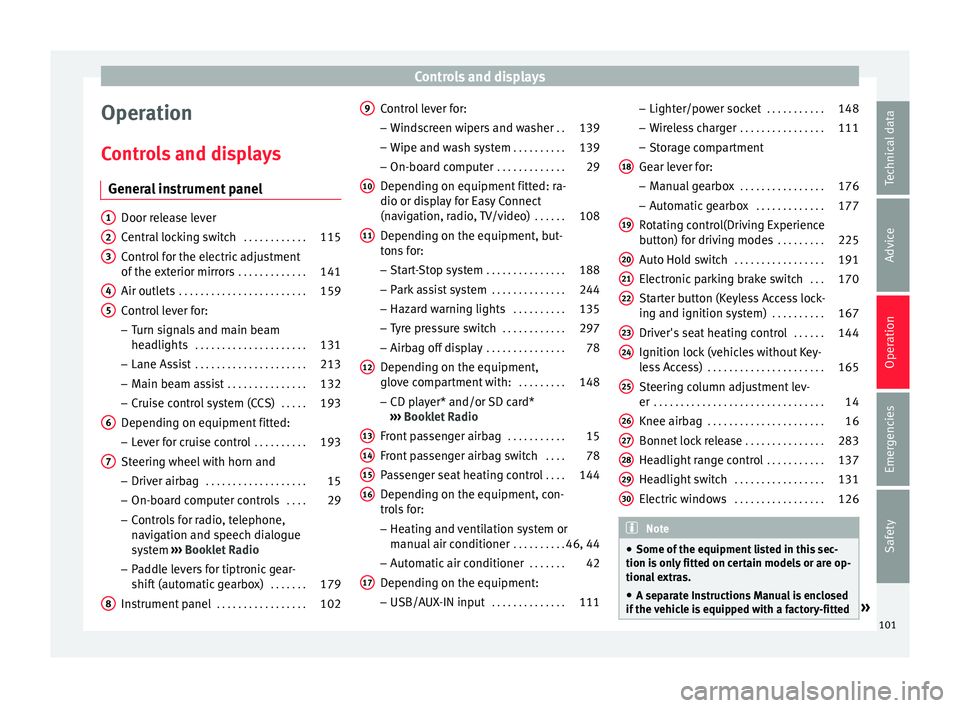
Operation
C ontr
ols and displays
General instrument panel Door release lever
C
entr
al locking switch . . . . . . . . . . . .115
Control for the electric adjustment
of the e
xterior mirrors . . . . . . . . . . . . . 141
Air outlets . . . . . . . . . . . . . . . . . . . . . . . . 159
Control lever for:
– Turn s
ignals and main beam
headlights . . . . . . . . . . . . . . . . . . . . . 131
– Lane As s
ist . . . . . . . . . . . . . . . . . . . . . 213
– Main be
am assist . . . . . . . . . . . . . . . 132
– Crui
se control system (CCS) . . . . .193
Depending on equipment fitted:
– Lev
er for cruise control . . . . . . . . . .193
Steering wheel with horn and – Driver airb
ag . . . . . . . . . . . . . . . . . . . 15
– On-bo ar
d computer controls . . . .29
– Contr
ols for radio, telephone,
navigation and speech dialogue
system ›››
Booklet Radio
– Paddle levers for tiptronic gear-
shift (automatic gearbox) . . . . . . .179
Instrument panel . . . . . . . . . . . . . . . . . 102
1 2
3
4
5
6
7
8 Control lever for:
– Wind
screen wipers and washer . .139
– Wipe and w
ash system . . . . . . . . . . 139
– On-boar
d computer . . . . . . . . . . . . . 29
Depending on equipment fitted: ra-
dio or dis
play for Easy Connect
(navigation, radio, TV/video) . . . . . .108
Depending on the equipment, but-
ton
s for:
– Start-Stop system . . . . . . . . . . . . . . . 188
– Park
assist system . . . . . . . . . . . . . . 244
– Hazar
d warning lights . . . . . . . . . .135
– Ty
re pressure switch . . . . . . . . . . . .297
– Airbag off
display . . . . . . . . . . . . . . . 78
Depending on the equipment,
glo v
e compartment with: . . . . . . . . .148
– CD p l
ayer* and/or SD card*
››› Booklet Radio
Front passenger airbag . . . . . . . . . . .15
Front passenger airbag switch . . . .78
Passenger seat heating control . . . .144
Depending on the equipment, con-
tr o
ls for:
– Heating and ventilation system or
manual air conditioner . . . . . . . . . .46, 44
– Aut om
atic air conditioner . . . . . . .42
Depending on the equipment:
– USB/A UX
-IN input . . . . . . . . . . . . . . 111
9
10
11
12
13
14
15
16
17 –
Light er/po
wer socket . . . . . . . . . . . 148
– Wir
eless charger . . . . . . . . . . . . . . . . 111
– Stor
age compartment
Gear lever for: – Manual gearbox . . . . . . . . . . . . . . . . 176
– Autom
atic gearbox . . . . . . . . . . . . . 177
Rotating control(Driving Experience
butt
on) for driving modes . . . . . . . . .225
Auto Hold switch . . . . . . . . . . . . . . . . . 191
Electronic parking brake switch . . .170
Starter button (Keyless Access lock-
ing and ignition sy
stem) . . . . . . . . . . 167
Driver's seat heating control . . . . . .144
Ignition lock (vehicles without Key-
le
ss Access) . . . . . . . . . . . . . . . . . . . . . . 165
Steering column adjustment lev-
er . . . . . . . . . . . . . . . . . . . . . . . . . . . . . . . . 14
Knee airbag . . . . . . . . . . . . . . . . . . . . . . 16
Bonnet lock release . . . . . . . . . . . . . . .283
Headlight range control . . . . . . . . . . .137
Headlight switch . . . . . . . . . . . . . . . . . 131
Electric windows . . . . . . . . . . . . . . . . . 126 Note
● Some of the equipment
listed in this sec-
tion is only fitted on certain models or are op-
tional extras.
● A separate Instructions Manual is enclosed
if the
vehicle is equipped with a factory-fitted » 18
19
20
21
22
23
24
25
26
27
28
29
30
101
Technical data
Advice
Operation
Emergencies
Safety
Page 145 of 328
Seats and head restraints
Seats and head restraints
Adju s
ting the seats and headr-
ests
Manual adjustment of seats Read the additional information carefully
› ›
› page 12 WARNING
The safe driving chapter contains important
inf orm
ation, tips, suggestions and warnings
that you should read and observe for your
own safety and the safety of your passengers
››› page 62. WARNING
● Adju s
t the front seats only when the vehi-
cle is stationary. Failure to follow this instruc-
tion could result in an accident.
● Be careful when adjusting the seat height.
Car
eless or uncontrolled adjustment can
cause injuries.
● The front seat backrests must not be re-
clined f
or driving. Otherwise, seat belts and
the airbag system might not protect as they
should, with the subsequent danger of injury. Electric driver's seat adjustment*
Read the additional information carefully
› ›
› page 13 WARNING
● If the el
ectric front seats are used negli-
gently or without paying due attention, it can
cause serious injury.
● The front seats can also be electrically ad-
jus
ted when the ignition is switched off. Nev-
er leave a child or any other person who may
need help in the vehicle.
● In the event of an emergency, electrical ad-
jus
tment can be stopped by pressing any
control. CAUTION
To avoid damaging the electrical components
of the fr
ont seats, please refrain from kneel-
ing on the seat or applying sharp pressure at
a single point to the seat cushion and back-
rest. Note
● It m
ay not be possible to electrically adjust
the seat if the vehicle battery is very low.
● If the engine is started while the seats are
being el
ectrically adjusted, the adjustment
will stop. Adjusting the front head restraints
Read the additional information carefully
› ›
› page 13
Adjust the head restraint ›››
page 13 so
that as far as possible the top of the head re-
straint is level with the top of your head.
When this is not possible, try to get as close
as possible to this position.
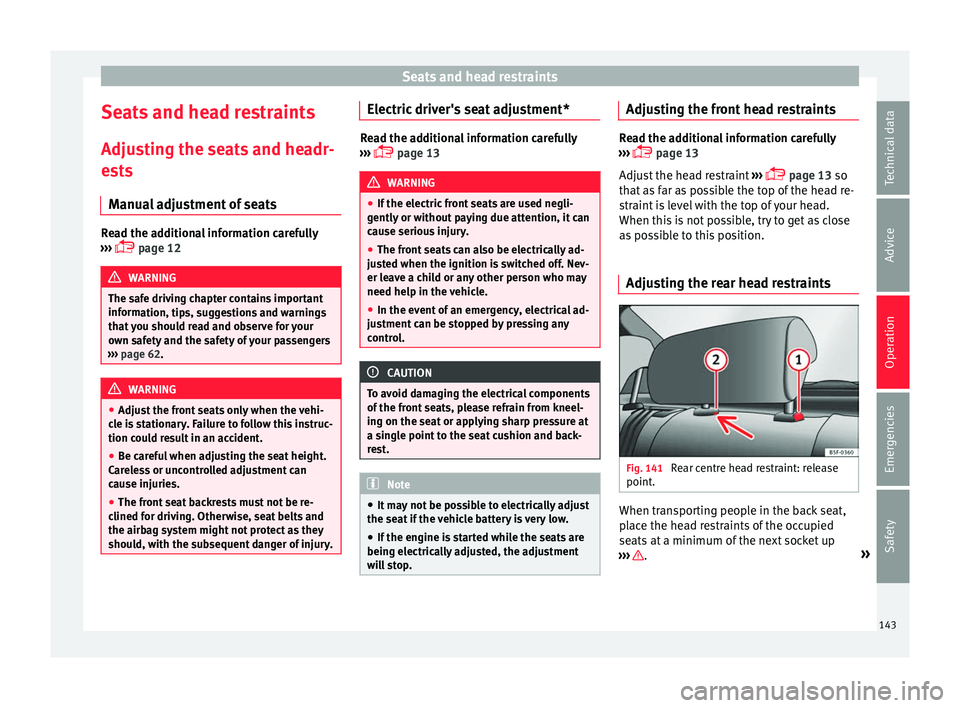
Adjusting the rear head restraints Fig. 141
Rear centre head restraint: release
point . When transporting people in the back seat,
p
l
ace the head restraints of the occupied
seats at a minimum of the next socket up
››› .
»
143
Technical data
Advice
Operation
Emergencies
Safety
Page 150 of 328
Operation
●
Do not u
se hard china cups or glasses.
These could cause injury in the event of an
accident. CAUTION
You should avoid putting open drinks con-
t ainer
s in the drink holders. The drinks could
otherwise spill over and cause damage to e.g.
the electrical equipment or the seat covers. Glove compartment
Fig. 147
Glove compartment Opening/closing
– To open the glove compartment, pull the
handl
e in the direction of the arrow.
– To close the glove compartment, move the
co
ver upwards until it engages. Depending on the vehicle equipment, the CD
pl
ayer is located in the glove compartment.
Separate operating instructions are enclosed
for this equipment in the corresponding In-
struction Manual. WARNING
The cover of the glove compartment should
a lw
ays be closed while driving. Failure to fol-
low this instruction could result in an acci-
dent. Other storage compartments
You will find more object holders, compart-
ments
and s
upports in other parts of the ve-
hicle:
● In the top of the glove compartment in ve-
hicl
es that do not have a CD reader. The load
of the compartment should not exceed
1.2 kg.
● In the centre console under the centre arm-
re
st*.
● Coat hooks in the door frames ››
› .
● Other storage compartments are found in
the r e
ar seat, to the left and the right of the
seats. WARNING
● Ple
ase make sure that any items of clothing
hanging from the coat hooks do not obstruct
your view to the rear.
● The coat hooks should only be used for
lightweight
clothing. Do not leave any heavy
or sharp objects in the pockets.
● Do not use clothes hangers to hang up the
clothin
g, as this could interfere with the func-
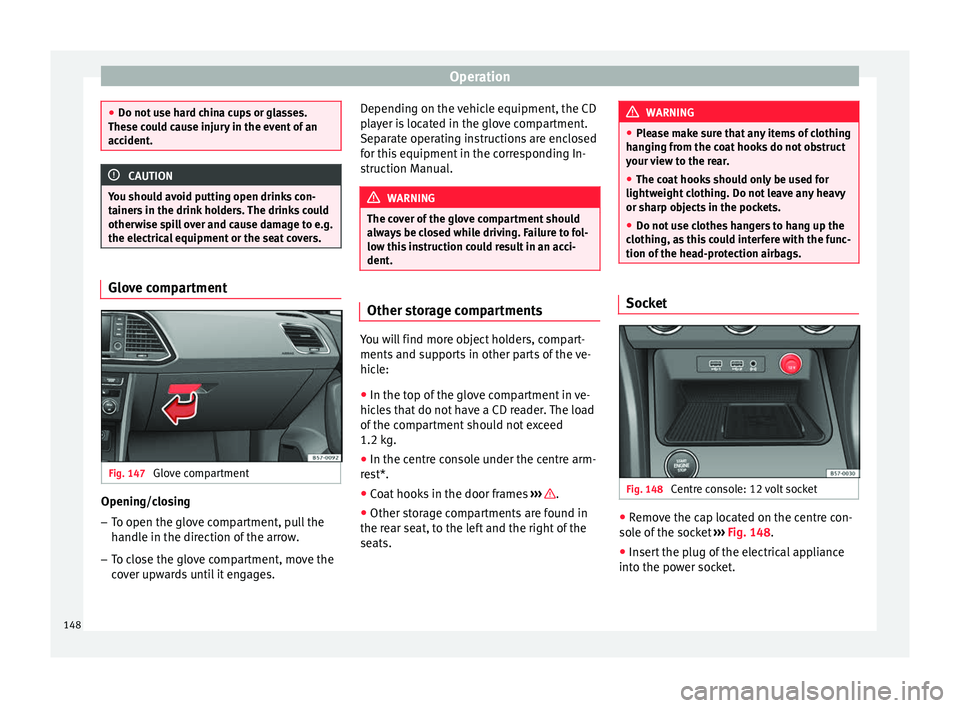
tion of the head-protection airbags. Socket
Fig. 148
Centre console: 12 volt socket ●
Remove the cap located on the centre con-
so l
e of the socket ››› Fig. 148.
● Insert the plug of the electrical appliance
into the po
wer socket.
148
Page 171 of 328
Driving
●
Electric
al components with a high power
consumption are switched off temporarily
when the engine starts.
● When starting with a cold engine, noise
lev
els may briefly increase. This is quite nor-
mal, and no cause for concern.
● When the outside temperature is below
+5°C (+41°F), if
the engine is diesel, some
smoke may appear under the vehicle when the fuel-operated auxiliary heater is on. Stopping the engine
3
V
alid for vehicles: with Keyless Access
StepSwitch off the engine with the starter
button ››› page 167.
1.Stop the vehicle completely ››› .
2.Press and hold the brake pedal until the step
4 is performed.
3.If you are driving an automatic vehicle, place
the selector lever in position P.
4.Connect the electronic parking brake
››› page 170.
5.
Briefly press the start-up button ››› Fig. 164.
The START ENGINE STOP button blinks again. If
the engine fails to switch off, perform an emer-
gency disconnect ››› page 167.
6.If the vehicle is equipped with a manual gear-
box, put it into 1st or reverse. WARNING
Never switch off the engine while the vehicle
i s
moving. This could cause loss of control of
the vehicle, accidents and serious injury.
● The airbags and belt tensioners do not
work
when the ignition is switched off.
● The brake servo does not work with the en-
gine off.
Therefore, you need to press the
break pedal harder to brake the vehicle.
● Power steering does not work when the en-
gine is
not running. You need more strength
to steer when the engine is switched off.
● If the ignition is switched off, the steering
co
lumn could be locked, making it impossible
to control the vehicle. CAUTION
If the engine is made to work hard for a long
time, it m
ay overheat after being switched
off. To prevent damage to the engine before
switching it off, leave it idle for approx. 2 mi-
nutes in neutral. Note
After switching off the engine, the cooling fan
m a
y continue to operate in the engine com-
partment for a few more minutes, even with
the ignition off. The radiator fan is automati-
cally switched off. “My Beat” Function
For vehicles with a convenience key there is
the “M
y
Beat” function. This feature provides
an additional indication of the vehicle igni-
tion system.
When accessing the vehicle, e.g. by opening
the doors with the remote control, the START ENGINE STOP button flashes, calling at-
t ention t
o the relevant starter system button.
Upon switching the ignition on/off, the light
of the START ENGINE STOP button flashes. With
the en gine sw
itched off, after a few seconds,
the STOP ENGINE START button stops flashing
and g oe
s out.
With the engine running, the START ENGINE STOP button light stays on, indi-
c atin
g that the engine is running. Upon
switching the ignition off with the START ENGINE STOP button, it starts flashing
ag ain.
In
vehicles with the Start-Stop system , the
“My Beat” function also offers additional in-
formation:
● When the engine stops during the Stop
pha
se, the light of the START ENGINE STOP but-
t on s
tays on, since, even though the engine
is off, the Start-Stop system is active.
● When the engine cannot be stated again
with the
Start-Stop system, ›››
page 188, and
needs to be started manually, the »
169
Technical data
Advice
Operation
Emergencies
Safety
Page 176 of 328
Operation
situations the torque delivered to the inner
wheel i
s too high, causing the wheels to
spin. On the other hand, the outer wheel is
receiving a lower drive torque than it could
transmit. This causes an overall loss of lateral
grip on the front axle, resulting in understeer
or “lengthening” of the trajectory.
The XDS system can detect and correct this
effect via the sensors and signals of the ESC.
Via the ESC, the XDS will brake the inside
wheel and counter the excess driving torque
of that wheel. This means that the driver's
desired trajectory is much more precise.
The XDS system works in combination with
the ESC and is always active, even when ASR
traction control is disconnected, or the ESC in
Sport mode or disconnected.
Multi-collision brake
In an accident, the multi-collision brake can
help the driver by braking to avoid the risk of
skidding during the accident, which could
lead to further collisions.
The multi-collision brake works for front, side
or rear accidents, when the airbag control
unit records its activation level and the acci-
dent takes place at a speed of over 10 km/h
(6 mph). The ESC automatically brakes the
vehicle, as long as the accident has not dam-
aged the ESC, the brake hydraulics or the on-
board network The following actions control automatic brak-
ing durin
g the accident:
● When the driver presses the accelerator,
the autom
atic braking does not take place.
● When the braking pressure through press-
ing the br
ake pedal is greater than the sys-
tem’s braking pressure the vehicle will brake
automatically.
● Multi-collision braking will not be available
if E
SC is malfunctioning. WARNING
● The E SC, ABS, ASR, ED
S and the electronic
torque control system cannot exceed the lim-
its imposed by the laws of physics. Always
bear this in mind, especially on wet or slip-
pery roads. If you notice the systems cutting
in, you should reduce your speed immediate-
ly to suit the road and traffic conditions. Do
not be encouraged to take risks by the pres-
ence of more safety systems. If you do, an ac-
cident may occur.
● Please remember that the accident risk al-
wa
ys increases if you drive fast, especially in
corners or on a slippery road, or if you follow
too close behind the vehicle in front of you.
The ESC, ABS, brake assist, EDS and the elec-
tronic torque control system cannot prevent
accidents: risk of accidents!
● Accelerate with caution on slippery surfa-
ce
s (for example, icy or snow-covered). De-
spite the control systems, the driven wheels could spin, affecting the stability of the vehi-
c
l
e: risk of accident! Note
● The ABS and ASR w
ill only operate correctly
if the four wheels have identical tyres. Any
differences in the rolling radius of the tyres
can cause the system to reduce engine power
when this is not desired.
● The regulating processes of the systems
can m
ake noises when they intervene.
● If the warning lamp lights
up, or alter-
natively, there could be a fault ››› page 106. Switching on/off the ESC and ASR
The ESC is switched on automatically when
the en
gine i
s started, and only works when
the engine is running and includes the ABS,
EDS and ASR systems.
The ASR function should only be switched off
in situations in which traction is insufficient,
including:
● When driving in deep snow or on surfaces
that
are not very firm.
● To “free” the vehicle if it gets stuck.
Then swit
ch the ASR function back on.
174
Page 196 of 328
Operation
Changing gear in CCS mode
The C C
S decelerates as soon as the clutch
pedal is pressed, intervening again automati-
cally after a gear is engaged.
Travelling down hills with the CCS
When travelling down hills the CCS cannot
maintain a constant speed. Slow the vehicle
down using the brake pedal and reduce
gears if required.
Automatic off
The cruise control system (CCS) is switched
off automatically or temporarily:
● If the system detects a fault that could af-
fect
the working order of the CCS.
● If you press and maintain the accelerator
pedal
for a certain time, driving faster than
the stored speed.
● If the dynamic driving control systems in-
ter
vene (e.g. ASR or ESC).
● If the airbag is triggered. Speed limiter
Dis
play messages and warning and
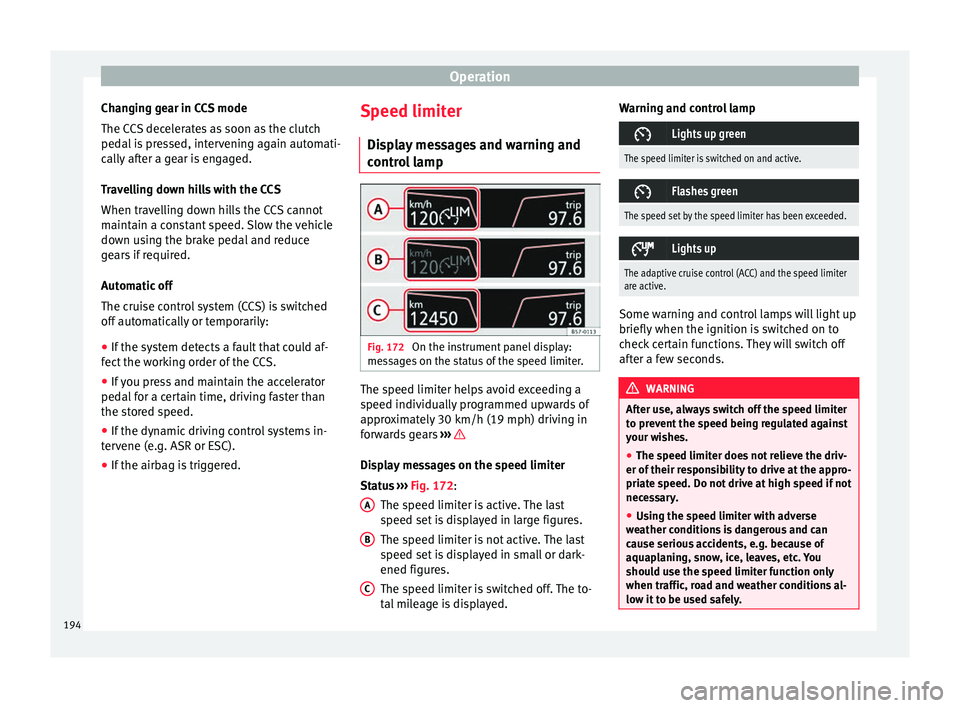
control lamp Fig. 172
On the instrument panel display:
me s
sages on the status of the speed limiter. The speed limiter helps avoid exceeding a
s peed indiv
idually programmed upwards of
approximately 30 km/h (19 mph) driving in
forwards gears ››› Display messages on the speed limiter
St
at
us ››› Fig. 172:
The speed limiter is active. The last
speed set is displayed in large figures.
The speed limiter is not active. The last
speed set is displayed in small or dark-
ened figures.
The speed limiter is switched off. The to-
tal mileage is displayed.
A B
C Warning and control lamp
Lights up green
The speed limiter is switched on and active.
Flashes green
The speed set by the speed limiter has been exceeded.
Lights up
The adaptive cruise control (ACC) and the speed limiter
are active.
Some warning and control lamps will light up
briefly
when the ignition i
s switched on to
check certain functions. They will switch off
after a few seconds. WARNING
After use, always switch off the speed limiter
t o pr
event the speed being regulated against
your wishes.
● The speed limiter does not relieve the driv-
er of their r
esponsibility to drive at the appro-
priate speed. Do not drive at high speed if not
necessary.
● Using the speed limiter with adverse
we
ather conditions is dangerous and can
cause serious accidents, e.g. because of
aquaplaning, snow, ice, leaves, etc. You
should use the speed limiter function only
when traffic, road and weather conditions al-
low it to be used safely. 194