AUX Seat Ateca 2017 Owner's Manual
[x] Cancel search | Manufacturer: SEAT, Model Year: 2017, Model line: Ateca, Model: Seat Ateca 2017Pages: 328, PDF Size: 6.36 MB
Page 5 of 328
Table of Contents
Table of Contents
The e s
sentials . . . . . . . . . . . . . . . . . . . . . . . . 5
Exterior view . . . . . . . . . . . . . . . . . . . . . . . . . . . . 5
Exterior view . . . . . . . . . . . . . . . . . . . . . . . . . . . . 6
Interior view (left-hand drive) . . . . . . . . . . . . . . 7
Interior view (right-hand drive) . . . . . . . . . . . . . 8
How it works . . . . . . . . . . . . . . . . . . . . . . . . . . . . 9
Unlocking and locking . . . . . . . . . . . . . . . . . . . . 9
Before driving . . . . . . . . . . . . . . . . . . . . . . . . . . . 12
Airbags . . . . . . . . . . . . . . . . . . . . . . . . . . . . . . . . 15
Child seats . . . . . . . . . . . . . . . . . . . . . . . . . . . . . 17
Starting the vehicle . . . . . . . . . . . . . . . . . . . . . . 23
Lights and visibility . . . . . . . . . . . . . . . . . . . . . . 23
Easy Connect . . . . . . . . . . . . . . . . . . . . . . . . . . . 26
Driver information system . . . . . . . . . . . . . . . . . 29
Driving data . . . . . . . . . . . . . . . . . . . . . . . . . . . . 33
Cruise control . . . . . . . . . . . . . . . . . . . . . . . . . . . 36
Warning lamps . . . . . . . . . . . . . . . . . . . . . . . . . . 38
Gearbox lever . . . . . . . . . . . . . . . . . . . . . . . . . . . 40
Air conditioning . . . . . . . . . . . . . . . . . . . . . . . . . 42
Fluid Level control . . . . . . . . . . . . . . . . . . . . . . . 48
Emergencies . . . . . . . . . . . . . . . . . . . . . . . . . . . . 51
Fuses . . . . . . . . . . . . . . . . . . . . . . . . . . . . . . . . . . 51
Bulbs . . . . . . . . . . . . . . . . . . . . . . . . . . . . . . . . . . 52
Action in the event of a puncture . . . . . . . . . . . 52
Changing a wheel . . . . . . . . . . . . . . . . . . . . . . . 54
Snow chains . . . . . . . . . . . . . . . . . . . . . . . . . . . . 56
Emergency towing of the vehicle . . . . . . . . . . . 57
How to jump start . . . . . . . . . . . . . . . . . . . . . . . . 58
Changing the wiper blades . . . . . . . . . . . . . . . . 60
Safety . . . . . . . . . . . . . . . . . . . . . . . . . . . . . . . . 62
Safe driving . . . . . . . . . . . . . . . . . . . . . . . . . . . . 62
Safety first! . . . . . . . . . . . . . . . . . . . . . . . . . . . . . 62
Advice about driving . . . . . . . . . . . . . . . . . . . . . 62 Correct position for passengers . . . . . . . . . . . . 63
Pedal area . . . . . . . . . . . . . . . . . . . . . . . . . . . . . . 67
Seat belts
. . . . . . . . . . . . . . . . . . . . . . . . . . . . . . 68
Why wear a seat belt? . . . . . . . . . . . . . . . . . . . . 68
How to properly adjust your seatbelt . . . . . . . . 71
Seat belt tensioners . . . . . . . . . . . . . . . . . . . . . . 72
Airbag system . . . . . . . . . . . . . . . . . . . . . . . . . . 73
Brief introduction . . . . . . . . . . . . . . . . . . . . . . . . 73
Airbag safety instructions . . . . . . . . . . . . . . . . . 75
Deactivating airbags . . . . . . . . . . . . . . . . . . . . . 77
Transporting children safely . . . . . . . . . . . . . . . 79
Safety for children . . . . . . . . . . . . . . . . . . . . . . . 79
Child seats . . . . . . . . . . . . . . . . . . . . . . . . . . . . . 80
Emergencies . . . . . . . . . . . . . . . . . . . . . . . . . . 83
Self-help . . . . . . . . . . . . . . . . . . . . . . . . . . . . . . . 83
Vehicle tool kit, anti-puncture kit* . . . . . . . . . . 83
Tyre repair . . . . . . . . . . . . . . . . . . . . . . . . . . . . . . 83
Manual unlocking/locking . . . . . . . . . . . . . . . . . 85
Changing the windscreen wiper blades . . . . . . 85
Tow-starting and towing . . . . . . . . . . . . . . . . . . 86
Fuses and bulbs . . . . . . . . . . . . . . . . . . . . . . . . . 90
Fuses . . . . . . . . . . . . . . . . . . . . . . . . . . . . . . . . . . 90
Changing bulbs . . . . . . . . . . . . . . . . . . . . . . . . . 93
Change the front bulbs . . . . . . . . . . . . . . . . . . . 94
Change the rear bulbs . . . . . . . . . . . . . . . . . . . . 96
Operation . . . . . . . . . . . . . . . . . . . . . . . . . . . . . 101
Controls and displays . . . . . . . . . . . . . . . . . . . . 101
General instrument panel . . . . . . . . . . . . . . . . . 100
Instruments and warning/control lamps . . . . . 102
Instruments . . . . . . . . . . . . . . . . . . . . . . . . . . . . 102
Control lamps . . . . . . . . . . . . . . . . . . . . . . . . . . . 106
Introduction to the Easy Connect system* . . . . 108
System settings (CAR)* . . . . . . . . . . . . . . . . . . . 108
Communications and multimedia . . . . . . . . . . . 109
Steering wheel controls* . . . . . . . . . . . . . . . . . . 109
Multimedia . . . . . . . . . . . . . . . . . . . . . . . . . . . . . 111 Opening and closing
. . . . . . . . . . . . . . . . . . . . . 112
Central locking system . . . . . . . . . . . . . . . . . . . . 112
Anti-theft alarm system* . . . . . . . . . . . . . . . . . . 121
Rear lid (luggage compartment) . . . . . . . . . . . . 123
Electric windows . . . . . . . . . . . . . . . . . . . . . . . . . 126
Sunroof* . . . . . . . . . . . . . . . . . . . . . . . . . . . . . . . 128
Lights and visibility . . . . . . . . . . . . . . . . . . . . . . 131
Lights . . . . . . . . . . . . . . . . . . . . . . . . . . . . . . . . . 131
Visibility . . . . . . . . . . . . . . . . . . . . . . . . . . . . . . . 138
Windscreen wiper and window wiper sys-
tems
. . . . . . . . . . . . . . . . . . . . . . . . . . . . . . . . . . 139
Mirror . . . . . . . . . . . . . . . . . . . . . . . . . . . . . . . . . 141
Seats and head restraints . . . . . . . . . . . . . . . . . 143
Adjusting the seats and headrests . . . . . . . . . . 143
Seat functions . . . . . . . . . . . . . . . . . . . . . . . . . . 144
Transport and practical equipment . . . . . . . . . 147
Storage compartments . . . . . . . . . . . . . . . . . . . 147
Storing objects . . . . . . . . . . . . . . . . . . . . . . . . . . 149
Roof carrier . . . . . . . . . . . . . . . . . . . . . . . . . . . . . 154
Air conditioning . . . . . . . . . . . . . . . . . . . . . . . . . 156
Heating, ventilation and cooling . . . . . . . . . . . . 156
Auxiliary heater (additional heater) . . . . . . . . . 161
Driving . . . . . . . . . . . . . . . . . . . . . . . . . . . . . . . . 165
Start and stop the engine . . . . . . . . . . . . . . . . . 165
Braking and parking . . . . . . . . . . . . . . . . . . . . . 170
Manual gearbox . . . . . . . . . . . . . . . . . . . . . . . . . 176
Automatic gearbox/DSG automatic gear-
box*
. . . . . . . . . . . . . . . . . . . . . . . . . . . . . . . . . . . 177
Run-in and economical driving . . . . . . . . . . . . . 184
Engine management and exhaust gas purifica-
tion sys
tem . . . . . . . . . . . . . . . . . . . . . . . . . . . . . 186
Driving tips . . . . . . . . . . . . . . . . . . . . . . . . . . . . . 187
Driver assistance systems . . . . . . . . . . . . . . . . . 188
Start-Stop System* . . . . . . . . . . . . . . . . . . . . . . . 188
Hill Descent Control (HDC) . . . . . . . . . . . . . . . . . 190
Auto Hold Function . . . . . . . . . . . . . . . . . . . . . . . 191
Cruise control system (CCS)* . . . . . . . . . . . . . . . 193
Speed limiter . . . . . . . . . . . . . . . . . . . . . . . . . . . 194 3
Page 93 of 328
Fuses and bulbs
●
Nev er u
se a fuse with a higher value. Only
replace fuses with a fuse of the same amper-
age (same colour and markings) and size.
● Never repair a fuse.
● Never replace a fuse by a metal strip, staple
or simi
lar. CAUTION
● To pr
event damage to the vehicle's electric
system, before replacing a fuse always turn
off the ignition, the lights and all electrical
elements and remove the key from the igni-
tion.
● If you replace a fuse with higher-rating
fu
se, you could cause damage to another part
of the electrical system.
● Protect the fuse boxes when open to pre-
vent
the entry of dust or humidity as they can
damage the electrical system. Note
● One c omponent
may have more than one
fuse.
● Several components may run on a single
fu
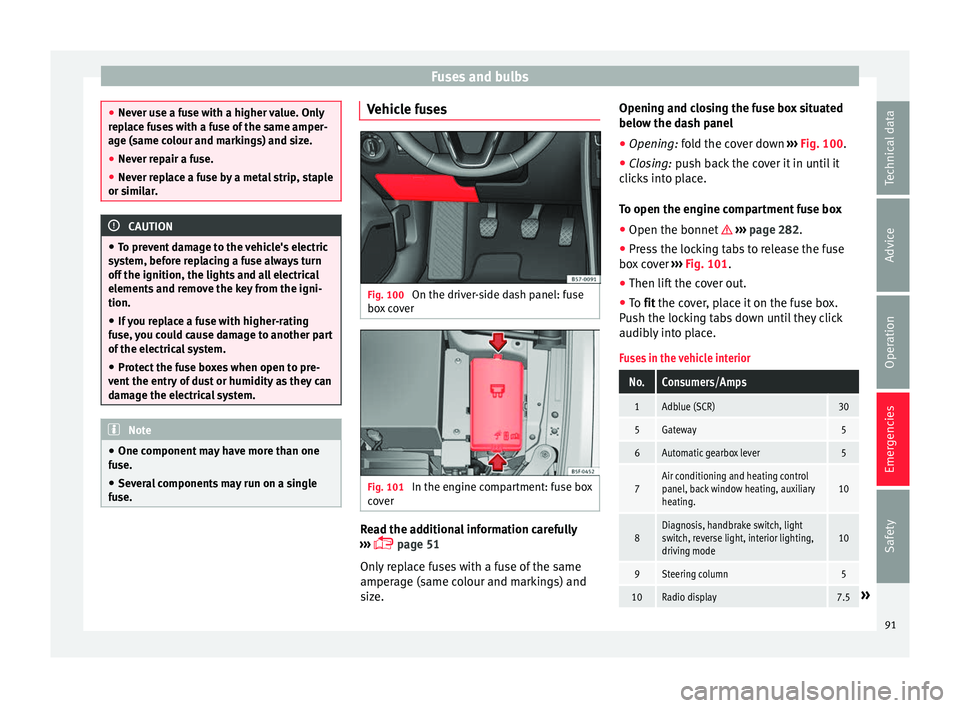
se. Vehicle fuses
Fig. 100
On the driver-side dash panel: fuse
bo x
cover Fig. 101
In the engine compartment: fuse box
c o
ver Read the additional information carefully
› ›
› page 51
Only replace fuses with a fuse of the same
amperage (same colour and markings) and
size. Opening and closing the fuse box situated
below the d
ash panel
● Opening: fold the cover down ›
›› Fig. 100.
● Closing: push back the cover it in until it
c
licks into place.
To open the engine compartment fuse box
● Open the bonnet ››
› page 282.
● Press the locking tabs to release the fuse
box
cover ››› Fig. 101.
● Then lift the cover out.
● To fit the cover, place it on the fuse box.
P
ush the locking tabs down until they click
audibly into place.
Fuses in the vehicle interior
No.Consumers/Amps
1Adblue (SCR)30
5Gateway5
6Automatic gearbox lever5
7Air conditioning and heating control
panel, back window heating, auxiliary
heating.10
8Diagnosis, handbrake switch, light
switch, reverse light, interior lighting,
driving mode10
9Steering column5
10Radio display7.5» 91
Technical data
Advice
Operation
Emergencies
Safety
Page 104 of 328
Operation
radio, CD player, AUX IN connection or navi-
g
ation sy
stem.
● The arrangement of switches and controls
on right-h
and drive models* may be slightly different from the layout shown in
› ›
› page 100. However, the symbols used to
identify the controls are the same. Instruments and warning/control lamps
In s
truments
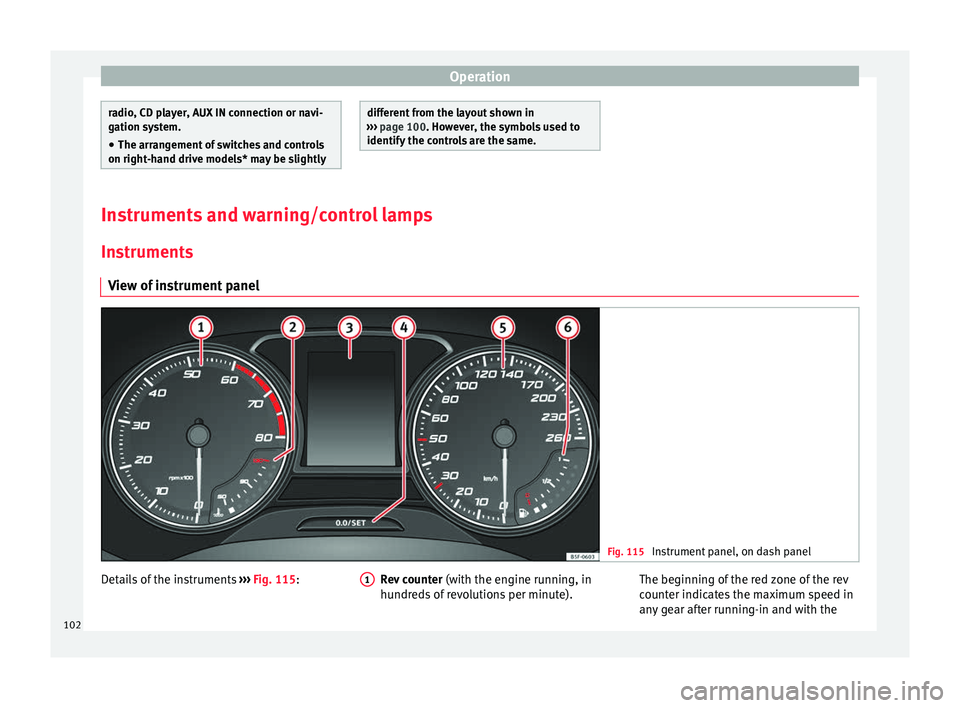
View of instrument panel Fig. 115
Instrument panel, on dash panel Details of the instruments
››
› Fig. 115: Rev counter (with the en gine running, in
hundreds of revolutions per minute).
1 The beginning of the red zone of the rev
c
ou
nter indicates the maximum speed in
any gear after running-in and with the
102
Page 112 of 328
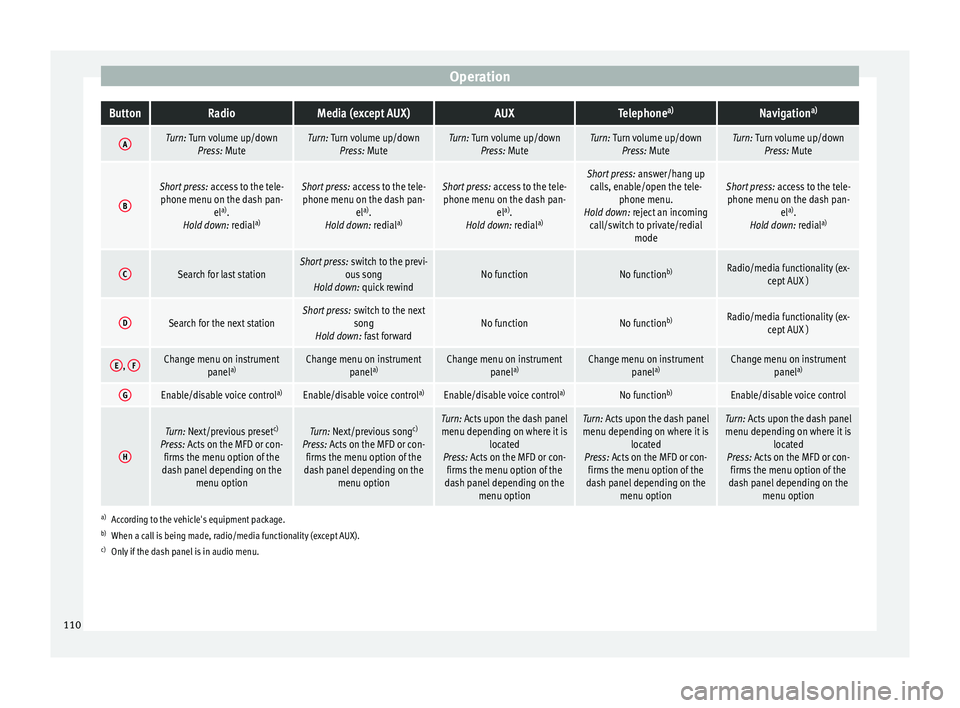
OperationButtonRadioMedia (except AUX)AUXTelephone
a)Navigation a)
ATurn: Turn volume up/down
Press: MuteTurn: Turn volume up/downPress: MuteTurn: Turn volume up/downPress: MuteTurn: Turn volume up/downPress: MuteTurn: Turn volume up/downPress: Mute
B
Short press: access to the tele-
phone menu on the dash pan- ela)
.
Hold down: redial a)Short press:
access to the tele-
phone menu on the dash pan- ela)
.
Hold down: redial a)Short press:
access to the tele-
phone menu on the dash pan- ela)
.
Hold down: redial a)Short press:
answer/hang up
calls, enable/open the tele- phone menu.
Hold down: reject an incoming call/switch to private/redial modeShort press: access to the tele-
phone menu on the dash pan- ela)
.
Hold down: redial a)
CSearch for last stationShort press:
switch to the previ-
ous song
Hold down: quick rewindNo functionNo function b)Radio/media functionality (ex-
cept AUX )
DSearch for the next stationShort press: switch to the next
song
Hold down: fast forwardNo functionNo function b)Radio/media functionality (ex-
cept AUX )
E, FChange menu on instrument
panela)Change menu on instrument
panela)Change menu on instrument
panela)Change menu on instrument
panela)Change menu on instrument
panela)
GEnable/disable voice control a)Enable/disable voice controla)Enable/disable voice controla)No functionb)Enable/disable voice control
H
Turn: Next/previous preset c)
Press: Acts on the MFD or con- firms the menu option of the
dash panel depending on the menu optionTurn: Next/previous song c)
Press: Acts on the MFD or con- firms the menu option of the
dash panel depending on the menu optionTurn: Acts upon the dash panelmenu depending on where it is located
Press: Acts on the MFD or con- firms the menu option of the
dash panel depending on the menu optionTurn: Acts upon the dash panelmenu depending on where it is located
Press: Acts on the MFD or con- firms the menu option of the
dash panel depending on the menu optionTurn: Acts upon the dash panelmenu depending on where it is located
Press: Acts on the MFD or con- firms the menu option of the
dash panel depending on the menu option
a)According to the vehicle's equipment package.
b) When a call is being made, radio/media functionality (except AUX).
c) Only if the dash panel is in audio menu.
110
Page 113 of 328
Communications and multimedia
Multimedia USB/A UX
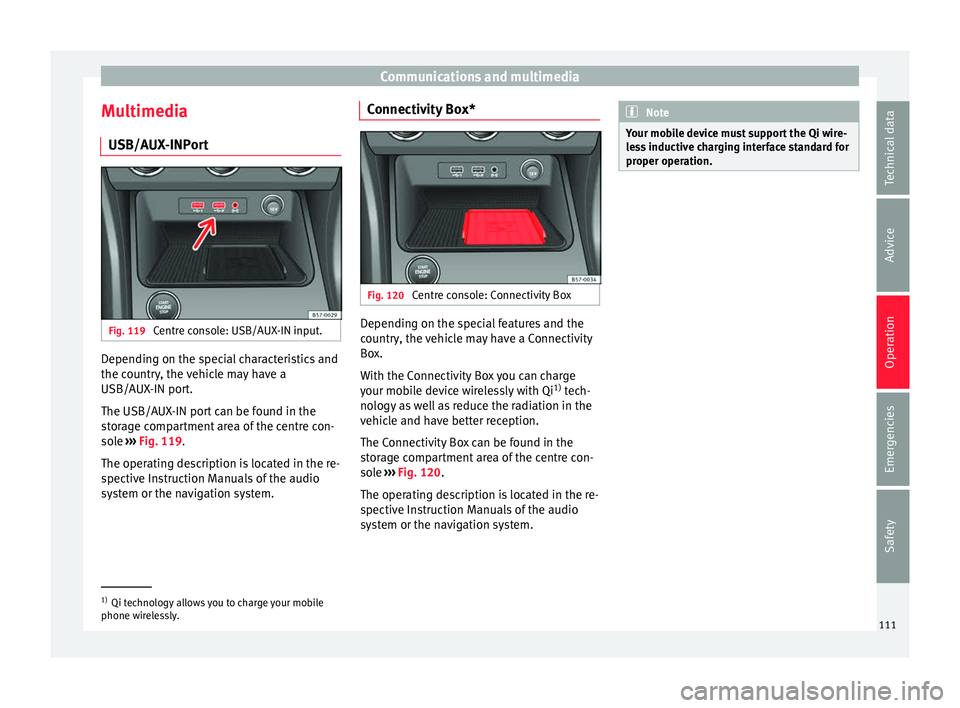
-INPortFig. 119
Centre console: USB/AUX-IN input. Depending on the special characteristics and
the c
ou
ntry, the vehicle may have a
USB/AUX-IN port.
The USB/AUX-IN port can be found in the
storage compartment area of the centre con-
sole ››› Fig. 119.
The operating description is located in the re-
spective Instruction Manuals of the audio
system or the navigation system. Connectivity Box*
Fig. 120
Centre console: Connectivity Box Depending on the special features and the
c
ou
ntry, the vehicle may have a Connectivity
Box.
With the Connectivity Box you can charge
your mobile device wirelessly with Qi 1)
tech-
nology as well as reduce the radiation in the
vehicle and have better reception.
The Connectivity Box can be found in the
storage compartment area of the centre con-
sole ››› Fig. 120.
The operating description is located in the re-
spective Instruction Manuals of the audio
system or the navigation system. Note
Your mobile device must support the Qi wire-
l e
ss inductive charging interface standard for
proper operation. 1)
Qi technology allows you to charge your mobile
phone w ir
elessly. 111
Technical data
Advice
Operation
Emergencies
Safety
Page 163 of 328
Air conditioning
Auxiliary heater (additional
he at
er)
Introduction The auxiliary heater runs on fuel from the ve-
hic
l
e's tank and can be used while you are
driving and when the vehicle is stationary.
The auxiliary heater can be switched on using
the fast heating button of the air condition-
ing controls, with the remote control or by
previously programming a departure time in
the auxiliary heater menu of the infotainment
system.
In winter, with the auxiliary heater switched
on, you can defog the windscreen and leave
it free of ice and snow (if it is a thin layer) be-
fore you start driving.
If the outside temperature is very high, the
vehicle interior can be ventilated with the en-
gine off using the auxiliary heater. WARNING
Swallowing a battery with a 20 mm diameter
or an y
other button battery can cause serious
and even fatal injuries within a very short
time.
● Always keep the remote control, keyrings
with b
atteries, the spare batteries, button
batteries and all other batteries over 20 mm
out of reach of children. ●
If
you suspect that someone may have
swallowed a battery, seek immediate medical
attention. WARNING
The auxiliary heater exhaust fumes contain
c arbon mono
xide, an odourless and colour-
less toxic gas. Carbon monoxide can cause
people to lose consciousness. It can also
cause death.
● Never switch on the auxiliary heater or
le
ave it running in enclosed spaces or areas
with no ventilation.
● Never programme the auxiliary heater so
that
it switches itself on and is running in an
enclosed space or an area with no ventila-
tion. WARNING
The components of the auxiliary heater are
e xtr
emely hot and could cause a fire.
● Always park your vehicle so that no part of
the exh
aust system can come in contact with
easily flammable materials that might be be-
low the vehicle, such as dried grass. CAUTION
Never place food, medicines or other temper-
at ur
e-sensitive objects close to the air vents.
Food, medicines and other objects sensitive
to heat or cold may be damaged or made un- suitable for use by the air coming from the
v
ent
s. Note
After switching the engine on with a 12-volt
b att
ery that is heavily discharged or newly
changed or after a jump start some system
settings (such as the time, the date, the per-
sonalised comfort settings and the program-
ming) might be altered or deleted. Check and
correct these settings once the battery is suf-
ficiently charged. Switching on and off the auxiliary
he
at
er
Switching the auxiliary heater on:
Manually with the fast heating button of the air
conditioner controls. The control lamp of the
button will light up
››› page 156.
Manually with the remote control
››› page 162.
Automatically by programming and activating a
departure time ››› page 163.
Switching the auxiliary heater off:
Manually with the fast heating button of the air
conditioner controls. The control lamp of the
button goes off
››› page 156.
Manually with the remote control
››› page 162.» 161
Technical data
Advice
Operation
Emergencies
Safety
Page 164 of 328
OperationSwitching the auxiliary heater off:
Automatically once the programmed departure
time has arrived or after the programmed oper-
ating time has elapsed
››› page 163.
Automatically when the control lamp (fuel
level indicator) ››› page 276 lights up.
Automatically when the 12-volt battery charge
is too low ››› page 289. Special feature
Onc
e sw
itched off, the auxiliary heater will
continue to operate for a short period of time
in order to burn the fuel remaining in the sys-
tem and also to expel the exhaust fumes.
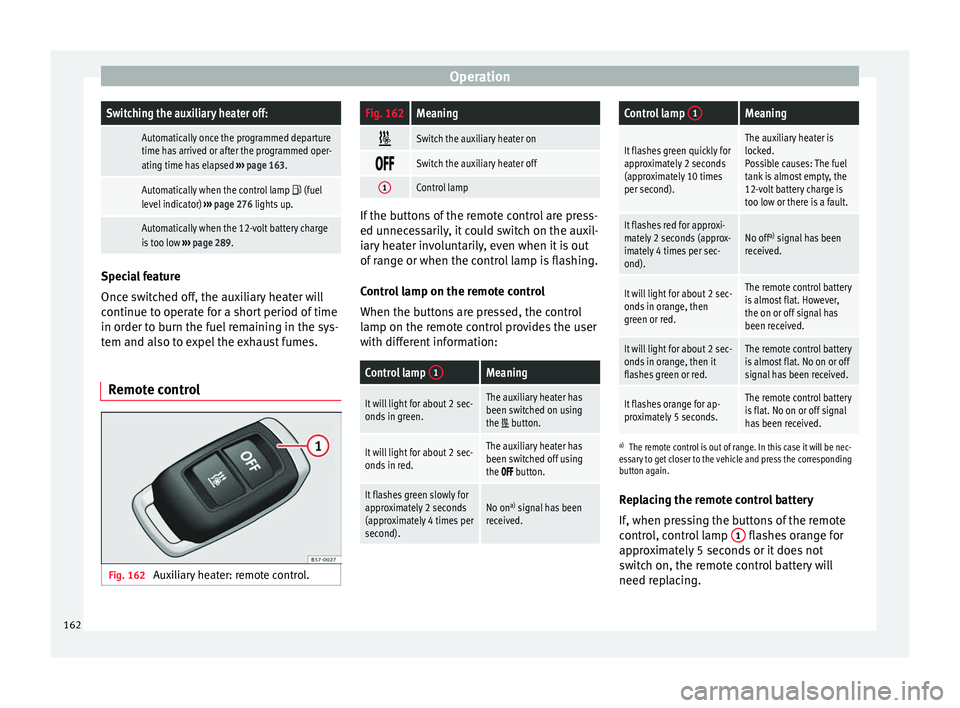
Remote control Fig. 162
Auxiliary heater: remote control.
Fig. 162Meaning
Switch the auxiliary heater on
Switch the auxiliary heater off
1Control lamp
If the buttons of the remote control are press-
ed u
nnec
essarily, it could switch on the auxil-
iary heater involuntarily, even when it is out
of range or when the control lamp is flashing.
Control lamp on the remote control
When the buttons are pressed, the control
lamp on the remote control provides the user
with different information:
Control lamp 1Meaning
It will light for about 2 sec-
onds in green.The auxiliary heater has
been switched on using
the
button.
It will light for about 2 sec-
onds in red.The auxiliary heater has
been switched off using
the
button.
It flashes green slowly for
approximately 2 seconds
(approximately 4 times per
second).No on a)
signal has been
received.
Control lamp 1Meaning
It flashes green quickly for
approximately 2 seconds
(approximately 10 times
per second).The auxiliary heater is
locked.
Possible causes: The fuel
tank is almost empty, the
12-volt battery charge is
too low or there is a fault.
It flashes red for approxi-
mately 2 seconds (approx-
imately 4 times per sec-
ond).No off a)
signal has been
received.
It will light for about 2 sec-
onds in orange, then
green or red.The remote control battery
is almost flat. However,
the on or off signal has
been received.
It will light for about 2 sec-
onds in orange, then it
flashes green or red.The remote control battery
is almost flat. No on or off
signal has been received.
It flashes orange for ap-
proximately 5 seconds.The remote control battery
is flat. No on or off signal
has been received.
a) The remote control is out of range. In this case it will be nec-
essary to get closer to the vehicle and press the corresponding
button again.
Replacing the remote control battery
If, when pressing the buttons of the remote
control, control lamp 1 flashes orange for
ap pr
oximately 5 seconds or it does not
switch on, the remote control battery will
need replacing.
162
Page 165 of 328
Air conditioning
The battery is located beneath a cover on the
b ac
k of the remote control.
● To open the cover, lift it slightly at the bot-
tom and s
lide it down.
● Remove the old battery.
● Insert the new battery. When doing so, take
into ac
count the polarity and use batteries of
the same type ››› .
● Replace the battery cover by inserting the
t ab
s at the top and pressing the bottom.
Range
The receiver is inside the vehicle. The remote
control, when fitted with new batteries, has a
range of several hundred metres. Obstacles
between the remote control and the vehicle,
bad weather conditions and discharged bat-
teries can considerably reduce the range of
the remote control. CAUTION
● The r a
dio frequency remote control con-
tains electronic components. Therefore, avoid
getting it wet and exposing it to knocks or di-
rect sunlight.
● The use of inappropriate batteries may
dam
age the radio frequency remote control.
For this reason, always replace the used bat-
tery with another of the same voltage, size
and specifications. For the sake of the environment
● Ple
ase dispose of your used batteries cor-
rectly and with respect for the environment.
● The remote control battery may contain
perc
hlorate. Observe the legal provisions re-
garding disposal.
● Care should be taken so as not to operate
the remot
e control unintentionally so as to
prevent the auxiliary heater being switched
on accidentally. Programming the auxiliary heater
Before pr
ogramming it, check that the vehi-
c
le's date and time are set correctly ››› .
The aux i
liary heater is programmed in the
Auxiliary heater menu of the infotain-
ment system.
Open the Auxiliary heater menu.
● Press the button in the C
limatronic
control panel.
● Press the fu
nction button.
Function button: function
Switch off: The auxiliary heater is immediately switched
off.
Function button: function
Heat, Ventilate: Set to heat or ventilate the vehicle interi-
or when the auxiliary heater is switched on. By pressing
the function button
, you can select the desired
mode.
Set: Opens the Auxiliary heater menu.
Departure time 1, Departure time 2, Departure time 3:
Three different departure times (hh.mm) may be
programmed. If the auxiliary heater should only
be switched on a certain day of the week, this can
also be selected.
Duration: The duration determines the operating
time of the auxiliary heater when switched on us-
ing the fast heating button
on the air condi-
tioning controls. The duration is also used to cal-
culate the departure time for the manual air con-
ditioner. It can be set between 10 and 60 mi-
nutes at 10-minute intervals.
This returns to the main menu.
The programmed departure time determines
the ap
pr
oximate time it should take to reach
the temperature set in the vehicle. The start
of the heating operation is determined auto-
matically depending on the outside tempera-
ture.
Checking the programming
When a departure time is activated and the
ignition is switched off the control lamp of
the fast heating button lights up for approx-
imately 10 seconds. »
163
Technical data
Advice
Operation
Emergencies
Safety
Page 166 of 328
Operation
WARNING
Never programme the auxiliary heater so that
it sw
itches itself on and is running in an en-
closed space or an area with no ventilation.
The auxiliary heater exhaust fumes contain
carbon monoxide, an odourless and colour-
less toxic gas. Carbon monoxide can cause
people to lose consciousness. It can also
cause death. Operating instructions
The auxiliary heater exhaust system located
belo
w the
vehicle must be kept clear of snow,
mud and other objects. The exhaust fumes
must be able to exit freely. The emissions
generated by the auxiliary heater are re-
moved via an exhaust pipe fitted underneath
the vehicle.
On heating the vehicle interior, depending on
the outside temperature, the warm air is first
directed at the windscreen and then to the
rest of the vehicle interior through the air
vents. Directing the diffusers – towards the
windows for example – can affect air distribu-
tion.
When will the auxiliary heater not be activa-
ted?
● The auxiliary heater requires about as
muc h po
wer as the dipped beam headlights.
If the 12-volt battery charge is too low, the auxiliary heater switches off automatically
and c
annot
be switched on. This avoids prob-
lems when starting the engine.
● The heating must be activated every time
you w
ant to set off. Similarly, the departure
time must reactivate each time.
● The control lamp (fuel
level indicator)
lights up. Note
● Noi se
s will be heard while the auxiliary
heater is running.
● When the air humidity is high and the in-
side t
emperature low, condensation from the
heating and ventilating system may evapo-
rate when the auxiliary heater is switched on.
In this case, steam may be released from un-
derneath the vehicle. This does not mean
that there is a vehicle malfunction.
● If the vehicle is tilted, e.g. if parked on a
slope, the oper
ation of the auxiliary heater
may be restricted if the fuel tank level is low
(just above the reserve level).
● If the auxiliary heater is used a number of
times
for a long period of time, the 12-volt
battery will lose its charge. To recharge the
battery, the vehicle must be driven for a num-
ber of kilometres from time to time. As a
guideline: The journey should last approxi-
mately as long as the heater was connected.
● At temperatures below +5°C (+41°F), the
auxi
liary heater may switch itself on automat-
ically when the engine is switched on. The auxiliary heater is switched off again after a
c
er
tain time.164
Page 171 of 328
Driving
●
Electric
al components with a high power
consumption are switched off temporarily
when the engine starts.
● When starting with a cold engine, noise
lev
els may briefly increase. This is quite nor-
mal, and no cause for concern.
● When the outside temperature is below
+5°C (+41°F), if
the engine is diesel, some
smoke may appear under the vehicle when the fuel-operated auxiliary heater is on. Stopping the engine
3
V
alid for vehicles: with Keyless Access
StepSwitch off the engine with the starter
button ››› page 167.
1.Stop the vehicle completely ››› .
2.Press and hold the brake pedal until the step
4 is performed.
3.If you are driving an automatic vehicle, place
the selector lever in position P.
4.Connect the electronic parking brake
››› page 170.
5.
Briefly press the start-up button ››› Fig. 164.
The START ENGINE STOP button blinks again. If
the engine fails to switch off, perform an emer-
gency disconnect ››› page 167.
6.If the vehicle is equipped with a manual gear-
box, put it into 1st or reverse. WARNING
Never switch off the engine while the vehicle
i s
moving. This could cause loss of control of
the vehicle, accidents and serious injury.
● The airbags and belt tensioners do not
work
when the ignition is switched off.
● The brake servo does not work with the en-
gine off.
Therefore, you need to press the
break pedal harder to brake the vehicle.
● Power steering does not work when the en-
gine is
not running. You need more strength
to steer when the engine is switched off.
● If the ignition is switched off, the steering
co
lumn could be locked, making it impossible
to control the vehicle. CAUTION
If the engine is made to work hard for a long
time, it m
ay overheat after being switched
off. To prevent damage to the engine before
switching it off, leave it idle for approx. 2 mi-
nutes in neutral. Note
After switching off the engine, the cooling fan
m a
y continue to operate in the engine com-
partment for a few more minutes, even with
the ignition off. The radiator fan is automati-
cally switched off. “My Beat” Function
For vehicles with a convenience key there is
the “M
y
Beat” function. This feature provides
an additional indication of the vehicle igni-
tion system.
When accessing the vehicle, e.g. by opening
the doors with the remote control, the START ENGINE STOP button flashes, calling at-
t ention t
o the relevant starter system button.
Upon switching the ignition on/off, the light
of the START ENGINE STOP button flashes. With
the en gine sw
itched off, after a few seconds,
the STOP ENGINE START button stops flashing
and g oe
s out.
With the engine running, the START ENGINE STOP button light stays on, indi-
c atin
g that the engine is running. Upon
switching the ignition off with the START ENGINE STOP button, it starts flashing
ag ain.
In
vehicles with the Start-Stop system , the
“My Beat” function also offers additional in-
formation:
● When the engine stops during the Stop
pha
se, the light of the START ENGINE STOP but-
t on s
tays on, since, even though the engine
is off, the Start-Stop system is active.
● When the engine cannot be stated again
with the
Start-Stop system, ›››
page 188, and
needs to be started manually, the »
169
Technical data
Advice
Operation
Emergencies
Safety