tow Seat Ateca 2017 Owner's Guide
[x] Cancel search | Manufacturer: SEAT, Model Year: 2017, Model line: Ateca, Model: Seat Ateca 2017Pages: 328, PDF Size: 6.36 MB
Page 95 of 328
Fuses and bulbs
CAUTION
● Alw
ays carefully remove the fuse box cov-
ers and refit them correctly to avoid problems
with your vehicle.
● Protect the fuse boxes when open to avoid
the entry
of dust or humidity. Dirt and humid-
ity inside fuse boxes can cause damage to
the electrical system. Note
● In the v
ehicle, there are more fuses than
those indicated in this chapter. These should
only be changed by a specialised workshop.
● Positions not containing a fuse do not ap-
pear in the f
ollowing tables.
● Some of the equipment listed in the tables
below per
tain only to certain versions of the
model or are optional extras.
● Please note that the above lists, while cor-
rect
at the time of printing, are subject to
change. Changing bulbs
Topic
introduction Read the additional information carefully
› ›
› page 52.
Changing bulbs requires a certain degree of
practical skill. If you choose to change the engine compart-
ment l
amps yourself, remember that it is a
dangerous area ››› in Work in the engine
c omp
artment on page 283.
Always use identical bulbs with the same
designation. The name can be found on the
base of the bulb holder.
Depending on how equipped the vehicle is,
there are different sets of headlights and tail
lights:
● Halogen headlights
● Full-LED main headlights*
● Rear bulb light
● LED rear light*
Fu
ll-LED headlight system*
Full-LED headlights handle all light functions
(daylight, side light, turn signal, dipped
beam and route light) with light emitting di-
odes (LEDs) as a light source.
Full-LED headlights are designed to last the
lifetime of the car and light bulbs cannot be
replaced. In case of headlight failure, go to
an authorised workshop to have it replaced. WARNING
● Tak
e particular care when working on com-
ponents in the engine compartment if the en-
gine is warm. Risk of burns. ●
Bu
lbs are highly sensitive to pressure. The
glass can break when you touch the bulb,
causing injury.
● When changing bulbs, please take care not
to injur
e yourself on sharp edges, in particu-
lar on the headlight housing. CAUTION
● Remo
ve the ignition key before working on
the electric system. Otherwise, a short circuit
could occur.
● Switch off the lights and the parking light
befor
e changing a bulb.
● Take good care to avoid damaging any com-
ponents. For the sake of the environment
Please ask your specialist retailer how to dis-
po se of
used bulbs in the proper manner. Note
● Ple
ase check at regular intervals that all
lighting (especially the exterior lighting) on
your vehicle is functioning properly. This is
not only in the interest of your own safety,
but also that of all other road users.
● Before changing a bulb, make sure you
hav
e the correct new bulb.
● Do not touch the glass part of the bulb with
your b
are hands, use a cloth or paper towel
instead, since the fingerprints left on the » 93
Technical data
Advice
Operation
Emergencies
Safety
Page 99 of 328
Fuses and bulbs
Remove the lid, levering it with the flat
s ide of
a screwdriver into the recess
››› Fig. 108 1 .
R emo
ve the bulb connector.
Unscrew the light securing bolt by hand
or using a screwdriver ››› Fig. 108 2 .
R emo
ve the light from the body, gently
pulling it toward you, and place on a
clean, smooth surface.
Disassemble the bulb holder unlocking
the securing tabs ››› Fig. 109 1 .
Ch an
ge the damaged bulb.
To refit follow the steps in reverse order,
taking special care when fitting the bulb
holder. The securing tabs must click into
place. CAUTION
Take care when removing the rear light unit to
m ak
e sure there is no damage to the paint-
work or any of its components. Note
● Mak
e sure you have a soft cloth ready to
place under the glass on the rear light unit, to
avoid any scratches.
● In the case of LED lights, change only the
turn s
ignal bulb. 3.
4.
5.
6.
7.
8.
9.
Rear lights (in the rear lid) Fig. 110
Rear lid open: remove the lid. Fig. 111
Remove the bulb holder. The rear lid must be open to change the
b
u
lbs.
Follow the steps indicated:
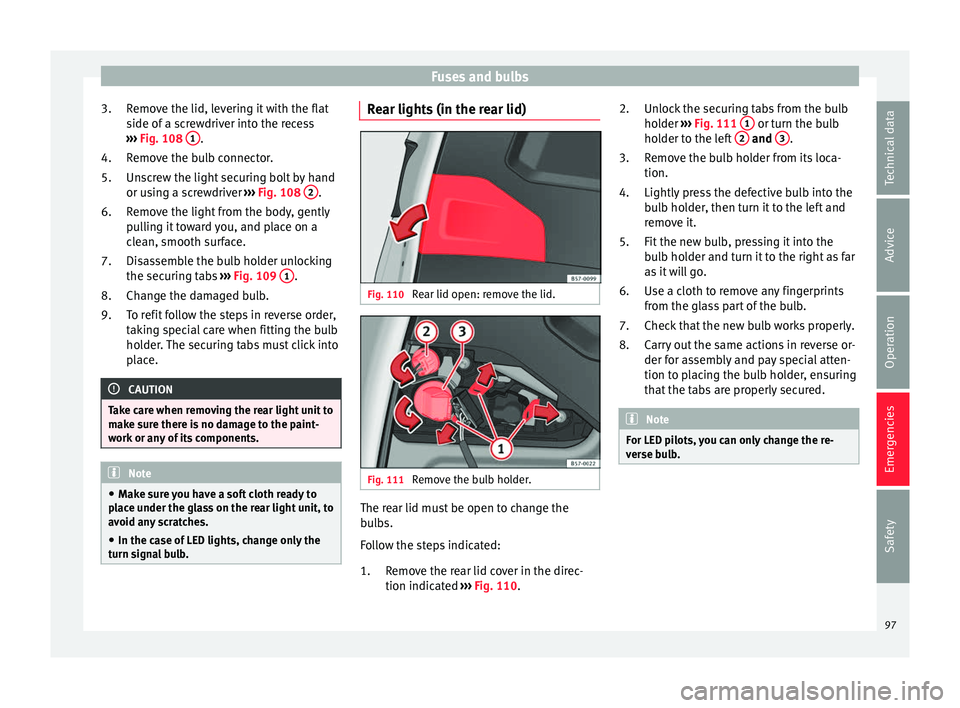
Remove the rear lid cover in the direc-
tion indicated ››› Fig. 110.
1. Unlock the securing tabs from the bulb
hol
der ››› Fig. 111 1 or turn the bulb
ho l
der to the left 2 and
3 .
R emo
ve the bulb holder from its loca-
tion.
Lightly press the defective bulb into the
bulb holder, then turn it to the left and
remove it.
Fit the new bulb, pressing it into the
bulb holder and turn it to the right as far
as it will go.
Use a cloth to remove any fingerprints
from the glass part of the bulb.
Check that the new bulb works properly.
Carry out the same actions in reverse or-
der for assembly and pay special atten-
tion to placing the bulb holder, ensuring
that the tabs are properly secured. Note
For LED pilots, you can only change the re-
v er
se bulb. 2.
3.
4.
5.
6.
7.
8.
97
Technical data
Advice
Operation
Emergencies
Safety
Page 114 of 328
Operation
Opening and closing C entr
al locking system
Description Read the additional information carefully
› ›
› page 9
The vehicle can be locked and unlocked via
the central locking system. There are several
methods, depending on the vehicle equip-
ment:
● key with remote control ›
›
›
page 114 ,
● lock on driver door (emergency opening
››
› page 9) or
● interior central locking switch ››
›
page 115.
Unlocking one side of the vehicle only
When you lock the vehicle with the key, the
doors and the rear lid are locked. When you
open the door, you can either unlock only the
driver door, or all the vehicle doors. To select
the required option, use Easy Connect*
››› page 115.
Automatic locking (Auto Lock)*
The Auto Lock function locks the doors and
the rear lid when the vehicle exceeds a speed
of about 15 km/h (9 mph). The vehicle is unlocked again when the igni-
tion key
is removed. Alternatively, the vehicle
can also be unlocked via the central locking
switch or by pulling one of the inside door
handles. The Auto Lock function can be
switched on and off on the sound system or
on the Easy Connect* system ››› page 115.
In the event of an accident in which the air-
bags inflate, the doors will be automatically
unlocked to facilitate access and assistance.
Anti-theft alarm system*
If the anti-theft alarm system senses interfer-
ence with the vehicle it triggers an audible
and visible alarm.
The anti-theft alarm system is automatically
switched on when locking the vehicle. It
switches off when the vehicle is unlocked
from a distance.
When the driver door is unlocked with the
key, you should switch on the ignition within
15 seconds. Otherwise the alarm will be trig-
gered. On some export versions, the alarm is
triggered immediately when you open a door.
To deactivate the alarm, press the button on the remote control key, or switch on the
ignition. Af
t
er a certain time, the alarm will
automatically switch off.
Switch off the vehicle interior monitoring and
tow-away protection if you wish to prevent the alarm from being triggered accidentally
››
› page 123.
Turn signals
The turn signals will flash twice when the ve-
hicle is unlocked and once when the vehicle
is locked.
If it does not flash, this indicates that one of
the doors, the rear lid or the bonnet is not
closed correctly.
Accidental lock-out
The central locking system prevents you from
being locked out of the vehicle in the follow-
ing situations: ● If the driver door is open, the vehicle can-
not be loc
ked with the central locking switch
››› page 115.
Lock the vehicle with the remote control key,
when all the doors and the rear lid have been
closed. This prevents the accidental locking
of the vehicle. WARNING
Do not leave anyone (especially children) in
the v
ehicle if it is locked from the outside and
the anti-theft security system* is enabled, as
the doors and windows cannot then be
opened from the inside. Locked doors could
delay assistance in an emergency, potentially
putting lives at risk. 112
Page 120 of 328
Operation
While the rear lid is in motion (either opening
or c lo
sing), it can be stopped with another
foot movement similar to the opening one
(provided a valid vehicle key is in the proxim-
ity of the rear lid).
The Easy Open feature is not available or only
has limited availability in the following situa-
tions (examples):
● If the rear bumper is very dirty.
● If the rear bumper is wet with salt water,
e.g. af
ter having driven on gritted roads.
● If the electrical unlocking tow hitch is not
co
vered.
● If the vehicle has been equipped at a later
time with a t
ow bracket.
In the event of heavy rain, the Easy Open fea-
ture may take a little longer to open the boot
or automatically disable to avoid the boot
opening by accident, e.g. when the rain falls.
The Easy Open function may be connected
and disconnected permanently in the info-
tainment system by pressing the
S
ETUP and
Openin
g and c
losing
› ››
page 26 func-
tion buttons.
What happens when locking the vehicle with
a second key
If there is a vehicle key inside the vehicle and
it is locked from the outside with a second
vehicle key, the key inside the vehicle is
blocked for engine ignition ››› page 165. In order to enable engine ignition, the button
on the key
inside the vehicle needs to be
pr e
ssed.
Automatically disabling sensors
If the vehicle is not locked or unlocked for a
long period of time, the proximity sensors on
the passenger doors are automatically disa-
bled.
If one of the sensor surfaces on the door han-
dles is often activated in a unusual manner
with the vehicle locked (e.g. by the branches
of a bush rubbing against it), all proximity
sensors are disabled for a certain period of
time.
Sensors will again be enabled: ● After a time.
● OR: if the vehicle is unlocked with the but-
t
on on the key.
● OR: if the rear lid is open.
● OR:
if the vehicle is unlocked manually with
the k
ey.
Convenience functions
To close all the electric windows and the
glass roof using the convenience function,
keep a finger for a few seconds on the lock-
ing sensor surface ››› Fig. 124 B (arrow) of
the door h andl
e until the windows and roof
have closed. The doors may be opened
by
touching the
sensor surface of the door handle depending
on the settings that have been activated in
the infotainment system with the
S
ETUP and
Openin
g and c
losing function buttons.
WARNING
If there is a valid key in the proximity of the
r e
ar lid, in some cases the Easy Open func-
tion may be accidentally turned on and the
rear lid will open, for example, when sweep-
ing under the rear bumper, when directing a
water jet or high pressure steam to the area
or when carrying out maintenance work or re-
pairs in that area. If accidentally opened, the
rear lid could injure somebody situated in its
area of operation or cause material damage.
● Therefore, always make sure that there is
no un
supervised valid key in the area near
the rear lid.
● Before carrying out any maintenance or re-
pair w
ork on the vehicle, always disable the
Easy Open feature on the infotainment sys-
tem.
● Before washing the vehicle, always disable
the Ea
sy Open feature on the infotainment
system.
● Before attaching a bicycle rack or a trailer
››
› page 255, always disable the Easy Open
feature on the information system. 118
Page 123 of 328
Opening and closing
The childproof lock prevents the rear doors
fr om bein
g opened from the inside. This sys-
tem prevents minors from opening a door ac-
cidentally while the vehicle is running.
This function is independent of the vehicle
electronic opening and locking systems. It
only affects rear doors. It can only be activa-
ted and deactivated manually, as described
below:
Activating the childproof lock
– Unlock the vehicle and open the door in
which
you wish to activate the childproof
lock.
– With the door open, rotate the groove in
the door us
ing the ignition key, clockwise
for the left hand side doors ››› Fig. 127 and
anti-clockwise for the right hand side
doors.
Deactivating the childproof lock
– Unlock the vehicle and open the door
whose c
hildproof lock you want to deacti-
vate.
– With the door open, rotate the groove in
the door us
ing the ignition key, anti-clock-
wise for the left hand side doors ››› Fig. 127
and clockwise for the right hand side
doors.
Once the childproof lock is activated, the
door can only be opened from the outside. The childproof lock can be activated or deac-
tivat
ed by inserting the key in the groove
when the door is open, as described above.
Anti-theft alarm system* De
scription The anti-theft alarm makes it more difficult to
br
e
ak into the vehicle or steal it.
The anti-theft alarm is automatically turned
on when the vehicle is locked with the key.
● The turn signal light will flash twice on
openin g and de
activating the alarm.
● The turn signal light will flash once on clos-
ing and activ
ating the alarm.
When does the system trigger an alarm?
The anti-theft alarm siren will be triggered for
about 30 seconds accompanied by sound
and optical (flashing) warning signals and
will be repeated about ten times when the
vehicle is locked and the following unauthor-
ised actions are attempted:
● Opening a door that is mechanically un-
lock
ed using the vehicle key without switch-
ing on the ignition in the next 15 seconds (in
certain markets, such as the Netherlands,
there is no 15 second waiting time and the alarm is activated immediately on opening
the door).
●
A door is opened.
● The bonnet is opened.
● The rear lid is opened.
● When the ignition is switched on with a
non-authori
sed key.
● When the vehicle battery is disconnected.
● Movement inside the vehicle (in vehicles
with int
erior monitoring ››› page 123).
● When the vehicle is towed (in vehicles with
anti-to
w system ››› page 123).
● When the vehicle is raised (in vehicles with
anti-to
w system ››› page 123).
● When the vehicle is transported on a ferry
or by
rail (vehicles with an anti-tow system or
vehicle interior monitoring ››› page 123).
● When a trailer connected to the anti-theft
alarm sy
stem is disconnected.
How to turn OFF the alarm
Unlock the vehicle with the unlocking button
on the key or turn on the ignition with a valid
key. Note
● Af t
er 28 days, the indicator light will be
switched off to prevent the battery from ex-
hausting if the vehicle has been left parked » 121
Technical data
Advice
Operation
Emergencies
Safety
Page 124 of 328
Operation
for a long period of time. The alarm system
r
em
ains activated.
● If, after the audible warning goes off, an-
other monitor
ed area is accessed (e.g. the
rear lid is opened after a door has been
opened), the alarm is triggered again.
● The anti-theft alarm is not activated when
the v
ehicle is locked from within using the
central locking button .
● If the driver door is unlocked mechanically
w ith the k
ey, only the driver door is unlocked,
the rest of the doors remain locked. Only
when the ignition has been turned on will the
other doors be available - but not unlocked -
and the central locking button will be activa-
ted.
● If the vehicle battery is run down or flat
then the anti-theft
alarm will not operate cor-
rectly.
● Vehicle monitoring remains active even if
the batt
ery is disconnected or not working for
any reason.
● The alarm is triggered immediately if one of
the batt
ery cables is disconnected while the
alarm system is active. Vehicle interior monitoring and anti-
t
o
w system* It is a monitoring or control function incorpo-
r
at
ed in the anti-theft alarm* which detects
unauthorised vehicle entry by means of ultra-
sound. Activation
– It is automatically switched on when the
anti-theft
alarm is activated.
Deactivation – Open the vehicle with the key, either me-
ch
anically or by pressing the button on
the r emot
e control. The time period from
when the door is opened until the key is in-
serted in the contact should not exceed 15
seconds, otherwise the alarm will be trig-
gered.
– Press the button on the remote control
tw ic
e. The volumetric sensor and tilt sen-
sors will be deactivated. The alarm system
remains activated.
The vehicle interior monitoring and the anti-
tow system are automatically switched on
again next time the vehicle is locked.
The vehicle interior monitoring and anti-tow
sensor (tilt sensor) are automatically switch-
ed on when the anti-theft alarm is switched
on. In order to activate it, all the doors and
the rear lid must be closed.
If you wish to switch off the vehicle interior
monitoring and the anti-tow system, it must
be done each time that the vehicle is locked;
if not, they will be automatically switched on.
The vehicle interior monitoring and the anti-
tow system should be switched off if animals
are left inside the locked vehicle (otherwise, their movements will trigger the alarm) or
when, for e
xample, the vehicle is transported
or has to be towed with only one axle on the
ground.
False alarms
Interior monitoring will only operate correctly
if the vehicle is completely closed. Please ob-
serve related legal requirements.
The following cases may cause a false alarm:
● Open windows (partially or fully).
● Panoramic/tilting sunroof open (partially or
comp
letely).
● Movement of objects inside the vehicle,
suc
h as loose papers, items hanging from
the rear vision mirror (air fresheners), etc. Note
● If the
vehicle is relocked and the alarm is
activated without the volumetric sensor func-
tion, relocking will activate the alarm with all
its functions, except the volumetric sensor.
This function is reactivated when the alarm is
switched on again, unless it is deliberately
switched off.
● If the alarm has been triggered by the volu-
metric sen
sor, this will be indicated by a
flashing of the warning lamp on the driver
door when the vehicle is opened. The flash is
different to the flash indicating the alarm is
activated. 122
Page 125 of 328
Opening and closing
●
The v
ibration of a mobile phone left inside
the vehicle may cause the vehicle interior
monitoring alarm to trigger, as both sensors
react to movements and shakes inside the ve-
hicle.
● If on activating the alarm, any door or the
re
ar lid is open, only the alarm will be activa-
ted. The vehicle interior monitoring and the
anti-tow system will only be activated once
all the doors are closed (including the rear
lid). Deactivating the vehicle interior moni-
t
orin
g and anti-tow systems* Fig. 128
Vehicle interior monitoring/tow-
a w
ay protection button. When the vehicle is locked, the alarm will be
trig
g
ered if movements are detected in the
interior (e.g. by animals) or if the vehicle's in-
clination is changed (e.g. during transport).
You can prevent the alarm from being trig- gered accidentally by switching off the vehi-
cl
e interior monitoring and/or tow-away pro-
tection.
– To switch off the vehicle interior monitoring
and to
w-away protection, switch off the ig-
nition and press button ››› Fig. 128. The in-
dicator on the button will light up.
– When the vehicle is locked now, the vehicle
interior monit
oring and the tow-away pro-
tection are switched off until the next time
the door is opened.
If the anti-theft security system (Safelock)*
››› page 119 is switched off, the vehicle interi-
or monitoring and the tow-away protection
are automatically switched off. WARNING
Observe the safety warnings ››
› in Descrip-
tion on p ag
e 112. Rear lid (luggage compart-
ment)
R e
ar lid with electric opening and
closing* Fig. 129
Rear lid open: button to close the
r e
ar lid immediately. Fig. 130
Centre console: button to open and
c lo
se rear lid. » 123
Technical data
Advice
Operation
Emergencies
Safety
Page 126 of 328
Operation
› › ›
table on page 2
Open rear lid
● Unlock the vehicle ››
› page 112 and briefly
press the handle of the rear lid. On vehicles
with Keyless Access you can directly press
the handle of the rear lid. The rear lid is un-
locked if an authorised key in the proximity of
the vehicle is recognised.
● OR: press the button on the centre console
f
or at least one second ››› Fig. 130. The but-
ton also works when the ignition is switched
off.
● OR: press and hold the
vehicle key but-
ton for approx. 1 second. If the vehicle is
locked, unlock the rear lid only (the doors re-
main locked).
● OR: on vehicles with Keyless Access and
c
ontrolled opening sensors you can open the
rear lid by moving one foot in the area of the
sensors located below the rear bumper (Easy
Open). The rear lid opens automatically.
Closing luggage lid
● Briefly press the butt
on on the rear lid
››› Fig. 129 ››› .
● OR: pr ess the
b
utton located on the
centre console until the rear lid is closed
››› Fig. 130.
● OR: on vehicles with Keyless Access, press
and ho
ld the vehicle key button until the
rear lid is closed or move one foot in the area of the sensors located below the rear bumper
(Ea
sy Open) ››› page 116. The vehicle key
must not be further than approx. 1.5 m from
the luggage compartment and should not be
in the vehicle.
● OR: move the rear lid with the hand in the
dir
ection of closing until it closes automati-
cally.
● The rear lid goes down automatically to the
final
position and also closes automatically
››› .
Int erruptin
g opening or closing
After beginning to open or close the rear lid,
the action can be halted by pressing one of
the buttons.
Continue opening or closing the rear lid by
hand. To do this, some force will have to be
used.
If you press one of the buttons again, the
rear lid will move again in the exit direction.
If the rear lid finds resistance or an obstacle
during the automatic opening or closing,
opening or closing will be interrupted imme-
diately. For the closing process, the rear lid
opens again slightly.
● Check why it has not been possible to open
or clo
se the rear lid.
● Try to open or close the rear lid again. ●
If nec
essary, the rear lid can be opened or
closed by hand using reasonable force.
Special feature for pulling a trailer
If the factory-fitted towing bracket is electri-
cally connected to a trailer ››› page 255, the
electric rear lid can only be opened or closed
with the keys available within it.
Acoustic warnings
Throughout the process of opening or closing
the rear lid, audible warnings can be heard.
Exception: when the rear lid is opened man-
ually using the handle or the Easy Open func-
tion with the movement of the foot or closed
using the button available within it
››› Fig. 129.
Modifying and memorising the opening an-
gle
If the space behind or above the vehicle is
less than the travel area of the rear lid, you
can change the opening angle of the rear lid.
To memorise a new opening angle, the rear
lid must be open at least halfway.
● Interrupt the opening process in the de-
sir
ed position.
● Press the ››
› Fig. 129 button available in
the rear lid for at least 3 seconds.
124
Page 135 of 328
Lights and visibility
When the system is activated and the camera
det ects
other vehicles that may be dazzled,
the main beam is automatically switched off.
Otherwise, the main beam is automatically
switched on.
The main beam assist generally detects illu-
minated areas and deactivates the main
beam when passing through a town, for ex-
ample.
Switching the main beam assist on and off
Func-
tionUse
Activate:
– Switch the ignition on and turn the light
switch to position .
– From the base position, move the main
beam and turn signal lever forwards
››› page 131. When the warning lamp
is
displayed on the instrument panel display,
the main beam assist is switched on.
To switch system off:
– Switch off the ignition.
– OR: turn the light switch to a different po-
sition to
››› page 131.
– OR: with main beam on, move the main
beam and turn signal lever backwards.
– OR: move the main beam and turn the
signal lever forwards to manually switch
the main beam on. The main beam assist
will then be deactivated. Malfunctions
The f
o
llowing conditions may prevent the
main beam headlight control from turning off the headlights in time or from turning off al-
tog
ether:
● In poorly lit towns with highly reflective
sign
s.
● Other insufficiently lit road users (such as
pedes
trians or cyclists).
● On tight bends and steep slopes (bumps)
and when oncomin
g vehicles are partially ob-
scured.
● When the drivers of other oncoming vehi-
cl
es (such as a truck) can see over a guard
rail in the centre of the road.
● If the camera is damaged or the power sup-
ply
is cut off.
● In fog, snow and heavy rain.
● With dust and sand turbulence.
● With loose gravel in the field of vision of
the camer
a.
● When the field of vision of the camera is
mis
ted up, dirty or covered by stickers, snow,
ice, etc. WARNING
The convenience features of the main beam
a s
sist should not encourage the taking of
risks. The system is not a replacement for
driver concentration.
● You are always in control of the main beam
and ad
apting it to the light, visibility and traf-
fic conditions. ●
It i
s possible that the main beam headlight
control does not recognise all driving situa-
tions and is limited under certain circumstan-
ces.
● When the field of vision of the camera is
dirty
, covered or damaged, operation of the
main beam control may be affected. This also
applies when changes are made to the vehi-
cle lighting system, for example, if additional
headlights are installed. CAUTION
To avoid affecting the operation of the sys-
t em, t
ake the following points into considera-
tion:
● Clean the field of vision of the camera regu-
larly
and make sure it is free of snow and ice.
● Do not cover the field of vision of the cam-
era.
● Chec
k that the windscreen is not damaged
in the are
a of the field of vision of the camera. Note
Main beam and headlight flasher can be
t urned on and off
manually at any time with
the turn signal and main beam lever
››› page 131. 133
Technical data
Advice
Operation
Emergencies
Safety
Page 140 of 328
Operation
Interior and reading lights 1)
› › ›
table on page 2
Read the additional information carefully
››› page 24
Glove compartment and luggage compart-
ment lighting*
When opening and closing the glove com-
partment on the front passenger side and the
rear lid, the respective light will automatically
switch on and off.
Footwell lighting*
The lights in the footwell area below the dash
(driver and front passenger sides) will switch
on when the doors are opened and will de-
crease in intensity while driving. The intensity
of these lights can be adjusted using the ra-
dio menu (see Easy Connect > Light
Settings > Interior lighting
››› page 26).
Ambient light*
The ambient lighting in the door panels may
change colour. The intensity of these lights
can be adjusted using the radio menu (see Easy Connect > Light Settings >
Interior lighting
› ›
› page 26). Note
The reading lights switch off when the vehi-
c l
e is locked using a key or after several mi-
nutes if the key is removed from the ignition.
This prevents the battery from discharging. Visibility
S u
n visors Fig. 137
Sun visor Options for adjusting driver and front pas-
sen
g
er sun visors:
● Lower the sun visor towards the wind-
sc
reen.
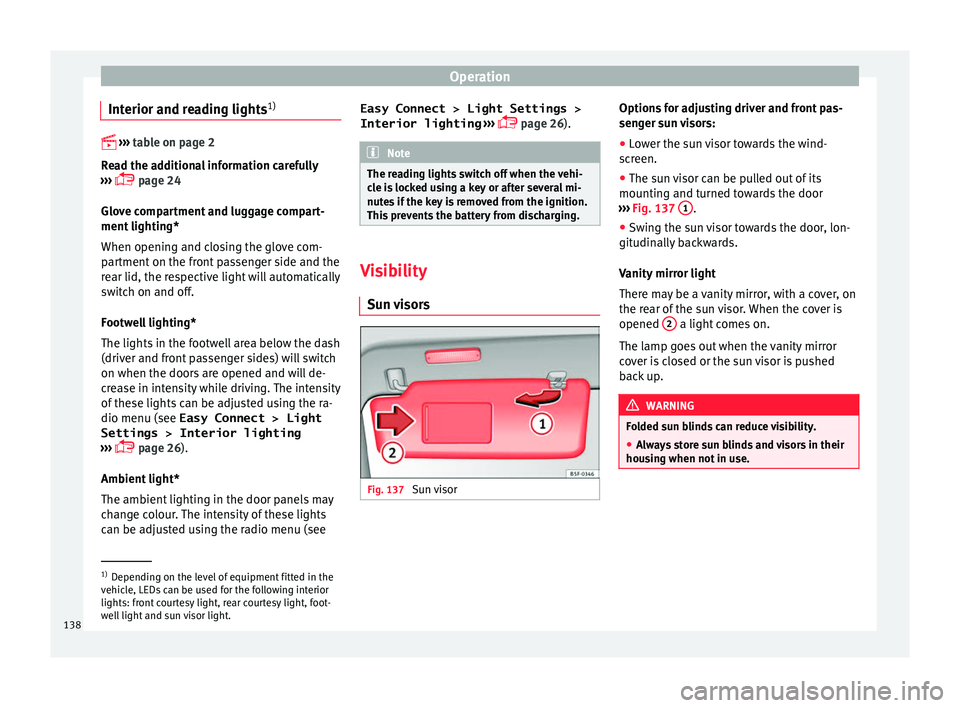
● The sun visor can be pulled out of its
mountin
g and turned towards the door
››› Fig. 137 1 .
● Swing the sun visor towards the door, lon-
git udin
ally backwards.
Vanity mirror light
There may be a vanity mirror, with a cover, on
the rear of the sun visor. When the cover is
opened 2 a light comes on.
The l amp g
oes out when the vanity mirror
cover is closed or the sun visor is pushed
back up. WARNING
Folded sun blinds can reduce visibility.
● Always store sun blinds and visors in their
hou s
ing when not in use. 1)
Depending on the level of equipment fitted in the
v ehic
le, LEDs can be used for the following interior
lights: front courtesy light, rear courtesy light, foot-
well light and sun visor light.
138