warning light Seat Ateca 2017 Owner's Guide
[x] Cancel search | Manufacturer: SEAT, Model Year: 2017, Model line: Ateca, Model: Seat Ateca 2017Pages: 328, PDF Size: 6.36 MB
Page 81 of 328
Transporting children safely
light up, with the word
in the centre part of the dash panel.
– The warning lamp is
illuminated for
60 seconds in the centre part of the dash
panel.
Control lamp with the word
(front passenger airbag disabled)
If the front passenger front airbag is disa-
bled, after switching on the ignition, the con-
trol lamp will light up for several seconds,
then it will switch off for about 1 s and then
switch on again.
If the control lamp is flashing, there is a fault
in the disabling of the airbag system ››› .
Pl e
ase go immediately to an Official Service. WARNING
● The driv er of
the vehicle is responsible for
disabling or switching on the airbag.
● Always switch off the ignition before disa-
blin
g the front passenger airbag! Failure to do
so could result in a fault in the airbag deacti-
vation system.
● Never leave the key in the airbag disabling
swit
ch as it could get damaged or enable or
disable the airbag during driving.
● If the (airbag di
sabled) control lamp
flashes, the front passenger front airbag will
not trigger in the event of an accident! Have
the system immediately checked by an Offi-
cial Service. Transporting children safely
Saf ety
for children
Introduction For safety reasons, as we have learned from
ac
c
ident statistics, we recommend that chil-
dren under 12 years of age travel in the rear
seats. Depending on their age, height and
weight, children travelling in rear seats must
use a child seat or a seat belt. For safety rea-
sons, the child seat should be installed in the
rear seat, behind the front passenger seat or
in the centre back seat.
The physical laws involved and the forces
acting in a collision apply also to children
››› page 70. But unlike adults, children do not
have fully developed muscle and bone struc-
tures. This means that children are subject to
a greater risk of injury.
To reduce the risk of injuries, children must
always use special child restraint systems
when travelling in the vehicle.
We recommend the use of child safety prod-
ucts from the SEAT Original Accessories Pro-
gramme, which includes systems for all ages
made by “Peke” (not for all countries) (see
www.seat.com). These systems have been especially de-
s
igned and ap
proved, complying with the
ECE-R44. regulation.
SEAT recommends securing the child seats
shown on the website as described below:
● Child seats in the opposite direction of
trav
el (group 0+): ISOFIX and support bracket
(Peke G0 Plus + ISOFIX Base (RWF)).
● Child seats in the direction of travel (group
1): ISOFIX and
Top Tether (Peke G1 ISOFIX
DUO Plus).
● Child seats in the direction of travel (group
2): seat
belt and ISOFIX (Peke G3 KIDFIX).
● Child seats in the direction of travel (group
3): with se
at belt (Peke G3 KIDFIX).
Follow the manufacturer's instructions and
observe any statutory requirements when in-
stalling and using child seats. Always read
and note ››› page 79.
We recommend you always carry the manu-
facturer's Child Seat Instruction Manual to-
gether with the on-board documentation.
Important information regarding the
front
passenger's airbag Read the additional information carefully
› ›
› page 17. »
79
Technical data
Advice
Operation
Emergencies
Safety
Page 85 of 328
Self-help
Emergencies
Self -help
V
ehicle tool kit, anti-puncture kit* The tools and anti-puncture kit* are stored
u
nder the floor p
anel in the luggage compart-
ment.
To access the vehicle tools:
– Lift up the floor surface by the plastic han-
dl e u
ntil it is fastened to the tabs on both
sides.
Depending on the vehicle equipment, the an-
ti-puncture kit* is located under the floor
panel in the luggage compartment.
The tool kit includes:
● Jack*
● Wire hook for pulling off the wheel cov-
er*/wheel bo
lt cap clip.
● Box spanner for wheel bolts*
● Towline anchorage
● Adapter for the anti-theft wheel bolts*
● Towing bracket device
Some of the it
ems listed are only provided in
certain model versions, or are optional ex-
tras. Note
The jack does not generally require any main-
t en
ance. If required, it should be greased us-
ing universal type grease. Tyre repair
TM S
(Tyre Mobility System)* Read the additional information carefully
› ›
› page 53
The Anti-puncture kit* (Tyre Mobility System)
will reliably seal punctures caused by the
penetration of a foreign body of up to about
4 mm in diameter. Do not remove foreign ob-
jects, e.g. screws or nails, from the tyre.
After inserting the sealant residue in the tyre,
you must again check the tyre pressure about
10 minutes after starting the engine.
You should only use the tyre mobility set if
the vehicle is parked in a safe place, you are
familiar with the procedure and you have the
necessary tyre mobility set! Otherwise, you
should seek professional assistance.
Do not use the tyre sealant in the following
cases:
● If the wheel rim has been damaged.
● In outside temperatures below -20°C (-4°F). ●
In the ev ent
of cuts or perforations in the
tyre greater than 4 mm.
● If you have been driving with very low pres-
sur
e or a completely flat tyre.
● If the sealant bottle has passed its use by
dat
e. WARNING
Using the tyre mobility system can be dan-
g er
ous, especially when filling the tyre at the
roadside. Please observe the following rules
to minimise the risk of injury:
● Stop the vehicle safely as soon as possible.
Park
it at a safe distance from surrounding
traffic to fill the tyre.
● Ensure the ground on which you park is flat
and solid.
● A
ll passengers and particularly children
mus
t keep a safe distance from the work area.
● Turn on the hazard warning lights to warn
other ro
ad users.
● Use the tyre mobility system only if you are
fami
liar with the necessary procedures. Oth-
erwise, you should seek professional assis-
tance.
● The tyre mobility set is intended for tempo-
rar
y emergency use only until you can reach
the nearest specialised workshop.
● Replace the repaired tyre with the tyre mo-
bi
lity set as soon as possible. » 83
Technical data
Advice
Operation
Emergencies
Safety
Page 88 of 328
Emergencies
they should be changed if they are damaged,
or c l
eaned if they are dirty ››› .
Dam ag
ed wiper blades should be replaced
immediately. These are available from quali-
fied workshops. WARNING
Worn or dirty wiper blades reduce visibility
and inc r
ease the risk of accident and serious
injury.
● Always replace damaged or worn blades or
bl
ades which do not clean the windscreen
correctly. CAUTION
● Dam ag
ed or dirty windscreen wipers could
scratch the glass.
● If products containing solvents, rough
spon
ges or sharp objects are used to clean
the blades, the graphite layer will be dam-
aged.
● Never use fuel, nail varnish remover, paint
thinner or simi
lar products to clean the win-
dows.
● In icy conditions, always check that the
wiper b
lades are not frozen to the glass be-
fore using the wipers. In cold weather, it may
help to leave the vehicle parked with the wip-
ers in service position ›››
page 60. CAUTION
● To pr
event damage to the bonnet and the
wiper arms, only leave them in the service
position.
● Before driving, always lower the wiper
arms. Tow-starting and towing
Intr oduction Tow-starting me
an
s starting the engine of
the vehicle while another pulls it.
Towing means one vehicle pulling another
that is not roadworthy.
Always consider the legal provisions relating
to tow-starting and towing.
For technical reasons, towing a vehicle with a
discharged battery is not allowed. The jump
start should be used instead ›››
page 58.
If the vehicle comes with the Keyless Access
system, towing is only allowed with the igni-
tion on!
The vehicle battery drains if the vehicle is
towed with the engine switched off and the
ignition connected. Depending on the battery
charge status, the drop in voltage may be so
large, even after just a few minutes, that no
electrical device in the vehicle may work e.g. the hazard warning lights. In vehicles with
the Keyl
ess Access system, the steering
wheel could lock ››› .
WARNING
A vehicle with no power should never be tow-
ed.
● During towing, never switch off the ignition
w ith the s
tarter button. Otherwise, the elec-
tronic lock of the steering column could sud-
denly get blocked and it would be impossible
to steer the vehicle. This could cause an acci-
dent, serious injury and loss of control of the
vehicle.
● If during towing the vehicle runs out of
pow
er, stop towing immediately and request
the assistance of specialist personnel. WARNING
Vehicle handling and braking capacity
c h
ange considerably during towing. Please
observe the following instructions to mini-
mise the risk of serious accidents and injury:
● As the driver of the vehicle being towed:
– You shou
ld depress the brake much hard-
er as the brake servo does not operate.
Pay the utmost attention to avoid crash-
ing into the towing vehicle.
– More strength is required at the steering
wheel as the power steering does not op-
erate when the engine is switched off.
● As the driver of the towing vehicle: 86
Page 92 of 328
Emergencies
CAUTION
● The t o
wing eye must always be completely
and firmly tightened. Otherwise, it could be
released while towing and tow-starting.
● If the vehicle is factory-equipped with a
to
wing bracket, it is only allowed to tow with
a tow bar if this has been specially designed
to be installed with a tow hitch. If an unsuita-
ble tow bar is used, both the tow hitch and
the vehicle may be damaged. Instead, a tow
rope should be used. Driving tips for towing
Towing requires some expertise and experi-
enc
e, e
specially when using a tow rope. Both
drivers should be familiar with the difficulties
involved in towing. For this reason, inexper-
ienced drivers should abstain from towing.
During towing, it should be ensured that no
impermissible tractive forces or shocks are
generated. When towing on an unpaved
road, there is always a risk of overloading
and damaging the anchorage points.
During towing, the towing vehicle can signal
the change of direction even with the hazard
warning lights turned on. To do so, at the
same time, the turn signal lever must be op-
erated with ignition switched on. Meanwhile,
the hazard warning lights will go off. When
the turn signal lever is returned to the rest position, the hazard warning lights will be
autom
atically reactivated.
Notes for the driver of the towed vehicle ● Leave the ignition on, so that the steering
is
not blocked, and the electronic parking
brake may be deactivated and the turn sig-
nals and wash/wipe operated.
● More strength is required at the steering
wheel a
s the power steering does not oper-
ate when the engine is switched off.
● You should depress the brake much harder
as
the brake servo does not operate. Avoid
hitting the towing vehicle.
● Bear in mind the information and instruc-
tions
in the manual of the vehicle to be tow-
ed.
Notes for the driver of the towing vehicle
● Accelerate with particular care and caution.
Av
oid sharp manoeuvres.
● Brake earlier than usual and smoothly.
● Bear in mind the information and instruc-
tions
in the manual of the towed vehicle. Fuses and bulbs
F u
ses
Introduction In general, a fuse can be assigned to various
el
ectric
al components. Likewise, an electrical
component can be protected by several
fuses.
Only replace fuses when the cause of the
problem has been solved. If a newly inserted
fuse blows after a short time, you must have
the electrical system checked by a special-
ised workshop as soon as possible. WARNING
The high voltages in the electrical system can
giv e seriou
s electrical shocks, causing burns
and even death!
● Never touch the electrical wiring of the igni-
tion sys
tem.
● Take care not to cause short circuits in the
electric
al system. WARNING
Using unsuitable fuses, repairing fuses or
bridgin g a c
urrent circuit without fuses can
cause a fire and serious injury. 90
Page 95 of 328
Fuses and bulbs
CAUTION
● Alw
ays carefully remove the fuse box cov-
ers and refit them correctly to avoid problems
with your vehicle.
● Protect the fuse boxes when open to avoid
the entry
of dust or humidity. Dirt and humid-
ity inside fuse boxes can cause damage to
the electrical system. Note
● In the v
ehicle, there are more fuses than
those indicated in this chapter. These should
only be changed by a specialised workshop.
● Positions not containing a fuse do not ap-
pear in the f
ollowing tables.
● Some of the equipment listed in the tables
below per
tain only to certain versions of the
model or are optional extras.
● Please note that the above lists, while cor-
rect
at the time of printing, are subject to
change. Changing bulbs
Topic
introduction Read the additional information carefully
› ›
› page 52.
Changing bulbs requires a certain degree of
practical skill. If you choose to change the engine compart-
ment l
amps yourself, remember that it is a
dangerous area ››› in Work in the engine
c omp
artment on page 283.
Always use identical bulbs with the same
designation. The name can be found on the
base of the bulb holder.
Depending on how equipped the vehicle is,
there are different sets of headlights and tail
lights:
● Halogen headlights
● Full-LED main headlights*
● Rear bulb light
● LED rear light*
Fu
ll-LED headlight system*
Full-LED headlights handle all light functions
(daylight, side light, turn signal, dipped
beam and route light) with light emitting di-
odes (LEDs) as a light source.
Full-LED headlights are designed to last the
lifetime of the car and light bulbs cannot be
replaced. In case of headlight failure, go to
an authorised workshop to have it replaced. WARNING
● Tak
e particular care when working on com-
ponents in the engine compartment if the en-
gine is warm. Risk of burns. ●
Bu
lbs are highly sensitive to pressure. The
glass can break when you touch the bulb,
causing injury.
● When changing bulbs, please take care not
to injur
e yourself on sharp edges, in particu-
lar on the headlight housing. CAUTION
● Remo
ve the ignition key before working on
the electric system. Otherwise, a short circuit
could occur.
● Switch off the lights and the parking light
befor
e changing a bulb.
● Take good care to avoid damaging any com-
ponents. For the sake of the environment
Please ask your specialist retailer how to dis-
po se of
used bulbs in the proper manner. Note
● Ple
ase check at regular intervals that all
lighting (especially the exterior lighting) on
your vehicle is functioning properly. This is
not only in the interest of your own safety,
but also that of all other road users.
● Before changing a bulb, make sure you
hav
e the correct new bulb.
● Do not touch the glass part of the bulb with
your b
are hands, use a cloth or paper towel
instead, since the fingerprints left on the » 93
Technical data
Advice
Operation
Emergencies
Safety
Page 103 of 328
Controls and displays
Operation
C ontr
ols and displays
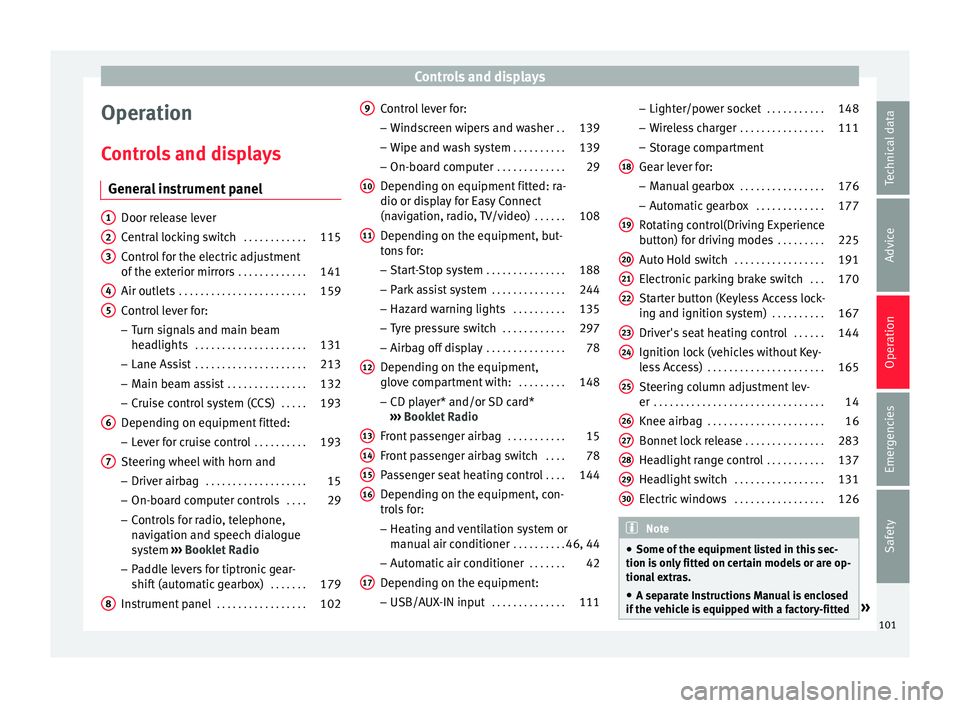
General instrument panel Door release lever
C
entr
al locking switch . . . . . . . . . . . .115
Control for the electric adjustment
of the e
xterior mirrors . . . . . . . . . . . . . 141
Air outlets . . . . . . . . . . . . . . . . . . . . . . . . 159
Control lever for:
– Turn s
ignals and main beam
headlights . . . . . . . . . . . . . . . . . . . . . 131
– Lane As s
ist . . . . . . . . . . . . . . . . . . . . . 213
– Main be
am assist . . . . . . . . . . . . . . . 132
– Crui
se control system (CCS) . . . . .193
Depending on equipment fitted:
– Lev
er for cruise control . . . . . . . . . .193
Steering wheel with horn and – Driver airb
ag . . . . . . . . . . . . . . . . . . . 15
– On-bo ar
d computer controls . . . .29
– Contr
ols for radio, telephone,
navigation and speech dialogue
system ›››
Booklet Radio
– Paddle levers for tiptronic gear-
shift (automatic gearbox) . . . . . . .179
Instrument panel . . . . . . . . . . . . . . . . . 102
1 2
3
4
5
6
7
8 Control lever for:
– Wind
screen wipers and washer . .139
– Wipe and w
ash system . . . . . . . . . . 139
– On-boar
d computer . . . . . . . . . . . . . 29
Depending on equipment fitted: ra-
dio or dis
play for Easy Connect
(navigation, radio, TV/video) . . . . . .108
Depending on the equipment, but-
ton
s for:
– Start-Stop system . . . . . . . . . . . . . . . 188
– Park
assist system . . . . . . . . . . . . . . 244
– Hazar
d warning lights . . . . . . . . . .135
– Ty
re pressure switch . . . . . . . . . . . .297
– Airbag off
display . . . . . . . . . . . . . . . 78
Depending on the equipment,
glo v
e compartment with: . . . . . . . . .148
– CD p l
ayer* and/or SD card*
››› Booklet Radio
Front passenger airbag . . . . . . . . . . .15
Front passenger airbag switch . . . .78
Passenger seat heating control . . . .144
Depending on the equipment, con-
tr o
ls for:
– Heating and ventilation system or
manual air conditioner . . . . . . . . . .46, 44
– Aut om
atic air conditioner . . . . . . .42
Depending on the equipment:
– USB/A UX
-IN input . . . . . . . . . . . . . . 111
9
10
11
12
13
14
15
16
17 –
Light er/po
wer socket . . . . . . . . . . . 148
– Wir
eless charger . . . . . . . . . . . . . . . . 111
– Stor
age compartment
Gear lever for: – Manual gearbox . . . . . . . . . . . . . . . . 176
– Autom
atic gearbox . . . . . . . . . . . . . 177
Rotating control(Driving Experience
butt
on) for driving modes . . . . . . . . .225
Auto Hold switch . . . . . . . . . . . . . . . . . 191
Electronic parking brake switch . . .170
Starter button (Keyless Access lock-
ing and ignition sy
stem) . . . . . . . . . . 167
Driver's seat heating control . . . . . .144
Ignition lock (vehicles without Key-
le
ss Access) . . . . . . . . . . . . . . . . . . . . . . 165
Steering column adjustment lev-
er . . . . . . . . . . . . . . . . . . . . . . . . . . . . . . . . 14
Knee airbag . . . . . . . . . . . . . . . . . . . . . . 16
Bonnet lock release . . . . . . . . . . . . . . .283
Headlight range control . . . . . . . . . . .137
Headlight switch . . . . . . . . . . . . . . . . . 131
Electric windows . . . . . . . . . . . . . . . . . 126 Note
● Some of the equipment
listed in this sec-
tion is only fitted on certain models or are op-
tional extras.
● A separate Instructions Manual is enclosed
if the
vehicle is equipped with a factory-fitted » 18
19
20
21
22
23
24
25
26
27
28
29
30
101
Technical data
Advice
Operation
Emergencies
Safety
Page 104 of 328
Operation
radio, CD player, AUX IN connection or navi-
g
ation sy
stem.
● The arrangement of switches and controls
on right-h
and drive models* may be slightly different from the layout shown in
› ›
› page 100. However, the symbols used to
identify the controls are the same. Instruments and warning/control lamps
In s
truments
View of instrument panel Fig. 115
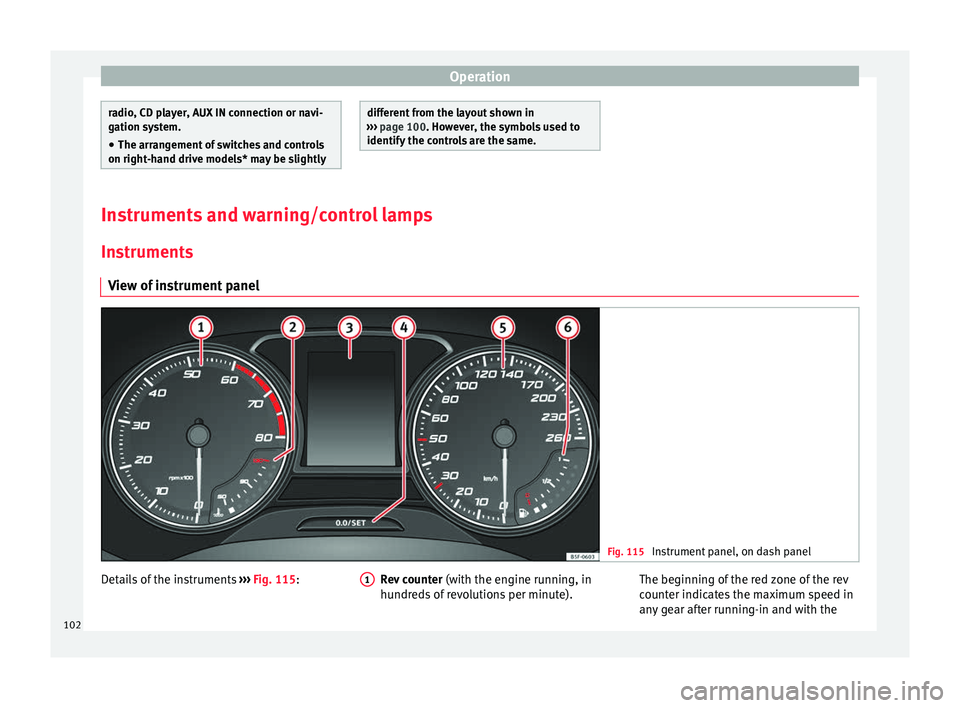
Instrument panel, on dash panel Details of the instruments
››
› Fig. 115: Rev counter (with the en gine running, in
hundreds of revolutions per minute).
1 The beginning of the red zone of the rev
c
ou
nter indicates the maximum speed in
any gear after running-in and with the
102
Page 107 of 328

Instruments and warning/control lamps
Identifying letters on engine (MKB)
Ho l
d the button ››› Fig. 115 4 down for more
th an 15 sec
onds to display the identifying
letters of the vehicle engine (MKB). To do
this, the ignition must be switched on and
the engine switched off. WARNING
Observe the safety warnings ››
› in Warning
and c ontr
ol lamps on page 107. WARNING
Even though outside temperatures are above
fr eez
ing, some roads and bridges may be icy.
● At outside temperatures above +4°C
(+39°F), even when the “ic
e crystal” symbol
is not visible, there may still be patches of ice
on the road.
● Do not rely on the outside temperature in-
dicat
or! Note
● Diff er
ent versions of the instrument panel
are available and therefore the versions and
instructions on the display may vary. In the
case of displays without warning or informa-
tion texts, faults are indicated exclusively by
the warning lamps.
● Depending on the equipment, some set-
ting
s and instructions can also be carried out
in the Easy Connect system. ●
When sev er
al warnings are active at the
same time, the symbols are shown succes-
sively for a few seconds and will stay on until
the fault is rectified. Odometer
Fig. 116
Instrument panel: odometer and re-
set b
utton. The distance covered is displayed in “kilome-
tr
e
s” or miles “m”. It is possible to change
the measurement units (kilometres
“km”/miles “m”) in the radio/Easy Connect*.
Please refer to the Easy Connect* Instructions
Manual for more details.
Odometer/trip recorder
The odometer shows the total distance cov-
ered by the vehicle.
The trip recorder shows the distance that has
been travelled since it was last reset. It is used to measure short trips. The last digit of
the trip rec
order indicates distances of 100
metres or tenths of a mile.
The trip recorder can be set to zero by press-
ing 0.0/SET
› ››
Fig. 116
.
Fault display
If there is a fault in the instrument panel, the
letters DEF will appear in the trip recorder
display. Have the fault repaired immediately,
as far as is possible.
Coolant temperature gauge For vehicles with no coolant temperature
g
aug
e, a control lamp appears for high
coolant temperatures ››› page 286. Please
note ››› .
The c oo
lant temperature gauge 2 ›››
Fig. 115 on ly
works when the ignition is
switched on. In order to avoid engine dam-
age, please read the following notes for the
different temperature ranges.
Engine cold
If only the diodes in the lower part of the
scale light up, this indicates that the engine
has not yet reached operating temperature.
Avoid high revs and heavy acceleration and
do not make the engine work hard. »
105
Technical data
Advice
Operation
Emergencies
Safety
Page 108 of 328
Operation
Normal temperature
If in norm
al operations, the diodes light up
until the central zone, it means that the en-
gine has reached operating temperature. At
high outside temperatures and when making
the engine work hard, the diodes may contin-
ue lighting up and reach the upper zone. This
is no cause for concern, provided the control
lamp does not light up on the instrument
panel digital display.
Heat range
When the diodes light up in the upper area of
the display and the control lamp appears
on the instrument panel display, the coolant
temperature is excessive ››› page 286. CAUTION
● To en
sure a long useful life for the engine,
avoid high revs, driving at high speed and
making the engine work hard for approxi-
mately the first 15 minutes when the engine
is cold. The phase until the engine is warm al-
so depends on the outside temperature. If
necessary, use the engine oil temperature*
››› page 34 as a guide.
● Additional lights and other accessories in
front
of the air inlet reduce the cooling effect
of the coolant. At high outside temperatures
and high engine loads, there is a risk of the
engine overheating.
● The front spoiler also ensures proper distri-
bution of
the cooling air when the vehicle is moving. If the spoiler is damaged this can re-
duc
e the c
ooling effect, which could cause
the engine to overheat. Seek specialist assis-
tance. Fuel level
Fig. 117
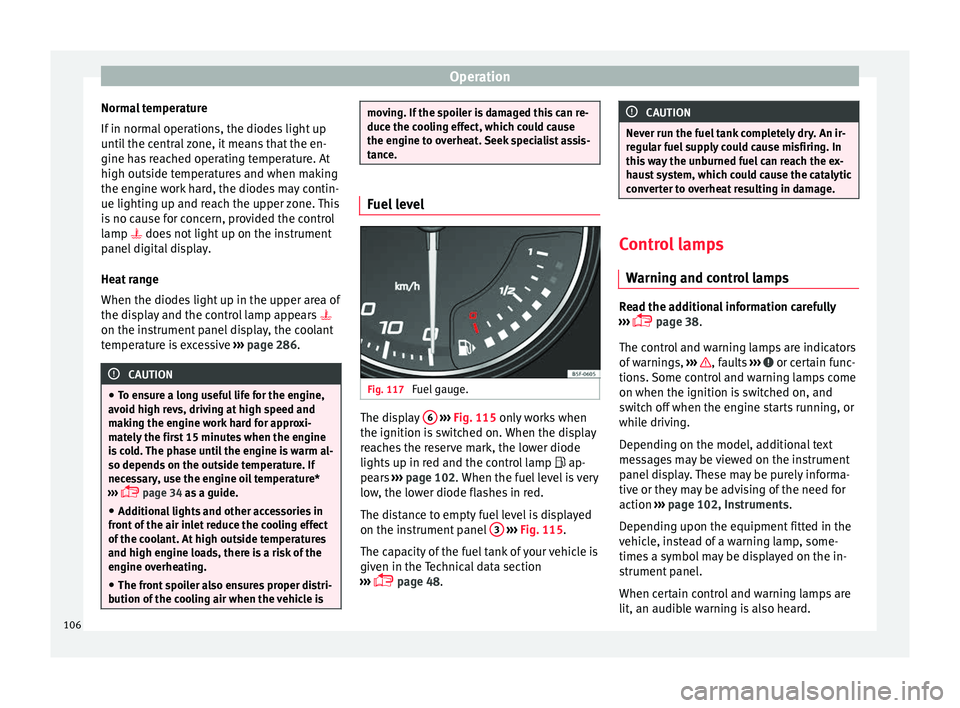
Fuel gauge. The display
6
› ›
›
Fig. 115 only works when
the ignition is switched on. When the display
reaches the reserve mark, the lower diode
lights up in red and the control lamp ap-
pears ››› page 102. When the fuel level is very
low, the lower diode flashes in red.
The distance to empty fuel level is displayed
on the instrument panel 3
› ›
›
Fig. 115.
The capacity of the fuel tank of your vehicle is
given in the Technical data section
››› page 48. CAUTION
Never run the fuel tank completely dry. An ir-
r e
gular fuel supply could cause misfiring. In
this way the unburned fuel can reach the ex-
haust system, which could cause the catalytic
converter to overheat resulting in damage. Control lamps
W arnin
g and control lamps Read the additional information carefully
› ›
› page 38.
The control and warning lamps are indicators
of warnings, ››› , faults
››
› or certain func-
tion s.
Some control and warning lamps come
on when the ignition is switched on, and
switch off when the engine starts running, or
while driving.
Depending on the model, additional text
messages may be viewed on the instrument
panel display. These may be purely informa-
tive or they may be advising of the need for
action ›››
page 102, Instruments.
Depending upon the equipment fitted in the
vehicle, instead of a warning lamp, some-
times a symbol may be displayed on the in-
strument panel.
When certain control and warning lamps are
lit, an audible warning is also heard.
106
Page 110 of 328
Operation
Introduction to the Easy
C onnect
system*
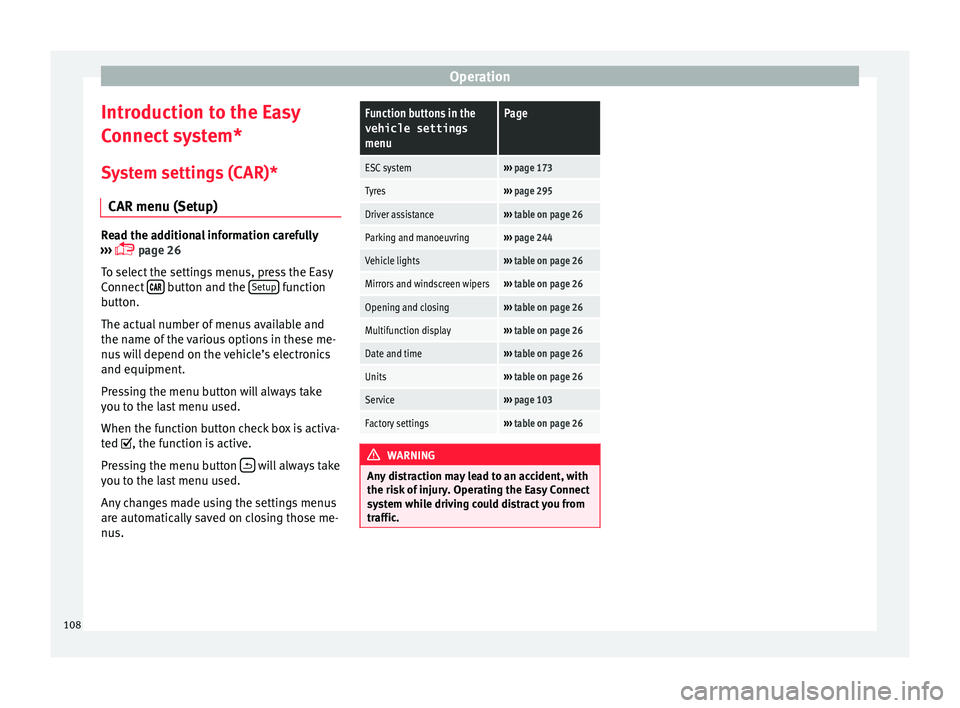
System settings (CAR)* CAR menu (Setup) Read the additional information carefully
› ›
› page 26
To select the settings menus, press the Easy
Connect button and the
Set
up function
b utt
on.
The actual number of menus available and
the name of the various options in these me-
nus will depend on the vehicle’s electronics
and equipment.
Pressing the menu button will always take
you to the last menu used.
When the function button check box is activa-
ted , the function is active.
Pressing the menu button will always take
y ou t
o the last menu used.
Any changes made using the settings menus
are automatically saved on closing those me-
nus.
Function buttons in the vehicle settings
menuPage
ESC system››› page 173
Tyres››› page 295
Driver assistance››› table on page 26
Parking and manoeuvring››› page 244
Vehicle lights››› table on page 26
Mirrors and windscreen wipers››› table on page 26
Opening and closing››› table on page 26
Multifunction display››› table on page 26
Date and time››› table on page 26
Units››› table on page 26
Service››› page 103
Factory settings››› table on page 26 WARNING
Any distraction may lead to an accident, with
the ri sk
of injury. Operating the Easy Connect
system while driving could distract you from
traffic. 108