cruise control Seat Ateca 2017 Owner's Manual
[x] Cancel search | Manufacturer: SEAT, Model Year: 2017, Model line: Ateca, Model: Seat Ateca 2017Pages: 328, PDF Size: 6.36 MB
Page 5 of 328
Table of Contents
Table of Contents
The e s
sentials . . . . . . . . . . . . . . . . . . . . . . . . 5
Exterior view . . . . . . . . . . . . . . . . . . . . . . . . . . . . 5
Exterior view . . . . . . . . . . . . . . . . . . . . . . . . . . . . 6
Interior view (left-hand drive) . . . . . . . . . . . . . . 7
Interior view (right-hand drive) . . . . . . . . . . . . . 8
How it works . . . . . . . . . . . . . . . . . . . . . . . . . . . . 9
Unlocking and locking . . . . . . . . . . . . . . . . . . . . 9
Before driving . . . . . . . . . . . . . . . . . . . . . . . . . . . 12
Airbags . . . . . . . . . . . . . . . . . . . . . . . . . . . . . . . . 15
Child seats . . . . . . . . . . . . . . . . . . . . . . . . . . . . . 17
Starting the vehicle . . . . . . . . . . . . . . . . . . . . . . 23
Lights and visibility . . . . . . . . . . . . . . . . . . . . . . 23
Easy Connect . . . . . . . . . . . . . . . . . . . . . . . . . . . 26
Driver information system . . . . . . . . . . . . . . . . . 29
Driving data . . . . . . . . . . . . . . . . . . . . . . . . . . . . 33
Cruise control . . . . . . . . . . . . . . . . . . . . . . . . . . . 36
Warning lamps . . . . . . . . . . . . . . . . . . . . . . . . . . 38
Gearbox lever . . . . . . . . . . . . . . . . . . . . . . . . . . . 40
Air conditioning . . . . . . . . . . . . . . . . . . . . . . . . . 42
Fluid Level control . . . . . . . . . . . . . . . . . . . . . . . 48
Emergencies . . . . . . . . . . . . . . . . . . . . . . . . . . . . 51
Fuses . . . . . . . . . . . . . . . . . . . . . . . . . . . . . . . . . . 51
Bulbs . . . . . . . . . . . . . . . . . . . . . . . . . . . . . . . . . . 52
Action in the event of a puncture . . . . . . . . . . . 52
Changing a wheel . . . . . . . . . . . . . . . . . . . . . . . 54
Snow chains . . . . . . . . . . . . . . . . . . . . . . . . . . . . 56
Emergency towing of the vehicle . . . . . . . . . . . 57
How to jump start . . . . . . . . . . . . . . . . . . . . . . . . 58
Changing the wiper blades . . . . . . . . . . . . . . . . 60
Safety . . . . . . . . . . . . . . . . . . . . . . . . . . . . . . . . 62
Safe driving . . . . . . . . . . . . . . . . . . . . . . . . . . . . 62
Safety first! . . . . . . . . . . . . . . . . . . . . . . . . . . . . . 62
Advice about driving . . . . . . . . . . . . . . . . . . . . . 62 Correct position for passengers . . . . . . . . . . . . 63
Pedal area . . . . . . . . . . . . . . . . . . . . . . . . . . . . . . 67
Seat belts
. . . . . . . . . . . . . . . . . . . . . . . . . . . . . . 68
Why wear a seat belt? . . . . . . . . . . . . . . . . . . . . 68
How to properly adjust your seatbelt . . . . . . . . 71
Seat belt tensioners . . . . . . . . . . . . . . . . . . . . . . 72
Airbag system . . . . . . . . . . . . . . . . . . . . . . . . . . 73
Brief introduction . . . . . . . . . . . . . . . . . . . . . . . . 73
Airbag safety instructions . . . . . . . . . . . . . . . . . 75
Deactivating airbags . . . . . . . . . . . . . . . . . . . . . 77
Transporting children safely . . . . . . . . . . . . . . . 79
Safety for children . . . . . . . . . . . . . . . . . . . . . . . 79
Child seats . . . . . . . . . . . . . . . . . . . . . . . . . . . . . 80
Emergencies . . . . . . . . . . . . . . . . . . . . . . . . . . 83
Self-help . . . . . . . . . . . . . . . . . . . . . . . . . . . . . . . 83
Vehicle tool kit, anti-puncture kit* . . . . . . . . . . 83
Tyre repair . . . . . . . . . . . . . . . . . . . . . . . . . . . . . . 83
Manual unlocking/locking . . . . . . . . . . . . . . . . . 85
Changing the windscreen wiper blades . . . . . . 85
Tow-starting and towing . . . . . . . . . . . . . . . . . . 86
Fuses and bulbs . . . . . . . . . . . . . . . . . . . . . . . . . 90
Fuses . . . . . . . . . . . . . . . . . . . . . . . . . . . . . . . . . . 90
Changing bulbs . . . . . . . . . . . . . . . . . . . . . . . . . 93
Change the front bulbs . . . . . . . . . . . . . . . . . . . 94
Change the rear bulbs . . . . . . . . . . . . . . . . . . . . 96
Operation . . . . . . . . . . . . . . . . . . . . . . . . . . . . . 101
Controls and displays . . . . . . . . . . . . . . . . . . . . 101
General instrument panel . . . . . . . . . . . . . . . . . 100
Instruments and warning/control lamps . . . . . 102
Instruments . . . . . . . . . . . . . . . . . . . . . . . . . . . . 102
Control lamps . . . . . . . . . . . . . . . . . . . . . . . . . . . 106
Introduction to the Easy Connect system* . . . . 108
System settings (CAR)* . . . . . . . . . . . . . . . . . . . 108
Communications and multimedia . . . . . . . . . . . 109
Steering wheel controls* . . . . . . . . . . . . . . . . . . 109
Multimedia . . . . . . . . . . . . . . . . . . . . . . . . . . . . . 111 Opening and closing
. . . . . . . . . . . . . . . . . . . . . 112
Central locking system . . . . . . . . . . . . . . . . . . . . 112
Anti-theft alarm system* . . . . . . . . . . . . . . . . . . 121
Rear lid (luggage compartment) . . . . . . . . . . . . 123
Electric windows . . . . . . . . . . . . . . . . . . . . . . . . . 126
Sunroof* . . . . . . . . . . . . . . . . . . . . . . . . . . . . . . . 128
Lights and visibility . . . . . . . . . . . . . . . . . . . . . . 131
Lights . . . . . . . . . . . . . . . . . . . . . . . . . . . . . . . . . 131
Visibility . . . . . . . . . . . . . . . . . . . . . . . . . . . . . . . 138
Windscreen wiper and window wiper sys-
tems
. . . . . . . . . . . . . . . . . . . . . . . . . . . . . . . . . . 139
Mirror . . . . . . . . . . . . . . . . . . . . . . . . . . . . . . . . . 141
Seats and head restraints . . . . . . . . . . . . . . . . . 143
Adjusting the seats and headrests . . . . . . . . . . 143
Seat functions . . . . . . . . . . . . . . . . . . . . . . . . . . 144
Transport and practical equipment . . . . . . . . . 147
Storage compartments . . . . . . . . . . . . . . . . . . . 147
Storing objects . . . . . . . . . . . . . . . . . . . . . . . . . . 149
Roof carrier . . . . . . . . . . . . . . . . . . . . . . . . . . . . . 154
Air conditioning . . . . . . . . . . . . . . . . . . . . . . . . . 156
Heating, ventilation and cooling . . . . . . . . . . . . 156
Auxiliary heater (additional heater) . . . . . . . . . 161
Driving . . . . . . . . . . . . . . . . . . . . . . . . . . . . . . . . 165
Start and stop the engine . . . . . . . . . . . . . . . . . 165
Braking and parking . . . . . . . . . . . . . . . . . . . . . 170
Manual gearbox . . . . . . . . . . . . . . . . . . . . . . . . . 176
Automatic gearbox/DSG automatic gear-
box*
. . . . . . . . . . . . . . . . . . . . . . . . . . . . . . . . . . . 177
Run-in and economical driving . . . . . . . . . . . . . 184
Engine management and exhaust gas purifica-
tion sys
tem . . . . . . . . . . . . . . . . . . . . . . . . . . . . . 186
Driving tips . . . . . . . . . . . . . . . . . . . . . . . . . . . . . 187
Driver assistance systems . . . . . . . . . . . . . . . . . 188
Start-Stop System* . . . . . . . . . . . . . . . . . . . . . . . 188
Hill Descent Control (HDC) . . . . . . . . . . . . . . . . . 190
Auto Hold Function . . . . . . . . . . . . . . . . . . . . . . . 191
Cruise control system (CCS)* . . . . . . . . . . . . . . . 193
Speed limiter . . . . . . . . . . . . . . . . . . . . . . . . . . . 194 3
Page 6 of 328
Table of Contents
Adaptive Cruise Control ACC* . . . . . . . . . . . . . . 197
Front Assist system including City emergency
br ak
ing and pedestrian monitoring* . . . . . . . . 207
Lane Assist system* . . . . . . . . . . . . . . . . . . . . . . 213
Traffic Jam Assist . . . . . . . . . . . . . . . . . . . . . . . . 216
Emergency Assist . . . . . . . . . . . . . . . . . . . . . . . . 218
Blind spot detector (BSD) with parking assis-
tanc
e (RCTA)* . . . . . . . . . . . . . . . . . . . . . . . . . . . 220
SEAT Drive Profile* . . . . . . . . . . . . . . . . . . . . . . . 225
Traffic sign detection system* . . . . . . . . . . . . . . 228
Fatigue detection (break recommendation)* . . 231
Park Assist* . . . . . . . . . . . . . . . . . . . . . . . . . . . . 232
Parking System Plus (ParkPilot)* . . . . . . . . . . . 239
Parking aid (ParkPilot)* . . . . . . . . . . . . . . . . . . . 244
Area View* . . . . . . . . . . . . . . . . . . . . . . . . . . . . . 247
Rear Assist (Rear View Camera)* . . . . . . . . . . . . 252
Towing bracket device* . . . . . . . . . . . . . . . . . . . 255
Trailer mode . . . . . . . . . . . . . . . . . . . . . . . . . . . . 255
Advice . . . . . . . . . . . . . . . . . . . . . . . . . . . . . . . . 265
Care and maintenance . . . . . . . . . . . . . . . . . . . . 265
Accessories and modifications to the vehi-
cl
e . . . . . . . . . . . . . . . . . . . . . . . . . . . . . . . . . . . . 265
Care and cleaning . . . . . . . . . . . . . . . . . . . . . . . 266
Vehicle exterior care . . . . . . . . . . . . . . . . . . . . . . 266
Caring for the vehicle interior . . . . . . . . . . . . . . 270
Intelligent technology . . . . . . . . . . . . . . . . . . . . 273
Electromechanical steering . . . . . . . . . . . . . . . . 273
Four-wheel drive . . . . . . . . . . . . . . . . . . . . . . . . . 273
Power Management . . . . . . . . . . . . . . . . . . . . . . 274
Checking and refilling levels . . . . . . . . . . . . . . . 276
Filling the tank . . . . . . . . . . . . . . . . . . . . . . . . . . 276
Fuel . . . . . . . . . . . . . . . . . . . . . . . . . . . . . . . . . . . 277
Exhaust purification system for vehicles with
diesel
engines (AdBlue ®
) . . . . . . . . . . . . . . . . . 279
Engine compartment . . . . . . . . . . . . . . . . . . . . . 282
Engine oil . . . . . . . . . . . . . . . . . . . . . . . . . . . . . . 284
Cooling system . . . . . . . . . . . . . . . . . . . . . . . . . . 286 Brake fluid . . . . . . . . . . . . . . . . . . . . . . . . . . . . . 287
Windscreen washer reservoir . . . . . . . . . . . . . . 288
Battery . . . . . . . . . . . . . . . . . . . . . . . . . . . . . . . . . 289
Wheels
. . . . . . . . . . . . . . . . . . . . . . . . . . . . . . . . 291
Wheels and tyres . . . . . . . . . . . . . . . . . . . . . . . . 291
Tyre monitoring systems . . . . . . . . . . . . . . . . . . 295
Temporary spare wheel . . . . . . . . . . . . . . . . . . . 298
Winter service . . . . . . . . . . . . . . . . . . . . . . . . . . . 299
Technical data . . . . . . . . . . . . . . . . . . . . . . . . 301
Technical specifications . . . . . . . . . . . . . . . . . . 301
Important . . . . . . . . . . . . . . . . . . . . . . . . . . . . . . 301
Vehicle identification data . . . . . . . . . . . . . . . . . 301
Information on fuel consumption . . . . . . . . . . . 302
Trailer mode . . . . . . . . . . . . . . . . . . . . . . . . . . . . 303
Wheels . . . . . . . . . . . . . . . . . . . . . . . . . . . . . . . . 303
Engine data . . . . . . . . . . . . . . . . . . . . . . . . . . . . . 304
Dimensions . . . . . . . . . . . . . . . . . . . . . . . . . . . . . 307
Index . . . . . . . . . . . . . . . . . . . . . . . . . . . . . . . . . 309
4
Page 29 of 328
The essentialsMenuSubmenuPossible settingDescription
TyresTyre pressure monitoringTyre pressure storing (Calibration)›››
page 295
Winter tyresActivation and deactivation of the speed warning. Setting the speed warning value››› page 299
Driver assistance
ACC (adaptive cruise control)Activation/deactivation: Gear programme, temporary distance from the vehicle in front (dis-
tance level)››› page 197
Front Assist (ambient traffic
monitoring system)Activation/deactivation: monitoring system, advance warning, distance warning display››› page 207
City emergency braking func-
tionActivation/deactivation of the City emergency braking function.››› page 211
Lane Assist (system warning
you if you leave the lane)Activation/deactivation: Lane Assist, Adaptive Lane Guidance››› page 213
Detection of traffic signsThe following functions can be activated and deactivated:
– Display of traffic signs on the multi-function display
– Trailer recognition (display of traffic signs for vehicles with trailer)››› page 228
Fatigue detectionActivation/deactivation››› page 231
Parking and ma-
noeuvringParkPilotAutomatically activate, front volume, front sound settings, rear volume, rear sound settings,
adjust volume››› page 244
Vehicle lights
Vehicle interior lightingInstrument and control lighting, ambient door lighting, footwell lighting››› page 138
Coming home/Leaving home
functionStart time for “Coming home” function, start time for “Leaving home” function››› page 134
››› page 135
Motorway lightActivation/deactivation››› page 136
Mirrors/wind‐
screen wipersMirrorsSynchronised regulation, lower the rear-view mirror when reversing, fold in after parking››› page 14,
››› page 141
Windscreen wipersAutomatic windscreen wipers, wipe when reversing››› page 25
Opening and clos-
ingRadio-operated remote controlConvenience open function››› page 127
Central locking systemUnlocking doors, automatic locking/unlocking, audible confirmation››› page 112» 27
Page 34 of 328
The essentials
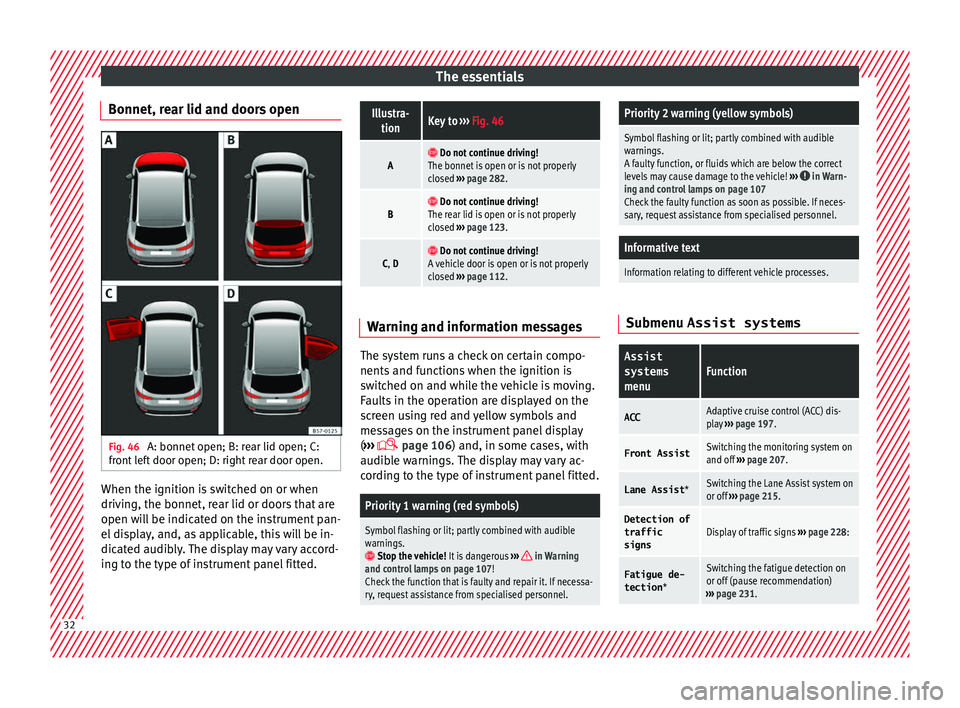
Bonnet, rear lid and doors open Fig. 46
A: bonnet open; B: rear lid open; C:
fr ont
left door open; D: right rear door open. When the ignition is switched on or when
driv
in
g, the bonnet, rear lid or doors that are
open will be indicated on the instrument pan-
el display, and, as applicable, this will be in-
dicated audibly. The display may vary accord-
ing to the type of instrument panel fitted.
Illustra- tionKey to ››› Fig. 46
A Do not continue driving!
The bonnet is open or is not properly
closed ››› page 282.
B Do not continue driving!
The rear lid is open or is not properly
closed ››› page 123.
C, D Do not continue driving!
A vehicle door is open or is not properly
closed ››› page 112. Warning and information messages
The system runs a check on certain compo-
nents
and f
unctions when the ignition is
switched on and while the vehicle is moving.
Faults in the operation are displayed on the
screen using red and yellow symbols and
messages on the instrument panel display
( ›››
page 106) and, in some cases, with
audible warnings. The display may vary ac-
cording to the type of instrument panel fitted.
Priority 1 warning (red symbols)
Symbol flashing or lit; partly combined with audible
warnings.
Stop the vehicle! It is dangerous ››› in Warning
and control lamps on page 107!
Check the function that is faulty and repair it. If necessa-
ry, request assistance from specialised personnel.
Priority 2 warning (yellow symbols)
Symbol flashing or lit; partly combined with audible
warnings.
A faulty function, or fluids which are below the correct
levels may cause damage to the vehicle! ›››
in Warn-
ing and control lamps on page 107
Check the faulty function as soon as possible. If neces-
sary, request assistance from specialised personnel.
Informative text
Information relating to different vehicle processes. Submenu Assist systems
Assist
systems
menuFunction
ACCAdaptive cruise control (ACC) dis-
play ››› page 197.
Front AssistSwitching the monitoring system on
and off ››› page 207.
Lane Assist *Switching the Lane Assist system on
or off ››› page 215.
Detection of
traffic
signsDisplay of traffic signs ››› page 228:
Fatigue de-
tection *Switching the fatigue detection on
or off (pause recommendation)
››› page 231. 32
Page 38 of 328
The essentials
the display mode changes. A clock symbol
ap pe
ars and the number of days until the
next service is due.
Vehicles with text messages : Service in
--- km or --- days will be shown on the
instrument panel display.
Service due
When the service date is due , an audible
warning is given when the ignition is switch-
ed on and the spanner displayed on the
screen flashes for a few seconds .
Vehicles with text messages : Service now
will be shown on the instrument panel dis-
play.
Reading a service notification
With the ignition switched on, the engine off
and the vehicle at a standstill, the current
service notification can be read:
Press and hold the button ›››
Fig. 115
4 for more than 5 seconds to consult the serv-
ic
e me
ssage.
When the service date has passed , a minus
sign is displayed in front of the number of kil-
ometres or days.
Vehicles with text messages : the following
message is displayed: Service --- km
(miles) or --- days ago .The time can also be set via the
key and
Set up function button in the Easy Connect
sy s
tem ›››
page 108.
Resetting service interval display
If the service was not carried out by a SEAT
dealership, the display can be reset as fol-
lows: ● Switch off the ignition, press and hold but-
ton ›
›› Fig. 115
4 .
● Switch ignition back on.
● Release THE 4
› ›
›
Fig. 115 button and
press it again for the next 20 seconds. Note
● The ser v
ice message disappears after a few
seconds, when the engine is started or when OK/RESET is pressed on the windscreen wiper
l ev
er, or OK on the multifunction steering
wheel .
● In
vehicles with the LongLife system in
which the b
attery has been disconnected for
a long period of time, it is not possible to cal-
culate the date of the next service. Therefore
the service interval display may not be cor- rect. In this case, bear in mind the maximum
service intervals permitted in the ››› Book-
let Maintenance Programme.
● If you reset the display manually, the next
serv
ice interval will be indicated as in vehi-
cles with fixed service intervals. For this rea-
son we recommend that the service interval
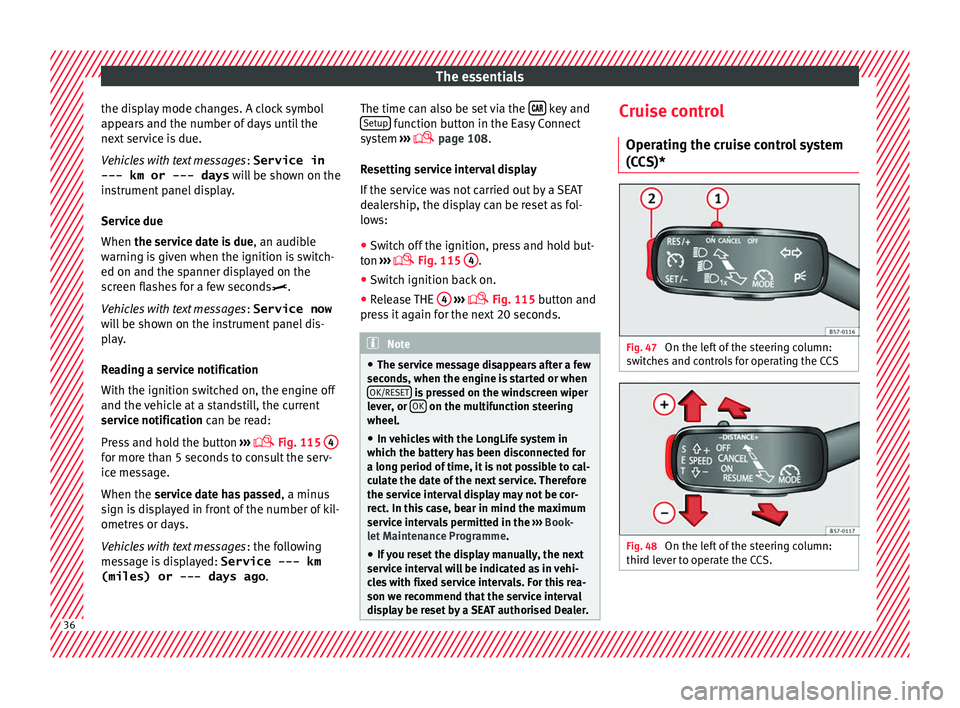
display be reset by a SEAT authorised Dealer. Cruise control
Oper atin
g the cruise control system
(CCS)* Fig. 47
On the left of the steering column:
sw it
ches and controls for operating the CCS Fig. 48
On the left of the steering column:
thir d l
ever to operate the CCS. 36
Page 39 of 328
The essentials
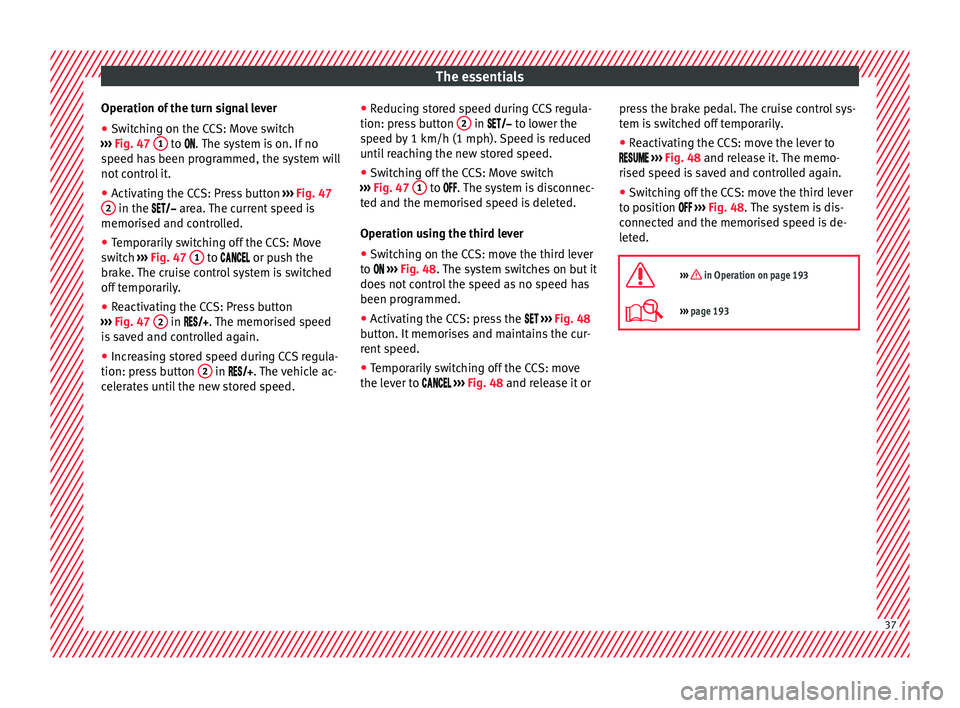
Operation of the turn signal lever
● Switching on the CCS: Move switch
› ›
› Fig. 47 1 to .
The system is on. If no
s
peed has been programmed, the system will
not control it.
● Activating the CCS: Press button ››
› Fig. 47
2 in the ar
e
a. The current speed is
memorised and controlled.
● Temporarily switching off the CCS: Move
swit
ch ››› Fig. 47 1 to
or push the
br
ake. The cruise control system is switched
off temporarily.
● Reactivating the CCS: Press button
››
› Fig. 47 2 in
. The memorised speed
is saved and controlled again.
● Increasing stored speed during CCS regula-
tion: pre
ss button 2 in
. The vehicle ac-
celerates until the new stored speed. ●
Reduc
ing stored speed during CCS regula-
tion: press button 2 in t
o lower the
s
peed by 1 km/h (1 mph). Speed is reduced
until reaching the new stored speed.
● Switching off the CCS: Move switch
››
› Fig. 47 1 to .
The system is disconnec-
t
ed and the memorised speed is deleted.
Operation using the third lever
● Switching on the CCS: move the third lever
to
››› Fig. 48. The system switches on but it
does not control the speed as no speed has
been programmed.
● Activating the CCS: press the ››
› Fig. 48
button. It memorises and maintains the cur-
rent speed.
● Temporarily switching off the CCS: move
the lev
er to ››› Fig. 48 and release it or press the brake pedal. The cruise control sys-
tem i
s switched off temporarily.
● Reactivating the CCS: move the lever to
››› Fig. 48 and release it. The memo-
rised speed is saved and controlled again.
● Switching off the CCS: move the third lever
to po
sition ››› Fig. 48. The system is dis-
connected and the memorised speed is de-
leted.
››› in Operation on page 193
››› page 193 37
Page 41 of 328
The essentials
Front brake pads worn.
›››
page
173 it lights up:
Fault in the ESC, or dis-
connection caused by the system.
flashes: ESC or ASR activated.
ASR manually deactivated.›››
page
173ESC in Sport mode.
ABS faulty or does not work.
Rear fog light switched on.›››
page
131
lights up or flashes:
fault in the
emission control system.››› page
186
it lights up:
pre-heating of diesel
engine.
››› page
187
flashes: fault in the diesel engine
management.
fault in the petrol engine manage-
ment.›››
page
187
lights up or flashes:
fault in the
steering system.››› page
273
Tyre pressure too low, or fault in
the tyre pressure monitoring sys-
tem.›››
page
295
Fuel tank almost empty.›››
page
102
Fault in airbag system and seat
belt tensioners.›››
page
73
Lane Assist is switched on, but not
active.›››
page
213 Other warning lamps
Left or right turn signal.›››
page
131
Hazard warning lights on.››› page
135
Trailer turn signals.›››
page
255
it lights up green:
Auto Hold activa-
ted.››› page
191
it lights up green:
Press the brake
pedal!
It blinks in green: the selector lever
locking button has not engaged.››› page
177
it lights up green:
cruise control ac-
tivated or speed limiter switched
on and active.
››› page
193
it blinks in green: the speed set by
the speed limiter has been excee-
ded.
it lights up green:
Lane Assist is
switched on and active.››› page
213
Main beam on or flasher on.›››
page
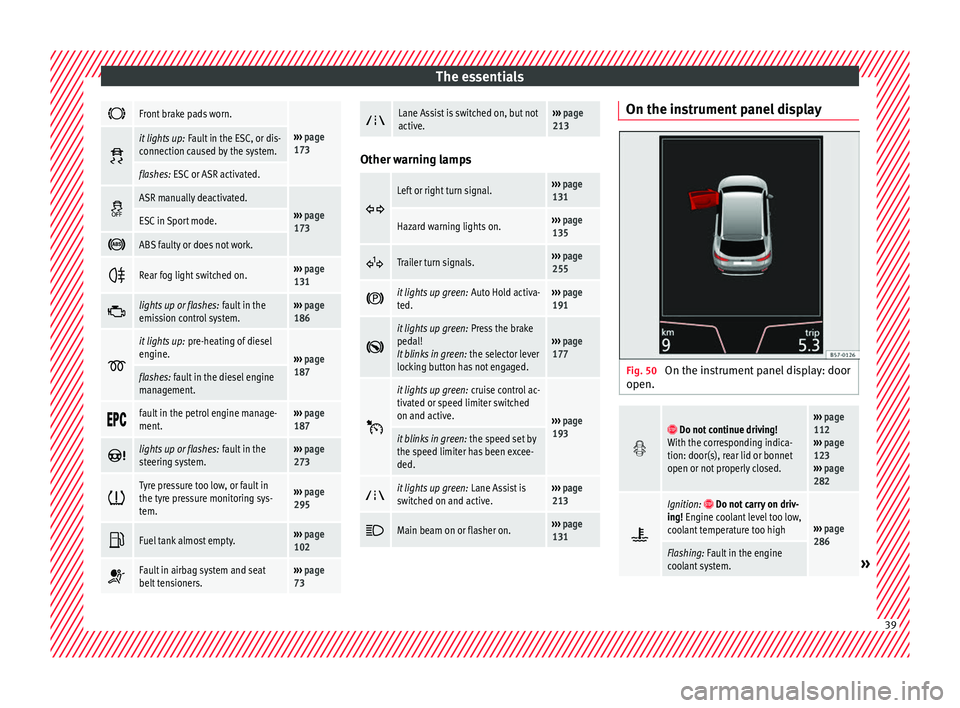
131 On the instrument panel display
Fig. 50
On the instrument panel display: door
open.
Do not continue driving!
With the corresponding indica-
tion: door(s), rear lid or bonnet
open or not properly closed.››› page
112
››› page
123
››› page
282
Ignition: Do not carry on driv-
ing! Engine coolant level too low,
coolant temperature too high
››› page
286
Flashing: Fault in the engine
coolant system.» 39
Page 103 of 328
Controls and displays
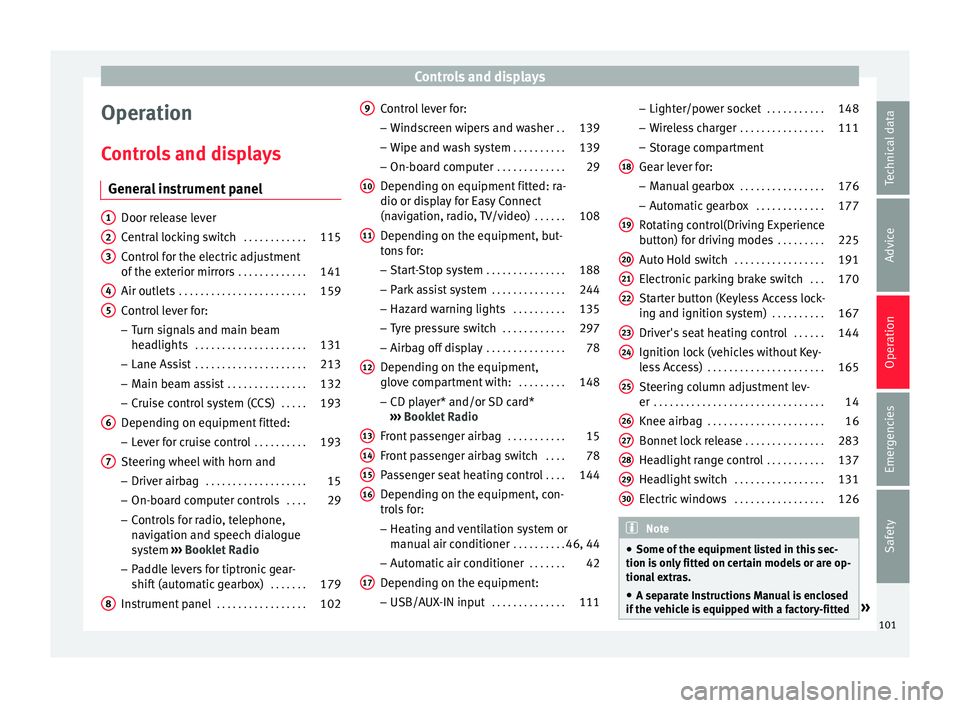
Operation
C ontr
ols and displays
General instrument panel Door release lever
C
entr
al locking switch . . . . . . . . . . . .115
Control for the electric adjustment
of the e
xterior mirrors . . . . . . . . . . . . . 141
Air outlets . . . . . . . . . . . . . . . . . . . . . . . . 159
Control lever for:
– Turn s
ignals and main beam
headlights . . . . . . . . . . . . . . . . . . . . . 131
– Lane As s
ist . . . . . . . . . . . . . . . . . . . . . 213
– Main be
am assist . . . . . . . . . . . . . . . 132
– Crui
se control system (CCS) . . . . .193
Depending on equipment fitted:
– Lev
er for cruise control . . . . . . . . . .193
Steering wheel with horn and – Driver airb
ag . . . . . . . . . . . . . . . . . . . 15
– On-bo ar
d computer controls . . . .29
– Contr
ols for radio, telephone,
navigation and speech dialogue
system ›››
Booklet Radio
– Paddle levers for tiptronic gear-
shift (automatic gearbox) . . . . . . .179
Instrument panel . . . . . . . . . . . . . . . . . 102
1 2
3
4
5
6
7
8 Control lever for:
– Wind
screen wipers and washer . .139
– Wipe and w
ash system . . . . . . . . . . 139
– On-boar
d computer . . . . . . . . . . . . . 29
Depending on equipment fitted: ra-
dio or dis
play for Easy Connect
(navigation, radio, TV/video) . . . . . .108
Depending on the equipment, but-
ton
s for:
– Start-Stop system . . . . . . . . . . . . . . . 188
– Park
assist system . . . . . . . . . . . . . . 244
– Hazar
d warning lights . . . . . . . . . .135
– Ty
re pressure switch . . . . . . . . . . . .297
– Airbag off
display . . . . . . . . . . . . . . . 78
Depending on the equipment,
glo v
e compartment with: . . . . . . . . .148
– CD p l
ayer* and/or SD card*
››› Booklet Radio
Front passenger airbag . . . . . . . . . . .15
Front passenger airbag switch . . . .78
Passenger seat heating control . . . .144
Depending on the equipment, con-
tr o
ls for:
– Heating and ventilation system or
manual air conditioner . . . . . . . . . .46, 44
– Aut om
atic air conditioner . . . . . . .42
Depending on the equipment:
– USB/A UX
-IN input . . . . . . . . . . . . . . 111
9
10
11
12
13
14
15
16
17 –
Light er/po
wer socket . . . . . . . . . . . 148
– Wir
eless charger . . . . . . . . . . . . . . . . 111
– Stor
age compartment
Gear lever for: – Manual gearbox . . . . . . . . . . . . . . . . 176
– Autom
atic gearbox . . . . . . . . . . . . . 177
Rotating control(Driving Experience
butt
on) for driving modes . . . . . . . . .225
Auto Hold switch . . . . . . . . . . . . . . . . . 191
Electronic parking brake switch . . .170
Starter button (Keyless Access lock-
ing and ignition sy
stem) . . . . . . . . . . 167
Driver's seat heating control . . . . . .144
Ignition lock (vehicles without Key-
le
ss Access) . . . . . . . . . . . . . . . . . . . . . . 165
Steering column adjustment lev-
er . . . . . . . . . . . . . . . . . . . . . . . . . . . . . . . . 14
Knee airbag . . . . . . . . . . . . . . . . . . . . . . 16
Bonnet lock release . . . . . . . . . . . . . . .283
Headlight range control . . . . . . . . . . .137
Headlight switch . . . . . . . . . . . . . . . . . 131
Electric windows . . . . . . . . . . . . . . . . . 126 Note
● Some of the equipment
listed in this sec-
tion is only fitted on certain models or are op-
tional extras.
● A separate Instructions Manual is enclosed
if the
vehicle is equipped with a factory-fitted » 18
19
20
21
22
23
24
25
26
27
28
29
30
101
Technical data
Advice
Operation
Emergencies
Safety
Page 178 of 328
Operation
Disable the ESC “Snow” mode
T urn the Driv
ing Experience button to select a
different driving mode ››› page 226. WARNING
The ESC Sport mode should be activated only
when tr affic
conditions and the ability of the
driver allow it. Danger of skidding!
● With ESC in Sport mode, the stabilising
fu
nction will be limited to allow for a sportier
drive. The driving wheels could spin and the
vehicle could skid. WARNING
You should only activate the Offroad Mode or
di s
able the ASR if the experience of the driver
and traffic conditions allow it. Danger of skid-
ding!
● With the Offroad mode activated, the stabi-
lis
ation function is limited. In particular, if
the road is too smooth and slippery, the driv-
ing wheels could spin and the vehicle could
skid. Note
If the ASR is disconnected or the ESC’s Sport
mode i s
selected, cruise control* will be
switched off. Manual gearbox
Ch an
ging gear Read the additional information carefully
› ›
› page 40
In some countries the clutch pedal must be
fully pressed down for the engine to start.
Selecting reverse gear ● Engage reverse gear only when the vehicle
is
stopped.
Changing down gears
While driving, changing down a gear must al-
ways be done gradually, i.e. to the gear di-
rectly below and when the engine speed is
not too high ››› . Changing down while by-
p a
ssing one or various gears at high speeds
or at high engine speeds can damage the
clutch and the gearbox, even if the clutch
pedal remains depressed ››› .
WARNING
When the engine is running, the vehicle will
s t
art to move as soon as a gear is engaged
and the clutch released. This is also the case
with the electronic parking brake switched
on.
● Never engage reverse gear when the vehi-
cl
e is moving. WARNING
If the gear is changed down inappropriately
b y
selecting a gear that is too low, you may
lose control of the vehicle, causing an acci-
dent and serious injuries. CAUTION
When travelling at high speeds or at high en-
gine s peed
s, selecting a gear that is too low
can cause considerable damage to the clutch
and the gearbox. This can also occur if the
clutch pedal is pressed and held and it does
not engage. CAUTION
To prevent damage and avoid premature
w e
ar, please observe the following:
● Do not rest your hand on the gear lever
whil
e driving. The pressure applied by your
hand is transmitted to the gearbox selector
forks.
● Always ensure that the vehicle is complete-
ly s
topped before engaging the reverse gear.
● Always press the clutch to the floor when
ch
anging gears.
● Never hold the vehicle “on the clutch” on
hil
ls with the engine on. 176
Page 184 of 328
Operation
●
Mak
e sure that the ESC remains switched
on. Please note that when the ASR and ESC
are deactivated, the wheels may start to spin,
causing the vehicle to lose grip. Risk of acci-
dent!
● After putting the vehicle into gear, the
“spor
t” mode of the ESC should be deactiva-
ted again by briefly pressing the OFF but-
t on. Note
● Af t
er using the Launch control programme,
the temperature in the gearbox may have in-
creased considerably. In this case, the pro-
gramme could be disabled for several mi-
nutes. The programme can be used again af-
ter the cooling phase.
● Accelerating with the Launch control pro-
gramme p
laces a heavy load on all parts of
the vehicle. This can result in increased wear
and tear. Downhill speed control*
The downhill speed control function helps
the driv
er when driv
ing down steep gradi-
ents.
Downhill speed control is activated when the
selector lever is in D/S and the driver applies
the foot brake. The automatic gearbox auto-
matically engages a lower gear that is suita-
ble for the slope. The downhill speed control function attempts to maintain the speed at
which the
vehicle was travelling when the
foot brake was applied (subject to the laws of
physics and technical drive limitations). It
may be necessary to adjust the speed again
using the foot brake in certain situations. Giv-
en that the downhill speed control can only
change down to 3rd gear, on very steep de-
scents the tiptronic mode may be required. In
this case, manually reduce the tiptronic to
2nd or 1st gear to use the engine brake and
reduce the charge on the brakes.
Downhill speed control is deactivated as
soon as the road levels out again or you
press the accelerator pedal.
On vehicles with cruise control system*
››› page 193, downhill speed control is acti-
vated when you set a cruising speed. WARNING
The downhill speed control cannot defy the
l a
ws of physics. Therefore, speed cannot be
maintained constant in all situations. Always
be prepared to use the brakes! Inertia mode
The inertia mode enables the kinetic energy
of
the
vehicle to be harnessed enabling cer-
tain stretches to be driven without using the
accelerator. This enables fuel to be saved. Use the inertia mode to “let the vehicle roll”
befor
e, for example, arriving in a town.
Switching on inertia mode
Important: selector lever must be in position
D, gradients below 12 %.
– Select, in SEAT Drive Profile*, Eco mode
››
› page 225.
– Take your foot off the accelerator.
The driver me
ssage Inertia will be dis-
played. At speeds higher than 20 km/h (12
mph), the gearbox will automatically disen-
gage and the vehicle will roll freely, without
the effect of the engine brake. While the vehi-
cle rolls, the engine runs at idling speed.
Stopping inertia mode
– Press the brake or the accelerator pedal.
To m
ake use of the braking force and switch
off the engine again, simply press the brake
pedal briefly.
Applying both the inertia mode (= prolonged
section with less energy) and the switching
off using inertia (= shorter section without
the need for fuel) facilitates improved fuel
consumption and emission balance.
182