warning lights Seat Ateca 2017 Owner's Manual
[x] Cancel search | Manufacturer: SEAT, Model Year: 2017, Model line: Ateca, Model: Seat Ateca 2017Pages: 328, PDF Size: 6.36 MB
Page 5 of 328
Table of Contents
Table of Contents
The e s
sentials . . . . . . . . . . . . . . . . . . . . . . . . 5
Exterior view . . . . . . . . . . . . . . . . . . . . . . . . . . . . 5
Exterior view . . . . . . . . . . . . . . . . . . . . . . . . . . . . 6
Interior view (left-hand drive) . . . . . . . . . . . . . . 7
Interior view (right-hand drive) . . . . . . . . . . . . . 8
How it works . . . . . . . . . . . . . . . . . . . . . . . . . . . . 9
Unlocking and locking . . . . . . . . . . . . . . . . . . . . 9
Before driving . . . . . . . . . . . . . . . . . . . . . . . . . . . 12
Airbags . . . . . . . . . . . . . . . . . . . . . . . . . . . . . . . . 15
Child seats . . . . . . . . . . . . . . . . . . . . . . . . . . . . . 17
Starting the vehicle . . . . . . . . . . . . . . . . . . . . . . 23
Lights and visibility . . . . . . . . . . . . . . . . . . . . . . 23
Easy Connect . . . . . . . . . . . . . . . . . . . . . . . . . . . 26
Driver information system . . . . . . . . . . . . . . . . . 29
Driving data . . . . . . . . . . . . . . . . . . . . . . . . . . . . 33
Cruise control . . . . . . . . . . . . . . . . . . . . . . . . . . . 36
Warning lamps . . . . . . . . . . . . . . . . . . . . . . . . . . 38
Gearbox lever . . . . . . . . . . . . . . . . . . . . . . . . . . . 40
Air conditioning . . . . . . . . . . . . . . . . . . . . . . . . . 42
Fluid Level control . . . . . . . . . . . . . . . . . . . . . . . 48
Emergencies . . . . . . . . . . . . . . . . . . . . . . . . . . . . 51
Fuses . . . . . . . . . . . . . . . . . . . . . . . . . . . . . . . . . . 51
Bulbs . . . . . . . . . . . . . . . . . . . . . . . . . . . . . . . . . . 52
Action in the event of a puncture . . . . . . . . . . . 52
Changing a wheel . . . . . . . . . . . . . . . . . . . . . . . 54
Snow chains . . . . . . . . . . . . . . . . . . . . . . . . . . . . 56
Emergency towing of the vehicle . . . . . . . . . . . 57
How to jump start . . . . . . . . . . . . . . . . . . . . . . . . 58
Changing the wiper blades . . . . . . . . . . . . . . . . 60
Safety . . . . . . . . . . . . . . . . . . . . . . . . . . . . . . . . 62
Safe driving . . . . . . . . . . . . . . . . . . . . . . . . . . . . 62
Safety first! . . . . . . . . . . . . . . . . . . . . . . . . . . . . . 62
Advice about driving . . . . . . . . . . . . . . . . . . . . . 62 Correct position for passengers . . . . . . . . . . . . 63
Pedal area . . . . . . . . . . . . . . . . . . . . . . . . . . . . . . 67
Seat belts
. . . . . . . . . . . . . . . . . . . . . . . . . . . . . . 68
Why wear a seat belt? . . . . . . . . . . . . . . . . . . . . 68
How to properly adjust your seatbelt . . . . . . . . 71
Seat belt tensioners . . . . . . . . . . . . . . . . . . . . . . 72
Airbag system . . . . . . . . . . . . . . . . . . . . . . . . . . 73
Brief introduction . . . . . . . . . . . . . . . . . . . . . . . . 73
Airbag safety instructions . . . . . . . . . . . . . . . . . 75
Deactivating airbags . . . . . . . . . . . . . . . . . . . . . 77
Transporting children safely . . . . . . . . . . . . . . . 79
Safety for children . . . . . . . . . . . . . . . . . . . . . . . 79
Child seats . . . . . . . . . . . . . . . . . . . . . . . . . . . . . 80
Emergencies . . . . . . . . . . . . . . . . . . . . . . . . . . 83
Self-help . . . . . . . . . . . . . . . . . . . . . . . . . . . . . . . 83
Vehicle tool kit, anti-puncture kit* . . . . . . . . . . 83
Tyre repair . . . . . . . . . . . . . . . . . . . . . . . . . . . . . . 83
Manual unlocking/locking . . . . . . . . . . . . . . . . . 85
Changing the windscreen wiper blades . . . . . . 85
Tow-starting and towing . . . . . . . . . . . . . . . . . . 86
Fuses and bulbs . . . . . . . . . . . . . . . . . . . . . . . . . 90
Fuses . . . . . . . . . . . . . . . . . . . . . . . . . . . . . . . . . . 90
Changing bulbs . . . . . . . . . . . . . . . . . . . . . . . . . 93
Change the front bulbs . . . . . . . . . . . . . . . . . . . 94
Change the rear bulbs . . . . . . . . . . . . . . . . . . . . 96
Operation . . . . . . . . . . . . . . . . . . . . . . . . . . . . . 101
Controls and displays . . . . . . . . . . . . . . . . . . . . 101
General instrument panel . . . . . . . . . . . . . . . . . 100
Instruments and warning/control lamps . . . . . 102
Instruments . . . . . . . . . . . . . . . . . . . . . . . . . . . . 102
Control lamps . . . . . . . . . . . . . . . . . . . . . . . . . . . 106
Introduction to the Easy Connect system* . . . . 108
System settings (CAR)* . . . . . . . . . . . . . . . . . . . 108
Communications and multimedia . . . . . . . . . . . 109
Steering wheel controls* . . . . . . . . . . . . . . . . . . 109
Multimedia . . . . . . . . . . . . . . . . . . . . . . . . . . . . . 111 Opening and closing
. . . . . . . . . . . . . . . . . . . . . 112
Central locking system . . . . . . . . . . . . . . . . . . . . 112
Anti-theft alarm system* . . . . . . . . . . . . . . . . . . 121
Rear lid (luggage compartment) . . . . . . . . . . . . 123
Electric windows . . . . . . . . . . . . . . . . . . . . . . . . . 126
Sunroof* . . . . . . . . . . . . . . . . . . . . . . . . . . . . . . . 128
Lights and visibility . . . . . . . . . . . . . . . . . . . . . . 131
Lights . . . . . . . . . . . . . . . . . . . . . . . . . . . . . . . . . 131
Visibility . . . . . . . . . . . . . . . . . . . . . . . . . . . . . . . 138
Windscreen wiper and window wiper sys-
tems
. . . . . . . . . . . . . . . . . . . . . . . . . . . . . . . . . . 139
Mirror . . . . . . . . . . . . . . . . . . . . . . . . . . . . . . . . . 141
Seats and head restraints . . . . . . . . . . . . . . . . . 143
Adjusting the seats and headrests . . . . . . . . . . 143
Seat functions . . . . . . . . . . . . . . . . . . . . . . . . . . 144
Transport and practical equipment . . . . . . . . . 147
Storage compartments . . . . . . . . . . . . . . . . . . . 147
Storing objects . . . . . . . . . . . . . . . . . . . . . . . . . . 149
Roof carrier . . . . . . . . . . . . . . . . . . . . . . . . . . . . . 154
Air conditioning . . . . . . . . . . . . . . . . . . . . . . . . . 156
Heating, ventilation and cooling . . . . . . . . . . . . 156
Auxiliary heater (additional heater) . . . . . . . . . 161
Driving . . . . . . . . . . . . . . . . . . . . . . . . . . . . . . . . 165
Start and stop the engine . . . . . . . . . . . . . . . . . 165
Braking and parking . . . . . . . . . . . . . . . . . . . . . 170
Manual gearbox . . . . . . . . . . . . . . . . . . . . . . . . . 176
Automatic gearbox/DSG automatic gear-
box*
. . . . . . . . . . . . . . . . . . . . . . . . . . . . . . . . . . . 177
Run-in and economical driving . . . . . . . . . . . . . 184
Engine management and exhaust gas purifica-
tion sys
tem . . . . . . . . . . . . . . . . . . . . . . . . . . . . . 186
Driving tips . . . . . . . . . . . . . . . . . . . . . . . . . . . . . 187
Driver assistance systems . . . . . . . . . . . . . . . . . 188
Start-Stop System* . . . . . . . . . . . . . . . . . . . . . . . 188
Hill Descent Control (HDC) . . . . . . . . . . . . . . . . . 190
Auto Hold Function . . . . . . . . . . . . . . . . . . . . . . . 191
Cruise control system (CCS)* . . . . . . . . . . . . . . . 193
Speed limiter . . . . . . . . . . . . . . . . . . . . . . . . . . . 194 3
Page 26 of 328
The essentials
Fr ont fog lights:
mo ve the switch to the
first position, from positions , or .
Rear fog light: move the switch completely
from positions , or .
● Switching off fog lights: Push the switch or
turn it
to the position.
››› in Side light and dipped beam head-
light on page 131
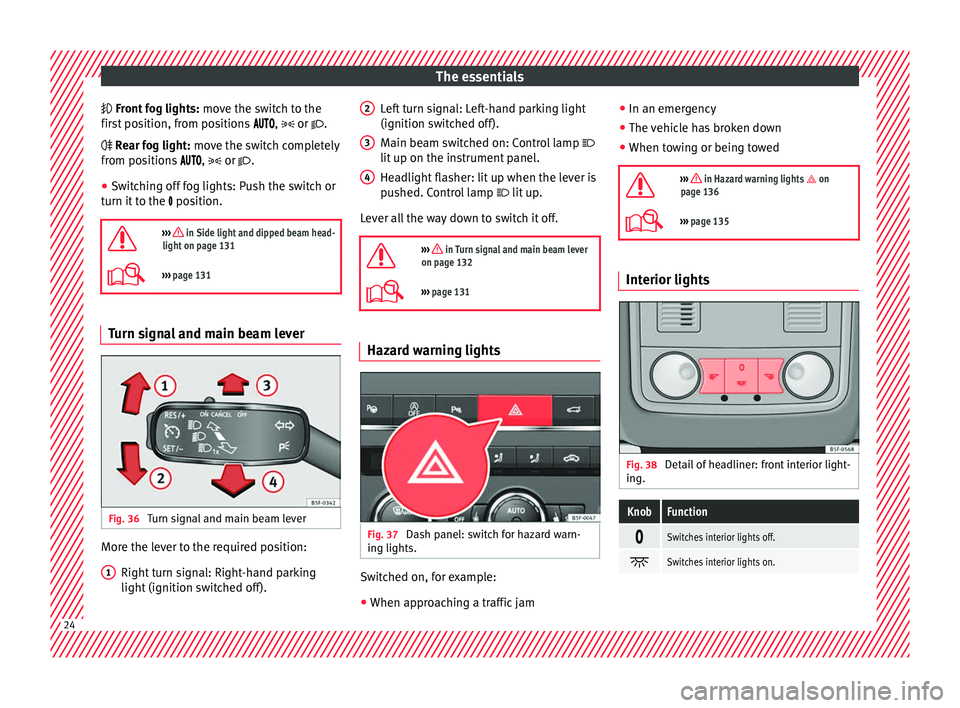
››› page 131 Turn signal and main beam lever
Fig. 36
Turn signal and main beam lever More the lever to the required position:
Right t
urn signal: Right-hand parking
light (ignition switched off).
1 Left turn signal: Left-hand parking light
(ignition sw
it
ched off).
Main beam switched on: Control lamp
lit up on the instrument panel.
Headlight flasher: lit up when the lever is
pushed. Control lamp lit up.
Lever all the way down to switch it off.
››› in Turn signal and main beam lever
on page 132
››› page 131 Hazard warning lights
Fig. 37
Dash panel: switch for hazard warn-
in g lights. Switched on, for example:
●
When approaching a traffic jam
2 3
4 ●
In an emer g
ency
● The vehicle has broken down
● When towing or being towed
››› in Hazard warning lights on
page 136
››› page 135 Interior lights
Fig. 38
Detail of headliner: front interior light-
in g.
KnobFunction
Switches interior lights off.
Switches interior lights on.
24
Page 29 of 328
The essentialsMenuSubmenuPossible settingDescription
TyresTyre pressure monitoringTyre pressure storing (Calibration)›››
page 295
Winter tyresActivation and deactivation of the speed warning. Setting the speed warning value››› page 299
Driver assistance
ACC (adaptive cruise control)Activation/deactivation: Gear programme, temporary distance from the vehicle in front (dis-
tance level)››› page 197
Front Assist (ambient traffic
monitoring system)Activation/deactivation: monitoring system, advance warning, distance warning display››› page 207
City emergency braking func-
tionActivation/deactivation of the City emergency braking function.››› page 211
Lane Assist (system warning
you if you leave the lane)Activation/deactivation: Lane Assist, Adaptive Lane Guidance››› page 213
Detection of traffic signsThe following functions can be activated and deactivated:
– Display of traffic signs on the multi-function display
– Trailer recognition (display of traffic signs for vehicles with trailer)››› page 228
Fatigue detectionActivation/deactivation››› page 231
Parking and ma-
noeuvringParkPilotAutomatically activate, front volume, front sound settings, rear volume, rear sound settings,
adjust volume››› page 244
Vehicle lights
Vehicle interior lightingInstrument and control lighting, ambient door lighting, footwell lighting››› page 138
Coming home/Leaving home
functionStart time for “Coming home” function, start time for “Leaving home” function››› page 134
››› page 135
Motorway lightActivation/deactivation››› page 136
Mirrors/wind‐
screen wipersMirrorsSynchronised regulation, lower the rear-view mirror when reversing, fold in after parking››› page 14,
››› page 141
Windscreen wipersAutomatic windscreen wipers, wipe when reversing››› page 25
Opening and clos-
ingRadio-operated remote controlConvenience open function››› page 127
Central locking systemUnlocking doors, automatic locking/unlocking, audible confirmation››› page 112» 27
Page 30 of 328
The essentialsMenuSubmenuPossible settingDescription
Multifunction
display–
Current consumption, average consumption, volume to fill up, convenience consumers,
ECOAdvice, travelling time, distance travelled, digital speed display, average speed, speed-
ing warning, oil temperature, coolant temperature, restore data “from start”, restore data
“total calculation”
››› page 29
Date and time–Time source, set the time, automatic summer time (DST) setting, select time zone, time for-
mat, set the date, date format–
Measurement units–Distance, speed, temperature, volume, consumption–
Service–Chassis number, date of next SEAT service inspection, date of next oil change service››› page 35
Factory settings–All settings can be reset: driver assistance, parking and manoeuvring, lights, rear view mir-
rors and windscreen wipers, opening and closing, multi-function display–
››› in CAR menu (Setup) on page 108
›››
page 108 28
Page 41 of 328
The essentials
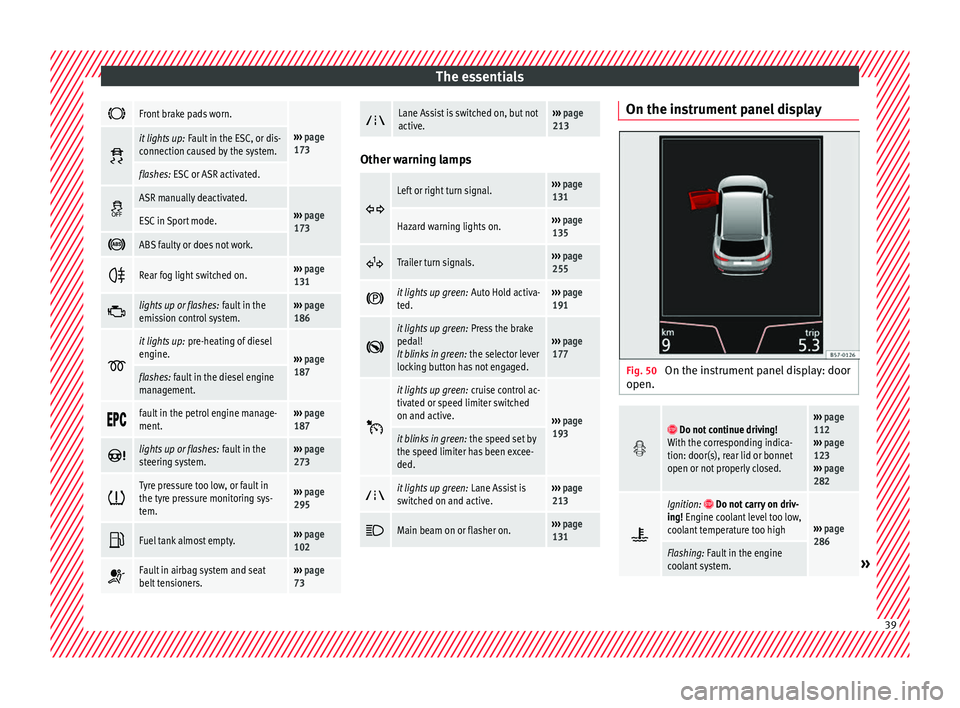
Front brake pads worn.
›››
page
173 it lights up:
Fault in the ESC, or dis-
connection caused by the system.
flashes: ESC or ASR activated.
ASR manually deactivated.›››
page
173ESC in Sport mode.
ABS faulty or does not work.
Rear fog light switched on.›››
page
131
lights up or flashes:
fault in the
emission control system.››› page
186
it lights up:
pre-heating of diesel
engine.
››› page
187
flashes: fault in the diesel engine
management.
fault in the petrol engine manage-
ment.›››
page
187
lights up or flashes:
fault in the
steering system.››› page
273
Tyre pressure too low, or fault in
the tyre pressure monitoring sys-
tem.›››
page
295
Fuel tank almost empty.›››
page
102
Fault in airbag system and seat
belt tensioners.›››
page
73
Lane Assist is switched on, but not
active.›››
page
213 Other warning lamps
Left or right turn signal.›››
page
131
Hazard warning lights on.››› page
135
Trailer turn signals.›››
page
255
it lights up green:
Auto Hold activa-
ted.››› page
191
it lights up green:
Press the brake
pedal!
It blinks in green: the selector lever
locking button has not engaged.››› page
177
it lights up green:
cruise control ac-
tivated or speed limiter switched
on and active.
››› page
193
it blinks in green: the speed set by
the speed limiter has been excee-
ded.
it lights up green:
Lane Assist is
switched on and active.››› page
213
Main beam on or flasher on.›››
page
131 On the instrument panel display
Fig. 50
On the instrument panel display: door
open.
Do not continue driving!
With the corresponding indica-
tion: door(s), rear lid or bonnet
open or not properly closed.››› page
112
››› page
123
››› page
282
Ignition: Do not carry on driv-
ing! Engine coolant level too low,
coolant temperature too high
››› page
286
Flashing: Fault in the engine
coolant system.» 39
Page 45 of 328
The essentials
To switch a specific function on, press the ap-
pr opri
ate button. Press the button again to
switch off the function. The LED on each control lights up to indicate
that
the respective function of a control has
been switched on.
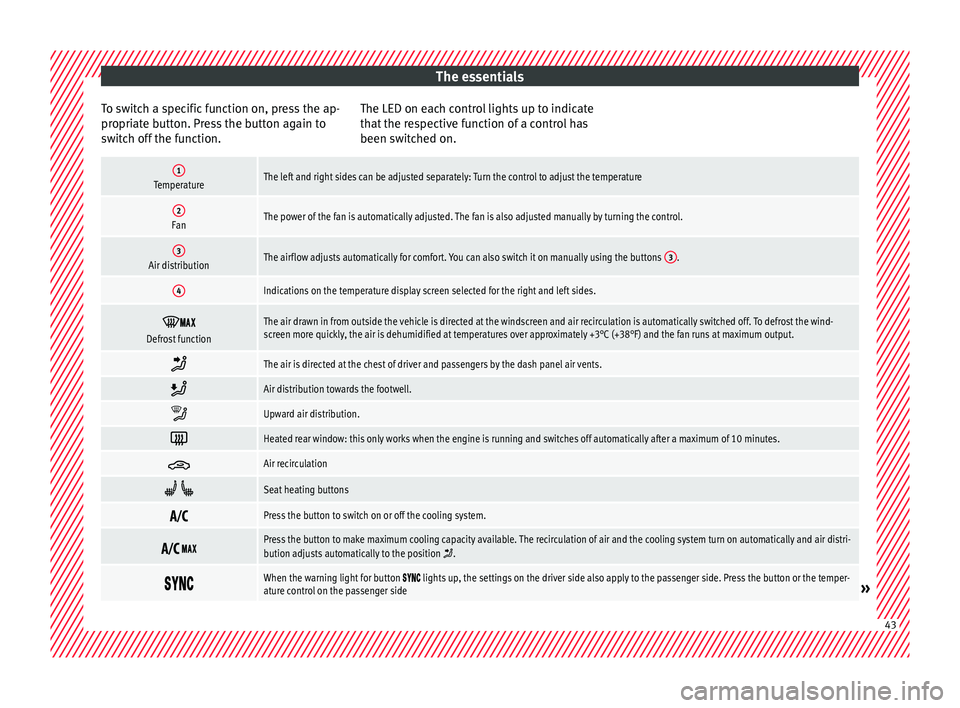
1TemperatureThe left and right sides can be adjusted separately: Turn the control to adjust the temperature
2FanThe power of the fan is automatically adjusted. The fan is also adjusted manually by turning the control.
3Air distributionThe airflow adjusts automatically for comfort. You can also switch it on manually using the buttons 3.
4Indications on the temperature display screen selected for the right and left sides.
Defrost functionThe air drawn in from outside the vehicle is directed at the windscreen and air recirculation is automatically switched off. To defrost the wind-
screen more quickly, the air is dehumidified at temperatures over approximately +3°C (+38°F) and the fan runs at maximum output.
The air is directed at the chest of driver and passengers by the dash panel air vents.
Air distribution towards the footwell.
Upward air distribution.
Heated rear window: this only works when the engine is running and switches off automatically after a maximum of 10 minutes.
Air recirculation
Seat heating buttons
Press the button to switch on or off the cooling system.
Press the button to make maximum cooling capacity available. The recirculation of air and the cooling system turn on automatically and air distri-
bution adjusts automatically to the position .
When the warning light for button lights up, the settings on the driver side also apply to the passenger side. Press the button or the temper-
ature control on the passenger side» 43
Page 46 of 328
The essentials
Automatic adjustment of temperature, fan, and air distribution. Press the button: the warning lamp on the button will light up .
Press the configuration button : the air conditioning operation menu will be displayed on the Easy Connect system screen.
Switching offTurn the blower control to the position or press the button.
››› in Introduction on page 157
›››
page 156 How does the manual air conditioning work*?
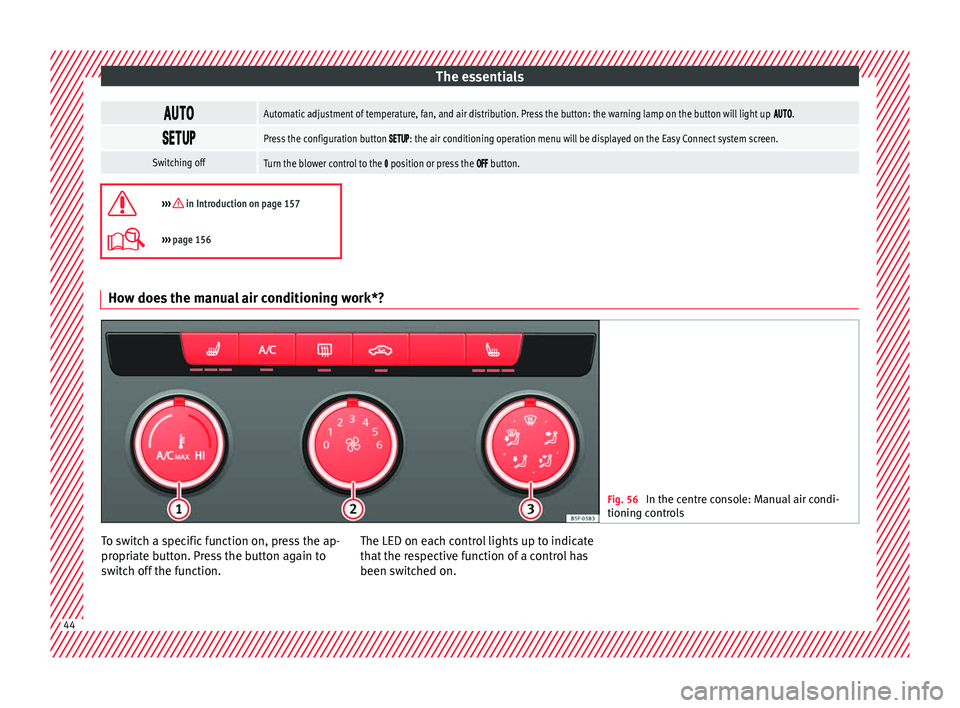
Fig. 56
In the centre console: Manual air condi-
tionin g c
ontrols To switch a specific function on, press the ap-
pr
opri
ate button. Press the button again to
switch off the function. The LED on each control lights up to indicate
that
the respective function of a control has
been switched on. 44
Page 54 of 328
The essentials
● Rep
lace the cover again or close the fuse
box lid.
Bulbs Bu
lbs (12 V)
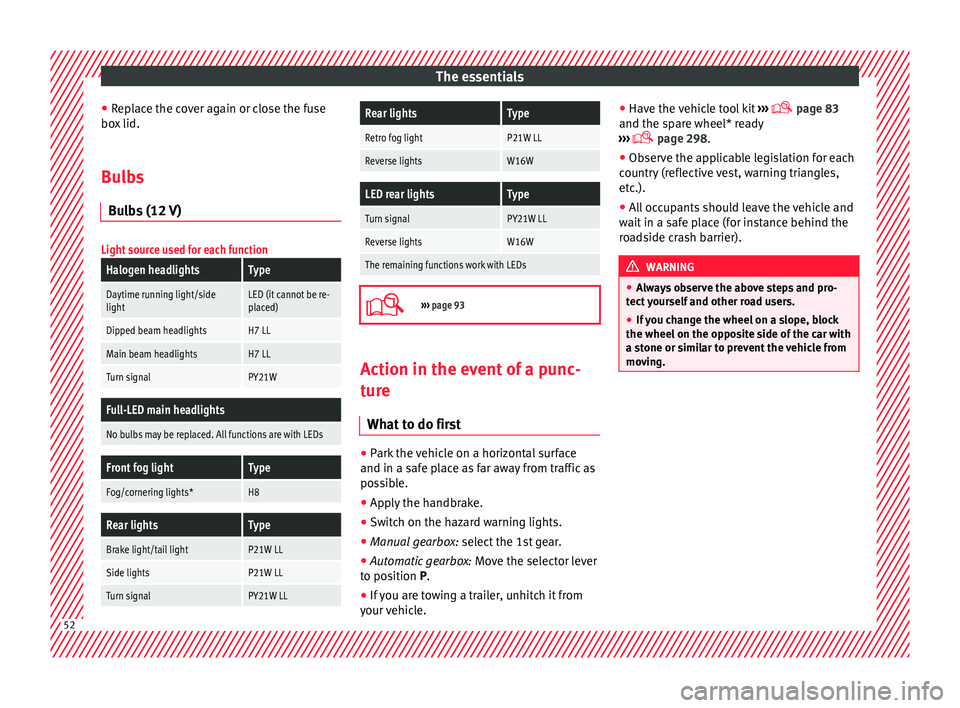
Light source used for each function
Halogen headlightsType
Daytime running light/side
lightLED (it cannot be re-
placed)
Dipped beam headlightsH7 LL
Main beam headlightsH7 LL
Turn signalPY21W
Full-LED main headlights
No bulbs may be replaced. All functions are with LEDs
Front fog lightType
Fog/cornering lights*H8
Rear lightsType
Brake light/tail lightP21W LL
Side lightsP21W LL
Turn signalPY21W LL
Rear lightsType
Retro fog lightP21W LL
Reverse lightsW16W
LED rear lightsType
Turn signalPY21W LL
Reverse lightsW16W
The remaining functions work with LEDs
›››
page 93 Action in the event of a punc-
t
ur
e
What to do first ●
Park the vehicle on a horizontal surface
and in a s af
e place as far away from traffic as
possible.
● Apply the handbrake.
● Switch on the hazard warning lights.
● Manual gearbox: select
the 1st gear.
● Automatic gearbox: Mov
e the selector lever
to position P.
● If you are towing a trailer, unhitch it from
your
vehicle. ●
Have the
vehicle tool kit ›››
page 83
and the spare wheel* ready
››› page 298.
● Observe the applicable legislation for each
cou
ntry (reflective vest, warning triangles,
etc.).
● All occupants should leave the vehicle and
wait
in a safe place (for instance behind the
roadside crash barrier). WARNING
● Alw
ays observe the above steps and pro-
tect yourself and other road users.
● If you change the wheel on a slope, block
the wheel on the op
posite side of the car with
a stone or similar to prevent the vehicle from
moving. 52
Page 61 of 328
The essentials
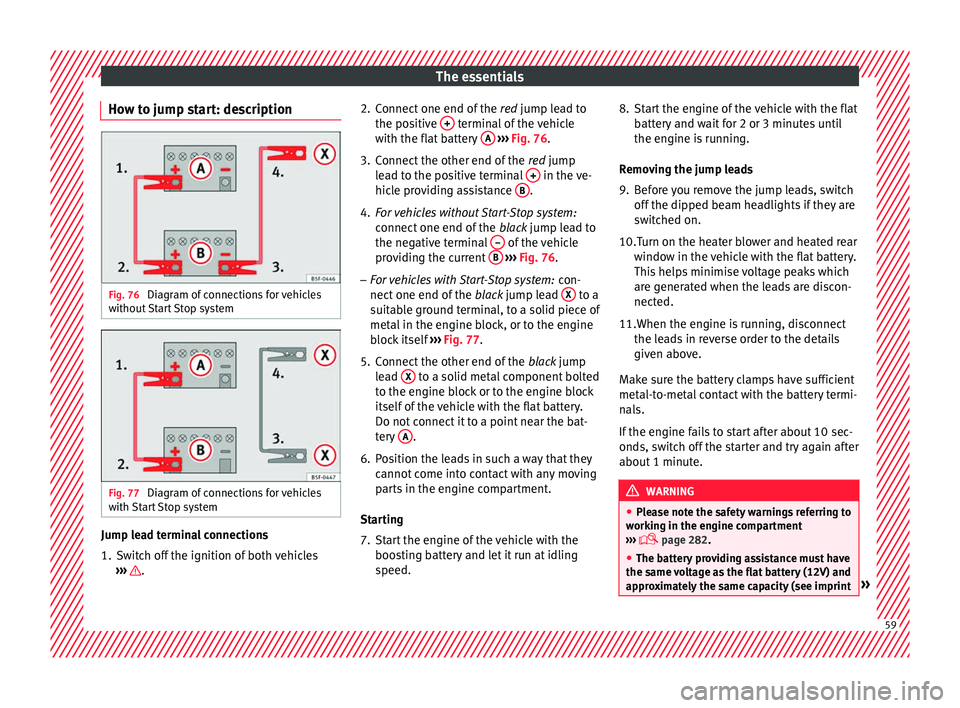
How to jump start: description Fig. 76
Diagram of connections for vehicles
w ithout
Start Stop system Fig. 77
Diagram of connections for vehicles
w ith
Start Stop system Jump lead terminal connections
1. Switch off the ignition of both vehicles
››
› . 2. Connect one end of the
re
d jump lead to
the positive + terminal of the vehicle
w ith the fl
at battery A
› ››
Fig. 76 .
3. Connect the other end of the re
d jump
lead to the positive terminal + in the ve-
hic l
e providing assistance B .
4. For vehicles without Start-Stop system:
connect
one end of the black jump lead to
the negative terminal – of the vehicle
pr o
viding the current B
› ››
Fig. 76 .
– For vehicles with Start-Stop system: con-
nect
one end of the black jump lead X to a
s uit
able ground terminal, to a solid piece of
metal in the engine block, or to the engine
block itself ››› Fig. 77.
5. Connect the other end of the blac
k jump
lead X to a solid metal component bolted
t o the en
gine block or to the engine block
itself of the vehicle with the flat battery.
Do not connect it to a point near the bat-
tery A .
6. Position the leads in such a way that they cannot
come into contact with any moving
parts in the engine compartment.
Starting
7. Start the engine of the vehicle with the boos
ting battery and let it run at idling
speed. 8. Start the engine of the vehicle with the flat
batt
ery and wait for 2 or 3 minutes until
the engine is running.
Removing the jump leads
9. Before you remove the jump leads, switch off the dip
ped beam headlights if they are
switched on.
10.Turn on the heater blower and heated rear windo
w in the vehicle with the flat battery.
This helps minimise voltage peaks which
are generated when the leads are discon-
nected.
11.When the engine is running, disconnect the le
ads in reverse order to the details
given above.
Make sure the battery clamps have sufficient
metal-to-metal contact with the battery termi-
nals.
If the engine fails to start after about 10 sec-
onds, switch off the starter and try again after
about 1 minute. WARNING
● Ple
ase note the safety warnings referring to
working in the engine compartment
››› page 282.
● The battery providing assistance must have
the same
voltage as the flat battery (12V) and
approximately the same capacity (see imprint » 59
Page 64 of 328
Safety
Safety
Saf e driv
ing
Safety first! WARNING
● Thi s
manual contains important informa-
tion about the operation of the vehicle, both
for the driver and the passengers. The other
sections of the on-board documentation also
contain further information that you should
be aware of for your own safety and for the
safety of your passengers.
● Ensure that the on-board documentation is
kept
in the vehicle at all times. This is espe-
cially important when lending or selling the
vehicle to another person. Advice about driving
B ef
ore starting every trip For your own safety and the safety of your
p
a
ssengers, always note the following points
before every trip:
– Make sure that the vehicle's lights and turn
sign
als are working properly.
– Check tyre pressure. –
Ens
ure that all windows provide a clear and
good view of the surroundings.
– Make sure all luggage is secured
››
› page 149.
– Make sure that no objects can interfere
with the ped
als.
– Adjust front seat, head restraint and mir-
ror
s properly according to your size.
– Ensure that the passengers in the rear
seats
always have the head restraints in
the in-use position ››› page 66.
– Instruct passengers to adjust the head re-
str
aints according to their height.
– Protect children with appropriate child
seats
and properly applied seat belts
››› page 79.
– Assume the correct sitting position. Instruct
your p
assengers also to assume a proper
sitting position. ››› page 63.
– Fasten your seat belt securely. Instruct your
pa
ssengers also to fasten their seat belts
properly. ››› page 68.
What affects driving safety? As a driver, you are responsible for yourself
and
y
our passengers. When your concentra-
tion or driving safety is affected by any cir- cumstance, you endanger yourself as well as
others
on the road ››› , for this reason:
– Always pay attention to traffic and do not
g et
distracted by passengers or telephone
calls.
– Never drive when your driving ability is im-
pair
ed (e.g. by medication, alcohol, drugs).
– Observe traffic laws and speed limits.
– Always reduce your speed as appropriate
for r
oad, traffic and weather conditions.
– When travelling long distances, take
bre
aks regularly - at least every two hours.
– If possible, avoid driving when you are tired
or str
essed. WARNING
When driving safety is impaired during a trip,
the ri sk
of injury and accidents increases. Safety equipment
Never put your safety or the safety of your
p
a
ssengers in danger. In the event of an acci-
dent, the safety equipment may reduce the
risk of injury. The following list includes most
of the safety equipment in your SEAT:
● Three-point seat belts
● belt tension limiters for the front and rear
side se
ats,
62