heating Seat Ateca 2018 User Guide
[x] Cancel search | Manufacturer: SEAT, Model Year: 2018, Model line: Ateca, Model: Seat Ateca 2018Pages: 348, PDF Size: 7.32 MB
Page 115 of 348
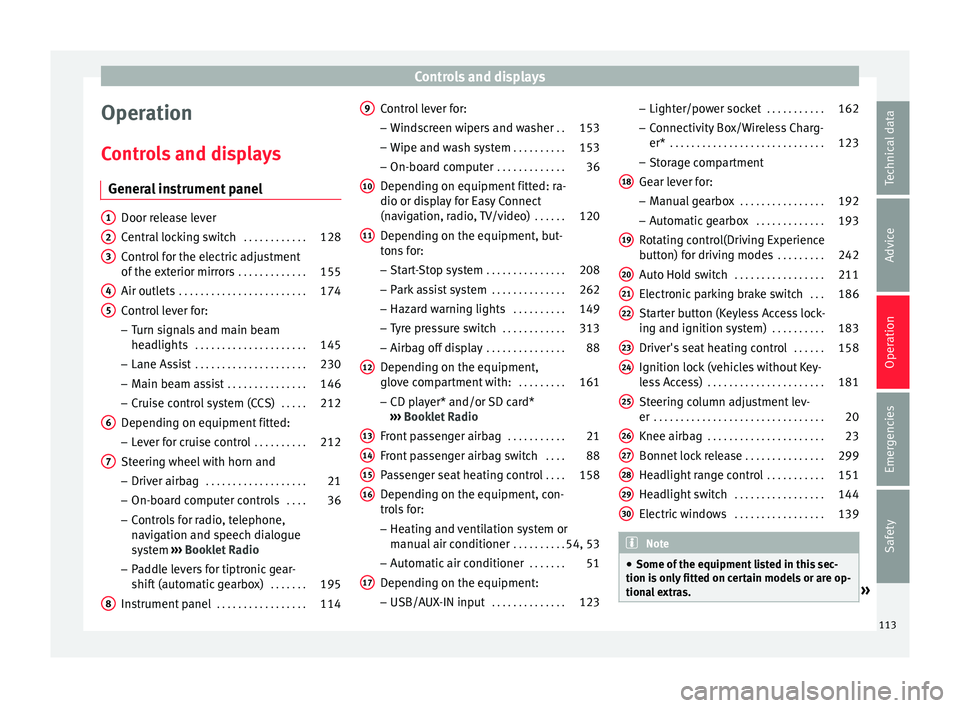
Controls and displays
Operation
C ontr
o
ls and displays
General instrument panel Door release lever
Centr
al
locking switch . . . . . . . . . . . .128
Control for the electric adjustment
of the ext
erior mirrors . . . . . . . . . . . . . 155
Air outlets . . . . . . . . . . . . . . . . . . . . . . . . 174
Control lever for:
– Turn s ign
als and main beam
headlights . . . . . . . . . . . . . . . . . . . . . 145
– Lane Ass i
st . . . . . . . . . . . . . . . . . . . . . 230
– Main beam a
ssist . . . . . . . . . . . . . . . 146
– Cruise c
ontrol system (CCS) . . . . .212
Depending on equipment fitted:
– Lev er f
or cruise control . . . . . . . . . .212
Steering wheel with horn and – Driver airbag . . . . . . . . . . . . . . . . . . . 21
– On-boar d c
omputer controls . . . .36
– Contro
ls for radio, telephone,
navigation and speech dialogue
system ›››
Booklet Radio
– Paddle levers for tiptronic gear-
shift (automatic gearbox) . . . . . . .195
Instrument panel . . . . . . . . . . . . . . . . . 114
1 2
3
4
5
6
7
8 Control lever for:
– Wind
s
creen wipers and washer . .153
– Wipe and wa
sh system . . . . . . . . . . 153
– On-board c
omputer . . . . . . . . . . . . . 36
Depending on equipment fitted: ra-
dio or disp
lay for Easy Connect
(navigation, radio, TV/video) . . . . . .120
Depending on the equipment, but-
tons
for:
– Start-Stop system . . . . . . . . . . . . . . . 208
– Park a
ssist system . . . . . . . . . . . . . . 262
– Hazard w
arning lights . . . . . . . . . .149
– Tyr
e pressure switch . . . . . . . . . . . .313
– Airbag off di
splay . . . . . . . . . . . . . . . 88
Depending on the equipment,
glov e c
ompartment with: . . . . . . . . .161
– CD pl a
yer* and/or SD card*
››› Booklet Radio
Front passenger airbag . . . . . . . . . . .21
Front passenger airbag switch . . . .88
Passenger seat heating control . . . .158
Depending on the equipment, con-
tro l
s for:
– Heating and ventilation system or
manual air conditioner . . . . . . . . . .54, 53
– Autom atic
air conditioner . . . . . . .51
Depending on the equipment:
– USB/A UX-IN inp
ut . . . . . . . . . . . . . . 123
9
10
11
12
13
14
15
16
17 –
Light er/po
w
er socket . . . . . . . . . . . 162
– Connectivity
Box/Wireless Charg-
er* . . . . . . . . . . . . . . . . . . . . . . . . . . . . . 123
– Storag
e compartment
Gear lever for: – Manual gearbox . . . . . . . . . . . . . . . . 192
– Automatic
gearbox . . . . . . . . . . . . . 193
Rotating control(Driving Experience
button) f
or driving modes . . . . . . . . .242
Auto Hold switch . . . . . . . . . . . . . . . . . 211
Electronic parking brake switch . . .186
Starter button (Keyless Access lock-
ing and ignition sys
tem) . . . . . . . . . . 183
Driver's seat heating control . . . . . .158
Ignition lock (vehicles without Key-
les
s Access) . . . . . . . . . . . . . . . . . . . . . . 181
Steering column adjustment lev-
er . . . . . . . . . . . . . . . . . . . . . . . . . . . . . . . . 20
Knee airbag . . . . . . . . . . . . . . . . . . . . . . 23
Bonnet lock release . . . . . . . . . . . . . . .299
Headlight range control . . . . . . . . . . .151
Headlight switch . . . . . . . . . . . . . . . . . 144
Electric windows . . . . . . . . . . . . . . . . . 139 Note
● Some of the equipment li
sted in this sec-
tion is only fitted on certain models or are op-
tional extras. » 18
19
20
21
22
23
24
25
26
27
28
29
30
113
Technical data
Advice
Operation
Emergencies
Safety
Page 120 of 348
Operation
The coolant temperature gauge only works
when the ignition i s
sw
itched on ››› Fig. 121.
In order to avoid engine damage, please read
the following notes for the different tempera-
ture ranges.
Engine cold
If only the diodes in the lower part of the
scale light up, this indicates that the engine
has not yet reached operating temperature.
Avoid high revs and heavy acceleration and
do not make the engine work hard.
Normal temperature
If in normal operations, the diodes light up
until the central zone, it means that the en-
gine has reached operating temperature. At
high outside temperatures and when making
the engine work hard, the diodes may contin-
ue lighting up and reach the upper zone. This
is no cause for concern, provided the control
lamp does not light up on the instrument
panel digital display.
Heat range
When the diodes light up in the upper area of
the display and the control lamp appears
on the instrument panel display, the coolant
temperature is excessive ››› page 302. CAUTION
● To en s
ure a long useful life for the engine,
avoid high revs, driving at high speed and
making the engine work hard for approxi-
mately the first 15 minutes when the engine
is cold. The phase until the engine is warm al-
so depends on the outside temperature. If
necessary, use the engine oil temperature*
››› page 42 as a guide.
● Additional lights and other accessories in
front of
the air inlet reduce the cooling effect
of the coolant. At high outside temperatures
and high engine loads, there is a risk of the
engine overheating.
● The front spoiler also ensures proper distri-
bution of the c
ooling air when the vehicle is
moving. If the spoiler is damaged this can re-
duce the cooling effect, which could cause
the engine to overheat. Seek specialist assis-
tance. Fuel level
Fig. 122
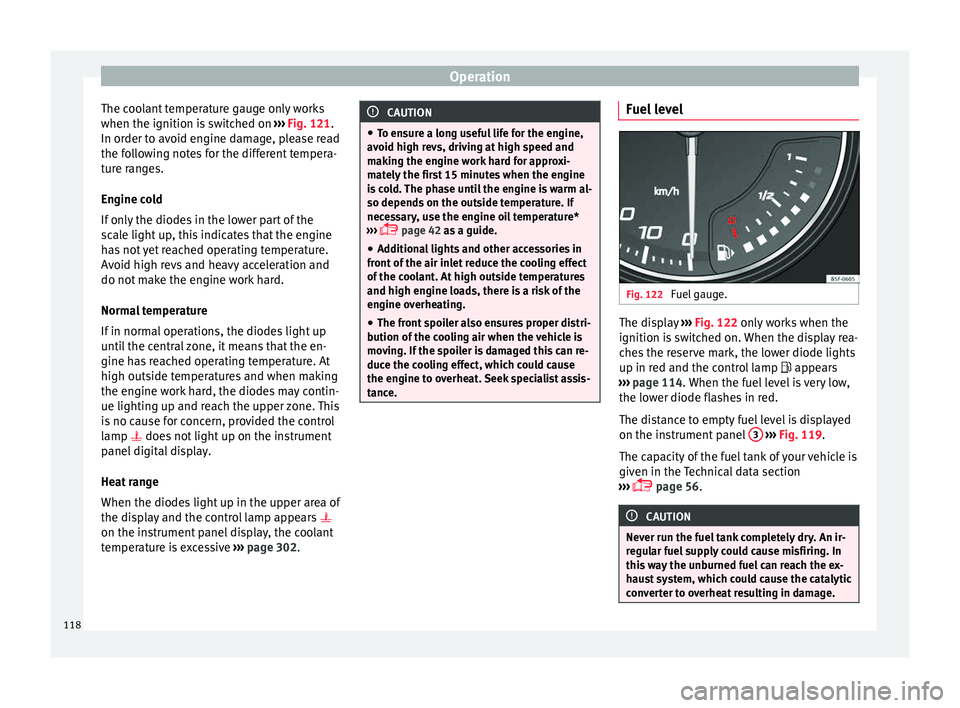
Fuel gauge. The display
››
› Fig. 122 only works when the
ignition is switched on. When the display rea-
ches the reserve mark, the lower diode lights
up in red and the control lamp appears
››› page 114. When the fuel level is very low,
the lower diode flashes in red.
The distance to empty fuel level is displayed
on the instrument panel 3
› ›
› Fig. 119
.
The capacity of the fuel tank of your vehicle is
given in the Technical data section
››› page 56. CAUTION
Never run the fuel tank completely dry. An ir-
re gu
lar fuel supply could cause misfiring. In
this way the unburned fuel can reach the ex-
haust system, which could cause the catalytic
converter to overheat resulting in damage. 118
Page 140 of 348
Operation
If you press one of the butt
on s again, the
rear lid will move again in the original direc-
tion.
If the rear lid is met with resistance or an ob-
stacle during the automatic opening or clos-
ing, opening or closing will be interrupted
immediately. For the closing process, the rear
lid opens again slightly.
● Check why it has not been possible to open
or close the r
ear lid.
● Try to open or close the rear lid again.
● If necessary, the rear lid can be opened or
closed b
y hand using reasonable force.
Special feature for pulling a trailer
If the factory-fitted towing bracket is electri-
cally connected to a trailer ››› page 273, the
electric rear lid can only be opened or closed
with the buttons on the rear lid itself.
Acoustic warnings
Throughout the process of opening or closing
the rear lid, acoustic warnings can be heard.
Exception: when the rear lid is opened man-
ually using the handle or the Easy Open func-
tion with the movement of the foot or closed
using the button on the rear lid itself
››› Fig. 137. Modifying and memorising the opening an-
gle
If the s
pace behind or above the vehicle is
less than the travel area of the rear lid, you
can change the opening angle of the rear lid.
To memorise a new opening angle, the rear
lid must be open at least halfway.
● Interrupt the opening process in the de-
sired po
sition.
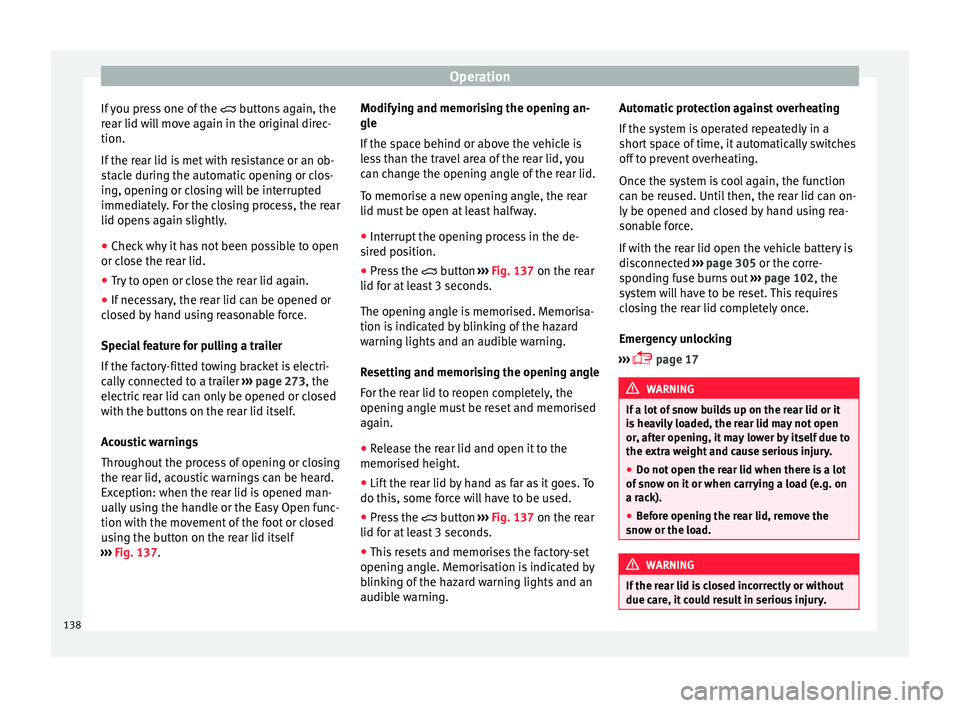
● Press the button ›
›› Fig. 137 on the rear
lid for at least 3 seconds.
The opening angle is memorised. Memorisa-
tion is indicated by blinking of the hazard
warning lights and an audible warning.
Resetting and memorising the opening angle
For the rear lid to reopen completely, the
opening angle must be reset and memorised
again.
● Release the rear lid and open it to the
memorised height.
● Lif
t the rear lid by hand as far as it goes. To
do this, some for
ce will have to be used.
● Press the button ›
›› Fig. 137 on the rear
lid for at least 3 seconds.
● This resets and memorises the factory-set
opening angl
e. Memorisation is indicated by
blinking of the hazard warning lights and an
audible warning. Automatic protection against overheating
If the sys
tem is operated repeatedly in a
short space of time, it automatically switches
off to prevent overheating.
Once the system is cool again, the function
can be reused. Until then, the rear lid can on-
ly be opened and closed by hand using rea-
sonable force.
If with the rear lid open the vehicle battery is
disconnected ››› page 305 or the corre-
sponding fuse burns out ››› page 102, the
system will have to be reset. This requires
closing the rear lid completely once.
Emergency unlocking
››› page 17 WARNING
If a lot of snow builds up on the rear lid or it
is he
avily loaded, the rear lid may not open
or, after opening, it may lower by itself due to
the extra weight and cause serious injury.
● Do not open the rear lid when there is a lot
of sno
w on it or when carrying a load (e.g. on
a rack).
● Before opening the rear lid, remove the
snow or the lo
ad. WARNING
If the rear lid is closed incorrectly or without
due car e, it
could result in serious injury.138
Page 160 of 348
Operation
should not be possible to remove the head
r e
s
traint from the backrest.
– Move the backrest until it engages properly
›››
.
WARNING
● Ple a
se observe the general notes
››› page 77.
● Remove the rear head restraints only when
it is
necessary for the placement of a child
seat ››› page 90. After removing a child seat,
remount the head restraint immediately.
Travelling with the head restraints removed
or improperly adjusted increases the risk of
severe injuries. Seat functions
Intr oduction WARNING
Inappropriate use of the seat functions can
cau se sev
ere injuries.
● Assume the proper sitting position before
your trip and rem
ain in it throughout. This al-
so applies to the other occupants.
● Always keep hands, fingers, feet and other
part
s of the body away from the operating ra-
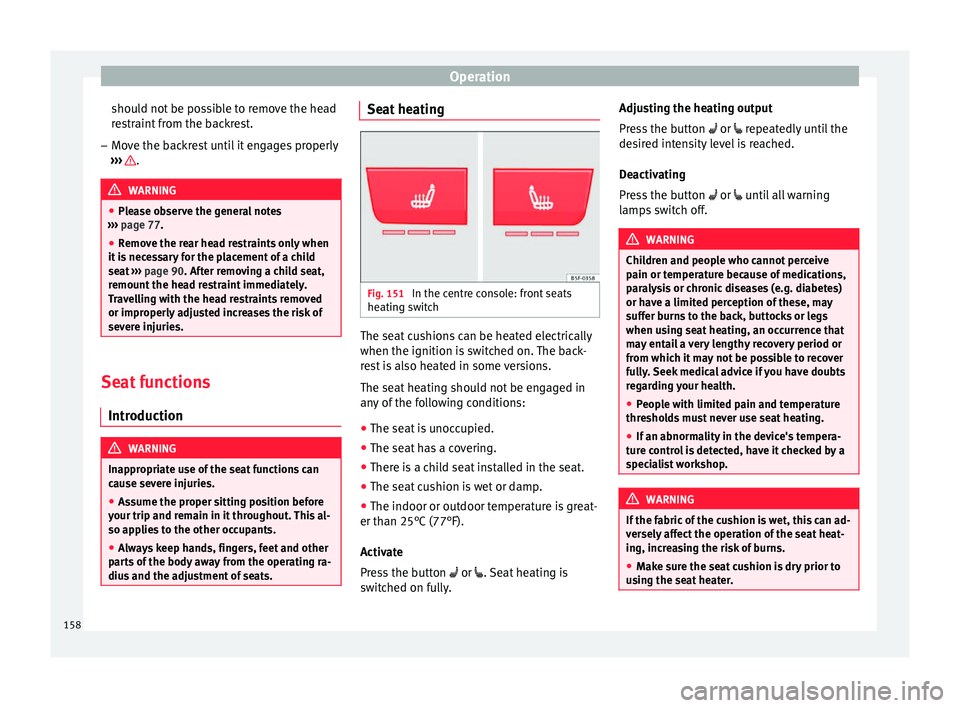
dius and the adjustment of seats. Seat heating
Fig. 151
In the centre console: front seats
he atin
g sw
itch The seat cushions can be heated electrically
when the ignition i
s
sw
itched on. The back-
rest is also heated in some versions.
The seat heating should not be engaged in
any of the following conditions:
● The seat is unoccupied.
● The seat has a covering.
● There is a child seat installed in the seat.
● The seat cushion is wet or damp.
● The indoor or outdoor temperature is great-
er than 25°C (77°F).
A
ctivate
Press the button or . Seat heating is
switched on fully. Adjusting the heating output
Pres
s the button or repeatedly until the
desired intensity level is reached.
Deactivating
Press the button or until all warning
lamps switch off. WARNING
Children and people who cannot perceive
pain or t emper
ature because of medications,
paralysis or chronic diseases (e.g. diabetes)
or have a limited perception of these, may
suffer burns to the back, buttocks or legs
when using seat heating, an occurrence that
may entail a very lengthy recovery period or
from which it may not be possible to recover
fully. Seek medical advice if you have doubts
regarding your health.
● People with limited pain and temperature
thresho
lds must never use seat heating.
● If an abnormality in the device's tempera-
ture c
ontrol is detected, have it checked by a
specialist workshop. WARNING
If the fabric of the cushion is wet, this can ad-
ver sely
affect the operation of the seat heat-
ing, increasing the risk of burns.
● Make sure the seat cushion is dry prior to
usin
g the seat heater. 158
Page 161 of 348
Seats and head restraints
●
Do not s it
on the seat with clothing that is
wet or damp.
● Do not leave clothing that is wet or damp
on the seat.
● Do not
spill liquid on the seat. CAUTION
● To av oid d
amaging the heating elements of
the seat heaters, please do not kneel on the
seat or apply sharp pressure to a single point
on the seat cushion or backrest.
● Liquids, sharps objects and insulating ma-
teria
ls (e.g. covers or child seats) can damage
the seat heating.
● In the event of smells, switch off the seat
heating immedi
ately and have it inspected by
a specialised workshop. For the sake of the environment
The seat heating should remain on only when
needed. Otherw i
se, it is an unnecessary fuel
waste. Front centre armrest
The centre armrest can be adjusted to various
l
ev
el
s.
Adjusting the centre armrest – To adjust the tilt, lift the armrest from the
star
ting position so that it is engaged. –
To ret
urn the armrest to the starting posi-
tion, remove the armrest from the upper
fixed position and lower it.
The armrest can be moved backwards and
forwards.
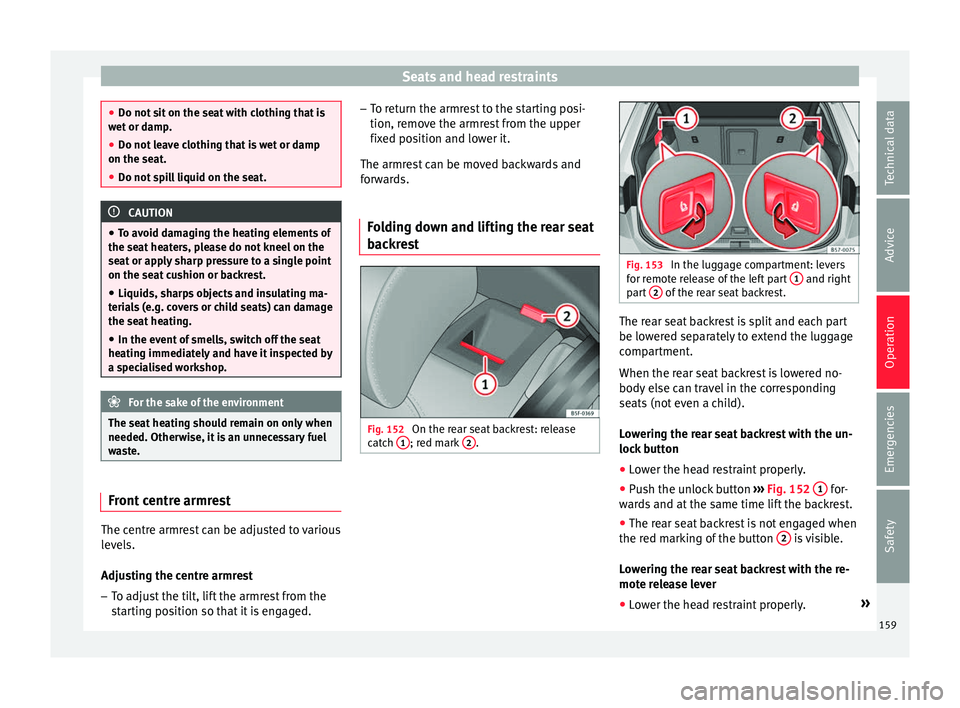
Folding down and lifting the rear seat
back
rest Fig. 152
On the rear seat backrest: release
c at
c
h 1 ; red mark
2 . Fig. 153
In the luggage compartment: levers
for r emot
e release of the left part 1 and right
par t
2 of the rear seat backrest.
The rear seat backrest is split and each part
be lo
w
er
ed separately to extend the luggage
compartment.
When the rear seat backrest is lowered no-
body else can travel in the corresponding
seats (not even a child).
Lowering the rear seat backrest with the un-
lock button
● Lower the head restraint properly.
● Push the unlock button ›››
Fig. 152 1 for-
w ar
d
s and at the same time lift the backrest.
● The rear seat backrest is not engaged when
the red mark
ing of the button 2 is visible.
L o
w
ering the rear seat backrest with the re-
mote release lever
● Lower the head restraint properly. »
159
Technical data
Advice
Operation
Emergencies
Safety
Page 173 of 348

Air conditioning
WARNING
Reduced visibility through the windows in-
cr e
ases the risk of serious accidents.
● Always ensure that all windows are free of
ice and sno
w, and that they are not fogged,
so as to maintain good visibility of everything
outside.
● The maximum heat output required to de-
fros
t windows as quickly as possible is only
available when the engine has reached its
normal running temperature. Only drive when
you have good visibility.
● Always ensure that you use the heating
syst
em, fresh air system, air conditioner and
the heated rear window to maintain good visi-
bility to the outside.
● Never leave the air recirculation on for a
long period of time. If
the cooling system is
switched off and air recirculation mode
switched on, the windows can mist over very
quickly, considerably limiting visibility.
● Switch air recirculation mode off when it is
not requir
ed. WARNING
Stuffy or used air will increase fatigue and re-
duce driv er c
oncentration possibly resulting
in a serious accident.
● Never leave the fresh air fan turned off or
use the air rec
irculation for long periods of
time; the air in the vehicle interior will not be
refreshed. CAUTION
● To r ep
lace the pollen filter, always visit a
service centre.
● Switch the air conditioner off if you think it
may
be broken. This will avoid additional
damage. Have the air conditioner checked by
a specialised workshop.
● Repairs to the air conditioner require spe-
cia
list knowledge and special tools. SEAT rec-
ommends visiting a SEAT Official Service. Note
● When the coo lin
g system is turned off, air
coming from the outside will not be dried. To
prevent fogging of the windows, SEAT recom-
mends leaving the cooling system (compres-
sor) turned on. To do this, press the button . The button lamp should light up.
● The maximum heat output required to de-
fro s
t windows as quickly as possible is only
available when the engine has reached its
normal running temperature.
● Keep the air intake slots in front of the
winds
creen free of snow, ice and leaves to en-
sure heating and cooling are not impaired,
and to prevent the windows from misting
over. Operating the Climatronic through the
E
a
sy
Connect system* 3 Applies to vehicles with a Media System
T ouc
h/Colour. Fig. 172
Easy Connect screen: air conditioner
menu. In the Easy Connect system it is also possible
t
o per
f
orm various adjustments to the Clima-
tronic.
Open the air conditioner menu
● Press the button on the Climatronic
c ontr
o
l panel.
● OR: press the button in Easy Connect.
W ith the r
ot
ating switch select the air con-
ditioner menu and open it.
On the touch screen you can see and change
the current settings, for example, the temper-
ature set for the driver and passenger sides,
the air distribution and the fan speed. »
171
Technical data
Advice
Operation
Emergencies
Safety
Page 174 of 348

Operation
To switch a function on or off, or to select a
s ubmenu,
y
ou must press the corresponding
function button.
Function button: Function
OFFSwitch off and switch on the Climatronic.
SYNCSynchronise driver and front passenger
temperatures.
SETTINGS
The air conditioning settings submenu is
opened. The following settings can also
be adjusted:
Air conditioning profile. : Adjust
the power of the fan in AUTO mode. You
can choose between low, medium and
high.
Automatic air recirculation :
Switching automatic air recirculation on
and off ››› page 174.
BACK : Close the submenu.
*The auxiliary heater submenu opens.
*It enables manual switching on or off of
the windscreen heater.
It enables activation and deactivation of
the PureAir and opens the submenu. Operating the Climatronic through the
E
a
sy
Connect system* 3 Applies to vehicles with Media System Plus / Navi
S y
stem / Navi System Plus. Fig. 173
Easy Connect screen: air conditioner
menu. In the Easy Connect system it is also possible
t
o per
f
orm various adjustments to the Clima-
tronic.
Open the air conditioner menu
● Press the button on the Climatronic
c ontr
o
l panel.
On the top of the screen you can see and
change the current settings, such as, for ex-
ample, the temperature set for the driver side
and for that of passenger. Temperatures up
to +22°C (+72°F) are shown with blue arrows,
and temperatures over +22°C (+72°F) with
red arrows. To switch a function on or off, or to select a
submenu, y
ou must press the corresponding
function button.
Function button: Function
OFFClimatronic is switched off.
ONClimatronic is switched on.
SYNCSynchronise driver and front passenger
temperatures.
SETTINGS
The air conditioning settings submenu is
opened. The following settings can also
be adjusted:
Automatic supplementary heater :
to activate/deactivate the automatic acti-
vation of the auxiliary heating for colder
countries (only for engines with auxiliary
heating). With the option deactivated, de-
pending on the outside temperature the
heating may need more time than normal
to reach a comfortable temperature.
Automatic windscreen heating *: to
switch the automatic windscreen heating
on and off ››› page 175.
Automatic air recirculation : to
switch automatic air recirculation on and
off ››› page 174.
BACK : to close the submenu.
*The auxiliary heater submenu opens.
*It enables manual switching on or off of
the windscreen heater.
172
Page 176 of 348
Operation
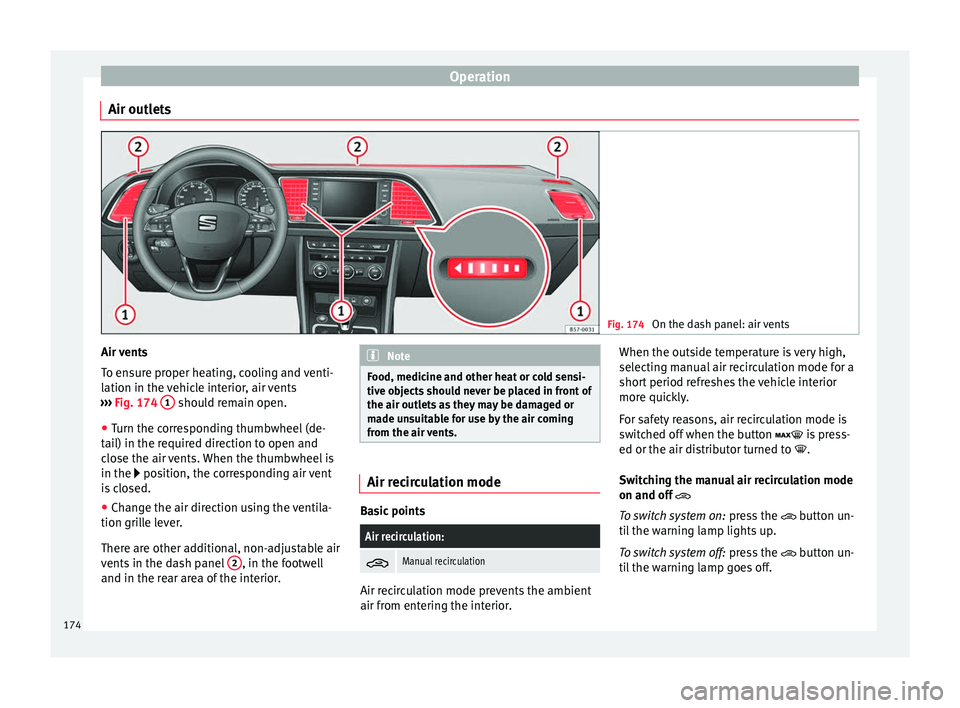
Air outlets Fig. 174
On the dash panel: air vents Air vents
T
o en
s
ure proper heating, cooling and venti-
lation in the vehicle interior, air vents
››› Fig. 174 1 should remain open.
● Turn the corresponding thumbwheel (de-
t ai
l) in the r
equired direction to open and
close the air vents. When the thumbwheel is
in the position, the corresponding air vent
is closed.
● Change the air direction using the ventila-
tion grill
e lever.
There are other additional, non-adjustable air
vents in the dash panel 2 , in the footwell
and in the r ear ar
ea of the interior. Note
Food, medicine and other heat or cold sensi-
tive o b
jects should never be placed in front of
the air outlets as they may be damaged or
made unsuitable for use by the air coming
from the air vents. Air recirculation mode
Basic points
Air recirculation:
Manual recirculation
Air recirculation mode prevents the ambient
air fr
om ent
erin
g the interior. When the outside temperature is very high,
selecting m
anual air recirculation mode for a
short period refreshes the vehicle interior
more quickly.
For safety reasons, air recirculation mode is
switched off when the button is press-
ed or the air distributor turned to .
Switching the manual air recirculation mode
on and off
To switch system on: press the button un-
til the warning lamp lights up.
To switch system off: press the button un-
til the warning lamp goes off.
174
Page 177 of 348
Air conditioning
Functioning mode of automatic air recircula-
tion (air c onditionin
g menu)
W
ith the automatic air recirculation mode ac-
tivated, the entry of fresh air into the cabin
interior is enabled. If the system detects a
high concentration of hazardous substances
in the ambient air, air recirculation mode is
switched on automatically. When the level of
impurities drops to within a normal range, re-
circulation mode is switched off.
The system is unable to detect unpleasant
smells.
The air recirculation will not connect auto-
matically in versions without humidity sensor
and in the following external conditions:
● The outside temperature is lower than +3°C
(+38°F).
● The cooling system is switched off and the
outside temper
ature is below +10°C (+50°F).
● The cooling system is switched off, the out-
side temper
ature is below +15°C (+59°F) and
the windscreen wipers are switched on.
Activation/deactivation of automatic air recir-
culation is done in the air conditioner menu,
under Configuration. WARNING
Observe the safety warnings ›››
in Intro-
duction on pag e 171
. ●
If the c oo
ling system is switched off and air
recirculation mode switched on, the windows
can mist over very quickly, considerably limit-
ing visibility.
● Switch air recirculation mode off when it is
not requir
ed. CAUTION
Do not smoke when air recirculation is
sw itc
hed on in vehicles with an air condition-
er. The smoke taken in could lie on the cool-
ing system vaporiser and on the activated
charcoal cartridge of the dust and pollen fil-
ter, leading to a permanently unpleasant
smell. Note
Climatronic: air recirculation mode is activa-
ted t o pr
event exhaust gas or unpleasant
odours from entering the vehicle interior
when it is in reverse and while the automatic
windscreen wiper is working. Heated windscreen*
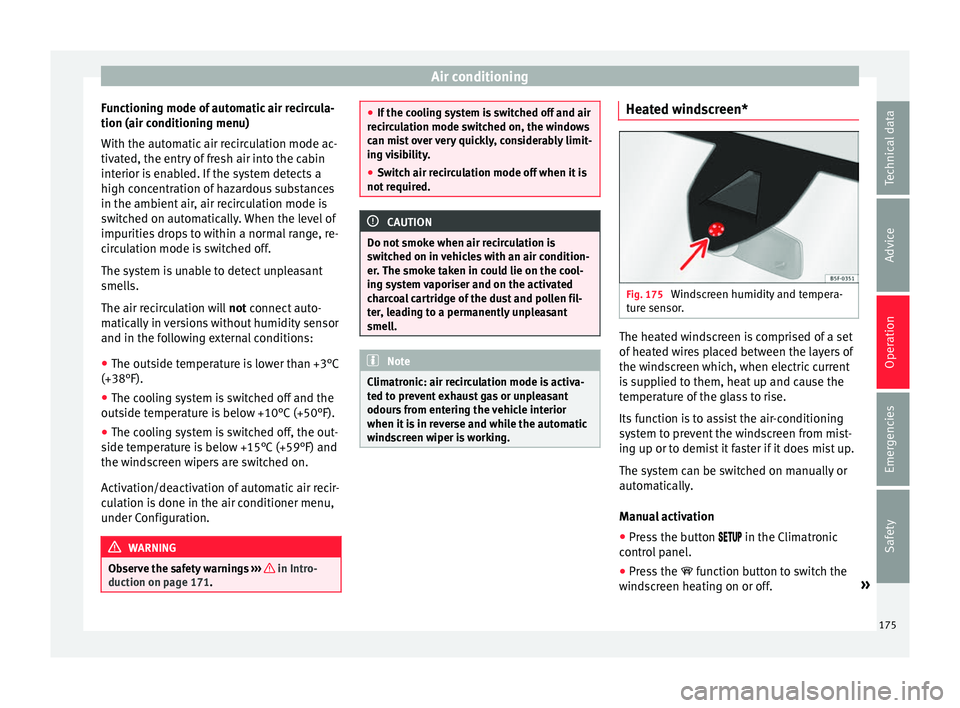
Fig. 175
Windscreen humidity and tempera-
t ur
e sen
sor. The heated windscreen is comprised of a set
of
he
at
ed wires placed between the layers of
the windscreen which, when electric current
is supplied to them, heat up and cause the
temperature of the glass to rise.
Its function is to assist the air-conditioning
system to prevent the windscreen from mist-
ing up or to demist it faster if it does mist up.
The system can be switched on manually or
automatically.
Manual activation
● Press the button in the Climatr
onic
control panel.
● Press the function b
utton to switch the
windscreen heating on or off. »
175
Technical data
Advice
Operation
Emergencies
Safety
Page 178 of 348
Operation
Automatic activation
T o f
ac
ilitate use of the heated windscreen it
can turn on automatically.
The Climatronic control panel can detect the
danger of the windscreen misting thanks to
its temperature and humidity sensors,
switching the system on or off accordingly
››› Fig. 175. Moreover, it will also be activated
automatically when the button is
pressed on the Climatronic control panel.
Adjust it as follows for it to switch on auto-
matically:
● Press the button in the Climatr
onic
control panel.
● Press the SETTINGS function b
utton on the
infotainment system.
● Switch the function on or off by pressing
the Automatic
windscreen heating function but-
t on. 176