towing Seat Ateca 2018 User Guide
[x] Cancel search | Manufacturer: SEAT, Model Year: 2018, Model line: Ateca, Model: Seat Ateca 2018Pages: 348, PDF Size: 7.32 MB
Page 103 of 348
Self-help
● Sc r
ew the t
owing eye in the housing by
turning it to the maximum anticlock-
wise ››› . Use a suitable object that can
c omp
l
etely and securely tighten the towing
eye in its housing.
● After towing, unscrew the towing eye clock
-
wise with a suitable object.
● Insert the side tab of the lid into the open-
ing of the b
umper and press until the tab is
properly clipped into the bumper.
● Clean the towing eye if necessary and then
stor
e it in the luggage compartment along
with the other vehicle tools. CAUTION
The towing eye must always be completely
and firmly tight
ened. Otherwise, it could be
released while towing and tow-starting. Fitting the rear towing eye
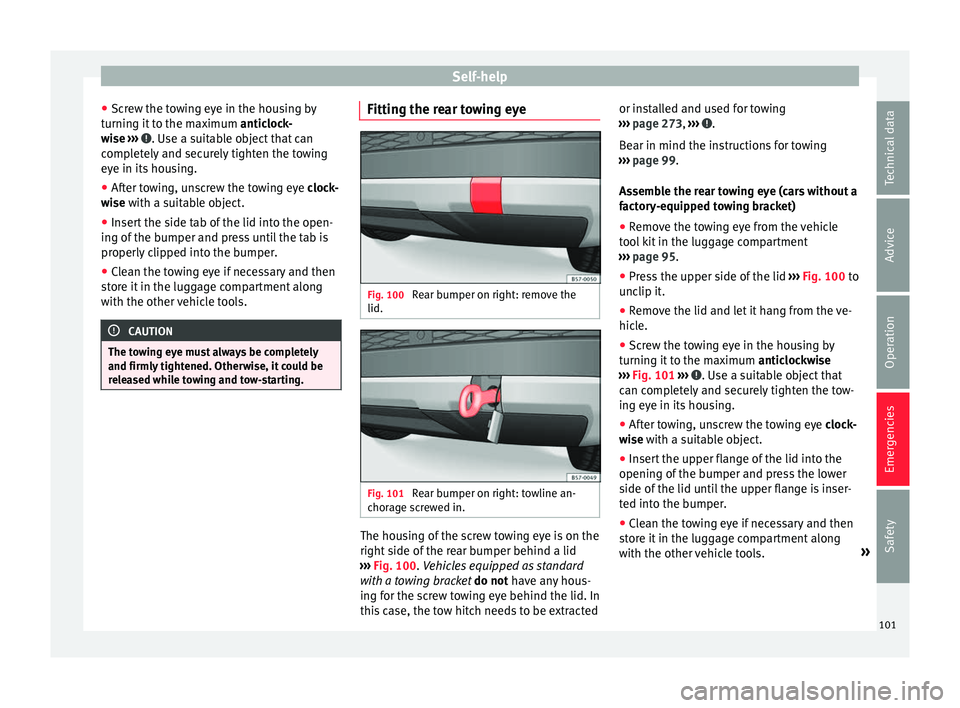
Fig. 100
Rear bumper on right: remove the
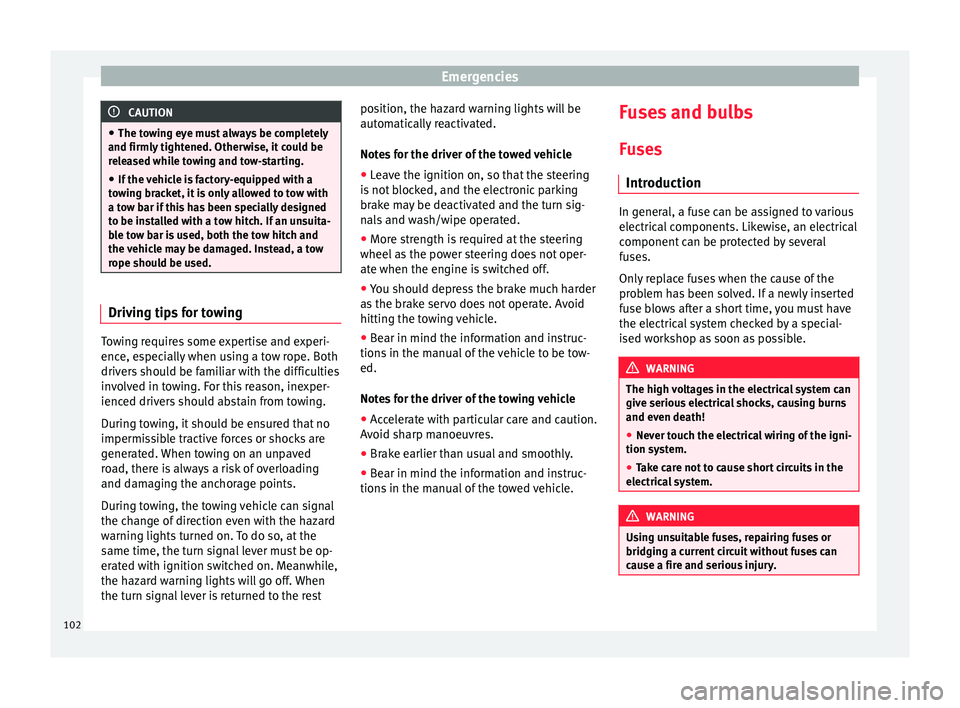
lid. Fig. 101
Rear bumper on right: towline an-
c hor ag
e screwed in. The housing of the screw towing eye is on the
right
s
ide of
the rear bumper behind a lid
››› Fig. 100. Vehicles equipped as standard
with a towing bracket do not have any hous-
ing for the screw towing eye behind the lid. In
this case, the tow hitch needs to be extracted or installed and used for towing
›››
page 273, ››› .
B e
ar in mind the in
structions for towing
››› page 99.
Assemble the rear towing eye (cars without a
factory-equipped towing bracket)
● Remove the towing eye from the vehicle
tool
kit in the luggage compartment
››› page 95.
● Press the upper side of the lid ›››
Fig. 100 to
unclip it.
● Remove the lid and let it hang from the ve-
hicle.
● Sc
rew the towing eye in the housing by
turning it
to the maximum anticlockwise
››› Fig. 101 ››› . Use a suitable object that
c an c
omp
letely and securely tighten the tow-
ing eye in its housing.
● After towing, unscrew the towing eye clock
-
wise with a suitable object.
● Insert the upper flange of the lid into the
opening of the b
umper and press the lower
side of the lid until the upper flange is inser-
ted into the bumper.
● Clean the towing eye if necessary and then
stor
e it in the luggage compartment along
with the other vehicle tools. »
101
Technical data
Advice
Operation
Emergencies
Safety
Page 104 of 348
Emergencies
CAUTION
● The to w
ing eye must always be completely
and firmly tightened. Otherwise, it could be
released while towing and tow-starting.
● If the vehicle is factory-equipped with a
tow
ing bracket, it is only allowed to tow with
a tow bar if this has been specially designed
to be installed with a tow hitch. If an unsuita-
ble tow bar is used, both the tow hitch and
the vehicle may be damaged. Instead, a tow
rope should be used. Driving tips for towing
Towing requires some expertise and experi-
enc
e, e
s
pecially when using a tow rope. Both
drivers should be familiar with the difficulties
involved in towing. For this reason, inexper-
ienced drivers should abstain from towing.
During towing, it should be ensured that no
impermissible tractive forces or shocks are
generated. When towing on an unpaved
road, there is always a risk of overloading
and damaging the anchorage points.
During towing, the towing vehicle can signal
the change of direction even with the hazard
warning lights turned on. To do so, at the
same time, the turn signal lever must be op-
erated with ignition switched on. Meanwhile,
the hazard warning lights will go off. When
the turn signal lever is returned to the rest position, the hazard warning lights will be
automatic
ally reactivated.
Notes for the driver of the towed vehicle ● Leave the ignition on, so that the steering
is not
blocked, and the electronic parking
brake may be deactivated and the turn sig-
nals and wash/wipe operated.
● More strength is required at the steering
wheel as
the power steering does not oper-
ate when the engine is switched off.
● You should depress the brake much harder
as the br
ake servo does not operate. Avoid
hitting the towing vehicle.
● Bear in mind the information and instruc-
tions in the m
anual of the vehicle to be tow-
ed.
Notes for the driver of the towing vehicle
● Accelerate with particular care and caution.
Avoid sh
arp manoeuvres.
● Brake earlier than usual and smoothly.
● Bear in mind the information and instruc-
tions in the m
anual of the towed vehicle. Fuses and bulbs
F u
se
s
Introduction In general, a fuse can be assigned to various
electric
al
components. Likewise, an electrical
component can be protected by several
fuses.
Only replace fuses when the cause of the
problem has been solved. If a newly inserted
fuse blows after a short time, you must have
the electrical system checked by a special-
ised workshop as soon as possible. WARNING
The high voltages in the electrical system can
give seriou s
electrical shocks, causing burns
and even death!
● Never touch the electrical wiring of the igni-
tion syst
em.
● Take care not to cause short circuits in the
electrica
l system. WARNING
Using unsuitable fuses, repairing fuses or
bridging a c urr
ent circuit without fuses can
cause a fire and serious injury. 102
Page 140 of 348
Operation
If you press one of the butt
on s again, the
rear lid will move again in the original direc-
tion.
If the rear lid is met with resistance or an ob-
stacle during the automatic opening or clos-
ing, opening or closing will be interrupted
immediately. For the closing process, the rear
lid opens again slightly.
● Check why it has not been possible to open
or close the r
ear lid.
● Try to open or close the rear lid again.
● If necessary, the rear lid can be opened or
closed b
y hand using reasonable force.
Special feature for pulling a trailer
If the factory-fitted towing bracket is electri-
cally connected to a trailer ››› page 273, the
electric rear lid can only be opened or closed
with the buttons on the rear lid itself.
Acoustic warnings
Throughout the process of opening or closing
the rear lid, acoustic warnings can be heard.
Exception: when the rear lid is opened man-
ually using the handle or the Easy Open func-
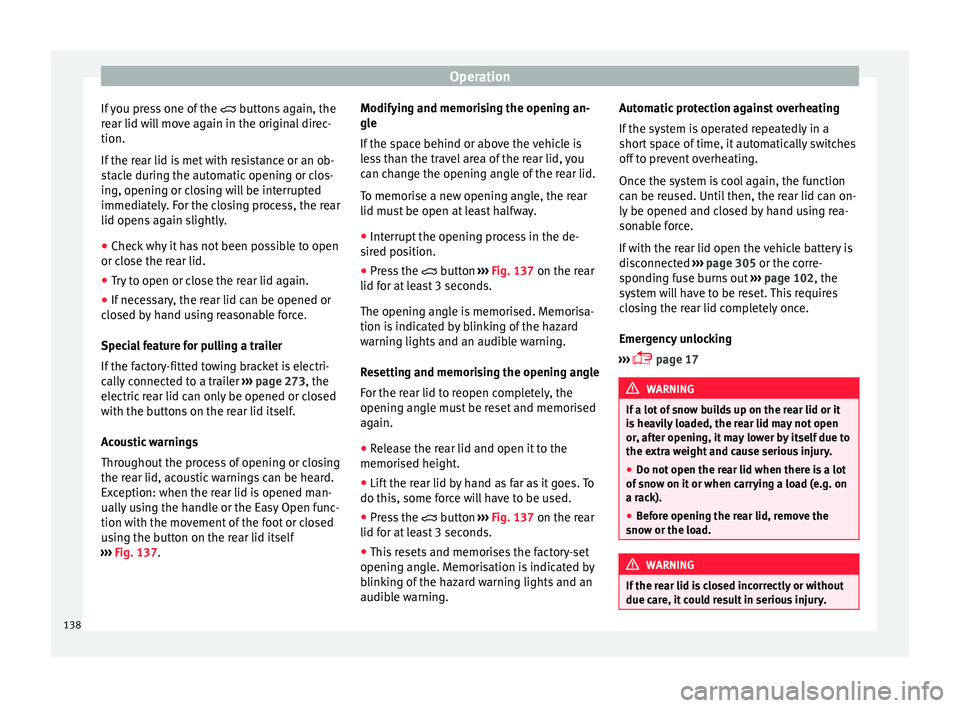
tion with the movement of the foot or closed
using the button on the rear lid itself
››› Fig. 137. Modifying and memorising the opening an-
gle
If the s
pace behind or above the vehicle is
less than the travel area of the rear lid, you
can change the opening angle of the rear lid.
To memorise a new opening angle, the rear
lid must be open at least halfway.
● Interrupt the opening process in the de-
sired po
sition.
● Press the button ›
›› Fig. 137 on the rear
lid for at least 3 seconds.
The opening angle is memorised. Memorisa-
tion is indicated by blinking of the hazard
warning lights and an audible warning.
Resetting and memorising the opening angle
For the rear lid to reopen completely, the
opening angle must be reset and memorised
again.
● Release the rear lid and open it to the
memorised height.
● Lif
t the rear lid by hand as far as it goes. To
do this, some for
ce will have to be used.
● Press the button ›
›› Fig. 137 on the rear
lid for at least 3 seconds.
● This resets and memorises the factory-set
opening angl
e. Memorisation is indicated by
blinking of the hazard warning lights and an
audible warning. Automatic protection against overheating
If the sys
tem is operated repeatedly in a
short space of time, it automatically switches
off to prevent overheating.
Once the system is cool again, the function
can be reused. Until then, the rear lid can on-
ly be opened and closed by hand using rea-
sonable force.
If with the rear lid open the vehicle battery is
disconnected ››› page 305 or the corre-
sponding fuse burns out ››› page 102, the
system will have to be reset. This requires
closing the rear lid completely once.
Emergency unlocking
››› page 17 WARNING
If a lot of snow builds up on the rear lid or it
is he
avily loaded, the rear lid may not open
or, after opening, it may lower by itself due to
the extra weight and cause serious injury.
● Do not open the rear lid when there is a lot
of sno
w on it or when carrying a load (e.g. on
a rack).
● Before opening the rear lid, remove the
snow or the lo
ad. WARNING
If the rear lid is closed incorrectly or without
due car e, it
could result in serious injury.138
Page 192 of 348
Operation
the other driven wheel. This function is active
up t o ap
pr
oximately 100 km/h (62 mph).
To prevent the disc brake of the braked wheel
from overheating, the EDL cuts out automati-
cally if subjected to excessive loads. The ve-
hicle can still be driven. The EDL will switch
on again automatically when the brake has
cooled down.
Tractor-trailer sway mitigation*
If the vehicle is pulling a trailer, it will control
the following: Tractor-trailers tend to sway.
When the swaying of the trailer is felt by the
vehicle and detected by the ESC, it will auto-
matically brake the towing vehicle within the
limits of the system and mitigate the sway.
Tractor-trailer sway mitigation is not available
in all countries.
Electronic torque management (XDS)
When taking a curve, the driveshaft differen-
tial mechanism allows the outer wheel to turn
at a higher speed than the inner wheel. In
this way, the wheel that is turning faster (out-
er wheel) receives less drive torque than the
inner wheel. This may mean that in certain
situations the torque delivered to the inner
wheel is too high, causing the wheels to
spin. On the other hand, the outer wheel is
receiving a lower drive torque than it could
transmit. This causes an overall loss of lateral
grip on the front axle, resulting in understeer
or “lengthening” of the trajectory. The XDS system can detect and correct this
effect
via the sensors and signals of the ESC.
Via the ESC, the XDS will brake the inside
wheel and counter the excess driving torque
of that wheel. This means that the driver's
desired trajectory is much more precise.
The XDS system works in combination with
the ESC and is always active, even when ASR
traction control is disconnected, or the ESC in
Sport mode or disconnected.
Multi-collision brake
In an accident, the multi-collision brake can
help the driver by braking to avoid the risk of
skidding during the accident, which could
lead to further collisions.
The multi-collision brake works for front, side
or rear accidents, when the airbag control
unit records its activation level and the acci-
dent takes place at a speed of over 10 km/h
(6 mph). The ESC automatically brakes the
vehicle, as long as the accident has not dam-
aged the ESC, the brake hydraulics or the on-
board network
The following actions control automatic brak-
ing during the accident:
● When the driver presses the accelerator,
the automatic
braking does not take place.
● When the braking pressure through press-
ing the brak
e pedal is greater than the sys- tem’s braking pressure the vehicle will brake
automatic
ally.
● Multi-collision braking will not be available
if ESC
is malfunctioning. WARNING
● The ESC, ABS, ASR, ED S
and the electronic
torque control system cannot exceed the lim-
its imposed by the laws of physics. Always
bear this in mind, especially on wet or slip-
pery roads. If you notice the systems cutting
in, you should reduce your speed immediate-
ly to suit the road and traffic conditions. Do
not be encouraged to take risks by the pres-
ence of more safety systems. If you do, an ac-
cident may occur.
● Please remember that the accident risk al-
way
s increases if you drive fast, especially in
corners or on a slippery road, or if you follow
too close behind the vehicle in front of you.
The ESC, ABS, brake assist, EDS and the elec-
tronic torque control system cannot prevent
accidents: risk of accidents!
● Accelerate with caution on slippery surfa-
ces
(for example, icy or snow-covered). De-
spite the control systems, the driven wheels
could spin, affecting the stability of the vehi-
cle: risk of accident! Note
● The ABS and ASR w i
ll only operate correctly
if the four wheels have identical tyres. Any
differences in the rolling radius of the tyres 190
Page 199 of 348
Driving
Driving down hills: in some s it
uation s (on
mountain roads or when towing a trailer or
caravan) it can be advantageous to switch
temporarily to the manual gearbox pro-
gramme so that the gear ratios can be selec-
ted manually to suit the driving conditions
››› .
On l ev
el
ground it is sufficient to move the
selector lever to position P. On slopes, first
engage the parking brake and then put the
selection lever into the P position. This
avoids overloading the locking mechanism
and it will be easier to move the selector lev-
er from position P. WARNING
Observe the safety warnings ›››
in Selector
lev er po
sitions on page 194.
● Never allow the brake to rub and do not use
the brake ped
al too often or for long periods.
Constant braking causes overheating in the
brakes. This could significantly reduce brak-
ing power, increase braking distance or even
result in the total failure of the brake system.
● To avoid rolling back on gradients always
hold the
vehicle with the footbrake or hand-
brake if you have to stop. CAUTION
● If y
ou stop the vehicle on a gradient, do not
attempt to stop it from rolling by depressing
the accelerator when a gear has been selec-
ted. This could cause overheating and dam- age the automatic gearbox. Apply the hand-
brak
e firm
ly or press the brake pedal in order
to prevent the vehicle from rolling back.
● If you allow the car to roll with the selector
lever in po
sition N with the engine switched
off, the automatic gearbox will be damaged as it will not be lubricated.
● In certain driving situations or traffic condi-
tions, suc
h as frequently starting, prolonged
“creeping” of the vehicle or traffic jams with
continuous stoppages, the gearbox could
overheat causing damage! If the warning
lamp lights up, stop the vehicle as soon as
possible and wait for the gearbox to cool
››› page 200. Kick-down feature
The kick-down feature allows maximum ac-
c
el
er
ation to be reached.
When the accelerator pedal is pressed right
down past the point of resistance at full throt-
tle, the gearbox will shift down to a lower
gear, depending on road speed and engine
speed. The upshift to the next higher gear is
delayed until the engine reaches maximum
rpm. WARNING
Please note that if the road surface is slip-
pery or w
et, the kick-down feature could cause the driving wheels to spin, which could
re
s
ult in skidding. Launch control program
3 Valid for vehicles: with Launch-Control/6-Speed
D SG w
ith diesel engines superior to 125 kW and pet-
rol engines superior to 140 kW.
The Launch control programme enables maxi-
mum acceleration.
Important: the engine must have reached op-
erating temperature and the steering wheel
must not be turned.
The engine speed for launch-control is differ-
ent on petrol and diesel engines. To use the
launch-control you must disconnect the anti-
slip regulation (ASR) through the Easy Con-
nect system menu ››› page 120. The warning
lamp will stay switched on or will flash
slowly depending on whether or not the vehi-
cle has a driver information system*.
On vehicles with the driver information sys-
tem, the ESC lamp lights up permanently and
the corresponding text message Stability
control deactivated (temporary) ap-
pears on the instrument panel to indicate the
deactivation status. »
197Technical data
Advice
Operation
Emergencies
Safety
Page 244 of 348
Operation
Using the blind spot detector (BSD)
w ith p
ark
ing assistant (RCTA)Activating and deactivating the blind spot
detect
or (BSD) w
ith parking assistant (RCTA)
The blind spot detector with parking assis-
tant can be switched on and off by accessing
the Assistance systems menu on the
dash panel display using the steering wheel
controls. If the vehicle is equipped with a
multifunction camera, it can also be ac-
cessed by means of the driver assistance sys-
tems key located on the main beam head-
light lever.
Open the Assistants menu.
● Blind spot
● Exit Assist
If
the verification box on the control panel is
checked , the functionality will be automat-
ically activated at ignition.
When the blind spot detector is ready to op-
erate, the indications in the external mirrors
will turn on briefly as confirmation.
When the vehicle is restarted, the last adjust-
ment in the system will remain active.
If the blind spot detector was automatically
deactivated, it will only be possible to restart
the system after turning the vehicle off and
restarting it. Automatic deactivation of the blind spot de-
tect
or (BSD)
The r
adar sensors of the blind spot detector
with rear cross traffic alert will be automati-
cally deactivated when, among other rea-
sons, one of the sensors is detected to be
permanently covered. This may be the case if,
for example, there is a layer of snow or ice in
front of one of the sensors.
The relevant text message will appear in the
dash panel display.
Trailer mode
The Blind spot detector and the rear cross
traffic alert will be automatically deactivated
and it will be impossible to activate them if
the tow hitch is electrically connected to a
trailer or other similar object.
As soon as the driver starts to drive with a
trailer connected electrically to the vehicle, a
message will appear on the instrument panel
display indicating that the blind spot detec-
tor and the rear cross traffic alert are deacti-
vated. Once the trailer has been unhitched
from the vehicle, if you want to use the blind
spot detector and the rear cross traffic alert,
you will have to reactivate them in the corre-
sponding menu.
If the towing hitch is not factory equipped,
then the blind spot detector and the rear
cross traffic alert will have to be deactivated
manually when driving with a trailer. SEAT Drive Profile*
Relat ed video Fig. 212
Autonomous
driving Introduction
The SEAT Drive Profile enables the driver to
c
hoo
se betw
een four profiles or modes, Eco,
Normal , Sport and Individual , that
modify the behaviour of various vehicle func-
tions, providing different driving experiences.
In addition, the 4Drive version features the Offroad and Snow profiles.
The Individual profile can be configured
according to personal preferences. The other
profiles have a fixed configuration.
Description Depending on the equipment fitted in the ve-
hic
l
e,
SEAT Drive Profile can operate on the
following functions:
242
Page 247 of 348
Driver assistance systems
Traffic sign detection system* 1)
Intr oduction The traffic sign detection system records the
st
and
ard traffic signs in front of the vehicle
with a camera located on the base of the in-
terior mirror and provides information about
speed limits and overtaking prohibitions.
Within its limitations, the system also dis-
plays additional signals, such as time-specif-
ic prohibitions, signs for vehicles towing trail-
ers ›››
page 273 or limitations that only apply
in the event of rain. Even on journeys without
signs, the system may display any applicable
speed limits.
In Germany, on motorways and vehicle roads,
besides speed limits and overtaking provi-
sions the system also displays the end of
prohibition signs. The valid speed limit at the
time in other countries is always shown. WARNING
The technology in the traffic sign detection
sys t
em cannot change the limits imposed by
the laws of physics and only works within the
system's limits. Do not let the extra conven-
ience afforded by the traffic sign detection
system tempt you into taking any risks when
driving. The system is not a replacement for
driver awareness. ●
Adapt
your speed and driving style to suit
visibility, weather, road and traffic condi-
tions.
● Poor visibility, darkness, snow, rain and fog
may
lead to the system failing to display traf-
fic signs or not displaying them correctly.
● If the camera's field of vision is dirty, cov-
ered or dam
aged, system operation may be
impaired. WARNING
The driving recommendations and traffic indi-
c ation s
shown on the traffic sign detection
system may differ from the actual current
traffic situation.
● The system may not detect or correctly
show al
l the traffic signs.
● Traffic signs and traffic regulations have
priority ov
er the recommendations and dis-
plays provided by the system. Note
In order not to compromise the system's op-
eration, p l
ease take the following points into
account:
● Regularly clean the area of vision of the
camera and k
eep it in a clean state, without
snow or ice. ●
Do not c o
ver the field of vision of the cam-
era.
● Always replace damaged or worn blades
when required t
o avoid lines on the camera's
field of vision.
● Check that the windscreen is not damaged
in the area of
the camera's field of vision. Note
● The u se of out
dated maps on the naviga-
tion system may cause the system to show
traffic signs incorrectly.
● In the waypoints mode of the navigation
syst
em, the traffic sign detection system is
only partly available. 1)
System available depending on the country.
245
Technical data
Advice
Operation
Emergencies
Safety
Page 249 of 348
Driver assistance systems
signs in front of the vehicle. After checking
and ev aluatin
g the inf
ormation from the cam-
era, the navigation system and the current
vehicle data, up to three valid traffic signs
are displayed ››› Fig. 214 B in conjunction
with their corresponding additional signs.
The sign that is currently valid for the
driver is shown in the left side of the
screen For example, a maximum speed
limit of 130 km/h (100 mph)
››› Fig. 214 A.
A sign valid only in certain circum-
stances, e.g. 100 km/h (60 mph) is
shown second, together with the addi-
tional rain sign.
If the windscreen wiper is
working while you are driving, the signal
with the additional rain sign will be
shown first, on the left, as it is the one
that is applicable at the time.
A sign valid only with restrictions, e.g.
No overtaking at certain times, will be
displayed third ››› Fig. 214 C.
Speed warning
If the system detects that the permitted
speed is exceeded, it may warn the driver
with a “gong” and visually with a message
on the dash panel display.
The speed warning can be adjusted or deacti-
vated completely in the infotainment system
using the button and the
S
ET
TINGS and
First:
Second:
Additional sign:
Third:
Driver Assistance function buttons
› ›
›
page 33. The speed is adjusted in
steps of 5 km/h (3 mph) within a range of be-
tween 0 km/h (mph) and 20 km/h (12 mph)
above the maximum speed permitted.
Trailer mode
In vehicles equipped with a towing bracket
device from the factory and a trailer that is
electrically connected to the vehicle, it is pos-
sible to activate or deactivate the display of
specific traffic signs for vehicles with trailer,
such as speed limits or overtaking prohibi-
tions. Activation or deactivation is performed
on the infotainment system using the button and the
S
ET
TINGS and
Driv er As
s
istance function buttons
› ›
›
page 33.
For trailer mode, the display of speed limits
applicable to the type of trailer or to the legal
provisions can be adjusted. The speed is ad-
justed in steps of 10 km/h (5 mph) within a
range of between 60 km/h (40 mph) and
130 km/h (80 mph). If it is adjusted to a
speed greater than that which is permitted in
the country in question for driving with a
trailer, the system automatically displays the
usual speed limits, e.g. in Germany 80 km/h
(50 mph).
If the speed warning for the trailer is deacti-
vated, the system displays the speed limits
as if there were no trailer hitched. Limited operation
The traffic s
ign detection system has certain
limitations. The following cases may lead the
system to operate with limitations or not at
all:
● In the case of poor visibility, e.g. in snow,
rain, fog or int
ense mist.
● In cases of dazzling, e.g. caused by head-
on traffic or b
y the sun.
● When driving at high speeds.
● If the camera is covered or dirty.
● If the traffic signs are out of the camera's
field of
vision.
● If the traffic signs are partially or totally
cov
ered, e.g. by trees, snow, dirt or other ve-
hicles.
● In the case of traffic signs that do not fulfil
the regu
lations.
● In the case of damaged or bent traffic
signs.
● In the c
ase of variable messages on over-
head or g
antry signs (LED-based variable traf-
fic signs or other lighting units).
● If the maps on the navigation system are
not up-to-d
ate.
● In the case of adhesives affixed to vehicles
that depict
traffic signs, e.g. speed limits on
lorries.
247
Technical data
Advice
Operation
Emergencies
Safety
Page 253 of 348
Driver assistance systems
● The p ark
in
g manoeuvre does not end with-
in approximately 6 minutes following activa-
tion of the automatic steering.
● There is a fault in the system (the system is
temporari
ly unavailable).
● ASR is switched off.
● ASR or ESC intervene with regulation.
● The driver door is opened.
To re
start the manoeuvre it is necessary that
none of these things occur and that the
button is pressed again.
Special Characteristics
The Park Assist system is subject to certain
limitations inherent to the system. For exam-
ple, it is therefore not possible to enter or exit
a parking space on sharp bends. While entering or exiting a parking space, a
brief sign
al sounds to prompt the driver to
change between forward and reverse gears
(depending on the case). In successive ma-
noeuvres, the assistant tells the driver to
change gears, at the latest, when the contin-
uous audible signal is given (object present
at a distance of ≤30 cm) by Park Pilot.
When the Park Assist system turns the steer-
ing wheel with the vehicle stationary, the in-
strument panel also displays the symbol .
Keep the brake pedal depressed while the
symbol remains on the dash panel display to
turn the wheels with the vehicle stopped.
This way, the system will require fewer ma-
noeuvres to complete the parking action. Trailer mode
The Park As
sist system cannot be switched
on if the factory-fitted towing bracket
››› page 273 is electrically connected to a
trailer.
After changing a wheel
If, after changing a wheel, the vehicle stops
entering and exiting parking spaces correctly,
the circumference of the new wheel may be
different and the system may need to adapt
to it. The adaptation is automatic and takes
place during driving. Making turns slowly and
in both directions (20 km/h [12 mph]) for a
few minutes may contribute to this adapta-
tion process ››› in Introduction on
p ag
e 249
.
251
Technical data
Advice
Operation
Emergencies
Safety
Page 261 of 348
Driver assistance systems
–
if the number p l
ate is not perfectly se-
cured to the bumper surface,
– or in locations such as the brow of a hill.
● In order to guarantee good system opera-
tion, keep the ultr
asound sensors clean, free
of snow or ice, and do not cover them with
adhesives or other objects.
● If you use high-pressure or vapour equip-
ment to c
lean the ultrasound sensors, apply
it directly only very briefly and always from a
distance of more than 10 cm.
● Retrofitting of accessories to the vehicle,
such a
s a bicycle rack, may interfere with the
operation of the Parking Aid.
● Fitting certain accessories to the front of
the vehic
le, such as a plate holder with ad-
vertising, may interfere with the operation of
the Park Assist.
● In order to familiarise yourself with the sys-
tem, it i
s advised that you practice parking in
an area or car park that is free from traffic.
There must be good weather and light condi-
tions.
● The volume and tone of the warnings can
be modified, in addition t
o the indications
››› page 265.
● In vehicles without an inf
otainment system,
these parameters can be modified in a SEAT
Official Service or in a specialised workshop.
● Please observe information on towing a
trail
er ››› page 265.
● The display on the Easy Connect screen
shows
a slight time delay. Parking Aid operation
Fig. 224
Centre console: Park Assist button
(dependin g on the
v
ersion). Manual connection of Parking Aid
● Press the butt
on
once.
Manual disconnection of Parking Aid
● Press the button
again.
Manual disconnection of Parking Aid display
(the audible sounds remain active)
● Press a button on the main menu of the fac-
tory
-assembled infotainment system.
● OR: press the BA
CK function button.
Aut om
atic
connection of Parking Aid
● Engage reverse gear or turn the selector
lever t
o position R.
● OR: If the vehicle approaches an obstacle
that
is in its forwards path at a speed below 10 km/h (6 mph)
›››
page 260. The obstacle
is detected as of a distance of approx. 95 cm
if the automatic connection is activated in
the infotainment system. A reduced display is
shown.
● OR: If the vehicle moves backwards.
Autom
atic disconnection of Parking Aid
● Move the selector lever to position P.
● OR: accelerate to more than approx.
10 km/h (6 mph) for
ward.
Temporary suppression of sound in Parking
Aid
● Press the function b
utton.
Change from reduced view to full view
● Engage reverse gear or turn the selector
lever t
o position R.
● OR: press the car icon in reduced view.
If nec
essary, switch to the rear-assist image
(Rear View Camera “RVC”)
● Engage reverse gear or turn the selector
lever t
o position R.
● OR: Press the RVC fu
nction button.
A short confirmation signal will be heard and
the button symbol will light up yellow when
the system is switched on.
259
Technical data
Advice
Operation
Emergencies
Safety