weight Seat Ateca 2018 User Guide
[x] Cancel search | Manufacturer: SEAT, Model Year: 2018, Model line: Ateca, Model: Seat Ateca 2018Pages: 348, PDF Size: 7.32 MB
Page 164 of 348
Operation
WARNING
● Ple a
se make sure that any items of clothing
hanging from the coat hooks do not obstruct
your view to the rear.
● The coat hooks should only be used for
lightweight c
lothing. Do not leave any heavy
or sharp objects in the pockets.
● Do not use clothes hangers to hang up the
clothing, a
s this could interfere with the func-
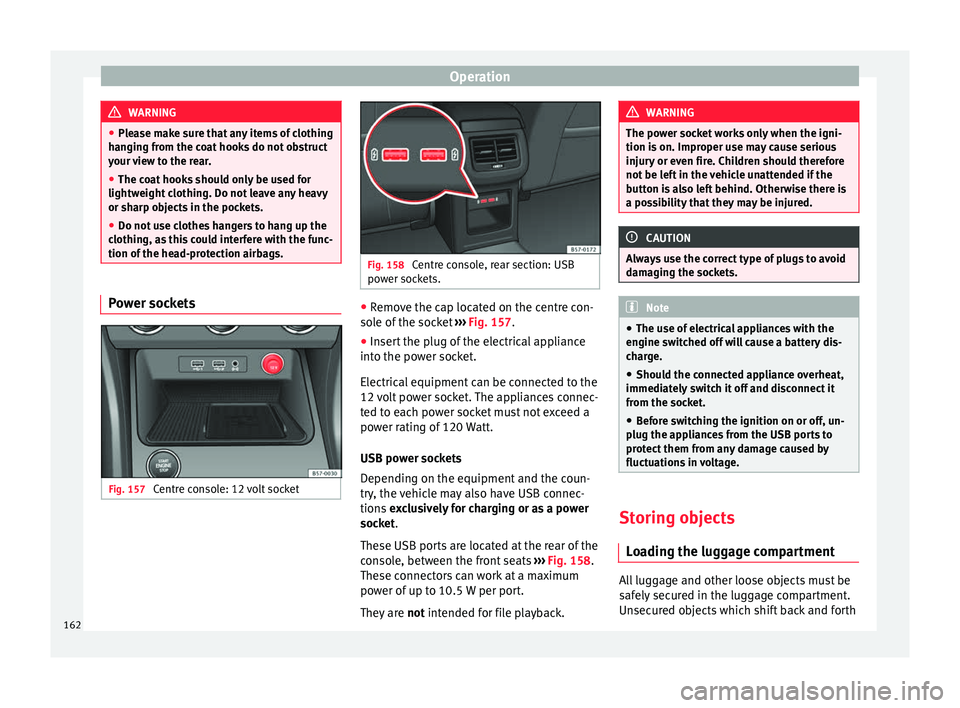
tion of the head-protection airbags. Power sockets
Fig. 157
Centre console: 12 volt socket Fig. 158
Centre console, rear section: USB
pow er soc
kets. ●
Remove the cap located on the centre con-
so l
e of
the socket ››› Fig. 157.
● Insert the plug of the electrical appliance
into the pow
er socket.
Electrical equipment can be connected to the
12 volt power socket. The appliances connec-
ted to each power socket must not exceed a
power rating of 120 Watt.
USB power sockets
Depending on the equipment and the coun-
try, the vehicle may also have USB connec-
tions exclusively for charging or as a power
socket.
These USB ports are located at the rear of the
console, between the front seats ››› Fig. 158.
These connectors can work at a maximum
power of up to 10.5 W per port.
They are not intended for file playback. WARNING
The power socket works only when the igni-
tion is on. Impr
oper use may cause serious
injury or even fire. Children should therefore
not be left in the vehicle unattended if the
button is also left behind. Otherwise there is
a possibility that they may be injured. CAUTION
Always use the correct type of plugs to avoid
dam agin
g the sockets. Note
● The use of el
ectrical appliances with the
engine switched off will cause a battery dis-
charge.
● Should the connected appliance overheat,
immediately
switch it off and disconnect it
from the socket.
● Before switching the ignition on or off, un-
plug the app
liances from the USB ports to
protect them from any damage caused by
fluctuations in voltage. Storing objects
Lo
a
ding the luggage compartment All luggage and other loose objects must be
s
af
ely
secured in the luggage compartment.
Unsecured objects which shift back and forth
162
Page 165 of 348
Transport and practical equipment
could impair the driving safety or driving
c h
ar
acteristics of the vehicle by shifting the
centre of gravity.
– Distribute the load evenly in the luggage
compar
tment.
– Place heavy objects as far forward as possi-
ble in the lug
gage compartment.
– Place the heavy objects first.
– Secure heavy objects to the fitted fastening
rings
››› page 165. WARNING
● Loo se lug
gage and other objects in the lug-
gage compartment could cause serious inju-
ries.
● Always stow objects in the luggage com-
partment
and secure them on the fastening
rings.
● Use suitable straps to secure heavy ob-
jects.
● D
uring sudden manoeuvres or accidents,
loose ob
jects can be thrown forward, injuring
vehicle occupants or passers-by. This in-
creased risk of injury will be further increased
if a loose object is struck by an inflating air-
bag. If this happens, objects may shoot out-
ward like a missile. Risk of fatal injury.
● Please note that the centre of gravity may
shift when tr
ansporting heavy objects; this
may affect vehicle handling and lead to an ac-
cident. Therefore, it is essential to adjust your speed and driving style accordingly, to
avoid ac
c
idents.
● Never exceed the allowed axle weights or
allo
wed maximum weight. If said weights are
exceeded, the driving characteristics of the
vehicle may change, leading to accidents, in-
juries and damage to the vehicle.
● Never leave your vehicle unattended, espe-
cia
lly when the rear lid is open. Children
could climb into the luggage compartment,
closing the door behind them; they will be
trapped and run the risk of death.
● Never allow children to play in or around
the vehic
le. Close and lock all the doors and
the rear lid when you leave the vehicle. Be-
fore you lock the vehicle, make sure that
there are no adults or children in the vehicle. Note
● Air cir c
ulation in the vehicle helps reduce
fogging of the windows. Used air escapes
through ventilation slits in the side trim of
the luggage compartment. Ensure that the
ventilation slots are never covered.
● Straps for securing the load to the fasten-
ing ring
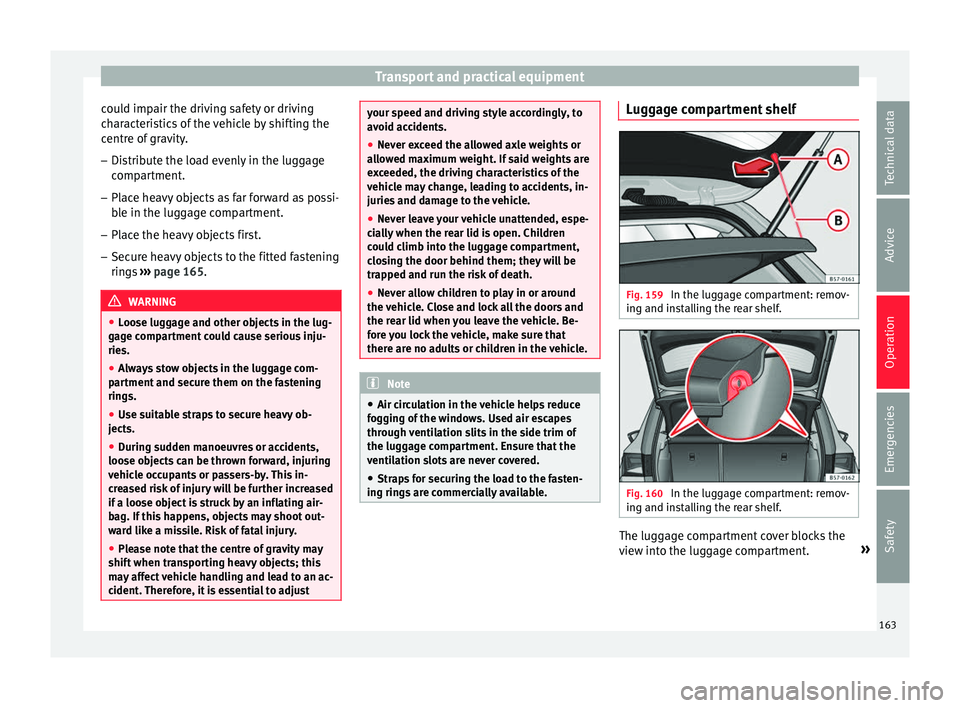
s are commercially available. Luggage compartment shelf
Fig. 159
In the luggage compartment: remov-
in g and in
s
talling the rear shelf. Fig. 160
In the luggage compartment: remov-
in g and in s
talling the rear shelf. The luggage compartment cover blocks the
v
iew int
o the lug
gage compartment. »
163
Technical data
Advice
Operation
Emergencies
Safety
Page 172 of 348
Operation
Loading the roof carrier system The load can only be secured if the crossbars
and the roof
c
arrier system are properly in-
stalled ››› .
Max imum authori
sed roof load
The maximum permissible roof load is 75 kg.
This figure comes from the combined weight
of the roof carrier, the cross bars and the load
itself on the roof ››› .
Alw a
ys check the weight of the roof carrier
system, the cross bars and the weight of the
load to be transported and weigh them if
necessary. Never exceed the maximum au-
thorised roof load.
If you are using cross bars and a roof carrier
with a lower weight rating, you will not be
able to carry the maximum authorised roof
load. In this case, do not exceed the maxi-
mum weight limit for the roof carrier which is
listed in the fitting instructions.
Distributing a load
Distribute loads uniformly and secure them
correctly ››› .
Chec k
att
achments
Once the cross bars and roof carrier system
have been installed, check the bolted con-
nections and attachments after a short jour- ney and subsequently with a certain frequen-
cy. WARNING
Exceeding the maximum authorised roof load
can r e
sult in accidents and considerable vehi-
cle damage.
● Never exceed the maximum authorised
load on the r
oof and on the axles or the vehi-
cle's maximum authorised weight.
● Never exceed the load capacity of the cross
bars
and the roof carrier system, even if the
maximum authorised roof load has not been
reached.
● Secure heavy items as far forward as possi-
ble and di
stribute the vehicle load uniformly. WARNING
If the load is loose or not secured, it could fall
from the r oof
carrier system or cause acci-
dents and injuries.
● Always use belts or retaining straps that
are suit
able and in a good condition.
● Secure the load properly. Air conditioning
He atin
g,
ventilation and cool-
ing
Introduction Read the additional information carefully
›› ›
page 51
Viewing Climatronic information
On the screen of Climatronic control unit and
on the screen of the factory-fitted Easy Con-
nect system, the theoretical values of the
temperature zones are shown.
The unit of temperature measurement can be
changed in the Easy Connect system.
Dust and pollen filter
The dust and pollen filter with its activated
charcoal cartridge serves as a barrier against
impurities in the air taken into the vehicle in-
terior.
The dust and pollen filter must be changed
regularly so that air conditioner performance
is not adversely affected.
If the filter loses efficiency prematurely due
to use in areas with very high levels of air
pollution, the filter must be changed more
frequently than stated in the Service Sched-
ule.
170
Page 205 of 348
Driving
Avoid carrying unnecessary loads
Giv en th
at
every kilo of extra weight will in-
crease the fuel consumption, it is advisable
to always check the luggage compartment to
make sure that no unnecessary loads are be-
ing transported.
Since the luggage rack increases the aerody-
namic drag of the vehicle, you should remove
it when not needed. At speeds of 100-120
km/h (62-75 mph), this will save 12% of fuel.
Save electrical energy
The engine drives the alternator, thereby gen-
erating electricity. This implies that any in-
crease in power consumption also increases
fuel consumption! For this reason, switch off
any unneeded electrical devices. Devices that
use a lot of electricity includes the blower at
a high setting, the rear window heating or
the seat heating*.
Power management
This sy
stem helps to ensure reliable
starting The power management controls the distribu-
tion of
el
ectric
al energy and thus helps to en-
sure that there is always enough power avail-
able to start the engine. If a vehicle with a conventional electrical sys-
tem is
left parked for a long time, the battery
will gradually lose its charge because certain
electrical devices, such as the electronic
gearbox lock continues to draw current even
when the ignition is off. In some cases there
may not be enough power available to start
the engine.
Your vehicle is equipped with an intelligent
power management system to control the
distribution of electrical energy. This signifi-
cantly improves reliability when starting the
engine, and also prolongs the useful life of
the battery.
The main functions incorporated in the power
management system are battery diagnosis,
residual current management and dynamic
power management.
Battery diagnosis
The battery diagnosis function constantly
registers the condition of the battery. Sen-
sors detect the battery voltage, battery cur-
rent and battery temperature. This enables
the system to calculate the current power lev-
el and charge condition of the battery.
Residual current management
The residual current management reduces
power consumption while the vehicle is
parked. It controls the supply of power to the
various electrical devices while the ignition is switched off. The system takes the battery di-
agnosi
s data into consideration.
Depending on the power level of the battery,
switch off the individual electrical devices
one after the other to prevent the battery
from losing too much charge and to ensure
that the engine can be started reliably.
Dynamic power management
While the vehicle is moving, this function dis-
tributes the available power to the various
electrical devices and systems according to
their requirements. The power management
ensures that on-board systems do not con-
sume more electrical power than the alterna-
tor can supply, and thus maintains the maxi-
mum possible battery power level. Note
● Neither is the po
wer management system
able to overcome the given physical limits.
Please remember that the power and useful
life of the battery are limited.
● When there is a risk that the vehicle will
not st
art, the alternator power failure or low
battery charge level warning lamp will be
shown ››› page 119. Flat battery
Starting ability has first priority.
»
203
Technical data
Advice
Operation
Emergencies
Safety
Page 215 of 348
Driver assistance systems
Read the additional information carefully
› ›
›
page 44
The cruise control system (CCS) is able to
maintain the set speed from 20 km/h (15
mph).
The CSS only reduces vehicle speed by ceas-
ing to accelerate, not by actively braking the
vehicle ››› .
C ontr
o
l lamp
When the warning lamp is lit, cruise con-
trol is active.
Several warning and control lamps light up
for a few seconds when the ignition is switch-
ed on, signalling that the function is being
verified. They will switch off after a few sec-
onds.
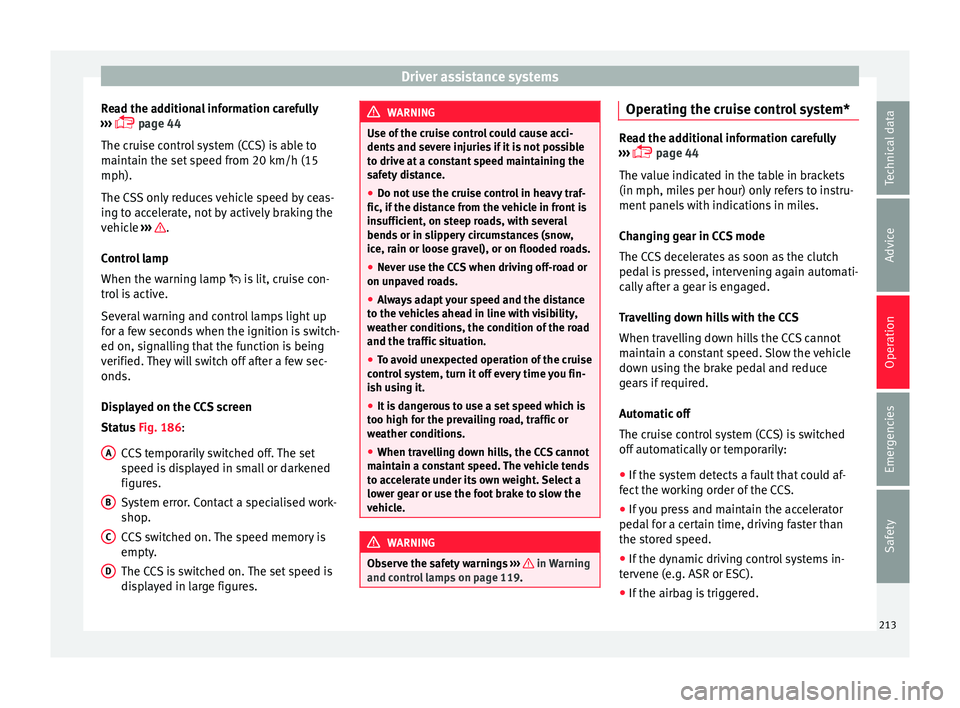
Displayed on the CCS screen
Status Fig. 186:
CCS temporarily switched off. The set
speed is displayed in small or darkened
figures.
System error. Contact a specialised work-
shop.
CCS switched on. The speed memory is
empty.
The CCS is switched on. The set speed is
displayed in large figures.
A B
C
D WARNING
Use of the cruise control could cause acci-
dents and sev
ere injuries if it is not possible
to drive at a constant speed maintaining the
safety distance.
● Do not use the cruise control in heavy traf-
fic, if the dis
tance from the vehicle in front is
insufficient, on steep roads, with several
bends or in slippery circumstances (snow,
ice, rain or loose gravel), or on flooded roads.
● Never use the CCS when driving off-road or
on unpav
ed roads.
● Always adapt your speed and the distance
to the v
ehicles ahead in line with visibility,
weather conditions, the condition of the road
and the traffic situation.
● To avoid unexpected operation of the cruise
contro
l system, turn it off every time you fin-
ish using it.
● It is dangerous to use a set speed which is
too high for the pr
evailing road, traffic or
weather conditions.
● When travelling down hills, the CCS cannot
maintain a c
onstant speed. The vehicle tends
to accelerate under its own weight. Select a
lower gear or use the foot brake to slow the
vehicle. WARNING
Observe the safety warnings ›››
in Warning
and contr o
l lamps on page 119. Operating the cruise control system*
Read the additional information carefully
›› ›
page 44
The value indicated in the table in brackets
(in mph, miles per hour) only refers to instru-
ment panels with indications in miles.
Changing gear in CCS mode
The CCS decelerates as soon as the clutch
pedal is pressed, intervening again automati-
cally after a gear is engaged.
Travelling down hills with the CCS
When travelling down hills the CCS cannot
maintain a constant speed. Slow the vehicle
down using the brake pedal and reduce
gears if required.
Automatic off
The cruise control system (CCS) is switched
off automatically or temporarily:
● If the system detects a fault that could af-
fect the w
orking order of the CCS.
● If you press and maintain the accelerator
pedal f
or a certain time, driving faster than
the stored speed.
● If the dynamic driving control systems in-
terv
ene (e.g. ASR or ESC).
● If the airbag is triggered.
213
Technical data
Advice
Operation
Emergencies
Safety
Page 216 of 348
Operation
Speed limiter Di s
p
lay messages and warning and
control lamp Fig. 187
On the instrument panel display:
me s
s
ages on the status of the speed limiter. The speed limiter helps avoid exceeding a
s peed indiv
idual
ly programmed upwards of
approximately 30 km/h (19 mph) driving in
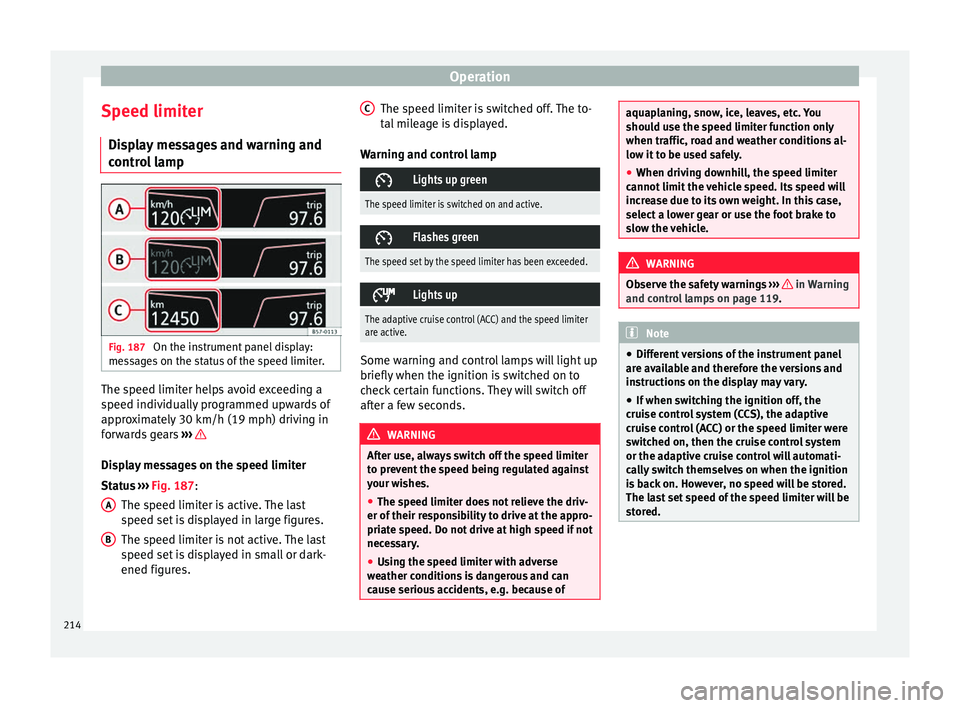
forwards gears ››› Display messages on the speed limiter
St
at
u
s ››› Fig. 187:
The speed limiter is active. The last
speed set is displayed in large figures.
The speed limiter is not active. The last
speed set is displayed in small or dark-
ened figures.
A B The speed limiter is switched off. The to-
t
al
mi
leage is displayed.
Warning and control lamp
Lights up green
The speed limiter is switched on and active.
Flashes green
The speed set by the speed limiter has been exceeded.
Lights up
The adaptive cruise control (ACC) and the speed limiter
are active.
Some warning and control lamps will light up
briefly
when the ignition i
s
switched on to
check certain functions. They will switch off
after a few seconds. WARNING
After use, always switch off the speed limiter
to pr ev
ent the speed being regulated against
your wishes.
● The speed limiter does not relieve the driv-
er of their re
sponsibility to drive at the appro-
priate speed. Do not drive at high speed if not
necessary.
● Using the speed limiter with adverse
weather c
onditions is dangerous and can
cause serious accidents, e.g. because of C
aquaplaning, snow, ice, leaves, etc. You
shoul
d u
se the speed limiter function only
when traffic, road and weather conditions al-
low it to be used safely.
● When driving downhill, the speed limiter
cannot limit
the vehicle speed. Its speed will
increase due to its own weight. In this case,
select a lower gear or use the foot brake to
slow the vehicle. WARNING
Observe the safety warnings ›
››
in Warning
and contr o
l lamps on page 119. Note
● Differ ent
versions of the instrument panel
are available and therefore the versions and
instructions on the display may vary.
● If when switching the ignition off, the
cruise c
ontrol system (CCS), the adaptive
cruise control (ACC) or the speed limiter were
switched on, then the cruise control system
or the adaptive cruise control will automati-
cally switch themselves on when the ignition
is back on. However, no speed will be stored.
The last set speed of the speed limiter will be
stored. 214
Page 276 of 348
Operation
Vehicles with the Start-Stop system
If the
v
ehicle has a factory-fitted towing
bracket or one that is retrofitted by SEAT, the
Start-Stop system operates as normal. No
special characteristics need to be taken into
account.
If the system does not recognise the trailer or
the trailer bracket has not been retrofitted by
SEAT, the Start-Stop system must be discon-
nected by pressing the corresponding button
in the lower part of the centre console before
driving with the trailer, and it should remain
off for the rest of the journey ››› .
V ehic
l
es with driving profile selection
If you are going to be towing a trailer, the use
of the Eco driving profile is not recommen-
ded. You are advised to select another of the
available driving profiles before beginning to
drive with a trailer. WARNING
Never use the trailer to transport people,
sinc e it
would put their life in danger and is
also prohibited. WARNING
Undue use of the towing bracket may cause
injury and ac
cidents.
● Only use the towing bracket if it is in a per-
fect s
tate of repair and is properly secured. ●
Never modif y
or repair the towing bracket
in any way.
● In order to reduce the danger of injury in
the event of
rear-end collisions and to avoid
injury to pedestrians and cyclists when park-
ing the vehicle, cover or remove the tow hitch
when you are not using a trailer.
● Never fit a towing bracket “with weight dis-
tribution” or “loa
d compensation”. The vehi-
cle has not been designed for this type of
towing bracket. The towing bracket could fail
and the trailer could be released from the ve-
hicle. WARNING
Driving with a trailer and transporting heavy
or lar g
e objects can affect driving properties
and even cause an accident.
● Always secure the load properly using belts
or strap
s that are suitable and in good condi-
tion.
● Adapt your speed and driving style at all
times t
o suit visibility, weather, road and traf-
fic conditions.
● Trailers with a high centre of gravity are
more likely
to overturn than those with a low
one.
● Avoid sudden braking and manoeuvres.
● Take great care when overtaking.
● Reduce speed immediately if you notice
that the tr
ailer is swaying, however slightly. ●
Never driv e at
more than 80 km/h (50 mph)
when towing a trailer (or at more than
100 km/h (60 mph) in exceptional circum-
stances). This also applies in countries where
driving at higher speeds is permitted. Take
into account the speed limit for vehicles with
trailers in the corresponding country, as it
could be less than the speed limit for vehi-
cles without a trailer.
● Never attempt to “straighten” the towing
vehicl
e and trailer while accelerating. WARNING
If the towing bracket has been retrofitted by a
non-S EA
T workshop, the Start-Stop system
must be disconnected manually whenever
driving with a trailer. Otherwise the brake
system could be damaged and could conse-
quently cause a serious accident or injury.
● Always disconnect the Start-Stop system
manual
ly when using a towing bracket that
has not been fitted by a SEAT workshop. Note
● Bef or
e hitching or unhitching a trailer, al-
ways deactivate the anti-theft alarm
››› page 125. Otherwise, the tilt sensor could
cause the alarm to go off.
● Do not drive with a trailer for the engine's
first
1000 km ››› page 201.
● SEAT recommends that, if possible, the tow
hitch be di
sassembled or covered when it is274
Page 277 of 348

Towing bracket device*
not going to be used. In the event of a rear-
end co
l
lision, the damage to the vehicle
could be greater if the bracket is fitted.
● Some retrofitted towing brackets cover the
rear t
owing eye. In these cases, the towing
eye should not be used for tow-starting or for
towing other vehicles. For this reason, if the
vehicle has been retrofitted with a towing
bracket, always keep the tow hitch in the ve-
hicle when you disassemble it. Control lamp
Lamp on button lights up
The tow hitch is not securely locked in position.
Check that the towing bracket is locked
››› page 276. Some warning and control lamps will light up
briefly
when the ignition i
s
switched on to
check certain functions. They will switch off
after a few seconds. WARNING
If the warning lamps and the corresponding
mes s
ages are ignored when they light up, the
vehicle may stall in traffic and cause acci-
dents and severe injuries.
● Never ignore the warning lamps or messag-
es.
● Stop the
vehicle at the next opportunity
and in a safe p
lace. CAUTION
Failure to heed the control lamps and corre-
spondin g t
ext messages when they light up
may result in damage to the vehicle. Technical requirements
Vehicles that are
factor
y-equipped with a
towing bracket fulfil all the technical and le-
gal requirements for driving with a trailer.
If the vehicle is retrofitted with a towing
bracket, only a bracket that is authorised for
the maximum authorised load of the trailer
that is to be towed may be fitted. The towing
bracket must be suitable for the vehicle and
the trailer and must be properly secured to
the vehicle's chassis. Only use a towing
bracket that has been authorised by SEAT for
this vehicle. Always check and take into ac-
count the towing bracket manufacturer's in-
structions. Never fit a towing bracket “with
weight distribution” or “load compensation”.
Towing bracket fitted on the bumper
Never fit a towing bracket to the bumper or to
the area where the bumper is mounted. The
towing bracket should not impair the bum-
per's function. Do not make modifications or
repairs to the exhaust system or the brake
system. Make regular checks to ensure that
the towing bracket is secure. Engine cooling system
Drivin
g w
ith a trailer increases the load on
the engine and cooling system. The cooling
system should have sufficient coolant and be
prepared for the additional effort involved in
driving with a trailer.
Trailer brakes
If the trailer has its own brake system, please
take the relevant legal requirements into ac-
count. Never connect the trailer's brake sys-
tem to the vehicle's brake system.
Tow rope
Always use a cable between the vehicle and
the trailer ››› page 278.
Trailer rear lights
The trailer's rear lights should comply with
the statutory safety regulations ››› page 278.
Never connect the trailer's rear lights directly
to the vehicle's electric system. If you are not
sure that the trailer's electrical connection is
correct, have it checked by a specialised
workshop. SEAT recommends visiting a SEAT
dealership for this.
Exterior mirrors
If you cannot see the area behind the trailer
with the exterior mirrors of the towing vehi-
cle, additional mirrors will have to be instal-
led in accordance with the regulations of the »
275
Technical data
Advice
Operation
Emergencies
Safety
Page 279 of 348
Towing bracket device*
● Turn the t
o
w hitch under the bumper with
your hand until you feel and see that it en-
gages and the control lamp on the ››› Fig. 235
button stays on.
● Close the rear lid.
Meanin
g of control lamp
● If the warning light of the button ›››
Fig. 235
is flashing , this means that the tow hitch has
not been attached properly or is damaged
››› .
● If the warning lamp st
a
ys on with the rear
lid open, the tow hitch is correctly in place
both when engaged and when covered.
● The control lamp of the button will go off
appro
x. 1 minute after closing the rear lid. WARNING
Undue use of the towing bracket may cause
injury and ac
cidents.
● Only use the tow hitch if it is properly en-
gaged.
● A
lways ensure that no person, animal or
obj
ect is to be found in the path of the tow
hitch.
● Never use a tool or instrument while the
tow hit
ch is moving.
● Never press the ›››
Fig. 235 button when
there is a trailer hooked to the vehicle or
when a carrier system or other accessories
are mounted on the tow hitch. ●
If the t o
w hitch is not attached properly, do
not use it. Instead, go to a specialised work-
shop and have the towing bracket checked.
● If you detect any fault in the electrical sys-
tem or in the to
wing bracket, contact a speci-
alised workshop and ask them to check it.
● If the ball has a diameter of less than 49
mm at any
one point, do not use the towing
bracket under any circumstances. CAUTION
If you clean the vehicle with high-pressure or
s te
am devices, do not point the jet directly
towards the retractable tow hitch or the trail-
er power socket, as this may damage the
joints or remove the grease necessary for lu-
brication. Note
At extremely low temperatures, the tow hitch
ma y
be impossible to use. In this case, place
the vehicle in a warmer location (for example,
a garage). Fitting a bicycle carrier on the retract-
ab
le t
ow hitch The maximum allowed weight of the carrier
sy
s
t
em, including the load, is 75 kg. The car-
rier system should not protrude more than
700 mm backwards from the spherical head.
Only carrier systems on which up to 3 bikes can be mounted are allowed. Heavier bicy-
cle
s must be mounted as close to the vehicle
as possible (tow hitch). WARNING
The incorrect use of the tow hitch with a bicy-
cl e r
ack mounted on the tow hitch can cause
accidents and injury.
● Never exceed the maximum weight or the
limits indic
ated above.
● The bicycle rack may not be mounted to the
neck of
the hitch below the ball because, due
to the shape of the neck and depending on
the rack model, the rack could be incorrectly
mounted on the vehicle.
● Always read and take the manufacturer as-
sembly in
structions into account. CAUTION
If the maximum weight and limits indicated
abov e ar
e exceeded, the vehicle may suffer
considerable damage.
● Never exceed the values indicated! Note
SEAT recommends removing, as far as possi-
bl e, a
ll removable parts of the bicycles before
setting off. These parts include, for example,
baskets and saddlebags, child seats or bat-
teries. This improves aerodynamics and the
centre of gravity of the rack system. 277
Technical data
Advice
Operation
Emergencies
Safety
Page 281 of 348
Towing bracket device*
Before hitching or unhitching a trailer, always
t urn off
the anti-thef
t alarm. Otherwise, the
tilt sensor could cause the alarm to go off.
Trailers with LED rear lights
For technical reasons, trailers fitted with LED
rear lights cannot be connected to the anti-
theft alarm system.
When the vehicle is locked, the alarm does
not go off when the electrical connection with
the trailer is cut if it has rear lights with light-
emitting diodes.
If the Eco driving profile was selected when
hitching the trailer, this will automatically
switch to the Normal profile. If the system
cannot detect the attached trailer or if the
towing bracket has been retrofitted by an au-
to repair shop other than SEAT, you must
manually select the Normal profile before you
start driving with a trailer attached. To recon-
nect the Eco profile once the trailer has been
unhitched, switch the ignition off and back
on once. WARNING
If the cables are improperly or incorrectly
connect ed, it
may lead to an excessive
amount of current supplied to the trailer,
which can cause abnormalities in the entire
vehicle electronic system, as well as acci-
dents and serious injuries. ●
Ens ur
e that any repairs that need to be car-
ried out on the electrical system are carried
out by a specialised workshop.
● Never connect the trailer's electric system
directly t
o the electrical connections of the
tail lights or any other power sources. WARNING
Contact between the pins of the trailer power
soc ket
can cause short circuits, overloading
of the electrical system or failure of the light-
ing system, and consequently can cause acci-
dents and serious injuries.
● Never connect the pins of the trailer power
socket
to each other.
● Make sure any work on bent pins is carried
out by
a specialised workshop. CAUTION
Do not leave the trailer connected to the vehi-
cl e when p
arked; place it on its support
wheel or its supports. If the vehicle rises or
falls due, for example, to a variation of the
load or a burst tyre, increased pressure will
be placed on the towing bracket and the trail-
er, and both the vehicle and the trailer can be
damaged. Note
● In ca se of
malfunctioning of the electrical
systems of the vehicle or trailer, as well as of the anti-theft system, have these checked out
by
a s
pecialised workshop.
● If the trailer accessories consume energy
through the pow
er socket to the trailer and
the engine is turned off, the battery will dis-
charge.
● If the vehicle battery is running low, the
electrica
l connection with the trailer will be
automatically cut. Loading a trailer
Technically permissible maximum trailer
w
eight
and
vertical load on the coupling de-
vice
The technically permissible maximum trailer
weight is the weight that the vehicle can tow
››› . The vertical load on the coupling load
i s
e
xerted vertically from above on the tow
hitch of the towing bracket ››› page 319.
The information on the maximum trailer
weight and vertical load on the coupling de-
vice contained in the type plate of the towing
bracket are experimental values only. The
correct figures for your specific model, which
may be lower than these figures, are given in
the vehicle documentation. The information
in the vehicle documentation takes prece-
dence at all times. »
279
Technical data
Advice
Operation
Emergencies
Safety