mirror Seat Ateca 2018 Owner's Guide
[x] Cancel search | Manufacturer: SEAT, Model Year: 2018, Model line: Ateca, Model: Seat Ateca 2018Pages: 348, PDF Size: 7.32 MB
Page 247 of 348
Driver assistance systems
Traffic sign detection system* 1)
Intr oduction The traffic sign detection system records the
st
and
ard traffic signs in front of the vehicle
with a camera located on the base of the in-
terior mirror and provides information about
speed limits and overtaking prohibitions.
Within its limitations, the system also dis-
plays additional signals, such as time-specif-
ic prohibitions, signs for vehicles towing trail-
ers ›››
page 273 or limitations that only apply
in the event of rain. Even on journeys without
signs, the system may display any applicable
speed limits.
In Germany, on motorways and vehicle roads,
besides speed limits and overtaking provi-
sions the system also displays the end of
prohibition signs. The valid speed limit at the
time in other countries is always shown. WARNING
The technology in the traffic sign detection
sys t
em cannot change the limits imposed by
the laws of physics and only works within the
system's limits. Do not let the extra conven-
ience afforded by the traffic sign detection
system tempt you into taking any risks when
driving. The system is not a replacement for
driver awareness. ●
Adapt
your speed and driving style to suit
visibility, weather, road and traffic condi-
tions.
● Poor visibility, darkness, snow, rain and fog
may
lead to the system failing to display traf-
fic signs or not displaying them correctly.
● If the camera's field of vision is dirty, cov-
ered or dam
aged, system operation may be
impaired. WARNING
The driving recommendations and traffic indi-
c ation s
shown on the traffic sign detection
system may differ from the actual current
traffic situation.
● The system may not detect or correctly
show al
l the traffic signs.
● Traffic signs and traffic regulations have
priority ov
er the recommendations and dis-
plays provided by the system. Note
In order not to compromise the system's op-
eration, p l
ease take the following points into
account:
● Regularly clean the area of vision of the
camera and k
eep it in a clean state, without
snow or ice. ●
Do not c o
ver the field of vision of the cam-
era.
● Always replace damaged or worn blades
when required t
o avoid lines on the camera's
field of vision.
● Check that the windscreen is not damaged
in the area of
the camera's field of vision. Note
● The u se of out
dated maps on the naviga-
tion system may cause the system to show
traffic signs incorrectly.
● In the waypoints mode of the navigation
syst
em, the traffic sign detection system is
only partly available. 1)
System available depending on the country.
245
Technical data
Advice
Operation
Emergencies
Safety
Page 248 of 348
Operation
Indication on display Fig. 214
On the instrument panel display: ex-
amp l
e
s of speed limits or overtaking prohibi-
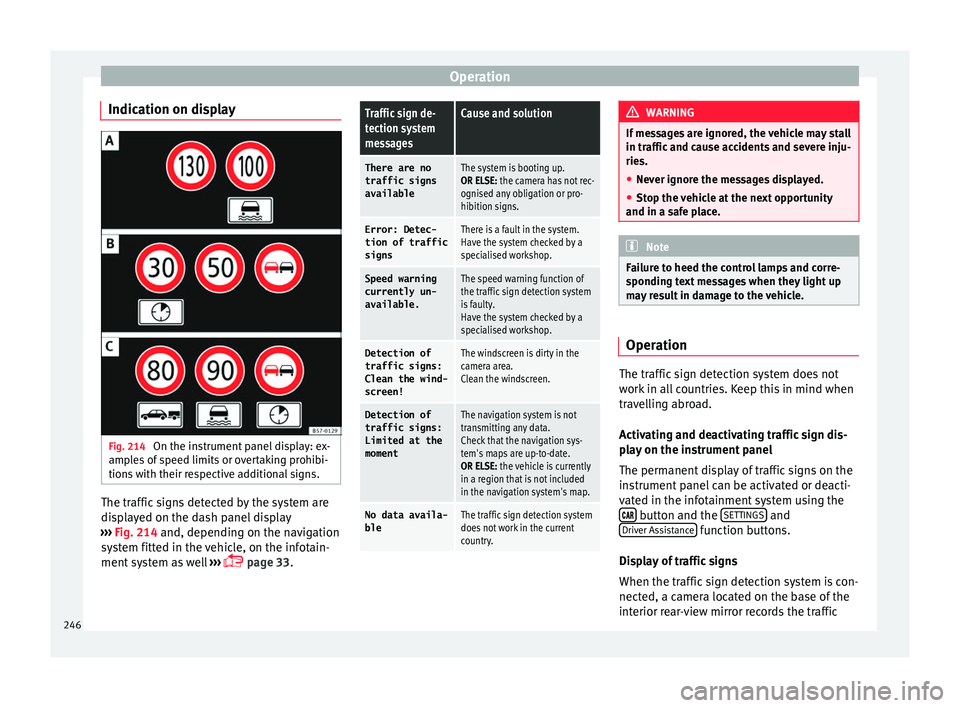
tions with their respective additional signs. The traffic signs detected by the system are
di
s
p
layed on the dash panel display
››› Fig. 214 and, depending on the navigation
system fitted in the vehicle, on the infotain-
ment system as well ›››
page 33.
Traffic sign de-
tection system
messagesCause and solution
There are no
traffic signs
availableThe system is booting up.
OR ELSE: the camera has not rec-
ognised any obligation or pro-
hibition signs.
Error: Detec- tion of traffic
signsThere is a fault in the system.
Have the system checked by a
specialised workshop.
Speed warningcurrently un-
available.The speed warning function of
the traffic sign detection system
is faulty.
Have the system checked by a
specialised workshop.
Detection oftraffic signs:
Clean the wind-
screen!The windscreen is dirty in the
camera area.
Clean the windscreen.
Detection of
traffic signs:
Limited at the
momentThe navigation system is not
transmitting any data.
Check that the navigation sys-
tem's maps are up-to-date.
OR ELSE: the vehicle is currently
in a region that is not included
in the navigation system's map.
No data availa- bleThe traffic sign detection system
does not work in the current
country. WARNING
If messages are ignored, the vehicle may stall
in traffic and c
ause accidents and severe inju-
ries.
● Never ignore the messages displayed.
● Stop the vehicle at the next opportunity
and in a safe p
lace. Note
Failure to heed the control lamps and corre-
spondin g t
ext messages when they light up
may result in damage to the vehicle. Operation
The traffic sign detection system does not
w
ork
in al
l countries. Keep this in mind when
travelling abroad.
Activating and deactivating traffic sign dis-
play on the instrument panel
The permanent display of traffic signs on the
instrument panel can be activated or deacti-
vated in the infotainment system using the button and the
S
ET
TINGS and
Driv er As
s
istance function buttons.
Di s
p
lay of traffic signs
When the traffic sign detection system is con-
nected, a camera located on the base of the
interior rear-view mirror records the traffic
246
Page 260 of 348
Operation
after four seconds (does not affect the tone
of the c
on
stant warning).
In order to view the entire periphery of the ve-
hicle, the vehicle must be moved a few me-
tres forwards and backwards. Thus, the miss-
ing areas are screened and obstacles at the
sides of the vehicle are displayed
››› Fig. 223 C .
S pec
i
al features of ParkPilot with Area View
In the following situations the screened area
on the side of the vehicle is automatically
hidden:
● When a vehicle door is opened.
● When the ASR is switched off.
● When there is ASR or ESC regulation.
● If the vehicle remains stationary for more
than appr
oximately 3 minutes. WARNING
● Alw a
ys pay attention, also when looking
straight ahead, to traffic and the vehicle sur-
roundings. The assistance systems are not a
replacement for driver awareness. When in-
serting or removing the vehicle from a park-
ing space, or when performing similar ma-
noeuvres the driver always assumes the re-
sponsibility.
● Adapt your speed and driving style at all
times t
o suit visibility, weather, road and traf-
fic conditions. ●
The ultr a
sound sensors have blind spots in
which obstacles and people are not regis-
tered. Pay special attention to children and
animals.
● Always keep visual control of the vehicle
surrou
ndings: use the mirrors for additional
help. CAUTION
Parking Aid functions may be negatively af-
f ect ed b
y different factors that may lead to
damage to the vehicle or its immediate sur-
rounds:
● Under certain circumstances, the system
does not
detect or display certain objects:
– Objects such as chains, trailer draw bars,
fences, posts and thin trees.
– Objects that are located above the sen-
sors, such as protrusions in a wall.
– Objects with certain surfaces or struc-
tures, such as wire mesh fences or pow-
der snow.
● Certain surfaces of objects and garments
do not refl
ect the ultrasound sensors' sig-
nals. The system cannot detect these objects
or people wearing such clothes correctly.
● Ultrasound sensor signals may be affected
by e
xternal sound sources. In certain circum-
stances this may prevent them from detect-
ing people or objects.
● Please note that low obstacles detected by
the syst
em may no longer be registered by the sensors as the car moves closer, so the
sys
t
em will not give any further warning. In
certain circumstances, objects such as high
kerbs that could damage the bottom of the
vehicle are not detected either.
● If the first warning from the ParkPilot is ig-
nored, the v
ehicle could suffer considerable
damage.
● The knocks or damage on the radiator
grill
e, bumper, wheel arch and vehicle under-
body can adjust the orientation of the sen-
sors. This can affect the parking aid function.
In this case, have the function checked by a
specialised workshop.
● A registration plate or plate holder on the
front w
ith larger than the space for the regis-
tration plate, or a registration plate that is
curved or warped can cause:
– false detections,
– loss of sensor visibility. Note
● In cer t
ain situations, the system can give a
warning even though there is no obstacle in
the detected area, e.g:
–with rough or cobbled floors or ground
with long grass;
– with external ultrasound sources, such as
cleaning vehicles or other vehicles equip-
ped with ultrasound systems;
– in downpours, intense snow, hail or
dense exhaust gases, 258
Page 265 of 348
Driver assistance systems
The approximate measurement range of the
r e
ar sen
sors is:
side area0.60 m
central area1.60 m As you approach the obstacle, the time inter-
val
betw
een the audible warnings will be re-
duced. When you reach around 0.30 m the
warning will be constant: Do not continue to
move forward (or backward) ››› ,
››› !
If y
ou maintain separation from the obstacle,
the volume of the warning begins to reduce
after four seconds (does not affect the tone
of the constant warning).
Activating/Deactivating
When engaging reverse gear, the parking aid
is automatically switched on. This is con-
firmed with a short warning.
On disengaging reverse gear, the parking aid
system is switched off. WARNING
● Alw a
ys pay attention, also when looking
straight ahead, to traffic and the vehicle sur-
roundings. The assistance systems are not a
replacement for driver awareness. When in-
serting or removing the vehicle from a park-
ing space, or when performing similar ma-
noeuvres the driver always assumes the re-
sponsibility. ●
Adapt
your speed and driving style at all
times to suit visibility, weather, road and traf-
fic conditions.
● The ultrasound sensors have blind spots in
which ob
stacles and people are not regis-
tered. Pay special attention to children and
animals.
● Always keep visual control of the vehicle
surrou
ndings: use the mirrors for additional
help. CAUTION
Parking Aid functions may be negatively af-
f ect ed b
y different factors that may lead to
damage to the vehicle or its immediate sur-
rounds:
● Under certain circumstances, the system
does not
detect or display certain objects:
– Objects such as chains, trailer draw bars,
fences, posts and thin trees.
– Objects that are located above the sen-
sors, such as protrusions in a wall.
– Objects with certain surfaces or struc-
tures, such as wire mesh fences or pow-
der snow.
● Certain surfaces of objects and garments
do not refl
ect the ultrasound sensors' sig-
nals. The system cannot detect these objects
or people wearing such clothes correctly.
● Ultrasound sensor signals may be affected
by e
xternal sound sources. In certain circum- stances this may prevent them from detect-
ing peop
l
e or objects.
● Please note that low obstacles detected by
the syst
em may no longer be registered by
the sensors as the car moves closer, so the
system will not give any further warning. In
certain circumstances, objects such as high
kerbs that could damage the bottom of the
vehicle are not detected either.
● If the first warning from the ParkPilot is ig-
nored, the v
ehicle could suffer considerable
damage.
● The knocks or damage on the radiator
grill
e, bumper, wheel arch and vehicle under-
body can adjust the orientation of the sen-
sors. This can affect the parking aid function.
In this case, have the function checked by a
specialised workshop. Note
● In cer t
ain situations, the system can give a
warning even though there is no obstacle in
the detected area, e.g:
–with rough or cobbled floors or ground
with long grass;
– with external ultrasound sources, such as
cleaning vehicles or other vehicles equip-
ped with ultrasound systems;
– in downpours, intense snow, hail or
dense exhaust gases,
– if the number plate is not perfectly se-
cured to the bumper surface, » 263
Technical data
Advice
Operation
Emergencies
Safety
Page 268 of 348
Operation
Introduction Using 4 cameras, the system generates a rep-
re
sent
ation that is shown on the infotain-
ment system display. The cameras are loca-
ted on the radiator grille, the exterior mirrors
and the rear lid.
The functions and representations of the
Area View system may vary depending on
whether or not the vehicle has ParkPilot. WARNING
The image from the cameras does not make it
pos s
ible to calculate the distance to the ob-
stacles (people, vehicles, etc.) precisely, so
using them could cause serious accidents
and injury.
● The camera lenses augment and distort the
vis
ual field and the objects on the screen are
seen differently and imprecisely.
● Certain objects may not be shown or may
not be shown
very clearly, for example, posts
or thin rails, due to the screen resolution or if
light conditions are insufficient.
● The cameras have blind spots in which ob-
stac
les and people are not registered.
● The camera lens must be kept free, without
snow or ic
e, and should not be covered. WARNING
The smart technology incorporated into the
Top V
iew Camera* system cannot overcome the limits imposed by the laws of physics and
it on
ly
works within the limits of the system.
The greater convenience provided by the Area
View system should never tempt you to take
any risk that may compromise safety. If used
negligently or involuntarily, it may cause se-
rious accidents and injuries. The system is
not a replacement for driver awareness.
● Adapt your speed and driving style to suit
vis
ibility, weather, road and traffic condi-
tions.
● Do not be distracted from the traffic by
looking at
the screen.
● Monitor the area around the vehicle at all
times, sinc
e the cameras do not capture small
children, animals and certain objects in all
situations.
● The use of a number plate may interfere in
the view
s shown on the screen, since the
cameras' field of vision may be reduced.
● The system will probably be unable to rep-
resent
all areas clearly. CAUTION
● The camer a im
ages are only two-dimen-
sional. Due to a lack of spatial depth, objects
that jut out or holes on the road, for example,
are more difficult to detect or may not be
seen at all.
● In certain circumstances, the camera does
not capt
ure objects such as beams, fences,
posts or thin trees, which could damage the vehicle. ●
The sys t
em displays the auxiliary lines and
boxes regardless of the vehicle's environ-
ment, no objects are detected. The driver is
responsible for determining that the vehicle
will fit in the parking space. CAUTION
In order to guarantee good system operation,
k eep the c amer
as clean, free of snow or ice,
and do not cover them with adhesives or oth-
er objects.
● Never use abrasive cleaning products to
cle
an the camera lenses.
● Do not use hot or warm water to remove ice
or snow fr
om the camera lenses. Doing so
could damage the lenses. Area View system
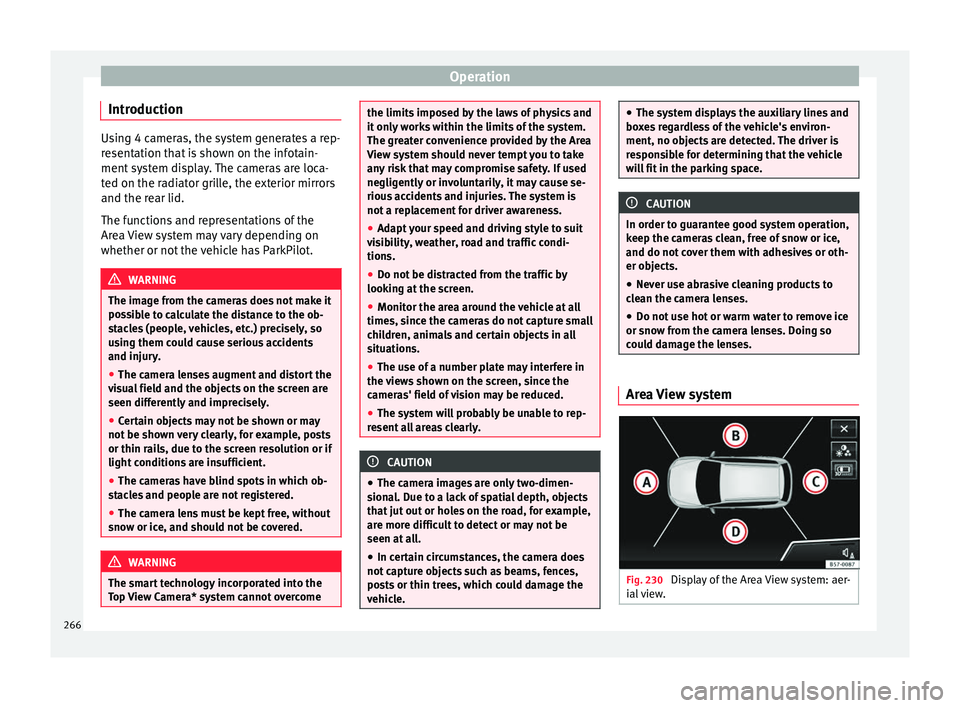
Fig. 230
Display of the Area View system: aer-
i al
view. 266
Page 275 of 348
Towing bracket device*
● OR: Pr e
s
s the RVC function button 1)
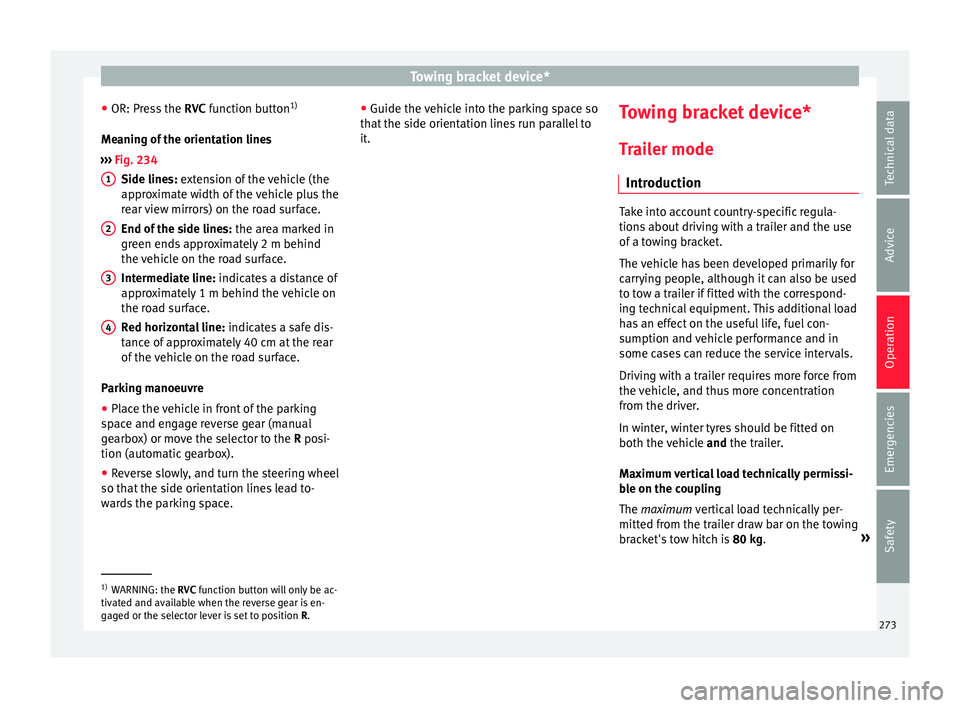
Meaning of the orientation lines
››› Fig. 234
Side lines: extension of the vehicle (the
approximate width of the vehicle plus the
rear view mirrors) on the road surface.
End of the side lines: the area marked in
green ends approximately 2 m behind
the vehicle on the road surface.
Intermediate line: indicates a distance of
approximately 1 m behind the vehicle on
the road surface.
Red horizontal line: indicates a safe dis-
tance of approximately 40 cm at the rear
of the vehicle on the road surface.
Parking manoeuvre ● Place the vehicle in front of the parking
spac
e and engage reverse gear (manual
gearbox) or move the selector to the R posi-
tion (automatic gearbox).
● Reverse slowly, and turn the steering wheel
so that the s
ide orientation lines lead to-
wards the parking space. 1 2
3
4 ●
Guide the v
ehic
le into the parking space so
that the side orientation lines run parallel to
it. Towing bracket device*
T r
ai
ler mode
Introduction Take into account country-specific regula-
tions
about
driving with a trailer and the use
of a towing bracket.
The vehicle has been developed primarily for
carrying people, although it can also be used
to tow a trailer if fitted with the correspond-
ing technical equipment. This additional load
has an effect on the useful life, fuel con-
sumption and vehicle performance and in
some cases can reduce the service intervals.
Driving with a trailer requires more force from
the vehicle, and thus more concentration
from the driver.
In winter, winter tyres should be fitted on
both the vehicle and the trailer.
Maximum vertical load technically permissi-
ble on the coupling
The maximum vertical load technically per-
mitted from the trailer draw bar on the towing
bracket's tow hitch is 80 kg. »1)
WARNING: the RVC function b
utton will only be ac-
tivated and available when the reverse gear is en-
gaged or the selector lever is set to position R.
273
Technical data
Advice
Operation
Emergencies
Safety
Page 277 of 348

Towing bracket device*
not going to be used. In the event of a rear-
end co
l
lision, the damage to the vehicle
could be greater if the bracket is fitted.
● Some retrofitted towing brackets cover the
rear t
owing eye. In these cases, the towing
eye should not be used for tow-starting or for
towing other vehicles. For this reason, if the
vehicle has been retrofitted with a towing
bracket, always keep the tow hitch in the ve-
hicle when you disassemble it. Control lamp
Lamp on button lights up
The tow hitch is not securely locked in position.
Check that the towing bracket is locked
››› page 276. Some warning and control lamps will light up
briefly
when the ignition i
s
switched on to
check certain functions. They will switch off
after a few seconds. WARNING
If the warning lamps and the corresponding
mes s
ages are ignored when they light up, the
vehicle may stall in traffic and cause acci-
dents and severe injuries.
● Never ignore the warning lamps or messag-
es.
● Stop the
vehicle at the next opportunity
and in a safe p
lace. CAUTION
Failure to heed the control lamps and corre-
spondin g t
ext messages when they light up
may result in damage to the vehicle. Technical requirements
Vehicles that are
factor
y-equipped with a
towing bracket fulfil all the technical and le-
gal requirements for driving with a trailer.
If the vehicle is retrofitted with a towing
bracket, only a bracket that is authorised for
the maximum authorised load of the trailer
that is to be towed may be fitted. The towing
bracket must be suitable for the vehicle and
the trailer and must be properly secured to
the vehicle's chassis. Only use a towing
bracket that has been authorised by SEAT for
this vehicle. Always check and take into ac-
count the towing bracket manufacturer's in-
structions. Never fit a towing bracket “with
weight distribution” or “load compensation”.
Towing bracket fitted on the bumper
Never fit a towing bracket to the bumper or to
the area where the bumper is mounted. The
towing bracket should not impair the bum-
per's function. Do not make modifications or
repairs to the exhaust system or the brake
system. Make regular checks to ensure that
the towing bracket is secure. Engine cooling system
Drivin
g w
ith a trailer increases the load on
the engine and cooling system. The cooling
system should have sufficient coolant and be
prepared for the additional effort involved in
driving with a trailer.
Trailer brakes
If the trailer has its own brake system, please
take the relevant legal requirements into ac-
count. Never connect the trailer's brake sys-
tem to the vehicle's brake system.
Tow rope
Always use a cable between the vehicle and
the trailer ››› page 278.
Trailer rear lights
The trailer's rear lights should comply with
the statutory safety regulations ››› page 278.
Never connect the trailer's rear lights directly
to the vehicle's electric system. If you are not
sure that the trailer's electrical connection is
correct, have it checked by a specialised
workshop. SEAT recommends visiting a SEAT
dealership for this.
Exterior mirrors
If you cannot see the area behind the trailer
with the exterior mirrors of the towing vehi-
cle, additional mirrors will have to be instal-
led in accordance with the regulations of the »
275
Technical data
Advice
Operation
Emergencies
Safety
Page 278 of 348
Operation
country in question. The exterior mirrors
shou l
d be a
djusted before you start driving
and must provide a sufficient field of vision
at the rear.
Trailer maximum electricity consumption
ConsumersEurope, Asia, Africa, South America and
Central AmericaAustralia
Brake lights (total)84 Watts108 Watts
Turn signal (on each
side)42 Watts54 Watts
Side lights (on each
side)50 Watts100 Watts
Reverse lights (in
total)42 Watts54 Watts
Rear fog light42 Watts54 Watts
Never exceed the values indicated! WARNING
If the towing bracket is wrongly fitted or is
not the right one, the tr
ailer could become
detached from the vehicle and cause serious
injury. CAUTION
● If the r e
ar lights of the trailer are not cor-
rectly connected, the vehicle's electronic sys-
tem may be damaged.
● If the trailer absorbs excessive electric cur-
rent, the v
ehicle's electronic system may be
damaged.
● Never connect the trailer's electric system
directly t
o the electrical connections of the
tail lights or any other power sources. Only
use the connections intended for providing
electric current to the trailer. Electrical unlocking tow hitch
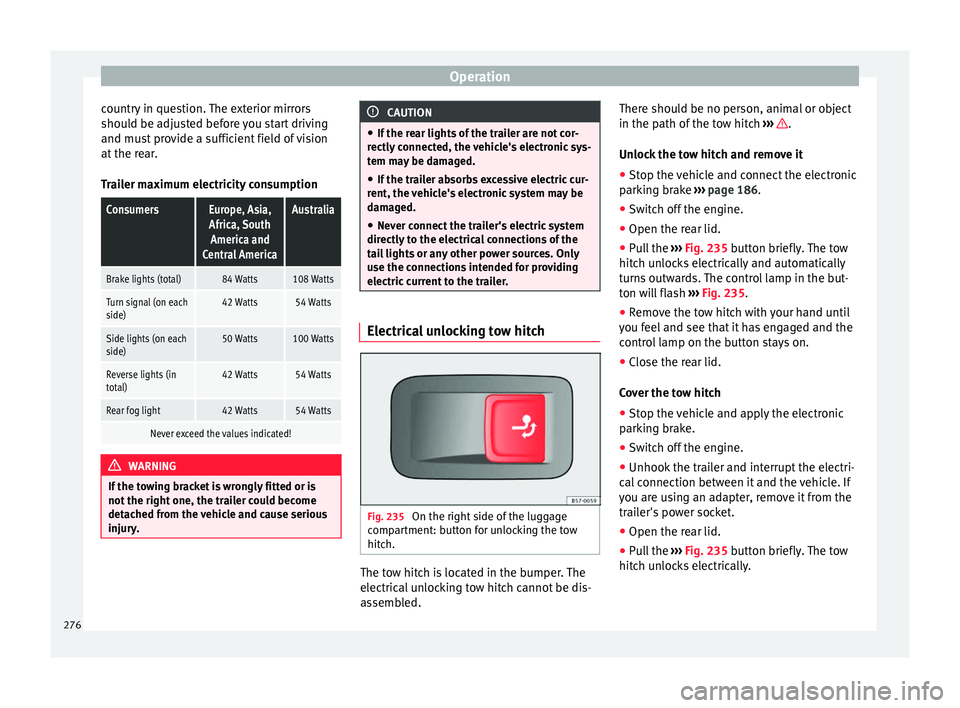
Fig. 235
On the right side of the luggage
c omp
ar
tment: button for unlocking the tow
hitch. The tow hitch is located in the bumper. The
el
ectric al
unlocking tow hitch cannot be dis-
assembled. There should be no person, animal or object
in the path of the t
ow hitch ››› .
Un loc
k
the tow hitch and remove it
● Stop the vehicle and connect the electronic
parkin
g brake ››› page 186.
● Switch off the engine.
● Open the rear lid.
● Pull the ››› Fig. 235 b
utton briefly. The tow
hitch unlocks electrically and automatically
turns outwards. The control lamp in the but-
ton will flash ››› Fig. 235.
● Remove the tow hitch with your hand until
you feel
and see that it has engaged and the
control lamp on the button stays on.
● Close the rear lid.
Cov
er the tow hitch
● Stop the vehicle and apply the electronic
parkin
g brake.
● Switch off the engine.
● Unhook the trailer and interrupt the electri-
cal c
onnection between it and the vehicle. If
you are using an adapter, remove it from the
trailer's power socket.
● Open the rear lid.
● Pull the ››› Fig. 235
button briefly. The tow
hitch unlocks electrically.
276
Page 288 of 348
Advice
Automatic car washes
B ef
or
e going through a car wash, be sure to
take the usual precautions such as closing
the windows and roof. If the vehicle has spe-
cial accessories such as spoilers or a roof
rack, it is advisable to consult the car wash
tunnel operator.
It is best to use a car wash without revolving
bristles if possible.
Washing the vehicle with a high pressure
cleaner
When washing the vehicle with a high-pres-
sure cleaner, always follow the operating in-
structions for the equipment. This applies
particularly to the operating pressure and the
spraying distance. Do not hold the nozzle too
close to soft materials such as rubber hoses
or seals. The same applies for the parking aid
sensors*, which are located in the rear
and/or front bumper.
Do not use a nozzle that sprays the water out
in a direct stream or one that has a rotating
jet for forcing off dirt.
Factory-fitted adhesive sheets
The following indications should be taken in-
to account to avoid damaging adhesive
sheets:
● Do not use high pressure cleaners. ●
Do not use s crapers to remove ice or snow
from the sheets.
● Do not polish the adhesive sheets.
● Do not use dirty cloths or sponges.
● It is preferable to wash them with a soft
spong
e and gentle neutral soap.
Washing the car by hand
When washing the car by hand, use plenty of
water to soften the dirt first, and rinse off as
well as possible.
Then clean the vehicle with a soft sponge,
glove or brush using only slight pressure.
You should start on the roof and work down.
Special car soap should only be used for very
persistent dirt.
Rinse the sponge or glove thoroughly and of-
ten.
Wheels, sills and similar should be cleaned
last. Use a second sponge for this. WARNING
● The v ehic
le should only be washed with the
ignition switched off. Failure to follow this in-
struction could result in an accident.
● Do not clean the underside of chassis, the
inside of
wheel arches or wheel trims without
protecting your hands and arms. You may cut
yourself on sharp-edged metal parts. Other-
wise, there is a risk of sustaining cuts. ●
When wa shin
g the car during the winter
season: water and ice in the brake system
can reduce braking effectiveness: risk of acci-
dent! CAUTION
● Do not wa
sh the vehicle in direct sunlight –
otherwise the paint can be damaged.
● Do not use sponges, abrasive household
spong
es or similar to clean insect remains.
This could damage the surface.
● Clean off stubborn dirt (insects, etc.) from
the headlight
s at regular intervals, for in-
stance when filling the fuel tank. The head-
lights should only be washed with water, do
not wipe them with a dry cloth or sponge. It
is best to use soapy water.
● Never wash tyres with a jet that sprays the
water out
in a direct stream. This could dam-
age the tyres even if the spray is kept at a
distance and only used for a very short time.
● Before washing the vehicle in an automatic
car wa
sh, please make sure to retract the ex-
terior mirrors to prevent them from being
damaged. Electrically retractable exterior
mirrors must not be folded in or out by hand,
always use the electrical power control. CAUTION
● Bef or
e washing the vehicle in an automatic
car wash, please proceed as follows to lock
the wiper arms so that they are not moved to-
wards the top of the windscreen: 286
Page 290 of 348
Advice
Plastic parts Plastic parts are cleaned with a power wash-
er. If
thi
s is not sufficient, plastic parts
should only be treated with a special solvent-
free plastic cleaning agent . Do not use paint-
work cleaners, polishes or wax on plastic
parts.
Carbon parts The carbon parts on your vehicle have a pain-
t
ed s
ur
face. They do not need any special
care and are cleaned just like any other pain-
ted part ›››
page 285.
Paint damage Minor damage to the paint, such as scratches
or s
t
one c
hips, should be touched up without
delay before the metal starts to corrode. Suit-
able touch-up brushes or sprays for your car
can be obtained from a SEAT Official Service.
The number of the original paint finish on the
vehicle is given on the data sticker
››› page 317.
If corrosion is already visible it must be thor-
oughly removed by a specialised workshop. Windows Clear vision is an essential safety factor.
The wind
s
creen must not be cleaned with in-
sect remover or wax, otherwise the wind-
screen wipers will not function properly (jud-
dering).
Traces of rubber, oil, grease or silicone can
be removed with a window cleaning solution
or a silicone remover. Wax residue can only
be removed with a special cleaner. Your SEAT
Official Service will be able to provide you
with more detailed information.
The windows should also be cleaned on the
inside at regular intervals.
Use a separate cloth or chamois to dry the
windows. Cloths used for waxing and polish-
ing contain residues that will cause smears
on the glass. WARNING
Do not use water-repellent coatings on the
wind s
creen. In bad visibility conditions (e.g.
in the rain, dark or with a low sun), these
coatings may cause dazzle: risk of accident!
Such coatings can also cause the windscreen
wiper blades to make noise. CAUTION
● Remo v
e snow and ice from windows and ex-
terior mirrors with a plastic scraper only. To avoid scratches caused by dirt on the glass,
the sc
r
aper should only be pushed in one di-
rection and not moved to and fro.
● The heating element for the rear window is
located on the inner s
ide of the window. To
avoid damaging them, do not apply stickers
to these heating elements.
● Never use warm or hot water to remove
snow and ic
e from windows and mirrors. This
could cause the glass to crack! Rims
The wheels require regular attention to pre-
ser
v
e their ap
pearance. It is important to re-
move road salt and brake dust by washing
the wheels at regular intervals, otherwise the
finish will be impaired.
After washing, the wheels should only be
cleaned with an "acid-free" cleaning agent
for alloy wheels. This is available from SEAT
Official Services and specialist retailers. Nev-
er leave the cleaning agent on the rims for
any longer than specified in the instructions
before rinsing it off. If the wheel cleaner fluid
contains acid it can attack the surfaces of the
wheel bolts.
Car polish or other abrasive agents should
not be used for maintaining the rims. If the
protective coating is damaged, e.g. by flying
stones, the damaged area should be re-
paired immediately.
288