mirror Seat Ateca 2018 User Guide
[x] Cancel search | Manufacturer: SEAT, Model Year: 2018, Model line: Ateca, Model: Seat Ateca 2018Pages: 348, PDF Size: 7.32 MB
Page 151 of 348
Lights and visibility
Function “Leaving Home” The “Leaving Home” function is only availa-
bl
e f
or vehicles with a light and rain sensor
(rotary light switch in position ).
This function may be connected/disconnec-
ted through the radio menu. The “Leaving
Home” function switch-off delay may also be
set (default: 30 sec).
Vehicle with halogen headlights
In the “Leaving Home” function, the daytime
running lights (DRL), the rear side lights and
the licence plate lights are switched on.
Vehicle with full-LED headlights
In the “Leaving Home” function, the dipped
beams, the daytime running lights (DRL), the
rear side lights, the number plate lights and
the courtesy lights in the rear view mirror
(“Welcome Light”) switch on.
Activation
● When the vehicle is unlocked using the re-
mote c ontr
ol.
● The “Leaving Home” function is only activa-
ted when the rot
ary light switch is in position
and the light sensor detects darkness.
Deactivation
● When the “Leaving Home” delay period
ends (def
ault: 30 sec). ●
When the vehic
le is locked using the re-
mote control.
● When the light control is switched into a
position other th
an .
● With the ignition is switched on.
Welcome light* 3
Valid for vehicles with a light and rain sensor
(light sw
itch in position ) and Full LED head-
lights.
The Welcome light is a light located on the
exterior mirrors facing the ground which is
switched on or off if the lights control is in
the position and the “Coming Home” /
“Leaving Home” function is switched on or
off. Hazard warning lights
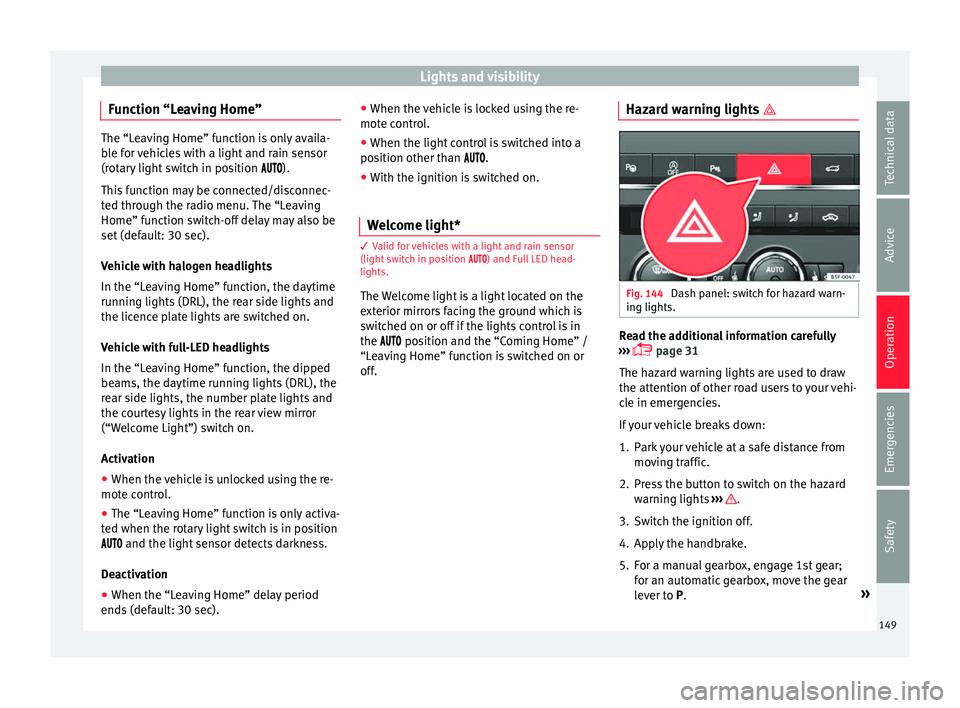
Fig. 144
Dash panel: switch for hazard warn-
in g lights. Read the additional information carefully
› ›
›
page 31
The hazard warning lights are used to draw
the attention of other road users to your vehi-
cle in emergencies.
If your vehicle breaks down:
1. Park your vehicle at a safe distance from movin
g traffic.
2. Press the button to switch on the hazard warning lights
››› .
3. Switch the ignition off.
4. Apply the handbrake.
5. For a manual gearbox, engage 1st gear; for an aut
om
atic gearbox, move the gear
lever to P. »
149
Technical data
Advice
Operation
Emergencies
Safety
Page 155 of 348
Lights and visibility
Vanity mirror light
Ther e m
a
y be a vanity mirror, with a cover, on
the rear of the sun visor. When the cover is
opened 2 a light comes on.
The l amp g
oe
s out when the vanity mirror
cover is closed or the sun visor is pushed
back up. WARNING
Folded sun blinds can reduce visibility.
● Always store sun blinds and visors in their
hous in
g when not in use. Note
The light above the sun visor automatically
swit c
hes off after a few minutes in certain
conditions. This prevents the battery from
discharging. Windscreen wiper and window
w
iper sy
s
tems
Window wiper lever Read the additional information carefully
› ›
›
page 32 CAUTION
If the ignition is switched off with the wind-
sc r
een wipers active, they complete their
wipe before returning to the rest position.
When switching the ignition back on, the
windscreen wiper will continue to operate at
the same wiping level. Ice, snow and other
obstacles on the windscreen may damage the
wiper and the windscreen wiper motor.
● If necessary, remove snow and ice from the
winds
creen wipers before starting your jour-
ney.
● Carefully lift the frozen windscreen wipers
from the gla
ss. SEAT recommends a de-icer
spray for this operation.
● Do not switch on the windscreen wipers if
the winds
creen is dry. Cleaning with the
windscreen wipers while dry can cause dam-
age.
● In icy conditions, always check that the
wiper bl
ades are not frozen to the glass be-
fore using the wipers. In cold weather, it may
help to leave the vehicle parked with the wip-
ers in service position ›››
page 71. Note
● The wind s
creen and window wipers only
function when the ignition is switched on and
the bonnet or rear lid, respectively, are
closed.
● The interval wipe speed varies according to
the vehic
le speed. The faster the vehicle is moving, the more often the windscreen is
cl
e
aned.
● The rear wiper is automatically switched on
when the winds
creen wiper is on and the car
is in reverse gear. Windscreen wiper functions
Windscreen wiper performance in different sit-
uations
If the vehicle is at a
standstillThe activated position provision-
ally changes to the previous posi-
tion.
During automatic
wipe
The air conditioner comes on for
approximately 30 seconds in air
recirculation mode to prevent the
smell of the windscreen washer
fluid entering the inside the vehi-
cle.
For the interval wipe
Intervals between wipes depend
on the vehicle's speed. The high-
er the vehicle speed the shorter
the intervals.
Heated windscreen washer jets*
The he
atin
g on
ly thaws the frozen jets, it
does not thaw the water in the washer hoses.
When the ignition is switched on the heated
windscreen washer jets automatically adjust
the heat depending on the ambient tempera-
ture. »
153
Technical data
Advice
Operation
Emergencies
Safety
Page 157 of 348
Lights and visibility
reduce the effectiveness of the rain sensor or
m ak
e it
react more slowly, later or not at all.
● Cracked windscreen: the impact of a stone
wil
l trigger a single wipe cycle with the rain
sensor on. Next the rain sensor detects the
reduction in the sensitive surface area and
adapts accordingly. The behaviour of the sen-
sor will vary with the size of the damage
caused by the stone. WARNING
The rain sensor may not detect enough rain
to sw it
ch on the wipers.
● If necessary, switch on the wipers manually
when water on the w
indscreen obstructs visi-
bility. Note
● Cle
an the sensitive surface of the rain sen-
sor regularly and check the blades for dam-
age ››› Fig. 148 (arrow).
● To remove wax and coatings, we recom-
mend a window c
leaner containing alcohol.Mirror
Anti-d azz
l
e rear view mirrorIt is dangerous to drive if you cannot see
c
l
e
arly through the rear window. Rear view mirror with automatic anti-dazzle
function*
The anti-d
azzle function is activated every
time the ignition is switched on.
When the anti-dazzle function is enabled, the
interior rear vision mirror will darken auto-
matically according to the amount of light it
receives. The anti-dazzle function is cancel-
led if reverse gear is engaged. WARNING
In the event that an automatic anti-dazzle
re ar
vision mirror breaks, an electrolyte fluid
may leak. This could cause irritation to the
skin, eyes and respiratory organs. If you
come into contact with this liquid, it must be
rinsed with large quantities of water. If neces-
sary, get medial help. CAUTION
In the event that an automatic anti-dazzle
re ar
vision mirror breaks, an electrolyte fluid
may leak. This liquid attacks plastic surfaces.
Clean it with a wet sponge as soon as possi-
ble. Note
● If the light inc
ident in the interior rear vi-
sion mirror is obstructed (e.g. with the sun
blind*), the anti-dazzle rear vision mirror with
automatic setting will not operate perfectly. ●
When the interior light s
are on or reverse
gear engaged, the mirrors do not darken with
automatic adjustment for anti-dazzle posi-
tion. Adjusting the exterior rear-view mir-
ror
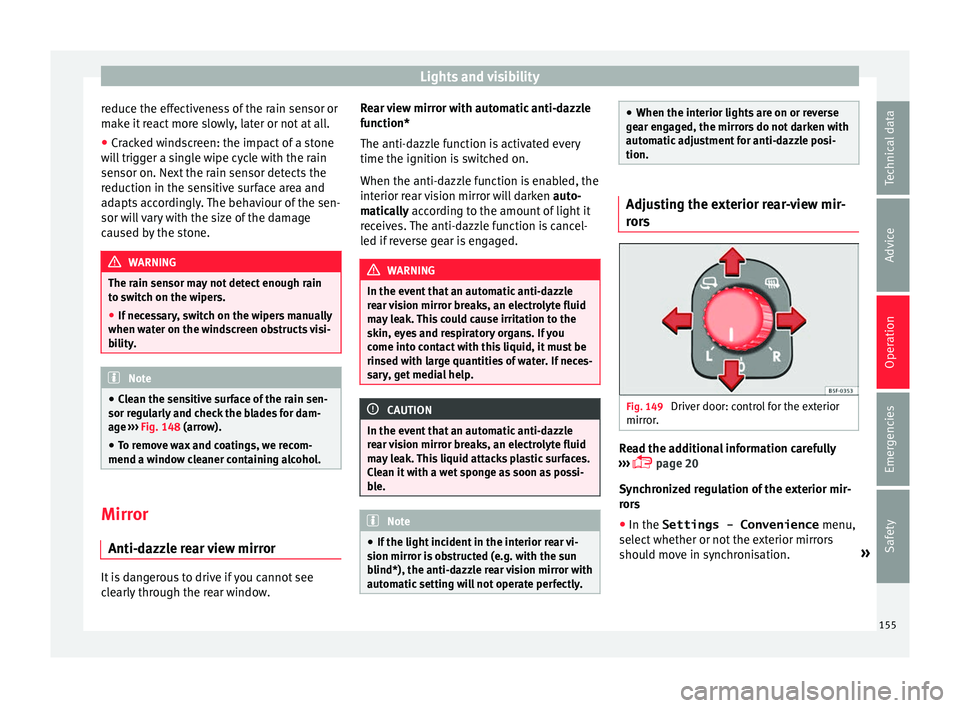
s Fig. 149
Driver door: control for the exterior
mirr or
. Read the additional information carefully
› ›
›
page 20
Synchronized regulation of the exterior mir-
rors
● In the Settings - Convenience menu,
select whether or not
the exterior mirrors
should move in synchronisation. »
155
Technical data
Advice
Operation
Emergencies
Safety
Page 158 of 348
Operation
● Turn the kno
b t
o position L1)
.
● Adjust the left-hand exterior mirror. The
right ext
erior mirror will be adjusted at the
same time (synchronised).
● If necessary the right exterior mirror adjust-
ment ma
y need correcting. turn the control to
position R 1)
.
● In the Easy Connect system the exterior mir-
rors
can be adjusted using the button
and the S
ET
TINGS function button.
F o
l
d in the exterior mirrors after parking
(convenience function)*
The Easy Connect system, the button and
the f u
nction b
uttons SETTINGS and
Mirr or
s
and windscreen wipers can be used to
h av
e the e
xterior mirrors fold in when the ve-
hicle is parked ››› page 120.
When the vehicle is locked with the remote
control, by pressing for more than approxi-
mately 1 second the exterior mirrors are fol-
ded in automatically. When the vehicle is
opened with the remote control, the exterior
mirrors are deployed automatically. WARNING
Convex or wide-angle* exterior mirrors give a
lar g
er field of vision. However, they make ob- jects look smaller and further away than they
re
a
lly are. If you use these mirrors to esti-
mate the distance to vehicles behind you
when changing lane, you could misjudge the
distance. Risk of accident! CAUTION
● If one of the mirr
or housings is knocked out
of position (e.g. when parking), the mirrors
must first be fully retracted with the electric
control. Do not readjust the mirror housing by
hand, as this will interfere with the mirror ad-
juster function.
● Before washing the vehicle in an automatic
car wa
sh, please make sure to retract the ex-
terior mirrors to prevent them from being
damaged. Electrically retractable exterior
mirrors must not be folded in or out by hand.
Always use the electrical power control. Note
If the electrical adjustment should fail to op-
erat e, both of
the mirrors can be adjusted by
hand by lightly pressing the edge of the mir-
ror glass. Seats and head restraints
Adju
s
tin
g the seats and headr-
ests
Manual adjustment of the seats Read the additional information carefully
›› ›
page 18 WARNING
The safe driving chapter contains important
inform ation, tip
s, suggestions and warnings
that you should read and observe for your
own safety and the safety of your passengers
››› page 73. WARNING
● Adjus t
the front seats only when the vehi-
cle is stationary. Failure to follow this instruc-
tion could result in an accident.
● Be careful when adjusting the seat height.
Carel
ess or uncontrolled adjustment can
cause injuries.
● The front seat backrests must not be re-
clined for driv
ing. Otherwise, seat belts and
the airbag system might not protect as they
should, with the subsequent danger of injury. 1)
Regulation in right-hand drive vehicles is symmet-
rical .
156
Page 234 of 348
Operation
Self-deactivation: the Lane As s
i st system can
be automatically deactivated if there is a sys-
tem malfunction. The control lamp
disappears.
Hands-Off Function
In the absence of steering wheel activity the
system alerts the driver with acoustic signals
and a text message on the dash panel asking
to actively take over the steering.
If the driver does not react to this, the system
also alerts the driver with a little shaking mo-
tion through the brakes and, if the vehicle
has it, activates the Emergency Assist func-
tion ››› page 234.
In vehicles without Emergency Assist, the
adaptive lane guidance function will be disa-
bled after the corresponding warnings to the
driver.
The lane assist system is active but it is not
available (the control lamp is lit up yellow)
● When driving at speeds below 65 km/h (38
mph).
● When the Lane Assist system does not de-
tect the div
iding lines of the road. For exam-
ple, in the event warnings indicating road
works, and snow, dirt, moisture or reflec-
tions.
● When the radius of a curve is too small.
● When no road markings can be seen. ●
When the dist
ance to the next marking to
too great.
● When the system does not detect any clear
and active st
eering movement during a long
period of time.
● Temporarily, in the event of very dynamic
driving s
tyles.
● If a turn signal is activated.
● With the stability control system (ESC) in
Sport
mode or switched off.
BSD Plus (Lane Assist with Blind Spot Detec-
tor)*
The BSD Plus function is achieved by activat-
ing the Lane Assist and BSD functions
››› page 237. In this case, the Lane Assist
function expands its functions in the follow-
ing way:
If the driver tries to change lane and there is
a vehicle in the blind spot:
● The lamp flashes in the corresponding
re
ar-view mirror even though the turn signal
has not been activated.
● The steering wheel vibrates to warn the
driver of the ri
sk of collision.
● torque is applied to correct the steering
and return the
vehicle to its lane. Switching off the Lane Assist system in the
fol
lowing situations
Due to the limits of the Lane Assist system,
switch it off in the following situations:
● When more attention is required of the
driver
● When drivin
g in a sporty style
● In unfavourable weather conditions
● On roads in poor condition
● In areas of road works WARNING
The intelligent technology in the Lane Assist
sys t
em cannot change the limits imposed by
the laws of physics and by the very nature of
the system. Careless or uncontrolled use of
the Lane Assist system may cause accidents
and injury. The system is not a replacement
for driver awareness.
● Always adapt your speed and the distance
to the v
ehicles ahead in line with visibility,
weather conditions, the condition of the road
and the traffic situation.
● Always keep your hands on the steering
wheel so it c
an be turned at any time.
● The Lane Assist system does not detect all
roa
d markings. The road surfaces, road struc-
tures or objects in poor condition can be in-
correctly detected as road markings under
certain circumstances by the Lane Assist sys-
tem. In such situations, switch the Lane As-
sist system off immediately. 232
Page 239 of 348
Driver assistance systems
Blind spot detector (BSD) with
p ark
in
g assistance (RCTA)*
Related video Fig. 206
Smart solutions Introduction
The blind spot detector (BSD) helps to detect
the tr
affic
s
ituation behind the vehicle.
The integrated parking assistant (RCTA) helps
the driver when backing out of a parallel
parking spot and in manoeuvring.
The blind spot detector has been developed
for driving on paved roads. WARNING
The smart technology incorporated into the
blind s pot
detector (BSD) with parking assis-
tance (RCTA) included cannot overcome the
limits imposed by the laws of physics; it only
works within the limits of the system. Acci-
dents and severe injury may occur if the blind
spot detection system or the rear cross traffic alert are used negligently or involuntarily.
The sys
t
em is not a replacement for driver
awareness.
● Adapt your speed and safe distance to the
vehicl
e in front of you at all times to suit visi-
bility, weather, road and traffic conditions.
● Keep your hands on the wheel at all times
to be re
ady to intervene in the steering at any
time.
● Pay attention to the control lamps that may
come on in the ext
ernal rear view mirrors and
on the instrument panel, and follow any in-
structions they may give.
● The blind spot assistant could react to any
speci
al constructions that might be present
on the sides of the vehicle: e.g. high or irreg-
ular dividers. This may cause erroneous warn-
ings.
● Never use the blind spot detector with rear
cro
ss traffic alert on unpaved roads. The blind
spot detector with rear cross traffic alert has
been designed for use on paved roads.
● Always pay attention to the vehicle's sur-
roundin
gs.
● Never use the blind spot detector or the
parkin
g assistant if the radar sensors are
dirty.
● The external rear view mirror control lamps
may
have limited functionality due to solar
radiation. CAUTION
● The ra d
ar sensors on the rear bumper may
be damaged or shifted in the event of a colli-
sion, for example, when entering or exiting a
parking space. This may result in the system
disconnecting itself, or at least possibly hav-
ing its functionality diminished.
● In order to ensure that the radar sensors
work pr
operly, keep the rear bumper free of
snow and ice and do not cover it.
● The rear bumper should only be painted
with paint
authorised by SEAT. The blind spot
detector's functions may be limited or work
incorrectly if other paints are used. Note
If the blind spot detector with parking assis-
tant doe
s not work as described in this chap-
ter, do not use it and contact a specialised
workshop. Control lamps
Control lamp in external rear view mirrors:
Lights up
Lights up once briefly: the blind spot detector is activa-
ted and ready to operate.
Lights up: blind spot detector has detected a vehicle in
the blind spot.»
237
Technical data
Advice
Operation
Emergencies
Safety
Page 240 of 348
Operation
Flashes
The blind spot detector has detected a vehicle in the
blind spot and the turn signal has been turned on in the
direction of the detected vehicle
›››
.
For vehicles that are also equipped with Lane Assist
››› page 230, a warning to switch lanes will also appear
even though the turn signal has not been engaged
(blind spot detector “Plus”). Some warning and control lamps will light up
briefly when the ignition i
s
switched on to
check certain functions. They will switch off
after a few seconds.
If there are no indications from the control
lamp in the external rear view mirror, this
means that the blind spot detector has not
detected any other vehicles in the area ››› .
If the dip
ped be
am is on, then the control
lamps in the external rear view mirrors will be
dimmed (night mode). WARNING
If the warning lamps and the corresponding
mes s
ages are ignored when they light up, the
vehicle may stall in traffic and cause acci-
dents and severe injuries.
● Never ignore the warning lamps or messag-
es.
● Carr
y out the necessary operations. CAUTION
Failure to heed the control lamps and corre-
spondin g t
ext messages when they light up
may result in damage to the vehicle. Blind spot detector (BSD)
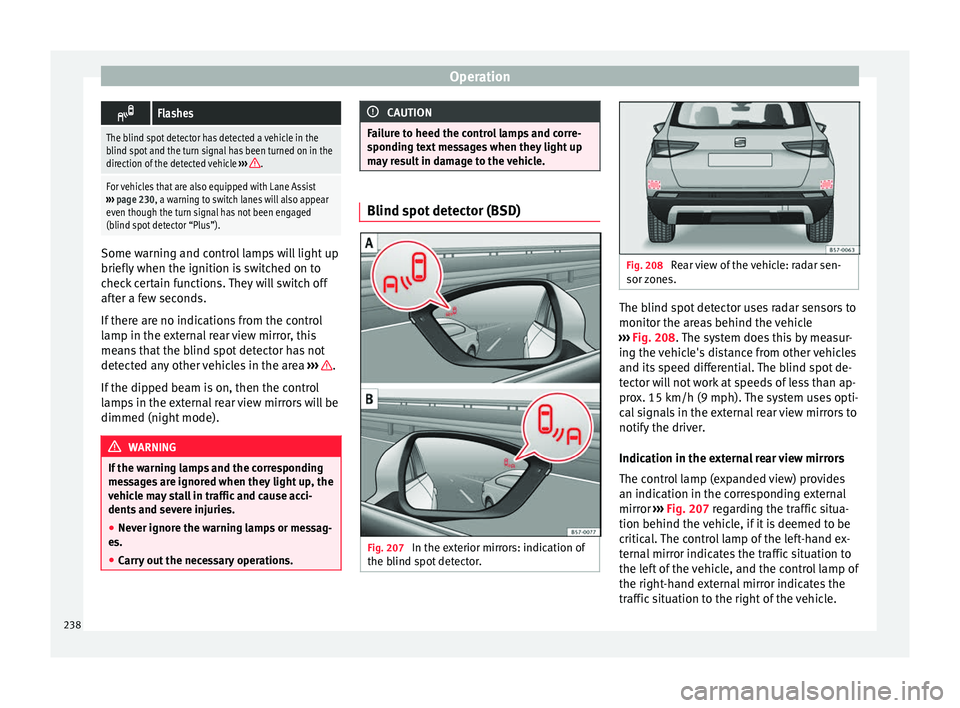
Fig. 207
In the exterior mirrors: indication of
the b lind s pot
detector. Fig. 208
Rear view of the vehicle: radar sen-
sor z one
s. The blind spot detector uses radar sensors to
monit
or the ar
e
as behind the vehicle
››› Fig. 208. The system does this by measur-
ing the vehicle's distance from other vehicles
and its speed differential. The blind spot de-
tector will not work at speeds of less than ap-
prox. 15 km/h (9 mph). The system uses opti-
cal signals in the external rear view mirrors to
notify the driver.
Indication in the external rear view mirrors
The control lamp (expanded view) provides
an indication in the corresponding external
mirror ››› Fig. 207 regarding the traffic situa-
tion behind the vehicle, if it is deemed to be
critical. The control lamp of the left-hand ex-
ternal mirror indicates the traffic situation to
the left of the vehicle, and the control lamp of
the right-hand external mirror indicates the
traffic situation to the right of the vehicle.
238
Page 241 of 348
Driver assistance systems
In the case of retrofitted tinted windows or
w indo
w
s with tinted film, the indications of
the external mirrors may not be seen clearly
or correctly.
Keep the external mirrors clean and free of
snow and ice, and do not cover them with ad-
hesives or other similar materials.
Radar sensors
The radar sensors are located on the left and
right of the bumper and are not visible from the outside
››› Fig. 208. The sensors monitor
both the blind spot and traffic behind the ve-
hicle ››› Fig. 209, ››› Fig. 210. The range to the
sides of the vehicle is a bit larger than the
width of a lane.
The lane width is not detected individually,
but is rather pre-configured in the system.
Thus if you are driving in wide lanes or in be-
tween two lanes, the indications may be in-
correct. Furthermore, the system can detect
vehicles driving in the lane next to you (if there are any), and can also detect stationary
obj
ects such as dividers, and thus give an in-
correct indication.
239
Technical data
Advice
Operation
Emergencies
Safety
Page 242 of 348
Operation
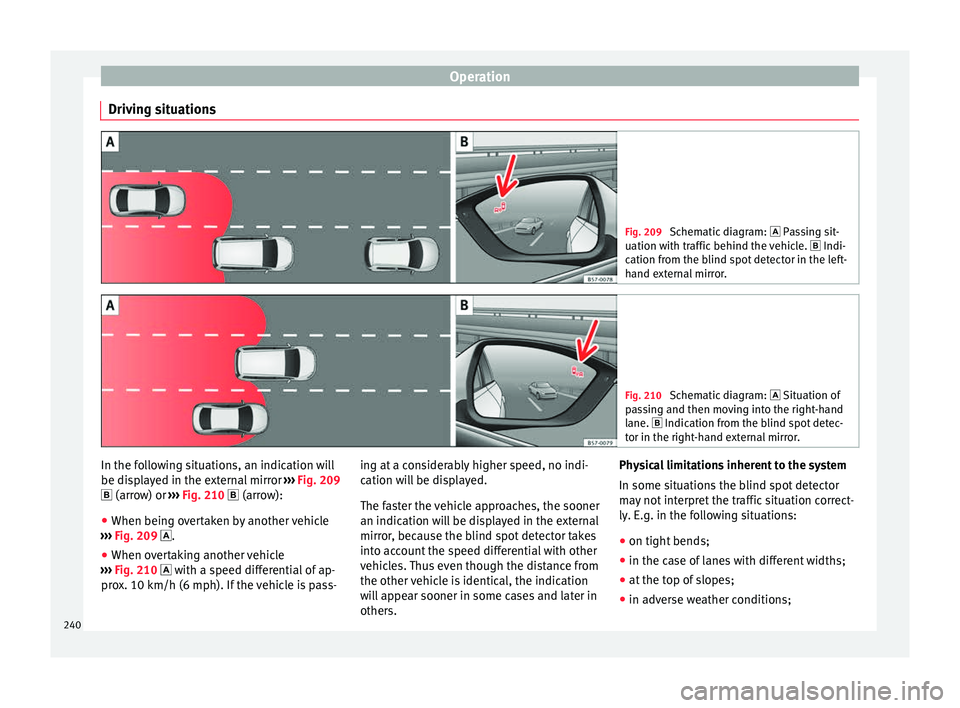
Driving situations Fig. 209
Schematic diagram: Pas sing sit-
uation with traffic behind the vehicle. Indi-
cation from the blind spot detector in the left-
hand external mirror. Fig. 210
Schematic diagram: Situation of
p a
ssing and then moving into the right-hand
lane. Indication from the blind spot detec- tor in the right-hand external mirror. In the following situations, an indication will
be di
s
p
layed in the external mirror ››› Fig. 209
(arrow) or ››› Fig. 210 (arrow):
● When being overtaken by another vehicle
›››
Fig. 209 .
● When overtaking another vehicle
›››
Fig. 210 with a speed differential of ap-
prox. 10 km/h (6 mph). If the vehicle is pass- ing at a considerably higher speed, no indi-
cation wi
ll be displayed.
The faster the vehicle approaches, the sooner
an indication will be displayed in the external
mirror, because the blind spot detector takes
into account the speed differential with other
vehicles. Thus even though the distance from
the other vehicle is identical, the indication
will appear sooner in some cases and later in
others. Physical limitations inherent to the system
In some situation
s the blind spot detector
may not interpret the traffic situation correct-
ly. E.g. in the following situations:
● on tight bends;
● in the case of lanes with different widths;
● at the top of slopes;
● in adverse weather conditions;
240
Page 244 of 348
Operation
Using the blind spot detector (BSD)
w ith p
ark
ing assistant (RCTA)Activating and deactivating the blind spot
detect
or (BSD) w
ith parking assistant (RCTA)
The blind spot detector with parking assis-
tant can be switched on and off by accessing
the Assistance systems menu on the
dash panel display using the steering wheel
controls. If the vehicle is equipped with a
multifunction camera, it can also be ac-
cessed by means of the driver assistance sys-
tems key located on the main beam head-
light lever.
Open the Assistants menu.
● Blind spot
● Exit Assist
If
the verification box on the control panel is
checked , the functionality will be automat-
ically activated at ignition.
When the blind spot detector is ready to op-
erate, the indications in the external mirrors
will turn on briefly as confirmation.
When the vehicle is restarted, the last adjust-
ment in the system will remain active.
If the blind spot detector was automatically
deactivated, it will only be possible to restart
the system after turning the vehicle off and
restarting it. Automatic deactivation of the blind spot de-
tect
or (BSD)
The r
adar sensors of the blind spot detector
with rear cross traffic alert will be automati-
cally deactivated when, among other rea-
sons, one of the sensors is detected to be
permanently covered. This may be the case if,
for example, there is a layer of snow or ice in
front of one of the sensors.
The relevant text message will appear in the
dash panel display.
Trailer mode
The Blind spot detector and the rear cross
traffic alert will be automatically deactivated
and it will be impossible to activate them if
the tow hitch is electrically connected to a
trailer or other similar object.
As soon as the driver starts to drive with a
trailer connected electrically to the vehicle, a
message will appear on the instrument panel
display indicating that the blind spot detec-
tor and the rear cross traffic alert are deacti-
vated. Once the trailer has been unhitched
from the vehicle, if you want to use the blind
spot detector and the rear cross traffic alert,
you will have to reactivate them in the corre-
sponding menu.
If the towing hitch is not factory equipped,
then the blind spot detector and the rear
cross traffic alert will have to be deactivated
manually when driving with a trailer. SEAT Drive Profile*
Relat ed video Fig. 212
Autonomous
driving Introduction
The SEAT Drive Profile enables the driver to
c
hoo
se betw
een four profiles or modes, Eco,
Normal , Sport and Individual , that
modify the behaviour of various vehicle func-
tions, providing different driving experiences.
In addition, the 4Drive version features the Offroad and Snow profiles.
The Individual profile can be configured
according to personal preferences. The other
profiles have a fixed configuration.
Description Depending on the equipment fitted in the ve-
hic
l
e,
SEAT Drive Profile can operate on the
following functions:
242