instrument panel Seat Ateca 2018 Repair Manual
[x] Cancel search | Manufacturer: SEAT, Model Year: 2018, Model line: Ateca, Model: Seat Ateca 2018Pages: 348, PDF Size: 7.32 MB
Page 248 of 348
Operation
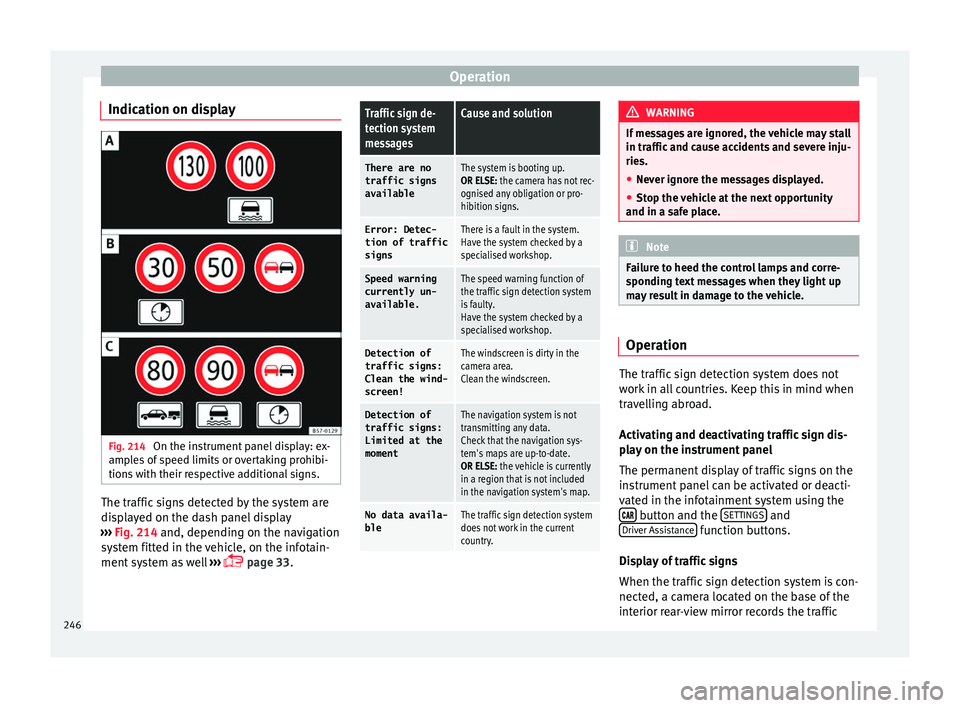
Indication on display Fig. 214
On the instrument panel display: ex-
amp l
e
s of speed limits or overtaking prohibi-
tions with their respective additional signs. The traffic signs detected by the system are
di
s
p
layed on the dash panel display
››› Fig. 214 and, depending on the navigation
system fitted in the vehicle, on the infotain-
ment system as well ›››
page 33.
Traffic sign de-
tection system
messagesCause and solution
There are no
traffic signs
availableThe system is booting up.
OR ELSE: the camera has not rec-
ognised any obligation or pro-
hibition signs.
Error: Detec- tion of traffic
signsThere is a fault in the system.
Have the system checked by a
specialised workshop.
Speed warningcurrently un-
available.The speed warning function of
the traffic sign detection system
is faulty.
Have the system checked by a
specialised workshop.
Detection oftraffic signs:
Clean the wind-
screen!The windscreen is dirty in the
camera area.
Clean the windscreen.
Detection of
traffic signs:
Limited at the
momentThe navigation system is not
transmitting any data.
Check that the navigation sys-
tem's maps are up-to-date.
OR ELSE: the vehicle is currently
in a region that is not included
in the navigation system's map.
No data availa- bleThe traffic sign detection system
does not work in the current
country. WARNING
If messages are ignored, the vehicle may stall
in traffic and c
ause accidents and severe inju-
ries.
● Never ignore the messages displayed.
● Stop the vehicle at the next opportunity
and in a safe p
lace. Note
Failure to heed the control lamps and corre-
spondin g t
ext messages when they light up
may result in damage to the vehicle. Operation
The traffic sign detection system does not
w
ork
in al
l countries. Keep this in mind when
travelling abroad.
Activating and deactivating traffic sign dis-
play on the instrument panel
The permanent display of traffic signs on the
instrument panel can be activated or deacti-
vated in the infotainment system using the button and the
S
ET
TINGS and
Driv er As
s
istance function buttons.
Di s
p
lay of traffic signs
When the traffic sign detection system is con-
nected, a camera located on the base of the
interior rear-view mirror records the traffic
246
Page 250 of 348
Operation
Fatigue detection (break rec-
ommend ation)*
Intr oduction The Fatigue detection informs the driver
when their drivin
g beh
aviour shows signs of
fatigue. WARNING
Do not let the comfort afforded by the Fatigue
detection sy s
tem tempt you into taking any
risks when driving. Take regular breaks, suffi-
cient in length when making long journeys.
● The driver always assumes the responsibil-
ity of driv
ing to their full capacity.
● Never drive if you are tired.
● The system does not detect the tiredness of
the driver in al
l circumstances. Consult the in-
formation in the section ››› page 248, System
limitations.
● In some situations, the system may incor-
rectly int
erpret an intended driving manoeu-
vre as driver tiredness.
● No warning is given in the event of the ef-
fect c
alled microsleep!
● Please observe the indications on the in-
strument p
anel and act as is necessary. Note
● Fatigue det ection h
as been developed for
driving on motorways and well paved roads
only.
● If there is a fault in the system, have it
check
ed by a specialised workshop. Function and operation
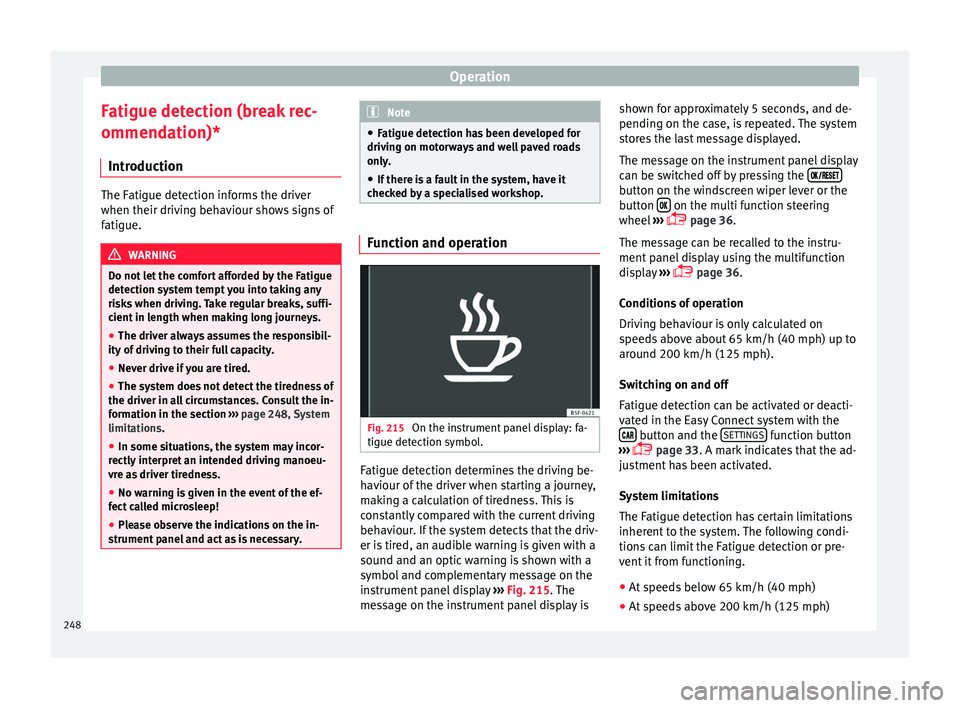
Fig. 215
On the instrument panel display: fa-
tigue det ection symbo
l
. Fatigue detection determines the driving be-
h
av
iour of
the driver when starting a journey,
making a calculation of tiredness. This is
constantly compared with the current driving
behaviour. If the system detects that the driv-
er is tired, an audible warning is given with a
sound and an optic warning is shown with a
symbol and complementary message on the
instrument panel display ››› Fig. 215. The
message on the instrument panel display is shown for approximately 5 seconds, and de-
pending on the ca
se, is repeated. The system
stores the last message displayed.
The message on the instrument panel display
can be switched off by pressing the button on the windscreen wiper lever or the
b
utt
on on the multi function steering
wheel
›
›
› page 36.
The message can be recalled to the instru-
ment panel display using the multifunction
display ›››
page 36.
Conditions of operation
Driving behaviour is only calculated on
speeds above about 65 km/h (40 mph) up to
around 200 km/h (125 mph).
Switching on and off
Fatigue detection can be activated or deacti-
vated in the Easy Connect system with the button and the
S
ET
TINGS function button
› ›
›
page 33. A mark indicates that the ad-
justment has been activated.
System limitations
The Fatigue detection has certain limitations
inherent to the system. The following condi-
tions can limit the Fatigue detection or pre-
vent it from functioning.
● At speeds below 65 km/h (40 mph)
● At speeds above 200 km/h (125 mph)
248
Page 252 of 348
Operation
CAUTION
● In cer t
ain circumstances, the ultrasonic
sensors do not detect objects such as trailer
tongues, bars, fences, posts or thin trees, or
an open (or opening) rear lid, which could
damage the vehicle.
● Retrofitting of certain accessories to the ve-
hicle, s
uch as a bicycle rack, may interfere
with the operation of the Park Assist system
and cause damage.
● The Park Assist system uses as a reference
parked
vehicles, curbs and other objects.
Make sure that the tyres and wheels are not
damaged while parking. If necessary, oppor-
tunely interrupt the parking manoeuvre to
avoid damaging the vehicle.
● The ultrasound sensors on the bumper may
be damag
ed or shifted in the event of a colli-
sion, for example, when entering or exiting a
parking space.
● If you use high-pressure or vapour equip-
ment to c
lean the ultrasound sensors, do not
apply it directly unless very briefly and al-
ways from a distance of more than 10 cm.
● A registration plate or plate holder on the
front w
ith larger than the space for the regis-
tration plate, or a registration plate that is
curved or warped can cause:
–false detections,
– loss of sensor visibility.
– cancellation of the parking manoeuvre or
defective parking. ●
If one of the u
ltrasonic sensors is damaged,
the area corresponding to that group of sen-
sors (front or rear) is deactivated and cannot
be activated until the fault is corrected. How-
ever, you can still use the sensors of the oth-
er bumper as per usual. If there is a fault in
the system, consult a specialist workshop.
SEAT recommends visiting a SEAT dealership
for this. Note
● In or der t o guar
antee good system opera-
tion, keep the ultrasound sensors of the
bumper clean, free of snow or ice, and do not
cover them with adhesives or other objects.
● Certain sources of noise, such as rough as-
phalt
or paving stones and the noise of other
vehicles can induce the Park Assist system or
ParkPilot to give erroneous warnings.
● In order to become familiar with the system
and its f
unctions, SEAT recommends that you
practice operating the Park Assist system in
an area where there is not too much traffic or
in a car park. Description of the Park Assist system
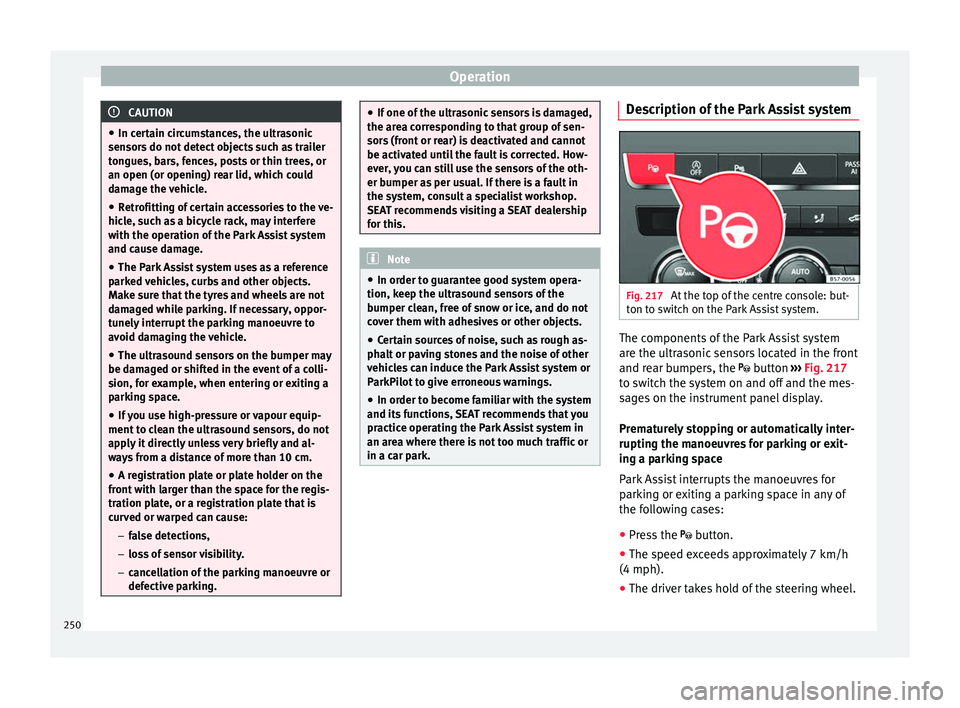
Fig. 217
At the top of the centre console: but-
t on t
o sw
itch on the Park Assist system. The components of the Park Assist system
ar
e the u
ltr
asonic sensors located in the front
and rear bumpers, the button ›››
Fig. 217
to switch the system on and off and the mes-
sages on the instrument panel display.
Prematurely stopping or automatically inter-
rupting the manoeuvres for parking or exit-
ing a parking space
Park Assist interrupts the manoeuvres for
parking or exiting a parking space in any of
the following cases:
● Press the
button.
● The s
peed exceeds approximately 7 km/h
(4 mph).
● The driver takes hold of the steering wheel.
250
Page 254 of 348
Operation
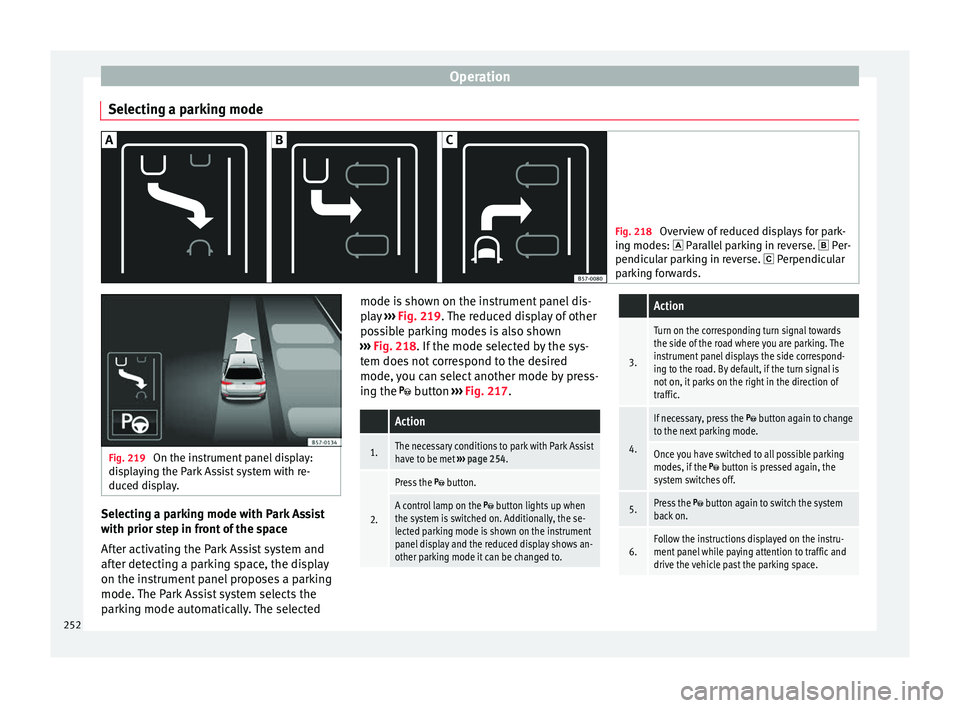
Selecting a parking mode Fig. 218
Overview of reduced displays for park-
ing mode s:
Parallel parking in reverse. Per-
pendicular parking in reverse. Perpendicular
parking forwards. Fig. 219
On the instrument panel display:
dis p
laying the Park Assist system with re-
duced display. Selecting a parking mode with Park Assist
w
ith prior s
t
ep in front of the space
After activating the Park Assist system and
after detecting a parking space, the display
on the instrument panel proposes a parking
mode. The Park Assist system selects the
parking mode automatically. The selected mode is shown on the instrument panel dis-
pla
y ››› Fig. 219. The reduced display of other
possible parking modes is also shown
››› Fig. 218. If the mode selected by the sys-
tem does not correspond to the desired
mode, you can select another mode by press-
ing the button ››› Fig. 217.
Action
1.The necessary conditions to park with Park Assist
have to be met ››› page 254.
2.
Press the button.
A control lamp on the button lights up when
the system is switched on. Additionally, the se-
lected parking mode is shown on the instrument
panel display and the reduced display shows an-
other parking mode it can be changed to.
Action
3.
Turn on the corresponding turn signal towards
the side of the road where you are parking. The
instrument panel displays the side correspond-
ing to the road. By default, if the turn signal is
not on, it parks on the right in the direction of
traffic.
4.
If necessary, press the button again to change
to the next parking mode.
Once you have switched to all possible parking
modes, if the button is pressed again, the
system switches off.
5.Press the button again to switch the system
back on.
6.Follow the instructions displayed on the instru-
ment panel while paying attention to traffic and
drive the vehicle past the parking space. 252
Page 255 of 348
Driver assistance systems
Special case of perpendicular parking space
t o p
ark
forwards without driving past first
Action
1.The necessary conditions to park with Park Assist
have to be met ››› page 254.
2.Drive forward towards the parking space while
paying attention to traffic and stop the vehicle.
Action
3.
Press the button once.
A control lamp on the button lights up when
the system is switched on. Additionally, the se-
lected parking mode is shown on the instrument
panel display without reduced display.
4.Release the steering wheel ››› in Introduction
on page 249. 253
Technical data
Advice
Operation
Emergencies
Safety
Page 256 of 348
Operation
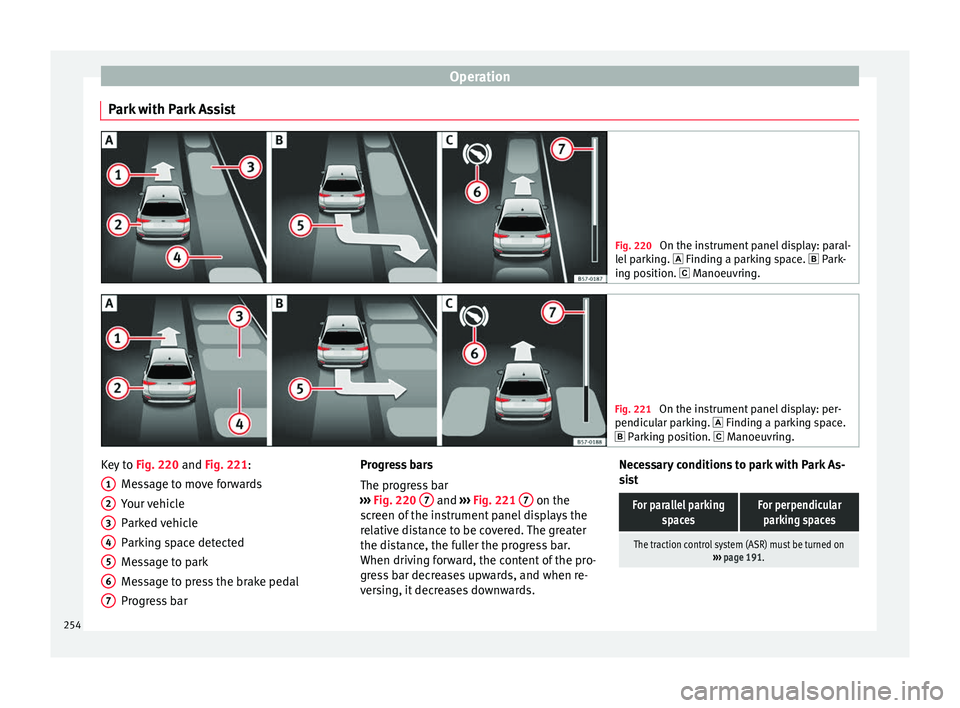
Park with Park Assist Fig. 220
On the instrument panel display: paral-
lel p
arking. Finding a parking space. Park-
ing position. Manoeuvring. Fig. 221
On the instrument panel display: per-
pendicu l
ar parking. Finding a parking space.
Parking position. Manoeuvring. Key to
Fig. 220 and Fig. 221:
M e
s
sage to move forwards
Your vehicle
Parked vehicle
Parking space detected
Message to park
Message to press the brake pedal
Progress bar
1 2
3
4
5
6
7 Progress bars
The pr
ogr
e
ss bar
››› Fig. 220 7 and
›››
Fig. 221 7 on the
s c
r
een of the instrument panel displays the
relative distance to be covered. The greater
the distance, the fuller the progress bar.
When driving forward, the content of the pro-
gress bar decreases upwards, and when re-
versing, it decreases downwards. Necessary conditions to park with Park As-
sis
t
For parallel parking spacesFor perpendicularparking spaces
The traction control system (ASR) must be turned on ››› page 191. 254
Page 257 of 348
Driver assistance systemsFor parallel parking
spacesFor perpendicularparking spaces
Do not exceed approxi-
mately 40 km/h (25 mph)
when driving past the parking space.Do not exceed approxi-
mately 20 km/h (12 mph)
when driving past the parking space.
Keep a distance between 0.5 and 2.0 metres when driv- ing past the parking space.
Length of the space:
length of the vehicle + 0.8 metresWidth of the space: width
of the vehicle + 0.8 me- tres
Do not exceed approximately 7 km/h (4 mph) when
parking. Parking
Do the following:
1.The necessary conditions have to be met to park
with Park Assist
››› page 254 and the parking
mode must be selected ››› page 252.
2.
Look at the display on the instrument panel to
see if the space has been detected as “appropri-
ate” and if the correct position for parking has
been reached ››› Fig. 220
or ››› Fig. 221 .
The space is considered “appropriate” if the dis-
play on the instrument panel shows the message
to park 5
.
3.Stop the vehicle and, after a brief pause, engage
the reverse gear.
4.Release the steering wheel
››› in Introduction
on page 249.
Do the following:
5.
Please note the following message: Active au-
tomatic steering. Watch out around
you.
While you keep watch around you, carefully start
accelerating up to no more than 7 km/h (4 mph).
During the parking manoeuvre, the system only
takes charge of the steering. You, as the driver,
have to accelerate, engage the clutch if necessa-
ry, change gears and brake.
6.
Reverse until the ParkPilot continuous signal is
heard.
OR: reverse until the instrument panel displays
the message to go forwards ››› Fig. 220 or ››› Fig. 221 .
OR: reverse until the instrument panel displays
the message Park Assist finished .
The progress bar 7 indicates the distance to
cover ››› page 254.
7.
Press down the brake pedal until the Park Assist
system has finished turning the steering wheel.
OR: until the symbol on the instrument panel
display switches off.
8.Select first gear.
Do the following:
9.
Go forward until the ParkPilot continuous signal
is heard.
OR: go forward until the instrument panel display
shows the message to reverse.
The Park Assist system steers the vehicle forward
and back until it centres it in the space ››› Fig. 220
or ››› Fig. 221 .
10.
For best results, wait at the end of each manoeu-
vre until the Park Assist system has finished turn-
ing the steering wheel.
The parking manoeuvre ends when a correspond-
ing message is displayed on the instrument panel
and, in some cases, an acoustic signal sounds. Note
If the manoeuvre is terminated prematurely
during p ark
ing, the result may not be the
best. 255
Technical data
Advice
Operation
Emergencies
Safety
Page 258 of 348
Operation
Exiting a parking space with Park As-
s i
s
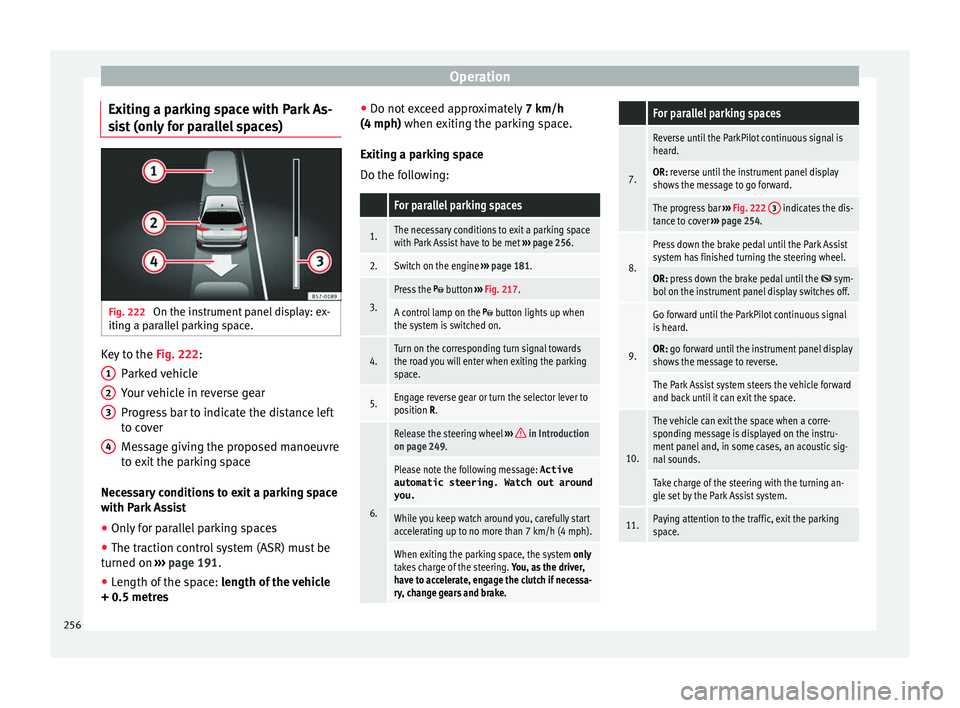
t (only for parallel spaces) Fig. 222
On the instrument panel display: ex-
itin g a p
ar
allel parking space. Key to the
Fig. 222:
P ark
ed
vehicle
Your vehicle in reverse gear
Progress bar to indicate the distance left
to cover
Message giving the proposed manoeuvre
to exit the parking space
Necessary conditions to exit a parking space
with Park Assist
● Only for parallel parking spaces
● The traction control system (ASR) must be
turned on ››
› page 191.
● Length of the space: leng
th of the vehicle
+ 0.5 metres 1 2
3
4 ●
Do not e
x
ceed approximately 7 km/h
(4 mph) when exiting the parking space.
Exiting a parking space
Do the following:
For parallel parking spaces
1.The necessary conditions to exit a parking space
with Park Assist have to be met ››› page 256.
2.Switch on the engine ››› page 181.
3.
Press the button ››› Fig. 217.
A control lamp on the button lights up when
the system is switched on.
4.Turn on the corresponding turn signal towards
the road you will enter when exiting the parking
space.
5.Engage reverse gear or turn the selector lever to
position R.
6.
Release the steering wheel ››› in Introduction
on page 249.
Please note the following message: Active
automatic steering. Watch out around
you.
While you keep watch around you, carefully start
accelerating up to no more than 7 km/h (4 mph).
When exiting the parking space, the system only
takes charge of the steering. You, as the driver,
have to accelerate, engage the clutch if necessa-
ry, change gears and brake.
For parallel parking spaces
7.
Reverse until the ParkPilot continuous signal is
heard.
OR: reverse until the instrument panel display
shows the message to go forward.
The progress bar ››› Fig. 222 3 indicates the dis-
tance to cover ››› page 254.
8.
Press down the brake pedal until the Park Assist
system has finished turning the steering wheel.
OR: press down the brake pedal until the sym-
bol on the instrument panel display switches off.
9.
Go forward until the ParkPilot continuous signal
is heard.
OR: go forward until the instrument panel display
shows the message to reverse.
The Park Assist system steers the vehicle forward
and back until it can exit the space.
10.
The vehicle can exit the space when a corre-
sponding message is displayed on the instru-
ment panel and, in some cases, an acoustic sig-
nal sounds.
Take charge of the steering with the turning an-
gle set by the Park Assist system.
11.Paying attention to the traffic, exit the parking
space. 256
Page 263 of 348
Driver assistance systems
obstacles that are less than
30 c m a
w
ay from the vehicle are dis-
played in red.
Moreover, with the SEAT Media System
Plus/Navi System/Navi System Plus radios, a
yellow trail indicates the vehicle's expected
trajectory based on the steering angle.
Whenever the obstacle is located in the vehi-
cle’s direction of travel, the corresponding
audible warning will sound.
As the vehicle approaches an obstacle, the
segments are displayed closer to the vehicle.
When the penultimate segment is displayed,
this means that the vehicle has reached the
collision zone. In the collision zone, the ob-
stacles are represented in red, including
those out of the path. Do not continue to
move forward (or backward) ››› in Descrip-
tion on p ag
e 258
, ››› in Description on
p ag
e 258
!
In the event the car is equipped with the Top
View Camera system, Park Assist visual guid-
ance will appear in accordance with the view
selected in the Top View Camera system.
Adjusting the display and audible
warning
s The settings for the display and audible
w
arnin g
s are controlled via the Easy Con-
nect*. Red segments: Automatic activation
on – activate
s the Automatic activa-
tion option ››› page 260.
off – deactivates the Automatic ac-
tivation option ››› page 260.
Front volume*
Volume in the front and rear area.
Front sound settings/sharpness*
Frequency (tone) of the sound in the front
area.
Rear volume*
Volume in the rear area.
Rear sound settings/sharpness*
Frequency (tone) of the sound in the rear
area.
Adjust volume
With the parking aid switched on, the active
audio/video source volume will be reduced
to the intensity of the selected setting.
Error messages When the Parking Aid is activated or when it
i
s
sw
itched on, if a message reporting a Park- ing aid error is displayed on the instrument
panel, there i
s a fault in the system.
If the fault does not disappear before discon-
necting the ignition, the next time that the
parking aid is engaged in reverse, no audible
signal of the existence of a fault will be is-
sued.
If there is a fault in the parking aid system a
message will appear on the instrument panel
indicating the error. In addition the key
LED will blink.
If there is a fault in a sensor, the symbol is
displayed on the Easy Connect display in
front of/behind the vehicle. If a rear sensor is
faulty, only the obstacles in area A are dis-
p l
a
yed ››› Fig. 223. If a front sensor is faulty,
only the obstacles in area B are displayed.
Hav e the f
au
lt corrected by a specialised
workshop without delay.
261
Technical data
Advice
Operation
Emergencies
Safety
Page 267 of 348
Driver assistance systems
they are displayed if the
o b
s
tacle is not in the vehicle's direction
of travel, even when the electronic park-
ing brake is activated.
obstacles located in the
vehicle's trajectory and which are more
than 30 cm away from the vehicle are
displayed in yellow.
obstacles that are less than
30 cm away from the vehicle are dis-
played in red.
Whenever the obstacle is located in the vehi-
cle’s direction of travel, the corresponding
audible warning will sound.
As the vehicle approaches an obstacle, the
segments are displayed closer to the vehicle.
When the penultimate segment is displayed,
this means that the vehicle has reached the
collision zone. In the collision zone, the ob-
stacles are represented in red, including
those out of the path. Do not continue to re-
verse ››› in Description on page 263,
››
›
in Description on page 263 !
If
y
ou are equipped with the Top View
Camera*
Segments are not displayed when the vehicle
is equipped with Top View Camera*.
The PDC system will issue an audible warning
for objects that are near the rear of the vehi-
cle, and the Top View Camera* image will be White segments:
Yellow segments:
Red segments: available on the screen, giving a real image
of the ob
jects around the car.
Adjusting the display and audible
warning
s The settings for the display and audible
warnin
g
s are controlled via the Easy Con-
nect*.
Rear volume*
Volume in the rear area.
Rear sound settings/sharpness*
Frequency (tone) of the sound in the rear
area.
Adjust volume
With the parking aid switched on, the active
audio/video source volume will be reduced
to the intensity of the selected setting.
Error messages When the Parking Aid is activated or when it
i
s
sw
itched on, if a message reporting a Park-
ing aid error is displayed on the instrument
panel, there is a fault in the system.
If the fault disappears before disconnecting
the ignition, the next time that the parking aid is engaged in reverse, no audible signal
of the ex
istence of a fault will be issued.
If there is a fault in a sensor, the symbol is
displayed on the Easy Connect display.
Have the fault corrected by a specialised
workshop without delay.
Towing bracket In vehicles equipped with a towing bracket
devic
e fr
om the factory, when the trailer is
connected electrically, the Parking Aid rear
sensors will not be activated when reverse
gear is engaged (manual gears) nor when the
selector lever is turned to position R (auto-
matic gears).
Top View Camera* Rel at
ed video Fig. 229
Smart solutions 265
Technical data
Advice
Operation
Emergencies
Safety