wheel Seat Exeo 2008 Owner's Guide
[x] Cancel search | Manufacturer: SEAT, Model Year: 2008, Model line: Exeo, Model: Seat Exeo 2008Pages: 303, PDF Size: 10.02 MB
Page 93 of 303
Steering wheel controls91
Safety First
Operating instructions
Practical tips
Te c h n i c a l D a t a
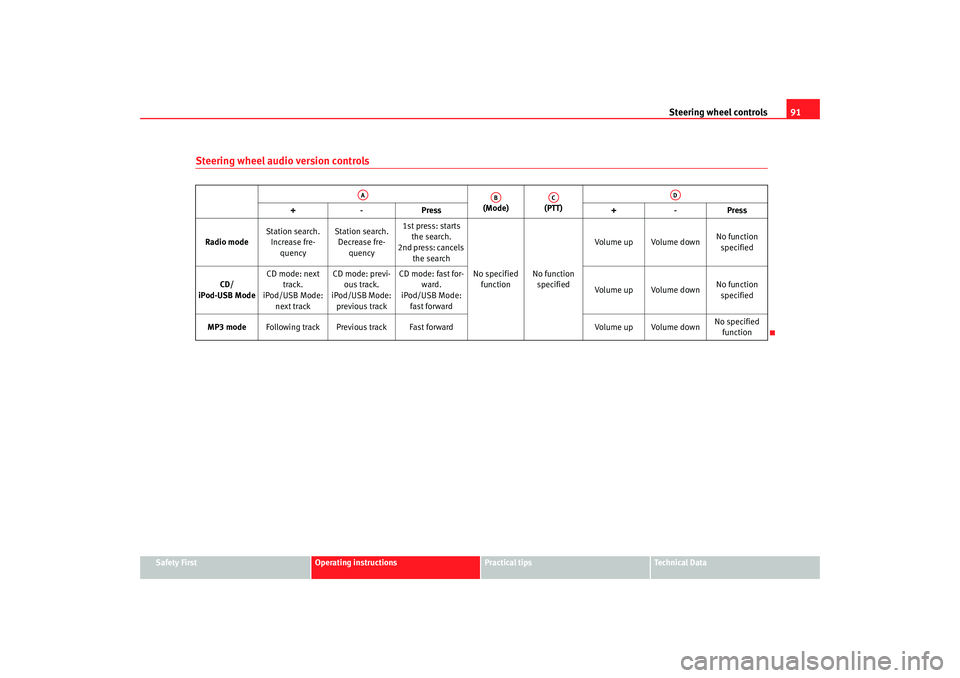
Steering wheel audio version controls
(Mode) (PTT)
+-P re ss +-Pre ss
Radio mode Station search.
Increase fre- quency Station search.
Decrease fre- quency 1st press: starts
the search.
2nd press: cancels
the search
No specified function No function
specified Volume up Volume down
No function
specified
CD/
iPod-USB Mode CD mode: next
track.
iPod/USB Mode:
next track CD mode: previ-
ous track.
iPod/USB Mode:
previous track CD mode: fast for-
ward.
iPod/USB Mode:
fast forward Volume up Volume down
No function
specified
MP3 mode Following track Previous track Fast forward Volume up Volume downNo specified
function
AA
AB
AC
AD
Exeo_EN.book Seite 91 Freitag, 17. Oktober 2008 11:24 11
Page 94 of 303
Steering wheel controls
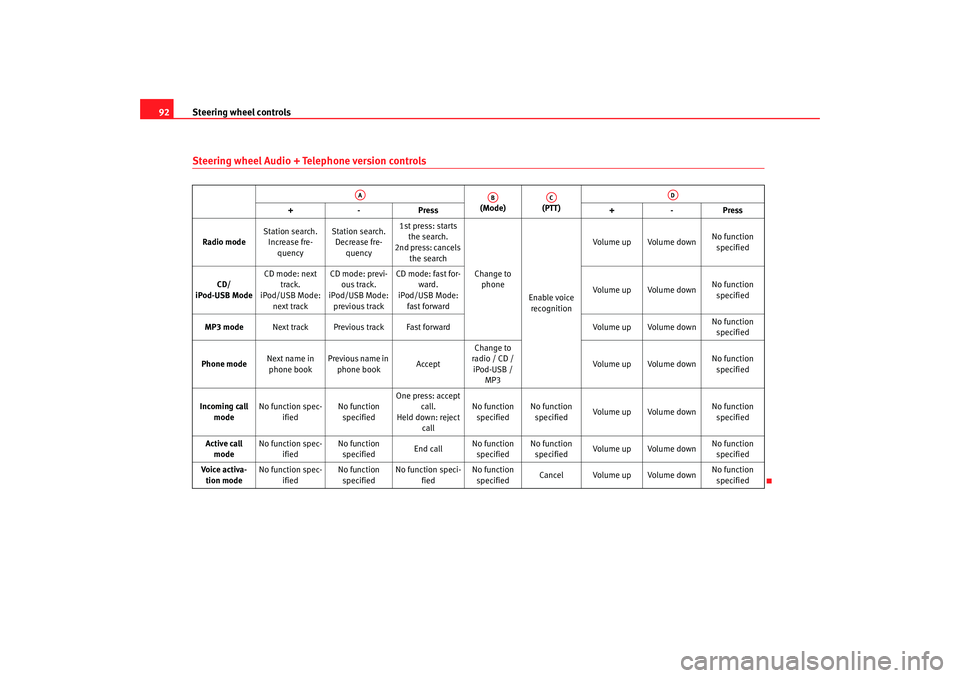
92Steering wheel Audio + Telephone version controls
(Mode) (PTT)
+-P re ss +-Pre ss
Radio mode Station search.
Increase fre- quency Station search.
Decrease fre- quency 1st press: starts
the search.
2nd press: cancels
the search
Change to phone
Enable voice recognition Volume up Volume down
No function
specified
CD/
iPod-USB Mode CD mode: next
track.
iPod/USB Mode:
next track CD mode: previ-
ous track.
iPod/USB Mode:
previous track CD mode: fast for-
ward.
iPod/USB Mode:
fast forward Volume up Volume down
No function
specified
MP3 mode Next track Previous track Fast forward Volume up Volume downNo function
specified
Phone mode Next name in
phone book Previous name in
phone book AcceptChange to
radio / CD /
iPod-USB / MP3 Volume up Volume down
No function
specified
Incoming call mode No function spec-
ified No function
specified One press: accept
call.
Held down: reject call No function
specified No function
specified Volume up Volume down
No function
specified
Active call mode No function spec-
ified No function
specified End callNo function
specified No function
specified Volume up Volume down No function
specified
Voice activa- tion mode No function spec-
ified No function
specified No function speci-
fied No function
specified Cancel Volume up Volume down
No function
specified
AA
AB
AC
AD
Exeo_EN.book Seite 92 Freitag, 17. Oktober 2008 11:24 11
Page 120 of 303
Lights and visibility
118
– Press the knob in again to prevent the setting from being changed unintentionally.This function enables or disables the switch for daytime running lights When
the function is enabled, the daytime ru nning lights are switched on automat-
ically when the ignition is switched on.
Note
Please observe any relevant legal requirements which may apply in your
country.Self-directing headlights*
When driving around bends, the headlights will light the
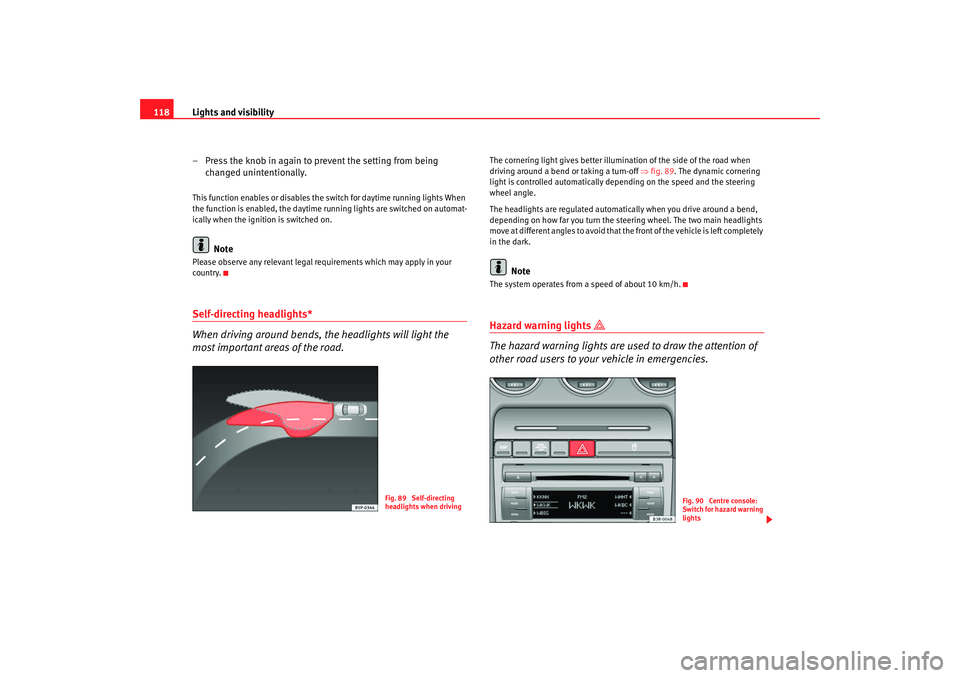
most important areas of the road.
The cornering light gives better illumination of the side of the road when
driving around a bend or taking a turn-off ⇒fig. 89 . The dynamic cornering
light is controlled automatically depending on the speed and the steering
wheel angle.
The headlights are regulated automatically when you drive around a bend,
depending on how far you turn the steering wheel. The two main headlights
move at different angles to avoid that the front of the vehicle is left completely
in the dark.
Note
The system operates from a speed of about 10 km/h.Hazard warning lights
The hazard warning lights are used to draw the attention of
other road users to your vehicle in emergencies.
Fig. 89 Self-directing
headlights when driving
Fig. 90 Centre console:
Switch for hazard warning
lights
Exeo_EN.book Seite 118 Freitag, 17. Oktober 2008 11:24 11
Page 122 of 303
Lights and visibility
120
Main beam headlights
– Press the lever forward to switch on the main beams.
– Pull the lever back towards you to switch the main beam head-lights off again.
Headlight flasher
– Pull the lever towards the steering wheel to operate the flasher.
Parking light
– Switch the ignition off.
– Move the lever up or down to turn on the right or left-hand parking lights respectively.Notes on these functions•
The indicators only work when the ignition is switched on. The indicator
lamp or flashes in the instrument panel when the turns signals
⇒ page 65 are working.
•
The indicators are cancelled automatically when the steering wheel is
returned to the straight-ahead position.
•
The main beam headlights can only be switched on if the dipped beam
headlights are already on. The main beam headlight indicator lamp
then
comes on in the instrument panel.
•
The headlight flasher comes on for as long as you pull the lever, even if no
other lights are switched on. The main beam headlight indicator lamp
then comes on in the instrument panel.
•
When the parking lights are switched on, the headlight and the rear light
on one side of the car light up with re duced intensity. The parking lights will
only work with the ignition off.
Caution
Never use the main beam headlights or the headlight flasher if this would
dazzle oncoming traffic.Interior lightsFront interior lights and glove compartment light
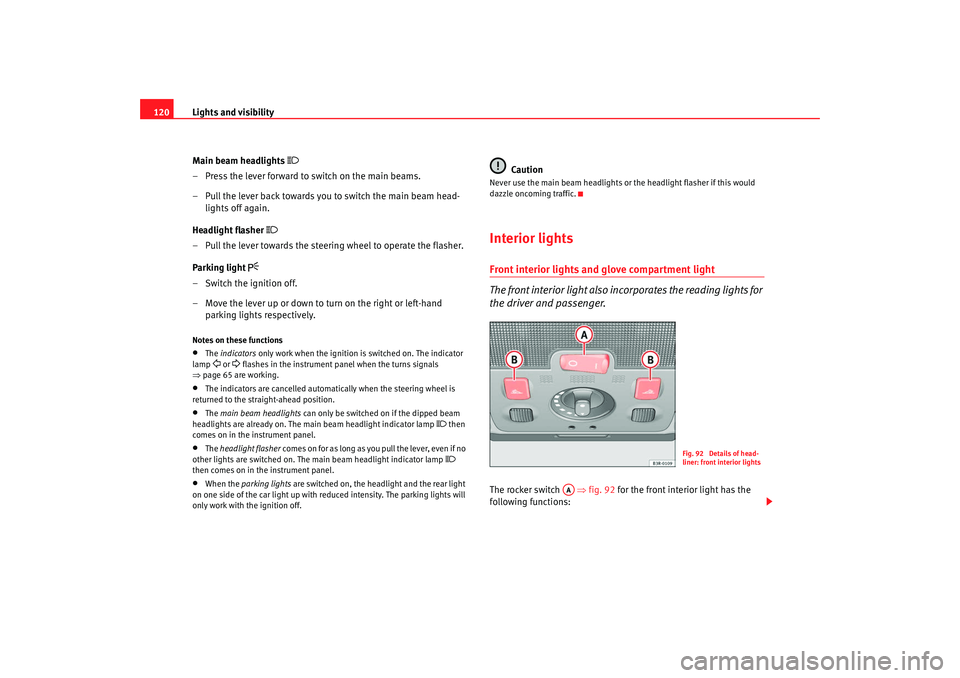
The front interior light also incorporates the reading lights for
the driver and passenger.The rocker switch ⇒fig. 92 for the front interior light has the
following functions:
Fig. 92 Details of head-
liner: front interior lights
AA
Exeo_EN.book Seite 120 Freitag, 17. Oktober 2008 11:24 11
Page 127 of 303

Lights and visibility125
Safety First
Operating instructions
Practical tips
Te c h n i c a l D a t a
Windscreen wipersWindscreen wipers
The windscreen wiper lever controls the windscreen wipers
and the automatic wash and wipe.The windscreen wiper lever ⇒fig. 100 has the following settings:
Brief wipe
– Move the lever down to position to give the windscreen a brief
wipe.
Intermittent wipe
/ Rain sensor* (enabling)
– Move the lever up to position .
– Move the switch up or down to set the wiper intervals. – On vehicles equipped with a rain sensor*, you can move the
switch up and down to set the sensitivity of the rain sensor.
Slow wipe
– Move the lever up to position .
Continuous wipe
– Move the lever up to position .
Automatic wash and wipe
– Pull the lever towards the steering wheel, , so that the wind- screen washer is activated.
– Release the lever. The washer will stop and the wipers will keep running for approximately 4 seconds.
Disabling the windscreen wiper
– Pull the lever to basic position .
General notes
The washers and wipers will work only when the ignition is switched on.
If you stop briefly, e.g. at traffic lights , the wiper speed will automatically be
reduced. The rain sensor* will automatically be set to the intermittent wipe
function.
The windscreen washer jets are heated when the ignition is switched on.
The wiper intervals in the intermittent wipe setting are also varied automati-
cally according to the road speed (in addition to the manual delay setting).
When the lights are switched on you should only pull the lever briefly to wash
the windscreen, otherwise the headlight washers* will also be enabled. This
will use an unnecessary amount of fluid from the reservoir.
Fig. 100 Windscreen
wiper lever
A1
A2
AA
AA
A3A4
A5
A0
Exeo_EN.book Seite 125 Freitag, 17. Oktober 2008 11:24 11
Page 133 of 303
Seats and stowage131
Safety First
Operating instructions
Practical tips
Te c h n i c a l D a t a
•
Be careful when adjusting the seat he ight. Injuries can be caused if the
height is adjusted without due care and attention.
Adjusting the backrest angle– Lean forwards to take your weight off the backrest.
– Turn the adjuster wheel ⇒page 130, fig. 104 to set the angle
of the backrest as required.
WARNING
The front backrests must not be reclined for driving. Otherwise, safety
belts and the airbag system might no t protect as they should, with the
subsequent danger of injury.
WARNING (continued)
A4
Exeo_EN.book Seite 131 Freitag, 17. Oktober 2008 11:24 11
Page 161 of 303
Heating, Ventilation and Air conditioning 159
Safety First
Operating instructions
Practical tips
Te c h n i c a l D a t a
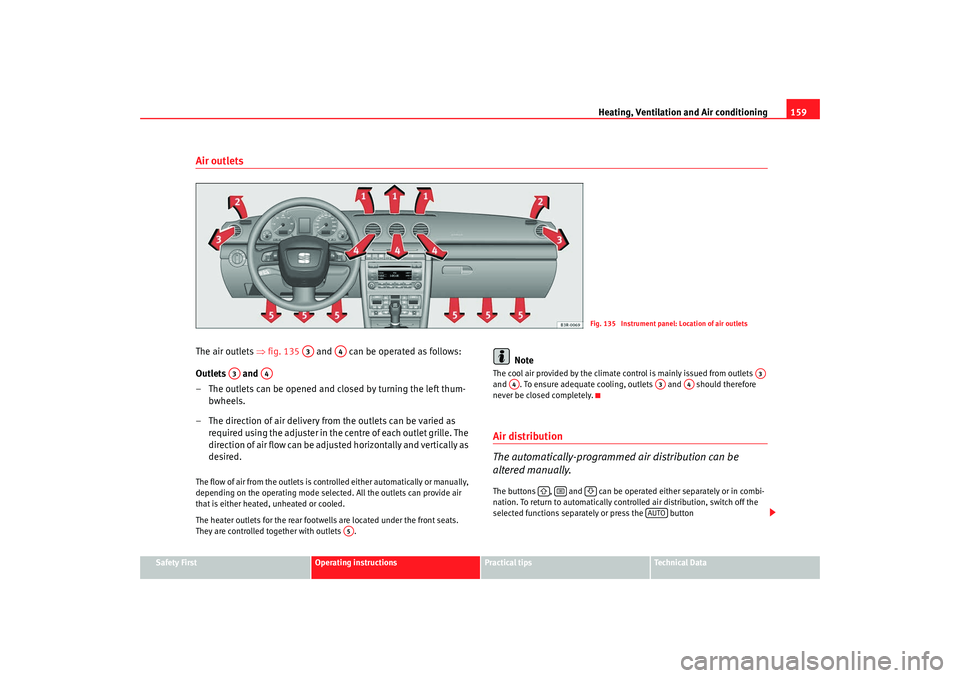
Air outletsThe air outlets ⇒fig. 135 and can be operated as follows:
Outlets and
– The outlets can be opened and closed by turning the left thum- bwheels.
– The direction of air delivery from the outlets can be varied as required using the adjuster in the centre of each outlet grille. The
direction of air flow can be adjusted horizontally and vertically as
desired.The flow of air from the outlets is controlled either automatically or manually,
depending on the operating mode selected. All the outlets can provide air
that is either heated, unheated or cooled.
The heater outlets for the rear footwells are located under the front seats.
They are controlled together with outlets .
Note
The cool air provided by the climate control is mainly issued from outlets
and . To ensure adequate cooling, outlets and should therefore
never be closed completely.Air distribution
The automatically-programmed air distribution can be
altered manually.The buttons , and can be operated either separately or in combi-
nation. To return to automatically contro lled air distribution, switch off the
selected functions separately or press the button
Fig. 135 Instrument panel: Location of air outlets
A3
A4
A3
A4
A5
A3
A4
A3
A4
AUTO
Exeo_EN.book Seite 159 Freitag, 17. Oktober 2008 11:24 11
Page 163 of 303

Heating, Ventilation and Air conditioning 161
Safety First
Operating instructions
Practical tips
Te c h n i c a l D a t a
Solar-powered blower/solar roof*
If the vehicle is parked in su fficiently strong sunlight, the
blower will operate in solar-powered mode when the ignition
is switched off.After the ignition is switched off, the blower is supplied with electrical power
from the solar roof. Please ensure that outlets 3 and 4 are open ⇒page 159,
fig. 135 to ensure the best possible ventilation.
The blower only works when the sun roof is closed or tilted open at the rear.
If the air recirculation mode is on when you switch off the engine, the climate
control will automatically switch to fresh air ventilation.Supplementary heating*Diesel vehicles are fitted with supplementary heating
2) to raise the tempera-
ture of the interior as quickly as possible. At outdoor temperatures below
+5°C and with the engine running, the supplementary heating will switch on
and off automatically depending on the temperature of the coolant.
In order to save fuel, the supplementary heating can be can be switched off
by briefly pressing the button on the climate control.
Seat heating*
The surface and backrest of the front seats can be electrically
heated.Turn thumbwheel or ⇒fig. 136 to switch on and adjust the
heating on the left or right front seats.The heating is switched off when the thumbwheel is set to 0. The temperature
settings range from 1 to 6.
Caution
To avoid damaging the heating elements of the seat heating, please do not
kneel on the seat or apply sharp pressure to a single point.
2)For Nordic countries only.
Fig. 136 Detailed view of
instrument panel: Thum-
bwheel controls for seat
heating
A1
A2
Exeo_EN.book Seite 161 Freitag, 17. Oktober 2008 11:24 11
Page 164 of 303
Driving
162DrivingAddressAdjusting the steering wheel position
The height and reach of the steering wheel can be adjusted as
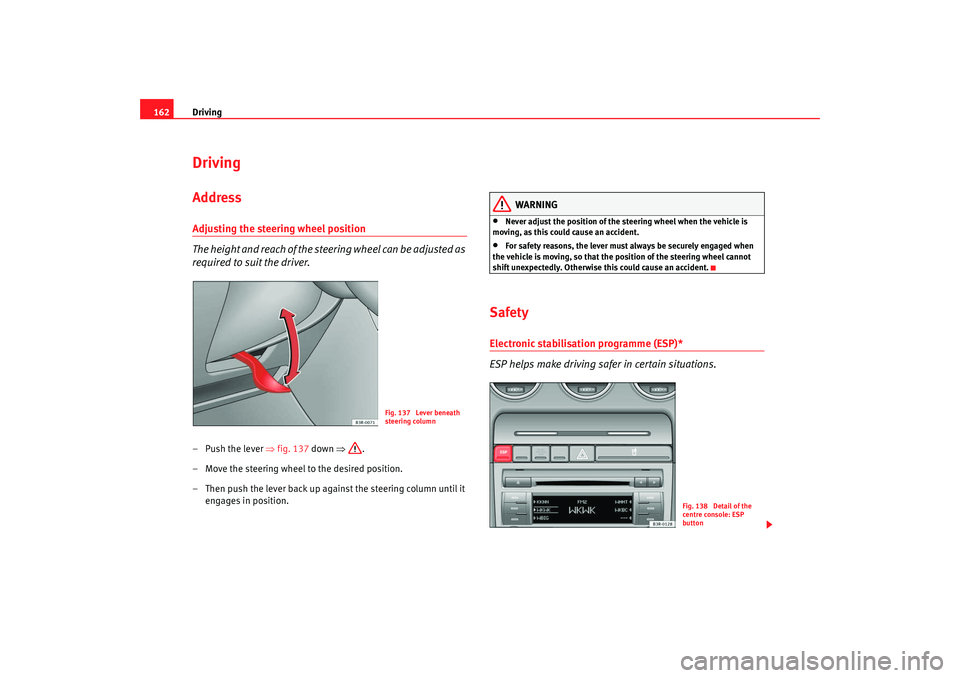
required to suit the driver.–Push the lever ⇒fig. 137 down ⇒.
– Move the steering wheel to the desired position.
– Then push the lever back up against the steering column until it engages in position.
WARNING
•
Never adjust the position of the steering wheel when the vehicle is
moving, as this could cause an accident.
•
For safety reasons, the lever must always be securely engaged when
the vehicle is moving, so that the position of the steering wheel cannot
shift unexpectedly. Otherwise this could cause an accident.
SafetyElectronic stabilisation programme (ESP)*
ESP helps make driving safer in certain situations.
Fig. 137 Lever beneath
steering column
Fig. 138 Detail of the
centre console: ESP
button
Exeo_EN.book Seite 162 Freitag, 17. Oktober 2008 11:24 11
Page 165 of 303

Driving163
Safety First
Operating instructions
Practical tips
Te c h n i c a l D a t a
The Electronic Stabilisation Program (ESP
) contains the electronic differential
lock (EDL) and the traction control system (TCS). The ESP function works
together with the ABS. If a fault in the ABS occurs, both warning lamps light
up, but if the ESP fails, only th e ESP warning lamp lights up.
The ESP is started automatically when the engine is started.
The ESP switch deactivates both TCS and ESP functions. The ESP, in spite of
being off, will always self-connect wher e necessary if brakes are being used.
The TCS can be deactivated when in cases where wheel sliding is desirable.
For example:
•
When driving with snow chains,
•
when driving in deep sn ow or on loose surfaces,
•
when rocking the vehicle backwards and forwards to free it from mud, for
example.
Next, the button should be pressed to reactivate the TCS.
When does the warning light switch on or flash ?
•
On switching the ignition on, it lights up for about two seconds to carry
out a function control.
•
The warning lamp will start flashing when the vehicle is moving if the ESP
or the TCS is activated.
•
It will light up continuously if there is a malfunction in the ESP.
WARNING
•
The electronic stabilisation programme (ESP) cannot defy the laws of
physics. This should be kept in mind, particularly on slippery and wet
roads and when towing a trailer.
•
Always adapt your driving style to suit the condition of the roads and
the traffic situation. Do not let the extra safety afforded by ESP tempt you
into taking any risks when driving, this can cause accidents.
•
Please refer to the corresponding warning notes on ESP in ⇒page 175,
“Intelligent technology”.
Ignition lockIgnition key positions
The ignition key is used to start and stop the engine.Position
The ignition key is inserted in this position. To engage the steering wheel
lock , take out the key and turn the wheel until you hear the pin engage. You
should always engage the steering lock when you leave the vehicle. This will
help to deter thefts ⇒.
WARNING (continued)
Fig. 139 Ignition key
positions
A0
Exeo_EN.book Seite 163 Freitag, 17. Oktober 2008 11:24 11