warning Seat Exeo 2009 Owner's manual
[x] Cancel search | Manufacturer: SEAT, Model Year: 2009, Model line: Exeo, Model: Seat Exeo 2009Pages: 310, PDF Size: 8.54 MB
Page 173 of 310

Driving171
Safety First
Controls and equipment
Practical tips
Technical Data
Enabling/DisablingEnabling
– Engage reverse gear or
– Press the button
on the central console ⇒fig. 141 or on the
gear selector gate. You will hear a brief acknowledgement tone
and the LED on the switch will light up.
Disabling
– Drive forwards faster than 10 km/h, or
– Press the button or
– disconnect the on button or
– go out of reverse gear.
WARNING
•The parking aid is not a replacement for driver awareness. The driver is
personally responsible for safe parking and other manoeuvres.•The sensors have blind spots in which obstacles are not registered.
Always look out for small children and animals because the system will not
always detect them. Always pay attention when reversing to avoid acci-
dents.•Always keep a close eye on the area around the vehicle and make full
use of the rear-view mirrors.Caution
Please note that low obstacles detected by the system may no longer be
registered by the sensors as the car moves closer, so the system will not give
any further warning. Certain kinds of obstacles (such as wire fences, chains,
thin painted posts or trailer draw bars, etc) may not always be detected by the
system, so take care not to damage the vehicle in such cases.
Note
•Please refer to the notes on towing ⇒page 171.•There is a slight delay in the picture display.To w i n g b r a c k e t *In towing mode, the rear parking sensors are not enabled when you select
reverse gear or press the switch
. This function may not be guaranteed on
towing brackets that are not factory fitted. This results in the following restric-
tions:
Fig. 141 Centre console:
switch for parking aid
Exeo_EN.book Seite 171 Freitag, 28. August 2009 10:14 10
Page 174 of 310
Driving
172SEAT parking system*
There is no distance warning.
SEAT parking system plus*
There is no rear distance warning. The system will still give a warning when
obstacles are detected while driving forwards.Fault messages*If you hear a long beep for a few seconds and the LED on the switch
* starts
flashing when you switch on the parking aid, a system fault has occurred.
Please have the fault corrected by a Dealer or specialist garage.
Note
If the fault is not corrected before you switch off the ignition, it will only be
indicated by the flashing LED on the switch
* the next time you switch on
the parking aid.
Cruise control (GRA)Introduction
The cruise control system allows you to maintain a constant
speed.Using this equipment, any speed over 30 km/h can be kept constant up to the
power output of the engine. This is subject to power output and braking
ability of the engine. This helps to reduce fatigue, especially on long jour-
neys. The indicator light
in the instrument panel lights up when the cruise
control system is operating.
WARNING
For safety reasons, the cruise control system should not be used in dense
traffic or poor road conditions (such as slippery surfaces, heavy rain, loose
grit or gravel), as this could cause an accident.
Caution
On vehicles with a manual gearbox: do not go into neutral if the device is
enabled without previously releasing the clutch, as the engine will increase
its revs and, under certain conditions, could break down.
Note
The cruise control cannot maintain a constant speed when travelling down
steep hills. The vehicle tends to accelerate under its own weight. Change
down to a lower gear in good time or use the foot brake to slow the vehicle.
Exeo_EN.book Seite 172 Freitag, 28. August 2009 10:14 10
Page 176 of 310
Driving
174Disabling cruise control temporarily–Press the brake pedal or
–the clutch or
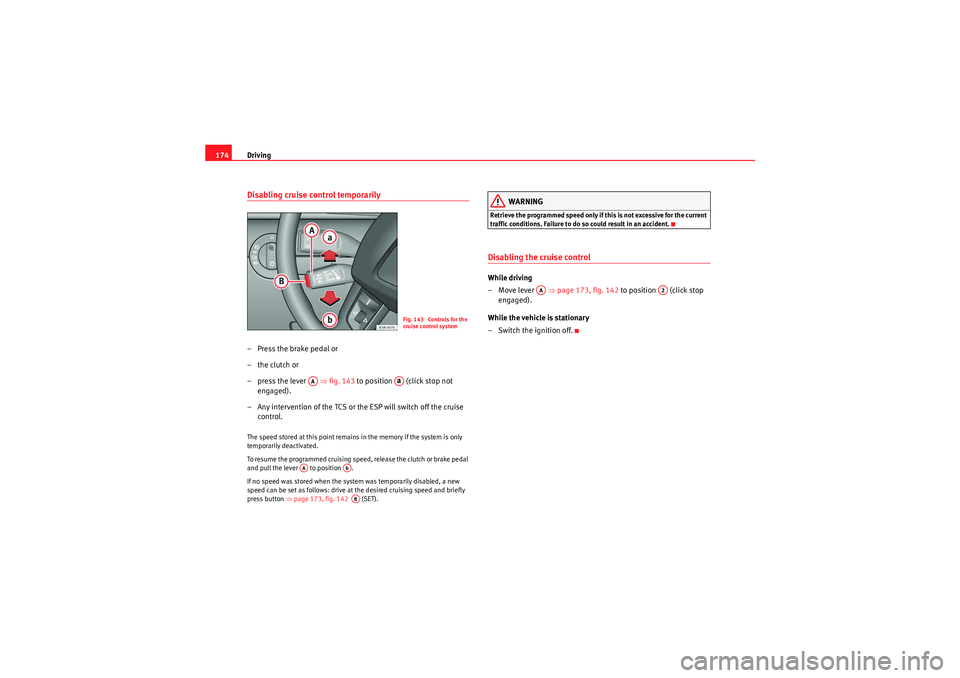
– press the lever ⇒fig. 143 to position (click stop not
engaged).
– Any intervention of the TCS or the ESP will switch off the cruise control.The speed stored at this point remains in the memory if the system is only
temporarily deactivated.
To resume the programmed cruising speed, release the clutch or brake pedal
and pull the lever to position .
If no speed was stored when the system was temporarily disabled, a new
speed can be set as follows: drive at the desired cruising speed and briefly
press button ⇒page 173, fig. 142 (SET).
WARNING
Retrieve the programmed speed only if this is not excessive for the current
traffic conditions. Failure to do so could result in an accident.Disabling the cruise controlWhile driving
–Move lever ⇒page 173, fig. 142 to position (click stop
engaged).
While the vehicle is stationary
– Switch the ignition off.
Fig. 143 Controls for the
cruise control system
AA
Aa
AA
AbAB
AA
A2
Exeo_EN.book Seite 174 Freitag, 28. August 2009 10:14 10
Page 177 of 310
Driving175
Safety First
Controls and equipment
Practical tips
Technical Data
Manual gearboxDriving a car with a manual gearboxEngaging the reverse gear
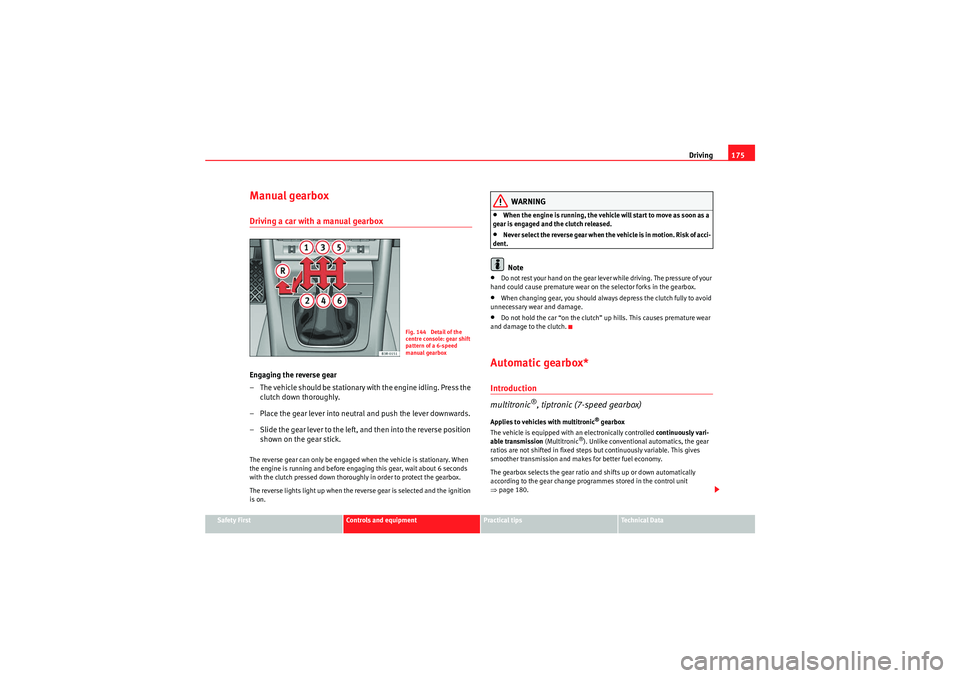
– The vehicle should be stationary with the engine idling. Press the
clutch down thoroughly.
– Place the gear lever into neutral and push the lever downwards.
– Slide the gear lever to the left, and then into the reverse position shown on the gear stick.The reverse gear can only be engaged when the vehicle is stationary. When
the engine is running and before engaging this gear, wait about 6 seconds
with the clutch pressed down thoroughly in order to protect the gearbox.
The reverse lights light up when the reverse gear is selected and the ignition
is on.
WARNING
•When the engine is running, the vehicle will start to move as soon as a
gear is engaged and the clutch released.•Never select the reverse gear when the vehicle is in motion. Risk of acci-
dent.Note
•Do not rest your hand on the gear lever while driving. The pressure of your
hand could cause premature wear on the selector forks in the gearbox.•When changing gear, you should always depress the clutch fully to avoid
unnecessary wear and damage.•Do not hold the car “on the clutch” up hills. This causes premature wear
and damage to the clutch.Automatic gearbox*Introduction
multitronic
®, tiptronic (7-speed gearbox)
Applies to vehicles with multitronic
® gearbox
The vehicle is equipped with an electronically controlled continuously vari-
able transmission (Multitronic
®). Unlike conventional automatics, the gear
ratios are not shifted in fixed steps but continuously variable. This gives
smoother transmission and makes for better fuel economy.
The gearbox selects the gear ratio and shifts up or down automatically
according to the gear change programmes stored in the control unit
⇒ page 180.
Fig. 144 Detail of the
centre console: gear shift
pattern of a 6-speed
manual gearbox
Exeo_EN.book Seite 175 Freitag, 28. August 2009 10:14 10
Page 179 of 310
Driving177
Safety First
Controls and equipment
Practical tips
Technical Data
This avoids overloading the locking mechanism and it will be easier to move
the selector lever from position P.
Vehicles with multitronic® gearbox: Your vehicle is equipped with the
hill
hold assist function which makes it easier to start off on a slope. The system
is activated when you press and hold the brake pedal for a few seconds.
When you release the brake pedal the braking force will be maintained for a
moment in order to prevent the vehicle rolling back when you drive away.
WARNING
•While you are selecting a gear and the vehicle is stopped with the
engine running, do not accelerate. Failure to do so could result in an acci-
dent.•Please note that some power will still be transmitted when you stop
temporarily with the selector lever in position D, S or R. To do this, when
stopping you will need to press the brake with the force required to hold
the vehicle still. Failure to do so could result in an accident.•N e v e r m ov e t h e s e l e c t o r l e v e r t o R o r P w h e n d r i v i n g , a s t h i s co u l d ca u s e
an accident.•Vehicles with multitronic® gearbox: Please note that some power will
still be transmitted when you stop temporarily with the selector lever in
position D, S or R. Therefore, when stopping you will need to press the
brake with the force required to hold the vehicle still. Failure to do so could
result in an accident.
Selector lever positions
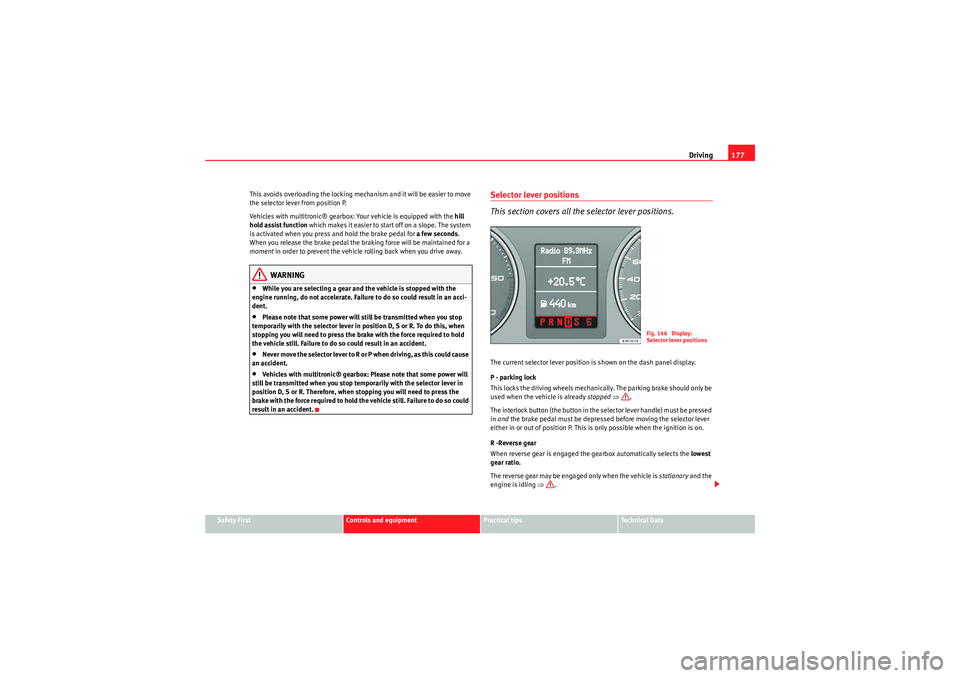
This section covers all th e selector lever positions.The current selector lever position is shown on the dash panel display.
P - parking lock
This locks the driving wheels mechanically. The parking brake should only be
used when the vehicle is already stopped ⇒ .
The interlock button (the button in the selector lever handle) must be pressed
in and the brake pedal must be depressed before moving the selector lever
either in or out of position P. This is only possible when the ignition is on.
R -Reverse gear
When reverse gear is engaged the gearbox automatically selects the lowest
gear ratio.
The reverse gear may be engaged only when the vehicle is stationary and the
engine is idling ⇒.
Fig. 146 Display:
Selector lever positions
Exeo_EN.book Seite 177 Freitag, 28. August 2009 10:14 10
Page 180 of 310
Driving
178To move the selector lever to position R, press in the interlock button and at
the same time press the brake pedal. Depending on the model, one or two
reversing lights will come on in selector lever position R (when ignition is
switched on).
N - Neutral (idling)
In this position the gearbox is in neutral ⇒.
D - Drive (forwards)
In this position, the gearbox selects the optimal transmission ratio
depending on the engine load, speed and the dynamic gear regulation
program (DRP).
Press the brake pedal when moving the selector lever from N to D if the
vehicle is stationary or at speeds below 5 km/h ⇒.
Under certain circumstances (e.g. when driving in mountains or towing a
trailer or caravan) it can be advantageous to switch temporarily to Tiptronic
mode ⇒page 181, so that the gear ratios can be selected manually to suit
the driving conditions.
S - Sport position
To drive in sports mode, select the position S. The engine power reserve is
used to its maximum. When accelerating the gear shifts will be noticeable.
Press the brake pedal when moving the selector lever from N to S if the
vehicle is stationary or at speeds below 5 km/h ⇒.
WARNING
•Never move the selector lever to R or P when driving. Failure to do so
could result in an accident.•In selector position D or S the vehicle must always be held with the foot
brake when the engine is running. This is because an automatic gearbox
still transmits power even at idling speed, and the vehicle tends to “creep”.
The throttle must on no account be opened inadvertently (for instance by hand from the engine compartment) when a gear is engaged with the
vehicle stationary. The vehicle could otherwise start moving immediately
(in some cases even if the parking brake is engaged) and possibly cause an
accident.
•To avoid accidents, apply the parking brake and put the selector lever
in position P before opening the bonnet and working on the vehicle with
the engine running. Please observe the important safety warnings
⇒ page 221, “Work in the engine compartment”.Note
•Applies to vehicles with tiptronic gearbox:•If the lever is moved accidentally to N when driving, release the acceler-
ator and let the engine speed drop to idling before selecting D or S again.•For the sake of fuel economy (and the environment), the gearbox ratios on
some models are designed so that maximum speed is only obtained when
the selector lever is at position S.WARNING (continued)
Exeo_EN.book Seite 178 Freitag, 28. August 2009 10:14 10
Page 182 of 310
Driving
180Applies to vehicles with tiptronic gearbox
When the accelerator pedal is pressed right down past the point of resistance
at full throttle, the gearbox will shift down to a lower gear, depending on road
speed and engine speed. The upshift to the next higher gear is delayed until
the engine reaches maximum rpm.
WARNING
P l eas e n o te t ha t i f t h e road s u r fa ce is s l i pp e r y o r w e t , t h e k ick- d ow n fe at u re
could cause the driving wheels to spin, which could result in skidding.Dynamic gear control program (DCP)
The automatic gearbox is controlled electronically.The vehicle is equipped with an electronically controlled gearbox. The gear
ratios are selected automatically according to preset gearshift programmes.
When you drive at moderate speeds the gearbox will select the most econom-
ical shift programme. It will then change up early and delay the downshifts to
give better fuel economy.
If you drive at higher speeds with heavy acceleration, if you open the throttle
quickly, or if you use the kick-down or the car's maximum speed, the gearbox
will automatically select the more sporty shift programmes.
The gearbox is self-adapting, and continuously selects the most suitable shift
programme. At the same time, the driver can also make the gearbox switch to
a more sporty programme by pressing the accelerator quickly. Depending on
road speed, this makes the gearbox shift down early into a lower gear ratio
for more rapid acceleration (for instance to pass another vehicle), without
having to press the accelerator all the way down into the kick-down position.
After the gearbox has shifted back up it returns to the original programme,
depending on your style of driving. Vehicles with multitronic® gearbox: the gearbox continuously adapts the
gear ratios to gradients. If the brake
pedal is pressed on a downhill gradient
the gearbox automatically shifts to a lower gear ratio. This increases the
engine braking effect.
Vehicles with tiptronic gearbox: in mountainous areas, the gearbox adapts
the gearshifts for uphill and downhill gradients. This prevents the gearbox
from shifting up and down unnecessarily on uphill gradients.
Exeo_EN.book Seite 180 Freitag, 28. August 2009 10:14 10
Page 186 of 310
Intelligent technology
184If required, the ESP can also be enabled and disabled manually by briefly
pressing the switch ⇒page 183, fig. 151. The ESP warning lamp lights
up when the system is switched off, see ⇒page 68.
In general, the ESP should be left switched on at all times. In particular
circumstances where a certain amount of wheel slip is desirable, it may be
advisable to switch off the ESP. Examples:•when driving with snow chains•when driving in deep snow or on loose surfaces•when rocking the car backwards and forwards to free it.
The ESP should be switched on again afterwards as soon as possible.WARNING
The ESP is not able to overcome the physical limits of adhesion. Even with
ESP, you should always adjust your speed to suit the conditions. Please
b ea r t h is i n m i n d , e s p e ciall y o n w e t o r s l i pp e r y roa d s u r fa ces . D o n o t l e t t h e
extra safety features tempt you into taking any risks when driving. Failure
to do so could result in an accident.Anti-lock brake system (ABS)
ABS prevents the wheels from locking up under braking.The anti-lock brake system (ABS) is an important part of the car's active safety
system. However, the ABS will not necessarily guarantee shorter stopping
distances in all conditions. For instance, on loose gravel or fresh snow on top
of an icy surface (conditions which anyway require extreme care and reduced
speed), the stopping distance with ABS may even be slightly longer. How the ABS works
The system runs an automatic self-check when the car reaches a road speed
of about 6 km/h. This may be accompanied by a noise from the ABS pump.
When one of the wheels is turning very slowly in relation to the road speed
and is close to locking up, the system will reduce the pressure in the brake
line to this wheel. The driver is made aware of this adjustment process by a
vibration of the brake pedal
and an audible noise. This is a deliberate
warning to the driver that one or more of the wheels is tending to lock up and
the ABS control function has intervened. In this situation it is important to
keep the brake pedal fully depressed so the ABS can regulate the brake appli-
cation, but do not “pump” the brake pedal.
WARNING
The grip provided by ABS is still subjec t to the physical limits of adhesion.
Always bear this in mind, especially on wet or slippery roads. If you notice
that the ABS is working (to counteract locked wheels under braking), you
should reduce speed immediately to suit the road and traffic conditions. Do
not let the extra safety features tempt you into taking any risks when
driving. Failure to do so could result in an accident.
Note
If a malfunction should occur in the ABS, this is indicated by a warning lamp
⇒ page 67.Brake assist system
The brake assist system helps the driver to achieve optimum
braking effect.The brake assist system helps to increase braking power and thus to achieve
a shorter stopping distance. If the driver presses the brake pedal very quickly,
ESP
Exeo_EN.book Seite 184 Freitag, 28. August 2009 10:14 10
Page 187 of 310
Intelligent technology185
Safety First
Controls and equipment
Practical tips
Technical Data
the brake assist system automatically boosts the braking force to the
maximum level, up to the point where the anti-lock brake function (ABS) inter-
venes to stop the wheels from locking. You should then keep the brake pedal
pressed until the vehicle has braked to the required speed. The brake assist
system switches itself off as soon as you release the brake pedal.
The brake assist system will not be operative if there is a malfunction in the
ABS or the ESP.
WARNING
Please remember that the accident risk always increases if you drive too
fast, especially in corners or on a slippery road, or if you follow too close
behind the vehicle in front of you. An increased accident risk cannot be
compensated even by the brake assist system. Risk of accident.Electronic differential lock (EDL)
The electronic differential lock prevents the loss of traction
caused if one wheel starts spinning.General notes
The electronic differential lock (EDL) helps the car to start moving, accelerate
and climb a gradient in slippery conditions where this may otherwise be diffi-
cult or even impossible.
How it works
The EDL works automatically, i.e. without the driver's involvement. With the
aid of the ABS sensors, the system monitors the rotational speed of the
driven wheels ⇒
page 184. If a considerable difference in revs is detected
(approx. 100 rpm) in the speed of the driven wheels, e.g. when only one part
of the surface supporting the wheels is slippery, the system applies the brake
to slow down the skidding wheel so that more of the power is directed to the other wheels. The systems works up to a speed of approx. 80 km/h. The
system will make noises while it is working.
Moving away from a standstill
If one wheel has less grip and starts spinning (for instance, if one of the
driven wheels is on ice), keep pressing the accelerator gradually until the car
starts moving.
Overheating of the brakes
To prevent the brake disk of the braked wheel from overheating, the EDL cuts
out automatically if subjected to excessive loads. In this case, the vehicle will
continue to run and will have the same running properties as those of another
without EDL.
The EDL will switch on again automatically when the brake has cooled down.
WARNING
•When accelerating on a uniformly slippery surface (for instance all four
wheels on ice or snow), press the accelerator gradually and carefully.
Despite EDL, the driven wheels may otherwise start to spin. This could
impair the car's stability. Risk of accident.•Even with EDL, you should always adjust your speed to suit the condi-
tions. Do not let the extra safety features tempt you into taking any risks
when driving. Failure to do so could result in an accident.Note
If the ABS warning lamp lights up, this can also mean there is a fault in the
EDL. Please take the vehicle to a specialist garage as soon as possible.
Exeo_EN.book Seite 185 Freitag, 28. August 2009 10:14 10
Page 188 of 310
Intelligent technology
186Traction control system (TCS)
The traction control system prevents the drive wheels from
spinning when the car is accelerating.General notes
The traction control system (TCS) is one of the functions incorporated in the
electronic stabilisation programme (ESP).
The traction control system (TCS) helps the car to start moving, accelerate or
climb a gradient in slippery conditions where this may otherwise be difficult
or even impossible.
How it works
The TCS acts automatically, i.e. without the driver's intervention. With the aid
of the ABS sensors ⇒page 184, the TCS monitors the speed of the driven
wheels. If the wheels start to spin, the engine power is reduced automatically
to match the amount of grip available. The system is active across the entire
speed range.
The TCS works in conjunction with the ABS. If a malfunction occurs in the ABS,
the TCS will also be inoperative.
Note
To ensure that the TCS works properly, all four wheels must be fitted with
identical tyres. The difference in size of the wheels may lead to an undesired
reduction in engine power. Also see ⇒page 241.
BrakesGeneral notesNew brake pads
New brake pads do not provide optimal performance during the first 200 km
they must be “run in”. However, the reduced braking capacity may be
compensated by pressing on the brake pedal a little harder. Avoid over-
loading the brakes during run-in.
Wear
T h e r a t e o f we a r o n t h e brake pads depends a great deal on how you drive and
the conditions in which the vehicle is operated. Negative factors are, for
instance, city traffic, frequent short trips or hard driving with abrupt starts
and stops.
Wet roads; road salt
In certain conditions, such as in heavy rain, or after washing the car or driving
through water, the full braking effect can be delayed by moisture (or in winter
by ice) on the discs and brake pads. The brakes should be “dried” by pressing
the pedal to restore full braking effect.
When the velocity is over 80 km/h windscreen wipers are on, the brake
system moves the pads towards the brake discs for a few seconds. This
occurs - without warning to the driver - at regular intervals and requires a
more rapid response from the brakes when driving on wet roads.
The effectiveness of the brakes can also be temporarily reduced if the car is
driven for some distance without using the brakes when there is a lot of salt
on the road in winter. In this case, the layer of salt on the brake discs and pads
has to wear off before braking.
Exeo_EN.book Seite 186 Freitag, 28. August 2009 10:14 10