lock Seat Exeo 2010 Workshop Manual
[x] Cancel search | Manufacturer: SEAT, Model Year: 2010, Model line: Exeo, Model: Seat Exeo 2010Pages: 319, PDF Size: 9.64 MB
Page 170 of 319
Driving
168Switching on the ignition/pre-heating glow plugs
If the key is difficult to turn in the lock, move the steering wheel (to take the
load off the steering lock mechanism) until the key turns freely. In the case of
vehicles with a diesel engine, the key is turned to this position to preheat the
glow plugs.
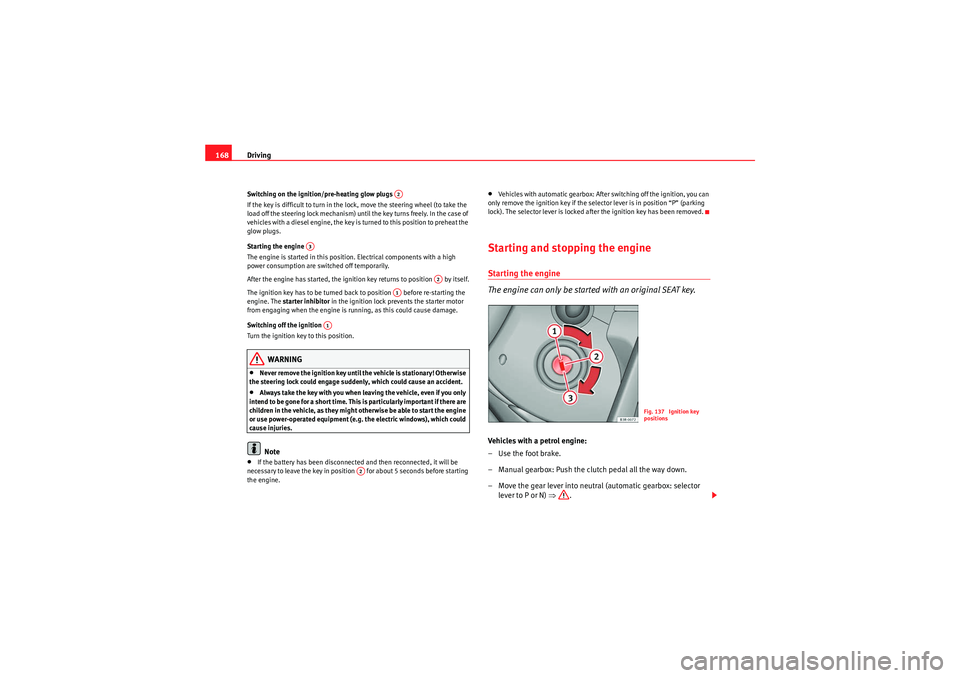
Starting the engine
The engine is started in this position. Electrical components with a high
power consumption are switched off temporarily.
After the engine has started, the ignition key returns to position by itself.
The ignition key has to be turned back to position before re-starting the
engine. The starter inhibitor in the ignition lock prevents the starter motor
from engaging when the engine is running, as this could cause damage.
Switching off the ignition
Turn the ignition key to this position.
WARNING
•Never remove the ignition key until the vehicle is stationary! Otherwise
the steering lock could engage suddenly, which could cause an accident.•Always take the key with you when leaving the vehicle, even if you only
intend to be gone for a short time. This is particularly important if there are
children in the vehicle, as they might otherwise be able to start the engine
or use power-operated equipment (e.g. the electric windows), which could
cause injuries.Note
•If the battery has been disconnected and then reconnected, it will be
necessary to leave the key in position for about 5 seconds before starting
the engine.
•Vehicles with automatic gearbox: After switching off the ignition, you can
only remove the ignition key if the selector lever is in position “P” (parking
lock). The selector lever is locked after the ignition key has been removed.Starting and stopping the engineStarting the engine
The engine can only be started with an original SEAT key.Vehicles with a petrol engine:
– Use the foot brake.
– Manual gearbox: Push the clutch pedal all the way down.
– Move the gear lever into neutral (automatic gearbox: selector lever to P or N) ⇒.
A2
A3
A2
A1
A1
A2
Fig. 137 Ignition key
positions
exeo_EN.book Seite 168 Montag, 30. August 2010 4:45 16
Page 173 of 319
Driving171
Safety First
Operating Instructions
Practical Tips
Technical Specifications
If you drive by mistake with the handbrake still applied, you will hear a
warning buzzer and the display will show the message:
Handbrake on
The handbrake warning switches on after driving for 3 seconds at speeds
above 5 km/h.
The handbrake warning lamp
H lights up when the handbrake is applied
with the ignition on.
WARNING
Please note that the handbrake should be released all the way. If it is only
partially released, this will cause rear brakes overheating, which can
impair the function of the brake system and could lead to an accident.
Caution
Once the vehicle has come to a standstill, always apply the handbrake firmly
and then, on a manual gearbox, engage a gear, or select P on an automatic.Parking
The following points will ensure there is no risk of the vehicle
rolling away accidentally after it is parked:– Use the foot brake to stop the vehicle.
– Apply the handbrake firmly.
– Switch the engine off.
– On a manual gearbox engage 1st gear or on an automatic move the selector lever to P ⇒ .
When parking on slopes:
Turn the steering wheel so that the, if the vehicle moves, it will do so towards
the curb.
WARNING
•Do not leave anyone (especially children) in the vehicle when it is
locked. Locked doors could delay assistance in an emergency, potentially
putting lives at risk.•Never leave children unsupervised in the vehicle. They could release
e.g. the handbrake or gear lever, moving the vehicle and causing an
accident.
Parking aid acoustic systemGeneral notesVarious systems are available to help you when parking or manoeuvring in
tight spaces, depending on the equipment fitted on your vehicle.
The SEAT Parking System gives an acoustic warning if there are any obstacles
behind your vehicle ⇒page 172.
When you are parking, SEAT Parking System Plus warns you acoustically and
optically about obstacles in front of and behind the vehicle ⇒page 172.
Note
To ensure the acoustic parking aid works properly, the sensors must be kept
clean and free of snow and ice.
exeo_EN.book Seite 171 Montag, 30. August 2010 4:45 16
Page 180 of 319
Driving
178If desired, you can also select the gears manually (tiptronic mode)
⇒ page 183.
Please note that in vehicles with a multitronic® gearbox, torque is trans-
mitted via a multi-plate clutch, and not via a torque converter as on conven-
tional automatics. This means that the vehicle will not “creep” as much as
conventional automatics when the engine is idling if you stop temporarily
with the selector lever in position D, S or R.
Vehicles with tiptronic gearbox
The vehicle is equipped with an electronically controlled 7-speed automatic
gearbox. The gearbox changes up and down automatically .
If desired, you can also select the gears manually (tiptronic mode)
⇒ page 183.Driving instructions
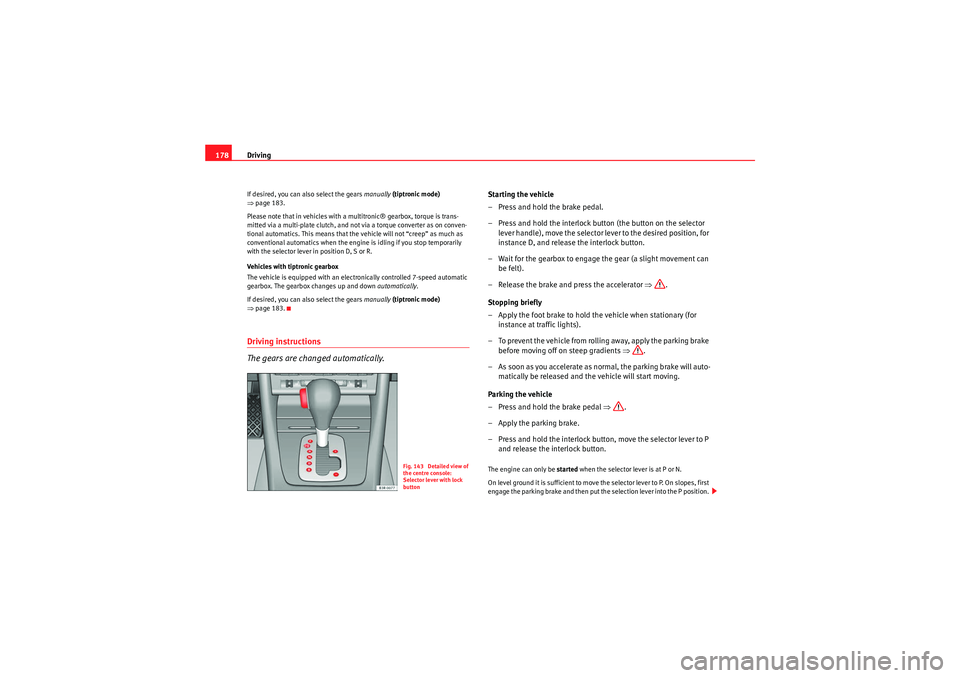
The gears are changed automatically.
Starting the vehicle
–Press and hold the brake pedal.
– Press and hold the interlock button (the button on the selector
lever handle), move the selector lever to the desired position, for
instance D, and release the interlock button.
– Wait for the gearbox to engage the gear (a slight movement can be felt).
– Release the brake and press the accelerator ⇒.
Stopping briefly
– Apply the foot brake to hold the vehicle when stationary (for instance at traffic lights).
– To prevent the vehicle from rolling away, apply the parking brake before moving off on steep gradients ⇒.
– As soon as you accelerate as normal, the parking brake will auto- matically be released and the vehicle will start moving.
Parking the vehicle
–Press and hold the brake pedal ⇒.
– Apply the parking brake.
– Press and hold the interlock button, move the selector lever to P and release the interlock button.The engine can only be started when the selector lever is at P or N.
On level ground it is sufficient to move the selector lever to P. On slopes, first
engage the parking brake and then put the selection lever into the P position.
Fig. 143 Detailed view of
the centre console:
Selector lever with lock
button
exeo_EN.book Seite 178 Montag, 30. August 2010 4:45 16
Page 181 of 319
Driving179
Safety First
Operating Instructions
Practical Tips
Technical Specifications
This avoids overloading the locking mechanism and it will be easier to move
the selector lever from position P.
Vehicles with multitronic® gearbox: Your vehicle is equipped with the
hill
hold assist function which makes it easier to start off on a slope. The system
is activated when you press and hold the brake pedal for a few seconds.
When you release the brake pedal the braking force will be maintained for a
short moment in order to prevent the vehicle rolling back when you drive
away.
WARNING
•While you are selecting a gear and the vehicle is stopped with the
engine running, do not accelerate. Failure to do so could result in an acci-
dent.•Please note that some power will still be transmitted when you stop
temporarily with the selector lever in position D, S or R. Therefore, when
stopping you will need to press the brake with the force required to hold
the vehicle still. Failure to do so could result in an accident.•N e v e r m ov e t h e s e l e c t o r l e v e r t o R o r P w h e n d r i v i n g , a s t h i s co u l d ca u s e
an accident.•Vehicles with multitronic® gearbox: Please note that some power will
still be transmitted when you stop temporarily with the selector lever in
position D, S or R. Therefore, when stopping you will need to press the
brake with the force required to hold the vehicle still. Failure to do so could
result in an accident.
Selector lever positions
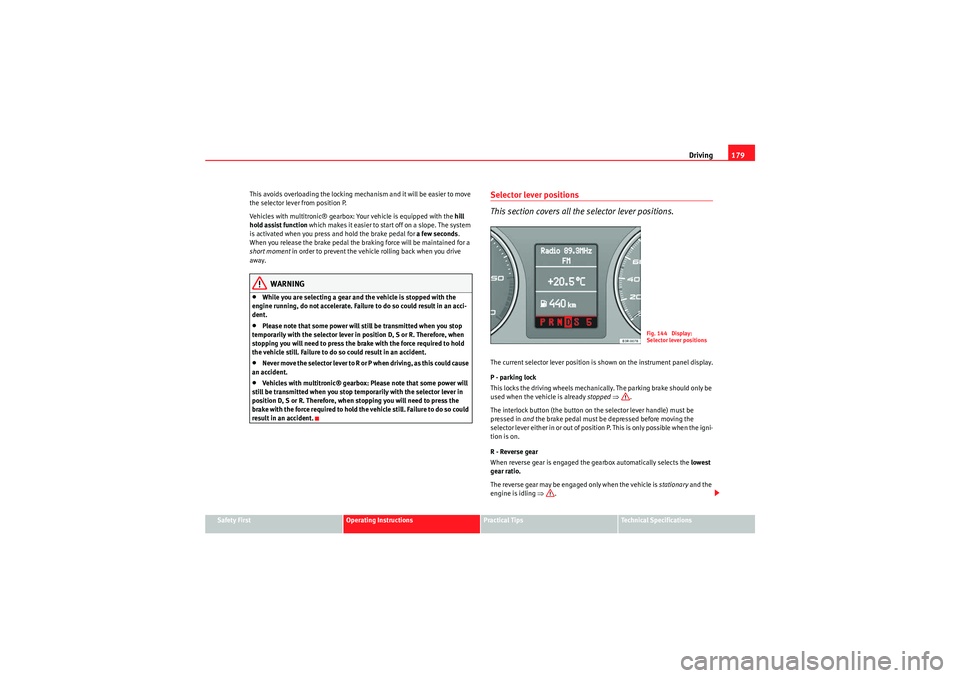
This section covers all th e selector lever positions.The current selector lever position is shown on the instrument panel display.
P - parking lock
This locks the driving wheels mechanically. The parking brake should only be
used when the vehicle is already stopped ⇒ .
The interlock button (the button on the selector lever handle) must be
pressed in and the brake pedal must be depressed before moving the
selector lever either in or out of position P. This is only possible when the igni-
tion is on.
R - Reverse gear
When reverse gear is engaged the gearbox automatically selects the lowest
gear ratio.
The reverse gear may be engaged only when the vehicle is stationary and the
engine is idling ⇒.
Fig. 144 Display:
Selector lever positions
exeo_EN.book Seite 179 Montag, 30. August 2010 4:45 16
Page 182 of 319
Driving
180To move the selector lever to position R, press in the interlock button and at
the same time press the brake pedal. Depending on the model, one or two
reverse lights will come on in selector lever position R (when ignition is
switched on).
N - Neutral (idling)
In this position the gearbox is in neutral ⇒.
D - Drive (forward)
In this position, the gearbox selects the optimal transmission ratio
depending on the engine load, speed and the dynamic gear regulation
programme (DRP).
Press the brake pedal when moving the selector lever from N to D if the
vehicle is stationary or at speeds below 5 km/h ⇒.
Under certain circumstances (e.g. when driving in mountains or towing a
trailer or caravan) it can be advantageous to switch temporarily to tiptronic
mode ⇒page 183, so that the gear ratios can be selected manually to suit
the driving conditions.
S - Sport position
To drive in sports mode, select the position S. The engine power reserve is
used to its maximum. When accelerating the gear shifts will be noticeable.
Press the brake pedal when moving the selector lever from N to S if the
vehicle is stationary or at speeds below 5 km/h ⇒.
WARNING
•Never move the selector lever to R or P when driving. Failure to do so
could result in an accident.•In selector position D or S the vehicle must always be held with the foot
brake when the engine is running. This is because an automatic gearbox
still transmits power even at idling speed, and the vehicle tends to “creep”.
The throttle must on no account be opened inadvertently (for instance by hand from the engine compartment) when a gear is engaged with the
vehicle stationary. The vehicle could otherwise start moving immediately
(in some cases even if the parking brake is engaged) and possibly cause an
accident.
•To avoid accidents, apply the parking brake and put the selector lever
in position P before opening the bonnet and working on the vehicle with
the engine running. Please observe the important safety warnings
⇒ page 224, “Work in the engine compartment”.Note
•Applies to vehicles with tiptronic gearbox:•If the lever is moved accidentally to N when driving, release the acceler-
ator and let the engine speed drop to idling before selecting D or S again.•For the sake of fuel economy (and the environment), the gearbox ratios on
some models are designed so that maximum speed is only obtained when
the gear lever is in position S.WARNING (continued)
exeo_EN.book Seite 180 Montag, 30. August 2010 4:45 16
Page 183 of 319

Driving181
Safety First
Operating Instructions
Practical Tips
Technical Specifications
Selector lever lock
The selector lever lock prevents gears from being engaged
inadvertently, so that the vehicle is not set in motion uninten-
tionally.The selector lever lock is released as follows:
– Switch the ignition on.
–Press the brake pedal and at the same time press in the interlock
button.Automatic selector lever lock
With the ignition turned on, the selector lever is locked in the positions P and
N. To remove it from these positions, press on the brake. The following
message appears in the instrument panel as a reminder for the driver when
the selector lever is in position P or N:
WHEN STATIONARY APPLY FOOTBRAKE WHILE SELECTING GEAR The selector lever lock only works if the vehicle is stationary or driving at
speeds up to 5 km/h. At higher speeds the selector lever lock in the N posi-
tion is disengaged automatically.
The selector lever lock is not engaged if the selector lever is moved quickly
through position N (e.g. when shifting from R to D). This makes it possible, for
instance, to “rock” the vehicle backwards and forwards if it is stuck in snow
or mud. The selector lever lock engages automatically if the brake pedal is not
depressed and the lever is in position N for more than about a second.
Interlock button
The interlock button on the selector lever handle prevents the driver from
inadvertently engaging particular gears. Press the button in to disengage the
selector lever lock. The selector lever
positions in which the interlock button
has to be pressed are shown in the illustration, highlighted in colour
⇒ fig. 145 .
Safety interlock for ignition key
Once the ignition has been turned off, the key may be removed only if the gear
selector is in position P. While the key is not in the ignition, the selector lever
is locked in position P.
Kick-down feature
The kickdown feature is designed to give maximum accelera-
tion.Vehicles with multitronic
® gearbox
When the accelerator pedal is pressed right down past the point of resistance
at full throttle, the gearbox will select a lower gear ratio, depending on road
speed and engine speed. While you keep the accelerator depressed the
engine speed is automatically controlled to give your vehicle maximum accel-
eration.
Fig. 145 Selector lever
lock functions
exeo_EN.book Seite 181 Montag, 30. August 2010 4:45 16
Page 186 of 319

Driving
184Back-up programme
A back-up system is in place if a fault should occur in the
control system.The automatic gearbox switches to the back-up programme if a fault should
occur in the control system. This is indicated by a gear pinion symbol which
lights up on the instrument panel display.
It is still possible to move the selector lever to all positions. The manual shift
programme (tiptronic) is not available when the back-up programme is
active.
Vehicles with tiptronic gearbox: when the selector lever is in position D or S
or in the manual shift programme, the gearbox will remain in 3rd gear if 1st,
2nd or 3rd gears were engaged when the fault occurred. The gearbox will
remain in 5th gear if 4th, 5th or 6th gears were engaged. The gearbox will
then engage 3rd gear when you drive away from a standstill or after the
engine is restarted.
It will still be possible to use reverse gear in the normal way. However, the
electronic lock for reverse gear will be switched off.
Caution
Should the gearbox ever switch into the back-up programme, you should take
the vehicle to a technical service or qualified workshop as soon as possible.
Steering wheel with paddle levers
The paddle levers on the steering wheel enable the driver to
manually select pre-programmed ratios or gears.– Briefly pull the left-hand paddle lever to change down to a
lower gear.
– Briefly pull the right-hand paddle lever to change up to a higher gear.The paddle levers are activated when the selector lever is in position D or S,
or the position for the manual shift programme (tiptronic).
The manual shift programme can, of course, still be operated using the
selector lever in the centre console.
Fig. 148 Steering wheel:
tiptronic controls
A–A+
exeo_EN.book Seite 184 Montag, 30. August 2010 4:45 16
Page 187 of 319

Intelligent technology185
Safety First
Operating Instructions
Practical Tips
Technical Specifications
Practical TipsIntelligent technologyElectronic Stability Programme (ESP)General notes
The Electronic Stability Programme increases the vehicle’s
stability on the road.The ESP is designed to increase the degree of control in situations where the
vehicle approaches the limits of adhesion, especially when accelerating and
cornering. It reduces the risk of skidding and improves stability in all road
conditions. The system is active across the entire speed range. The anti-lock brake system (ABS), the electronic differential lock (EDL) and
the traction control system (TCS) are all integrated into the Electronic Stability
Programme.
How it works
The ESP control unit processes data from the three integrated systems. It also
processes additional inputs provided by other high-precision sensors. These
register the vehicle’s rotation about the vertical axis (yaw rate), lateral accel-
eration, brake pressure and steering wheel angle.
The system uses the steering wheel angle and road speed to calculate the
changes of direction desired by the driver, and constantly compares them
with the actual behaviour of the vehicle. If the desired course is not being
maintained (for instance, if the vehicle is starting to skid), then the ESP
compensates automatically by braking the appropriate wheel.
The forces acting on the braked wheel bring the vehicle back to a stable
condition. If the vehicle over
swerves (tendency of the rear to leave the road),
the brakes will act on the front wheel facing the outside of the bend. If the
vehicle under swerves (tendency to leave the bend), the braking force is
applied to the rear wheel facing the inside of the bend.
The ESP works in conjunction with the ABS ⇒page 186. If a malfunction
should occur in the ABS, the ESP will also stop working.
Deactivating
The ESP is activated automatically when the engine is started and performs a
self-test routine.
Fig. 149 Centre console
with ESP switch
exeo_EN.book Seite 185 Montag, 30. August 2010 4:45 16
Page 188 of 319
Intelligent technology
186If required, the ESP can also be enabled and disabled manually by briefly
pressing the button ⇒ page 185, fig. 149. The ESP warning lamp lights
up when the system is switched off, see ⇒page 68.
In general, the ESP should be left switched on at all times. In particular
circumstances where a certain amount of wheel slip is desirable, it may be
advisable to switch off the ESP. Examples:•when driving with snow chains•when driving in deep snow or on loose surfaces•when rocking the vehicle backwards and forwards to free it.
The ESP should be switched on again afterwards as soon as possible.WARNING
The ESP is not able to overcome the physical limits of adhesion. Even with
ESP, you should always adjust your speed to suit the conditions. Please
b ea r t h is i n m i n d , e s p e ciall y o n w e t o r s l i pp e r y roa d s u r fa ces . D o n o t l e t t h e
extra safety features tempt you into taking any risks when driving. Failure
to do so could result in an accident.Anti-lock brake system (ABS)
ABS prevents the wheels from locking up under braking.The anti-lock brake system (ABS) is an important part of the vehicle’s active
safety system. However, the ABS will not necessarily guarantee shorter stop-
ping distances in all conditions. For instance, on loose gravel or fresh snow
on top of an icy surface (conditions which anyway require extreme care and
reduced speed), the stopping distance with ABS may even be slightly longer. How the ABS works
The system runs an automatic self-check when the vehicle reaches a road
speed of about 6 km/h. This may be accompanied by a noise from the ABS
pump.
When one of the wheels is turning very slowly in relation to the road speed
and is close to locking up, the system will reduce the brake pressure on that
wheel. The driver is made aware of this adjustment process by a vibration of
the brake pedal
and an audible noise. This is a deliberate warning to the
driver that one or more of the wheels is tending to lock up and the ABS control
function has intervened. In this situation it is important to keep the brake
pedal fully depressed so the ABS can regulate the brake application, but do
not “pump” the brake pedal.
WARNING
The grip provided by ABS is still subjec t to the physical limits of adhesion.
Always bear this in mind, especially on wet or slippery roads. If you notice
that the ABS is working (to counteract locked wheels under braking), you
should reduce speed immediately to suit the road and traffic conditions. Do
not let the extra safety features tempt you into taking any risks when
driving. Failure to do so could result in an accident.
Note
If a malfunction should occur in the ABS, this is indicated by a warning lamp
⇒ page 67.
ESP
exeo_EN.book Seite 186 Montag, 30. August 2010 4:45 16
Page 189 of 319
Intelligent technology187
Safety First
Operating Instructions
Practical Tips
Technical Specifications
Brake assist system
The brake assist system helps the driver to achieve optimum
braking effect.The brake assist system helps to increase braking power and thus to achieve
a shorter stopping distance. If the driver presses the brake pedal very quickly,
the brake assist system automatically boosts the braking force to the
maximum level, up to the point where the anti-lock brake function (ABS) inter-
venes to stop the wheels from locking. You should then keep the brake pedal
pressed until the vehicle has braked to the required speed. The brake assist
system switches itself off as soon as you release the brake pedal.
The brake assist system will not be operative if there is a malfunction in the
ABS or the ESP.
WARNING
Please remember that the accident risk always increases if you drive too
fast, especially in corners or on a slippery road, or if you follow too close
behind the vehicle in front of you. An increased accident risk cannot be
compensated even by the brake assist system. Risk of accident.Electronic differential lock (EDL)
The electronic differential lock prevents the loss of traction
caused if one wheel starts spinning.General notes
The electronic differential lock (EDL) helps the vehicle to start moving, accel-
erate and climb a gradient in slippery conditions where this may otherwise be
difficult or even impossible. How it works
The EDL works automatically, without the driver’s involvement. With the aid
of the ABS sensors, the system monitors the rotational speed of the drive
wheels
⇒page 186. If a considerable difference in revs is detected (approx.
100 rpm) in the speed of the drive wheels, e.g. when only one part of the
surface supporting the wheels is slippery, the system applies the brake to
slow down the skidding wheel so that more of the power is directed to the
other wheels. The systems works up to a speed of approx. 80 km/h. The
system will make noise while it is working.
Starting the vehicle
If one wheel has less grip and starts spinning (for instance, if one of the drive
wheels is on ice), keep pressing the accelerator gradually until the vehicle
starts moving.
Overheating of the brakes
To prevent the brake disk of the braked wheel from overheating, the EDL cuts
out automatically if subjected to excessive loads. In this case, the vehicle will
continue to run and will have the same running properties as those of another
without EDL.
The EDL will switch on again automatically when the brake has cooled down.
WARNING
•When accelerating on a uniformly slippery surface (for instance all four
wheels on ice or snow), press the accelerator gradually and carefully.
Despite EDL, the drive wheels may otherwise start to spin. This could
impair the vehicle’s stability. Risk of accident.•Even with EDL, you should always adjust your speed to suit the road and
traffic conditions. Do not let the extra safety features tempt you into taking
any risks when driving. Failure to do so could result in an accident.
exeo_EN.book Seite 187 Montag, 30. August 2010 4:45 16