technical Seat Exeo 2011 Manual PDF
[x] Cancel search | Manufacturer: SEAT, Model Year: 2011, Model line: Exeo, Model: Seat Exeo 2011Pages: 313, PDF Size: 5.02 MB
Page 135 of 313
133
Seats and storage compartments
Seats and storage compartments Manual adjustment of the front seats
Seat adjuster controls
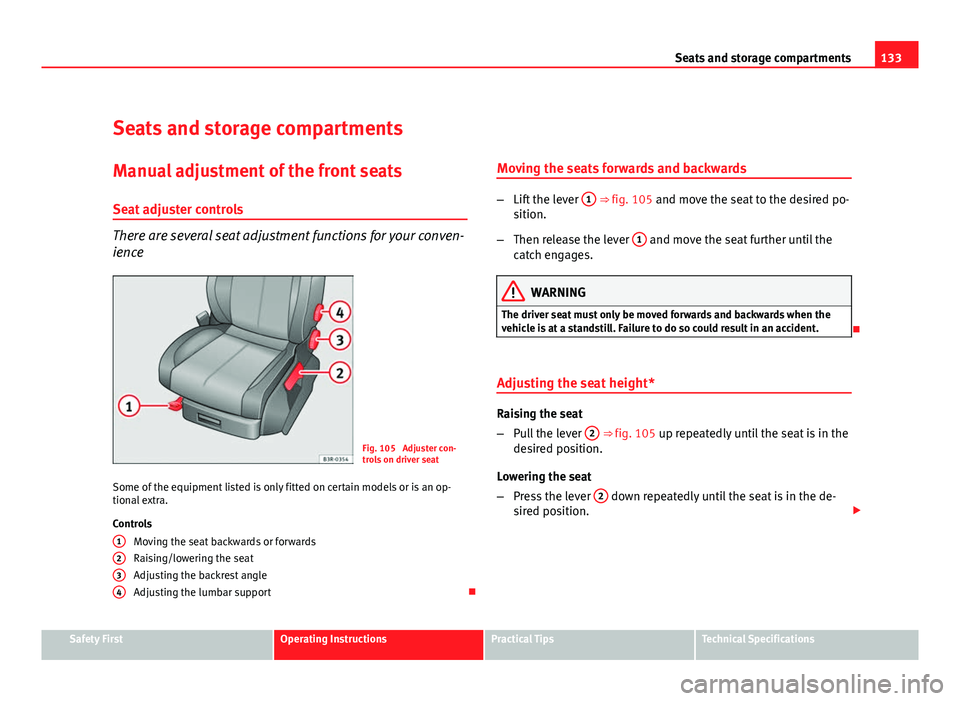
There are several seat adjustment functions for your conven-
ience
Fig. 105 Adjuster con-
trols on driver seat
Some of the equipment listed is only fitted on certain models or is an op-
tional extra.
Controls Moving the seat backwards or forwards
Raising/lowering the seat
Adjusting the backrest angle
Adjusting the lumbar support
1
234
Moving the seats forwards and backwards
–
Lift the lever 1 ⇒ fig. 105 and move the seat to the desired po-
sition.
– Then release the lever 1
and move the seat further until the
catch engages.
WARNING
The driver seat must only be moved forwards and backwards when the
vehicle is at a standstill. Failure to do so could result in an accident.
Adjusting the seat height*
Raising the seat
– Pull the lever 2
⇒ fig. 105 up repeatedly until the seat is in the
desired position.
Lowering the seat
– Press the lever 2
down repeatedly until the seat is in the de-
sired position.
Safety FirstOperating InstructionsPractical TipsTechnical Specifications
Page 137 of 313

135
Seats and storage compartments
Electric adjustment of front seats*
Adjusting the seat
The arrangement of the switches corresponds with the de-
sign of the seats.
Fig. 106 Front seat: Ad-
juster controls
Fig. 107 Front seat: Seat
adjustment switches
The adjustment switches for the seat and backrest correspond with
the layout, design and operation of the seat. The seats can be ad-
justed merely by pressing the corresponding switch in the required
direction.
Moving the seat forwards / backwards
– Press switch A
⇒ fig. 106 forwards or backwards 1 ⇒ fig. 107
⇒ .
Raising/lowering the seat
– Press switch A
up or down ⇒ .
Raising/lowering the front part of the seat
– Press the front of switch A
up or down 2 ⇒ .
Raising/lowering the rear part of the seat
– Press the rear of switch A
up or down 3 ⇒ .
Safety FirstOperating InstructionsPractical TipsTechnical Specifications
Page 139 of 313
137
Seats and storage compartments
– Press the rear part of the adjuster switch to decrease the con-
tour of the lumbar support.
Adjusting the height
– Press the top part of the adjuster switch to move the contour
upwards.
– Press the bottom part of the adjuster switch to move the con-
tour down.
The lumbar support provides effective support for the natural curvature of
the spine to give a more relaxed seating position, especially on long jour-
neys. Driver seat memory*
Description
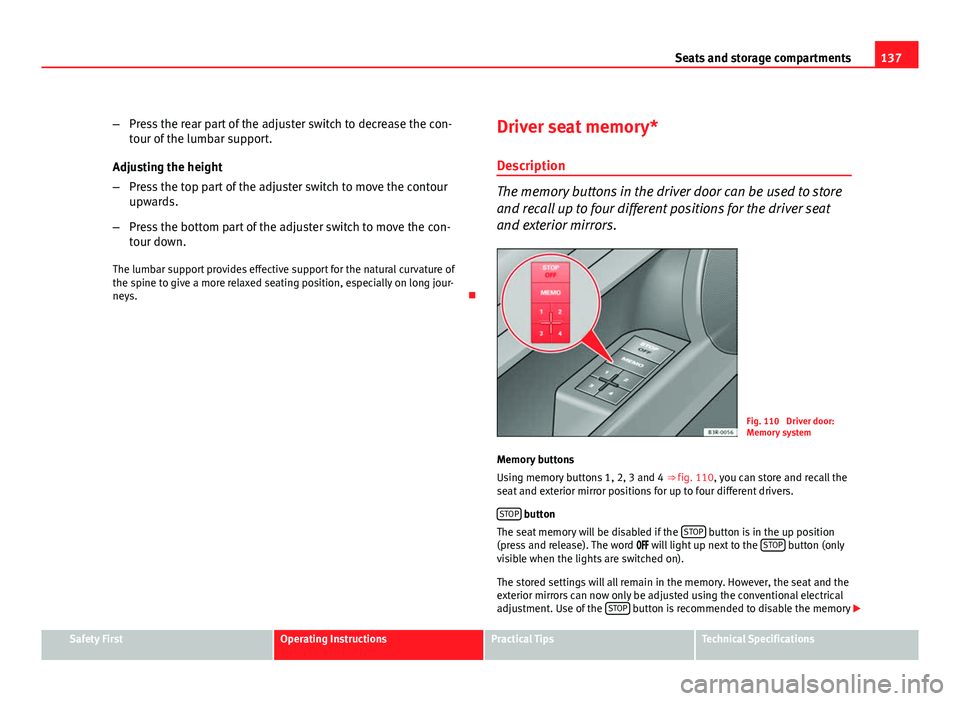
The memory buttons in the driver door can be used to store
and recall up to four different positions for the driver seat
and exterior mirrors.
Fig. 110 Driver door:
Memory system
Memory buttons
Using memory buttons 1, 2, 3 and 4 ⇒ fig. 110, you can store and recall the
seat and exterior mirror positions for up to four different drivers.
STOP
button
The seat memory will be disabled if the STOP button is in the up position
(press and release). The word will light up next to the STOP button (only
visible when the lights are switched on).
The stored settings will all remain in the memory. However, the seat and the
exterior mirrors can now only be adjusted using the conventional electrical
adjustment. Use of the STOP
button is recommended to disable the memory
Safety FirstOperating InstructionsPractical TipsTechnical Specifications
Page 141 of 313
139
Seats and storage compartments
Assigning remote control keys
The key must be assigned to a memory button so that the
positions stored in the memory can also be recalled using
the remote control key. Assigning the remote control key to a memory button
– Using the memory button, recall the settings that are to be pro-
grammed onto the key.
– Keeping the memory button pressed down, press the unlock
button on the remote control key within 10 seconds.
– Wait for about 2 seconds before releasing the memory button.
Deleting assignment of the remote control key to the memory
button
– Press and hold the MEMO
button and press the unlock button
on the remote control key within 10 seconds.
– Wait for about 2 seconds before releasing the MEMO
button.
The previous settings are automatically cancelled when the keys are re-as-
signed to different memory buttons. Head restraints
Front head restraints
In combination with properly worn seat belts, the head re-
straints offer effective protection, provided they are properly
adjusted to suit the height of the occupant.
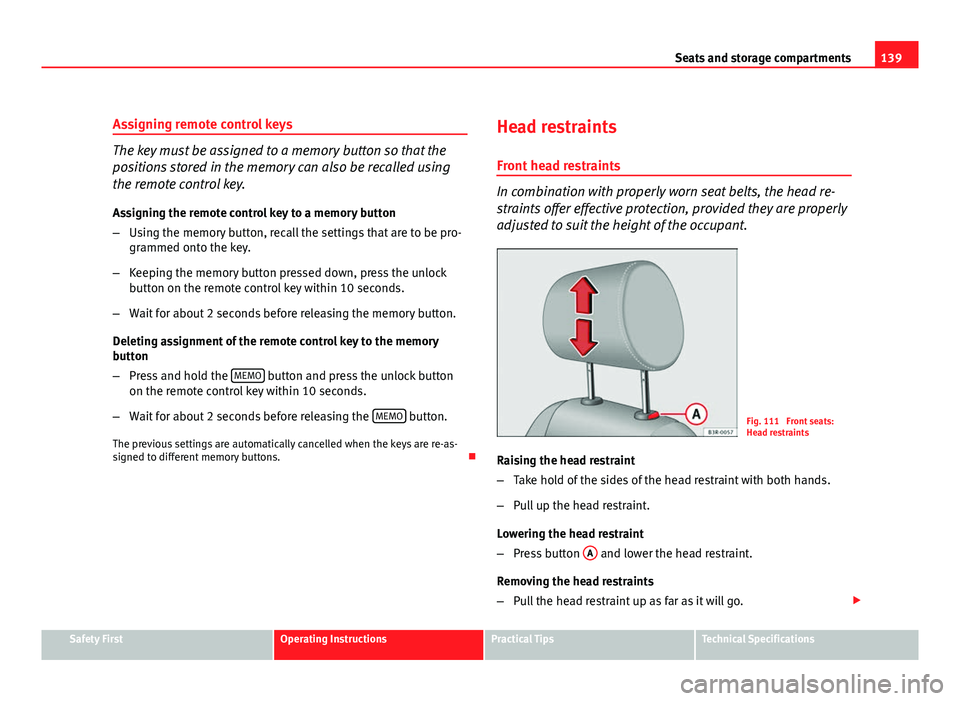
Fig. 111 Front seats:
Head restraints
Raising the head restraint
– Take hold of the sides of the head restraint with both hands.
– Pull up the head restraint.
Lowering the head restraint
– Press button A
and lower the head restraint.
Removing the head restraints
– Pull the head restraint up as far as it will go.
Safety FirstOperating InstructionsPractical TipsTechnical Specifications
Page 143 of 313
141
Seats and storage compartments
Rear seat central head restraint
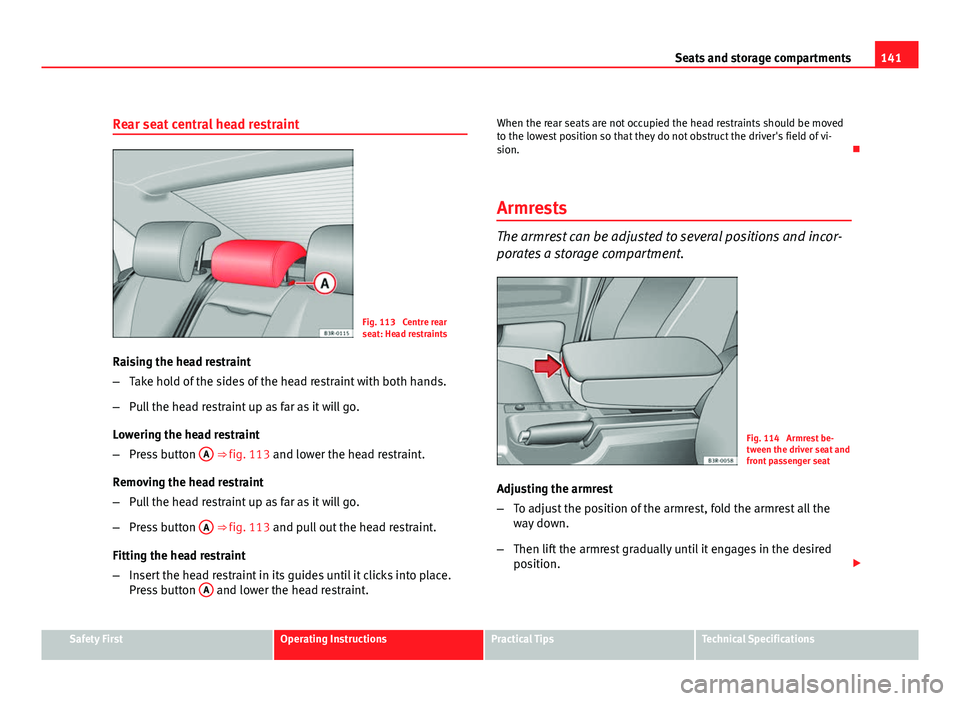
Fig. 113 Centre rear
seat: Head restraints
Raising the head restraint
– Take hold of the sides of the head restraint with both hands.
– Pull the head restraint up as far as it will go.
Lowering the head restraint
– Press button A
⇒ fig. 113 and lower the head restraint.
Removing the head restraint
– Pull the head restraint up as far as it will go.
– Press button A
⇒ fig. 113 and pull out the head restraint.
Fitting the head restraint
– Insert the head restraint in its guides until it clicks into place.
Press button A
and lower the head restraint. When the rear seats are not occupied the head restraints should be moved
to the lowest position so that they do not obstruct the driver's field of vi-
sion.
Armrests
The armrest can be adjusted to several positions and incor-
porates a storage compartment.
Fig. 114 Armrest be-
tween the driver seat and
front passenger seat
Adjusting the armrest
– To adjust the position of the armrest, fold the armrest all the
way down.
– Then lift the armrest gradually until it engages in the desired
position.
Safety FirstOperating InstructionsPractical TipsTechnical Specifications
Page 145 of 313
143
Seats and storage compartments
Extending the luggage compartment
The two sections of the backrest can be folded forwards ei-
ther together or separately to increase the capacity of the
luggage compartment.
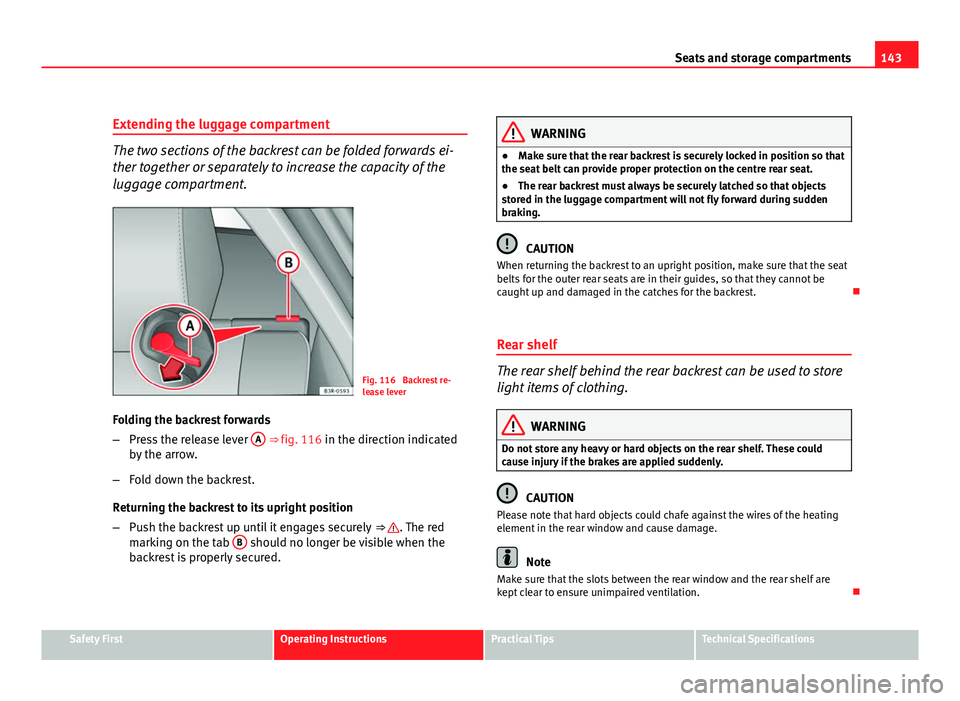
Fig. 116 Backrest re-
lease lever
Folding the backrest forwards
– Press the release lever A
⇒ fig. 116 in the direction indicated
by the arrow.
– Fold down the backrest.
Returning the backrest to its upright position
– Push the backrest up until it engages securely ⇒
. The red
marking on the tab B should no longer be visible when the
backrest is properly secured.
WARNING
● Make sure that the rear backrest is securely locked in position so that
the seat belt can provide proper protection on the centre rear seat.
● The rear backrest must always be securely latched so that objects
stored in the luggage compartment will not fly forward during sudden
braking.
CAUTION
When returning the backrest to an upright position, make sure that the seat
belts for the outer rear seats are in their guides, so that they cannot be
caught up and damaged in the catches for the backrest.
Rear shelf
The rear shelf behind the rear backrest can be used to store
light items of clothing.
WARNING
Do not store any heavy or hard objects on the rear shelf. These could
cause injury if the brakes are applied suddenly.
CAUTION
Please note that hard objects could chafe against the wires of the heating
element in the rear window and cause damage.
Note
Make sure that the slots between the rear window and the rear shelf are
kept clear to ensure unimpaired ventilation.
Safety FirstOperating InstructionsPractical TipsTechnical Specifications
Page 147 of 313
145
Seats and storage compartments
Note
Do not fold away the ski bag after use if it is still damp.
Roof rack
Description
Additional luggage can be carried on the roof rack. Note the following points if you intend to carry loads on the roof:
● There are aerodynamic drainage channels on the roof of the vehicle and,
therefore, normal roof racks cannot be used. We recommend using the ba-
sic support units from the range of genuine SEAT accessories.
● These basic supports are the base of a complete roof rack system. For
safety reasons, however, the corresponding additional fastenings must be
fitted to carry luggage, bicycles, surfboards, skis and boats. All the parts of
this system are available from SEAT Authorised Services.
CAUTION
Any damage to the vehicle caused by the use of other types of roof rack or
incorrect installation will not be covered by the factory warranty. The roof
rack system must therefore be installed exactly according to the instructions
provided. Attachment points
The roof rack must be attached at the marked points only.
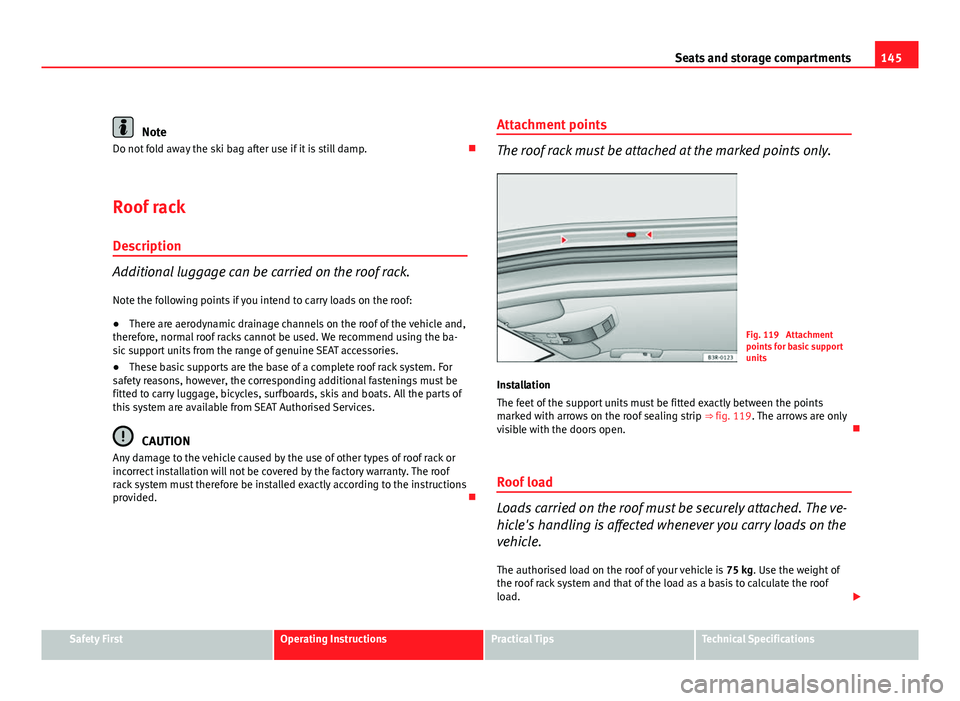
Fig. 119 Attachment
points for basic support
units
Installation
The feet of the support units must be fitted exactly between the points
marked with arrows on the roof sealing strip ⇒ fig. 119. The arrows are only
visible with the doors open.
Roof load
Loads carried on the roof must be securely attached. The ve-
hicle's handling is affected whenever you carry loads on the
vehicle. The authorised load on the roof of your vehicle is 75 kg. Use the weight of
the roof rack system and that of the load as a basis to calculate the roof
load.
Safety FirstOperating InstructionsPractical TipsTechnical Specifications
Page 149 of 313

147
Seats and storage compartments
Drink holder in the rear armrest*
Fig. 121 Drink holder in
the rear armrest
Opening the drink holder
– Press the symbol A
⇒ fig. 121.
Adjusting the retainer arm
– To adjust one of the retainer arms B
, release it by pressing in
the direction indicated (arrow) and move it as required.
The retainer arm should be positioned against the drink holder so that it is
held securely.
One or two drink holders can be held in the centre console.
WARNING
● Do not put any hot drinks in the drink holder while the vehicle is mov-
ing. You can be scalded if the hot liquid is spilt.
● Do not use hard china cups or glasses. These could cause injury in the
event of an accident.
Ashtray*, cigarette lighter* and electric
sockets* Front ashtray*
Fig. 122 Centre console:
Open ashtray
Opening the ashtray
– Lightly press the front part of the ashtray A
⇒ fig. 122.
Safety FirstOperating InstructionsPractical TipsTechnical Specifications
Page 151 of 313

149
Seats and storage compartments
Using the cigarette lighter
– Press in the cigarette lighter button.
– Wait for the lighter to pop out slightly.
– Pull out the cigarette lighter immediately.
– Use the glowing heater element of the cigarette lighter to light
your cigarette.
– Put the cigarette lighter back in its socket.
Operating the socket
– Take out the cigarette lighter.
– Insert the plug of the electrical appliance into the cigarette
lighter socket.
The cigarette lighter ⇒ fig. 124 employs a standard 12 volt socket, which can also be used as a power source for electrical appliances. The applian-
ces connected to the socket must not exceed a power rating of 100 W.
WARNING
● Be careful when using the electric cigarette lighter. Carelessness or
negligence when using the cigarette lighter can cause burns.
● The lighter will only work when the ignition is switched on.
● The electrical sockets and, therefore, any appliances connected to
them will only work when the ignition is switched on.
CAUTION
Always use the correct type of plugs to avoid damaging the sockets.
Note
The use of electrical appliances with the engine switched off will cause a
battery discharge.
Power socket*
Electrical equipment can be connected to the 12 volt socket.
Fig. 125 Detailed view of
the side trim in the lug-
gage compartment: 12
volt socket
– Lift the power socket cover ⇒ fig. 125.
– Insert the plug of the electrical appliance into the socket.
Electrical equipment can be connected to the 12 volt socket. The appliances
connected to the socket must not exceed a power rating of 100 W.
Safety FirstOperating InstructionsPractical TipsTechnical Specifications
Page 153 of 313

151
Seats and storage compartments
WARNING
● Heavy appliances or connectors (for example, adapters) which hang
down directly from the Europlug socket may damage the socket with the
resultant risk of injury.
● Ensure that appliances connected to the socket are secure to prevent
them from being thrown around the vehicle in the event of sharp braking
or an accident. This could result in severe injury or loss of life ⇒ page 16,
Storing objects.
● Never spill liquid over the socket – there is a risk of death. If any
moisture enters the socket, ensure that it is thoroughly dry before using.
● Improper use of the sockets or electrical accessories can lead to seri-
ous injuries or cause a fire, with the resultant risk of injury.
● Children must never be left alone in the vehicle with the engine run-
ning. They could cause an accident.
● Appliances connected to the socket do not behave in the same way as
when they are connected to the mains power supply. They may overheat
during use and cause injury.
● When using adapters and extension leads, the childproof safety de-
vice on the 230 volt socket is disconnected and the socket is live. Risk of
injury!.
● Never insert objects which conduct electricity, such as a needle, in
the pins of the 230 volt socket. There is a risk of death.
● Always switch off electrical appliances connected to the socket if the
inverter goes off as a result of overheating. Failure to comply could result
in injuries.
CAUTION
● The instructions for handling appliances connected to the socket must
be observed.
● If the power consumption of the appliances connected exceeds 150
watts, the socket inverter will overheat. If the temperature exceeds a certain
value, the inverter will switch off. It may also switch off if the outside tem- perature is very high, even if the power consumption is normal. The inverter
will switch on again automatically after it has cooled down. Appliances con-
nected to the socket, and which have been left switched on, will automati-
cally come back on
⇒
.
● Do not connect neon lamps to the socket. For technical reasons, these
could break down.
● Do not connect 115 volt appliances to the 230 volt power socket, as
they could be damaged. If you have any queries, please check the manufac-
turer's label for details of the power supply accepted by the appliance.
● With some adapters, for example for laptops, their built-in overload dis-
connection system prevents the equipment from switching on in the event
of an excessive start-up current. In this case, disconnect the adapter from
the power supply and try to reconnect after ten seconds.
Note
● Non-insulated equipment may cause interference to the radio or vehicle
electronics.
● The Europlug socket has a built-in childproof device and only carries live
current when the Europlug is correctly plugged in.
● Some appliances may not operate correctly in the absence of adequate
power (watts).
● In some countries this socket is 115 volts. Therefore the socket should
have a different inverter installed at the factory. You can obtain retrofit kits
from your Authorised Technical Service. Do not connect 115 Volt appliances
to the 230 Volt socket.
● The use of electrical equipment in the vicinity of the aerial in the rear
window may cause interference to the reception of stations broadcasting in
AM.
Safety FirstOperating InstructionsPractical TipsTechnical Specifications