buttons Seat Ibiza 2017 MEDIA SYSTEM PLUS - NAVI SYSTEM
[x] Cancel search | Manufacturer: SEAT, Model Year: 2017, Model line: Ibiza, Model: Seat Ibiza 2017Pages: 88, PDF Size: 2.34 MB
Page 41 of 88
Navigation*
(Search , Address , POI on the route or
On map ).
● Using voice control*, if you say Town, street
and number , w
ithout
pauses, and then the
instruction “Start Route Guidance” a route to
the given destination will start.
Search
Search for addresses and Points of Interest
using the keypad to enter them ››› Fig. 30.
For cities, post codes and points of interest,
the full details must be entered. You can also
search for points of interest by names or cat-
egories. When necessary, enter the name of
the city to refine the search.
››› Fig. 30
AAllows you to select a search that is local or
along the route.
BPress to open the cursor buttons (, ), which
allow you to move within the text. Address
Af
t
er ent
ering a country and a town, you can
start navigating towards the centre of the se-
lected town.
When narrowing down the destination ad-
dress, please note that every entry restricts
the available range of subsequent selections.
For instance, if the street you are looking for
is not in the postcode area you have selected in a previous window, you will not be able to
find the street
at the street selection stage.
Function button: function
Country: To select the desired country.
City: To enter the desired city or postcode.
Street: To enter the desired street name.
House number: To enter the desired house number.
Junction: To select the desired intersection.
Last destinations: Open the My destinations menu
››› page 41.
Start: Start route guidance to the selected address. Using the
● Select the destination on the map or enter
it u
s
ing GPS coordinates and confirm with
OK .
Function button: function
Save: To save the selected point of interest in the desti-
nation memory ››› page 41.
Edit: To edit a destination or to enter another destina-
tion.
Route options: To adjust route options, see Navigation
Setup ››› page 48.
Start: Starts guided navigation to the selected point of
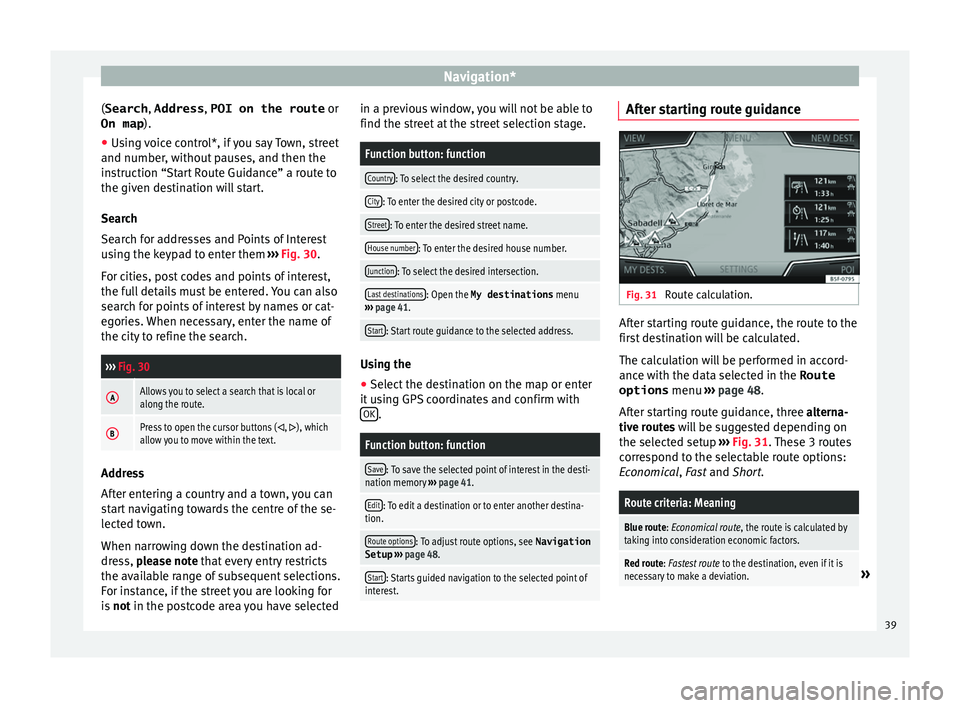
interest. After starting route guidance
Fig. 31
Route calculation. After starting route guidance, the route to the
fir
s
t
destination will be calculated.
The calculation will be performed in accord-
ance with the data selected in the Route options menu ››› page 48.
After starting route guidance, three alterna-
tive routes will be suggested depending on
the selected setup ››› Fig. 31. These 3 routes
correspond to the selectable route options:
Economical, Fast and Short.
Route criteria: Meaning
Blue route: Economical route, the route is calculated by taking into consideration economic factors.
Red route: Fastest route to the destination, even if it is
necessary to make a deviation.» 39
Page 43 of 88
Navigation*
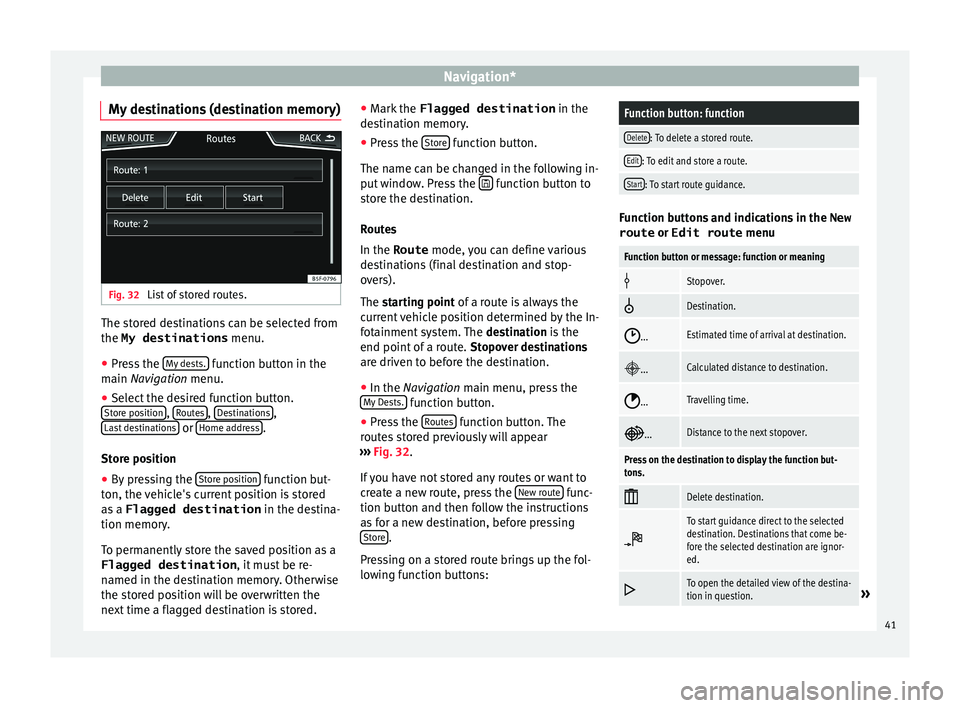
My destinations (destination memory) Fig. 32
List of stored routes. The stored destinations can be selected from
the My destinations
menu.
● Press the M
y
de sts. function button in the
m ain
Na
vigation menu.
● Select the desired function button.
Store po
sition ,
R
out
e s ,
D
e
s tinations ,
La s
t
destinations or
Home a
d
dr ess .
St or
e po
sition
● By pressing the Store po
sition function but-
t on, the
v
ehicle's current position is stored
as a Flagged destination in the destina-
tion memory.
To permanently store the saved position as a
Flagged destination , it must be re-
named in the destination memory. Otherwise
the stored position will be overwritten the
next time a flagged destination is stored. ●
Mark the Flagged destination in the
de
stination memory.
● Press the Store function button.
The n ame c
an be c
hanged in the following in-
put window. Press the function button to
s t
or
e the destination.
Routes
In the Route mode, you can define various
destinations (final destination and stop-
overs).
The starting point of a route is always the
current vehicle position determined by the In-
fotainment system. The destination is the
end point of a route. Stopover destinations
are driven to before the destination.
● In the Navigation main menu, press the
My
Dests. function button.
● Press the R
out
e
s function button. The
r out
e
s stored previously will appear
››› Fig. 32.
If you have not stored any routes or want to
create a new route, press the New route func-
tion b utt
on and then f
ollow the instructions
as for a new destination, before pressing Store .
Pr e
s
sing on a stored route brings up the fol-
lowing function buttons:
Function button: function
Delete: To delete a stored route.
Edit: To edit and store a route.
Start: To start route guidance. Function buttons and indications in the
New
route or Edit route menu
Function button or message: function or meaning
Stopover.
Destination.
...Estimated time of arrival at destination.
...Calculated distance to destination.
...Travelling time.
...Distance to the next stopover.
Press on the destination to display the function but-
tons.
Delete destination.
To start guidance direct to the selected
destination. Destinations that come be-
fore the selected destination are ignor-
ed.
To open the detailed view of the destina-
tion in question.»
41
Page 44 of 88

Navigation*Available function buttons.
New dest.To add a new destination to the tour.
Destina-
tionsTo add a new destination from My des-
tinations
to the tour.
StoringTo store the created tour in the tour
memory.
StartTo start route guidance.
CalculateTo update calculated distance and esti-
mated arrival time. a)
StopTo stop route guidance to the active des-
tination.b)
To move a stopover or a destination to
another position on the list. Press and
drag to move the destination.
a)
This function button is only displayed with route guidance ac-
tivated and when a destination has been added to the tour.
b) This function button is only displayed with route guidance ac-
tivated.
Last destinations
View of destinations for which a route has al-
ready been started.
My destinations
● Press the Options function button and se-
lect the de
sired function button.
Function button: function
Destination memory: View of destinations stored manually
and from imported vCards ››› page 46, Importing
vCards (electronic business cards) .
Favourites: View of destinations stored as favourites.
Contacts: View of entries in the phonebook that have a
stored address (postal address). Home address
Only
one a
ddress or position can be stored
as the home address at any one time. The
stored home address can be edited or over-
written.
If a home address has already been stored,
route guidance will be started to the stored
home address.
If a home address has not yet been stored,
an address can be assigned as the home ad-
dress.
Assigning the home address for the first time:
Position: Press to store the vehicle's current position as
the home address.
Address: Press to enter the home address manually.
Editing the home address:
The home address can be edited in the Navigation
settings menu ››› page 48.
Points of interest (POI) Fig. 33
Points of interest on the map. The points of interest saved in the navigation
d
at
a memor
y are divided into different point
of interest categories. Each point of interest
category is assigned a symbol for display on
the map.
If a database of points of interest has been
imported into the Infotainment system,
››› page 46, Importing Personal POI the cat-
egory Personal POI is also shown.
In the Map settings menu, the cat
e
gories
of points of interest to display on the map
can be configured ››› page 48. Up to 10 cat-
egories of points of interest can be selected.
42
Page 46 of 88
Navigation*Function button: function
Position: current vehicle position in coordinates and GPS
status (satellite reception).
a) This function button is only shown when route guidance is
not active or when predictive route guidance is active.
Press the function button to close the split
sc r
een.
At any moment during navigation, pressing
inside the map will make a pop-up menu ap-
pear with the following functions:
Function button: function
Street name or coordinates: shows the details of the point
selected on the map.
Only when you press on an icon on the map:
POI: name of the point of interest (when only one
appears on the map).
Group of POIs: more points of interest (when you
press on the map on various POIs grouped togeth-
er).
Favourite: name of the favourite.
Home: Home address.
Start route guidance: starts guidance directly.
Add stopover destination: only when you have an active
route.
Search nearby: enters in the search menu, but only for the
area around the point selected on the map.
Function button: function
Demo mode start (only when demo mode is active) Map display
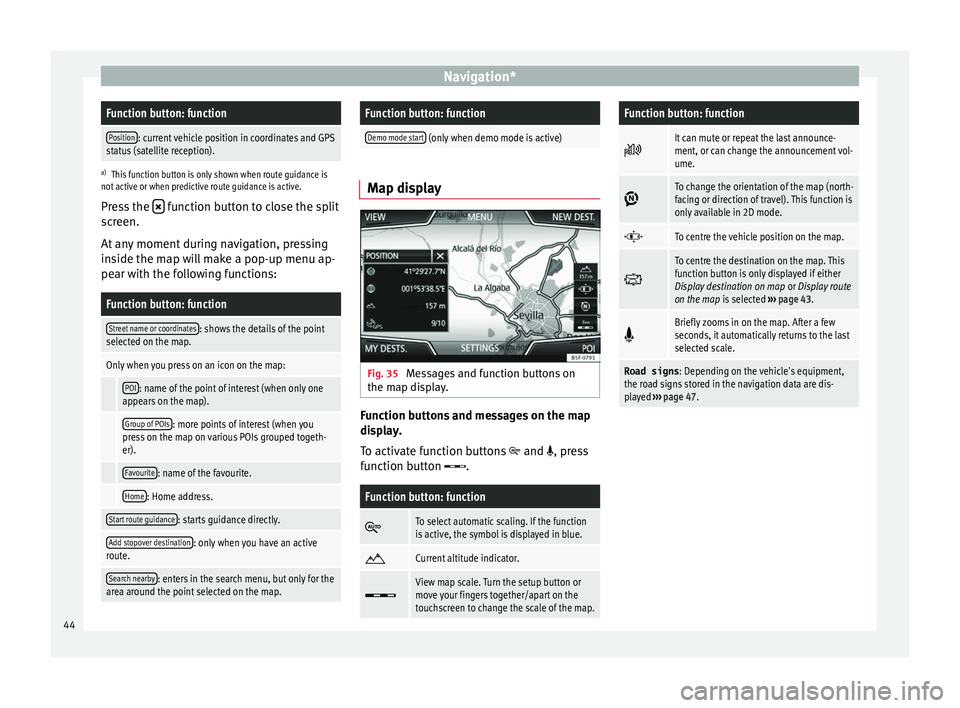
Fig. 35
Messages and function buttons on
the m ap di
s
play. Function buttons and messages on the map
di
s
p
lay.
To activate function buttons
and , press
function button .
Function button: function
To select automatic scaling. If the function
is active, the symbol is displayed in blue.
Current altitude indicator.
View map scale. Turn the setup button or
move your fingers together/apart on the
touchscreen to change the scale of the map.
Function button: function
It can mute or repeat the last announce-
ment, or can change the announcement vol-
ume.
To change the orientation of the map (north-
facing or direction of travel). This function is
only available in 2D mode.
To centre the vehicle position on the map.
To centre the destination on the map. This
function button is only displayed if either
Display destination on map
or Display route
on the map is selected ››› page 43.
Briefly zooms in on the map. After a few
seconds, it automatically returns to the last
selected scale.
Road signs
: Depending on the vehicle's equipment,
the road signs stored in the navigation data are dis-
played ››› page 47. 44
Page 54 of 88
Vehicle MenuDisplay
››› Fig. 41: Meaning
3
Bars to represent acceleration.
The position of the car represents the acceleration.
If speed is constant, the car remains in the central
area. When accelerating or braking, the car moves
forward or backward respectively.
4
Columns to show driving style efficiency.
On the horizon, the columns represent the effi-
ciency of the driving style in a retrospective man-
ner and move from left to right every five seconds
or so. The higher the height of the columns, the
more efficient the driving style.
The colour of the sky represents the average of the
last three minutes. The colour changes from grey
(less efficient) to blue (more efficient).
Symbols ››› Fig. 42: Meaning
AForesight when driving. If sudden changes of ac-
celeration occur, driving style efficiency is re-
duced.
BGear-change indicator.
CThe current vehicle speed is having a negative im-
pact on fuel consumption.
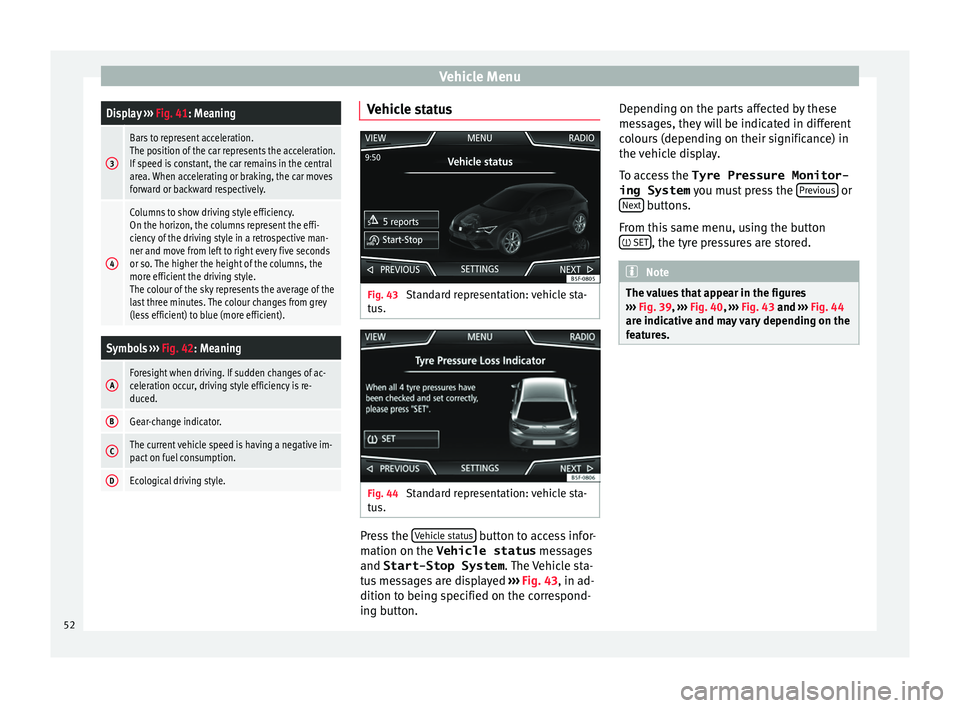
DEcological driving style. Vehicle status
Fig. 43
Standard representation: vehicle sta-
t u
s. Fig. 44
Standard representation: vehicle sta-
t u s. Press the
V
ehic
l
e status button to access infor-
m ation on the Vehicle status
me
s
sages
and Start-Stop System . The Vehicle sta-
tus messages are displayed ››› Fig. 43, in ad-
dition to being specified on the correspond-
ing button. Depending on the parts affected by these
mess
ages, they will be indicated in different
colours (depending on their significance) in
the vehicle display.
To access the Tyre Pressure Monitor-
ing System you must press the Previous or
Ne xt buttons.
Fr om thi
s
same menu, using the button
SET , the tyre pressures are stored.
Note
The values that appear in the figures
›› ›
Fig. 39, ››› Fig. 40, ››› Fig. 43 and ››› Fig. 44
are indicative and may vary depending on the
features. 52
Page 59 of 88
Telephone management system (PHONE)
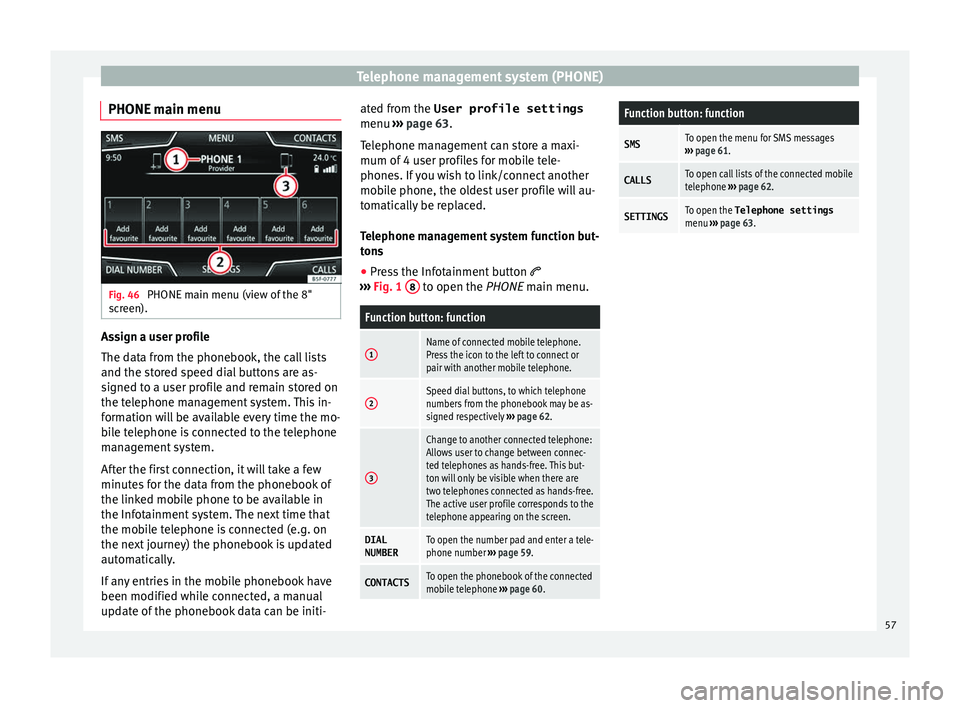
PHONE main menu Fig. 46
PHONE main menu (view of the 8"
s c
r
een). Assign a user profile
The d
at
a fr
om the phonebook, the call lists
and the stored speed dial buttons are as-
signed to a user profile and remain stored on
the telephone management system. This in-
formation will be available every time the mo-
bile telephone is connected to the telephone
management system.
After the first connection, it will take a few
minutes for the data from the phonebook of
the linked mobile phone to be available in
the Infotainment system. The next time that
the mobile telephone is connected (e.g. on
the next journey) the phonebook is updated
automatically.
If any entries in the mobile phonebook have
been modified while connected, a manual
update of the phonebook data can be initi- ated from the User profile settings
menu ›››
page 63.
Telephone management can store a maxi-
mum of 4 user profiles for mobile tele-
phones. If you wish to link/connect another
mobile phone, the oldest user profile will au-
tomatically be replaced.
Telephone management system function but-
tons
● Press the Infotainment button
›››
Fig. 1 8 to open the PHONE m
ain menu.
Function button: function
1Name of connected mobile telephone.
Press the icon to the left to connect or
pair with another mobile telephone.
2Speed dial buttons, to which telephone
numbers from the phonebook may be as-
signed respectively
››› page 62.
3
Change to another connected telephone:
Allows user to change between connec-
ted telephones as hands-free. This but-
ton will only be visible when there are
two telephones connected as hands-free.
The active user profile corresponds to the
telephone appearing on the screen.
DIAL
NUMBERTo open the number pad and enter a tele-
phone number ››› page 59.
CONTACTSTo open the phonebook of the connected
mobile telephone ››› page 60.
Function button: function
SMSTo open the menu for SMS messages
››› page 61.
CALLSTo open call lists of the connected mobile
telephone ››› page 62.
SETTINGSTo open the Telephone settings
menu ››› page 63. 57
Page 63 of 88
Telephone management system (PHONE)Possible functions
Send an SMS
to a contactPress the function button in the
detailed list.
Starting route
guidance to
the address of
a contact a)If the address details of a contact
have been stored, route guidance can
be started for the address of the con-
tact. Press the address data on the
detailed view to start route guidance.
a)
A system with a navigation function is required. Note
If you edit the number before calling, this will
only be u
sed for the call and will not be stor-
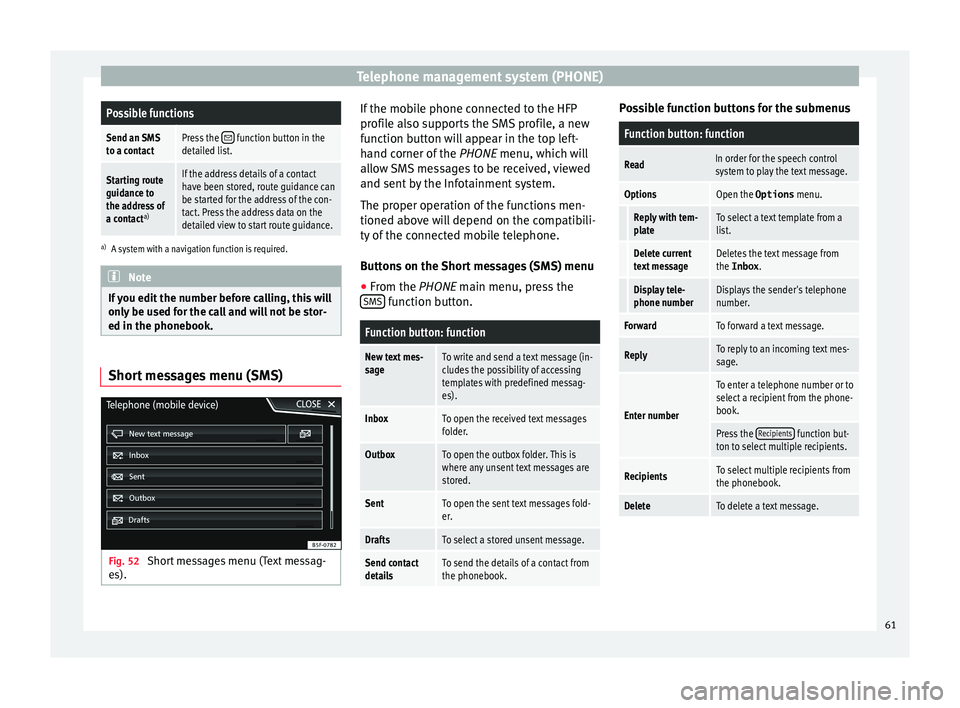
ed in the phonebook. Short messages menu (SMS)
Fig. 52
Short messages menu (Text messag-
e s). If the mobile phone connected to the HFP
pr
ofi
l
e also supports the SMS profile, a new
function button will appear in the top left-
hand corner of the PHONE menu, which will
allow SMS messages to be received, viewed
and sent by the Infotainment system.
The proper operation of the functions men-
tioned above will depend on the compatibili-
ty of the connected mobile telephone.
Buttons on the Short messages (SMS) menu
● From the PHONE main menu, pre
ss the
SMS function button.
Function button: function
New text mes-
sageTo write and send a text message (in-
cludes the possibility of accessing
templates with predefined messag-
es).
InboxTo open the received text messages
folder.
OutboxTo open the outbox folder. This is
where any unsent text messages are
stored.
SentTo open the sent text messages fold-
er.
DraftsTo select a stored unsent message.
Send contact
detailsTo send the details of a contact from
the phonebook. Possible function buttons for the submenus
Function button: function
ReadIn order for the speech control
system to play the text message.
OptionsOpen the Options
menu.
Reply with tem-
plateTo select a text template from a
list.
Delete current
text messageDeletes the text message from
the Inbox.
Display tele-
phone numberDisplays the sender's telephone
number.
ForwardTo forward a text message.
ReplyTo reply to an incoming text mes-
sage.
Enter number
To enter a telephone number or to
select a recipient from the phone-
book.
Press the Recipients function but-
ton to select multiple recipients.
RecipientsTo select multiple recipients from
the phonebook.
DeleteTo delete a text message. 61
Page 64 of 88
Telephone management system (PHONE)
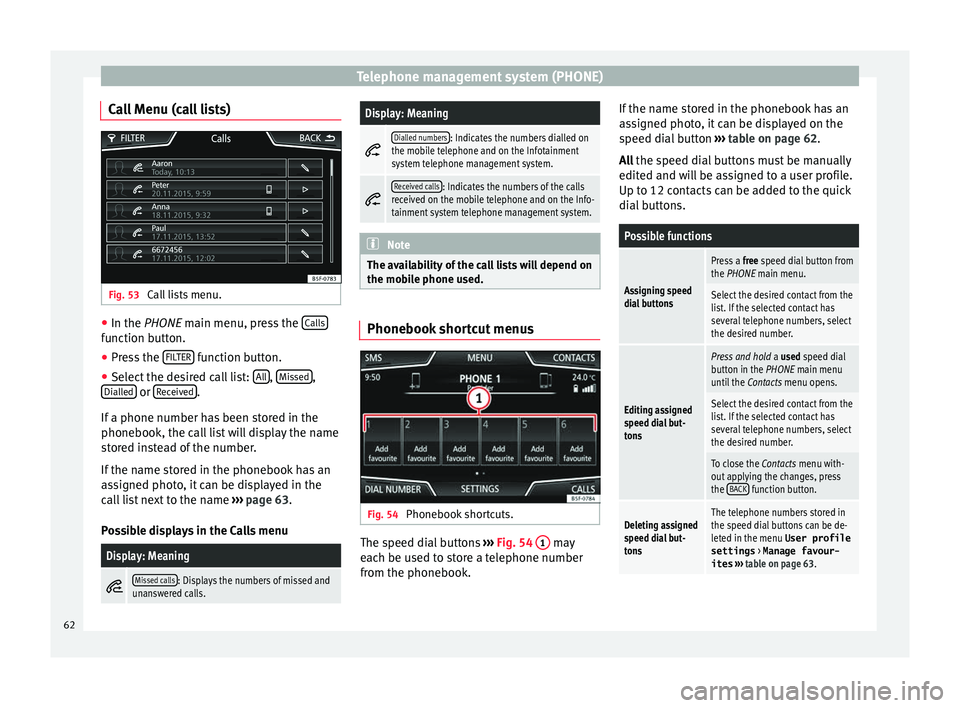
Call Menu (call lists) Fig. 53
Call lists menu. ●
In the PHONE m ain menu, pr
e ss the Calls function button.
● Press the FIL
TER function button.
● Select the desired call list: A
l
l ,
Mi
s
sed ,
Di al
l
ed or
R
ec
eiv ed .
If a phone number h
a
s been stored in the
phonebook, the call list will display the name
stored instead of the number.
If the name stored in the phonebook has an
assigned photo, it can be displayed in the
call list next to the name ››› page 63.
Possible displays in the Calls menu
Display: Meaning
Missed calls: Displays the numbers of missed and
unanswered calls.
Display: Meaning
Dialled numbers: Indicates the numbers dialled on
the mobile telephone and on the Infotainment
system telephone management system.
Received calls: Indicates the numbers of the calls
received on the mobile telephone and on the Info-
tainment system telephone management system. Note
The availability of the call lists will depend on
the mob i
le phone used. Phonebook shortcut menus
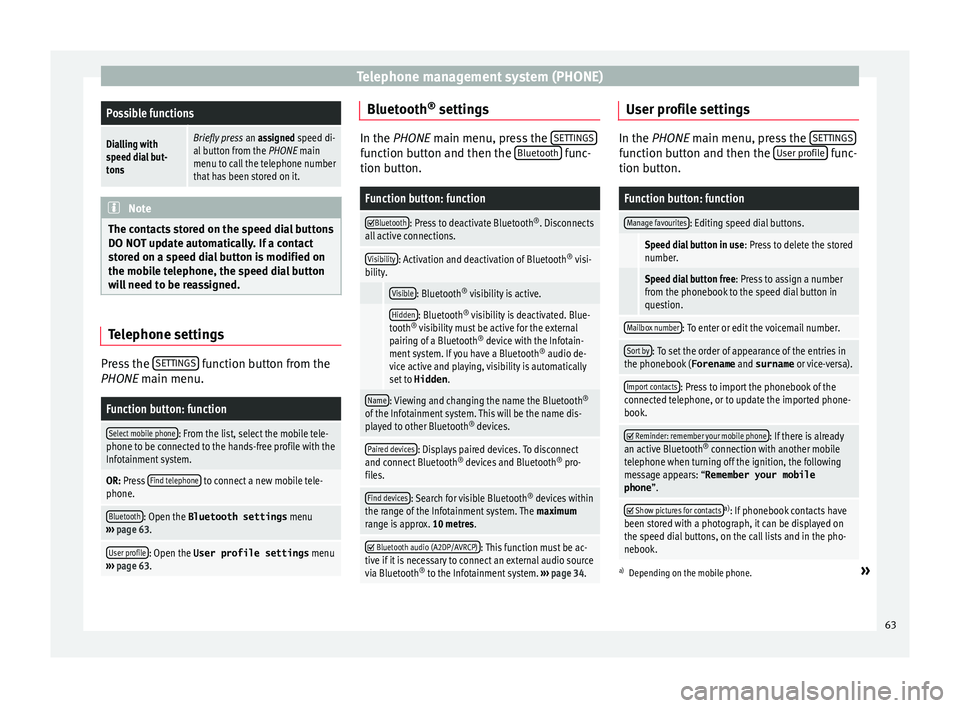
Fig. 54
Phonebook shortcuts. The speed dial buttons
››
›
Fig. 54 1 may
e ac
h be u
sed to store a telephone number
from the phonebook. If the name stored in the phonebook has an
ass
igned photo, it can be displayed on the
speed dial button ››› table on page 62.
All the speed dial buttons must be manually
edited and will be assigned to a user profile.
Up to 12 contacts can be added to the quick
dial buttons.
Possible functions
Assigning speed
dial buttons
Press a free speed dial button from
the PHONE main menu.
Select the desired contact from the
list. If the selected contact has
several telephone numbers, select
the desired number.
Editing assigned
speed dial but-
tons
Press and hold a used speed dial
button in the PHONE main menu
until the Contacts menu opens.
Select the desired contact from the
list. If the selected contact has
several telephone numbers, select
the desired number.
To close the Contacts menu with-
out applying the changes, press
the BACK
function button.
Deleting assigned
speed dial but-
tonsThe telephone numbers stored in
the speed dial buttons can be de-
leted in the menu User profile
settings
> Manage favour-
ites ››› table on page 63. 62
Page 65 of 88
Telephone management system (PHONE)Possible functions
Dialling with
speed dial but-
tonsBriefly press
an assigned speed di-
al button from the PHONE main
menu to call the telephone number
that has been stored on it. Note
The contacts stored on the speed dial buttons
DO NOT upd at
e automatically. If a contact
stored on a speed dial button is modified on
the mobile telephone, the speed dial button
will need to be reassigned. Telephone settings
Press the
S
ET
TINGS function button from the
PHONE m ain menu.
Function button: function
Select mobile phone: From the list, select the mobile tele-
phone to be connected to the hands-free profile with the
Infotainment system.
OR: Press Find telephone to connect a new mobile tele-
phone.
Bluetooth: Open the Bluetooth settings menu
››› page 63.
User profile: Open the User profile settings menu
››› page 63. Bluetooth
®
settin g
s In the PHONE main menu, pr
e
ss the SETTINGS function button and then the
Bluetooth func-
tion butt on.
Function button: function
Bluetooth: Press to deactivate Bluetooth
®
. Disconnects
all active connections.
Visibility: Activation and deactivation of Bluetooth ®
visi-
bility.
Visible: Bluetooth ®
visibility is active.
Hidden: Bluetooth ®
visibility is deactivated. Blue-
tooth ®
visibility must be active for the external
pairing of a Bluetooth ®
device with the Infotain-
ment system. If you have a Bluetooth ®
audio de-
vice active and playing, visibility is automatically
set to Hidden .
Name: Viewing and changing the name the Bluetooth ®
of the Infotainment system. This will be the name dis-
played to other Bluetooth ®
devices.
Paired devices: Displays paired devices. To disconnect
and connect Bluetooth ®
devices and Bluetooth ®
pro-
files.
Find devices: Search for visible Bluetooth ®
devices within
the range of the Infotainment system. The maximum
range is approx. 10 metres.
Bluetooth audio (A2DP/AVRCP): This function must be ac-
tive if it is necessary to connect an external audio source
via Bluetooth ®
to the Infotainment system. ››› page 34. User profile settings
In the PHONE main menu, pr
e
ss the SETTINGS function button and then the
User pr
ofi le func-
tion butt on.
Function button: function
Manage favourites: Editing speed dial buttons.
Speed dial button in use : Press to delete the stored
number.
Speed dial button free : Press to assign a number
from the phonebook to the speed dial button in
question.
Mailbox number: To enter or edit the voicemail number.
Sort by: To set the order of appearance of the entries in
the phonebook ( Forename and surname or vice-versa).
Import contacts: Press to import the phonebook of the
connected telephone, or to update the imported phone-
book.
Reminder: remember your mobile phone: If there is already
an active Bluetooth ®
connection with another mobile
telephone when turning off the ignition, the following
message appears: “Remember your mobile
phone ”.
Show pictures for contactsa)
: If phonebook contacts have
been stored with a photograph, it can be displayed on
the speed dial buttons, on the call lists and in the pho-
nebook.
a) Depending on the mobile phone.»
63
Page 73 of 88
Full Link*
●
Only c
ompatible applications can be used,
in accordance with the technology connected. MirrorLink
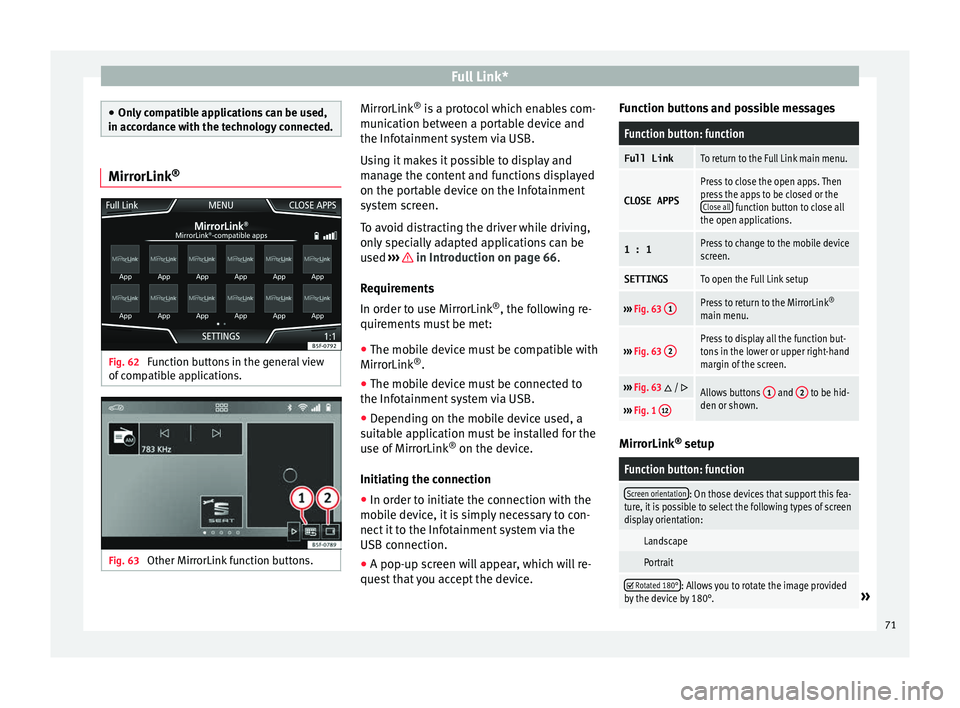
®Fig. 62
Function buttons in the general view
of c
omp
atible applications. Fig. 63
Other MirrorLink function buttons. MirrorLink
®
is
a pr
otocol which enables com-
munication between a portable device and
the Infotainment system via USB.
Using it makes it possible to display and
manage the content and functions displayed
on the portable device on the Infotainment
system screen.
To avoid distracting the driver while driving,
only specially adapted applications can be
used ››› in Introduction on page 66.
R equir
ement
s
In order to use MirrorLink ®
, the following re-
quirements must be met:
● The mobile device must be compatible with
MirrorLink ®
.
● The mob
ile device must be connected to
the Infotainment
system via USB.
● Depending on the mobile device used, a
suitab
le application must be installed for the
use of MirrorLink ®
on the device.
Initiating the connection ● In order to initiate the connection with the
mobi
le device, it is simply necessary to con-
nect it to the Infotainment system via the
USB connection.
● A pop-up screen will appear, which will re-
quest
that you accept the device. Function buttons and possible messages
Function button: function
Full LinkTo return to the Full Link main menu.
CLOSE APPS
Press to close the open apps. Then
press the apps to be closed or the
Close all
function button to close all
the open applications.
1 : 1Press to change to the mobile device
screen.
SETTINGSTo open the Full Link setup
››› Fig. 63 1Press to return to the MirrorLink ®
main menu.
››› Fig. 63 2Press to display all the function but-
tons in the lower or upper right-hand
margin of the screen.
›››
Fig. 63 / Allows buttons 1 and 2 to be hid-
den or shown.
››› Fig. 1 12 MirrorLink
®
set up
Function button: function
Screen orientation: On those devices that support this fea-
ture, it is possible to select the following types of screen
display orientation:
Landscape
Portrait
Rotated 180°: Allows you to rotate the image provided
by the device by 180°.» 71