infotainment Seat Ibiza 2017 MEDIA SYSTEM TOUCH - COLOUR
[x] Cancel search | Manufacturer: SEAT, Model Year: 2017, Model line: Ibiza, Model: Seat Ibiza 2017Pages: 48, PDF Size: 1.5 MB
Page 23 of 48
Media
Search and press on the track/folder list or
on the de sired track/folder. If there is infor-
mation available, the track name is displayed
(for audio CDs) or the name of the file (MP3)
instead of Track + number .
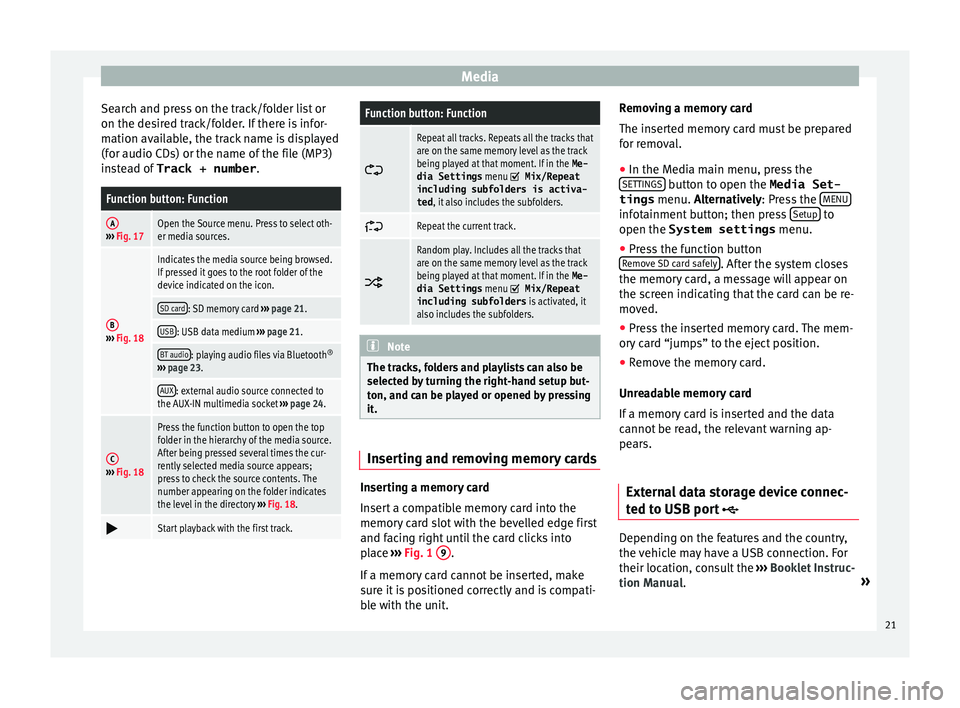
Function button: Function
A››› Fig. 17Open the Source menu. Press to select oth-
er media sources.
B› ›› Fig. 18
Indicates the media source being browsed.
If pressed it goes to the root folder of the
device indicated on the icon.
SD card: SD memory card ››› page 21.
USB: USB data medium ›› › page 21.
BT audio: playing audio files via Bluetooth ®
› ›› page 23.
AUX: external audio source connected to
the AUX-IN multimedia socket ››› page 24.
C› ›› Fig. 18
Press the function button to open the top
folder in the hierarchy of the media source.
After being pressed several times the cur-
rently selected media source appears;
press to check the source contents. The
number appearing on the folder indicates
the level in the directory ›› › Fig. 18.
Start playback with the first track.
Function button: Function
Repeat all tracks. Repeats all the tracks that
are on the same memory level as the track
being played at that moment. If in the Me-
dia Settings menu
Mix/Repeat
including subfolders is activa-
ted , it also includes the subfolders.
Repeat the current track.
Random play. Includes all the tracks that
are on the same memory level as the track
being played at that moment. If in the Me-
dia Settings menu
Mix/Repeat
including subfolders is activated, it
also includes the subfolders. Note
The tracks, folders and playlists can also be
sel
ected by turning the right-hand setup but-
ton, and can be played or opened by pressing
it. Inserting and removing memory cards
Inserting a memory card
In
sert a compatible memory card into the
memory card slot with the bevelled edge first
and facing right until the card clicks into
place ››› Fig. 1 9 .
If
a memory card cannot be inserted, make
sure it is positioned correctly and is compati-
ble with the unit. Removing a memory card
The in
serted memory card must be prepared
for removal.
● In the Media main menu, press the
S
ETTINGS button to open the Media Set-
tings menu. A
lternatively: Press the MENU infotainment button; then press
Set
up to
open the System settings menu.
● Press the function button
R
emove SD card safely . After the system closes
the memor
y card, a message will appear on
the screen indicating that the card can be re-
moved.
● Press the inserted memory card. The mem-
or
y card “jumps” to the eject position.
● Remove the memory card.
Unr
eadable memory card
If a memory card is inserted and the data
cannot be read, the relevant warning ap-
pears.
External data storage device connec-
t
ed to USB port Depending on the features and the country,
the
vehicle may have a USB connection. For
their location, consult the ››› Booklet Instruc-
tion Manual. »
21
Page 24 of 48
Media
Audio files on an external data storage de-
v ice connected to the USB port can be
played and controlled via the Infotainment
system.
Where this manual refers to external data
storage devices, this means USB mass stor-
age devices containing supported audio
files, such as MP3 players, iPods™ and USB
sticks.
Only supported audio files are displayed and
played. Other files are ignored.
Further operation of the external data medi-
um (changing track, selecting tracks and
playback modes) is described in the appro-
priate chapters of this manual ››› page 17.
Instructions and restrictions
Compatibility with Apple™ devices and other
media players depends on the unit.
The USB port supplies the usual USB volt-
age of 5 volts for a USB connection.
External hard disks with a capacity greater
than 32 GB must be reformatted for the
FAT32 file system in some circumstances. You
will find the necessary software and informa-
tion on the Internet. Take into account all other instructions and
limit
ations regarding requirements for media
sources ››› page 17.
iPod™, iPad™ and iPhone™
Depending on the country and the equip-
ment, iPods™, iPads™ or iPhones™ can be
connected using the device's USB cable to
the USB port of the vehicle and used as
audio sources.
After connecting an iPod™, iPad™ or
iPhone™, the specific list views of the iPod
are displayed in the upper selection level
( Playlists , Artists , Albums ,
Tracks , Podcasts etc.).
Possible error messages after connecting an
external data storage device 1)
The device is not compatible
CauseProcedure
The external data carri-
er cannot be played or
communication is not
possible with the
adapter cable being
used.Check the connection and
make sure the external data
storage device is working cor-
rectly.
If possible, update the exter-
nal data storage device soft-
ware.
The device does not work
CauseProcedure
Communication fault.Check the connection and
make sure the external data
medium is working correctly. Disconnecting
An
y connected data storage devices must be
prepared before their disconnection in order
to remove them.
● In the Media main menu, press the
S
ETTINGS button to open the
Media Set-
tings menu.
● Press the Saf
ely remove USB device func-
tion button. After the system has closed the
USB device, a message will appear on the
screen indicating that the device can be re-
moved.
● Now the data storage device can be discon-
nect
ed. Note
● Do not
connect an external media player at
the same time to play music via Bluetooth ®1)
Due to the large number of different data storage
dev
ices and various iPod™, iPad™ and iPhone™
generations available, it is not possible to guarantee
fault-free operation of all functions described here.
22
Page 25 of 48
Media
and via the USB port
w ith the Infotain-
ment system, as this could cause playback
limitations.
● If the external player is an Apple device™,
it
cannot be simultaneously connected by
USB and by Bluetooth.
● If a connected device is not recognised, dis-
c
onnect all the connected devices and try
connecting the device again.
● Do not use memory card adaptors, USB ex-
t
ension cords or USB hubs! Connect external audio source via
Bluet
ooth® In Bluetooth audio mode, audio files from an
e
xternal audio source that is connected via
Bluetooth ®
, for example a mobile telephone
(Bluetooth audio playback), can be played
over the vehicle speakers.
Conditions
● The Bluetooth ®
audio sour
ce must support
the A2DP Bluetooth ®
profile.
● In the Bluetooth Settings menu the
Bluetooth Audio (A2DP/AVRCP)
function mu
st be on. Starting Bluetooth
®
audio tr
ansmission
● Activate Bluetooth ®
v
isibility on the exter-
nal Bluetooth ®
audio source (e.g., mobile tel-
ephone).
● Lower the base volume on the Infotainment
sy
stem.
● Press the Infotainment MEDIA button.
● Click on the MEDIA function button and se-
l
ect BT Audio .
● Press Find new dev
ice in order to connect an
e
xternal Bluetooth ®
audio source for the first
time ››› page 26.
● OR: Sel
ect a Bluetooth ®
external audio
source from the list.
● Please refer to the instructions on the
s
creen of the Infotainment system and on the
Bluetooth ®
audio source regarding the rest
of the procedure.
You may still need to manually start playback
on the Bluetooth ®
source.
When playback on the Bluetooth ®
audio
source is stopped, the Infotainment system
remains in Bluetooth ®
Audio mode.
Controlling playback
The extent to which the Bluetooth ®
audio
source can be controlled via the Infotainment
system depends on the connected Blue-
tooth ®
audio source. The available functions will depend on the
Bluet
ooth®
Audio profile that the connected
external player supports.
With media players that support the AVRCP
Bluetooth ®
profile, playback on the Blue-
tooth ®
audio source can be automatically
started or stopped when the unit is switched
to Bluetooth ®
Audio mode or to a different
audio source. In addition, it is possible to
view or change the track via the Infotainment
system. Note
● D
ue to the large number of different Blue-
tooth audio sources available, it is not possi-
ble to guarantee fault-free operation of all
functions described here.
● Deactivate the service and warning sounds
of
a connected Bluetooth audio source (for
example, the key tones of the mobile tele-
phone) to avoid interference noise and
anomalies in the operation.
● Depending on the external player connec-
t
ed, the response time of the system can
vary.
● Do not connect an external media player at
the s
ame time to play music via Bluetooth®
and via the USB port with the Infotainment
system, as this could cause playback limita-
tions.
● If the external player is an Apple device™,
it
cannot be simultaneously connected by
USB and by Bluetooth. 23
Page 26 of 48
Media
Media settings Media settings
●
Select the media main menu by pressing
the inf otainment button MEDIA .
● Press the function button Set
up to open the
menu Media settings .
Function button: effect
Traffic Information (TP): the TP function (traffic announce-
ment tracking) is activated ››› page 14. If the function
button is deactivated (in grey), you must first activate
the function button
Traffic Station (TP) in the FM Setup
menu ››› page 14 .
Mix/Repeat including subfolders: the subfolders are taken
into account in the playback mode selected ››› page 18.
Bluetooth setup: ››› page 33.
Remove USB device safely: the system closes the USB, sub-
sequently enabling it to be ejected safely.
Safely remove the SD memory card: the system closes the SD
card, subsequently enabling it to be ejected safely. External audio source connected to
the A
UX-IN multimedia socket Depending on the equipment and country
ther
e may be an AUX-IN multimedia socket
››› Booklet Instruction Manual.
In order to connect the external audio source
to the AUX-IN socket, a suitable cable is re- quired with a 3.5 mm jack that is inserted in-
t
o the AUX-IN socket of the vehicle.
The connected external audio source is
played over the vehicle speakers and cannot
be controlled via the Infotainment system
controls.
The connection of an external audio source is
indicated by AUX on the screen.
Connecting an external audio source to the
AUX-IN multimedia socket
● Lower the volume on the Infotainment sys-
t
em.
● Connect the external audio source to the
A
UX-IN multimedia socket.
● Start playback on the external audio
sour
ce.
● In the MEDIA main menu, press the MEDIA function button and select
A
UX .
The outp
ut volume of the connected external
audio source should be adjusted to the vol-
ume of the other audio sources ››› page 40.
Information on operating an external audio
source connected to the AUX-IN multimedia
socket
OperationEffect
Selection of another au-
dio source from the Info-
tainment system.The external audio source
continues to run in the
background.
OperationEffect
Stopping playback on the
external audio source.The infotainment system
remains in the AUX menu.
Disconnecting the plug
from the AUX-IN multime-
dia socket.The infotainment system
remains in the AUX menu. Note
● Pl
ease read and observe the manufactur-
er's instruction manual for the external audio
source.
● Interference noise may be heard if the ex-
t
ernal audio source is powered from the 12-
volt power socket of the vehicle. 24
Page 27 of 48
Telephone management system (PHONE)*
Telephone management sys-
t em (PHONE)*
Introduction to the telephone
management system General information The Telephone functions described below
c
an be used through the Infotainment system
if there is a mobile telephone connected to it
via Bluetooth ®
››› page 26.
In order for the mobile telephone to be able
to connect to the Infotainment system the tel-
ephone must be equipped with Bluetooth®
.
If there is no mobile telephone connected to
the Infotainment system, the telephone man-
agement system will not be available.
The instructions shown on the screen for the
telephone menus will depend on the mobile
telephone used. There may be variations.
Only use compatible Bluetooth ®
devices. For
further information on compatible Blue-
tooth ®
products, ask your nearest SEAT deal-
er or check on the internet.
Use the instruction manual of the mobile tel-
ephone and of any accessories.
If you detect any operating issues between
your mobile telephone and the Infotainment system, restart your mobile by switching it off
and on ag
ain.
You may experience poor reception or may be
cut off in areas where the signal is weak.
Most electronic devices are shielded against
HF (high-frequency) signals. In any case, the
electronic equipment may not be protected
from the HF signals of the telephone man-
agement system. This may cause interfer-
ence. WARNING
Speaking by telephone and operating the mo-
b
ile telephone whilst driving can distract you
from the road and cause an accident.
● Always drive carefully and responsibly.
● Select volume settings that allow you to
e
asily hear signals from outside the vehicle
at all times (e.g. emergency services sirens
and horns).
● In areas of little or no coverage or, in some
c
ases, in a tunnel, garage or underpass, your
call may be cut off and you may not be able to
make even emergency calls. WARNING
If a mobile telephone is not secured or is in-
c
orrectly secured in the vehicle, it could move
around the passenger compartment in the
event of a sudden driving manoeuvre or emer-
gency stop, resulting in injury. ●
Whi
le the vehicle is in motion, always se-
cure the mobile telephone properly outside
the airbag deployment zone. WARNING
Mobile telephones may interfere with and al-
t
er the correct operation of pacemakers if
they are carried directly over them.
● Maintain a minimum distance of at least
20 c
entimetres between the aerials of the
mobile telephone and the pacemaker, as mo-
bile phones may affect the functioning of
pacemakers.
● Do not carry your switched-on mobile tele-
phone in
your breast pocket directly over the
pacemaker.
● If you suspect interference, switch off the
mo
bile telephone immediately. CAUTION
High speeds, poor weather or road conditions
and the qua
lity of reception can all affect the
quality of a telephone conversation in the ve-
hicle. Note
● R
estrictions on the use of devices using
Bluetooth ®
technology may apply in some
countries. For further information, contact the
local authorities. » 25
Page 28 of 48

Telephone management system (PHONE)*
●
If you wish to connect a device to the tele-
phone management system via Bluetooth ®
technology, consult the safety warnings in its
instruction manual. Only use compatible
Bluetooth ®
devices. Areas where special regulations apply
Switch off the mobile telephone and the tele-
phone Bluet
ooth function in places with a
risk of explosion. In the majority of cases,
these places are signposted, but not always
clearly ››› in General information on
p
age 25. They include, for example:
● the vicinity of chemical pipelines and tanks
● The lower decks of boats and ferries.
● In the proximity of vehicles that run on liq-
uid g
as (such as propane or butane).
● places where the air is laden with chemi-
c
als or particles such as flour, dust or metal
powder.
● all other places where the vehicle engine
mu
st be switched off. WARNING
Switch off the mobile phone in areas with a
ri
sk of explosion! The mobile telephone can
automatically connect to the mobile tele-
phone network again if it loses the Blue-
tooth ®
connection to the telephone manage-
ment system. CAUTION
In areas where special regulations apply or
the u
se of mobile telephones is prohibited,
both the telephone and the telephone man-
agement system must be switched off. The
radiation produced by the mobile telephone
when switched on may interfere with sensi-
tive technical and medical equipment, possi-
bly resulting in a malfunction or damage to
the equipment. Bluetooth
® Bluetooth
®
t
echnology allows a mobile tele-
phone to be connected to your vehicle's tele-
phone management system. In order to use
the telephone management system with a
mobile telephone with Bluetooth ®
technolo-
gy, it is first necessary to pair them.
Some Bluetooth ®
mobile telephones detect
and automatically connect when turning on
the ignition if a connection has been previ-
ously established. For this to take place the
telephone must be switched on and its Blue-
tooth ®
function activated, and there must be
no active Bluetooth ®
connection with other
devices.
Bluetooth ®
connections are free.
Bluetooth ®
is a registered trademark of Blue-
tooth ®
SIG, Inc. Bluetooth profiles
®
When a mo
bile phone is connected to the tel-
ephone management system, a data ex-
change takes place via one of the Bluetooth ®
profiles.
● Hands-free Bluetooth profile (HFP): If
a mo-
bile telephone is connected to the telephone
manager through the HFP, calls can be made
wirelessly through the hands-free device.
This function also requires other Bluetooth
profiles such as the phonebook download.
● Audio profile (A2DP): Bluet
ooth profile for
transmitting audio with stereo quality. This
function can also connect other additional
Bluetooth profiles for managing and control-
ling playback. CAUTION
● T
o prevent them from being heard through
the speakers, the button and mobile tele-
phone alert tones must be disconnected.
Where necessary, disconnect the headset
from the mobile telephone you wish to con-
nect to the system. Pair and connect a mobile telephone
t
o the Infotainment system In order to manage a mobile telephone via
the Inf
otainment system, it is necessary to
pair both devices once.
26
Page 29 of 48
Telephone management system (PHONE)*
For your safety, we recommend you make the
link when the vehicle is stationary. In some
countries it is not possible to perform the
pairing with the vehicle running.
Conditions
You must guarantee the following setup in
the mobile phone and the Infotainment sys-
tem:
● The ignition must be switched on.
● The Bluet
ooth ®
function of the mobile tele-
phone and the Infotainment system must be
active as well as visibility.
● The k
eypad lock on the mobile telephone
must be deactivated.
Follow instructions in the manual for the mo-
bile telephone.
After turning on the ignition, the visibility of
the Bluetooth ®
function activates.
During the pairing process it is necessary to
enter data via the mobile telephone's key-
pad. To do so, the mobile telephone must be
ready.
Starting mobile telephone pairing
● Make sure the Bluetooth function of the
mo
bile device is active and visible.
● Press the PHONE button on the Infotain-
ment
system.
● Press the Find t
elephone function button.OR:
● Press the PHONE button on the Infotain-
ment
system.
● Press the Set
up function button.
● Press the Sel
ect telephone function button
and then Find .
OR:
● Press the PHONE unit button of the Infotain-
ment
system.
● Press the Set
up function button.
● Press the Bluet
ooth function button.
● Press the Find dev
ices function button.
OR:
● Connect from the mobile device itself.
The n
ame of the Bluetooth function of your
Infotainment system will be displayed in Setup >
Bluet
ooth >
Name
› ›› page 33.
The search process can take up to 1 minute.
On the screen the system will dynamically
update the names of the Bluetooth devices
found.
As soon as the search is completed, the
names of the Bluetooth ®
devices found are
displayed on-screen.
● In the Infotainment system select the mo-
b
ile telephone to which you want to connect
from the list of Bluetooth devices found. In
certain circumstances, it is possible that to finish the connection between the two devi-
c
es, you must enter additional data in the
mobile telephone and Infotainment system.
● If necessary, confirm the link to the mobile
t
elephone.
● Use your mobile telephone to enter and
c
onfirm your PIN code, as indicated in the
display of the infotainment system.
OR:
● Compare the PIN code shown on the dis-
p
lay of the Infotainment system with that
shown on the mobile telephone. If they
match, confirm on both devices.
The infotainment system and the mobile tele-
phone will now be connected to each other.
When the pairing has been finalized correct-
ly, the PHONE main menu will appear. The
phonebook and call lists stored in the mobile
phone will be loaded once the requests have
been accepted in the mobile phone. The du-
ration of the loading process depends on the
amount of data stored on the mobile tele-
phone. After loading, the data will be availa-
ble on the Infotainment system.
Pairing and connection of mobile telephones
You can pair up to 20 mobile telephones to
the Infotainment system, but only one mobile
telephone can be connected as hands-free,
and this or another device as a Bluetooth au-
dio profile. »
27
Page 30 of 48
Telephone management system (PHONE)*
When the Infotainment system is switched
on, it automatically connects to the last con-
nected mobile telephone. If it is not possible
to connect to this mobile telephone, the tele-
phone management system will try to auto-
matically connect to the next mobile tele-
phone on the list of paired devices.
The maximum range of the Bluetooth ®
con-
nection is approx. 10 metres. The active
Bluetooth ®
connection disconnects if this
distance is exceeded. The connection is auto-
matically re-established as soon as the de-
vice is once again within Bluetooth ®
range.
If the maximum number of paired devices is
reached and you wish to pair another one to
the system, it will automatically replace the
one least used recently. If you wish to replace
it with another one, the user must erase it be-
forehand. To do so:
● Press the Setup button on the device while
in t
elephone mode.
● Press the Bluet
ooth function button.
● Activate the P
aired devices function button.
● In the list of paired devices, press the function button next to the mobile telephone
t
o be deleted and then press Delete to con-
firm the process. Note
● It
may be necessary to confirm the phone-
book data transfer request on the mobile tel-
ephone.
● Check that there are no requests pending
ac
ceptance in your mobile phone. If there are,
this could block some of the functions in the
PHONE menu. Description of the telephone
m
anagement system
Introduction Some functions and setup can only be per-
f
ormed when the vehicle is stopped and are
not available on all mobile telephones.
With the help of the telephone manager, up
to 2 mobile telephones can be connected to
the Infotainment system via the Bluetooth
profiles (for example, one used as a Blue-
tooth-audio player and/or another as a
hands-free telephone). Note
● U
sing a mobile telephone inside the vehicle
may provoke noise in the speakers.
● Some networks may not recognise all lan-
guag
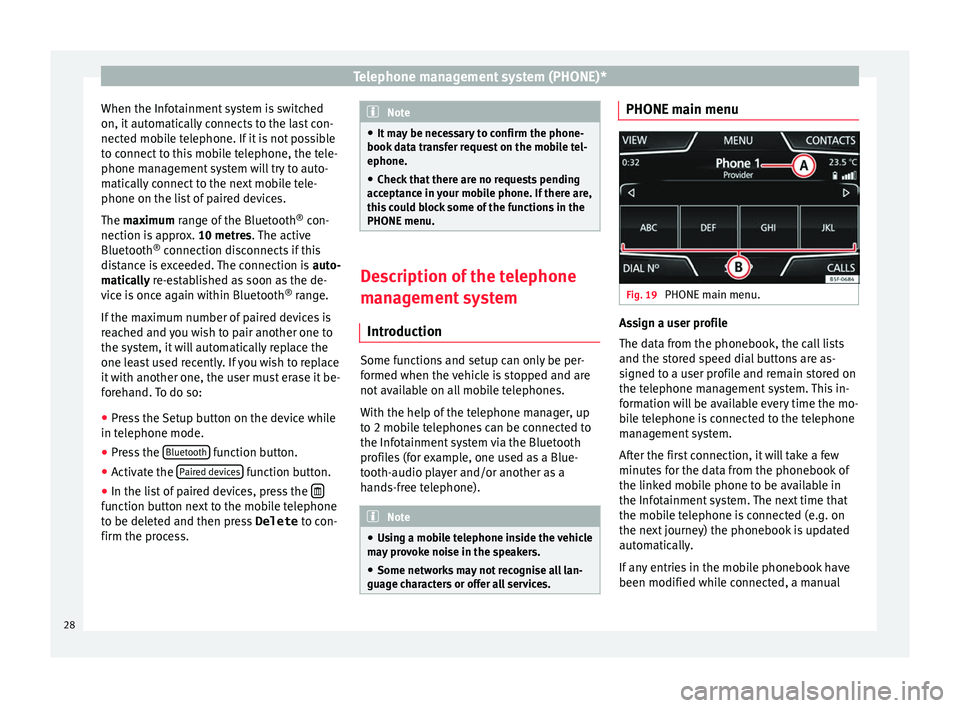
e characters or offer all services. PHONE main menu
Fig. 19
PHONE main menu. Assign a user profile
The d
ata from the phonebook, the call lists
and the stored speed dial buttons are as-
signed to a user profile and remain stored on
the telephone management system. This in-
formation will be available every time the mo-
bile telephone is connected to the telephone
management system.
After the first connection, it will take a few
minutes for the data from the phonebook of
the linked mobile phone to be available in
the Infotainment system. The next time that
the mobile telephone is connected (e.g. on
the next journey) the phonebook is updated
automatically.
If any entries in the mobile phonebook have
been modified while connected, a manual
28
Page 33 of 48
Telephone management system (PHONE)*
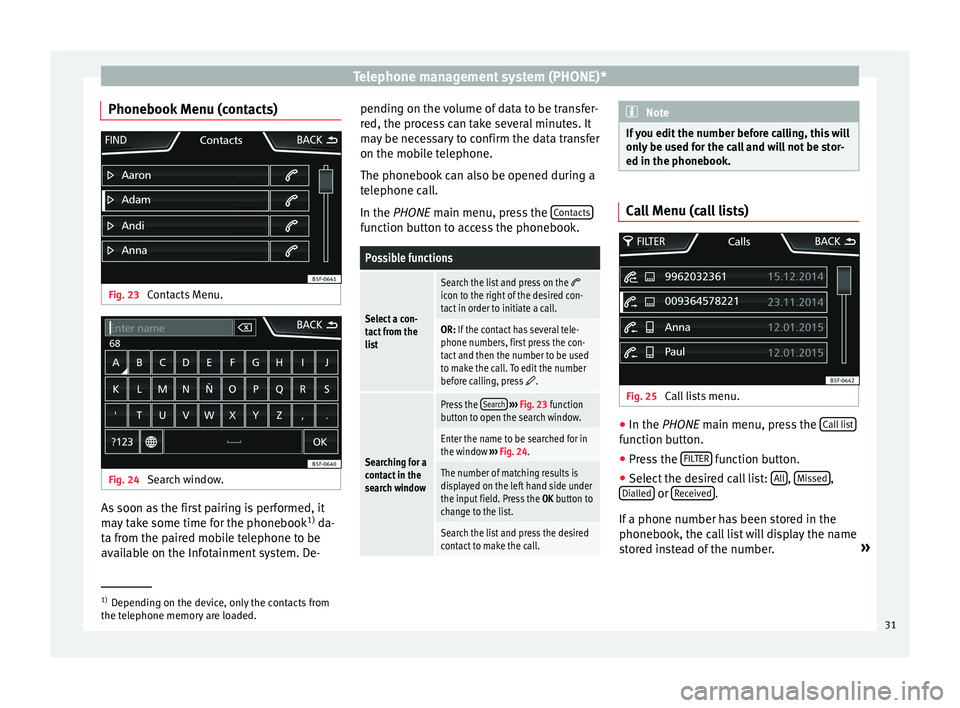
Phonebook Menu (contacts) Fig. 23
Contacts Menu. Fig. 24
Search window. As soon as the first pairing is performed, it
m
ay take some time for the phonebook 1)
da-
ta from the paired mobile telephone to be
available on the Infotainment system. De- pending on the volume of data to be transfer-
r
ed, the process can take several minutes. It
may be necessary to confirm the data transfer
on the mobile telephone.
The phonebook can also be opened during a
telephone call.
In the PHONE main menu, press the Contacts function button to access the phonebook.
Possible functions
Select a con-
tact from the
list
Search the list and press on the icon to the right of the desired con-
tact in order to initiate a call.
OR: If the contact has several tele-
phone numbers, first press the con-
tact and then the number to be used
to make the call. To edit the number
before calling, press
.
Searching for a
contact in the
search window
Press the Search
› ›› Fig. 23 function
button to open the search window.
Enter the name to be searched for in
the window ››› Fig. 24.
The number of matching results is
displayed on the left hand side under
the input field. Press the OK button to
change to the list.
Search the list and press the desired
contact to make the call. Note
If you edit the number before calling, this will
on
ly be used for the call and will not be stor-
ed in the phonebook. Call Menu (call lists)
Fig. 25
Call lists menu. ●
In the PHONE m
ain menu, press the Call list function button.
● Press the FIL
TER function button.
● Select the desired call list: A
ll ,
Mi ssed ,
Di
alled or
R eceived .
If
a phone number has been stored in the
phonebook, the call list will display the name
stored instead of the number. »1)
Depending on the device, only the contacts from
the t
elephone memory are loaded. 31
Page 34 of 48
Telephone management system (PHONE)*
Possible displays in the Calls menuDisplay: Meaning
Missed calls
: Displays the numbers of missed
and unanswered calls.
Dialled numbers
: Indicates the numbers dial-
led on the mobile telephone and on the Infotain-
ment system telephone management system.
Received calls
: Indicates the numbers of the
calls received on the mobile telephone and on
the Infotainment system telephone management
system. Note
The availability of the call lists will depend on
the mo
bile phone used. Direct access menus to the phone-
book
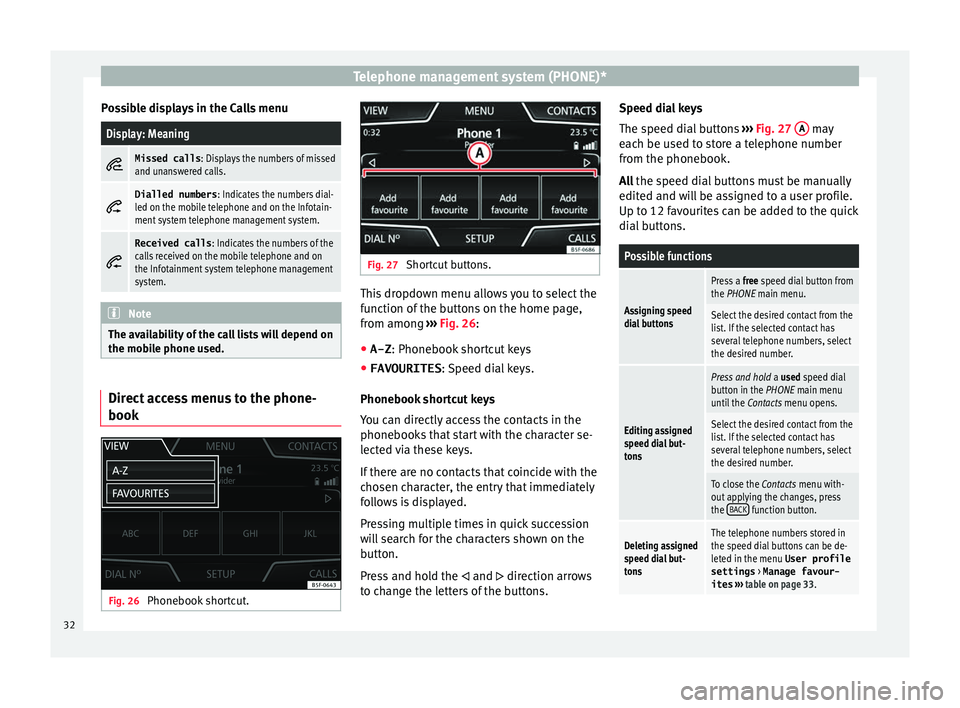
Fig. 26
Phonebook shortcut. Fig. 27
Shortcut buttons. This dropdown menu allows you to select the
f
unction of the buttons on the home page,
from among ››› Fig. 26:
● A-Z : Phone
book shortcut keys
● FAVOURITES :
Speed dial keys.
Phonebook shortcut keys
You can directly access the contacts in the
phonebooks that start with the character se-
lected via these keys.
If there are no contacts that coincide with the
chosen character, the entry that immediately
follows is displayed.
Pressing multiple times in quick succession
will search for the characters shown on the
button.
Press and hold the and direction arrows
to change the letters of the buttons. Speed dial keys
The s
peed dial buttons ››› Fig. 27 A may
e
ach be used to store a telephone number
from the phonebook.
All the speed dial buttons must be manually
edited and will be assigned to a user profile.
Up to 12 favourites can be added to the quick
dial buttons.
Possible functions
Assigning speed
dial buttons
Press a free speed dial button from
the PHONE main menu.
Select the desired contact from the
list. If the selected contact has
several telephone numbers, select
the desired number.
Editing assigned
speed dial but-
tons
Press and hold a used speed dial
button in the PHONE main menu
until the Contacts menu opens.
Select the desired contact from the
list. If the selected contact has
several telephone numbers, select
the desired number.
To close the Contacts menu with-
out applying the changes, press
the BACK
function button.
Deleting assigned
speed dial but-
tonsThe telephone numbers stored in
the speed dial buttons can be de-
leted in the menu User profile
settings > Manage favour-
ites › ›› table on page 33 .32