wheel Seat Ibiza 5D 2005 Owner's Guide
[x] Cancel search | Manufacturer: SEAT, Model Year: 2005, Model line: Ibiza 5D, Model: Seat Ibiza 5D 2005Pages: 252, PDF Size: 7.56 MB
Page 106 of 252

Seats and stowage
104
To lower and lift the seat back* (for 2-door vehicles with the Easy
- Entry* function)
4)
–To lower the seat back, pull on the lever upwards, in the direc-
tion of the arrow and press the seatback forwards. You can push
the seat forwards at the same time to make entry to the rear seats
easier.
–To lift the seatback, first move the seat fully back.
Adjusting the seat forwards and backwards
– Pull up the grip and move th e seat forwards or backwards.
– Then release the grip and move the seat further until the catch engages.
Adjusting the seat height*
– Pull the lever up or push down (s everal times if necessary) from
its home position. This adjusts the seat height in stages.
Adjusting the backrest angle
– Take your weight off the backrest and turn the hand wheel.The Easy-Entry function facilitates access to the vehicle rear seats. Before
lifting the seatback, put the seat base in its correct position. The seat will
engage when the seatback is lifted.
WARNING
•
Never adjust the driver or front passenger seat while the vehicle is in
motion. While adjusting your seat, you will assume an incorrect sitting
position. Risk of fatal accidents. Adju st the driver or front passenger seat
only when the vehicle is stationary.
•
To reduce the risk of injury to the driver and front passenger during
sudden braking manoeuvres or an acci dent, never drive with the backrest
tilted far to the rear. The maximum protection of the seat belt can be
achieved only when the backrests are in an upright position and the driver
and front passenger have properly adjusted their seat belts. The further
the backrests are tilted to the rear, the greater the risk of injury due to
improper positioning of the belt web!
•
Exercise caution when adjusting the seat height or forwards/back-
wards position. Injuries can be caused if the backrest is tilted without due
care and attention.
Heated seats*
The front seat cushions and backrests can be heated electri-
cally.
A1
A2
A2
A1
A3A4
WARNING (continued)
Fig. 73 Thumb wheel for
the front seat heating
ibiza_ingles Seite 104 Mittwoch, 5. Oktober 2005 5:17 17
Page 107 of 252
Seats and stowage105
Safety First
Operating instructions
Tips and Maintenance
Te c h n i c a l D a t a
– Turn the appropriate thumb wheel ⇒page 104, fig. 73 to switch
on the seat heating. The seat heating is switched off in the 0
position.The seat heating only works when the ignition is switched on. The left thumb
wheel controls the left seat and the right thumb wheel the right seat.
Caution
To avoid damaging the heating elements, please do not kneel on the seat or
apply sharp pressure at a single poin t to the seat cushion and backrest.Rear seat benchFolding down rear seats
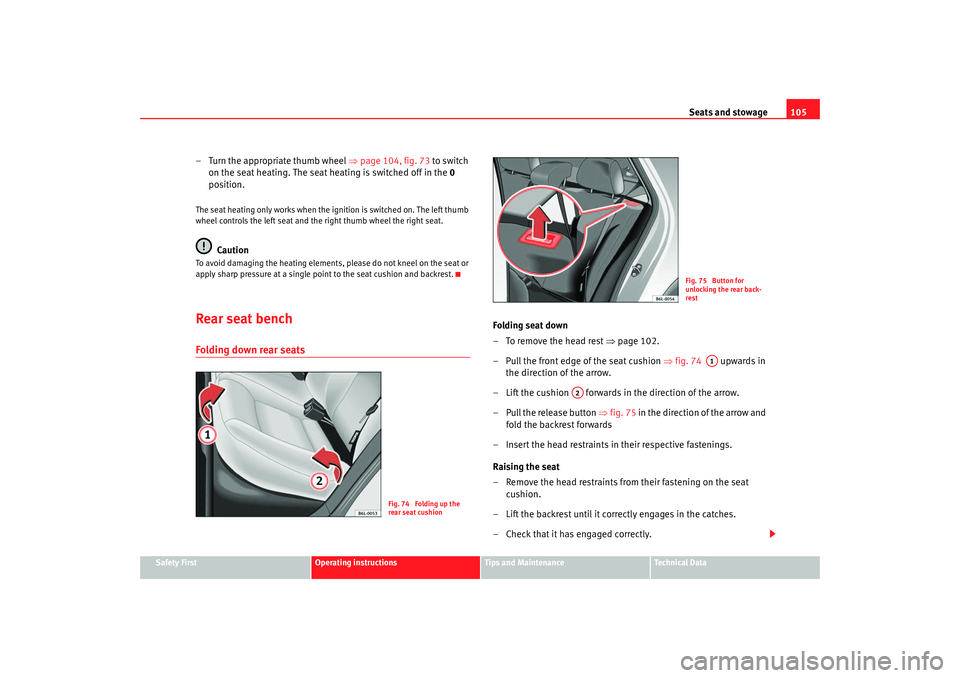
Folding seat down
– To remove the head rest ⇒ page 102.
– Pull the front edge of the seat cushion ⇒fig. 74 upwards in
the direction of the arrow.
– Lift the cushion forwards in the direction of the arrow.
– Pull the release button ⇒ fig. 75 in the direction of the arrow and
fold the backrest forwards
– Insert the head restraints in their respective fastenings.
Raising the seat
– Remove the head restraints from their fastening on the seat cushion.
– Lift the backrest until it correctly engages in the catches.
– Check that it has engaged correctly.
Fig. 74 Folding up the
rear seat cushion
Fig. 75 Button for
unlocking the rear back-
rest
A1
A2
ibiza_ingles Seite 105 Mittwoch, 5. Oktober 2005 5:17 17
Page 125 of 252
Driving123
Safety First
Operating instructions
Tips and Maintenance
Te c h n i c a l D a t a
DrivingSteeringAdjusting the steering wheel position
The height and reach of the steering wheel can be freely
adjusted to suit the driver.
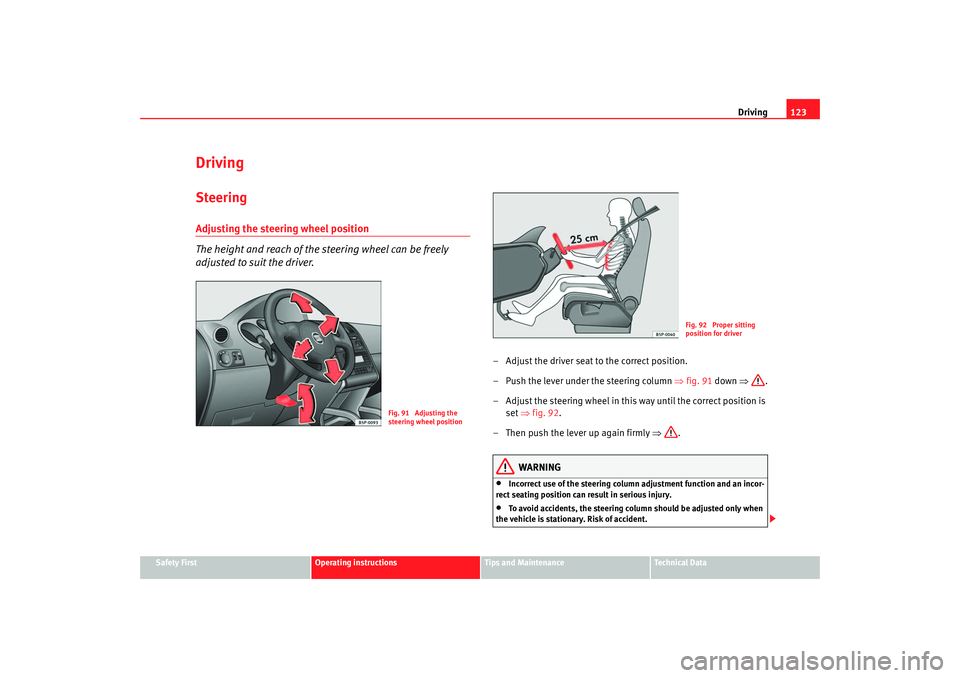
– Adjust the driver seat to the correct position.
– Push the lever under the steering column ⇒fig. 91 down ⇒ .
– Adjust the steering wheel in this way until the correct position is set ⇒fig. 92 .
– Then push the lever up again firmly ⇒.
WARNING
•
Incorrect use of the steering column adjustment function and an incor-
rect seating position can result in serious injury.
•
To avoid accidents, the steering column should be adjusted only when
the vehicle is stationary. Risk of accident.
Fig. 91 Adjusting the
steering wheel position
Fig. 92 Proper sitting
position for driver
ibiza_ingles Seite 123 Mittwoch, 5. Oktober 2005 5:17 17
Page 126 of 252
Driving
124•
Adjust the driver seat or steering wheel so that there is a distance of at
least 25 cm between the steering wheel and your breast bone ⇒page 123,
fig. 92. If you fail to observe the minimum distance, the airbag will not
protect you. Risk of fatal injury.
•
If your physical constitution prevents you from maintaining the
minimum distance of 25 cm, contact an Authorised Service Centre. The
Authorised Service Centre will help you decide if special specific modifica-
tions are necessary.
•
If you adjust the steering wheel so tha t it points towards your face, the
driver airbag will not protect you properly in the event of an accident. Make
sure that the steering wheel points towards your chest.
•
When driving, always hold the steer ing wheel with both hands on the
outside of the ring at the 9 o'clock and 3 o'clock positions. Never hold the
steering wheel at the 12 o'clock positi on, or in any other manner (e.g. in
the centre of the steering wheel, or on the inside of the rim). In such cases,
you could receive severe injuries to the arms, hands and head.
SafetyElectronic stabilisation programme (ESP)*
ESP helps make driving safer in certain situations.The Electronic Stabilisation Program (ESP ) contains the electronic differential
lock (EDL) and the traction control syst em (TCS). The ESP function works in
conjunction with the ABS. Both warning lamps will light up if the ESP or ABS
systems are faulty.
The ESP is started automatically when the engine is started.
In specific circumstances where you require less traction, you can switch off
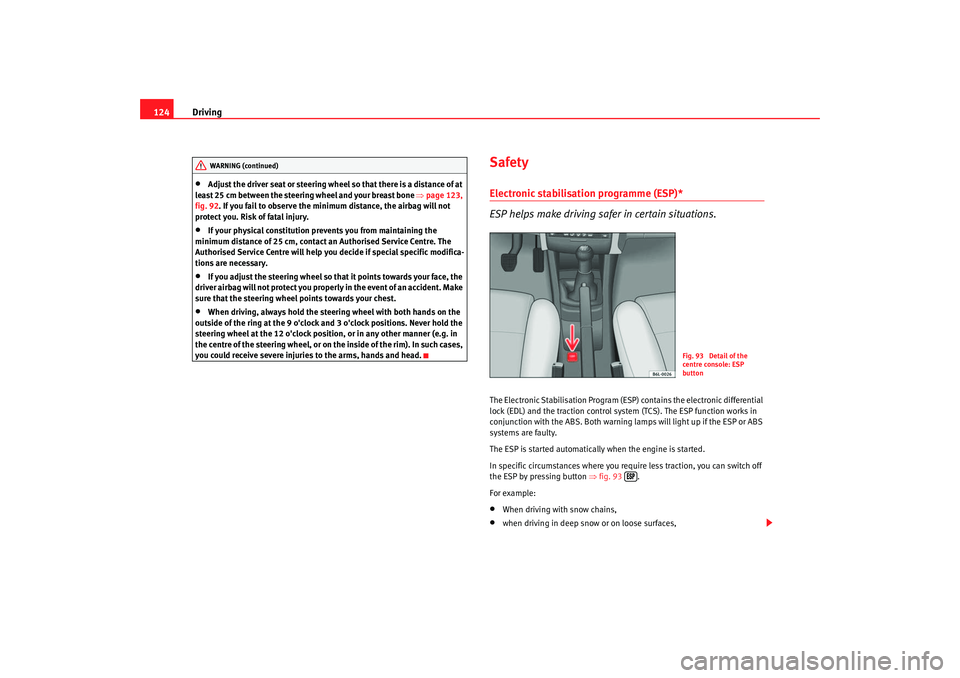
the ESP by pressing button ⇒fig. 93 .
For example:•
When driving with snow chains,
•
when driving in deep snow or on loose surfaces,
WARNING (continued)
Fig. 93 Detail of the
centre console: ESP
button
ibiza_ingles Seite 124 Mittwoch, 5. Oktober 2005 5:17 17
Page 127 of 252
Driving125
Safety First
Operating instructions
Tips and Maintenance
Te c h n i c a l D a t a
•
when rocking the vehicle backwards and forwards to free it from mud, for
example.
You should press the button to switch the ESP back on when you no longer
need wheel spin.
The TCS and EDL are also switched off if the ESP is switched off. That is to say,
these systems are not available while ESP is not activated.
When does the button light up or flash?
•
It lights up when the ignition is switched on and should go out again after
about 2 seconds.
•
It will start flashing to indicate that ESP is counteracting an unstable
driving condition.
•
It will light up continuously if there is a malfunction in the ESP.
•
It will light up continuously if the ESP is switched off.
WARNING
•
The electronic stabilisation program (ESP) cannot defy the laws of
physics. This should be kept in mind, particularly on slippery and wet
roads and when towing a trailer.
•
Always adapt your driving style to suit the condition of the roads and
the traffic situation. Do not let the extra safety afforded by ESP tempt you
into taking any risks when driving, this can cause accidents.
•
Please refer to the corresponding warning notes on ESP in ⇒page 139,
“Intelligent technology”.
Ignition lockPosition of the ignition keyIgnition switched off, steering lock
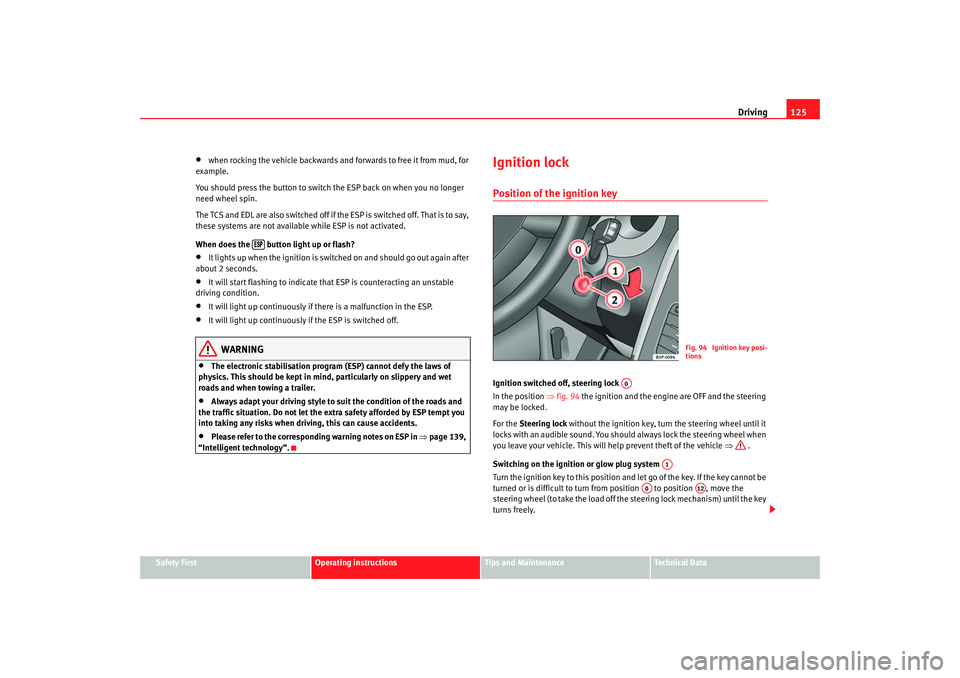
In the position ⇒fig. 94 the ignition and the engine are OFF and the steering
may be locked.
For the Steering lock without the ignition key, turn the steering wheel until it
locks with an audible sound. You should always lock the steering wheel when
you leave your vehicle. This will help prevent theft of the vehicle ⇒ .
Switching on the ignition or glow plug system
Tu rn the ignition key to this position and let go of the key. If the key canno t b e
turned or is difficult to turn from position to position , move the
steering wheel (to take the load off the steering lock mechanism) until the key
turns freely.
Fig. 94 Ignition key posi-
tions
A0
A1
A0
A12
ibiza_ingles Seite 125 Mittwoch, 5. Oktober 2005 5:17 17
Page 134 of 252
Driving
132N - neutral (idling)
To take the lever out of position N at speeds of below 5 km/h or when the car
is at a standstill but the ignition is switched on, depress the brake pedal and
press the lock button on the gearstick knob.
D - Drive (forwards)
The four gears automatically change up or down, depending on engine load
and vehicle speed.
In certain conditions it is preferable to place the selector lever provisionally in
one of the positions described below:
3 - Position for uneven surfaces
Gears 1st, 2nd and 3rd automatically change up or down depending on the
engine load and vehicle speed. 4th gear is blocked. This increases the engine
braking effect when decelerating.
This position is recommended when in position D and under certain driving
conditions, there are frequent changes between 3rd and 4th.
2 - Position for hilly roads
Position recommended for long slopes.
1st and 2nd gear change automatically depending on engine load and vehicle
speed. 3rd and 4th do not operate.
1 - Position for very steep slopes or manoeuvres
Recommended position for extreme slopes.
The vehicle only travels in 1st gear. 2nd, 3rd and 4th are blocked.
The cruise control* can not be used in position 1.
Caution
Never move the selector lever to R or P when driving. This could damage the
gearbox. Risk of accident!
Note
The selector lever can be pla c
ed in positions 3, 2 and 1
when the change is
made
manually, but the automatic gearbox does not change to a lower gear
until the number of rev olutions is appropriate.
Kick-down featureThis system allows maximum acceleration. When the accelerator is
depressed to full throttle, and depending on the vehicle speed and engine
speed, the lowest gear is engaged. As soon as the maximum engine speed
for that gear is reached, the next gear up is engaged.
WARNING
Remember that the drive wheels may skid if the kick-down featue is acti-
vated when driving on icy or slippery roads. Danger of skidding!Instructions for drivingStarting
The engine can only be started when the selector lever is at N or
P ⇒ page 126.
Selecting a range
When the car is at a standstill and the engine is running, always depress the
brake pedal before selecting a range.
Do not accelerate on selecting a range when the engine is at a standstill
ibiza_ingles Seite 132 Mittwoch, 5. Oktober 2005 5:17 17
Page 135 of 252
Driving133
Safety First
Operating instructions
Tips and Maintenance
Te c h n i c a l D a t a
If, while driving, the selector lever accidentally moves to position
N, first
release the accelerator pedal and wait un til the engine slows to idling before
selecting a forwards gear ⇒ .
Starting
Select a range ( R, D, 3, 2, 1). Wait until the change has taken place and the
power transmission of the drive wheels has stabilised (slight pressure is
noticeable). Then depress the accelerator.
Stopping
In the case of a temporary stop, for example at a traffic lights, it is not neces-
sary to move to position N, it is sufficent to brake using the brake pedal. The
engine should only run at idle speed.
Parking
On slopes, first pull handbrake on firmly and then connect block. This
prevents overloading the blocking mechanism, making the subsequent
disconnection easier ⇒ .
Emergency start
in vehicles fitted with an automatic gearbox the engine can not be started by
towing or pushing the vehicle ⇒page 217
If the vehicle battery is flat, a battery from another car can be used to jump-
start the car using a set of jump leads ⇒ page 126
To w i n g
If the vehicle requires towing at any time, observe the instructions of
⇒ page 217, “Towing and tow-starting”.
Back-up programme
In the event of a malfunction of the gearbox electronics, emergency
programmes are activated, according to the type of fault.
•
The gearbox continues to connect gears automatically, but the operations
are jerky. Consult the Authorised Service Centre.
•
The gearbox does not automatically engage gears.
In this case they can be changed manually. 3rd gear is only ava ilable in posi-
tions D, 3 and 2 of the selector lever.
In positions 1 and R of the selector lever 1st gear and reverse gear are availa ble
respectively as normal
As the torque converter is required to work more, especially due to the lack of
2nd gear, it is possible that the gearbox oil may overheat. In this case, consult
the Authorised Service Centre as soon as possible.
WARNING
•
In all the ranges the vehicle must always be held with the foot brake
when the engine is running. This is because an automatic gearbox still
transmits power even at idling speed, and the vehicle tends to “creep”.
•
If, when the car is at a standstill and the engine is idling, a range is
connected, take care not to accelerate accidentally (for example, when
working in the engine compartment), as the car will start to move immedi-
ately.
•
Before working on a running engine, place the selector lever in position
P and apply the handbrake.
•
To prevent the vehicle from moving out of control, the handbrake
should always be applied when the vehi cle is at a standstill. In addition
move the selector lever to position P.
ibiza_ingles Seite 133 Mittwoch, 5. Oktober 2005 5:17 17
Page 136 of 252

Driving
134HandbrakeUsing the handbrake
The handbrake should be applied firmly to prevent the
vehicle from accidentally rolling away.Always apply the handbrake when you leave your vehicle and when
you park.
Applying the handbrake
– Pull the handbrake lever up firmly ⇒fig. 99 .
Releasing the handbrake
– Pull the lever up slightly and press the locking knob in the direc- tion of the arrow ⇒fig. 99 and guide the handbrake lever down
fully ⇒ .
Always apply the handbrake firmly. This prevents you driving with the hand-
brake applied ⇒.
The handbrake warning lamp
lights up when the handbrake is applied
and the ignition switched on. The warning lamp goes out when the hand-
brake is released.
WARNING
•
Never use the handbrake to slow down the vehicle when it is in motion.
The braking distance is considerably longer, as braking is only applied to
the rear wheels. Risk of accident!
•
If it is only partially released this will cause overheating of the rear
brakes, which can impair the function of the brake system and could lead
to an accident. This also causes premature wear on the rear brake
pads/linings.Caution
Always apply the handbrake before you leave the vehicle. The first gear
should also be selected.Parking
The handbrake should always be firmly applied when the
vehicle is parked.Always note the following points when parking the vehicle:
– Use the foot brake to stop the vehicle.
–Apply the handbrake.
– The first gear should also be selected.
Fig. 99 Handbrake
between the front seats
ibiza_ingles Seite 134 Mittwoch, 5. Oktober 2005 5:17 17
Page 137 of 252
Driving135
Safety First
Operating instructions
Tips and Maintenance
Te c h n i c a l D a t a
– Switch off the engine and remove the key from the ignition lock.
Turn the steering wheel slightly to engage the steering lock.
– Always take you car keys with you when you leave the vehicle ⇒ .Additional notes on parking the vehicle on gradients:
Turn the steering wheel so that the vehicle would roll against the kerb if it did
start to roll.•
If the vehicle is facing downhill, turn the front wheels so that they point
towards the kerb.
•
If the vehicle is facing uphill , turn the front wheels so that they point away
from the kerb .
•
Secure the vehicle as normal by applying the handbrake firmly and
selecting first gear.
WARNING
•
Take measures to reduce the risk of injury when you leave your vehicle
unattended.
•
Never park where the hot exhaust system could ignite inflammable
materials, such as dry grass, low bushes, spilt fuel etc.
•
Never allow vehicle occupants to re main in the vehicle when it is
locked. They would be unable to open the vehicle from the inside, and
could become trapped in the vehicle in an emergency. In the event of an
emergency, locked doors will delay assistance to occupants.
•
Never leave children unsupervised in the vehicle. They could set the
vehicle in motion, for example, by releasing the handbrake or the gear
lever / selector lever.
•
Depending on weather conditions, it may become extremely hot or cold
inside the vehicle. This can be fatal.
Cruise control system (CCS)*Description
The cruise control system is able to maintain the set speed in
the range from approx. 30 km/h to 180 km/h.Once the speed setting has been saved, you may take your foot off the accel-
erator.
WARNING
It could be dangerous to use the cruise control system if it is not possible
to drive at constant speed.•
For safety reasons the cruise control system should not be used in
dense traffic, in sections with bends or where roads conditions are poor
(e.g. aquaplaning, loose chippings, slippery surfaces, snow). Risk of acci-
dent.
•
Always switch off the CCS when you have finished using it. This will
prevent you using it by mistake.
•
It is dangerous to use a set speed which is too high for the current road,
traffic or weather conditions. Risk of accident.Note
The cruise control cannot maintain a constant speed when descending gradi-
ents. The vehicle will accelerate under its own weight. Use the foot brake to
slow the vehicle.
ibiza_ingles Seite 135 Mittwoch, 5. Oktober 2005 5:17 17
Page 142 of 252
Intelligent technology
140Anti-lock brake system and traction control
ABSAnti-lock brake system (ABS)
The anti-lock brake system prevents the wheels locking
during braking.The anti-lock brake system (ABS) is an important part of the vehicles active
safety system.
How the ABS works
If one of the wheels is turns too slowly in relation to the road speed, and is
close to locking, the system will reduce the braking pressure for this wheel.
The driver is made aware of this control process by a pulsating of the brake
pedal and audible noise. This is a deliberate warning to the driver that one or
more of the wheels is tending to lock and the ABS control function has inter-
vened. In this situation it is important to keep the brake pedal fully depressed
so the ABS can regulate the brake application. Do not “pump”.
If you brake hard on a slippery road surface, the best possible control is
retained as the wheels do not lock.
However, ABS will not necessarily guarantee shorter braking distances in all
conditions. The braking distance could even be longer if you brake on gravel
or on fresh snow covering a slippery surface.
WARNING
•
The anti-lock brake system cannot defy the laws of physics. Slippery
and wet roads are dangerous even with ABS! If you notice that the ABS is
working (to counteract locked wheels under braking), you should reduce
speed immediately to suit the road and traffic conditions. Do not let the
extra safety features tempt you into taking any risks when driving.
•
The effectiveness of ABS is also determined by the tyres fitted
⇒ page 185.
•
If the running gear or brakes are mo dified, the effectiveness of the ABS
could be severely limited.
Traction control system (TCS)*
The traction control system prevents the drive wheels from
spinning when the car is acce lerating. The system includes
ABSDescription and operation of the traction control system during acceleration
(TCS)
TCS reduces engine power to help prevent the drive wheels of front-wheel
drive vehicles losing traction during acceleration. The system works in the
entire speed range in conjunction with ABS. If a malfunction should occur in
the ABS, the TCS will also be out of action.
TCS helps the vehicle to start moving, accelerate and climb a gradient in slip-
pery conditions where this may otherwise be difficult or even impossible.
The TCS is switched on automatically when the engine is started. If necessary,
it may be turned on or off pushing the button on the centre console.
When the TCS is off, the warning lamp is lit. The TCS should normally be left
switched on at all times. Only in exceptional circumstances, when slipping of
the wheels is required, should it be disconnected, for example•
With compact temporary spare wheel.
•
When using the snow chains.
•
When driving in deep snow or on loose surfaces
•
When the vehicle is bogged-down, to free it by “rocking.”WARNING (continued)
ibiza_ingles Seite 140 Mittwoch, 5. Oktober 2005 5:17 17