buttons Seat Ibiza 5D 2008 Owner's manual
[x] Cancel search | Manufacturer: SEAT, Model Year: 2008, Model line: Ibiza 5D, Model: Seat Ibiza 5D 2008Pages: 260, PDF Size: 8.11 MB
Page 74 of 260
Unlocking and locking
72Unlocking and lockingCentral locking Description
The central locking system enables you to lock and unlock all
doors with just pushing on the keybutton.Central locking can be activated by using any of the following options:•
the key , by inserting it into the driver's door cylinder and rotating it manu-
ally,
•
the interior central locking button ⇒page 75.
•
the radio frequency remote control, using the buttons on the key
⇒ page 78.
Various functions are available to improve the vehicle safety:
- Locking system “Safe”
- Selective unlocking system*
- Self-locking system to prevent involuntary unlocking
- Automatic speed-dependent locking and unlocking system*
- Emergency unlocking system
WARNING
•
Locking from the outside without seeing may cause bruising to other
people, particularly tochildren.
•
When locking a vehicle, never leave children unaccompanied inside, as
from the outside it will be difficu lt to provide assistance if required.
•
Having the doors locked prevents an intrusion from getting in, for
example when stopped at a traffic light.
Note
For anti-theft security, only the driver's door is fitted with a lock cylinder.Safety system “Safe*”
This is an anti-theft device which consists of a double lock for
the door locks and a deactivation function for the boot in
order to prevent a forced entry.Activation
The “safe” system is activated when the vehicle is locked using the key or the
remote control.
To activate it with the key, rotate once it is inserted in the door lock cylinder
in the locking direction.
To activate the system using the remote control, press the lock button once on the remote.
Once this system is activated, opening doors from the outside and the inside
is not possible. The tailgate can not be opened. The central locking button
does not work.
Deactivation
Rotate the key inserted in the lock cylinder twice towards the locking direc-
tion.
To activate the system using the remote control, press the lock button on the
remote twice in less than five seconds.
Ibiza250_angles Seite 72 Dienstag, 5. August 2008 1:11 13
Page 80 of 260
Unlocking and locking
78Radio frequency remote controlLocking and unlocking the vehicle
The remote control key is used to lock and unlock the vehicle
from a distance.
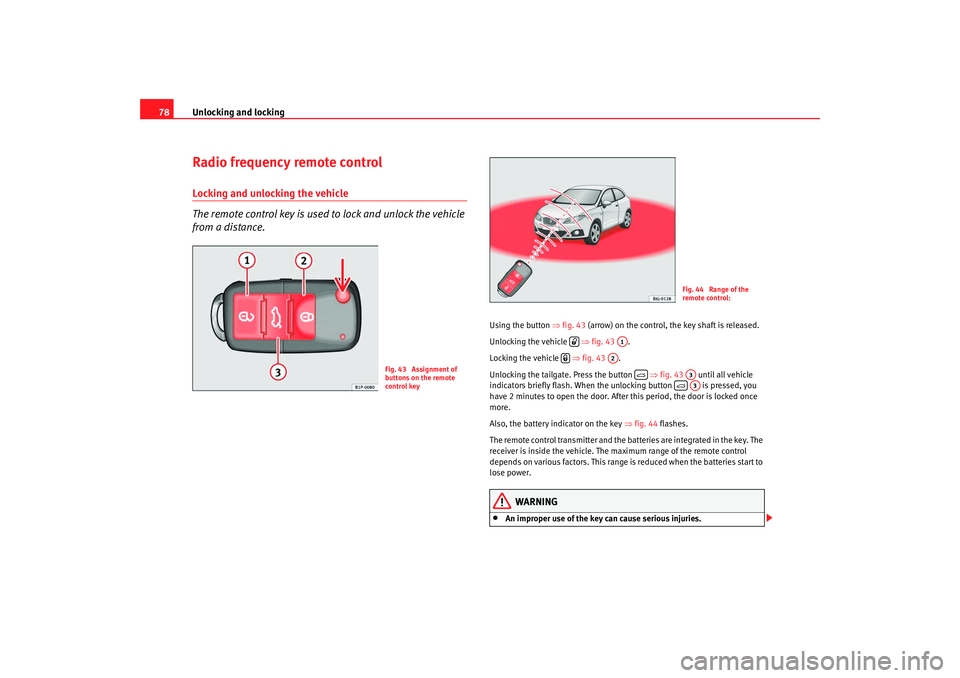
Using the button ⇒fig. 43 (arrow) on the control, the key shaft is released.
Unlocking the vehicle ⇒fig. 43 .
Locking the vehicle ⇒fig. 43 .
Unlocking the tailgate. Press the button ⇒fig. 43 until all vehicle
indicators briefly flash. When the unlocking button is pressed, you
have 2 minutes to open the door. After this period, the door is locked once
more.
Also, the battery indicator on the key ⇒fig. 44 flashes.
The remote control transmitter and the batteries are integrated in the key. The
receiver is inside the vehicle. The maximum range of the remote control
depends on various factors. This range is reduced when the batteries start to
lose power.
WARNING
•
An improper use of the key can cause serious injuries.
Fig. 43 Assignment of
buttons on the remote
control key
Fig. 44 Range of the
remote control:
A1
A2
A3
A3
Ibiza250_angles Seite 78 Dienstag, 5. August 2008 1:11 13
Page 81 of 260
Unlocking and locking79
Safety First
Operating instructions
Practical tips
Te c h n i c a l D a t a
•
Never leave children or disabled persons in the vehicle. In case of emer-
gency, they may not be able to leave the vehicle and not manage on their
own.
•
Never forget the keys inside the vehicle. Otherwise, this could result in
serious injuries, accidents or even the theft of your vehicle. Always take the
key with you when you leave the vehicle.
•
An uncontrolled use of the key could start the engine or activate any
electric equipment(e.g. electric win dows), causing risk of accident. The
vehicle can be locked when using the remote control key. This could
complicate the aid in cas of emergency.Note
•
The remote control key functions only when you are within range
⇒ page 78, fig. 44 .
•
If the vehicle cannot be unlocked or locked by using the radio-frequency
remote control, the remote control key wi ll have to be re-synchronised. In this
case, please refer to your Technical Service.
Changing the batteryIf the battery indicator does not flash when the buttons are pushed, the
battery must be replaced.
Caution
The use of inappropriate batteries may damage the radio frequency remote
control. For this reason, always replace the dead battery with another of the
same size and power.
For the sake of the environment
The flat batteries must be thrown away in accordance with regulations
governing the protection of the environment.Anti-theft alarm system*Description of anti-theft alarm system*
The anti-theft alarm triggers if unauthorised movements are
detected around the vehicle.The anti-theft alarm makes it more difficult to break into the vehicle or steal
it. The system will emit acoustic an d optical warning signals if someone is
trying to force your vehicle.
The anti-theft alarm system is automatically connected on locking the
vehicle. For this, either rotate the key in the locking position or press button on the radio-frequency remote control*. The system is immediately
activated and the indicator light located on the driver's door will flash along
with the indicators, indicating that the alarm and the locking security system
(double lock) have been turned on.
If any of the doors or the bonnet are open, they will not be included in the
protection zones of the vehicle when the alarm is connected. If the door or the
bonnet are subsequently closed, they will automatically be included in the
protection areas of the vehicle and the indicators will flash accordingly when
the doors close.•
The indicator light will flash twice on opening and deactivating the alarm.
•
The indicator light will flash once on closing and activating the alarm.
WARNING (continued)
A2
Ibiza250_angles Seite 79 Dienstag, 5. August 2008 1:11 13
Page 86 of 260
Unlocking and locking
84WindowsOpening or closing the windows electrically*
The front and rear electric windows can be operated by using
the controls on the driver's door. The other doors each have a
switch for their own window.Opening and closing the windows
– Press the button to open a window.
– Pull button to close a window ⇒.Always close the windows fully if you park the vehicle or leave it unattended
⇒.
You can use the electric windows for approx. 10 minutes after switching off
the ignition if neither the driver door nor the front passenger door has been
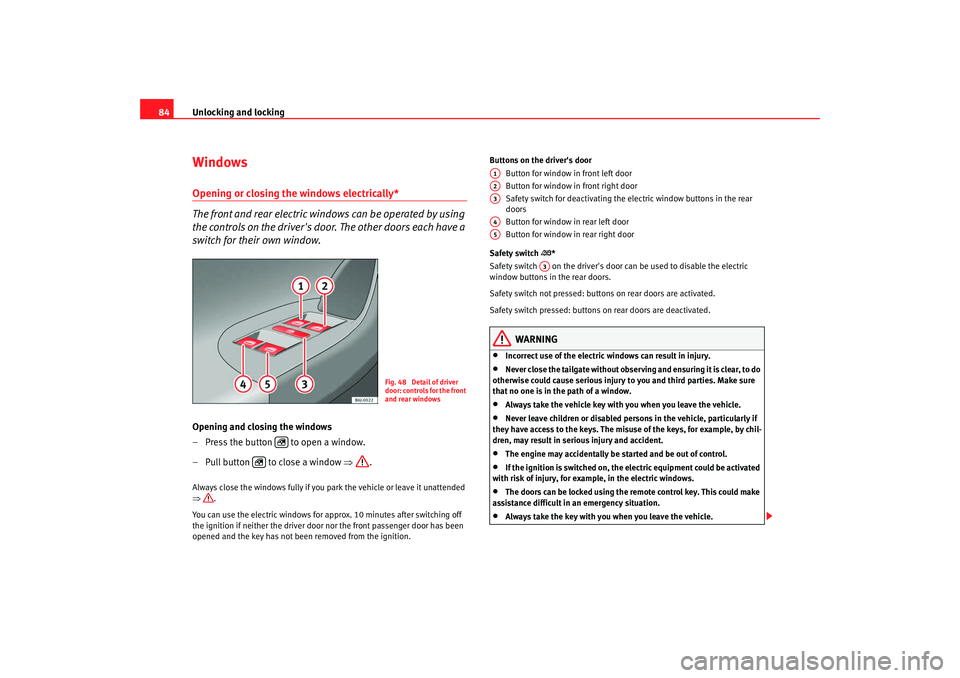
opened and the key has not been removed from the ignition. Buttons on the driver's door
Button for window in front left door
Button for window in front right door
Safety switch for deactivating the electric window buttons in the rear
doors
Button for window in rear left door
Button for window in rear right door
Safety switch
*
Safety switch on the driver's door can be used to disable the electric
window buttons in the rear doors.
Safety switch not pressed: buttons on rear doors are activated.
Safety switch pressed: buttons on rear doors are deactivated.
WARNING
•
Incorrect use of the electric windows can result in injury.
•
Never close the tailgate without observing and ensuring it is clear, to do
otherwise could cause serious injury to you and third parties. Make sure
that no one is in the path of a window.
•
Always take the vehicle key with you when you leave the vehicle.
•
Never leave children or disabled persons in the vehicle, particularly if
they have access to the keys. The misuse of the keys, for example, by chil-
dren, may result in serious injury and accident.
•
The engine may accidentally be started and be out of control.
•
If the ignition is switched on, the electric equipment could be activated
with risk of injury, for example, in the electric windows.
•
The doors can be locked using the remote control key. This could make
assistance difficult in an emergency situation.
•
Always take the key with you when you leave the vehicle.
Fig. 48 Detail of driver
door: controls for the front
and rear windows
A1A2A3A4A5
A3
Ibiza250_angles Seite 84 Dienstag, 5. August 2008 1:11 13
Page 87 of 260
Unlocking and locking85
Safety First
Operating instructions
Practical tips
Te c h n i c a l D a t a
•
The electric windows will work unti l the ignition has been switched off
and one of the front doors has been opened.
•
If necessary, use the safety switch to disable the rear electric windows.
Make sure that they have been disabled.Note
If the window is not able to close because it is stiff or because of an obstruc-
tion, the window will automatically open again ⇒ page 85. If this happens,
check why the window could not be clos ed before attempting to close it
again.One-touch opening and closing*
One-touch opening and closing means you do not have to
hold down the button.The buttons ⇒page 84, fig. 48 , , and have two levels
for opening the window and two for closing it. This makes it easier
to open and close windows to the desired position.
One-touch closing
– Pull up the window button briefl y up to the second position. The
window closes fully.
One-touch opening
– Push down the window button briefly up to the second position. The window opens fully. Restoring one-touch opening and closing
– The automatic open and close function will not work if the battery
has been temporarily disconnected. The function can be restored
as follows:
– Close the window as far as it will go by lifting and holding the window switch.
– Release the switch and then lift it again for one second. This will reactivate the automatic function.
If you push (or pull) a button to the first stage, the window will open (or close)
until you release the button. If you push or lift the button briefly to the second
stage, the window will open (one-touch opening) or close (one-touch closing)
automatically. If you operate the button while the window is opening or
closing, the window stops at this position.
The one-touch opening and closing function will not function once the igni-
tion has been switched off.
The one-touch function and roll-back function will not work if there is a
malfunction in the electric windows. Contact an Authorised Service Centre.Roll-back function
The roll-back function reduces the risk of injury when the elec-
tric windows close.•
If a window is obstructed when closing automatically, the window stops
at this point and lowers immediately ⇒.
•
Next, check why the window does no t close before attempting it again.
WARNING (continued)
A1
A2
A4
A5
Ibiza250_angles Seite 85 Dienstag, 5. August 2008 1:11 13
Page 88 of 260
Unlocking and locking
86•
If you try within the next 10 seconds and the window closes again with
difficulty or there is an obstruction, the automatic closing will stop working
for 10 seconds.
•
If the window is still obstructed, the window will stop at this point.
•
If there is no obvious reason why the window cannot be closed, try to
close it again by pulling the tab with in ten seconds.. The window closes with
great force The roll-back function is deactivated.
If more than 10 seconds pass, the window will open fully when you operate
one of the buttons. One-touch closing is reactivated.
The one-touch function and roll-back fu nction will not work if there is a
malfunction in the electric windows. Co ntact an Authorised Service Centre.
WARNING
•
Incorrect use of the electric windows can result in injury.
•
Always take the key with you when leaving the vehicle, even if you only
intend to be gone for a short time. Please ensure that children are never left
alone inside the vehicle.
•
The electric windows will work until the ignition has been switched off
and one of the front doors has been opened.
•
Closing the windows without observin g and ensuring it is clear could
cause serious injury to you and third parties. Make sure that no one is in
the path of a window.
•
Never allow people to remain in th e vehicle when you close the vehicle
from the outside. The windows cannot be opened even in an emergency.
•
The roll-back function does not prevent fingers or other parts of the
body getting pinched against the window frame and injuries may be
caused.
Convenience opening and closing* Using the door lock
– Hold the key in the door lock of the driver door in either the locking or the unlocking position until all windows are either
opened or closed.
– Release the key to interrupt this function.
Using the remote control
– Keep the locking/unlocking button pressed for the electrical window risers to open/close; if you stop pressing the button, the
window raising/lowering function is stopped.
– If the automatic raising is stopped and immediately after, the opening button is kept pressed, the window risers will lower.
– Once the windows are completely closed, the indicators will flash.
Ibiza250_angles Seite 86 Dienstag, 5. August 2008 1:11 13
Page 127 of 260
Heating, Ventilation and Air conditioning 125
Safety First
Operating instructions
Practical tips
Te c h n i c a l D a t a
– Turn the temperature selector ⇒page 124, fig. 91 to adjust
the desired temperature.
– The functions will be switched on when its buttons are pressed. When the function is activated, a symbol is displayed on the
screen. Press the button again to switch off the function.
Fan level indicator.
Air recirculation display:
Display AUTO (Automatic operation)
Demisting indicator
AC indicator (Cooling connected)
Interior temperature indicator selected
Air flow direction indicator
Fan speed increase
Fan speed decrease
Interior temperature increase
Interior temperature decrease
Button – Automatic adjustment of temperature, ventilation and air
distribution control
Button – Windscreen demisting functi on. The air drawn in is directed
at the windscreen. The air recirculation mode will be switched off as soon
as the demisting function is switched on. At temperatures over 3 °C, the
cooling system is switched on automatically in order to dry the air.
Button – Air distribution to head
Button – Air distribution to the upper body.
Button – Air distribution to footwell
– Manual air recirculation button - To switch on the air conditioning.
WARNING
For your safety, the windows should never be fogged up or covered with
snow or ice. This is essential to ensure good visibility. Please familiarise
yourself with the correct operation of the heating and ventilation system,
including the demist/defrost functions for the windows.
Note
Please consider the general notes.Automatic mode
In automatic mode air temperatur e, air flow and distribution
are automatically regulated so that a specified temperature is
attained as quickly as possible, and then maintained.Switching on automatic mode
– Press the button . The indication ⇒page 124, fig. 91
is visible.
– Turn the temperature selector to adjust the desired temperature inside the vehicle. We recommend 22°C (72°F).A comfortable interior climate is quickly reached when a temperature of
+22°C (72°F) is set in automatic mode . Therefore, we recommend you not to
change this adjustment, except as necessary to suit individual preferences or
particular circumstances. It is possible to select interior temperatures from
+18°C (64°F) up to +29°C (86°F). If a lo wer or higher temperature is selected,
LO or HI are respectively displayed on the screen. These are approximate
temperatures which may slightly vary depending on the outside conditions.
A10
A1A2A3A4A5A6A7A8A9A10A11A12
AUTO
A13
A14
A15
A16
A17
A18
AC
AUTO
A7
Ibiza250_angles Seite 125 Dienstag, 5. August 2008 1:11 13
Page 128 of 260
Heating, Ventilation and Air conditioning
126Climatronic maintains a constant temperature. To do it, it automatically regu-
lates the supplied air temperature, the blower speed and the air distribution.
The system also considers the sunlight radiation, so there is no need for
manual readjustment. Therefore, automatic mode almost always provides
the best comfort for the vehicle occupants throughout the year.
Automatic mode is switched off whenever an adjustment is made using the
buttons for the air distribution, blower or . The temperature continues to
self-regulate.Manual mode
In manual mode the air temperature, flow, and the desired air
distribution can be adjusted.Switching on manual mode
– Press one of the buttons ⇒page 124, fig. 91 to or press
the blower control and down. The indicator is switched
off.Temperature
It is possible to select interior temp eratures from +18°C (64°F) up to +29°C
(86°F). These are approximate temperatures which may slightly vary
depending on the outside conditions.
If a temperature below 18°C (64°F) is selected, the screen will show LO. In this
setting the system runs at maximum c ooling output and the temperature is
not regulated.
If a temperature above 29°C (86°F) is selected, the screen will show HI. In this
setting the system runs at maximum heating output and the temperature is
not controlled. Blower
The blower can be adjusted with buttons and
⇒page 124, fig. 91 . If
the blower is off (level is not shown on the screen) and button is kept
pressed down, the Climatronic switches off. Then OFF is displayed on the
screen.
Air distribution
The air distribution is adjusted using the buttons , and . It is also
possible to open and close some of the air outlets separately.
Switching the air conditioning system on and off
By pressing the button, the air cool ing system can be switched off in
order to save fuel. The temperature continues to self-regulate. The set
temperature can then only be reache d if it is higher than the outside
temperature.
Air recirculation mode
Air recirculation mode prevents fumes or unpleasant smells
from coming from the outside.– Press the button to switch air recirculation mode on or off. This is ON if the symbol
⇒ page 124, fig. 91 is displayed on
the screen.
Air recirculation mode pr events strong odours in the ambient air from
entering the vehicle interior, for example when passing through a tunnel or in
a traffic jam.
When the outside temperature is low , air recirculation mode improves
heating performance by heating air from the interior instead of cold air from
the outside.
AC
A14
A16
A8
A9
A3
A8
A9
A1
A9
AC
Ibiza250_angles Seite 126 Dienstag, 5. August 2008 1:11 13
Page 256 of 260
Index
254Remote control key
Buttons . . . . . . . . . . . . . . . . . . . . . . . . . . . . . 78
Removing and fitting the wheel . . . . . . . . . . . . 208
Repairs airbags . . . . . . . . . . . . . . . . . . . . . . . . . . . . . . 28
Replacement keys . . . . . . . . . . . . . . . . . . . . . . . . 77
Replacement of parts . . . . . . . . . . . . . . . . . . . . 173
Rev counter . . . . . . . . . . . . . . . . . . . . . . . . . . . . . 52
Reverse gear Manual gearbox . . . . . . . . . . . . . . . . . . . . . 134
Roll-back function Panoramic/ tilt ing roof . . . . . . . . . . . . . . . . . 88
Windows . . . . . . . . . . . . . . . . . . . . . . . . . . . . 85
Roof aerial* . . . . . . . . . . . . . . . . . . . . . . . . . . . . 174
Roof carrier* . . . . . . . . . . . . . . . . . . . . . . . . . . . . 117
Rubber seals . . . . . . . . . . . . . . . . . . . . . . . . . . . 168
Running in Brake pads . . . . . . . . . . . . . . . . . . . . . . . . . . 153
Engine . . . . . . . . . . . . . . . . . . . . . . . . . . . . . 153
Tyres . . . . . . . . . . . . . . . . . . . . . . . . . . . . . . . 153
Running in tyres . . . . . . . . . . . . . . . . . . . . . . . . 153SSafe driving . . . . . . . . . . . . . . . . . . . . . . . . . . . . . . 7
Safety . . . . . . . . . . . . . . . . . . . . . . . . . . . . . . . . . . . 8
Safety equipment . . . . . . . . . . . . . . . . . . . . . . . . . 7
Safety instructions Coolant temperature . . . . . . . . . . . . . . . . . . . 66 Safety notes
Airbags . . . . . . . . . . . . . . . . . . . . . . . . . . . . . . 28
Belt tension devices . . . . . . . . . . . . . . . . . . . 25
Curtain airbags . . . . . . . . . . . . . . . . . . . . . . . 36
Disabling front passenger airbag . . . . . . . . 39
frontal airbags . . . . . . . . . . . . . . . . . . . . . . . . 31
side airbags . . . . . . . . . . . . . . . . . . . . . . . . . . 34
Using child seats . . . . . . . . . . . . . . . . . . . . . . 41
Using seat belts . . . . . . . . . . . . . . . . . . . . . . 20
Safety system- safe . . . . . . . . . . . . . . . . . . . . . . . 72
Seals . . . . . . . . . . . . . . . . . . . . . . . . . . . . . . . . . 168
Seat adjustment . . . . . . . . . . . . . . . . . . . . 103, 106
Seat belt position Pregnant women . . . . . . . . . . . . . . . . . . . . . . 23
Seat belts . . . . . . . . . . . . . . . . . . . . . . . . . . . . 22
Seat belt release . . . . . . . . . . . . . . . . . . . . . . . . . 24
Seat belt warning lamp . . . . . . . . . . . . . . . . . . . . 16
Seat belts . . . . . . . . . . . . . . . . . . . . . . . . . . . . . . . 16 adjustment . . . . . . . . . . . . . . . . . . . . . . . . . . 21
Incorrectly fastened . . . . . . . . . . . . . . . . . . . 24
Not worn . . . . . . . . . . . . . . . . . . . . . . . . . . . . 19
Safety notes . . . . . . . . . . . . . . . . . . . . . . . . . . 20
Warning lamp . . . . . . . . . . . . . . . . . . . . . . . . 16
Seat belts cleaning . . . . . . . . . . . . . . . . . . . . . . 172
Seat belts protection . . . . . . . . . . . . . . . . . . . . . 20
Seat heating . . . . . . . . . . . . . . . . . . . . . . . . . . . 107
Seats . . . . . . . . . . . . . . . . . . . . . . . . . . . . . . . . . . 16
Selective opening* . . . . . . . . . . . . . . . . . . . . . . . 73
Self directional headlights . . . . . . . . . . . . . . . . . 91
Semiautomatic air conditioning controls . . . . . . . . . . . . . . . . . . . . . . . . . . . . 121 Shoes . . . . . . . . . . . . . . . . . . . . . . . . . . . . . . . . . . 14
Side airbags . . . . . . . . . . . . . . . . . . . . . . . . . . . . 31
Description . . . . . . . . . . . . . . . . . . . . . . . . . . 31
Function . . . . . . . . . . . . . . . . . . . . . . . . . . . . . 32
Safety notes . . . . . . . . . . . . . . . . . . . . . . . . . . 34
Side lights . . . . . . . . . . . . . . . . . . . . . . . . . . . . . . 89
Sitting position Driver . . . . . . . . . . . . . . . . . . . . . . . . . . . . . . . . 9
Front passenger . . . . . . . . . . . . . . . . . . . . . . 10
Incorrect sitting position . . . . . . . . . . . . . . . 13
Passengers . . . . . . . . . . . . . . . . . . . . . . . . . . 11
Sitting position, occupants . . . . . . . . . . . . . . . . . 9
Snow chains . . . . . . . . . . . . . . . . . . . . . . . 202, 237
Soot accumulation in the diesel engine particulate
filter *
Indicator . . . . . . . . . . . . . . . . . . . . . . . . . . . . 60
Spare parts . . . . . . . . . . . . . . . . . . . . . . . . . . . . 173
Spare wheel . . . . . . . . . . . . . . . . . . . . . . . . . . . . 203
Speed selector lever lock warning lamp . . . . . . . . . . . . . . . . . . . . . . . . 64
Speedometer . . . . . . . . . . . . . . . . . . . . . . . . . . . . 52
Starting on a hill . . . . . . . . . . . . . . . . . . . . . . . . 143
Starting Petrol engines . . . . . . . . . . . . . . . . . . . 133
Starting the engine . . . . . . . . . . . . . . . . . . 132, 133 After the fuel tank has been run dry . . . . . 133
Steam jets . . . . . . . . . . . . . . . . . . . . . . . . . . . . . 166
Steering . . . . . . . . . . . . . . . . . . . . . . . . . . . . . . . 129 Steering lock . . . . . . . . . . . . . . . . . . . . . . . . 131
Steering column controls Audio Control . . . . . . . . . . . . . . . . . . . . . . . . 68
Steering wheel height adjustment . . . . . . . . . 129
Ibiza250_angles Seite 254 Dienstag, 5. August 2008 1:11 13