ignition Seat Ibiza SC 2011 Owner's Guide
[x] Cancel search | Manufacturer: SEAT, Model Year: 2011, Model line: Ibiza SC, Model: Seat Ibiza SC 2011Pages: 278, PDF Size: 3.92 MB
Page 75 of 278
73
Cockpit
If the indicator flashes the voltage is insufficient for normal vehicle opera-
tion.
Turn signals
The indicator lamp flashes when the turn signals are in op-
eration.
Depending on which turn signal is operating, either the left or right
turn signal lamp flashes. Both indicator lamps will flash at the same time
when the hazard warning lights are switched on.
If any of both turn signals fails, the indicator lamp will start flashing twice
faster than normal.
For further information on the turn signals, please see ⇒ page 100.
Electronic immobiliser* “Safe”
This warning lamp flashes if an unauthorised key is used.
Inside the key there is a chip that deactivates the electronic immobiliser au-
tomatically when the key is inserted into the ignition. The immobiliser will
be activated again automatically as soon as you pull the key out of the igni-
tion lock.
The instrument panel displays the following message 1)
: SAFE. The vehicle
cannot be started in this case
The engine can, however, be started if the appropriate coded SEAT genuine
key is used.
Note
The vehicle cannot operate properly if you do not have a genuine SEAT key.
1)
Depending on the version of the model.
Safety FirstOperating InstructionsPractical TipsTechnical Specifications
Page 80 of 278
78Unlocking and locking
Once this system is activated, opening doors from the outside and the in-
side is not possible. The tailgate can not be opened. The central locking
button does not work.
When the ignition is switched off, the instrument panel indicates that the
Safe system is on.
Deactivation
Rotate the key inserted in the lock cylinder twice towards the locking direc-
tion.
To activate the system using the remote control, press the lock button on
the remote twice
in less than five seconds.
On deactivating the “Safe” system, the alarm volumetric sensor is also de-
activated.
With the “Safe” switched off, doors can be opened from the interior but not
from the exterior.
See “Selective unlocking system*”
“Safe” status
On the driver door, there is a visible warning lamp which shows the “Safe”
system status.
We will know that “Safe” system is activated by the flashing warning lamp.
The indicator will flash on all vehicles, fitted and nor fitted with an alarm,
until they unlock.
Remember:
Safe activated with or without an alarm: Warning lamp flashes continuous-
ly.
Safe deactivated without an alarm: The indicator remains off.
Safe deactivated with an alarm: The indicator remains off.
WARNING
No one should remain inside the vehicle if the “Safe” mechanism is acti-
vated because opening the doors will not be possible in case of emergen-
cy neither from the inside nor the outside. Danger of death. Passengers
could become trapped inside in case of emergency.
Selective unlocking system*
This system allows to unlock either just the driver door or all
the vehicle.
Driver door unlock button
Unlock once. Use either the key or the remote control.
Once the key is inserted in the lock cylinder, rotate once in the unlock direc-
tion. The driver door will remain without “Safe” and unlocked. See Anti-theft
Alarm chapter for vehicles fitted with an alarm ⇒ page 84.
Using the remote control, press the unlock button on the remote
once.
The Safe system for all the vehicle is deactivated, only the driver door is un-
locked and both the alarm and the warning lamp are also turned off.
Unlocking all doors and the luggage compartment
The unlock button on the remote control must be pressed twice
so that
all doors and the luggage compartment can be opened.
Press twice within 5 seconds to deactivate the Safe system for all vehicle, to
unlock all doors and to use the luggage compartment. The warning lamp
and the alarm (only vehicles fitted with one) are turned off.
Unlocking the luggage compartment
See ⇒ page 87.
Page 81 of 278
79
Unlocking and locking
Activating the selective unlocking system*
With the door open, insert a key into the start cylinder and start the ignition.
Insert the other key into the driver door lock and turn in the opening direc-
tion for at least 3 seconds. The turn signals will flash twice.
Deactivating the selective unlocking system*
With the door open, insert a key into the start cylinder and start the ignition.
Insert the other key into the driver door lock and turn in the locking direc-
tion for at least 3 seconds. The turn signals will flash once.
Involuntary unlocking
It is an anti-theft system and prevents the unintentional un-
locking of the vehicle. If the vehicle is unlocked and any of the doors (including the tailgate) are
opened within 30 seconds, it gets re-locked automatically.
Automatic speed dependent locking and unlocking system*
This is a safety system which prevent the access to the vehi-
cle from the outside when it is running (for example, when
stopped at a traffic light).
Locking
The doors lock automatically after exceeding 15km/h. The tailgate locks au-
tomatically after exceeding 6 km/h.
If the vehicle is stopped and any of its doors open, when starting again and
exceeding the mentioned speed, all doors will lock again. Unlocking
On withdrawing the ignition key, the vehicle will returns to its status prior to
self-locking.
Each door can be unlocked and opened independently from the inside (for
example, when a passenger gets out of it). To do it, simply operate the lever
inside the door.
Activating the system*
With the ignition on, press the locking key on the central locking system
within 3 to 10 seconds.
Deactivating the system*
With the ignition on, press the unlocking key on the central locking system
within 3 to 10 seconds.
In both cases, if the operation has been carried out correctly, the locking
lamp will flash
⇒
fig. 43.
WARNING
The door handles must not be operated when the vehicle is running: the
door would open.
Note
If the airbags are triggered during an accident, the vehicle is unlocked, ex-
cept for the luggage compartment. It is possible to lock the vehicle from in-
side with the central locking, after turning the ignition off and back on
again.
Safety FirstOperating InstructionsPractical TipsTechnical Specifications
Page 82 of 278
80Unlocking and locking
Central lock button
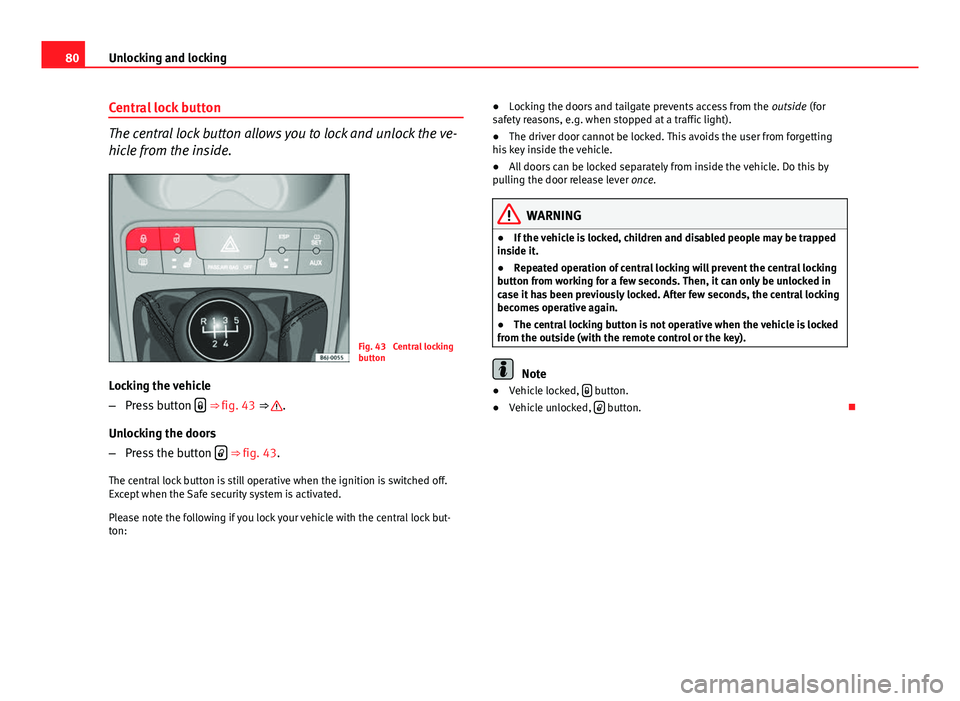
The central lock button allows you to lock and unlock the ve-
hicle from the inside.
Fig. 43 Central locking
button
Locking the vehicle
– Press button
⇒ fig. 43 ⇒ .
Unlocking the doors
– Press the button
⇒ fig. 43.
The central lock button is still operative when the ignition is switched off.
Except when the Safe security system is activated.
Please note the following if you lock your vehicle with the central lock but-
ton: ●
Locking the doors and tailgate prevents access from the outside (for
safety reasons, e.g. when stopped at a traffic light).
● The driver door cannot be locked. This avoids the user from forgetting
his key inside the vehicle.
● All doors can be locked separately from inside the vehicle. Do this by
pulling the door release lever once.
WARNING
● If the vehicle is locked, children and disabled people may be trapped
inside it.
● Repeated operation of central locking will prevent the central locking
button from working for a few seconds. Then, it can only be unlocked in
case it has been previously locked. After few seconds, the central locking
becomes operative again.
● The central locking button is not operative when the vehicle is locked
from the outside (with the remote control or the key).
Note
● Vehicle locked, button.
● Vehicle unlocked, button.
Page 83 of 278
81
Unlocking and locking
Keys
Set of keys
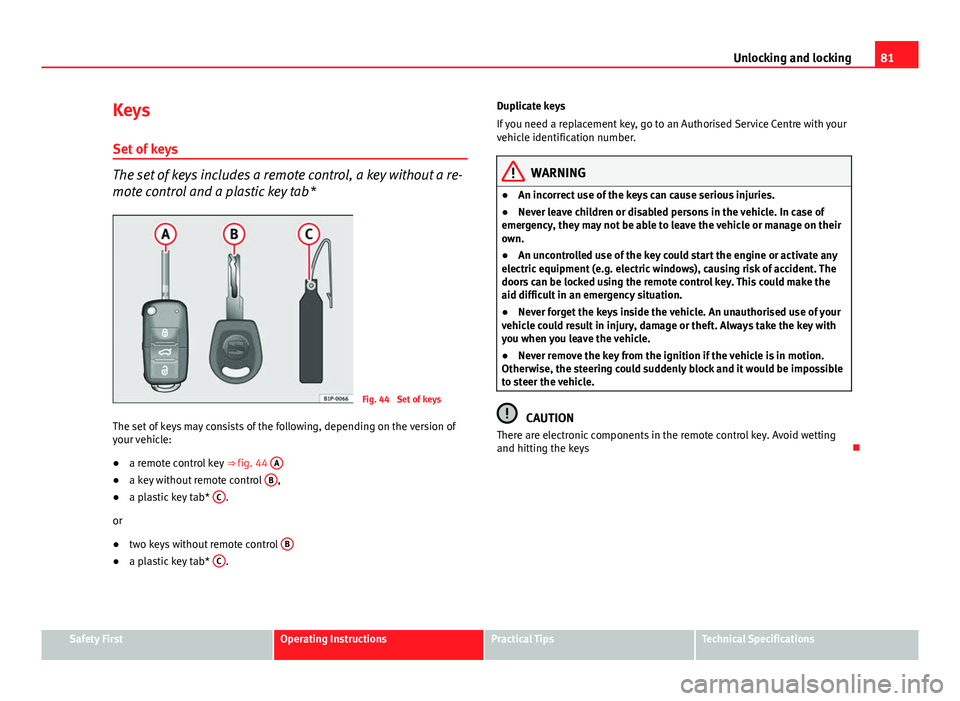
The set of keys includes a remote control, a key without a re-
mote control and a plastic key tab*
Fig. 44 Set of keys
The set of keys may consists of the following, depending on the version of
your vehicle:
● a remote control key ⇒ fig. 44 A
●
a key without remote control B,
● a plastic key tab* C.
or
● two keys without remote control B
●
a plastic key tab* C. Duplicate keys
If you need a replacement key, go to an Authorised Service Centre with your
vehicle identification number.
WARNING
● An incorrect use of the keys can cause serious injuries.
● Never leave children or disabled persons in the vehicle. In case of
emergency, they may not be able to leave the vehicle or manage on their
own.
● An uncontrolled use of the key could start the engine or activate any
electric equipment (e.g. electric windows), causing risk of accident. The
doors can be locked using the remote control key. This could make the
aid difficult in an emergency situation.
● Never forget the keys inside the vehicle. An unauthorised use of your
vehicle could result in injury, damage or theft. Always take the key with
you when you leave the vehicle.
● Never remove the key from the ignition if the vehicle is in motion.
Otherwise, the steering could suddenly block and it would be impossible
to steer the vehicle.
CAUTION
There are electronic components in the remote control key. Avoid wetting
and hitting the keys
Safety FirstOperating InstructionsPractical TipsTechnical Specifications
Page 86 of 278
84Unlocking and locking
Anti-theft alarm system*
Description of anti-theft alarm system*
The anti-theft alarm triggers if unauthorised movements are
detected around the vehicle.
The anti-theft alarm makes it more difficult to break into the vehicle or steal
it. The system will initiate acoustic and optical warning signals when your
vehicle is tried to be forced.
The anti-theft alarm system is automatically connected on locking the vehi-
cle. For this, either rotate the key in the locking position or press button
2 on the radio-frequency remote control*. The system is immediately acti-
vated and the turn signal light located on the driver door will flash along
with the turn signals, indicating that the alarm and the locking security sys-
tem (double lock) have been turned on.
If any of the doors or the bonnet are open, they will not be included in the
protection zones of the vehicle when the alarm is connected. If the door or
the bonnet are subsequently closed, they will be automatically included in
the protection areas of the vehicle and the turn signals will flash according-
ly when the doors close.
● The turn signal light will flash twice on opening and deactivating the
alarm..
● The turn signal light will flash once on closing and activating the alarm.
When does the system trigger an alarm?
The system triggers an alarm if the following unauthorised actions are car-
ried out when the car is locked: ●
Opening of vehicle with mechanical key without switching ignition on
within the next 15 seconds
● Opening a door
● Opening the bonnet
● Opening the tailgate
● Ignition switched on with a non-validated key.
● Movements in the driving compartment (vehicles with a volume sensor)
● Towing of the vehicle 1)
● Tilt angle (tow-away protection) 1)
● Undue manipulation of the alarm
● Battery handling
The acoustic signals sound and the turn signals flash for approx. 30 sec-
onds. This may be repeated up to 10 times depending on the country.
Opening all the doors in manual mode
In vehicles without alarm, when opening the driver door manually all the
doors are opened.
How to switch the alarm off
To deactivate the anti-theft alarm, turn the key to the opening direction,
open the door and switch the ignition on, or press the unlocking button
on the remote control.
In vehicles equipped with an anti-theft alarm system, you have 15 seconds
to insert the key in the ignition lock and activate the ignition if the vehicle is
opened using the driver door key.
Otherwise, the alarm will trigger for 30 sec. and the ignition will be blocked.
1)
With vehicles fitted with a tow-away protection
Page 91 of 278
89
Unlocking and locking
Windows Opening or closing the windows electrically*
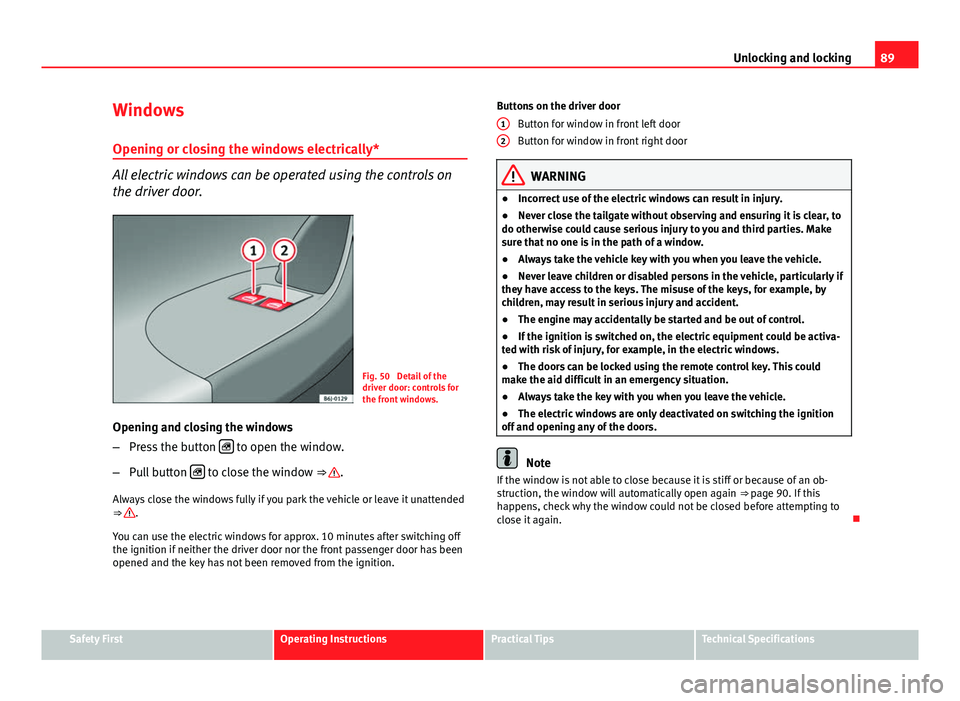
All electric windows can be operated using the controls on
the driver door.
Fig. 50 Detail of the
driver door: controls for
the front windows.
Opening and closing the windows
– Press the button
to open the window.
– Pull button
to close the window ⇒ .
Always close the windows fully if you park the vehicle or leave it unattended
⇒
.
You can use the electric windows for approx. 10 minutes after switching off
the ignition if neither the driver door nor the front passenger door has been
opened and the key has not been removed from the ignition. Buttons on the driver door
Button for window in front left door
Button for window in front right door
WARNING
● Incorrect use of the electric windows can result in injury.
● Never close the tailgate without observing and ensuring it is clear, to
do otherwise could cause serious injury to you and third parties. Make
sure that no one is in the path of a window.
● Always take the vehicle key with you when you leave the vehicle.
● Never leave children or disabled persons in the vehicle, particularly if
they have access to the keys. The misuse of the keys, for example, by
children, may result in serious injury and accident.
● The engine may accidentally be started and be out of control.
● If the ignition is switched on, the electric equipment could be activa-
ted with risk of injury, for example, in the electric windows.
● The doors can be locked using the remote control key. This could
make the aid difficult in an emergency situation.
● Always take the key with you when you leave the vehicle.
● The electric windows are only deactivated on switching the ignition
off and opening any of the doors.
Note
If the window is not able to close because it is stiff or because of an ob-
struction, the window will automatically open again ⇒ page 90. If this
happens, check why the window could not be closed before attempting to
close it again.
1
2
Safety FirstOperating InstructionsPractical TipsTechnical Specifications
Page 93 of 278
91
Unlocking and locking
WARNING
● Incorrect use of the electric windows can result in injury.
● Always take the key with you when leaving the vehicle, even if you
only intend to be gone for a short time. Please ensure that children are
never left alone inside the vehicle.
● The electric windows will work until the ignition has been switched
off and one of the front doors has been opened.
● Closing the windows without observing and ensuring it is clear could
cause serious injury to you and third parties. Make sure that no one is in
the path of a window.
● Never allow people to remain in the vehicle when you close the vehi-
cle from the outside. The windows cannot be opened even in an emergen-
cy.
● The roll-back function does not prevent fingers or other parts of the
body from getting pinched against the window frame, causing injury.
Convenience opening and closing*
Using the door lock*
– Hold the key in the door lock of the driver door in either the
locking or the unlocking position until all windows are either
opened or closed.
– Release the key to interrupt this function.
Using the remote control
– Keep the locking/unlocking button pressed for the electrical
window risers to open/close; if you stop pressing the button,
the window raising/lowering function is stopped. –
If the automatic raising is stopped and immediately after, the
opening button is kept pressed, the window risers will lower.
– Once the windows are completely closed, the turn signals will
flash.
Panorama tilting sunroof* Opening and closing the panorama/tilting sunroof
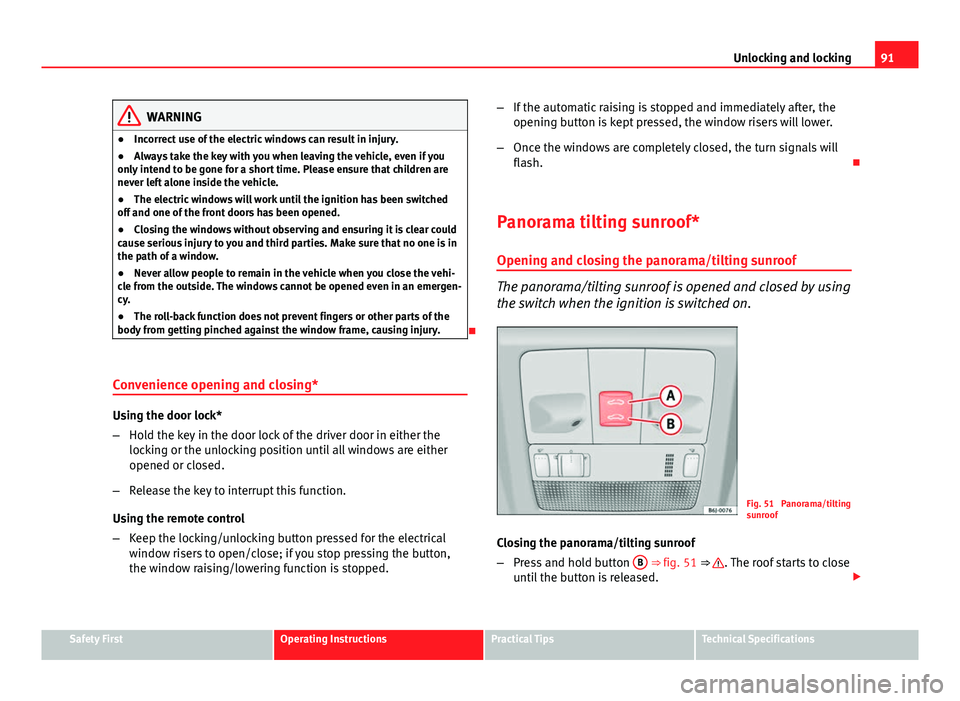
The panorama/tilting sunroof is opened and closed by using
the switch when the ignition is switched on.
Fig. 51 Panorama/tilting
sunroof
Closing the panorama/tilting sunroof
– Press and hold button B
⇒ fig. 51 ⇒ . The roof starts to close
until the button is released.
Safety FirstOperating InstructionsPractical TipsTechnical Specifications
Page 94 of 278
92Unlocking and locking
Opening the panorama/tilting sunroof
–Press and hold down button A
. The roof starts opening until
the button is released.
Automatic closing of the panorama/tilting sunroof
– Press button B
once only; the sunroof starts closing automati-
cally until it is completely closed.
Automatic opening of the panorama/ tilting sunroof
– Press button A
once only. The sunroof starts opening automat-
ically until it is completely open.
Restoring one-touch opening and closing
– Close the sunroof manually until it is completely closed. Re-
lease the button
– Press the closing button again, keeping it pressed down, until a
complete opening and closing cycle has taken place.
Always close the panorama/tilting sunroof fully if you park the vehicle or
leave it unattended ⇒
.
The tilting sunroof can be operated for up to about ten minutes after the ig-
nition has been switched off, provided the driver door and the front passen-
ger door are not opened.
Sun visor
The sun visor is opened and closed manually (independently of the sliding/
tilting sunroof).
WARNING
● Incorrect use of the tilting sunroof can result in injury.
● Never close the tilting sunroof without first checking that there are no
obstructions. Risk of serious injury to you or others. Make sure that no
one is in the path of the tilting sunroof.
● Always take the vehicle key with you when you leave the vehicle.
● Never leave children or disabled persons in the vehicle, particularly if
they have access to the keys. Unsupervised use of a key could mean that
the engine is started or that electrical equipment is used (e.g. electric
tilting sunroof) with a risk of accident. The doors can be locked using the
remote control key. This could make the aid difficult in an emergency sit-
uation.
● The tilting sunroof continues to function until one of the front doors is
opened and the key removed from the ignition.
● Ensure that no object and/or end is between the glass and the sun-
roof when the one-touch opening/closing function is reset.
Convenience closing*
Using the door lock
– Hold the key in the door lock of the driver door in the locking
position until the tilting sunroof is closed.
– Release the key to interrupt this function.
Using the remote control
– Push the lock button on the remote control for about 3 seconds.
The tilting sunroof closes.
– Press the unlock button to interrupt the function.
Page 96 of 278
94Lights and visibility
Lights and visibility
Lights Switching lights on and off
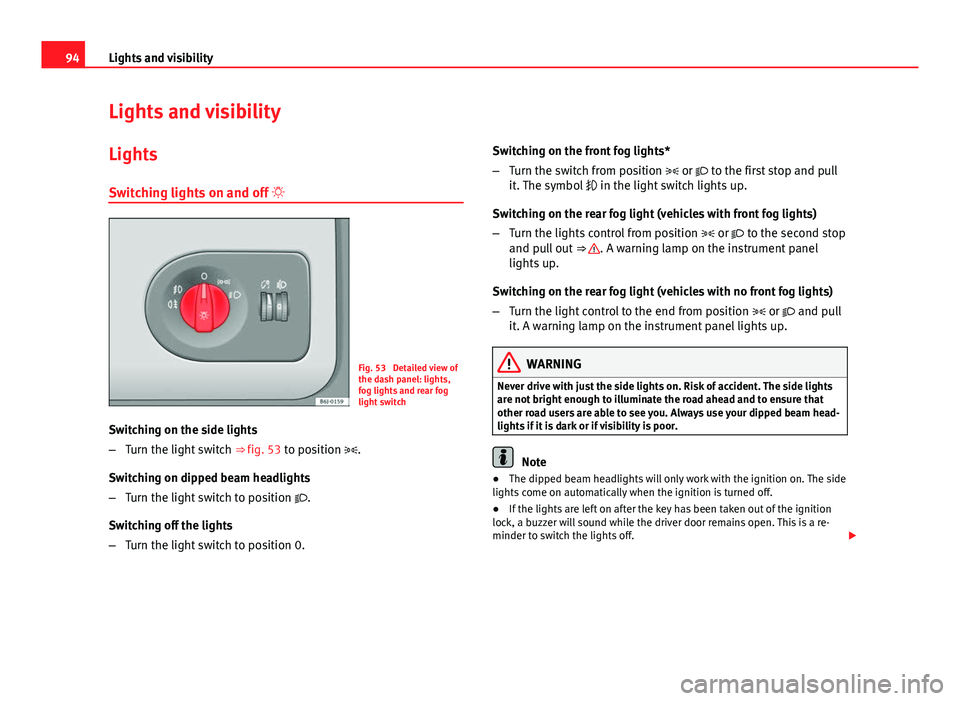
Fig. 53 Detailed view of
the dash panel: lights,
fog lights and rear fog
light switch
Switching on the side lights
– Turn the light switch ⇒ fig. 53 to position .
Switching on dipped beam headlights
– Turn the light switch to position .
Switching off the lights
– Turn the light switch to position 0. Switching on the front fog lights*
–
Turn the switch from position or to the first stop and pull
it. The symbol in the light switch lights up.
Switching on the rear fog light (vehicles with front fog lights)
– Turn the lights control from position or to the second stop
and pull out ⇒
. A warning lamp on the instrument panel
lights up.
Switching on the rear fog light (vehicles with no front fog lights)
– Turn the light control to the end from position or and pull
it. A warning lamp on the instrument panel lights up.
WARNING
Never drive with just the side lights on. Risk of accident. The side lights
are not bright enough to illuminate the road ahead and to ensure that
other road users are able to see you. Always use your dipped beam head-
lights if it is dark or if visibility is poor.
Note
● The dipped beam headlights will only work with the ignition on. The side
lights come on automatically when the ignition is turned off.
● If the lights are left on after the key has been taken out of the ignition
lock, a buzzer will sound while the driver door remains open. This is a re-
minder to switch the lights off.